Typography Comprehensive Guide For App UI Design

10 Rules of Good UI Design to Follow On Every Web Design Project | Elegant Themes Blog

“The text is too big.” “The words are placed too distantly.” “The words are not going with the image” Such comments have been passed continuously ever since the day user experience established itself as a crucial element of the mobile app design industry. With users spending a major portion of their day on applications, consuming information, and interacting with words, the importance of carefully crafted typography has come to the forefront.

Let’s walk you through the concept that holds the power to lower app abandonment and play a crucial role in increasing the app revenue – Typography.

A Basic Introduction to Typography

Typography, in simple words, is an art of organizing written text, point sizes, line-spacing, and other elements in a way that offer a pleasant and readable user experience. It is a craft that enables designers to transform human interactions into durable visual form.

Now, when talking about what is typography, it is good to have a familiarity with elements it comprises of – something we will discuss in the next section of this article.

6 Typography Elements You Must Know About

Beginning Graphic Design: Typography - YouTube

1. Typeface

Typeface refers to a set of symbols, numbers, letters, and characters that share similar features. For example, Garamond, Helvetica, and Baskerville is a typeface.

2. Font

Often used as a synonym of typeface, Font is basically a typeface that is set in a particular style, size, and height.

3. Line Length

Another typography design element you should be familiar with is line length. It refers to the area covered by a block of text positioned between the left and right margins.

It is usually calculated as the total number of words or characters in a particular line.

4. Line Spacing

Also termed as Leading, line spacing is the distance between two baselines, i.e, imaginary lines where the text resides.

5. Kerning

Kerning is defined as the spacing between two particular characters or letters.

6. Tracking

Tracking is another typography element used by UI designers for crafting a better experience. It is termed as the spacing between two individual blocks of texts and is also known as letter spacing.

Now as you know the definition and typography elements to consider for user interface design, it’s good to look into why is it necessary to focus on this UI design method.

So, let’s go through the advantages of focusing on Typography in UI design.

Reasons Why It Is Important to Consider Typography

1. It Sets a Mood/Tone

369 Mood Tone Stock Illustrations, Cliparts and Royalty Free Mood Tone Vectors

The foremost reason why typography is important in UI design is that it helps in setting the tone of the message. While plain and simple typography shows that content needs to be considered with seriousness, innovative typography adds fun and excitement to the screen.

2. It Helps Deliver Better Visual Experience’

7 DMO Websites that Deliver Beautiful Visual Experiences | by Elizabeth Ching | The Viewfinder | Medium

Typography also boosts the visual appearance of a mobile app. When chosen wisely, it infuses positive vibes and helps to deliver a delightful experience to your target audience. Whereas, wrong typography ruins the user experience and compels them to exit the platform soon.

So, it is profitable to consider typography as a key element of your mobile app design process.

3. It Enhances Readability

8 Tips for Better Readability - The latest Voice of Customer and CX trends | Usabilla Blog

Another reason why focusing on typography is one of the proven tips to enhance mobile app UI design is that it eases the process of reading content. It simplifies how users comprehend every single detail you mentioned in your app while helping in building better connections.

4. It Shows Professionalism

Core Values Icons - Professionalism & Integrity - Compass Associates

Typography also adds a tint of professionalism in your mobile app UI design. When you pick a typography which goes with your brand vision, customer behavior, and market standards, it brings a positive impression on the audience. It encourages them to trust in your brand and thus, support you in achieving expected goals in stipulated time and effort.

5. It Boosts Sales Conversion

18 Proven Ways to Increase Your Sales Funnel Conversion Rate

Typography encourages users to spend more time on your application and understand the context more effectively. This increases the chances of motivating them to perform the desired actions and ultimately, boosts sales.

6. It Creates Brand Recognition

Brand Awareness Definition

When you use a particular set of typography and use the same pattern throughout your content, users start relating it to your brand. They begin to remember your work via the typography you have used.

With this attended to, it is likely that you would be interested to know how to use typography in UI design, next.

While hiring a reputed mobile application design and development services provider is a good idea, having information about popular apps to get inspiration from can be really significant.

So, let’s look at the list of apps that have over time, amazed users through their mobile design system typography.

5 Mobile Apps to Take Inspiration From

1. Hotel Tonight
Make Tonight Unforgettable with HotelTonight - Technology and Operations Management

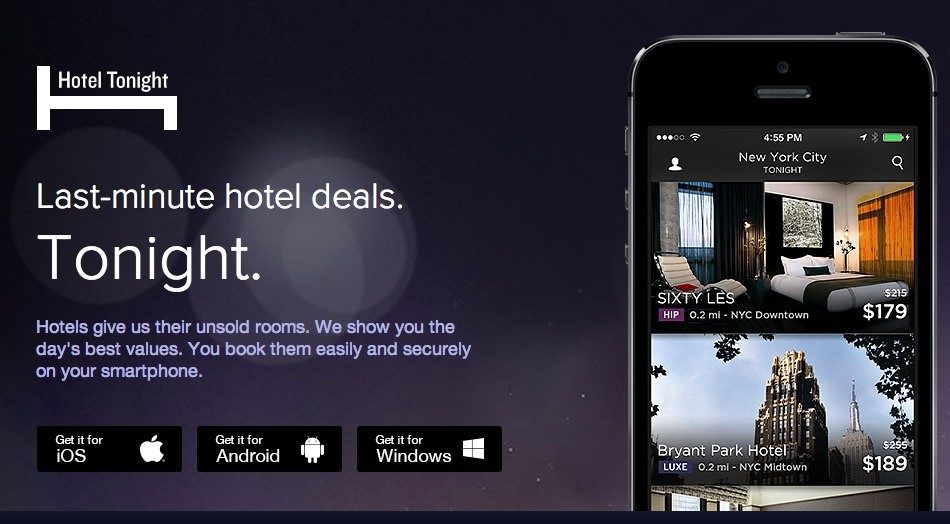
Hotel Tonight has used different fonts and styles on both platforms. While the brand implemented various weights of Google’s Roboto for its Android application, it used Gothan for its iOS platform.

2. FIFA

FIFA - Wikipedia

FIFA mobile application has used Miso for typography in UI design, though in different font sizes and weights to bring better emphasis on particular content elements.

3. Fancred

Fancred

Fancred has also focused on using different typography elements in their app UI design. Besides, they have also experimented with the idea of adding text to pictures and did UX reviews to give a seamless user experience.

4. Citroen Lifestyle

Citroen Lifestyle is another impressive iOS application that has worked with the idea of using font pairing, text-in-picture, and other ways of implementing typography in their app design.

5. UltraVisual

Flipboard buys photo and video creation app Ultravisual

Another mobile application that has inspired users with its typography is UltraVisual. The application, in its iOS version, has used different fonts and added content on photos to deliver better information with minimal space.

Now, as we have seen what Android and iOS applications you can consider for getting an understanding of the rightful implementation of typography UI design, let’s take a look at what UI typography style guide to follow while creating a design strategy for your app.

8 Typography Principles to Focus Upon While Creating Your App

1. Complement Mood to the Message

How Typography Aid Consumer Moods | DesignMantic: The Design Shop

As per the best mobile design experts, every typeface comes with a unique vibe. While some are fancy and friendly, others are simple and yet professional. In such a scenario, picking the one that goes with your brand message is a must.

So, do not overlook this fact while pondering upon how to improve your UI design through better typography.

2. Pick the Font’s Point Size as per Design Context

A Comprehensive Guide on Typography in App UI Design

Choosing too small or too bigger fonts altogether makes it difficult for users to continue reading with the same flow. It affects the readability of the app content.

In such a scenario, it is important for mobile app designers to select the right font point size for their app’s  UI design.

Now when talking about picking the right font point size, it is profitable to invest your time and effort in the general thumb rule-keeping body text between 10 and 12 points for print projects and 15 to 20 pixels for the web.

3. Stick to a Limited Number of Fonts

Typography in Design Systems. Choose Fonts, Set a Hierarchy, and… | by Nathan Curtis | EightShapes | Medium

Adding too many fonts on the same page can be a barrier to readability. So, it is again vital to keep yourself limited to a certain number of fonts – usually those who are not drastically different in look and feel.

4. Build a Hierarchy

Another rule to follow when talking about typography in UI design is to create a good hierarchy. This will help in easier navigation, better organization of every element as well as simplifying the process of finding information.

Now, when focusing on creating a hierarchy, the basic things a UI designer must know are:-

  • Employing text size to prioritize information by importance.
  • Adding appropriate spacing to make content scannable.
  • Arranging related items together.
  • Introducing headings, subheadings, etc. in the content.

5. Focus on Grammar

English Grammar Pill: How to use the present perfect tenses correctly | English with a Twist

Since a wrong spelling can break the flow and make it difficult for the audience to comprehend the whole meaning, it is again imperative to focus on the grammar aspect as well.

6. Don’t Overlook Spacing and Alignment

Spacing and alignment also make a huge difference in the overall app UI experience. When you introduce the right amount of spacing and alignment in your app content, users find it easier and faster to grasp the information and respond effectively.

For example, when you use center or justified alignment, users have to struggle with maintaining a continuous communication flow. Whereas, this is not so in the case of left-aligned content.

Likewise, when the letters in your app content are too tightly hugged or at significant distance, users fail to continue reading with the same pace and often exit the platform. But, this does not happen when you pay attention to proper spacing between all the words and letters.

So, do not forget to focus on this principle when considering how to use typography in UI design.

7. Prevent using Design Fads

Another thing you should focus upon is to prevent employing design fads. This is because the fads do not prevail in the market for longer. They have a shorter time span, implying you might have to change your app’s UI design with some other typography later.

So, do not prefer going with any such design fad.

8. Observe and Practice

Practice Method Observe Operation Perform Utilize Concept Stock Photo, Picture And Royalty Free Image. Image 61729774.

Last but not the least, invest your time and effort into practicing different typography and evaluate their success rate. This will help you in receiving better user experience outcomes.

Now while these principles of typography will help you with crafting a perfect UI design plan, it is incredibly important to keep a watch on the typography trends as they were one of the crucial mobile app UI design trends for 2018.

So, taking the same thought into consideration, let’s end this article with a focus upon top typography trends to watch out for in 2019.

Typography Trends You Should Stick to in 2019

1. Hand-Drawn Fonts are Popular

awesome font | Lettering, Cool fonts, Lettering fonts

The foremost typography trend to follow in 2019 is using hand-drawn fonts, i.e, the fonts resembling with our handwriting.

Such fonts are highly preferred by brands like Etsy and Fiverr because of the fact that they add a human touch to the app design and encourages users to connect more easily.

2. Glyphs are Gaining a Huge Momentum

Mysterious Ancient Maya 'Star War' Glyph And Its Possible Connection To Venus | Ancient Pages

Not only text fonts, but designers are also focusing on a varied set of symbols and non-alphanumeric characters like dividers and icons in their app UI design to enhance the user experience.

3. Font Pairing Will Go Trendy

10 Beautiful Font Combinations For Your Design In 2021

Another answer to what are the typography trends to focus upon in 2019 is font pairing.

As the name depicts, it’s the practice of using a combination of two or more different font types in a particular design in order to add a surprising element in the content.

4. Variable is the New Responsive

Another typography UI design trend for designers to focus upon this year is to introduce variable fonts.

Unlike the traditional fonts that are static, these fonts showcase content in different smooth yet non-discrete transitions. This makes content more appealing and engaging.

5. Variant Sizes Will Create a Perfect Match

UI designers will also experiment with contrasting fonts this year and for some time to come. They will use the same font in varying sizes to create a ‘hierarchy like impression.

And in this way, direct users to focus more on particular texts instead of giving equal attention to all.

6. Photos Will Go Expressive

Art Therapy for Children

In 2019, UI designers are taking another route to deliver visual storytelling experience to their audience. They are adding text and other elements to photos. And in this way, delivering more information in minimal space and that too without making it unpleasant to eyes.

7. Geometric Typefaces Will Take a Lead

Top 5 geometric fonts for 2019. Need some geometric fonts for your next… | by Florian Gaefke | UX Collective

Last but not the least, Geometric typefaces will also take a lead in the marketplace this year. The typeface, created with the help of straight lines and round forms, will add a futuristic vibe to your content and make it easy to scan and readable.

It will be highly used in the process of creating branding and logo designs, especially in the field of Science, Technology, and Engineering.

Frequently Asked Questions About Typography in UI Design

1. What is good typography?

Good typography is defined as the one that complements the tone of the design while helping spread the desired message. When talking about picking good typography for any design, there can be more than one option available.

2. What are the principles of typography?

While there are various principles related to typography, the prime ones are:-

  1. Pick typography that enhances the tone of the message.
  2. Pick the Font’s point size according to the design’s perspective.
  3. Set up a Hierarchy.
  4. Pay attention to Spacing and Alignment.
  5. Observe, Get Inspired, and Practice.

3. Is typography an element of design?

Yes, typography is a part of the design. The technique enables designers to present their app content in an engaging and knowledgeable manner – resulting in a better user experience.

4. Why is typography important in graphic design?

Typography is important in graphic design because it:-

  • Sets a tone/mood to the message,
  • Encourages visual experience,
  • Shows professionalism,
  • Enhances readability,
  • Boosts sales conversion,
  • Creates brand recognition.

Android Issues Affecting Websites Using Let’s Encrypt

Android Issues to Affect Websites with Let's Encrypt SSL | Web Hosting UK Blog

Site owners that use the free Let’s Encrypt SSL certificate have been warned that, from next September, their websites will no longer work on older Android operating systems. The issue, which will affect a third of all Android devices, including smartphones, could prevent over 220 million websites working properly.

Launched by the Internet Safety Research Group, ISRG, in 2016, Let’s Encrypt has played a crucial role in making the internet more secure by providing millions of free SSL certificates to websites across the globe. By encrypting data as it travels between a user’s browser and a website’s server, an SSL ensures that personal information and payment details are kept out of the hands of cybercriminals. At Anteelo, we recognise the important contribution Let’s Encrypt is making and are proud to be a sponsor of its parent organisation, ISRG.

Another of its sponsors is Chrome, the Google-owned browser, while Google itself encourages the uptake of SSL certificates by including SSL installation in its ranking criteria and rewarding those websites that have them with higher rankings. This makes it a little ironic that the problem Let’s Encrypt faces is with Android, Google’s own operating system.

Alphabet's Google to Fold Chrome Operating System Into Android - WSJ

Though unintentional on Google’s behalf, the issue is that, from September next year, devices with older versions of the Android operating system (versions 7.1.1 or earlier) won’t be able to connect securely with websites using Let’s Encrypt. Anyone with one of these devices that attempts to visit a website with a Let’s Encrypt SSL will, instead, be shown a warning sign telling them that the website is not safe.

Free SSL Security Certificate with 256 bit data encryption | I.T.ZAP Website Design Works

The cause of the problem is that, when ISRG launched Let’s Encrypt in 2016, its own root certificate had not been in existence long enough to have become trusted by operating systems. To overcome this challenge, it used an existing certificate authority, IdenTrust, as a cross-signature. IdenTrust’s root certificate had been firmly established for some time and was trusted and accepted by operating systems such as Windows, iOS, macOS and Android.

The use of IdenTrust’s root certificate was always seen as a short term solution, with Let’s Encrypt knowing its own certificate would be trusted by all operating systems by the time the IdenTrust certificate expired.

That expiration is set to take place in September next year and Let’s Encrypt’s SSL certificate is now trusted by the major operating systems. There is, however, a technical snag that affects older versions of Android. That snag is that these operating systems have not been updated since 2016 and, as a result, have not been configured to accept Let’s Encrypt’s root certificate; nor will they, after 1 September 2021, continue to accept the expired IdenTrust root certificate.

This means that devices running Android versions 7.1.1 or earlier will, from next September, no longer trust websites with the Let’s Encrypt certificates installed. This problem can also impact apps that gather data from websites using a Let’s Encrypt certificate.

Unfortunately, if you are a website owner using Let’s Encrypt, a third of all Android devices still in use fall into this category. That means that from September 2021, around 850 million devices, mainly smartphones, will start seeing certificate warning errors when their users visit your site. According to Let’s Encrypt, that works out at between 1 per cent and 5 per cent of the traffic that visits the websites they serve.

A temporary solution

Cost control takes a total team effort

For anyone with an affected Android device, there are three potential solutions: if possible, upgrade the OS to version 7.1.1 or later; if not, install the Firefox Mobile web browser app which accepts the Let’s Encrypt root certificate and works with Android versions 5 and later; or, alternatively, buy a newer device.

Let’s Encrypt is working hard to find a solution that will let websites using their certificates work with these older devices; however, with time running out, those concerned about losing traffic may need to replace their Let’s Encrypt SSL certificate, at least for the time being, with one that will be recognised by all Android devices as well as by other OS.

If you are considering installing an alternative SSL certificate on your website, Anteelo offers a range of SSLs to suit the needs of different organisations. What’s more, we’ll take away the hassle and install and test it for you. For more details, visit our SSL Certificates page.

The Hospitality Industry and Information Technology

Innovation in Hotel Industry - Groupe.io

Though it’s been a difficult year for hospitality, an increasing number of businesses are making use of the latest technologies to help them adapt to the changing landscape. It is being used to cut costs, improve the customer experience, comply with COVID regulations and to provide insights for development and revenue opportunities. Here, we’ll look at the ways IT is transforming the hospitality industry.

Cutting costs

Avoid This Pitfall When Cutting Costs | AlignOrg Solutions

Hospitality venues are making increased use of the internet of Things to save on energy costs. Devices, such as temperature sensors and smart thermostats, are being installed to control intelligent HVAC systems so that the costs of heating and cooling are kept to a minimum. Similarly, smart LED lighting systems that use sensors to adapt to natural daylight levels or gauge occupancy can cut lighting costs by 80%.

Beyond this, today’s energy management systems make use of AI and machine learning to analyse energy consumption, weather patterns, peak demands and even thermodynamics to optimise energy use. Additionally, the IoT can also be used to monitor the health of systems, ensuring that faulty machinery or appliances are detected and mended before the cost spirals or they break down and affect amenities for guests.

As these systems are cloud-based, they can be managed centrally, so that businesses with multiple hospitality venues can have unified control of their operations. The systems can even be managed remotely over the internet

Improving the customer experience

15 Proven Techniques to Improve Customer Experience (CX)

Technology is beginning to have a significant impact on enhancing the customer experience, with guests being able to use websites and smartphone apps for a wide range of purposes. Today, these include remote booking and checkouts, making reservations in restaurants and spas, accessing services such as room service, reserving parking spaces, unlocking hotel rooms, controlling smart room appliances, communicating with staff, paying for products and services and so forth.

Web based apps and smart devices are also being deployed to improve how staff work, speeding up service, automating processes and eradicating human error – all of which improves customer satisfaction.

Providing insights

CEIR report provides insight from leaders in marketing

Website and app interactions, together with monitoring from IoT devices, produce vast quantities of data which can be analysed to provide detailed business insights. They help hospitality businesses predict peak occupancy, understand how demand for different services changes over time and give a clearer picture of which guests are making use of which services. This can help them better deploy staff, improve inventory, implement more effective marketing strategies and develop new and existing services in line with customer expectations: all of which can help improve efficiency, cut costs and increase revenue.

Storing all that data in the cloud provides hospitality businesses with numerous advantages. The data is secure, helping businesses achieve compliance; there is easy scalability, so that as data grows and demand increases, the company won’t get caught out by a lack of IT resources; cloud-native apps make it easy to undertake data analytics and make use of AI and machine learning; and, perhaps most importantly, as websites, apps and IoT devices all need the public cloud for connectivity, its makes sense to store the data they collect there too.

Helping with the pandemic

How to help during the coronavirus pandemic - The Washington Post

Technology is increasingly important for the hospitality industry during the pandemic. By using the internet to offer takeaways and deliveries, for example, restaurants and cafés have been able to stay working during the lockdown and have supplemented reduced capacity once reopened. From a safety perspective, the use of smartphone apps has enabled customers to order prior to arrival, cutting down the amount of time they spend in the restaurant and the number of interactions needed with staff.

For all hospitality venues, there’s an obligation to help the NHS Track and Trace Service by collecting customers’ personal information as they enter. This information needs to be kept for a period of 21 days so that, should there be an outbreak of coronavirus or an infected person being on the premises, all other customers can be contacted. Collecting this information online, either via the website or app means the data is more manageable and secure and can be more easily passed on if required by the Track and Trace Service. It also removes the unhygienic practice of asking guests to fill in paper registers where they often handle the same piece of paper and pen as other guests.

Conclusion

Although hospitality is not a sector most people usually associate with cloud-based technology, many businesses within the industry have begun to see the advantages of its adoption. Advanced websites, smartphone apps, smart lighting and HVAC systems, etc, have reduced costs, improved customer experiences, provided valuable insights, helped businesses survive the pandemic and comply with COVID regulations.

The Impact of Cloud Hosting on Retail

Best cloud computing services of 2021 | TechRadar

Technology is changing the retail landscape at a dramatic rate. The proportion of online sales continues to grow (from 2.8% in 2006 to 32.8% in 2020 – source: ONS), there are more ways to sell than ever before and the lines between online and in-store shopping are becoming increasingly blurred. To stay competitive, many retail are now adopting the cloud to free them from the constraints of in-house IT systems, enable them to be more agile and let them take advantage of the latest technologies. Here, we’ll look at how cloud is transforming retail.

Operational integration

Mediaclip Third-Party Software Integration | Mediaclip

One of the major advantages of cloud over legacy in-house IT systems is that it enables data to be easily unified and systems like communications, marketing, inventory and shipping to be integrated. This provides businesses with a greater understanding of their business and more control over their operations. Instead of separate, disjointed systems, they are provided with a business-wide IT infrastructure that provides operational seamlessness.

As a result, companies are able to make operational savings, teams can collaborate better, new approaches can be developed and customer experiences can be improved.

Better visibility of supply chain and inventory

How to Modernize Your Supply Chain: 3 ways to improve your supply chain

With all parts of the business connected to the cloud, retailers can have company-wide visibility of their supply chain and inventory. The cloud-based technology, blockchain, for example, offers retailers a clearer overview of the supply chain, giving them the ability to track the origin and movement of goods and create financial audit trails.

With inventory, businesses can have stock information in real-time, ensuring they have up to date information of what’s in stock and where it is. This can help them maintain stock levels, offer customers click and collect from individual stores and give the company a better understanding of what is and isn’t selling.

Seamless supplier integration

Supply Chain Management Software | SCM Systems Solution | JAGGAER

From the procurement of stock to shipping and aftersales, retailers collaborate with numerous partners to provide services to their customers. Cloud technology enables retail and their suppliers to integrate systems, providing real-time status information. Retailers can know where their incoming consignments and outgoing deliveries are, access data from outsourced communications partners or loyalty programs and share documents with suppliers.

What’s more, some of this information can be used to enhance the customer experience, for example, sharing delivery tracking information and enabling customers to modify delivery instructions en-route, in real-time.

Personalised customer experience

50 Stats Showing The Power Of Personalization

Not only are customers attracted to retailers that offer personalisation; many are willing to pay more for the experience. Personalisation means the shopping experience is tailored to individual customers; they are given product recommendations and offers that are relevant to their wants and needs and this saves them a great deal of time finding the right items. This convenience makes them loyal shoppers and increases LTV.

The essential ingredient for personalisation is customer data, ideally a complete map of the customer journey. It is here where cloud plays an important role, providing real-time data on browsing and purchasing histories and linking it to all the other information the business holds on a customer to provide product recommendations and other services that are personalised for the individual.

Business intel

Business Intelligence

While retailers gather a lot of valuable data, making use of it has, historically, been hampered because it was stored in different departmental silos, sometimes on separate IT systems. Cloud enables data to be unified, stored centrally and accessed by anyone who is permitted to use it.

As a result, datasets that had previously been kept isolated can be brought together to provide a far more detailed analysis. With cloud’s ability to offer big data analytics, together with advanced technologies like AI and machine learning, the capacity to gain new insights has never been greater. Retail that use the cloud have benefitted from finding ways to save money, improve and automate operations and deliver new and better services for their customers. What’s more, the cloud enables them to do this quicker than ever before, giving the ability to react swiftly to changes in the marketplace.

A cost-effective IT solution

IP service providers: a more cost-effective solution post M&A?

As retailers become increasingly reliant on IT, many have struggled with the cost. Cloud has enabled these businesses to shrink IT costs considerably. With cloud vendors providing the IT infrastructure, retailers no longer need to purchase and maintain expensive in-house datacentres of their own. The cloud’s pay-as-you-go payment structure is also beneficial, enabling retailers to scale up or down as demand requires, while only paying for the resources they use. And there’s no limit to the resources that are at a retailer’s disposal, should it need them.


Additionally, there are no hardware maintenance costs to pay and the service is managed, freeing up time for IT staff to work on business oriented projects. Even software is less expensive, with many cloud-based apps being open-source and vendors able to offer the most popular proprietary apps at lower costs.

Conclusion

Cloud has become the go-to solution for retails, with migration accelerating significantly since the pandemic. Its ability to unify and integrate systems and data and make use of modern technologies like data analytics, AI and machine learning has provided retailers with better intelligence to improve all aspects of their businesses, cut costs and enhance user experience.

Why Do Finance Companies Require the Cloud?

Future of Cloud Computing with a Flavor of Finance and HR | MarTech Demand

The need for robust security and to comply with stringent data privacy regulations have, until recently, prevented many finance companies opting for cloud computing. Today, however, there’s a growing shift towards the cloud as more organization adopt digital-first approaches in a bid to stay relevant in the rapidly advancing, technology-based market. Cloud technology provides finance companies with the infrastructure needed for digital transformation, helping them to improve customer experience, drive growth and stay competitive, all while enabling them to remain compliant with regulations. Here, we’ll examine why finance companies need cloud computing.

Cloud keeps financial data secure

Is Your Data Safe in the Cloud? What You Need to Know

It is no surprise that finance organisations are heavily regulated. The data they hold is highly sensitive and includes both the financial information of customers and details of trading operations. This makes it an extremely valuable target for cybercriminals which, if stolen, could have a major impact on personal and business customers and on the financial company itself. Organisations within the sector therefore need to put security at the centre of their IT operations and must develop a secure infrastructure that robustly defends them against attacks.

The issue for many finance companies is that achieving such security in-house is not easy to accomplish. State of the art security tools are expensive to implement and require specialist expertise. Cloud providers, however, already have both the tools and the expertise in place to keep their infrastructure and their customers’ systems and data secure. This also helps them maintain compliance with regulations like GDPR and PCI DSS. Migrating to the cloud, therefore, can provide levels of security far better than most companies can achieve on-site and in most cases, come included in the cost of the service.

Cloud vendors provide protection for finance companies in a number of important ways. For those with concerns over the multitenancy of the public cloud, for example, this can be overcome by adopting a hybrid cloud infrastructure where data is housed in a single-tenancy private cloud and applications on the public cloud.

Of course, whether public or private, the cloud system will be robustly protected by a powerful arsenal of leading-edge security tools. These include state of the art, next-gen firewalls, like the FortiGate firewalls used at eukhost, as well as intrusion detection and prevention tools, anti-malware, data encryption, SSL certificates, DDoS protection, VPNs, email verification and encryption tools, spam filtering and more.

The providers themselves have to comply with stringent security regulations and will have their own security policies and procedures in place. These will include ensuring that they have enough redundancy in their system to maintain services should one of their datacentres be taken offline, providing backup power and cooling systems, maintaining physical security of the premises, and guaranteeing availability with an SLA. This way, they can ensure a company’s financial data remains secure and available at all times.

With regard to GDPR, financial institutions need to be careful that vendors do not store their data in countries that do not provide the necessary guarantees for privacy. Any data stored in datacentres in the USA, for example, can be legally accessed by the US government security agencies if they think it pertinent to an investigation. As this contravenes GDPR, the data of UK and EU citizens should not be stored in such countries. This is why, at eukhost, all our datacentres are located within the UK.

Taking advantage of the cloud

Ancoris makes a play for Microsoft Office customers | Cloud Pro

Financial companies that have already migrated to the cloud have put themselves in pole position to benefit from the digital revolution taking place in the market. They are able to adopt and make use of advanced fintech solutions, develop and deploy new services at speed, and analyse big data using tools like AI and machine learning to discover new growth opportunities, predict market movements and find more cost-effective and efficient ways to operate.

With data centralised and synced, teams can collaborate on projects far more effectively, regardless of where in the world they work, employees can work remotely and customers can access their accounts, services and communications via the gamut of devices that they now make use of.

The speed at which the cloud operates also provides benefits. Servers and applications can be deployed instantly and workloads that would have taken weeks to carry out on traditional systems can be done far quicker. Indeed, the interconnectivity of the cloud provides a genuine opportunity for finance companies to benefit from the use of real-time data, enabling them to react swiftly to changes in the market.

Cutting costs

Cutting Costs with Your Time-Off Policy - Mitrefinch

The growing reliance on IT in the finance sector has burdened companies with the ongoing costs of using it. The cloud provides significant opportunities to reduce and better manage those costs. By moving to the cloud, companies no longer need to invest in expensive hardware or pay for the running of a datacentre. Instead of capital expenditure, they shift to operational expenditure and have greater control over what is spent, by whom and when.

Additionally, the scalability of the cloud enables finance companies to increase IT resources on-demand. Whether catering for peaks in website traffic or undertaking resource-heavy processing, their system can access all the storage, bandwidth, CPU and RAM it needs to maintain service. The advantage, financially, is that this is charged for on a pay-per-use basis. Once the demand has ceased, the company can scale down and reduce costs.

Preparing for the future

Preparing for the future of federal IT -- FCW

The pandemic has not only hastened the drive for digital transformation across all sectors; it has also seen customers flock to digital in unprecedented numbers. This ‘push-me-pull-you’ relationship is driving the finance sector along the digital railroad. Consumers are pushing for better online services and customer experiences and financial companies are pulling new customers in by providing them. Increasingly, those services need cloud infrastructure and cloud-based applications to make use of technologies like AI, machine learning, IoT and automation.

Conclusion

Cloud technology opens a world of opportunity for finance companies, enabling them to innovate quickly, improve customer experiences and work smarter and more efficiently. At the same time, it provides a compliant environment in which to store their sensitive data and keep it secure.

The Importance of HTML Headings for SEO and User-Friendliness

Proper Use of HTML Headings | OPTASY

Do you use HTML headings and subheadings in your website content? If you want your site to rank better in search engine results, it is, perhaps, time you did. Here we’ll explain why headings can help your website rank better and make your content more user-friendly at the same time?

How headings benefit your visitors

The Importance of Headings and Subheadings on Content Pages

Headings and subheadings help organise your content better for your visitors. They divide up the text into sections and provide useful information about what is included in each section. This helps a reader work their way through the text and skip any parts they deem irrelevant. At the same time, a page divided into headed sections looks more attractive and easier to read than one which just has lots of paragraphs.

Using headings, therefore, provides a better customer experience, keeping visitors on the page and entices users to read more of your content.

How headings improve SEO

How to be on the top results in search engines? | Code95

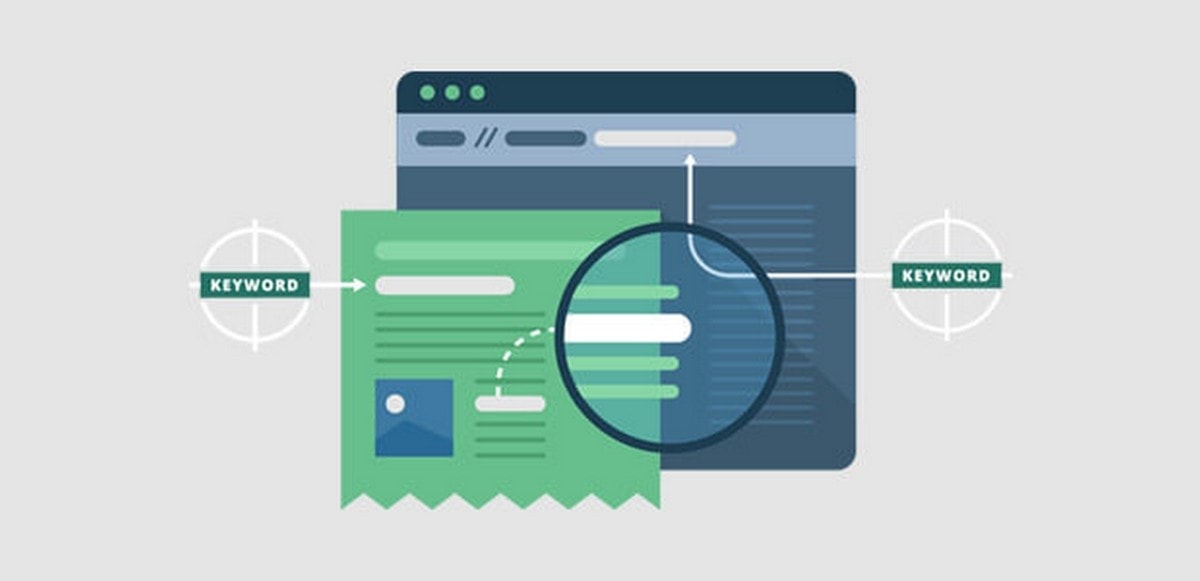
The difference between using bold text and proper HTML headings (H1, H2, H3, for example) is that search engines can identify the headings’ HTML. This enables the search engine to scan the headings for keywords and phrases and this helps them get a deeper understanding of a page’s entire content. As a result, it can match your pages’ content better to individual user queries so that when people are specifically looking for the type of content on your website, your pages have a better chance of appearing in the results.

Another key SEO benefit relates to the impact on visitors. If your headings help keep visitors on your pages for longer, search engines will notice that your ‘bounce rates’ have declined and your ‘time on page’ figures have improved. They will conclude from this that your page does indeed provide the information particular queries are asking for and this will help you rank even higher. Importantly, this is why, when writing headlines, you should always create them to help the user stay on the page rather than over-pack them with keywords to attract search engines.

How to use headings correctly

The two key tips for using headings are to structure them correctly and to make sure they contain your keyphrase.

Heading structure

How to structure headings for web accessibility | Nomensa

When we talk about heading structure, we are really talking about which type of heading (H1 to H6) that you use, and where, on your pages. Essentially, to structure your pages well, you need to know that these numbers don’t merely affect the size of the text on the page; far more importantly, they signify the importance of the heading to both the reader and the search engines.

At the top of the heading hierarchy is the H1 heading. There should only be one H1 heading per page and this should be the page’s main heading or page title. It is the most important heading by far and must contain the keyword or phrase that you want the page to rank for.

The next set of headings, in importance, are the H2 headings. These should be used for your page’s main content headings and at least one of these should contain the page’s main keyword or phrase. However, it is also critical that they clearly inform the reader and the search engines about the content of each section they head.

If these sections are fairly long in themselves, it is also useful to subdivide them using H3 subheadings. H4 to H6 tags, although available on most website software, are rarely needed, unless, of course, you are writing very long content, such as academic papers, that have many levels of textual structure.

Another thing to consider is your heading and subheading distribution. The most important thing is to put a new heading or subheading every time you start to write about a new topic or subject. However, with web content, it is also believed that you should never leave too much text without a heading. The current guideline says you should have a heading (H2) or subheading (H3) around every 250 to 300 words or so on your page in order to help people progress through what’s on the screen.

How to add a heading

How to add Headings in HTML | HowTech

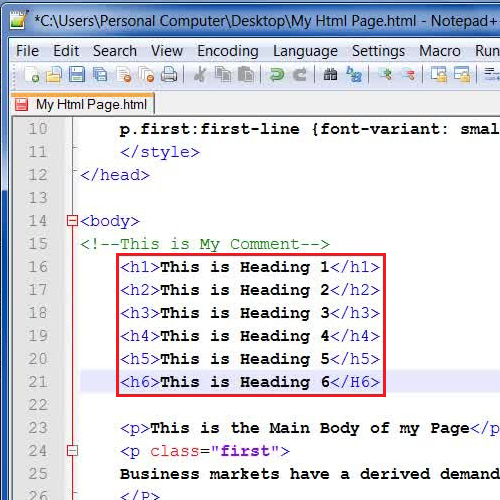
The page or post title is usually created as an H1 heading automatically when you type the text into the ‘Title’ field. For other types of heading, most website software comes with an editor or block builder with built-in options for turning a line of text into a heading. These often come with a dropdown menu where you select H2 or H3 (or others if needed) accordingly. It is also possible to create titles in the HTML editor using the HTML tags, for example: <h2> This is a heading</h2>.

Using keywords and phrases in your headings

How to use keywords in subheadings to rank better? | Marketing91

As we have already stated, it is important to put your main keyword or phrase in the page or post’s H1 title. However, you should also try to put it in other headings, at least once and only where relevant, to make it abundantly clear to readers and the search engines what the content is about and to emphasise the keyword’s importance. At the same time, you should also include it a number of times in the rest of the page’s content, without, of course, going overboard.

Conclusion

Visitors and search engines make use of headings and subheadings. They make your pages easier to navigate, look more appealing and break up long text into manageable chunks. When created using HTML, search engines pick up on the importance of your headings and use them to match your site with relevant queries, helping you rank higher for those visitors you most want to attract.

How the Cloud Benefits Charities and the Public Sector

Top 10 benefits of cloud computing - Information Age

Cloud technology brings significant advantages for all organisations, not just businesses. Today, it is being increasingly adopted by both charities and the public sector, including local authorities, healthcare providers, universities and government agencies. Here, we’ll look at the financial savings and operational benefits it can offer, as well as how it can provide a better service to your end-users.

Remote connectivity

Remote Connectivity, रिमोट एक्सेस सर्विस, रिमोट एक्सेस सेवा in New Delhi , ADG Infosystems | ID: 7029227473

Even before the pandemic forced people to work at home, charities and public sector organisations were leading the way with remote working. While many charities have people working around the country and, in some instances, around the globe, the public sector was dealing with austerity by shrinking office space to cut costs and having employees work remotely several days of the week.

One of the benefits of the public cloud is that it enables your employees to work from wherever they have an internet connection. Here, they can log in to your system and access your applications and documents securely. What’s more, data is stored centrally, not on individual machines, meaning that it is kept secure and that everyone has the latest version of files and information available to them. Indeed, modern, cloud-based remote working solutions allow colleagues to collaborate, share work and hold meetings online, no matter where on the planet they are based.

The benefits of remote connectivity are many. For example, you can reduce the size of your office space, allow employees greater flexibility over their working arrangements, recruit employees from further afield and ensure things like bad weather don’t prevent staff from working.

Financial savings

Invest your Money in a Proper Way to have a Good Financial Savings

Charities and the public sector both increasingly rely on IT services to carry out many of their day to day functions. Running IT on-site, however, can be a major financial burden, especially for organisations that need to reserve as much of their budgets as possible to deliver frontline services.

Cloud migration can help cut IT costs dramatically. The main reason for this is that, in the cloud, you will be hosting your applications and storing your data on hardware belonging to your IT vendor. This means you will no longer need to purchase, regularly upgrade and maintain those expensive servers. Nor will you need to pay for the ongoing costs of an in-house datacentre, such as premises rent, high energy bills, insurance or security. And of course, your in-house IT staff will no longer need to manage or maintain that hardware, giving them more time to work on projects that benefit the end-user.

Greater security

?▷ Tips for greater security

Keeping data secure is an essential requirement for charities and the public sector, with organisations often handling sensitive information about individuals. Whilst a reticence to move this to the cloud can be understood, it is worth pointing out that the cloud is likely to be more secure than most in-house systems.

Unlike many charities and public sector organisations, cloud vendors invest significantly in cybersecurity to ensure they comply with their stringent security regulations. They employ security experts and deploy highly advanced security tools to keep their infrastructure and data secure. Indeed, even the datacentre premises are protected by robust security measures.

Additionally, the cloud allows all data to be centrally stored, enables organisations to implement strict logical control and access privileges and lets data be swiftly backed up, encrypted and integrity tested. For those requiring additional security, there is also the option of migrating to a private cloud, where a single client has dedicated use of their cloud infrastructure.

Staying online

Staying safe online | Internet safety tips | Kids Helpline

Often hosting critical, public-facing services, charities and public sector organisations need their applications to remain available for their staff and end-users. For those with in-house datacentres, server failure can be a significant issue, in some circumstances putting lives at risk. Bringing a server back online can be a timely and expensive procedure that causes prolonged disruption to your services.

In the cloud, your applications are run on virtual machines which means they are not tied to any physical hardware. If there is a hardware issue in a cloud datacentre, the virtual machine is simply and instantly moved to different physical hardware and continues without any downtime or disruption. With exceptional levels of uptime, guaranteed by SLA, the cloud offers the high availability needed to stay online.

Scalability

What is Company Scalability – Really? - Mirus Capital Advisors

One of the most sought after benefits of the cloud is its scalability. This is the ability of the charity or public sector organisation to use additional computing resources (storage, CPU, RAM and bandwidth) on-demand, at the click of a mouse.

There are two chief benefits of this. Firstly, is that it enables your organisation to cope with peaks in demand or heavy workloads, ensuring you don’t run out of IT resources when you need them most. For example, your website won’t crash if you get a massive spike in traffic, something which could be dangerous if dealing with an emergency situation.

The other benefit is the financial one. In the cloud, you will only pay for any additional resources as and when you need them, on a pay as you go basis. When demand reduces, you can scale down once again and save money. Achieving such scalability in-house would be difficult and expensive to do – you would need to purchase additional servers and leave them redundant just so they could be used in times of heavy demand.

Conclusion

Charities and public sector organisations are making increased use of the cloud to benefit in all the ways mentioned above. Indeed, the UK Government’s keenness to encourage cloud adoption has led to the launch of its G-Cloud. This is a marketplace of approved cloud vendors with framework agreements already in place, from which public sector organisations can buy services without needing to run a full tender or competition procurement process. Anteelo is an approved G-Cloud supplier.

Features to Look for in a Web Host for a Hospitality Business

5 Tech Solutions for a Better Hotel Guest Experience

As the hospitality sector prepares to bounce back after the lockdown, many companies are seeing the importance of their websites going forward. From marketing to customer experience, your online presence can make a dramatic difference to the success of your business. Here, we’ll look at some of the ways your website can benefit your company and what things you’ll need to include in your web hosting solution.

Better marketing

The medium is the message – Prime Creative Media

Having a website ensures your hospitality business is open 24 hours a day. Visitors who search for you, click on ads or see your social media posts can quickly find all the information they need about your business.

From a marketing perspective, you’ll be able to make a feature of your business’ services, whether that’s your menus, hotel rooms, spas and other services. You’ll be able to post detailed descriptions, interior and exterior photographs, videos, customer reviews, star ratings and all the other details that discerning customers want to know before making a reservation.

Improved customer experience

How to improve Customer Experience (CX) in 9 steps? | Feedier Blog

Websites are no longer just for promoting your business. Today, many hospitality companies are making them useful for customers throughout their journey with you. A website can enhance customer experience in many ways. A hotel, for example, can use it to take room bookings, enable customers at the venue to book restaurant tables, order room service, contact the concierge, find out about nearby amenities, take advantage of offers, check out and more. Even after they have left, you can use the website to create a members’ area to develop customer loyalty and promote future visits.

Customer experience has become increasingly important in hospitality and those venues that make things quicker, easier and more convenient for their customers will benefit from better reviews,  increased loyalty and a growth in revenue.

A website for staff

Design Trends For Company Team &amp; Staff Pages - Vandelay Design

A further way to use your website is to create a separate area for your staff. This can be used to increase efficiency and improve the way you deliver services. Staff can use your site on their smartphones to sign in or notify you of absences, they can inform management about issues, such as low stock or maintenance requirements. It can be used to send messages, display notices and timetables, issue daily instructions and more. All of these can improve the way the venue is managed and enhance the service you provide your customers.

What to look for in a hosting solution

To put these things into place and get the most from your hospitality website, it is vital that you have the right hosting solution for your hospitality company. Here are some of the hosting features you should look for.

Strong security

9 rules for strong passwords: How to create and remember your login credentials - CNET

As a hospitality company, you will likely need to collect and store the personal data of your customers. In some cases, this may include names, addresses, contact information, payment details and even passport information. Legally, you are required to keep this data safe in order to comply with regulations, such as GDPR.

Hospitality companies are the targets of cyberattacks simply because the criminals know they keep this information and they are using increasingly sophisticated means to acquire it, including ransomware, phishing attacks, malware infections and hacking.

To keep your system and data protected, you need to choose a secure hosting solution. Make sure your web host provides a range of security tools, including a robust firewall, intrusion prevention, malware scanning, remote backups, SSL encryption, spam filtering, email scanning and more.

Growing room

GOING V/S GROWING: Are you GOING or GROWING through life? – NLP Training, NLP Coaching, NLP Master Practitioner,Motivational Speaker

As the hospitality sector becomes increasingly digitised and automated, your hosting needs will grow over time in order to provide a wider range of online services for both staff and customers. You might, for example, need to deploy website chatbots, virtual tours, customer-facing reservation tools and link your website to third party booking sites. Additionally, the increasing reliance on data for decision making means you may need to analyse more data to improve online and digital services for your customers.

To make use of these tools and technologies, you’ll need a hosting package with more storage and better performance, such as VPS, dedicated servers and cloud hosting. To make growth easy, look for a web host that provides all these services and will help you migrate from one to the other. This will save you the headache of having to move everything to a new host.

Guaranteed uptime

Does Kinsta Offer High-Availability Hosting and Guaranteed Uptime?

If you are going to offer 24/7 services to your customers, you need a website that remains constantly online and which can cope with the demand for your growing online services. Failure to do this can lose you custom, damage your reputation and lead to complaints and poor reviews. Look for a web host that guarantees an uptime of 99.9% and above and make sure your package is large enough to deal with the demand you expect.

24/7 technical support

The Importance of 24×7 Customer Service for Your Business

Managing a hospitality business is challenging enough without having to struggle with technical website problems. However, as the sector adopts more sophisticated online technologies, the demand on managers is likely to grow. To take away the stress and the challenge, it is important that your web host provides 24/7 technical support. This way, should you have an issue there will be a qualified expert there to help you, regardless of the time of day.

Conclusion

Finding the right hosting solution is critical if your hospitality company is to bounce back from the lockdown and remain competitive in a market that makes increasing use of digital technologies. The right hosting can ensure your website is capable of delivering a wider range of services to your customers, enables you to deploy tools to improve staff and operational effectiveness, keeps your systems and data secure and ensures your site stays online.

The cPanel Control Panel’s Key Characteristics

cPanel Reviews 2021: Details, Pricing, &amp; Features | G2

The cPanel control panel is the leading web hosting control panel on the market today. Designed for use on Linux operating systems, it is often used for managing the hosting of WordPress, Magento, Drupal, Joomla and similar websites. With an intuitive and easy to use graphical interface, cPanel offers website owners a broad suite of tools and functions unrivalled by other Linux-based control panels. Here, we’ll provide an overview of cPanel and look at some of its main features.

An overview of cPanel

cPanel is a control panel that enables you to carry out a multitude of website and hosting management tasks. While the admin area of your website is where you can update content, change themes, install plugins, etc., cPanel enables you to carry out higher-level tasks, managing both your website and other aspects of your hosting, as well as offering other ways to carry out some of the things that can be done in the admin area.


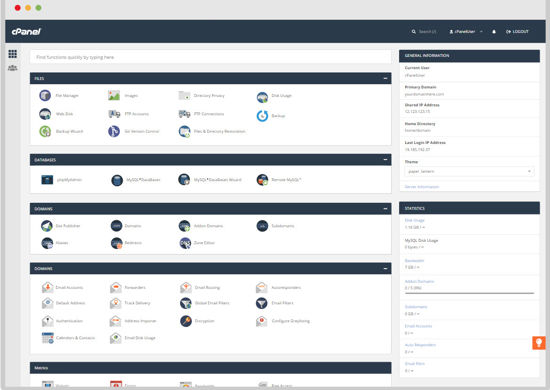
What is cPanel? How to use cPanel in WordPress hosting?cPanel organises its tools into 10 easily navigable sections. These are:
  • Files: for managing your website files and disk space.
  • Databases: for managing your databases.
  • Domains: for managing your domains and DNS.
  • Email: For managing email, email security, contacts, etc.
  • Metrics: For viewing website data, such as visitor numbers and resource usage.
  • Security: a suite of tools for securing your site, such as 2FA and SSL.
  • Software: to manage PHP, web platforms and to install new apps.
  • Advanced: More complex tools for things like cron jobs, error pages, etc.
  • Preferences: for cPanel management, such as user manager, passwords and interface personalisation.
  • Softaculous App Installer: Softaculous is a tool that lets you install hundreds of tools/apps directly from cPanel.

Main features-

Email

Transactional Email Provider SendGrid Continues Its Entry Into Marketing With Launch Of “Campaigns”
cPanel’s email tools help you to manage your email from directly within the control panel. They enable you to:

  • Add and remove email accounts
  • Set up email forwarding, mailing lists and auto-responders
  • Manage spam filters and global filters
  • Encrypt emails for security
  • Read and compose emails anywhere in the world via Webmail.

FTP Manager

FTP Manager Lite - Free FTP Client Software - DeskShare
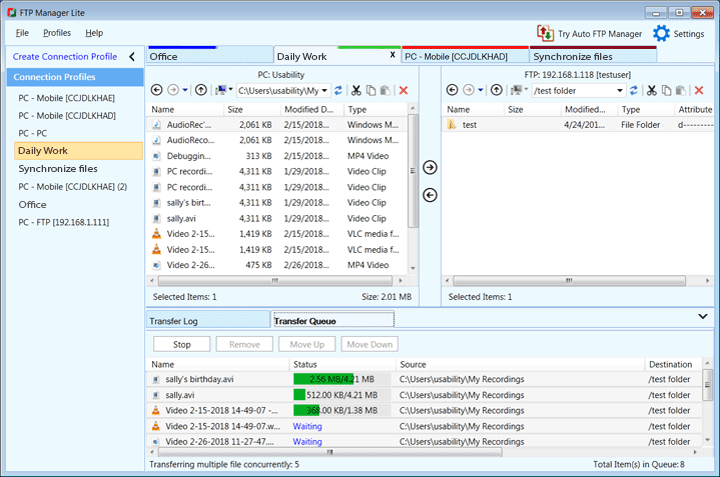
The FTP manager can be used to manage FTP access to your server directories and files. Features include:

  • Set up FTP accounts
  • Set up anonymous FTP access
  • FTP session control

File Manager

The 10 Best Android File Managers of 2021
The File Manager makes managing your files even easier than using FTP as you can do it directly from an interface within cPanel. You won’t need to make an FTP connection, use an FTP program or create additional usernames and passwords.

Backup

How to back up your iPhone, iPad, and iPod touch - Apple Support
Backups are essential to help you recover from lost data, corrupted files, hardware failure and cybercrime. cPanel has built-in backup functionality that lets you create a backup of your website with a single click, download it, and store it remotely from your server.

Domains

Why Secure More Than One Domain for Your Business? | Networksolutions.com
cPanel gives you complete control over your domains. It enables you to manage your domains and DNS settings, add new domains and subdomains, publish domains once your websites are completed, set up domain aliases and redirects.

Raw Log Manager

Raw Log Management in AlienVault USM Appliance
The Raw Log Manager lets you choose how raw logs are stored on your hosting account.

Raw Access Log
cPanel gives you the ability to download the raw access logs for any domain in your account. This information is useful for tracking user movements.

Error Log
cPanel’s Error Log helps you get to the bottom of 404 errors. The log displays all the “404 File does not exist” errors, helping you discover which files are missing from your website and quickly replace them or remove broken links.

MySQL Databases
CMS websites require a MySQL database and you may have multiple databases if you have more than one domain. The MySQL Databases tool enables you to manage your databases, creating new ones, modifying existing ones and creating, managing and removing database users.

Two Factor Authentication (2FA)

Two Factor Authentication (2FA) - Auth0
Take your cPanel security up a level by using the control panel’s 2FA tool. This will require anyone logging into your cPanel account to use an additional method of verification, sent to their phone, besides the username and password. 2FA helps prevent unauthorised users or brute force hackers gaining access to your control panel.

Softaculous

Softaculous Auto Installer
Make the installation of applications a breeze with Softaculous. Softaculous enables you to install hundreds of useful apps and tools, quickly and easily, to improve your website’s functionality. From CMS, such as WordPress, Joomla, Drupal, Magento, etc, popular eCommerce platforms, image galleries, social media tools, blogging tools, forums, ad managers, calendars, user polls, project management tools, customer support tools and much more –  all installed with a single click!

There are many more useful features available in cPanel. With such a rich variety of features, it’s no wonder that cPanel is the world’s most used control panel.

The Benefits of Cloud Computing for Real Estate Agents

Agent Image - Real Estate Agent Cartoon , Free Transparent Clipart - ClipartKey

The estate agency landscape has transformed over the last decade, with home buyers increasingly looking to the internet as their first port of call. This has led to the rise of disrupter startups that have stormed the market with nationwide online platforms and the promise of low-cost selling. To stay competitive and relevant, traditional estate agencies have had little option but to adopt new technologies themselves, a need accelerated by the impact of the pandemic. For those looking for the right solutions to their IT requirements, the answer lies in cloud technology. Here, we’ll explain why.

1. Better customer experience

15 Proven Techniques to Improve Customer Experience (CX)

For estate agencies concerned about competition from low-cost online agencies, it’s worth noting that, according to Gartner, 86% of consumers are willing to pay more for better customer experience (CX). The issue is that many online estate agencies have already begun to provide great online CX themselves. Migrating to the cloud, however, not just enables you to provide excellent CX yourself, but do so swiftly and cost-effectively.

Migrating to the cloud enables you to provide both buyers and sellers with all the information and help they need without having to visit your premises. There are a growing number of cloud-based tools and technologies to help estate agents offer great CX. These include financial calculation tools, virtual tours, online form completion and submission, customer service chatbots, omnichannel messaging and much more. These provide great CX in that they make the buying and selling of property quicker, more convenient, less stressful and highly engaging. Who wants to look at a photo of a house when they can put on a VR headset? Who wants to wait for a phone call when information can be accessed and answers provided instantly?

All these cloud-based technologies make customers more confident about your services, foster strong relationships and lead to better reviews and online reputations.

2. Using data to improve your business

How To Use Data To Improve Your Business | NewsGram

Data is now a critical component of decision making for businesses, providing insights that can help improve marketing, website design, productivity, cost-effectiveness and more. Analysing that data needs cloud technology. Cloud enables you to cost-effectively store and centrally manage your data and provides you with the AI and analysis tools that can find those insights needed to drive your business forward.

It can help you map customer journeys across all touchpoints, ensuring that communications are consistent and that whoever is dealing with a client is always up to date; it can pinpoint weaknesses in your website, such as poorly performing calls to action or quickly abandoned pages; and It can show you whether your communications are being opened and accessed and if not, predict which channels and times of day are most effective. It can even help predict shifts in the market, changes in consumer behaviour and the impact of changes in regulation, such as the return of full stamp duty, all of which can help you react quickly and make gains before your competitors.

3. Cost-effective

Behavioral &#39;Nudges&#39; Offer a Cost-Effective Policy Tool – Association for Psychological Science – APS

As digital transformation takes place in the housing market, estate agents will face growing IT needs. Developing an in-house infrastructure can be highly expensive, requiring the hiring of IT talent and the purchase of servers. Not just in real estate but across all sectors, businesses large and small have migrated to the cloud in a bid to keep IT costs to a minimum.

In the cloud, you are using the infrastructure of your service provider and this means there is no need for capital investment in hardware. And while there is a monthly fee for your cloud services, this is charged for on a pay-as-you-go basis, so you only pay for the resources (storage, CPU, RAM, bandwidth) that you actually use. This is an exceptionally cost-efficient way to procure your IT.

What’s more, the cloud gives you the flexibility to scale up or scale down on-demand, so if your website gets very busy or you need to carry out a process-heavy data analytics workload, you can be assured that you’ll always have enough IT resources to carry it out without your system crashing. When your period of high demand is over, you can simply scale down again and save money. Doing this in-house would require you to purchase additional hardware which might sit idle except for at the busiest of times.

4. Managed services

A complete guide to adopt successful IT managed services within your organization

As an estate agent, you’ll want to focus on the needs of your business and not spend too much time dealing with IT. With an in-house system, every aspect of your IT will need to be dealt with by your own staff and this includes server management and maintenance tasks that detract IT staff from implementing better services.

In the cloud, server management comes with the service. Your provider will update and patch the operating system on your behalf and ensure that your server is working optimally and remains constantly online for your customers.

What’s more, a good service provider will also offer 24/7 technical support, which means if you have an issue with your cloud services or any of the applications you run on them, you have an expert available, there and then, to help you get it fixed.

5. Remote working

Transition to Remote Working During the Outbreak: 3+1 Strategies | Geekbot

With cloud-based tools at your disposal, the days of telling a customer ‘I’ll check that when I get to the office and get back to you,’ are over. In the cloud, your systems and files are available anywhere with an internet connection and on any device, including smartphones and tablets. This means when carrying out the remote aspect of your job, such as visiting a client’s home, you can access the tools you need and ensure that you have up-to-date information at your fingertips.

It also means you and your staff can work more flexibly and stay productive during disruptions like the lockdown and bad weather days.

6. Stronger security

Why the office of the future will demand stronger security measures | Zimbabwe Information &amp; Communication Technologies (ZICT) Divisions

With the constant risk of hacking, malware, ransomware, DDoS attacks and other threats and a need to comply with regulations like GDPR, IT security is a major concern for all businesses. Putting robust security in place is both expensive and challenging, especially for companies with limited IT budgets.

Cloud vendors, however, employ security experts and utilise the most advanced tools to protect their datacentres and their customers’ systems. They deploy next-gen firewalls with intrusion and malware protection to keep cybercriminals away from your servers and data. They also provide essential security services, such as SSL certificates, email encryption, VPN, 2FA, data encryption and remote backups.

What’s more, when your data is stored in the cloud, you don’t need to keep copies on removable drives, laptops or other devices that can easily be lost or stolen. This helps prevent the risk of your customers’ personal data being breached.

Conclusion

The shift towards a digital market means estate agents need to digitally transform to remain competitive and relevant. To offer the services that customers want, benefit from the advantages of the latest technologies, stay secure and remain cost-effective, this means migrating to the cloud.

error: Content is protected !!