Ways for airlines to benefit from combining digital and live agents.

Fuel Efficiency Key to Airline Success | Business Aviation News: Aviation International News

Many of us have had an experience similar to this: You call an airline to make a reservation and get a digital agent on the phone. The call starts off fine, but when you ask if your friend can sit next to you on the flight, the digital agent stalls and sends you to a live agent. You then wait several minutes before you reach a live agent and, when you finally do, she has no call history and you have to start from scratch, explaining who you are and making the reservation a second time.

Eventually, your request gets resolved and you manage to book your flight. But the entire process takes more time than you would have preferred, and you’re left irritated and feeling like you’ll switch airlines the next time.

Situations like these occur because many airlines have separate systems for the digital agent and the live agent, often from different providers whose contracts restrict the integration of both systems. When the two systems don’t communicate with one another, the digital agent hands the call off to a live agent, and the information doesn’t transfer. Airlines are now working to integrate both systems, and there are at least five benefits to doing so:

1. Saves the customer time. Customers don’t have to start from scratch and can complete their reservation request in much less time.

Technology That Saves Time, the Most Important Resource of All | Creative Virtual

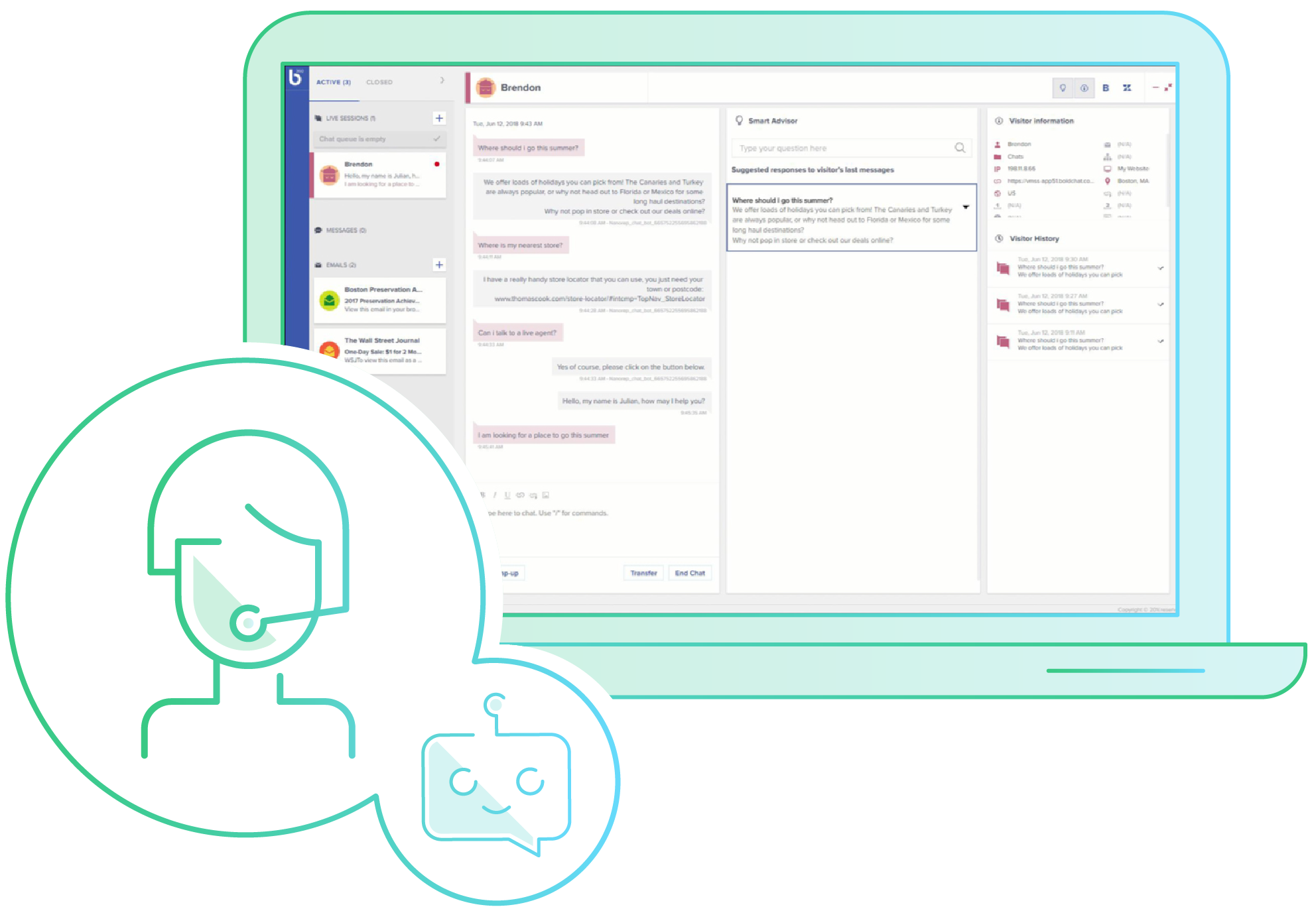
2. More efficient use of the agent’s time. When the customer saves time, so does the agent, which gives her more time to upsell the customer on other services or deals the airline has to offer. The live agent can transition to becoming more of a salesperson and problem solver than a mere order taker.
Agent Productivity | Bold360

3. More efficient back-end processing. In the past, any time a change was made the airline would have to input the change into two separate systems. Now, the change gets entered only once and both systems get the update.

How to Improve Process Efficiency | Lucidchart Blog

4. Improved brand loyalty. The customer will remember his issue was resolved quickly and the live agent had a complete call history and knew and understood the customer’s preferences.

8 Ways to Build Brand Loyalty + Examples

5. Personalized service. Artificial intelligence and machine learning will enable the system to learn more about the customer over time. For example, it might know immediately the customer’s seat preferences based on her flight time – towards the front of the plane on a connecting flight, at the back on the red-eye, or in the aisle during a daytime flight –so that when the customer books a future flight with the digital agent, the correct seat will be assigned automatically.

Personalized Customer Service: How to Deliver and Drive Loyalty

As the system matures, fewer calls would need to be routed to a live agent, so that only the most exceptional requests, or those involving sensitive information (such as a declined credit card), would need to be transferred.

A centralized platform is the most effective tool for integrating digital agents and live agents. It can connect disparate applications, services, and processes under a uniform customer experience, helping airlines to ensure data compliance, easily transform data, and more efficiently route information.

That said, integrating live and digital agents is a challenge, with legacy systems and processes often hindering progress. But the overall goals of an integrated system –improved customer service, brand loyalty and the ability of live agents to upsell services that customers really want – are well worth the effort.

When airlines succeed in doing this, they can win customers for life.

How to Evaluate a Web Hosting Provider’s Reliability

Reliability in Qualitative Research – HotCubator | Learn| Grow| Catalyse

As any builder will tell you, if you build a house on poor foundations, it will fall. The same principle applies when building a website: here, however, the foundations are not reinforced concrete but the services of your hosting provider. A website its reliant on its hosting for its ongoing performance and success. Here, we’ll look at the criteria you need to look at when measuring the reliability of a web hosting provider.

1. The services you need

How to Start an Agency After Successfully Freelancing

Hosting comes in a variety of forms and websites have their own specific needs. Finding the right host means matching these together. For example, if you run a WordPress website, you may want dedicated WordPress hosting which is designed specifically for optimising the performance and security of WordPress sites.

Look for a provider that offers all forms of hosting: shared, VPS, dedicated servers and cloud and which provides different solutions and packages for each form. You may need Linux or Windows hosting, business or reseller hosting, a choice between cPanel or Plesk control panels, the ability to choose the hardware spec of your dedicated server, want managed services or a bespoke enterprise-level cloud solution. A reliable host will be able to provide the solution which is tailored to your needs.

2. Availability

Security system 'availability' jargon buster

Availability, in web hosting parlance, refers to the amount of time that your website or application stays online. Also known as ‘uptime’, it is of critical importance because a website or app that goes offline loses you money and damages your reputation for reliability.

There are several reasons a website can go offline and not all of these are caused by poor web hosting. However, issues with hardware failure or overcrowded shared servers are within the remit of a web host and if these lead to constant lack of availability, your online venture can suffer as a consequence.

When it comes to availability, look for a web host that guarantees 99.9% uptime (the remaining 0.1% may be needed to update the operating system and patch vulnerabilities). At the same time, you can increase hardware reliability by opting for SSD storage, which uses solid-state rather than mechanical disk drives and is thus less prone to failure.

3. Technical support

What's A Career In Technical Support And Help Desk Like?

While all web hosts will have a customer service department, what is more vital is finding a host that provides 24/7 technical support. There are many issues you can have with running a website and having 24/7 technical support in place means that, regardless of the time of day, an expert will be available to help sort the problem straight away.

Having a support team there for you in a time of need is one of the main reliability measures you should look for. For convenience, look for a support team that can be contacted by live chat, phone or ticket.

4. Money-back guarantee

A Question of Money-back Guarantees and Marketing Your Online Products

People don’t always make the right choice with their hosting, nor are they always satisfied with the hosting services or support they receive. What makes this a bitter pill to swallow is that, should they change their mind, they find themselves out of pocket.

A reliable host is one which puts its customers first and which is so confident in the quality of its service that it offers a money-back guarantee. Here at Anteelo, for example, if you change your mind, you can claim a full refund on all hosting services (except dedicated servers and licensed add-ons) within the first 30 days. Additionally, our Anytime Money Back policy allows you to claim a refund for any unused portion of your contract even after the initial 30 days have passed.

5. Security

What Is IT Security? - Information Technology Security - Cisco

Cyberattacks have become a major threat to website owners with hacking, ransomware, malware, data theft and DDoS attacks leading to the demise of many businesses. One increasingly important measure of a web host’s reliability is how well they protect their customers from cybercrime.

Hosts should have security experts in place and provide them with the latest tools to do their job effectively. These should include the latest firewalls, intrusion detection and prevention tools and anti-spam email filters. They should also provide security services such as remote, encrypted backups, SSL certificates and email signing certificates.

6. Scalability    

4 Tips for Building a More Scalable Business

Your hosting needs may change over time. If your website grows and gets lots more traffic, the hosting package you currently use might not offer sufficient storage, bandwidth, RAM and CPU resources to cope with your needs.

A measure of reliability is how quick and easy a host makes it to scale up to a bigger package or even to a different form of hosting solution (e.g. VPS, dedicated server or cloud). If this involves migrating to a different server, they’ll also help you with the process of migration so that the move is as seamless and undisruptive as possible. At the same time, scaling back to a smaller solution should be just as easy.

7. Price

NDIS prices – the good, the bad and the ugly - Every Australian Counts

Every business will consider price when it looks to acquire the services of a web host. However, it is important to compare like with like rather than going for the cheapest deal. While affordability is important, so too is price stability and cost transparency.

A reliable host is one which makes its pricing completely clear and where there are no hidden extras. Additionally, although prices do change from time to time, a good host will try to keep increases to a minimum and implement them as infrequently as possible.

8. What others think

What the others think of you reflects what they are, not who you are

While web hosts can provide details about their products and services on their website, a true measure of their reliability is what their customers say about them. Online reviews and star ratings are highly valuable resources for owners looking for the best hosting solutions as you get the customer’s judgement on the quality of their services.

Conclusion

With a reliable web host supporting your online venture, you have the right solution for your budget and hosting needs, the flexibility to grow, the security and uptime guarantees to keep you online, the support in place to take care of issues and the backing of other customers to help you make the right decision. And if you’re still not happy, you can rest assured that you’ll get your money back.

Intelligent Audio Transcript Analytics – NLP Anthology (Part 1)

Voice Transcription & Speech Analytics | Verint Financial Compliance

Intelligent Audio Transcript Analytics: The Next Big Thing for Scaling Industrial NLP Applications.

Over the last few years, Natural Language Processing (NLP) has made significant strides in mastering language models to understand the nuances of different languages, dialects, and voices. NLP has unlocked countless new possibilities, and the market has corroborated this with a high rate of adoption. However, many in the industry, across the Fortune 500, are still skeptical about implementing NLP-based tools to derive value from texts; instead, they rely on their experts to do this manually, resulting in low efficiency, inconsistency, and challenges at scale.

Tredence is helping enterprises address these challenges through our AI CoE. We’ve recently partnered with a Fortune 100 Research and Advisory client to solve several challenging NLP problems using audio transcripts for conversations between the client’s analysts and their customers (usually Business Directors and above). These problems have potential use cases, including Research Guidance, Evolving Categorizations, Automated Reports, and Process Automation.

This is the first in a 4-part blog series that will discuss the overview of the problem and motivation behind the solution along with some challenges faced during the solution’s development.

The Problem: Rising Metadata and Lack of Actionable Insights

With companies using a host of call monitoring and recording applications, a large amount of unstructured call data gets generated every day. But the inherent resource constraints of a manual approach fail to provide valuable insights.

NLP solutions can play a vital role in mining the call data and categorizing and providing actionable insights. For example, it can be applied on call transcripts to quickly extract key topics covered with little or no human input. Further, using the solution to understand call transcripts can improve workplace efficiency, reduce human capital costs and improve training and feedback for employees. It can also help in identifying business problems algorithmically, making it easier for the organization to deploy resources in an evidence-based manner.

We have built an NLP-enabled Audio Transcript Analytics Solution that helps systematically understand the business calls by using three key components:

  • Key Concepts Identification
  • Natural Language Intent Extraction
  • Multi-label Document Tagging

We will discuss each component in detail in the next three blogs of this series.

Our solution has been successfully applied to many Fortune industrial 500 clients’ various transcription needs in multiple domains.

The tools can be combined to form a full-spectrum Natural Language Understanding and Processing System that’s customized for new domains relatively easily.

Data & Present Framework

Sensr: Evaluating A Flexible Framework for Authoring Mobile Data-Collection Tools for Citizen Science – Follow the Crowd

Roughly 100,000 analyst-client calls, lasting between 30-40 minutes, take place every year. Before our solution was deployed, the domain experts had to analyze and extract the key elements of each call transcript.

Before we discuss the critical components used by our Audio Transcript Analytics Solution, let’s glance at some of the challenges.

Challenges

  • Ambiguity is inherent to human language. Hence, the speech-to-text converted data poses many problems for NLP systems like transcription errors – incorrect words, spelling errors, and incorrect sentence segmentation.
  • The lack of speaker text segregation hinders the application of NLP algorithms in client spoken segment.
  • Off-topic conversations or casual talks also impact the algorithm’s effectiveness significantly. Hence, to address this issue, we’ve developed a Casual Talk Removal method in which we considered the causal talk identification as a sentence classification problem using:
  • A supervised approach: We trained an ensemble model for nearly 10,000 sentences on the quantitative features derived from each sentence, such as the sentence’s position and count of tokens, stop words, entities, person names, geographic location. We observed that the sentence’s position is the most important feature since the transcripts have a high density of casual talk in the beginning. This approach performed well in the classification of sentences present at the beginning of the call transcript.

However, this approach had two significant limitations:

  • It required a sizeable labeled corpus to train the model.
  • Poor classification accuracy in later sections of the transcript.

To overcome these limitations, we developed an unsupervised method to classify casual talk sentences.

  • An unsupervised approach: Some information such as people names, geographical location names, and certain stop words were removed from the sentences. We used part-of-speech (POS) tags such as Noun and Proper Nouns, and IDF values at the sentence level to classify casual talks.

Hope you liked our approach to call data analysis and framework for removing ambiguity and casual talk from call transcripts and perform meaningful analysis.

6 stages to adopting a cloud-based digital operating model

An argument against cloud-based applications | TechCrunch

Moving to the cloud was supposed to be simple, right? So why are many IT managers — even those experienced in IT change — finding cloud adoption far more difficult than they expected?

One big reason is that moving to the cloud represents a new and different kind of change. The cloud involves not only IT, but also makes possible business models that were unimaginable or impractical even a few short years ago.

Complicating matters further, many organizations have realized that some enterprise applications may never move to the cloud. Instead, those applications will do best remaining on premises. Even among those that are good candidates for the cloud, there are interesting decisions to be made about what level of transformation is appropriate to potentially drive greater business value out of that application in the cloud, as well as decisions about how to integrate cloud and traditional workloads. In short, it’s complicated.

To help, here are six best practices for moving to hybrid IT

  • Make the cloud a business decision. Digital transformation at its heart provides a new strategy not just for IT, but also for the business. It empowers business leaders to transform processes, improve the customer experience, and more — all with new business models. Getting the technology right is of course vital. But it must be done in alignment with and in the context of serving the entire business. Businesses and IT must align around a product management approach.

4 Reasons Why The Cloud Is A Smart Business Decision

  • Take DevOps to the next level. Moving to a hybrid cloud environment means looking differently across the entire operating model. Smart organizations will use DevOps to explore and use the marketplace of cloud services and change their IT operating model to do so. However, this isn’t an environment where you’re just using a new technology to simply provide the same services with the same controls. In fact, the opportunities to do “new things in new ways” are tremendous but the threat landscape is different, and the compliance opportunities are different, too.

15 Metrics for DevOps Success – Stackify

  • Before moving workloads, collect hard data. Some applications perform best in a public cloud, some in a private cloud, and some by remaining on-premises. How to make this determination? Look for true business value at the outcome level. There are tools available that can analyze performance-utilization data to map workloads to their best possible configuration in the public cloud. Other useful tools can assess performance data for specific workloads.

5 Steps for Moving Big Data Workloads to the Cloud - Big Data Analytics News

  • Get value from your data. Established enterprises have a big advantage over startups: They possess years’ worth of valuable data. However, enabling and extending the value of that data may not be easy, especially if it resides on legacy systems. Once again, a hybrid approach to data management can help, as some legacy systems can be moved to the cloud, while others will need to remain on-prem (though still integrated with cloud environments). Organizations will need to tackle the infrastructure, the applications and the data together. If this is done in a modular “Fix Today and Enable Tomorrow” type approach it can deliver the additional value to the enterprise in small, bite-sized chunks.

How to Measure the Value of Data - 7 Ways to Inform Your Data Strategy | Towards Data Science

  • Create a cloud model that scales. When moving to the hybrid cloud, it can help to think like a restaurant owner. First, have “chefs” come up with recipes (architectural patterns). Then have “cooks” who can repeat those patterns many times at scale to move the workload. Also, start with quick, sure “hits.” That way, you’ll gain confidence and experience, while also amassing a persuasive collection of early successes. Note: These tasks may be outside the scope of most organizations (skills, know-how and scale) and may therefore require the help of a partner model.

What is cloud computing? Everything you need to know now | InfoWorld

  • Regularly update your roadmap. Because every organization is unique, its roadmap to hybrid IT will need to be unique, too. But that roadmap must be able to change and adapt as the organization makes progress and learns new lessons, especially as the marketplace of cloud services is changing so rapidly. Today’s perfect plan won’t be perfect tomorrow when new services have enabled or automated a lot of what you were planning to do.

Should You Share Your Product Roadmap Publicly?

Don’t go it alone

Throughout the process, remember that the days of one-technology solutions are long gone. These are now replaced by a myriad of technology solutions to consider. So you need a partner to help you navigate both the technology and business landscapes, one that isn’t locked into any particular technology stack.

Much of the change will be cultural, as your organization adopts new ways of working, innovating and developing. A good partner can provide you with the baseline for building a hybrid-IT plan that’s effective, innovative and secure. They can also scale, helping you launch, adopt and run the transformation.

8 Facts About CTR That Will Make You Reconsider Your SEO

Click-Through Rate (CTR)

Visitors are the lifeblood of a website. Its why site owners spend a fortune on PPC ads and invest heavily in social media campaigns. The holy grail for websites, however, is organic traffic, that which comes free from search engines. Getting that organic traffic depends on two key things: first, ranking high enough to be seen and, secondly, getting the user to click through to your site. To highlight the importance of ranking and clickthrough rates, here are eight eye-opening facts you might want to consider.

1. Top spot gets over 30% of clicks

Top Google Result Gets 36.4% of Clicks [Study] - Search Engine Watch

When it comes to Google, the world’s most popular search engine, the site which ranks number one in the results gets, on average, a whopping 31.7 percent of all the clickthroughs. That means, if there are 1,000 daily searches for that term, that website will get 317 visitors. Things aren’t too bad for places two and three, either, with the top three results, between them, getting a combined average of 75 percent of all the clickthroughs.

The bad news for all the other sites is that once the lions’ share has been taken away, they are left with only 25 percent of clickthroughs between them – and the share diminishes the further down the results they go.

2. Disparity of clicks on first page

CTR

While getting on the first page might seem like an achievement, the number 10 position is far less lucrative in terms of clickthroughs than the page hitting the top spot. Indeed, it will only receive 10 percent of the traffic that the number one site gets. In this case, 1,000 daily searches will only bring in 31 visitors: a trawl that may need backing up with PPC advertising.

3. Rising one place brings big benefits – most of the time

An All-In-One Guide To Boost Employee Job Satisfaction

The higher your page ranks in search engine results, the more visitors you’ll get. On average, each step up will increase clickthroughs by around a third, however, this isn’t evenly distributed. While jumping from 6th to 5th will boost your CTR by 53 percent, going from 9th to 8th will only bring you a 5 percent increase.

The duff position on Google’s top page is number 9. Moving from 10th to 9th position will actually see your clickthroughs drop by almost 4 percent.

4. A question is the answer to higher rankings

CTR

With searchers often asking questions in their queries, websites that provide the answer are always going to perform better in search results. In addition, pages that include the question in their title get a bigger slice of the visitors – on average, 14 percent more than those which don’t have the question. This may influence how you decide to title your pages.

5. Middling title lengths do better

Hefty history of Cold War middling - Winnipeg Free Press

Google doesn’t stipulate a maximum number of characters in webpage titles and what gets displayed is dependent on the device on which it is viewed. In general, most SEO websites tell you to keep it to a maximum of 60 characters if you want the bulk of your titles displayed in full. The result is that many website owners try to fill up the 60 characters by adding keywords if they have additional room.

Research shows, however, that short to medium length titles perform best for clickthroughs, with those between 15 and 40 characters getting almost 9 percent more visitors than those with longer or shorter titles. It may be worth re-examining your titles and making the overly long ones a little more succinct.

6. URL keywords boost traffic  

CTR

With all the important information in the title and the snippet, it’s likely that the user will only cast a glancing eye over the URL. That said, URLs that contain keywords included in the search query perform 45 percent better than those which don’t when it comes to clickthroughs rates (CTR). This is probably because having a keyword in the URL helps the page rank better.

7. Title wording affects clicks

10 keywords to get more clicks on your titles

The language you use in your titles can have an impact on your CTR. If you want to improve clickthroughs, try adding emotive language. Those with both positive and negative feelings gained a 7 percent increase in traffic. However, those that seek to draw users’ attention through the use of power terms (e.g. 8 Ways to Instantly improve SEO or Amazing new website tool) achieved 14 percent fewer clickthroughs.

8. Meta descriptions give click boost

How to Write High-Converting Meta Descriptions to Boost Rankings

The two advantages of writing a meta description are that search engines use the keywords you place within it to help determine if your page should rank and that, if it does rank, the snippet often displays the information from the meta description.

Careful writing of the meta description so that it appeals to your readers and includes keywords can help it rank better and lead to a 5.8 percent improvement in CTR.

Conclusion

The more organic traffic your website receives from search engines, the less reliant you will need to be on expensive PPC advertising. While ranking highly is important for page visibility, increasing your traffic is entirely dependent on getting users to click on your links. Hopefully, the facts mentioned here will help you improve your CTR.

How to Improve Cloud Cost Management in 7 Easy Steps

Save on cloud spending: Five essential AWS cost management strategies that work - Site24x7 Blog

The economic turmoil following in the wake of the global pandemic means most companies will be looking to cut costs. While migration to the cloud has long been seen as a way for businesses to reduce capital expenditure and overheads, with careful management, it is also possible to minimise cloud expenditure too. Here, we’ll look at seven ways that cloud cost management can save you money.

1. Opt for pay as you go cloud

Pay-As-You-Go Added To VAD Cloud Marketplaces | Oracle PartnerNetwork Blog

Cloud services are available in two pricing models: fixed and scalable. Companies which have a fixed price package will have bought a stated amount of storage, compute and networking resources and committed to a minimum period over which they will pay for them. Like purchasing a dedicated server, this often leaves companies paying for resources that are seldom or never used and means money not being spent cost-effectively.

Scalable models charge for resources on a pay as you go basis, enabling companies to scale up instantly when there are spikes and scale back again when the need is no longer there. This way, companies only pay for the resources they use.

2. Assign a gatekeeper

If individuals or departments within a company have the ability to increase the cloud resources they want to utilise, there is the potential for costs to rise unexpectedly.

Creating the post of a cloud manager, someone who acts as a gatekeeper and who ensures that additional provisioning is only allowed if it follows procedure and meets company criteria, can significantly keep costs under control.

This becomes more complicated if departments can purchase cloud services independent from the IT department. To enable this to work cost-effectively, the cloud manager should have oversight of the ordering and approval process as well as monitoring individual departments’ cloud spend.

3. Monitor, analyse and automate

Process Monitor | Process Automation | Interfacing

Even companies which utilise pay as you go cloud services can save money through monitoring, analysis and automation. Using a combination of application performance and user-experience monitoring, you can know if the application is performing effectively in the cloud environment and if this is providing end-users with a quality experience.

Together, these two forms of monitoring will clearly indicate resource usage, including during peaks, and give a better idea of the cost-effectiveness of running the applications. With insights from cost optimisation tools, companies can quickly find areas to cut spending.

What’s more, with continuous monitoring taking place, the process of both maintaining performance and saving money can be automated. Automation tools can use the data gathered during monitoring to scale up or down when required. This way, the company can always have the resources it needs and keep a tight rein on expenses.

4. Improve storage management

Do You Really Need Storage Management Software? -- Virtualization Review

While companies can easily scale up and down their processing resources, the amount of data collected generally just keeps on growing, leading to ever-larger storage costs. A close inspection of that data often reveals that much of it is duplicated, frequently the result of departments and even individuals keeping siloed versions of files and datasets for their own purposes.

Changing the way the company uses and stores its data can enable these unnecessary duplications to be deleted and thus make a significant dent in storage costs.

5. Remove overprovisioning

When companies migrate applications from dedicated servers to the cloud, they often provision the same resources as were available on the dedicated server, even if these were seldom utilised. Through monitoring, it becomes much easier to understand what resources the application actually needs and then identify and remove incidents of overprovisioning. Not only can this cut costs; the monitoring can also help improve memory and CPU performance.

6. Software efficiency

Maximise efficiency with service management software | Service Geeni

Where software makes more demands on the server, the amount of resources increases and so can the cost of your cloud service. This can be altered by making your software work more efficiently. On websites, for example, minimising scripts, compression, deleting unnecessary plugins – all the things that can speed up loading times, can also reduce network traffic and decrease costs.

7. Check your software licences

Why You Need to Have Your Software Licenses in Check - IT Support Guys

Software licences can be expensive and, in many cases, your cloud vendor can provide them much cheaper than purchasing your own. That said, if you already have a licence for using an application in your datacentre, there are some software developers which will let you continue to use this in the cloud. While this is not always the case, it is worth checking so that you don’t end up paying twice.

Conclusion

While the cloud has proven itself to be a cost-effective IT solution, there are ways to make sure it can be run even more efficiently. Hopefully, the seven points raised here can help your company to cut cloud costs during the current period of economic uncertainty.

The rationale for MRO change from a business standpoint

4 tips to navigating the changing maintenance, repair, and overhaul (MRO) market - Aerospace Manufacturing and Design

Without sophisticated maintenance, repair and overhaul (MRO) systems, airlines couldn’t operate as the global enterprises they are today. Yet recent studies of aircraft IT MRO systems have revealed a long list of shortcomings.

For example, older systems lack the ability to minimize the impact of scheduled and unscheduled maintenance. They maintain a dependence on manual workflows and paper-based systems. But the effects from a forward-looking perspective are even more important. Older systems lack the ability to optimize business processes or drive operational improvements from a growing body of data generated by next-generation aircraft now entering service.

Despite the growing list of limitations, existing MRO systems have continued to hang on because they are highly customized and tightly woven into many other operational areas. Replacement isn’t a point-and-click upgrade. And because migration to a new MRO solution can be a multiyear process, many airlines still choose to bear the growing expense of maintaining existing systems.

That no longer needs to be the case. Airlines can break from the cycle of escalating costs and diminishing returns by adopting a new vision for what an MRO system can be and the value it can deliver.

Digitizing and transforming maintenance operations

What is the Value of Digitization, Digitalization & Digital Transformation (DX) in Manufacturing?

Central to this shift is the transition to a connected transportation platform. Airlines want to analyze data to better predict maintenance events, minimize unplanned maintenance, react more swiftly to scheduling changes, increase resource efficiency, and ultimately become more agile. A platform for MRO services enables airlines to accelerate their business transformation.

Airlines that digitize and transform maintenance operations will be positioned for growth. They can gain visibility into the scheduling needs and compliance of maintenance requirements, maximize aircraft maintenance yields, improve agility to adapt to operational business process changes, increase the productivity and job satisfaction of their workforces, and offer a superior experience for passengers by reducing aircraft delays. A next-generation, connected MRO solution can help airlines achieve this by:

  • Improving connectivity across systems, enabling airlines to make agile decisions based on accurate data
  • Shifting equipment maintenance from scheduled or condition-based maintenance to analytics-based predictive maintenance
  • Delivering productivity gains through automation and digitization of manual maintenance processes
  • Optimizing maintenance execution by enabling just-in-time delivery of materials
  • Improving the ability to gain insight into historical maintenance
  • Offering increased flexibility to swiftly adapt to operational and regulatory compliance process changes
  • Empowering technicians and simplifying their work via mobile applications and virtual assistants
  • Reducing the potential for expensive delays through improved visibility of maintenance variables when making scheduling changes

At the scale airlines operate at today, small changes add up to big savings. For example, shaving a half-percent off the number of daily flight delays due to maintenance results in annual cost savings of $4 million to $18 million for 1,000 to 4,000 flights per day. Or, consider this: a 10 percent staff productivity gain could result in annual savings of $15 million to $70 million.

Want to Know How Digital Transformation in Manufacturing is Driving Interconnection Growth? - Interconnections - The Equinix Blog

A connected transportation platform is the key element that airlines require to develop a deeper understanding of their maintenance needs, while providing the foundation for delivering innovative services. A connected transportation platform enables a forward-looking operation to enhance quality and achieve the level of agility, flexibility, and speed needed to transform capabilities such as long-term planning, staff scheduling and task execution.

As airlines look for ways to grow and deliver new value to customers, success hinges on embracing solutions that lead to their desired business outcomes: maximizing the availability and reliability of aircraft while minimizing maintenance costs.

Three strategies for cybersecurity teams to develop a rapid-response culture

Clipart - Rapid Response | Clipart Panda - Free Clipart Images

The phrase “need for speed” might sound like a catchy one-liner from a Hollywood blockbuster. However, when it comes to information security, they are words to live by. Consider this vital fact: Malware permeates organizations with lightning speed and frequently causes millions of dollars of damage in a relatively short period of time. Because of this, cybersecurity teams should be able to respond speedily when threats happen. Growing your team from an average state into one with a rapid response mindset requires a few key elements:First, there has to be modular structure. What this means is that teams need a set response format to work with. This structure should evolve, adding processes or additional needed components, as a team’s obligations in cybersecurity change.  As Bob Carver, CISSP, CISM, MS, says in a 2017 article, Cybersecurity: The Need for SPEED: “You don’t want to be one of those organizations that gets notified of a compromise by law enforcement before your security teams are aware of the situation.”

What is Modular CSS?

The second element to maintaining a rapid response culture is situational awareness. Is the cybersecurity team “in-the-know” regarding where to find their tools? What type of response to take, who to contact, when to act, and most importantly, how to execute their response — are all questions that should be answered before operating in a production environment.

5 ways to improve your situational awareness | Rapid

Third, encourage drills to promote team agility. Even with cutting-edge skill sets and available resources, response time can still falter if both components are not used frequently. By “going through the motions” of regularly responding to simulated threats, a team can build the physical and mental bite that lessens the chance for mistakes during the execution of an actual incident response. Cybersecurity stakeholders will discover that this practice in fact leaves information ingrained deeper within a team’s psyche, both at the individual and collaborative level.

For Valtech COO, business transformation means agility and access to data

Accelerated response in cybersecurity is a learned practice. However, when a culture is developed, rapid response becomes natural and can increasingly match the hostile landscape created by malicious actors.

The Benefits of Google’s Grow My Store Tool for eCommerce Websites

How to Increase Ecommerce Sales: 10 Tactics From 53 Experts

As the world’s leading search engine, Google is in a good position to understand what makes online stores successful. Indeed, its influence gives it the power to set the criteria by which eCommerce websites are judged. Its latest tool, Grow My Store, is designed to provide online shop owners with valuable information and site analysis that can help them improve. Here, we’ll take a closer look at what the tool has to offer.

What does Grow My Store do?

Improve Your Retail Website Customer Experience | Grow My Store

Google’s primary objective is to offer its users the best search results. While it constantly works to improve its search algorithm, it also tries to improve the quality of the websites that feature in its search results. Those that follow its guidance generally end up ranking higher. This is why it has so much power and influence. One of the key attributes that Google wants online stores to improve is customer experience. The Grow My Store tool was designed with this in mind and is particularly aimed at small and medium-sized retail sites.

In a nutshell, the Grow My Store tool will scan your online store and provide you with a customer experience report which will point out what you are doing well and areas where you should look to make improvements. The benefits, apart from helping your site to be more Google-friendly, are that improved customer experience can increase your revenue by as much as 15% and also help you cut costs.

What kind of websites can use Grow My Store?

25 Retail News Websites You Can't Afford to Miss

The tool is designed to analyse the websites of all retailers, whether you only sell via a bricks and mortar store, only sell online or sell both online and in store. The feedback you get is tailored to the particular business model that you have. However, while the tool is helpful for retailers who don’t sell directly from their websites, it’s not designed to help businesses that aren’t in the retail sector.

Getting started with Grow My Store

Enhance your ecommerce site with Grow My Store - Think with Google

Like most of Google’s website analysis tools, using Grow My Store is easy. Simply visit the Grow My Store page and paste in your website’s URL and click the ‘Get Started’ Button. You will then be asked to choose your business model (i.e. online only, physical store only or both) so that results can be tailored to your needs.

After this, you are asked to choose the sector which best suits your site. The options are limited to apparel, beauty and personal care, computers and consumer electronics, food and groceries, home and garden and other. If you choose ‘other’, you are able to type in something more specific. Once this information is inputted, the tool will begin analysing your website. To get the full report, you’ll need to sign up or sign in.

What kind of feedback will I receive?

How to Get Customer Feedback (20 Tried & Tested Methods)

Google will analyse your site on 22 areas of customer experience best practice. These include basic things like having a returns policy, clear pricing and adequate product information, as well as website features such as easy site navigation, live chat support and a customer-friendly checkout process.

The tool will analyse site speed, including loading times, how long it takes for customers to be able to interact with the site and the time it takes for the site to respond to interactions – all of which can affect bounce rates and shopping cart abandonment. It will examine mobile friendliness, which is increasingly important as more people shop with smartphones and use them to search for local stores. From a security perspective, it will look to see whether you have an SSL certificate installed that encrypts data sent between the user’s browser and your server, keeping payment details secure.

Other areas the tool will report back on include whether you have product ratings enabled; if you display basic store information (e.g. opening times and location and direction details for physical stores); how well your site offers personalisation; how easy you make it for customers to order, return and collect products; and the quality of your fulfilment and customer service.

When completed, the tool will give your store an overall rating and compare it to the average of similar stores. It will also offer advice and guidance on areas in which it thinks you can improve.

Conclusion

It’s always helpful to get feedback on the quality of your online store. The information provided by Google’s Grow My Store Tool can offer insights that you might not have previously considered or highlight issues that you were unaware of. What’s more, it can show you how well your site performs in relation to your competitors. Hopefully, it can help you improve your customer experience and reap the benefits of doing so.

The 6 Best Free Places To Help Promote Your business

9 Tips on How to Promote Business Online in 2021 | Paldesk

If you want your business to be a success, you need to promote it to as wide an audience as you can. Getting the message out there, however, can be expensive. The cost of pay per click advertising and other forms of paid promotion can soon use up your marketing budget. To help, we’ve put together a list of the top free to use places that can seriously boost your marketing reach.

1. Google My Business

Google My Business – Drive Customer Engagement on Google

Google My Business is a very useful place to list your business as it makes it highly visible on the world’s most used search engine. As Google search is available on Android phones, it’s also great for local businesses. Not only does the listing increase your chances of being found; it also provides searchers with a wide range of information about your business. They can use the listing to visit your website, send messages, read reviews, get directions and call you. You can also upload images, offers and deals, display your opening times and more. It even lets users follow you.

2. Bing Places

Get Your Business Found With Bing Places For Business |

Bing Places is Microsoft’s version of Google My Business and is available on Bing. Though It doesn’t offer all the same features or have the same reach as Google, it still enables you to create a profile with a company description, directions and links to your website and Facebook page. Unlike Google which features its own reviews, Bing lets you display reviews from other sites, like Facebook or Yell.

3. Apple Maps Connect

Apple Maps Connect - Apple's Local Online Business Directory

Apple Maps Connect is the place to list your business for viewing on Apple devices like iPhones, Macs and iPads. With millions of iPhone users, this is also ideal for local businesses. Just like the two examples above, you can display your basic business information, including address, phone number, business category and opening hours, as well as providing links to your website and social media pages. You can’t upload images (yet) and the reviews Apple uses are taken from third-party sites like Trip Advisor.

4. Yell

Yell (company) - Wikipedia

The services mentioned above mean that fewer people need to visit sites like Yell to find businesses. However, quite a lot still do and it can attract visitors and generate new business. As businesses listed on Yell are also indexed by search engines, the link to your website from it can help your website to rank better.

The free listing enables you to display name, address, opening times and photos. Reviews can be made through Yell and these are displayed on your profile page. There is a map, but it doesn’t give directions.

Yell has a paid-for premium service. At some point, its representatives will call you to try and persuade you to upgrade.

5. Facebook

15 Hidden Facebook Features Only Power Users Know | PCMag

With over 2.6 billion active users, Facebook is a place you can’t afford not to promote your business. Setting up a Facebook Business Page is free and easy, though you will need a personal Facebook account first. Facebook business pages give you lots of potential to share company information, contact details, directions, website links, videos, images and blog posts. You can use it to communicate with other users, answer questions and show reviews. What’s more, Facebook is developing a storefront which will enable you to sell products directly from the site and now has a Facebook Manager service which lets you control all aspects of managing your business on the platform.

6. Instagram

What Is Instagram and How It Works: a Beginner's Guide

Owned by Facebook, Instagram Business offers a broadly similar suite of features to those of its parent company. The key difference between the platforms is in the type of content used on the sites and the types of people who use them. Generally speaking, Instagram is very popular with younger people and is mainly used for sharing videos and images. For companies that promote themselves using these forms of media and are targeting younger people, this makes it an ideal choice. The platform even provides tools to enhance the content you create.

Instagram is also developing a storefront to sell products directly from your business page, but this is likely to be launched sometime after the Facebook version.

Conclusion

Savvy businesses need to take every opportunity to promote themselves and the six places listed here offer plenty of opportunities for doing that. They all have large numbers of users and are established places where people go to search for businesses. They provide a range of means to display business details, give directions, provide reviews, get contacted and showcase your products and services. What’s more, they are free and won’t put a dent in your marketing budget.

error: Content is protected !!