Business continuity with a remote workforce-Checklist

Maintaining Business Continuity with a Remote Workforce | Architect Magazine

Whether dealing with the current coronavirus (COVID-19) crisis or anticipating a future natural disaster, organizations need to prepare for emergencies that require employees to suddenly switch from a corporate environment to a home office. Even once the crisis arrives, organizations might have to drastically adjust their plans to address the scale required. Continuity plans must encompass not only the technology required to keep the business up and running but also the human aspect — making sure employees are well-trained and prepared to work remotely. As the size of the remote workforce suddenly increases, here is a checklist for IT leaders to consider when tackling the technology piece of the puzzle:

Network Capacity Planning 101: Performance & Visibility Requirements | Kentik

  • Network capacity planning: Conduct a capacity analysis to determine whether internet bandwidth is sufficient to handle the increased WAN traffic that occurs when large numbers of employees access the network. Additional items on the capacity planning checklist include firewalls, VPNs, and other remote access-related technologies that might be overwhelmed by the increased volume of traffic coming from outside of corporate headquarters.

What Is Cyber Monitoring? - Entrust Solutions News

  •  Security monitoring: Intensify activities designed to detect and prevent attacks. Hackers are likely to take this opportunity to increase malicious activities. “Secure the Human” training can be delivered remotely to ensure that employees remember the organization’s security practices.

What Is Identity Access Management (IAM)? - Cisco

  • Identity and access management: Beef up identity and access management for remote workers through methods such as multifactor authentication.

28 January - Data protection day

  • Data protection: Ensure that security is extended and corporate data is encrypted to prevent the unintentional or malicious exposure of sensitive data.

5 Reasons Why You Should Avoid Free VPNs | CyberDB

  • VPNs: Make sure that VPN agents are installed on every device that connects to the corporate network to provide secure remote access.
  • Devices: Prepare for a shortage of devices to support the growing number of remote workers. Have a contingency purchase plan as well as a template for quickly configuring the device and loading the appropriate software.
  • Bring your own device (BYOD): Consider BYOD as supply chains are strained and the ability to get the needed hardware to employees becomes increasingly difficult. Using a cloud-based portal, employees can self-register their devices and download VPNs and other security tools, with the ability to segregate corporate data from personal information.

Virtual Desktop Infrastructure (VDI) - autvdi

  • Virtual desktop infrastructure (VDI): Consider deploying a thin client architecture for remote workers as another option. However, upfront planning is required to make sure the thin clients are available and that the back-end server infrastructure is in place to support the thin client model.

7 Ways You Can Foster Collaboration in the Workplace

  • Collaboration: Provide strong communication and collaboration capabilities to help keep employees productive and engaged. Organizations may want to look at videoconferencing tools to compensate for the lack of face time to help employees feel more connected. Collaboration platforms such as Microsoft Office 365 with Teams activated and G Suite, as well as videoconferencing services such as Zoom, are providing new ways of working, connecting and collaborating. Training employees on how to conduct work in these virtual spaces is critical.

Omni-channel vs Multi-channel Support — What's Right for Your Business

  • Omnichannel support: Be prepared for a significant volume increase for IT support. Some employees may have been abruptly moved to a remote access environment, while others may now find themselves with new devices, software or tools they have never used before. And as a remote working model typically provides increases in flexibility, spikes in support needs may not follow the traditional patterns of regular business hours. The IT department needs to be prepared to offer omnichannel and remote support, including video options for face-to-face communications. Of course, service desk employees may themselves be working remotely, so pay special attention to make sure they have the capacity and the tools to respond to service desk issues from their home offices. Proactive and predictive analytics tools, combined with an easy-to-use support portal, can drastically reduce the calls to a strained service desk for rudimentary problems.

As we all know, even the best-laid plans don’t always work perfectly. In the midst of a global crisis, organizations might find that their business continuity plans haven’t accounted for an unprecedented level of scale, urgency, capacity and employee needs. In these instances, organizations should stay in close contact with their preferred vendors. There is no need to go it alone when expert help and support are available.

Unexpected challenges can cause maximum disruption to people’s lives and to business. The way in which we mitigate risks to ease the strain on businesses and their employees will ensure an organization’s ability to continue into the future.

Criterias to Consider When Choosing an Email Hosting Provider

Business Email Hosting Solutions.

For business communications, your first choice of getting in touch is likely to be email. It’s quick, easy and unlike the many messaging apps, everybody has it. You can send it internally and externally, attach documents or add links and use it for all manner of purposes. For a business, an own-domain email address is essential. However, while there are plenty of email services you can use, not all of them are the same. Here, we’ll explain what things you need to look for when finding a business emailhosting provider.

1. Security

ESA - ESA practices cybersecurity

As virtually everyone has an email address, email has become a popular tool for cybercriminals. Aside from the mountain of spam that can clog up your inbox and waste hours of your employees’ time, emails are used to defraud, to phish, to spread malware and to ransom computers. For businesses, not only is there the threat that comes from receiving, opening and acting on these emails, there is also the potential of unknowingly passing on malware to recipients, including your customers, from an infected computer. In addition, some cybercriminals may send fake emails in your company’s name to try and scam your customers.

All of these threats can have damaging consequences for your business and its reputation; that’s why you need solutions that will minimise the security risks. These include email scanning and filtering tools that detect spam, phishing and malware, preventing them from arriving in your inbox and stopping infected emails being unwittingly sent. Also, look for emailsigning certificates that both verify the legitimacy of your outgoing emails to customers and secure its contents, including attachments, by encryption. You should also look for email backup services that ensure your communications are never lost and can be easily restored.

For businesses that need to comply with regulations like GDPR and ISO, you may want to consider enterprise-level email. This detects, alerts and blocks sensitive content from being sent, as well as archiving emails and providing powerful auditing tools.

2. Reliability

100 of the Most Effective Ways to Boost Machine Reliability

The sending and receiving of timely communications are vital for companies. When your phone call ends with, ‘I’ll emailit now,’ or your website tells customers, ‘Check your inbox’, most people will sit waiting for the delivery. When it doesn’t happen, it leads to disappointment and sometimes to the loss of business. Companies cannot afford their emails to be hosted on unreliable servers that frequently go down. As a minimum, you should look for a guaranteed 99% uptime and, if needed, choose enterprise email that offers 100% uptime.

3. Accessibility

What is web accessibility?. The basics of web accessibility, and… | by Marty Wallwood | UX Collective

Whether you are sending or receiving, email should be easy. You should be able to access it in the office or on the go, on computers or mobile devices and via both web portals and email clients such as Outlook. You should also have the option of using both Pop3 and IMAP access. What’s more, your email should be synced so that everything is available on all devices.

Make sure that your hosting provides the level of accessibility your business needs, especially if you have remote employees who need to send and receive away from the office.

4. More than just email

Successful Marketing Requires More Than Just Email – Dynamo Software

Email services should do much more than let you send and receive communications. They should also provide you with the ability to manage your contact lists, calendars and tasks, share files securely and fully integrate with clients like Outlook. This valuable suite of features makes it easier for your business to communicate and for employees to collaborate and manage their schedules or projects.

5. Adequate storage

Whether it’s for compliance or future reference, many of the emails we receive, together with their attachments, will be kept in our inboxes or archives. Over time, the amount of storage you will need increases, especially if you regularly send or receive large attachments.

It is important, therefore, that you choose a provider that offers email packages with gradually increasing storage. This means, as your storage needs grow, you can upgrade to a larger package without having to migrate your email to a new host.

6. Enough email addresses for your needs

How to Get a Professional Email Address with a Custom Domain

Even very small companies often need multiple email addresses, some for individuals, some for departments (e.g. sales@) or some for specific purposes (e.g. info@ or newsletter@). You will often find various options available from email providers; at Anteelo, for example, our packages range from a single email address to unlimited addresses, so as your company grows, you can upgrade when it is appropriate to do so. Make sure you choose a host that provides packages which offer you enough addresses for your current needs and the flexibility to grow.

7. Easy management

Datavo - Why Us

Another consideration is the ease at which you can manage your email service, carrying out such tasks as adding or deleting email addresses or configuring your account settings. The quality of the control panel you use for this purpose is key. Control panels like cPanel and Plesk are ideal for this purpose, enabling you to manage your email from the same interface as you run your website and offering a suite of tools to improve the email service. cPanel, for example, can compress email on delivery, helping minimise the amount of storage you need.

8. 24/7 technical support

Ultrasound Technical Support – Phone, E-mail, FaceTime | MXR

As email is essential, it is critical that, should you encounter any problems or need assistance, support is available 24/7. Check carefully that your email provider offers technical support, not just customer service, so that you can be confident an expert can help you out there and then.

Conclusion

Businesses rely on emails to deliver their services. Being almost universally used, they are necessary for both internal and external communications. Choosing the right email hosting solution is crucial to ensure you have a secure, reliable and fully featured service that is accessible, flexible and easy to manage.

Emerging trends in Cloud Computing

Cloud Computing Growth Shows Promise in Education Sector

Barriers to enterprise adoption of cloud computing including security concerns and regulatory compliance continue to crumble. As new cloud computing capabilities mature, such as support for containers and serverless computing, multi-cloud environments are becoming the platform of choice for innovation and digital transformation.

Cloud computing, a fundamental component of the digital trends affecting businesses today, will continue to grow in 2019, driven by these key trends:

Edge computing is on the rise

What is Edge Computing

The proliferation of IoT devices and the need for organizations to deliver near real-time services based on advanced data analytics is pushing the action out to the network edge. The explosion of data at multiple edge locations has profound implications for data management, hybrid cloud models and digital technologies such as machine learning and AI. Sending data collected at the edge back to a single public cloud or to an enterprise data center for processing is ineffective because companies need to be able to make fast decisions as close to the data sources as possible in order to minimize analytics latency.

Multi-cloud management becomes an imperative

Why Cloud is an essential foundation of successful digital transformation?

In an edge computing world, companies must embrace a multi-cloud strategy in which compute power and analytics capabilities exist in multiple locations but are managed seamlessly across the enterprise landscape so there is no interruption in producing the business results the company needs. Functions such as security, governance and auditing need to run across all platforms, but there are other operations that are better managed within individual clouds, so companies need to sort that out and draw clear lines.

Data management gains new importance

Data management made simple

As data becomes increasingly distributed due to the requirements of edge computing, data management across multiple clouds becomes critical. Companies need to understand where the data is located, who has access to it, and how it needs to be processed throughout the data lifecycle.

Regulatory compliance impacts infrastructure

New CISO first steps | Cloud Raxak

The full ramifications of the European Union’s General Data Protection Regulations (GDPR) will be felt in 2019 and are expected to have a significant impact on how companies handle and secure data that falls under regulatory scrutiny. This affects edge and cloud data and requires companies to re-think their data management and data control systems. However, the barriers to running highly regulated applications in the cloud are evaporating and many companies are finding they can meet even these tighter compliance and security standards in a multi-cloud environment. 

Data centers continue declines

Data Center as a Service” (DCaaS): The Future of Colocation

As more and more workloads move to the cloud — even crown-jewel, mission-critical applications such ERP software — the pressure builds to close enterprise data centers altogether.  There will always be some workloads that have to run in an on-premises environment. But companies can move those workloads to a co-location facility that features high-speed, low-latency connections to the cloud to maximize data integration, so companies can still shutter their data center without impacting the business. 

Modern operating platform adoption grows

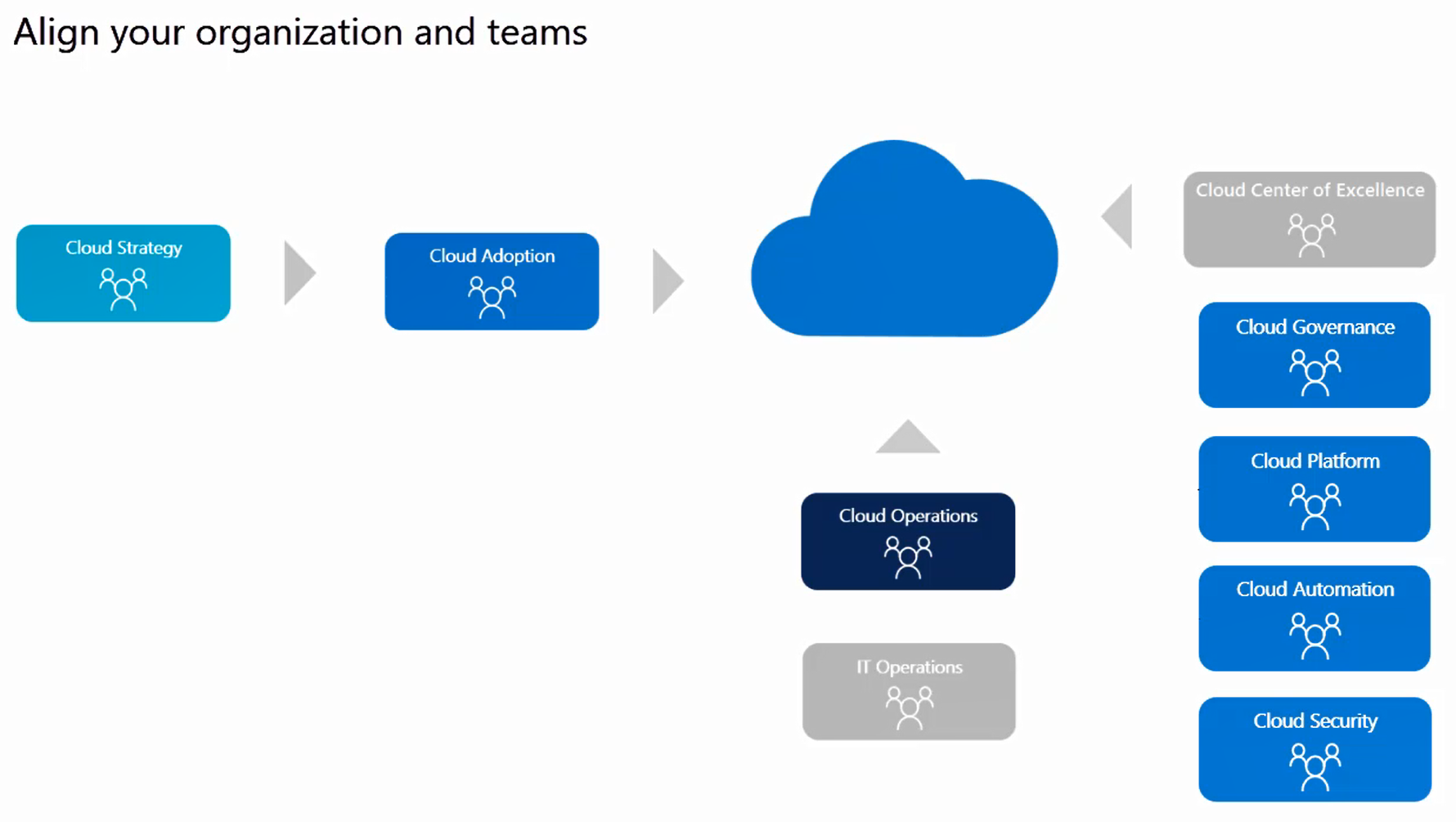
Mature team structures - Cloud Adoption Framework | Microsoft Docs

Organizations that simply lifted and shifted existing applications to the cloud are now taking advantage of maturing approaches like serverless computing and containerization to re-factor their applications for a cloud-native environment. While there is still some apprehension as organizations try to figure out the best way to benefit from these new approaches, companies will see a real payoff in application optimization on these new platforms in 2019. 

DevOps and security merge

What's the foundation of DevOps success? 500 professionals gave us their take - Work Life by Atlassian

Increasingly, security best practices will be codified into the application development tooling pipeline. In a DevSecOps scenario, security is baked into the agile development process via automated systems. On the operations side, companies will benefit from the improved monitoring and increased visibility provided by cloud service companies. In fact, it is difficult to argue today that a small or mid-size company has better security than cloud providers who have made security a top priority. And third-party cloud-based providers will use machine learning to offer security services like threat detection-as-a-service.

High-performance computing moves to the cloud

Nissan Moves to Oracle Cloud Infrastructure for High-Performance Computing

There have always been some specialized, high-performance applications that organizations were reluctant to run in the cloud. But cloud providers have built high-performance, GPU-based systems that are now allowing organizations to migrate niche, high-performance applications, thus making it easier to shutter their data centers.


Cloud computing was once associated with shadow IT or with apps that could be opportunistically migrated, but in 2019 we will see multi-cloud environments emerging as strategic platforms for driving innovation.

The Top 10 Search Engine Optimization (SEO) Trends To Drive More Traffic

Content marketing SEO strategy

Although most website owners are aware that SEO is essential if they want their site to rank well in search engine results, keeping up to date with the ways in which SEO should be done and then putting it into practice can be a time-consuming task. Search engines are constantly refining their algorithms in order to produce ever better results for their users and this means the Search Engine Optimization goalposts are constantly on the move. To help you stay up to date, here are the latest major developments in search engine optimization.

Optimising for search intent

How to Optimize Your Content for Search Intent - The Next Scoop

Search engines’ main priority is to give users the content they want to find. Doing this means they are using more sophisticated ways to understand the intent of the user when they carry out a search. When someone types in ‘paracetamol’, for example, the search engine will try to work out whether they are looking to buy paracetamol or whether they want to find information about it. This might seem impossible from a one-word search; however, by using all the information they have on that user, recent search history, browsing habits and so forth, and by comparison to other users, their incredibly sophisticated algorithms can ascertain intent to a far better degree.

What does this mean for website optimisation? It means you have to undertake a new form of keyword research looking for the intent of users when they use the keywords you want to rank for. Only when you understand what their intent is (to buy, to find information, etc.) can you create the content to match. Indeed, you should do this for all the content on your site, not just the things you publish in the future.

Redefining domain authority

Moz Domain Authority 2.0: Stronger, Sharper, Scarier | Techosaur

Domain authority has always been based on the quality of the content that a website provides. Once upon a time, search engines’ main measure of this was by the number of reputable websites that linked to it. Quality backlinks were priority number one.

Today, as search engines find more sophisticated ways to judge the quality of the content, the emphasis is on, to quote Google, ‘identifying pages that demonstrate expertise, authoritativeness and trustworthiness on a given topic.’ Expertise, authoritativeness and trustworthiness, often referred to by the acronym EAT, are therefore the new main priority when it comes to domain authority.

What does this mean in practical terms? It means your content has to illustrate expertise in your field and that any posts you publish need to be accredited to someone within your organisation with authority in that area, preferably people who can prove their trustworthiness by having their expertise mentioned on other leading websites (an actual link is not necessary). In other words, even if you have someone else write the content, the author by-line needs to be attributed to a recognised expert. Indeed, going much further, the website as a whole should be seen to specialise in its chosen topic.

Do backlinks still really matter? Yes – as long as they are from quality sites relevant to your own area. They help with what is known as PageRank and are taken by search engines as proof that the information your site provides is trustworthy.

Optimising for image searches

SEO Guide: How to Rank for “Near Me” Searches?

Image searches have begun to take off in a big way and websites which haven’t yet begun to optimise for them should do so. Why? Because tech native generations find it very user-friendly to take a picture of something rather than type in a search term and with Google Lens being able to identify over a billion items already, the technology is increasingly being used.

Websites should make sure that every image has a filename that reflects its subject matter (IMG001.jpg won’t suffice) and an alt-tag that describes the picture. Aside from that, domain authority is also a key factor in whether your images will be ranked. A picture of an owl from the RSPB will likely rank higher than one a blogger has taken on a day trip to an owl sanctuary. More up to date photos from sites that regularly post fresh content will also rank better, especially if the photograph is a featured image on a page.

Optimising for voice searches

Voice Search: The Definitive Guide

The growth of Google’s Search Assistant and the increasing numbers of Google Home devices means Google, in particular, is increasingly focussed on voice search. Chances are, it will be difficult for your content to feature in spoken search results, as Google will prioritise the top ranking sites. However, to give your content a better chance, you should consider putting questions and answers in your content, and to frame the questions in the way someone would ask them when speaking out loud.

As Google uses featured snippets in its voice search results, this is another area where you should concentrate. In particular, you need to include keywords in the snippet and these should be keywords that the page actually ranks for. In other words, if there are keywords you want to rank for but don’t, don’t use these in the snippet unless they are part of a long-tail keyphrase.

Conclusion

Doing well in organic searches is getting increasingly harder, especially as even the top results now get pushed aside by adverts, answer boxes and lists of related questions. Because of this, the developments in Search Engine Optimization mentioned here are all the more important to help you rank better. Hopefully, you will find the information of value to you.

If you are looking for faster website loading to improve your SEO, check out our wide range of high-performance hosting solutions.

7 Exceptionally Effective Online Business Management Tools

11 Powerful Cloud Management Tools | Network Computing

Though there is a lot of work involved in creating and managing an online business, there are plenty of useful tools around to help you do things quicker, smarter and more easily. Today, there are applications and services, many of them free to use, which can help you do everything from building professional standard websites and eCommerce stores, to ensuring you’re well prepared for the worst kind of emergencies. Here, we’ll look at seven of the most useful.

1. WordPress

WordPress: what is it, how can you use it, and the main secrets

WordPress is the perfect tool for creating fully functioning, professional websites. This completely free CMS platform has been used to create 35% of the world’s websites and has been developed over many years to make it easy for anyone with basic computer skills to use.

What’s more, with thousands of free themes and tens of thousands of free plugins, WordPress users can create websites that are uniquely designed and which have unparalleled functionality compared to other website creation software. With it, you can build any kind of website and have it perform any kind of function. The sheer scope of its plugins gives any website enormous potential.

If that’s not enough, its massive popularity means that beginners have a vast range of online support to help them with any issues, with many websites and web hosts offering specialist support in all areas of its use.

2. WooCommerce

WooCommerce - Wikipedia

If your main purpose is to sell products or services online, then you will need to create an eCommerce store. The ultimate tools for doing this is WooCommerce, which is actually a WordPress plugin rather than a standalone program. Essentially, once you have created your WordPress website, all you need to do is install and activate the free WooCommerce plugin and your site is transformed into an eCommerce store. All you have to do then is set up the store and add the products (physical or digital) or services (including bookings and reservations) that you want to offer.

WooCommerce is a user-friendly plugin that helps you manage sales, inventory, payment and delivery. It is so popular; it is one of the few WordPress plugins to have its own set of plugins. These provide additional functionality to enhance the customer experience and to make it easier for you to manage your store.

3. PersonalSign

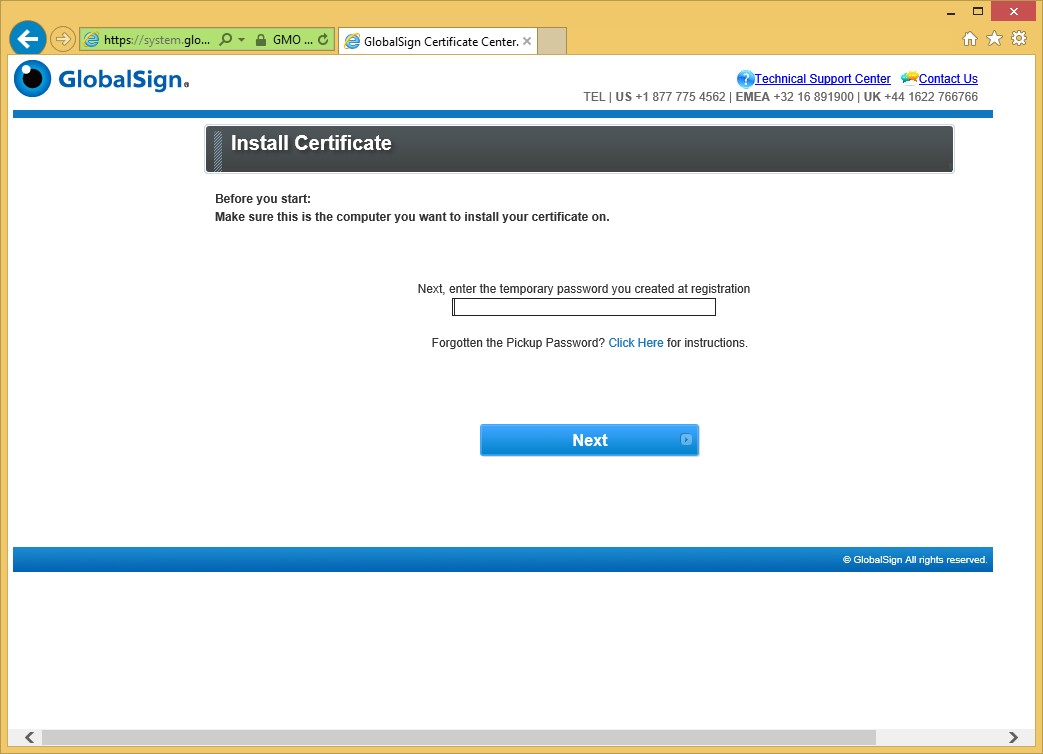
Download and Install PersonalSign Certificate :: Download and Install PersonalSign Certificate :: GlobalSign Support

Many people fall victim to online scams like phishing because they are unable to tell the difference between a genuine email and one which scammers have tried to make look authentic. PersonalSign is an email signing certificate that puts a stop to this by letting recipients of your emails quickly verify that it is trustworthy. Additionally, the contents of your email and any attachments you send are encrypted, preventing them being stolen or tampered with during transit or at rest.

PersonalSign isn’t just of benefit to your customers, either. Many businesses fall victim to phishing because employees receive fake emails purporting to come from executives in their own company – often asking for money to be transferred to the scammers’ account or asking for sensitive data. Email signing certificates put an end to this, too.

4. cPanel hosting

cPanel Hosting | Host With cPanel & Experience the Full Control

When setting up your online business, one of the first decisions you will need to take is on the type of hosting package tools you wish to use. While there are many different types of hosting to choose from (e.g. shared, VPS, dedicated server or cloud) one of the things you will need to consider is the type of control panel which your hosting will come with.

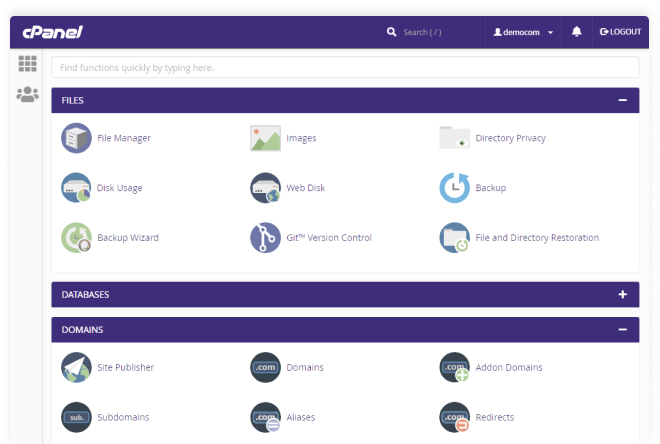
The control panel is the interface you will use to manage your hosting and your websites. The most common form of hosting uses Linux-based servers and the most popular control panel for Linux is cPanel. cPanel web hosting tools makes it easy to manage your web hosting and email; its user-friendly interface offers simple file management, 1-click application installs and a comprehensive suite of useful tools that enable you to carry out a wide range of management activities. Setting up new domains, automating updates, adding new email addresses, etc., is a breeze with cPanel.

5. Google Analytics

GA4] Search box in Google Analytics 4 properties - Analytics Help

Data has become the backbone of today’s decision-making processes and this is equally true of running a website. Google Analytics (GA) is a free tool, provided by Google, that gives you in-depth data on visitors to your website. Going way beyond telling you how many visitors your website gets, when they visit and where from; GA can be used to track where visitors have found you, which pages they visit, how long they spend on each page and what pages they exit from.

Perhaps most importantly, you can use GA to improve your marketing. You can set up goals to track visitor progress through your sales funnel, including analysing how effectively your ads and other online marketing techniques generate conversions.

What’s more, GA is incredibly easy to set up and integrate with your website. WordPress users can do the integration simply by using a plugin.

6. Yoast SEO

SEO for everyone • Yoast

The success of your online venture depends upon the number of visitors you get to your website. Unless you want to rely heavily on paid advertisements, the main way to get visitors is through ranking well in search engine results. Search engine optimisation, however, is a complicated and ongoing process covering everything from site speed and mobile-friendliness to website structure, keyword placement and domain authority.

When it comes to on-site SEO, there is no better tool than the free Yoast SEO plugin for WordPress. This plugin automatically looks after much of the optimisation you will need to do while providing wizard-like guidance to ensure any content you are creating meets the most up-to-date SEO requirements.

7. Automated remote backups

Why You Need Automated Website Backup - HostPapa Blog

The final tool you should consider is automated remote backups. A necessity rather than an option, a remote backup is the only fall back you will have if you lose your website data. Should your site be hacked, your server fail, your data be corrupted or even if you accidentally press the delete button, there’s the potential that you could lose the entire content of your website and the website files themselves. Failure to restore your website swiftly can have catastrophic consequences and even put you out of business completely. A remote backup can help you get your site back online quickly.

An automated backup service does more than just back up. It enables you to take backups as frequently as your business needs, it saves the files remotely from your own server, provides enough space for multiple backups and even checks that the backups are not themselves corrupted. You can also encrypt your backups to ensure that you comply with data protection regulations.

Conclusion

There are a huge number of tools you can use to create and manage your websites and it can be challenging to search through them all looking for the best ones. The tools and services we have shown here are those which we think provide great value and are exceptionally useful.

What Exactly Is Digital Transformation, and What Are Its Advantages?

Digital Transformation: Three Areas of Focus to Enhance Business Value

Digital transformation puts companies in a far more advantages, giving them all the benefits that the latest technologies bestow. However, while the adoption of new technologies is a key element of the process, deeper changes are needed before an organisation can truly reap the rewards. In this post, we’ll take a closer look at what digital transformation is and what it can offer.

What is digital transformation?

What AI and machine learning are and how they relate to IoT | Basefarm

Digital transformation puts companies in a far more advantages . On one level, digital transformation is the process of adopting technologies like cloud, artificial intelligence, machine learning and the IoT in order to make business processes more effective and efficient. What makes these technologies particularly beneficial is their ability to gather and process data. This enables companies to be more informed about their processes, strategies and activities while giving them data-driven insights to help with decision-making.

The adoption of these technologies, digital transformation puts companies in a far more advantages however, is not merely something that happens in the data centre or in IT, it brings change to the entire organisation, forcing the company to rethink its goals and strategies, reorganise its structures and roles, and to make changes to processes that affect all its workforce. Indeed, for many companies, some of these changes are often necessary before the process of digital transformation can commence. Key here is the corporate attitude to digital transformation. For it to be successful, the business needs to embrace new technologies and this often requires a shift in company culture.

The driving force behind successful digital transformation is the digital leader. This is someone who clearly knows the technologies needed to transform the company and who understands the changes their deployment will bring. These leaders don’t just have belief in the project, they are also able to communicate that belief in order to bring on the cultural shift that’s required – and that’s not just in the board room; it’s across the whole business.

What are the advantages of digital transformation?

Once the company is ready to embrace new technologies and the changes they will bring, there are numerous benefits that can result. Here are some of the main ones.

Making the most of data

Making the Most of Data Should Be a Priority for Business, Not Just for IT

Digitalisation helps break down departmental silos so that data can be unified and more easily analysed. As a result, end to end customer journey mapping is attainable, while other forms of unstructured data can be combined to gain previously unobtainable insights.

Cost savings

IT outsourcing customers cling to cost-savings mindset | CIO

While technologies like cloud, with its pay as you go pricing, can significantly reduce IT costs, this is just the tip of the cost-saving iceberg. New technology can help companies optimise a wide range of business processes, providing valuable data to show where efficiencies can be made

Consolidation

Consolidation of Meetings and Travel Functions on the Rise | MeetingsNet

Modern digital technologies can transform how a business goes about its operations, helping to streamline its workflows and, in the process, cut employee workloads and reduce overheads.

Creating customer-centric businesses

5 Key Considerations When Creating a Customer-Centric Culture - Acquire

One of the main benefits of digital transformation is that the data it provides about customers enables businesses to improve the customer experience. From websites that offer personalised products to communications sent at the right time and via the right channel and with the right message, digital transformation enables businesses to deliver experiences that the customer wants.

More attractive products and services

Product Description: 9 Examples of Product Descriptions that Sell

Understanding what the customer wants not only improves the customer experience, it also enables businesses to provide the products and services that the customer is looking for. It helps manufacturers with product design and retailers with inventory selection while enabling other companies to offer services which are more likely to appeal to their customers. As a result, companies become increasingly more effective in the marketplace.

Precise market segmentation

The Complete Guide to STP Marketing with Examples | Yieldify

The technology available to digitally transformed businesses enables them to have far more information about their customers, helping them to discover new market segments that, in the past, they would never have been aware of.

Omnichannel customer experiences

Designing Omnichannel Customer Experiences | by Momentum | Medium

Digital technology enables business-wide systems to be put into place so that your customers can interact and buy from you when, where and how they choose, whether that’s online or at your bricks and mortar store.

A more agile and innovative business

5 Examples of Agile Organisations | Clear Review

The modern technology that digital transformation provides is faster, more powerful and more capable than legacy IT systems. It makes it easier for teams to collaborate and enables businesses to react quickly to market changes. It also speeds up the development and launch of new products, services and strategies.

Conclusion

Digital transformation is not merely the process of deploying new technologies, it’s the adoption of a digital culture that embraces this technology and carefully manages the significant changes that it will bring to the company as a whole. As technology is in constant development, digital transformation, too, is an ongoing process. However, once the culture is in place and the technology is deployed, there are significant benefits to be had.

The Digital Port: Transforming an ancient economic hub without disrupting workers’ lives

Port of the future: how technology is transforming shipping

Today’s ports are struggling to manage the massive volume of containers arriving on giant vessels.  Industry leaders are looking for new ideas to cope, but it’s hard to find answers that satisfy everyone.

The roots of the problem are multifold. Most obvious is the logjam that’s created when a modern ship laden with tens of thousands of containers arrives in port. Finding a spot to stack the large cargo is a problem. But the bigger issue is a matter of velocity. One-by-one, thousands of trucks enter and exit congested urban locations to drop off empty containers or pick up new loads. While freight rail is beginning to move an increased share of containers, the majority still arrive and leave the land-side of the port one or two at a time.

In an effort to reduce wait times and move containers faster, some container terminal operators are turning to waterfront robots to increase capacity and velocity while reducing cost. This type of automation has great potential, but we need to apply the same design thinking to the systems around the automation to realize the full potential of digital transformation.

A better way

So how do ports fully realize the goals of automation while optimizing the work environment and productivity of today’s port workers? First, we should consider all the parties involved:

  1. Truckers who assume the costs for delays in picking up loads and dropping off empty containers.
  2. Dock workers’ labor unions who want their members to participate in the benefits of automation and upskill the value of their members.
  3. Terminal managers who want to maintain a lean staff for profitability but also need to increase capacity and velocity of operations.
  4. Manufacturers and receivers who want lower demurrage and detention fees that result when there are delays in picking up freight and returning containers ready to ship.
  5. Consumers who want faster deliveries.

Fortunately, there is a way to satisfy all parties and it begins with a modern Port Community System (PCS). A PCS can digitally tie together the Coast Guard, maritime shipping agents, port authority, freight forwarders, Customs, dangerous goods clearance, port and terminal gates, and many of the other entities in the port community.

As each party electronically completes its part of operations—declarations, permits requests, inspections, goods authorizations and more—the PCS immediately moves   the filing, declaration, request, or approval to the queue of the next party, notifying them of updates specific to their work queue. Items they need to complete or adjust are noted, and wherever possible turned into drop-down lists.  Ideally the workers can be notified and fill out forms from any device —at their desk, on a tablet at the docks, or on their phone in the truck.

Greasing the skids

Greasing the Skids | He's Taken Leave

The terminals, which are separate business entities, are tied together in the PCS under the supervision of the port authority. Any insufficiencies in the permits, requests, or declarations are immediately identified, and the sender is automatically notified for quick updates and resubmission. Eliminating the communication hurdles — paper documents, point-to-point (rather than end-to-end) filings, loading and unloading orders – can save significant time and cost for all parties. Furthermore, a PCS provides time-definite delivery commitments to shippers and sellers while reducing ship and container time in port.

For exports, freight forwarders who consolidate loads into containers will know when empty containers will arrive, reducing the number they need to keep on hand. For imports, freight forwarders and consolidators will know when to expect the containers they need to break down and repack for shipping to final destination. Maritime agents can get their ships out of port faster as they will be able to communicate the location of containers ready and approved for loading to terminal operators. Once a PCS is implemented, other steps can be taken to increase the efficiency of trucks moving in and out of the port.

At Anteelo, we’ve given this a lot of thought as we increasingly focus on the ports business and our own PCS solution, Port Logistics Accelerator. We’ve come to recognize that connecting people and automating the processes those people use every day will have the largest impact on costs and hence, profitability.

Anteelo’s Intermodal Appointment System (IAS), when integrated with the PCS, can notify truckers when their loads are ready, setting a specific appointment for pick-up and delivery agreed to by their trucking company (or themselves, if freelance). Further, our Intelligent Truck Parking (ITP) system can interface with the IAS, monitoring parking lots and assigning parking spots and timeslots. These systems make pick-ups predictable, smoothing the flow of traffic around and inside the port and terminals. They also save time and fuel while reducing pollution and congestion.

Enabling operational flexibility

3 Ways Nuclear is More Flexible Than You Might Think | Department of Energy

A PCS can also help integrate the shunting operations required for full integration of freight rail into intermodal seaport logistics.  This gives port operators flexibility to use the best value transportation method for each shipment while maximizing the traffic flow into and out of seaports.

There’s no doubt that robots have their place and that, over time, ports will manage a greater share of shipments using automation. It’s also true, however, that digital solutions like port community, appointment, and intelligent parking systems can help everyone achieve the aims they seek.

How Can Mobile Apps Help Your Company’s Digital Transformation?

Master Digital Transformation - Learning Path

Irrespective of which industry you look at, you will find entrepreneurs hustling to kickstart their digital transformation efforts which have been lying in the backdrop since several business years. While a considerably easy move when you have to alter your digital offering according to the customers’ needs, things become a little difficult when you start planning digital transformation for your business. A difficulty that mobile applications can solve.

There are two prime elements which businesses need to focus on when planning to digitally transform their workflow and workforce: adaptability and portability. And by bringing their processes and communications on mobile apps, they are able to hit both the targets in one go.

Here are some statistics looking into why enterprises need to count mobile application in, in their digital transformation strategy –

Although the above graph should be a reason enough to take mobile apps seriously, there are some other numbers as well.

  • 57% of the digital media use comes in through apps.
  • On an average, any smartphone user has over 80 apps out of which they use 40 apps every month.
  • 21% of millennials visit a mobile application 50+ times everyday.

While the statistics establish the rising growth of mobile apps, what we intend to cover in the article is the pivotal role mobile applications play in digital business transformation. To understand it from the entirety, we will first have to look into what is digital transformation and what it entails.

What is digital transformation?

5 Digital Advertising Platforms You Need To Start Using Now - Mediaboom

Digital transformation means using digital technologies for changing how a business operates, fundamentally. It offers businesses a chance to reimagine how they engage with the customers, how they create new processes, and ultimately how they deliver value.

The true capabilities of introducing digital transformation in business lies in making a company more agile, lean, and competitive. The end of the long term commitment results in several benefits.

Benefits of digital transformation for a business

  • Greater efficiency – leveraging new technologies for automating processes leads to greater efficiency, which in turn, lowers the workforce requirements and cost-saving processes.
  • Better decision making – through digitalized information, businesses can tap in the insights present in data. This, in turn, helps management make informed decisions on the basis of quality intelligence.
  • Greater reach – digitalization opens you to omni-channel presence which enables your customers to access your services or products from across the globe.
  • Intuitive customer experience – digital transformation gives you the access to use data for understanding your customers better enabling you to know their needs and delivering them a personalized experience.

Merging mobile app capabilities with digital transformation outcomes 

The role of mobile applications can be introduced in all the areas which are also often the key areas of digital transformation challenges that an enterprise faces.

  1. Technology integration
  2. Better customer experience
  3. Improved operations
  4. Changed organizational structure

When you partner with a digital transformation consulting firm that holds an expertise in enterprise app development, they work around all these above-mentioned areas in addition to shaping their digital transformation roadmap around technology, process, and people.

In addition to a seamless integration with the digital transformation strategy of an enterprise,  there are a number of reasons behind the growing need to adopt digital transformation across sectors. Ones that encompasses and expands beyond the reasons to invest in enterprise mobility solutions.

The multitude of reasons, cumulatively, makes mobility a prime solution offering of the US digital transformation market.

How are mobile apps playing a role in advancing businesses’ internal digital transformation efforts?

1.  By utilizing AI in mobile apps

How To Utilize Artificial Intelligence In Mobile App Development

The benefits of using AI for bettering customer experience is uncontested. Through digital transformation, businesses have started using AI for developing intuitive mobile apps using technologies like natural language processing, natural language generation,  speech recognition technology, chatbots, and biometrics.

AI doesn’t just help with automation of processes and with predictive, preventative analysis but also with serving customers in a way they want to be served.

2.  An onset of IoT mobile apps

Future trends in IoT user interface design (Updated 2020)

The time when IoT was used for displaying products and sharing information is sliding by. The use cases of mobile apps in the IoT domain is constantly expanding.

Enterprises are using IoT mobile apps to operate smart equipment in their offices and making the supply chains efficient, transparent. While still a new entrant in the enterprise sector, IoT mobile apps are finding ways to strengthen their position in the business world.

3.  Making informed decisions via real-time analytics

Data Driven Decision Making – 10 Tips For Business Success

In the current business world, access to real-time analytics can give you a strong competitive advantage. Mobile applications are a great way for businesses to collect users’ data and engage with them through marketing transformation messages designed around the analytics based on their app journey.

You can use real-time analytics to know how your teams are performing, analyze their productivity, and get a first-hand view into the problems they are facing in performing a task and how it’s impacting the overall business value.

4.  Greater portability

Ultrasound market gets supercharged by AI, cloud, and greater portability: report

Portability in an enterprise ecosystem enables employees to work as per their convenience. While it shows less impact in the short term, in the long run, it plays a huge role in how productive a team is.

By giving employees the space to work as per the time and location of their choice, you give them the space to boost their creativity fuel and in turn productivity. One of the results of using software that enabled our employees to work according to their terms and conveniences for us was greater business expansion ideas and an increase in overall productivity of the workforce.

Tips to consider when making mobile apps a part of the digital transformation strategy

Part 2]: Digital Transformation in Manufacturing: Defining the Digital Transformation Strategy and The Challenges Ahead | by PlumLogix (Salesforce Partner) | PlumLogix | Medium

If at this stage, you are convinced that mobile applications are a key part of digital transformation efforts, here are some tips that can help your strategies for increasing the ROI on your enterprise app –

Adopt mobile-first approach – the key factor that separates enterprise apps that are winning is how they don’t treat apps as the extension of their websites. Their software development process is strictly mobile-only. This in turn shapes their entire design, development, and testing processes.

Identifying the scope of mobility – the next tip that digital transformation consulting firms would give you is analyzing the operations and workflows for understanding which teams, departments, or functions would benefit from mobility the most. You should not start reinventing a process which works okay, you should look for areas which can be streamlined, automated, or valued through mobility.

Outsourcing digital transformation efforts – when we were preparing An Entrepreneur’s Guide on Outsourcing Digital Transformation article, we looked into several benefits of outsourcing digitalization to a digital transformation strategy consulting agency. But the prime benefit revolved around saving businesses’ efforts and time which goes into solving challenges like – absence of digital skillset, limitations of the agile transformation process, or the inability to let go of the legacy systems.

Key Concept Extraction from NLP Anthology (Part 2)

Automated Keyword Extraction from Articles using NLP | by Sowmya Vivek | Analytics Vidhya | Medium

Key Concept Extraction: Intelligent Audio Transcript Analytics Extracting Key Phrases for Scaling Industrial NLP Applications

The COVID‐19 pandemic that hit us last year brought a massive cultural shift, causing millions of people across the world to switch to remote work environments overnight and use various collaboration tools and business applications to overcome communication barriers.

However, this generates humongous amounts of data in audio format. Converting this data to text format provides a massive opportunity for businesses to distill meaningful insights.

One of the essential steps for an in-depth analysis of voice data is ‘Key Concept Extraction,’ which determines the business calls’ main topics. Once the identification is accurately completed, it leads to many downstream applications.

One way to extract key concepts is to use Topic Modelling, which is an unsupervised machine learning technique that clusters words into topics by detecting patterns and recurring words. However, it cannot guarantee precise results and may present many transcription errors when converting audio to text.

Let’s glance at the existing toolkits that can be used for topic modelling.

Some Selected Topic Modelling (TM) Toolkits

  • Stanford TMT : It is designed to help social scientists or researchers analyze massive datasets with a significant textual component and monitor word usage.

Stanford Topic Modeling Toolbox

  • VISTopic : It is a hierarchical visual analytics system for analyzing extensive text collections using hierarchical latent tree models.

VISTopic: A visual analytics system for making sense of large document collections using hierarchical topic modeling - ScienceDirect

  • MALLET : It is a Java-based package that includes sophisticated tools for document classification, NLP, TM, information extraction, and clustering for analyzing large amounts of unlabelled text.

MALLET homepage

  • FiveFilters : It is a free software solution that builds a list of the most relevant terms from any given text in JSON format.

fivefilters (FiveFilters.org) · GitHub

  • Gensim : It is an open-source TM toolkit implemented in Python that leverages unstructured digital texts, data streams, and incremental algorithms to extract semantic topics from documents automatically.

GitHub - RaRe-Technologies/gensim: Topic Modelling for Humans

Anteelo’s AI Center of Excellence (AI CoE)

Our AI CoE team has developed a custom solution for key concept extraction that addresses the challenges we discussed above. The whole pipeline can be broken down into four stages, which follow the “high recall to high precision” system design using a combination of rules and state-of-the-art language models like BERT.

Pipeline:

Intro to Automatic Keyphrase Extraction

1) Phrase extraction : The pipeline starts with basic text pre-processing, eliminating redundancies, lowercasing texts, and so on. Next, use specific rules to extract meaningful phrases from the texts.

2) Noise removal: This stage of the pipeline uses the above-extracted phrases to remove noisy phrases based on signals mentioned below:

  • Named Entity Recognition (NER): Certain NER such as quantity, time, and location type that are most likely to be noise for the given task are dropped from the set of phrases.
  • Stop-words: Dynamically generated list of stop words and phrases obtained from casual talk removal [refer to the first blog of the series for details regarding casual talk removal (CTR) module] are used to identify noisy phrases.
  • IDF: IDF values of phrases are used to remove common recurring phrases, which are part of the usual greetings in an audio call.

3) Phrase normalization: After removing the noise, the pipeline proceeds to combine semantically and syntactically similar phrases. To learn phrase embedding, the module uses state-of-the-art BERT language model and domain trained word embeddings. For example, “Price Efficiency Across Enterprise” and “Business-Venture Cost Optimization” will be clubbed together by this pipeline as they essentially mean the same.

4) Phrase ranking: This is the last and final stage of the pipeline, which ranks the final set of phrases using various metadata such as frequency, number of similar phrases, and linguistic POS patterns. These metadata signals are not comprehensive, and other signals may be added based on any additional data present.

Hosting Perplexity? Explained: the Different Types of Web Hosting

How to choose Best Web Hosting Service for your Blog/Website – STA

Baffled by all the different types of web hosting? Unsure what they all are or which is the right one for you? You’re not alone. To help, this post will look at each different type of hosting and explain what they are.

What is web hosting?

Before we discuss the different types of hosting, it is helpful to understand what hosting is and why you need it. Essentially, your website is a set of files that you are sharing over the internet with other people. As a website, you want these files to be accessible all the time and easily found by anyone looking for the information you publish. To make this happen, your website content and the software that makes your website work have to be installed on a special kind of computer called a webserver. A webserver is connected to the internet 24/7 and enables your web pages to be downloaded to someone’s browser for viewing or interacting with. The webserver, therefore, is where your website is hosted and the company that provides the webserver is your web host or service provider.

The other important thing to mention is the operating system. Generally, all hosting is either run on Windows or Linux operating systems. While Windows is the most popular operating system for home computers, most website software is designed to run on Linux. When purchasing hosting, you will need to choose the operating system that your software needs.

Here’s an overview of different hosting types.

Shared hosting

What is Shared Hosting? Uses, Advantages, Examples and Plans of Shared Hosts

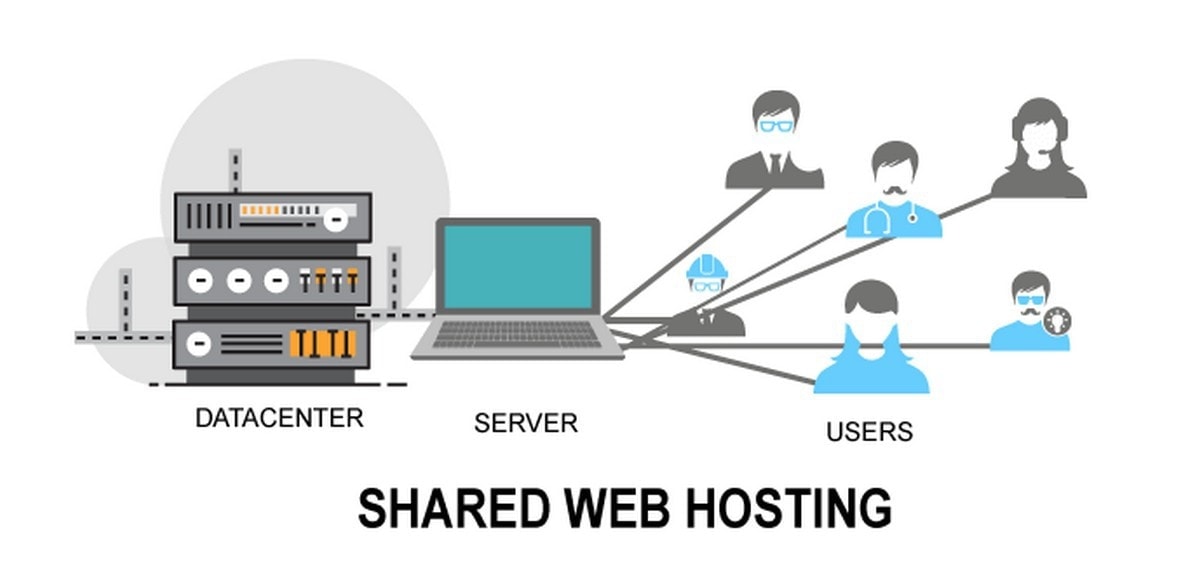
Shared hosting is the cheapest and most popular form of web hosting and is suitable for small business or personal websites. What makes it inexpensive is that the web host takes one large server and divides up the storage space for many different users. In effect, you will be leasing a small slice of a large hard drive.

While this slice can be big enough for all your website’s files and data, the downside of shared hosting is that you also have to share all the other web server resources, such as RAM and CPU. If lots of other users have busy websites, there may be times when your website is affected and loads slowly or performs poorly on people’s devices. It is similar to having too many programs running on your computer and finding that they lag or freeze.

Specialised shared hosting

The Best Shared Web Hosting Services for 2021 | PCMag

Today, lots of web hosts offer specialist forms of shared hosting. In many instances, this is done by configuring the web server so particular types of website software can perform optimally. You may, for example, see WordPress, Joomla, Magento or Drupal hosting and these packages will also include other features to improve the hosting or make things easier for users of those types of software.

Additionally, some hosts offer shared hosting with particular types of control panel, such as the cPanel hosting here at Anteelo. cPanel is a leading control panel whose user-friendly interface and comprehensive range of tools make it a breeze to manage your website. You may also find shared hosting packages that are specially designed for business users or bloggers.

VPS

VPS Hosting | Windows, Linux, & cPanel | Atlantic.Net

A virtual private server (VPS) is the next step up from shared hosting. It uses clever virtualisation technology to create several small, virtual servers on a single physical server. The difference between shared hosting and VPS is that your VPS is completely independent of all the other VPS on the physical server, so you don’t have to share resources or endure the issues this can cause. You even get your own operating system.

The other chief difference is that a VPS package is much bigger than a shared hosting package. In essence, it is like a mini dedicated server, giving you substantially more storage, CPU and RAM. This makes it ideal to run large websites, multiple websites or other types of application for your business. The surprising thing about VPS is that they are cheap, costing from as little as £15.59 a month (at time of publication).

Dedicated server

What Is a Dedicated Server? Learn the Basics

With shared hosting, a user gets a small share of a large webserver. The term ‘dedicated server’ simply means that you get that entire server dedicated for your own use. This provides you with enormous amounts of disk space together with substantial processing power and RAM. This is ideal for bigger businesses that need to run large websites, store lots of data and run critical business applications which need to be online all of the time. Compared to VPS, these can be much more expensive solutions.

Cloud hosting

5 Best Cloud Hosting Companies In 2021 - Productivity Land

The cloud is a vast network of interconnected servers hosted in huge data centres. Using virtualisation, websites can be moved instantaneously from one physical machine to another, even across geographical locations. This means if there is a problem with the physical hardware, a cloud-hosted website or application will never go offline.

Cloud’s virtual technology also means that companies that need extra computing resources at a moment’s notice, can instantly have it at their disposal – and in enormous quantities. What’s more, the cloud is paid for on a pay as you go basis, so you only pay for the resources you need as and when you need them. You can scale up or down at any time.

Accessible over the internet, cloud hosting brings with it many of the benefits of connectivity – flexible working, working from home, collaboration, etc. It’s scalability also makes it ideal for carrying out big data analytics or making use of technologies such as AI, machine learning or the Internet of Things.

There are three different types of cloud hosting: public, private and hybrid. Public cloud is where the hardware, software and other infrastructure are shared with all the other cloud tenants and managed by the web host, whereas in a private cloud those resources are used exclusively by you. Hybrid cloud is where a company makes use of both private and public solutions, often with dedicated servers included in the mix.

Managed hosting

Managed Hosting Services: How Can Customers Benefit? - ITSM.tools

Managed hosting is not a different type of hosting solution but a feature of many of the above. It is a service provided by the web host to manage your server for you. This will typically include looking after the physical hardware, ensuring the server is working optimally and updating the operating system on your behalf. For certain types of hosting, this form of server management is included in your package.

Enterprise hosting

7 Best Managed Hosting Service Providers 2020 - Cloud7

Some companies have extraordinarily complex IT needs which require bespoke hosting and support solutions. Service providers, like Anteelo, have the infrastructure and expertise to offer these tailored solutions, often referred to as enterprise hosting.

Conclusion

As you can see, there is a wide range of hosting solutions available, ranging from the basic shared hosting needed to run a small website to the complex solutions needed by large companies to run a range of critical applications. Hopefully, this post will have given you a clear idea of what these types of hosting are and which is most relevant to you.

error: Content is protected !!