Kotlin Programming Language now supported in Android

Google has just unveiled in their I/O 2017 conference that Android will officially support Kotlin programming language and got huge applause from the IT world. It is an open source project under Apache 2.0 license and built by JetBrains who earlier built IntelliJ. Google has announced that Kotlin is brilliantly designed, mature and will take android development to the next level as it is fast and fully supported by Java. Using Kotlin in Android development will be more fun.

For Android developers, Kotlin as a “first-class” language, is a chance to use a modern, powerful and mature language. It will help to solve the run-time exceptions and source code verbosity. Kotlin provides the flexibility which means it can be easily introduced into an existing project. Kotlin emits the java bytecode and can call java and vice versa out of the box. “The effortless inter-operation between the two languages” was a large part of Kotlin’s appeal to the Android team.

Covariance, Contravariance & inline function | The Startup

Developers can play around the Kotlin using Android Studio 3.0 and there is no need to install any extra plugin or worry about the compatibility issue. You can open the existing Java file, and then choose the option “Convert Java File to Kotlin File”. Android Studio will then add all required Kotlin dependencies into your project and the equivalent Kotlin code. Isn’t this cool?

Kotlin’s major goal is to be available on multiple platforms. Also, they are pretty much busy on working on native platforms like iOS, IoT, macOS, embedded systems.

As said by Google, some of the apps have already started using Kotlin like Expedia, Flipboard, Pinterest, Square. They are getting very positive feedback.

Kotlin has a lot in common to Java in structure as it’s object oriented and statically typed. It is designed for the problem that actually Java solves.

Some of the cool features of Kotlin

Features of Kotlin - DEV Community

  1. Nullability is a very common problem in Java. Basically having null references in the application can kill it. Kotlin finds the difference between the reference that can hold the null or that can’t, effortlessly.
  2. Switching from Java is easy as there is an option to convert Java files in Kotlin directly from the plugin in Android Studio.
  3. Kotlin is versatile and interoperable with Java as developers can write their own module that will work with Java code. It’s compatible with the existing Java library.
  4. Kotlin’s architecture is written in such a way that one has to write less code; at least 20% less while development, which is fascinating.
  5. A common problem in Android development that causes inefficiency to Java code is extra garbage collection. So Kotlin does a fabulous job to avoid this problem.
  6. The Lean syntax in Kotlin language is very convenient. Kotlin balances terseness and readability in syntax which helps to write the code faster and allows better productivity.
  7. Kotlin also provides Functional programming support with zero-overhead Lambdas.
  8. It imposes no runtime overhead.
  9. Kotlin’s extension functions are helpful in building really clean APIs and solve a bunch of other problems.
  10. The == operator does exactly what the community expects.

To learn more about Kotlin, check out their official website.

Understand softwares!

Every day, we come across different types of computer software that helps us with our tasks and increase our efficiency. From MS Windows that greets us when we switch on the system to the web browser that is used to surf the internet or the games that we play on our computer to the calorie burn counter on our smartphone, are all examples of software. In this world of technology, we even come across various software development trends that help our business to grow, we are surrounded by all these software that are determined to make our lives easier. By definition, Software (also abbreviated as an SW or S/W) is a collection of data, programs, procedures, instructions, and documentation that perform various predefined tasks on a computer system. They enable users to interact with the computer

In the field of software engineering and computer science, the software is nothing but information processed by a computer system and programs. The software includes libraries, programs, and corresponding non-executable data, such as digital media and online documentation. Computer hardware and software need each other and neither one of them can be convincingly used on its own. The amalgamation of the hardware and the software gives control and flexibility to modern-day computing systems. Without software, computers would be of no use. For instance, without the help of your web browser software, you will not be able to surf the Internet. Similarly, without an operating system, no application can run on your computer.

Today there are abundant high-end technologies and software accessible to us that outline the way we lead our lives and house our continuously changing and increasing needs. The endless number of software types can be overwhelming for anybody, especially when one does not understand the various types of software and their users thoroughly.

Different Types of Software

Typically, there are two major classifications of software, namely System Software and Application Software.

1. System Software

A system software aids the user and the hardware to function and interact with each other. Basically, it is a software to manage computer hardware behavior so as to provide basic functionalities that are required by the user. In simple words, we can say that system software is an intermediator or a middle layer between the user and the hardware. These computer software sanction a platform or environment for the other software to work in. This is the reason why system software is very important in managing the entire computer system. When you first turn on the computer, it is the system software that gets initialized and gets loaded in the memory of the system. The system software runs in the background and is not used by the end-users. This is the reason why system software is also known as ‘low-level software’.

System Software

Some common system software examples are:

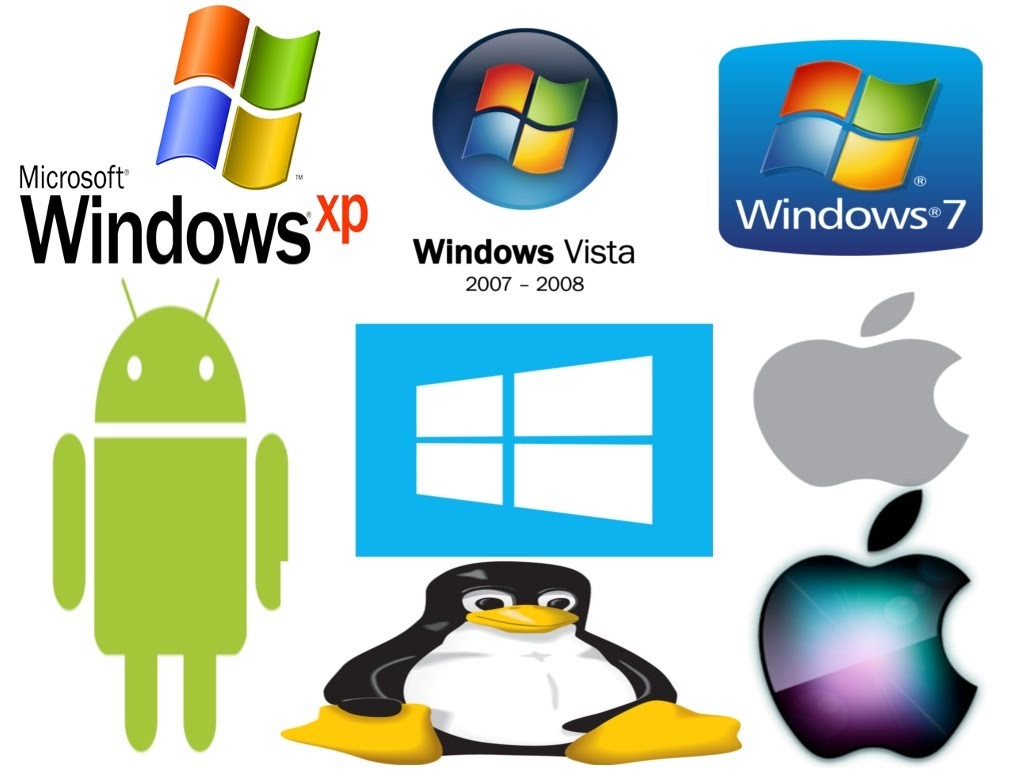
  • Operating System: It is the most prominent example of System Software. It is a collection of software that handles resources and provides general services for the other applications that run over them. Although each Operating System is different, most of them provide a Graphical User Interface through which a user can manage the files and folders and perform other tasks. Every device, whether a desktop, laptop or mobile phone requires an operating system to provide the basic functionality to it. As an OS essentially determines how a user interacts with the system, therefore many users prefer to use one specific OS for their device. There are various types of operating system such as real-time, embedded, distributed, multiuser, single-user, internet, mobile, and many more. It is important to consider the hardware specifications before choosing an operating system. Some examples of Operating systems given below:
    • Android
    • CentOS
    • iOS
    • Linux
    • Mac OS
    • MS Windows
    • Ubuntu
    • Unix
  • Device Drivers: It is a type of software that controls particular hardware which is attached to the system. Hardware devices that need a driver to connect to a system include displays, sound cards, printers, mice and hard disks. Further, there are two types of device drivers: Kernel Device Drivers and User Device Driver. Some examples of device drivers are:
    • BIOS Driver
    • Display Drivers
    • Motherboard Drivers
    • Printer Drivers
    • ROM Drivers
    • Sound card Driver
    • USB Drivers
    • USB Drivers
    • VGA Drivers
    • VGA Drivers
    • Virtual Device Drivers
  • Firmware: Firmware is the permanent software that is embedded into a read-only memory. It is a set of instructions permanently stored on a hardware device. It provides essential information regarding how the device interacts with other hardware. Firmware can be considered as ‘semi-permanent as it remains permanent unless it is updated using a firmware updater. Some examples of firmware are:
    • BIOS
    • Computer Peripherals
    • Consumer Applications
    • Embedded Systems
    • UEFI
  • Programming Language Translators: These are mediator programs on which software programs rely to translate high-level language code to simpler machine-level code. Besides simplifying the code, the translators also do the following :
    • Assign data storage
    • Enlist source code as well as program details
    • Offer diagnostic reports
    • Rectify system errors during the runtime
    • Examples of Programming Language Translators are Interpreter, Compiler and Assemblers.
  • Utility: Utility software is designed to aid in analyzing, optimizing, configuring, and maintaining a computer system. It supports the computer infrastructure. This software focuses on how an OS functions and then accordingly it decides its trajectory to smoothen the functioning of the system. Softwares like antiviruses, disk cleanup & management tools, compression tools, defragmenters, etc are all utility tools. Some examples of utility tools are:
    • Avast Antivirus
    • Directory Opus
    • McAfee Antivirus
    • Piriform CCleaner
    • Razer Cortex
    • Windows File Explorer
    • WinRAR
    • WinZip

2. Application Software

Application software and Peopleware

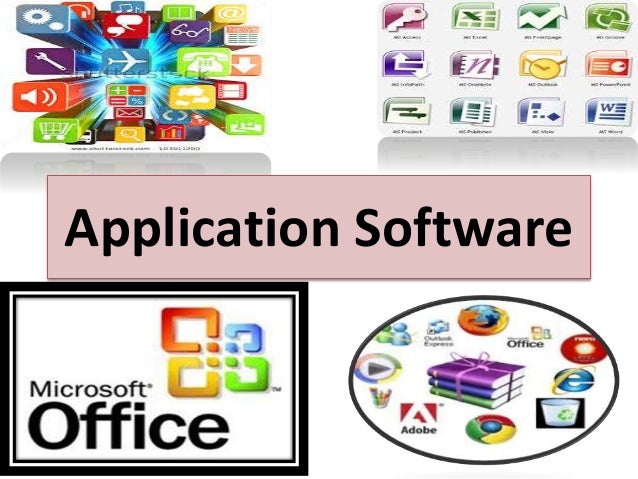
Application Software, also known as end-user programs or productivity programs is software that helps the user in completing tasks such as doing online research, jotting down notes, setting an alarm, designing graphics, keeping an account log, doing calculations or even playing games. They lie above the system software. Unlike system software, they are used by the end-user and are specific in their functionality or tasks and do the job that they are designed to do. For example, a browser is an application designed specifically for browsing the internet, or MS Powerpoint is an application used specifically for making presentations. Application Software or simply apps can also be referred to as non-essential software as their requirement is highly subjective and their absence does not affect the functioning of the system. All the apps that we see on our mobile phones are also examples of Application Software. There is certain software that is exclusively made for app development like Meteor and Flutter. These are examples of Application software too.

There are various types of application software:

  • Word Processors: These applications for documentation. Along with that it also helps in storing, formatting and printing of these documents. Some examples of word processors are:
    • Abiword
    • Apple iWork- Pages
    • Corel WordPerfect
    • Google Docs
    • MS Word
  • Database Software: This software is used to create and manage a database. It is also known as the Database Management System or DBMS. They help with the organization of data. Some examples of DBMS are:
    • Clipper
    • dBase
    • FileMaker
    • FoxPro
    • MS Access
    • MySQL
  • Multimedia Software: It is the software that is able to play, create or record images, audio or video files. They are used for video editing, animation, graphics, and image editing, Some examples of Multimedia Software are:
    • Adobe Photoshop
    • Inkscape
    • Media Monkey
    • Picasa
    • VLC Media Player
    • Windows Media Player
    • Windows Movie Maker
  • Education and Reference Software: These types of software are specifically designed to facilitate learning on a particular subject. There are various kinds of tutorial software that fall under this category. They are also termed academic software. Some examples are:
    • Delta Drawing
    • GCompris
    • Jumpstart titles
    • KidPix
    • MindPlay
    • Tux Paint
  • Graphics Software: As the name suggests, Graphics Software has been devised to work with graphics as it helps the user to edit or make changes in visual data or images. It comprises of picture editors and illustration software. Some examples are:
    • Adobe Photoshop
    • Autodesk Maya
    • Blender
    • Carrara
    • CorelDRAW
    • GIMP
    • Modo
    • PaintShop Pro
  • Web Browsers: These applications are used to browse the internet. They help the user in locating and retrieving data across the web. Some examples of web browsers are:
    • Google Chrome
    • Internet Explorer
    • Microsoft Edge
    • Mozilla Firefox
    • Opera
    • Safari
    • UC Browser

Other than these, all the software that serves a specific purpose fall under the category of Application Software.

However, there exists one more classification of the software. The software can also be classified based on its availability and sharability.

This classification is as given below:

1. Freeware

Freeware software is available without any cost. Any user can download it from the internet and use it without paying any fee. However, freeware does not provide any liberty for modifying the software or charging a fee for its distribution. Examples are:

  • Adobe Reader
  • Audacity
  • ImgBurn
  • Recuva
  • Skype
  • Team Viewer
  • Yahoo Messenger

2. Shareware

It is software that is freely distributed to users on a trial basis. It usually comes with a time limit and when the time limit expires, the user is asked to pay for the continued services. There are various types of shareware like Adware, Donationware, Nagware, Freemium, and Demoware (Cripplewareand Trialware). Some examples of shareware are:

  • Adobe Acrobat
  • Getright
  • PHP Debugger
  • Winzip

3. Open-source

Linux: "Collabora. An open-source (and libre software) …" - LinuxRocks.Online

These kinds of software are available to users with the source code which means that a user can freely distribute and modify the software and add additional features to the software. Open-Source software can either be free or chargeable. Some examples of open-source software are:

  • Apache Web Server
  • GNU Compiler Collection
  • Moodle
  • Mozilla Firefox
  • Thunderbird

4. Software

They are also known as Closed-source software. These types of applications are usually paid and have intellectual property rights or patents over the source code. The use of these is very restricted and usually, the source code is preserved and kept as a secret.


Outsourcing your app? Ask Right!

When it is about outsourcing application development work, there’s no one-size-fits-all approach. It’s all about looking for the right partner that is the most appropriate fit for your team. As per the Computer Economics study IT Outsourcing Statistics 2014-2015, 62% of big organizations are outsourcing at least a part of their application development work.

As time-to-market needs increase and IT budgets decline, the trend of farming out development work is both rising and broadening to contain new services. In response, service providers have extended their offerings to comprise of product, technical, and process services. Notably, this runs the gamut from product management, information architecture and quality automation, analytics, and more.

If a mobile application is developed and executed in the right manner, it has the capability of offering increased efficiency, growth, and revenue for your business. That’s why development is so essential, as faults in this phase can lead to the development of a dysfunctional app that wouldn’t give you the preferred results.

To attain success in mobile app development, you need clarity of purpose and focus. To make this possible during outsourcing, you and your team have to sit down and ask some crucial questions before outsourcing, so you can attain success and avoid some of the most expensive pitfalls.

Things you Should Know Before Outsourcing an Apps

Here are some of the most critical questions that you must ask to select the correct partner for your organization’s specific outsourcing needs.

1. What is the purpose of the mobile app?

The Importance Of Mobile Applications In Everyday Life!

Are you developing an app just for building an app or because you are caught up in the hype about mobility? Will your application be a business version of your website, or will it have a particular purpose? Asking yourself the intent behind developing a mobile app can help you come up with a capable mobile app that aids a definite purpose. To make your mobile application successful, it must be extraordinarily focussed and address a specific purpose/function. You can discuss with the outsourcing team and narrow down on a definite problem that it is going to resolve or the particular purpose of your app. Ponder about why your mobile app is needed, how your customers can profit from it and how the application can be a more convenient alternative when compared to your website.

2. What should be a probable deadline for the completion of the app?

How to Create a Project Management Communication Plan | TeamGantt

Narrowing down to a deadline for the app is very important if the mobile app is to be developed for a particular event or occasion. If the mobile app is not finished before the event, the entire development is futile. Even a delay of a few days might make an enormous difference and cease the mobile app from serving its purpose — moreover, the plan for the release schedule for the app. In case your application is released in different versions, you have to prepare for the release date accordingly.

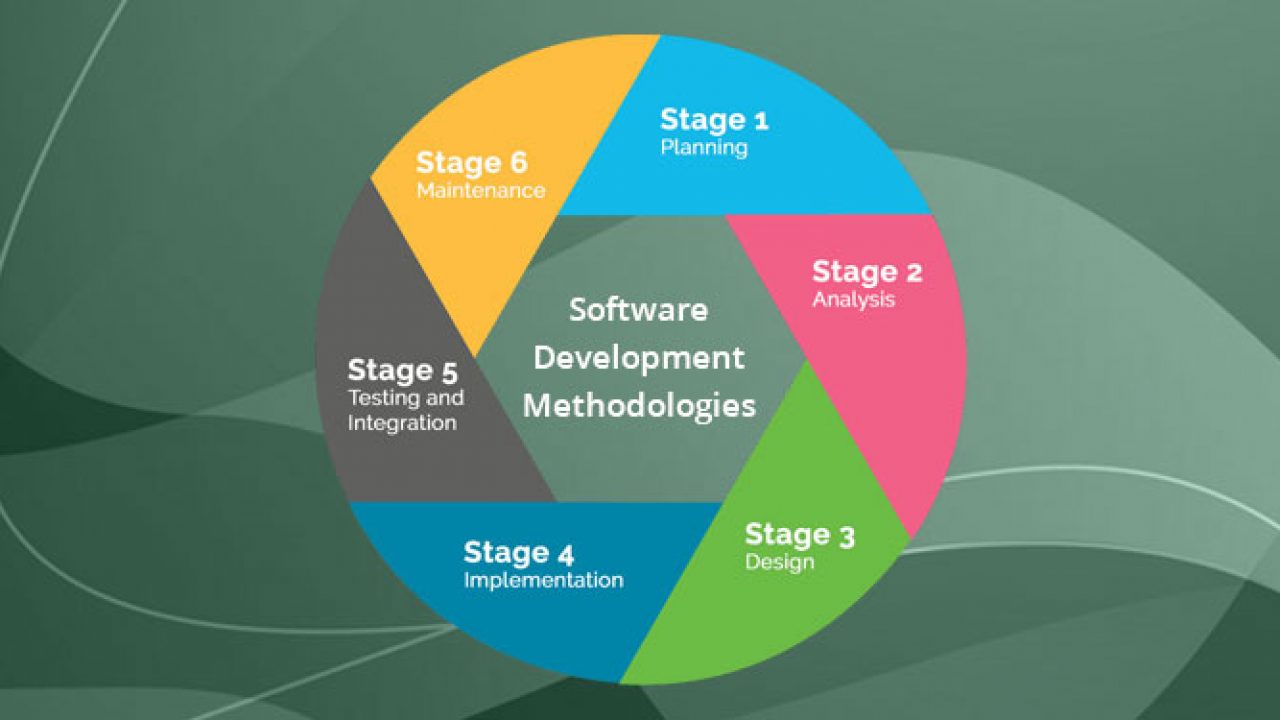
3. What programming methodology do you want?

Top 12 Software Development Methodologies & its Advantages & Disadvantages

How do you wish your end-users to interact with your application? This supports the outsourcing developers to create an appropriate wire-frame. Also, think about the visual design needs and User Experience. Briefing the developers about the non-functional and functional needs of your application can help them to develop product backlog. You would also want to explain the required programming interfaces, outside services/systems, and third-party vendors, sharing such details is important.

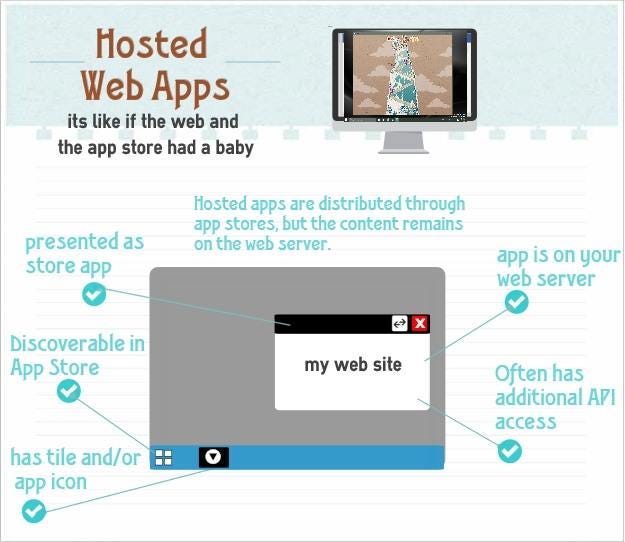
4. How do you need the app to be hosted?

Hosted Web Apps explained | by Jeff Burtoft | ThisHereWeb

Do you need your mobile app to be plugged in to a new or preexisting infrastructure? Ponder about the hosting space that you would want. Brief the outsourcing developers beforehand about the post-launch support that you might need to fix the bugs and tweaks that you may get from users.

5. From where do you need the app to be downloaded?

How to Download and Update Apps on Android Phones and Tablets

Did you have an idea that the delivery channels of an application can significantly affect the design of the application? Getting listed on the App Store and Google Play is essential. You need to inform the developers in advance about your requirements for listing and get them talked at the development and design stage itself.

6. What level of security is needed?

Corporate network security levels

Tell the developers that you are expecting security protocols that ensure that is the app is protected and secure from hackers trying to attack and breakthrough code vulnerability. Also, ensure that you get the privacy policy of the application drafted.

7. Does your application need to adhere to guidelines?

8 steps in the selection process for hiring [A complete guide] | Workable

Ensure that your business app adheres to corporate guidelines like consistent screen design, design of icons, and branding conventions.

8. What are some of the risks involved?

Risks Involved in Forex Trading | Reputable Forex Regulators by Country

Through the course of mobile application development, you might face risks and uncertainties that can hinder the project. To steer clear of such hazards, make sure that you build a risk register at the onset of your application so that you can file the actions at every step. This way, you can hold your stakeholders responsible for each risk factor.

9. Who are the main stakeholders involved in the development process?

Key Stakeholders in Agile Product Development

It is crucial to identify the main stakeholders who are involved in the development and usage of your mobile application. Who would be funding it? Who would be owning it? Who would be benefiting from it? Who would keep the app active? Who would maintain the app daily? Asking such questions and trying to understand the involved decision-makers can lead to the successful development and running of the app. By comprehending the needs of the stakeholders, attaining clarity about their role, and taking responses to help in developing a successful application.

10. What budget can be allotted?

Budget, Budgeting, Budgetary Control - BBA|mantra

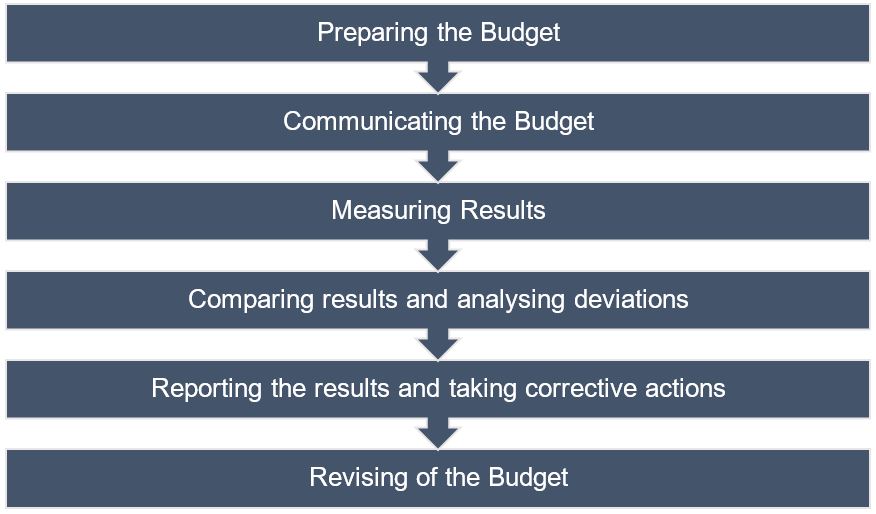
Many times the budget is overlooked when it comes to developing mobile apps. This is a significant reason why it becomes tough to estimate one. Make sure to sit down with the developers and discuss the various variables at play, be it multiple operating systems, testing environments, and more.

Summary

If you have made your mind to outsource your software development, you must have found some software development companies that you’re considering working with, and you are on the horns of a perplexity of making the correct choice. There is nothing better than talking to them and satisfying every query that you might have. Choose the web development company that passes all your parameters and comes out as reliable and trustworthy as a lot of your business now lies in their hands.

error: Content is protected !!