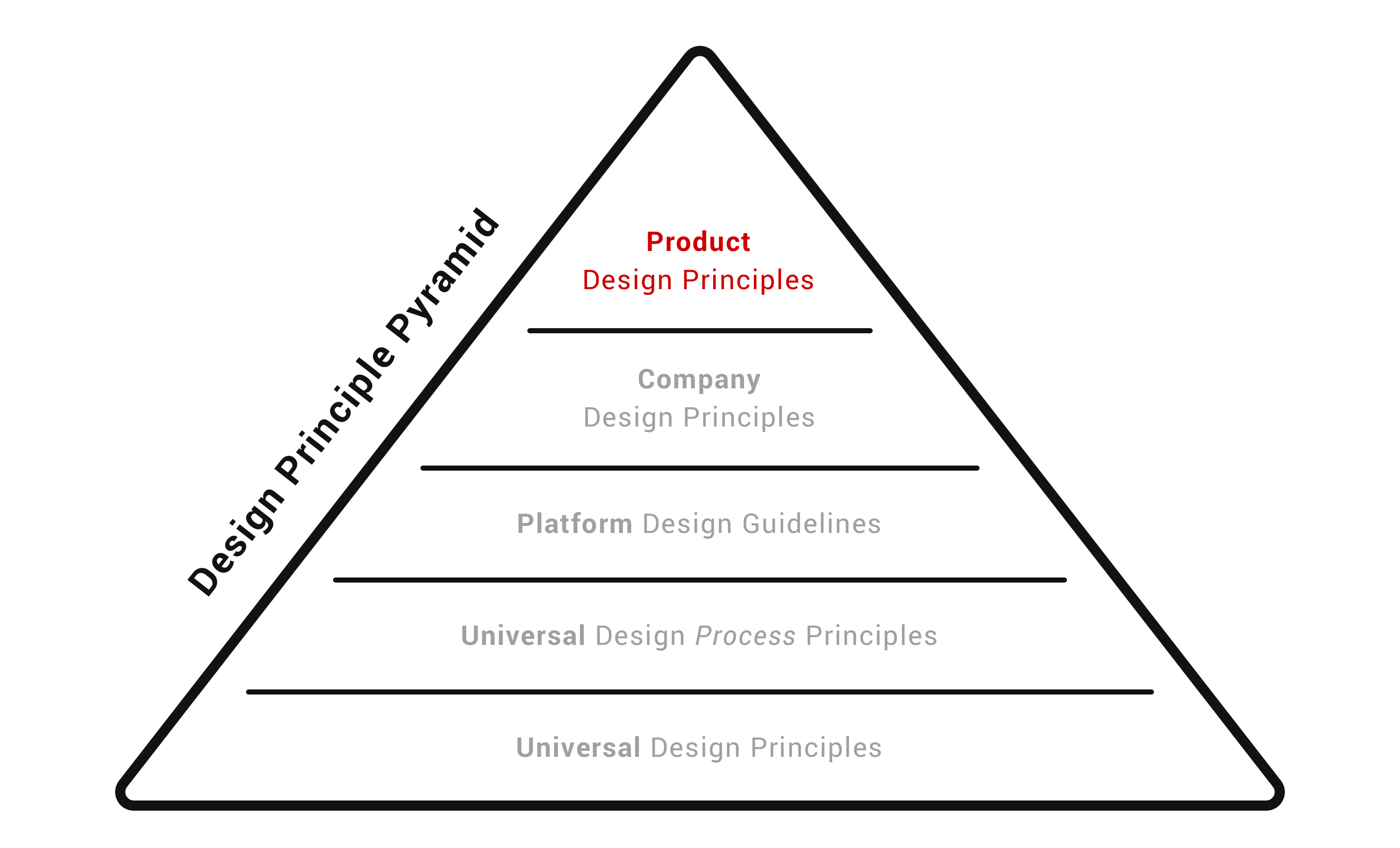
Simple Principles for Creating Better Designs

A guide to Design Principles and why you should create your own | by Christian Jensen | UX Collective

After countless tiring discussions, intense debates, exchange of verbal volleys and people yelling things in design standups like –

  • Huh…Whatya mean by the button should be smaller?
  • Have you heard of the word? hmm..whatyamacall it – hmm… consistency!
  • Step away from the design please…
  • What on the earth is wrong with using Lorem Ipsum…I love those profound Latin words


I exaggerate but our design standups highlighted the difference in our group’s design philosophies and what we valued. It’s not that designs were bad but they weren’t following our core design principles.

What led to a more frustrating experience was that the feedback sometimes even didn’t highlight the context and someone would blurt, “It just doesn’t feel right”.

Someone would ask – “What do you mean that it doesn’t feel right?”

Followed by silence, scratching of one’s beard, intense gazing at the ceiling, and then silent shrugging of the shoulders.

They knew one of the things was wrong with the design in discussion – lack of consistency or complexity or any such thing but they weren’t able to verbalize it well.

It was turning out to be a big problem – how do you lead effective design feedback standups without having a common language?

That led to the codification of our design principles to create a shared understanding of our design approach and what we value as a team. These principles enable us to have a common design philosophy and approach. It also facilitates in having meaningful conversations and giving each other valuable feedback about the design.

Not that our intense discussions have subsided but they have become more meaningful now

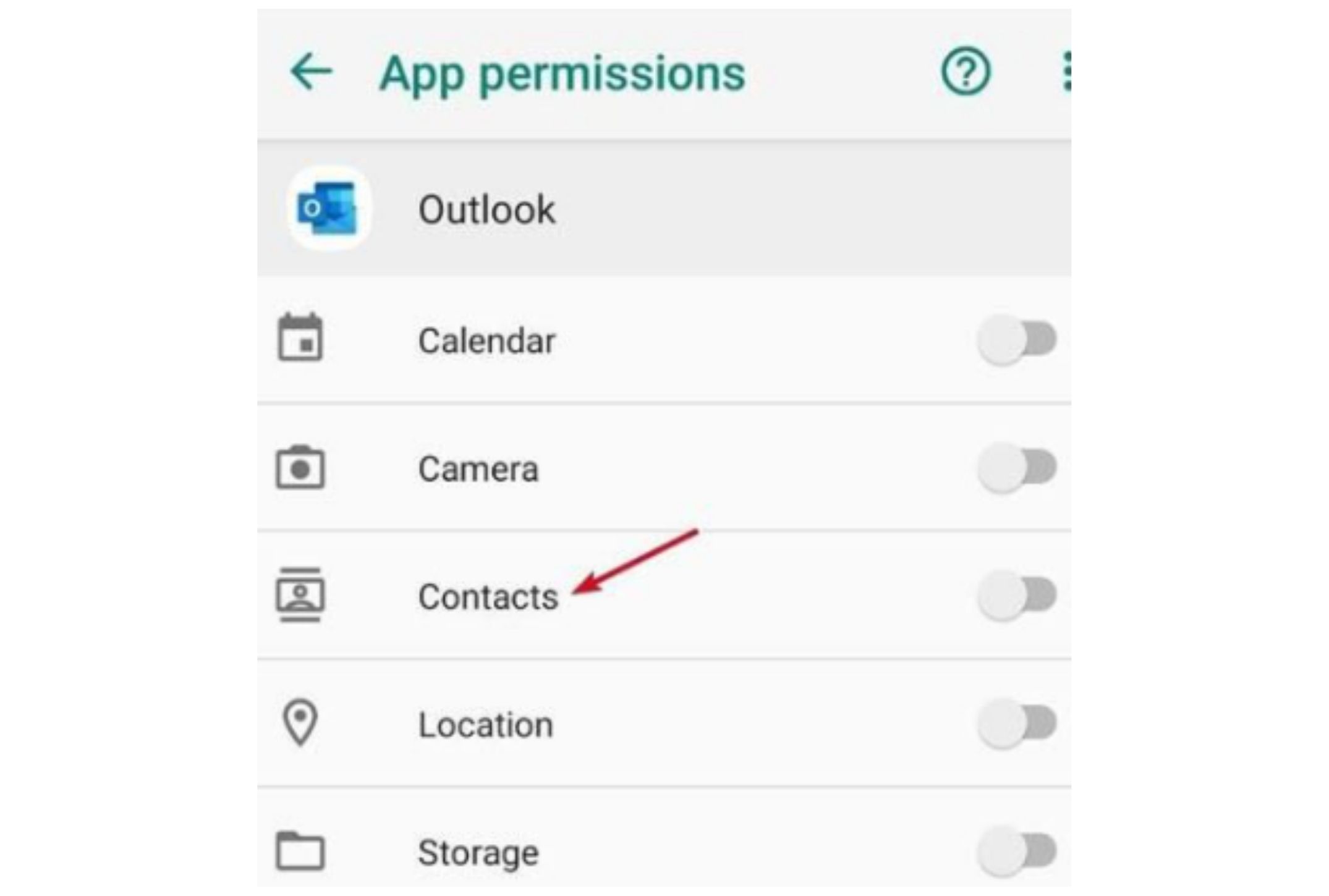
Syncing Contacts with an Android Application

How to Sync Google Contacts With Android: 4 Steps (with Pictures)

Syncing the phone book contacts in an android device with your application is being used by various android applications today. These applications include Whatsapp, Google+, Skype and various email applications. In this way, contacts syncing allows the user to access contacts from various social applications from the phone book itself.Now I will explain with an example Android application how the syncing process happens. This Android application runs in the background as soon as its launched and synchronizes itself with the device’s phone book contacts. Following is a screenshot of a contact synced with the app.

Clicking on MyData will take us to the desired screen on the application.


Contacts syncing requires three components to work in order which is:-

  1. Contacts provider
  2. Authenticator service
  3. Sync service

Contacts provider

Contacts provider is the standard access provider to the device’s data about people. All the contacts in the phone are managed by the contacts provider through tables that can be queried to get data. There are basically three tables that store data for a person.

These tables are-

Figure 1- Contacts provider table structure (Source)

  1. ContactsContract.Contacts is the table that contains the aggregated data from raw contacts rows that represents different people in the contacts list.
  2. ContactsContract.RawContacts table contains the person’s accounts and type data summary.
  3. ContactsContract.Data table contains other details corresponding to each raw contact like email address, phone number, etc.

I made use of the ContentProviderOperation to handle the table insertion operations on the table to add a raw contact and the data corresponding to my app and finally to apply the changes to the database as a batch operation.

Here is the sample code for the class that handles this functionality:

Authenticator Service

Tutorial: Build an Android Application with Secure User Authentication

The authenticator service is used to create an account for our app on the device. It plugs into the Android accounts and authentication framework through which an account type is created on the device corresponding to our app. Accounts for standard social applications like Whatsapp, Skype, Facebook, etc. can be found if you visit the accounts screen in settings on your device.

Sync Service

The sync service is made up of two parts the sync adapter and the sync service itself. The sync adapter is used to synchronize data between the server and the local database. My app doesn’t fetch any data from the server but still, it is required to implement the sync adapter. The sync service is what binds the sync adapter to the android sync framework.

The authenticator service runs in the background when the app is launched to create an account for the app on the device. The sync service is called in a periodic cycle to constantly sync the data.

When you tap on the Whatsapp icon on the contacts screen, it will take you to the chat screen of that contact. Similarly, in the phonebook contacts, your app icon can be seen which is clickable to access the app screens that correspond to that contact’s information on the app. The contact data can be sent through the intent extras to the activity that launches.

Emacs vs. Webstorm for Node.js development

If you are a developer, you know the struggle of choosing the right tools for your projects. Opting for the right editor or IDE is a great hassle if you don’t have your facts right. In software development, Emacs and WebStorm are two very common names, both of them being tools that support Node.js Development. However, the question arises that which of these two tools should you consider while starting your Node.js project.

Emacs vs. WebStorm for Node.js Development

Node JS Development Services in Hyderabad | Creo Tech Solutions

In this article, I shall guide you through all the details, from big to small, regarding Emacs and Webstorm to help you choose which of these two might be better for your project.

Similarities

There are a few features that are shared by both Emacs and WebStorm. Firstly, both of them are capable of connecting to external code quality tools such as ESLint. Both of them can connect to these tools and provide real-time code analysis and bug spotting. Secondly, either one of the tools can provide a deep analysis of JavaScript mode. WebStorm has its exclusive JavaScript analysis engine whereas Emacs has its own js2 mode. Both aid in finding the bugs and issues in the code like finding a function that does not return a value and can perform minor tasks such as extracting variables too. Lastly, both the tools greatly support smart auto-completion.  Where Emacs does this through Tern, which is an open-source JS code analyzer that various editors can connect with. On the other hand, WebStorm does it using its own engine which, in addition, parses JSDoc comments and TypeScript descriptor documents.

Why WebStorm?

WebStorm Logo " Sticker by SuperJellyfish | Redbubble

Although Emacs is great yet there are a few things that lie out of its scope and just cannot be done right with it. Disparagingly, few of the peskiest things that Emacs can not do, can be done by WebStorm, making it a great choice for developers.  One of the major aspects of this domain is debugging. The basic debugger in the Node.js is terribly slow. WebStorm emerges as a great alternative in this case. It wouldn’t be wrong to say that this debugger in itself enough to make a developer opt for it over anything else for major JavaScript Development. Though Emacs does have an inbuilt editor for debugging, it fails to work with the default Node.js debugger. Even if it did work, it would’ve been taken back by the utterly sluggish performance of the default debugger.

Definition and Symbol lookup is another incredible component of WebStorm. While Emacs can discover definitions and symbols in a solitary document by means of Tern, WebStorm can really review your entire task and discover a definition, or if nothing else give you a very pruned rundown of contenders to look over. This makes exploring through code exponentially quicker, and it truly diminishes the strain of setting exchanging between documents.

Testing integration is the last enormous success for WebStorm. When utilizing the most well-known JavaScript testing systems, Jasmine and Mocha, WebStorm removes the need for running individual tests, entire test files, and entire test suites with only a couple of keyboard shortcuts.

If we join this last component with debugging and code navigation between documents, WebStorm turns into an astounding TDD tool. Emacs can be inconsequentially set up to run an entire test suite, however not to run individual tests for any of the regular JavaScript testing frameworks. While this is possible in Emacs too, (such integration exists for Ruby’s RSpec tools), nobody has contributed to the opportunity to make it work.

Why Emacs?

Laravel & Emacs - Part 1 | Grok Interactive

Regardless of the considerable number of pros WebStorm has, there are still various things Emacs is better at. One of the most significant of those is auto-completion. I have already mentioned above that both Emacs and WebStorm can do some degree of smart, context-aware completion. The truth of a dynamic scripting language like JavaScrip is that on multiple occasions, there is no relevant completion accessible as there is an excessive vagueness or the code has improper structure.

In these cases, WebStorm simply doesn’t offer any completion, compelling you to type everything physically. Emacs accomplishes something amazing in this case. It basically tokenizes the majority of the words in each buffer of a similar kind, for example, each JavaScript buffer, and takes a gander at the characters you have begun to type and attempts to discover a match. It is nothing but a fact that often in the event that you type around three characters of a word, it will offer you around 3-5 choices of words starting from those three characters. This radically improves the speed as you don’t need to type the whole words to get going.

Something else Emacs is commendable at is Vim emulation. While WebStorm’s Vim copying is good too, but it does encounter bugs frequently. These incorporate bugs like keys not enlisting, getting into abnormal states where you seem to be somewhere between the normal and insert mode, and a peculiarly delicate mouse choice that consistently appears to place you in visual when you didn’t ask it to. Also, some propelled highlights like macros once in a while work directly for rarely work. It also fails to copy things on the system clipboard, which Emacs does as a matter of course. Also, large file editing or micro-driven refactoring is also better done in Emacs.

Summary

Like every other app development tool, Emacs and Webstorm too, have their own advantages and disadvantages. A significant disadvantage is automated refactoring. Automated refactoring is an incredibly tricky problem in a dynamic language. Neither Emacs or WebStorm is capable of going beyond extractions or simple variable renames. It can make refactoring across files a wearisome, error-prone process. Similarly, both tools lack at generating code for JavaScript. Either of the tools supports expanding developer-defined templates, but nothing else. WebStorm appears to be at least trying a bit in this regard. Presently, it can generate a method that you call in code, but only into the same file you are in, and it will often call the method wrong. A developer must consider all the points before choosing the right tool and beginning the development so as to utilize the features to their utmost capacity.

Learn How to Start Working with KAFKA and More

Top 10 Courses to Learn Apache Kafka in 2021 | by javinpaul | Javarevisited | Medium

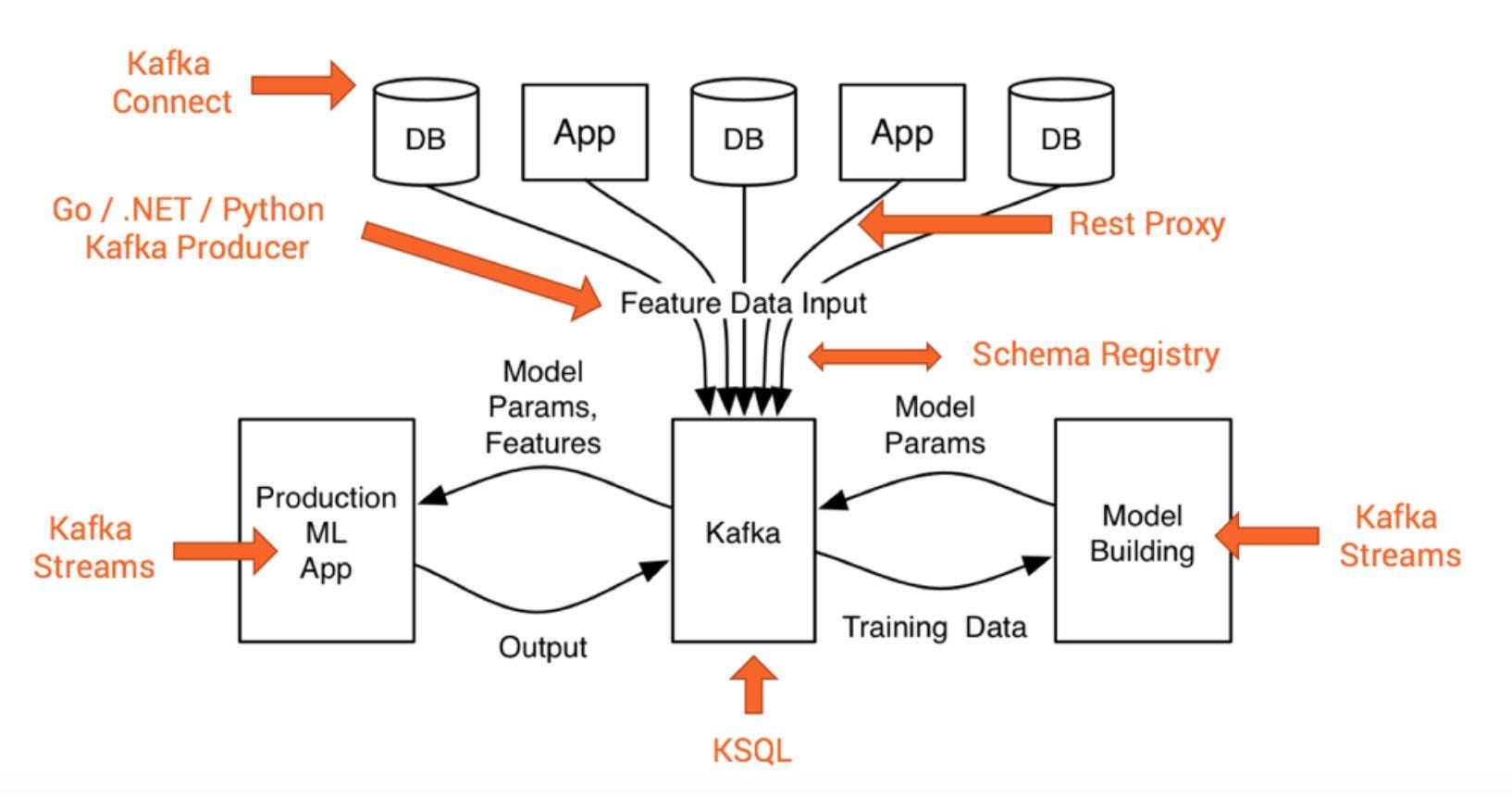
Kafka is a distributed publish-subscribe messaging system that is designed to be fast, scalable, and durable. It was developed by LinkedIn and open-sourced in the year 2011. It makes an extremely desirable option for data integration with the increasing complexity in real-time data processing challenges. It is a great solution for applications that require large-scale message processing.

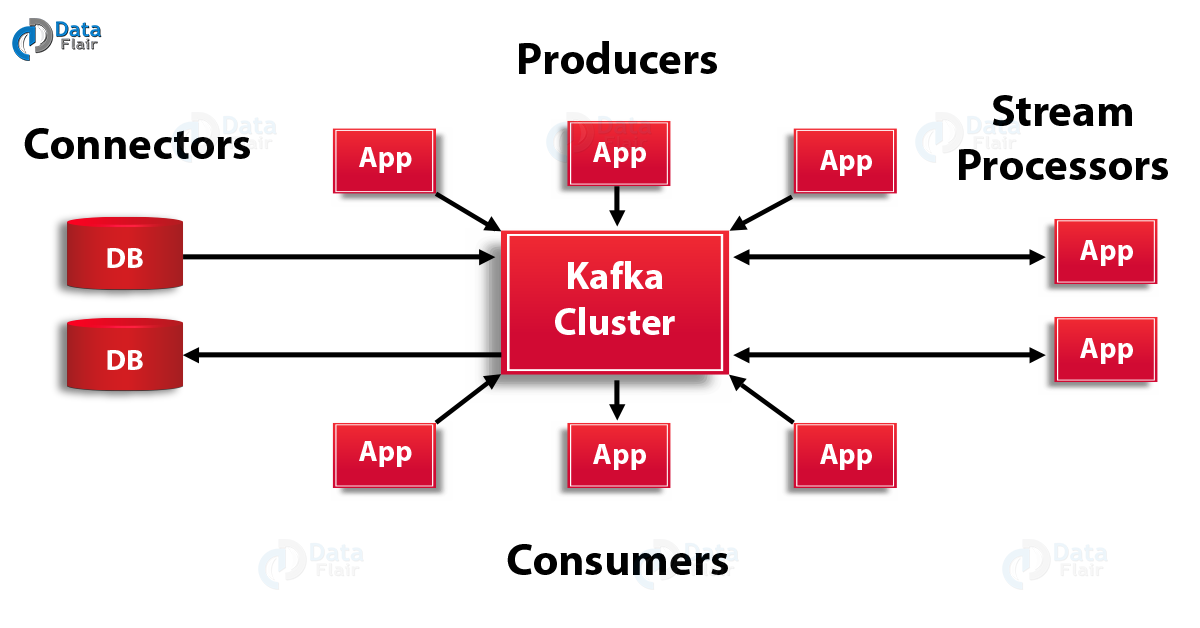
Components of Kafka are :

  1. Zookeeper
  2. Kafka Cluster – which contains one or more servers called brokers
  3. Producer – which publishes messages to Kafka
  4. Consumer – which consumes messages from Kafka.

Components :

Kafka Architecture and Its Fundamental Concepts - DataFlair

It saves messages on a disk and allows subscribers to read from it. Communication between producers, Kafka clusters, and consumers takes place with the TCP protocol. All the published messages will be retained for a configurable period of time. Each Kafka broker may contain multiple topics into which producers publish messages. Each topic is broken into one or more ordered partitions. Partitions are replicated across multiple servers for fault tolerance. Each partition has one Leader server and zero or more follower servers depending upon the replication factor of the partition.

When a publisher publishes to a Kafka cluster, it queries which partitions exist for that topic and which brokers are responsible for each partition. Publishers send messages to the broker responsible for that partition (using some hashing algorithm).

Consumers keep track of what they consume (partition id) and store it in Zookeeper. In case of consumer failure, a new process can start from the last saved point. Each consumer in the group gets assigned a set of partitions to consume from.

Producers can attach key with messages, in which all messages with same key goes to same partition. When consuming from a topic, it is possible to configure a consumer group with multiple consumers. Each consumer in a consumer group will read messages from a unique subset of partitions in each topic they subscribe to, so each message is delivered to one consumer in the group, and all messages with the same key arrive at the same consumer.

Role of Zookeeper in –

What Is Apache Kafka? | How Kafka Works | OpenLogic

It provides access to clients in a tree-like structure. It use ZooKeeper for storing configurations and use them across the cluster in a distributed fashion. It maintains information like topics under a broker, offset of consumers.

Steps to get started with (For UNIX):

  1. Download Kafka – wget http://mirror.sdunix.com/apache/kafka/0.8.2.0/kafka_2.10-0.8.2.0.tgz
  2. tar -xzf kafka_2.10-0.8.2.0.tgz
  3. cd kafka_2.10-0.8.2.0/
  4. nside Config folder you will see server, zookeeper config files
  5. Inside bin folder you will see bash files for starting zookeeper, server, producer, consumer
  6. Start zookeeper – bin/zookeeper-server-start.sh config/zookeeper.properties
  7. Start server – bin/kafka-server-start.sh config/server.properties
  8. creating topic –bin/kafka-topics.sh –create –zookeeper localhost:2181 –replication-factor <your_replication_factor> –partitions <no._of_partitions> –topic <your_topic_name>
    This will create a topic with specified name and will be replicated in to brokers based on replication factor and topic will be partitioned based on partition number. Replication factor should not be greater than no. of brokers available.
  9. view topic – bin/kafka-topics.sh –list –zookeeper localhost:2181
  10. delete a topic – add this line to server.properties file delete.topic.enable=true
    then fire this command after starting zookeeper
    bin/kafka-topics.sh –zookeeper localhost:2181 –delete –topic <topic_name>
  11. alter a topic – bin/kafka-topics.sh –zookeeper localhost:2181 –alter –topic <topic_name>
  12. Start producer – bin/kafka-console-producer.sh –broker-list localhost:9092 –topic <your_topic_name> and send some messages
  13. Start consumer – bin/kafka-console-consumer.sh –zookeeper localhost:2181 –from-beginning –topic <your_topic_name> and view messages

If you want to have more than one server, say for ex : 4 (it comes with single server), the steps are:

  1. create server config file for each of the servers :
    cp config/server.properties config/server-1.proeprties
    cp config/server.properties config/server-2.properties
    cp config/server.properties config/server-3.properties
  2. Repeat these steps for all property files you have created with different brokerId, port.
    vi server-1.properties and set following properties
    broker.id = 1
     port = 9093
    log.dir = /tmp/kafka-logs-1
  3. Start Servers :
    bin/kafka-server-start.sh config/server-1.properties &
    bin/kafka-server-start.sh config/server-2.properties &
    bin/kafka-server-start.sh config/server-3.properties &

Now we have four servers running (server, server-1,server-2,server-3)

PROGRAMMING

The program in java includes producer class and consumer class.

Producer Class :

Producer class is used to create messages and specify the topic name with an optional partition.

The maven dependency jar to be included is

We need to define properties for a producer to find brokers, serialize messages, and sends them to the partitions it wants.

Once producer sends data, if we pass an extra item (say id) via data :
ex :

before publishing data to brokers, it goes to the partition class which is mentioned in the properties and selects the partition to which data has to be published.

Consumer Class :

Topic Creation :

It is a distributed commit log service that functions much like a publish/subscribe messaging system, but with better throughput, built-in partitioning, replication, and fault tolerance.

Applications:

  1. Stream processing
  2. Messaging
  3. Multiplayer online game
  4. Log aggregation

Offline-first Apps: Trending Customer Experience Strategy

Learning gets Truly Mobile with Effectus

Around the globe over $2.7 billion is lost yearly because of a poor connection and bad internet speed. On a micro level, if an app does not load well more than 75% of the users would leave it, and additionally, more than 45% of users strongly feel that they won’t return to the apps which didn’t load.

There is a strong negative emotion that users carry towards applications not optimized for limited connectivity. This, when added to the fact that quarantines across the globe have made people more reliant on the internet resulting in a massive drop in download and streaming speed, is a bad sign for the app industry. The omen of lowered connectivity has turned app entrepreneurs towards offline apps.

Before we get to the stage of dissecting what are the benefits of offline apps for businesses, especially in the current time, let us first peek into the state of internet connectivity across the US – a picture that validates the need for offline-first apps not just in the coronavirus times but till much after.

What are Offline first Applications?

Best Practices for Building Offline First Apps | NTSPL

Majority of the mobile applications in the market access a database located on servers and provide requested data to the users. The offline mobile applications, while still needing a server connection do not require a consistent internet connection. In this case, data is downloaded on users’ devices and can be accessed offline.

On a technical level, the offline apps download updates from the server when a connection is available and simultaneously upload changes the users made when offline to the server.

An offline mobile application development process generally revolves around some assumptions:

  • Offline apps assume that the users are offline, meaning there will be low latency and unreliable network.
  • Fetching the resources over the network will be slower than fetching them from a local source.
  • The app must inform users of low network conditions but must not keep them from completing the objective.
  • Respecting users’ network and battery conditions, only the data which has changed from the last synchronization must be synchronized.

What Are the Benefits of Offline Mobile Application Development?

1. Seamless Online to Offline Experience

Mobile App Offline Mode | AxisCare

The first of the numerous benefits of offline mobile app development is that the user experience remains unaffected between high and limited connectivity. For a user the benefit of working seamlessly online and offline results into a greater loyalty and return visits.

2. Simplified Storage Process

Process Delivery Stock Illustrations – 8,771 Process Delivery Stock Illustrations, Vectors & Clipart - Dreamstime

When you store all the data on the server, you must ensure that there is a powerful network and stable connection. Additionally, the responsibility of providing the perfect condition also falls down on you.

While it is an unmissable stage, you can ease the work with offline app development. In this case, you will have to update information on the server when necessary and possible. The only thing you will have to worry about is choosing the best local database. You can either go with either of the react native local databases or make a choice between MySQL and MongoDB.

3. Faster Loading Speed

The Importance of Page Load Speed & 4 Ways to Improve it

Since offline applications do not rely on servers or internet speed, they load faster. The users get to enjoy working on the application irrespective of whether they are in a fluctuating network state or on airplane mode.

4.  Competitive Edge

One Way to Get a Competitive Edge | Red Pill Email

An application that is not dependent on an active internet connection is always a step ahead of competition compared to one that works only through the internet. This is the number one reason why brands like Google, Spotify, Kindle, etc. have an unmatched customer experience backing their growth.

Although the benefits of offline apps give an impression that an offline running app is the route of app success, you have to realize that it is not a universal solution to every problem that comes associated with an unreliable network. The custom application development approach makes the most sense when you are working around features and use cases that put your app in an active state in a no-network area.

But when your app relies on making financial transactions or keeping people updated with real-time updates like cricket scores or share market, going offline-first will deem to be unsuccessful.

Is Offline-First Application Development a Necessity? An IFTTT Answer

  • Your application will most likely be used in a poor connectivity area 

A good starting point when developing an offline-first mobile app is to know whether your app will be used in areas having poor signal – these can vary from apps that travelers use to being a key feature in enterprise applications.

  • Your app offers limited features which do not necessarily need to be performed online

If your application needs features that are dependent on being online at all times, it would be best to not work on an offline-first option. But if your application is more on data recording or consuming content – basically, one where interaction is not a mandate, you must go with the approach.

  • Your application offers a large set of content accessible through the search functionality

Searching for large data volumes can be difficult when your users are working with low and unreliable connections. You can better the experience by implementing a lightweight version of the online database.

If these three points stand true in your case – meaning taking an offline-first approach makes the most sense for your business, the next step would be to know how to get started. While your partnered mobile app development company would perform the technicalities, it won’t harm to be in the know-how of the changes that will happen in your app when it moves from online to offline state.

Developing Offline-First Mobile Apps: Ways & Considerations 

Show a Proper UI for the Offline State

Why every app should go offline-first | by Oursky | Oursky Team

Communication is the key to a successful customer experience strategy. You should notify the users when the application detects low or unavailable network conditions. This can be done both by displaying a blank interface or via a popup message.

Make Static Information Available

✓ SSS Static Information → How to Print it【SEE MORE】

In the case of applications that work with limited connectivity, the static information gets downloaded and stored locally when it first loads. The information generally is of the kind that is not altered frequently.

An example of this can be seen in Google Maps. It comes with offline functionality that enables users to navigate locations on a map and expand to some level of detail even when the connection fails.

Create Cache of Commonly Used Dynamic Data

Introducing the Workers Cache API: Giving you control over how your content is cached

Unlike in case of static caching, dynamic cache data are expected to be updated constantly. To enable this in a limited connectivity environment, users’ information is stored temporarily in the local cache (a process most commonly seen in PWAs) – this prevents blank screen during the offline mode.

The approach, beside acting as a reason why big brands make use of PWAs, is used heavily by game developers and social media applications. Majority of the social media applications enable users to access their last newsfeed load.

Real Time Data Synchronization

Firebase Realtime Database | Store and sync data in real time

In this case, the data is uploaded automatically in place of manually. With the help of advanced synchronization protocols, the offline app that makes use of this method can transfer the changed data version and the actions taken to edit it?

Parting words

At Anteelo our answer to how to make an app offline lies in multiple considerations. We ensure that your application works with the best local databases, has a seamless workflow integration, faces zero data security and protection issues, and promises seamless connectivity.

Our developers are skilled in not just efficient online-first app development, which comes almost naturally to them, they also have the right mindset and technical know-how to build an offline-first mobile application.

Run Design Sprint with Remote Teams: The Ultimate Guide

15 tips for running remote design sprints - UXM

Geographical distances should not be a roadblock to collaboration and creativity. Who understands this better than a digital product development team? Going by this sentiment, for a process that lays down the basics of creativity and collaboration at the product ideation stage – Design Sprint – the steps should be the least complex.

While good to hear, on paper, the reality is that for a lot of brands, the process of a design sprint is difficult when conducted in a room, let alone when conducted remotely.

But with 85% of our clients belonging to other global nations, we have more or less mastered the art of running remote design sprints. So now when remote is the new workplace normal, we are in a somewhat better space.

Here’s our design sprint process that your team can also benefit from.

Table of Content

  1. What is the design sprint methodology?
  2. Challenges of Running Design Sprints Remotely
  3. Pre-Design Sprint Model
  4. 4 Days Remote Product Design Sprint Process
  5. Remote Design Sprint Tips & Tricks

What is the design sprint methodology?

7 tips for the first ever Design Sprint of a company. | by Tobias Rieth | Sprint Stories

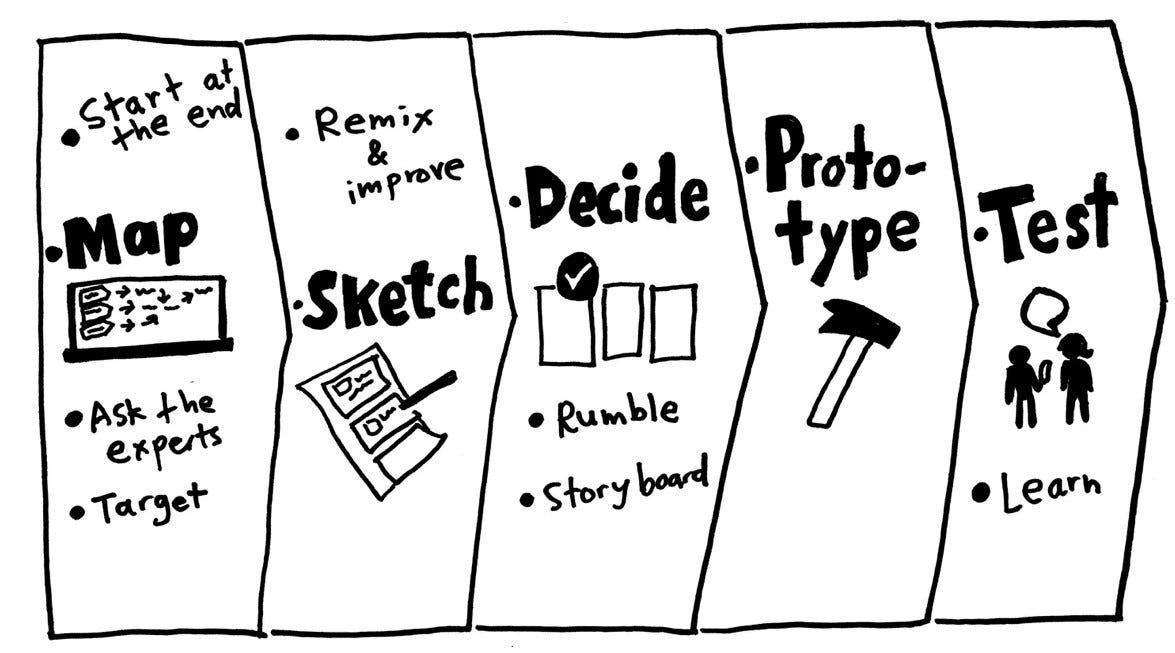
The design sprint process – a.k.a one of the top UX best practices – is a four days’ step-by-step methodology that answers critical business and product questions via designing, prototyping, and idea testing. Built by Google and GV, it is a mix of innovation, business strategy, design thinking, behaviour science, etc. brought together to make a way of working that any team can make use of.

The user experience design formulation process works for product managers, developers, and designers, who work in the space of innovation and problem-solving. It answers some of the most critical questions a brand struggles with:

  • How can we convert an idea into a validated prototype faster?
  • How can we ensure we are designing the right product before putting a ton of money in it?
  • How can we test whether the feature-set we are envisioning the ones that users need?

Irrespective of how straightforward the product design sprint process looks, conducting the event virtually is difficult.

Challenges of Running Design Sprints Remotely 

How to Overcome the 3 Biggest Blogging Challenges

  • The difference in time zone and availability of team – UX sprint calls for intense, engaging sessions. Scheduling and aligning distributed teams for long periods can pose a challenge.
  • Low engagement – On a remote mode, the concentration of the team is one click away from going to YouTube or Telegram. Keeping them focused is a key issue that sprint teams face.
  • Tech-specific challenges – Low battery, bad internet condition, and faulty microphone is a trio that can make your design sprint steps take a bad turn. As a mobile app design company, we ensure that the technology part of the sprint is on point before the design sprint commences.

Our first two three sprint sessions brought us face to face with these challenges. Although the failure count was low, the frustrations were galore. Although our struggle phase goes back to 2014 when we were handling our first client interaction, from what we read across the internet, the issues remain more or less the same. Here are some of the pre-sprint setups we settled on to make the remote design sprint process smooth-sailing.

Pre-Design Sprint Model

Prepare the design sprint material and template beforehand

Product Design Sprint Process, Methods, Tools and Templates: A Complete Guide to Running a Design Sprint

For ensuring that you get the most of the remote design sprint, prepare all the materials beforehand. The existing customer insights, documentation shared by the clients, etc. should be gathered and distributed within the team before the process starts.

Form the team

Together Everyone Achieves More is the full form of TEAM | VMock Thinks

We created a team of seven people leaving the finance team out of the process since we would hardly need any budgeting activity here. The role of decider and facilitator, although important even in the regular sprint session becomes all the more important in a remote sprint design process. The decider is the one who has the final call while the facilitator is someone who takes the responsibility of bringing everyone on the same page aided by the necessary technical help.

Schedule the sprint event 

Use A Social Media Calendar To Fill Your Social Media Feed (With a Calendar Template!)

The UX design sprint method requires the teammates to be available, without distraction for five days. While doable when we were in the same space, fixing 5 days is difficult when operating remotely. But since we pride ourselves on being an app design firm that takes a design-first approach, we knew the importance of the process and convinced the clients to make themselves available as well.

Pro Tip: If you find it difficult to get people available for five consecutive days, put a weekend between the deciding and prototyping days. This way, the team will approach prototype creation with a fresh mind on Monday.

Logistics side of pre-sprint prep 

The Ultimate Guide to Sprint Planning | Smartsheet

Although a remote-inclined tech and office setup should come naturally for brands that work with a distributed team or overseas client, in case you are not one of them, we recommend you to have:

  • Camera
  • Microphone
  • Cubicle
  • Good internet connection which can support you being on video at all times for five days
  • Whiteboard to make the sketches on.

With the pre-design sprint process discussed, let us now give you a peek into our four-day process.

4 Days Remote Product Design Sprint Process

Day 1: Sketching and Mapping 

How to Draw a 3D City Map: A Bird's Eye View - YouTube

The phase comprises bringing the sprint team together and brainstorming the product and the solution it would offer. The entire day is spent on researching whether or not the product is even needed by the masses and if that as a whole is a solution they are looking for. Here, we also discuss the alternatives of what would people choose had the product didn’t exist.

The more you brainstorm and read into this process, the more you would realize that this step is the same as what a mobile app design and development company follow when they validate an MVP.

Day 2: Storyboarding

IED | How an entrepreneurial idea can be transformed into a startup

With multiple ideas now present, the team on Day 2 fix a plan of action. They draw a storyboard containing how the users would come to the app, why they would open it, the features they would interact with, and what will be the outcome of their time inside the application.

Ensure that you have added all the necessary materials and resources backing the storyboard assumptions.

Day 3: Prototyping 

The Benefits of Prototyping - UX24/7

Once you have the storyboard ready and the idea decided, head on to the stage of prototype development. The idea is not to build a product that will be deployed in the stores, but an app that people can run and experience. There are a number of different app prototype tools you can work on to create a clickable version of your app vision.

The process of prototype development should be done with the intent to allow people to test it on Day 4.

Day 4: Testing

Test automation tools: 8 trends and techniques to watch | TechBeacon

This is the last step of the design sprint process where you get people to test your prototype and share their experiences with your team. The best thing to do here is to record those sessions so that you can always go back to them when your application hits the development stage.

Up until this point, you have read everything that you need to know about conducting remote design sprints. But the true success stories lie with brands that know the many side-tips. Ones that every innovative mobile app design agency knows.

Remote Design Sprint Tips & Tricks 

  1. In case you are finding it difficult to get team’s availability at the same time, divide the remote design sprint across two weeks.
  2. Prepare sprint brief and template beforehand
  3. Add ample breaks
  4. Restrict multi-tasking – the team focus throughout the design sprint session should be on the session.
  5. Ask everyone to divide their screen into video and the digital whiteboard so that they can see the whiteboard and the participants at the same time.

We have reached the stage where the only thing left for you to do before you go to the idea conception stage is get in touch with a mobile application design company that is an expert in remote design sprint. We can help.

Cost Of a Podcast Application Development

Podcast App Development: 3 Powerful Features to Make it a Success

Let’s be completely honest, you and I. The chances that you will read every line of this article are very slim.

But if we dictated the same article as you were driving or between meetings, the chance of listening to the entire piece would increase by manifold. Better yet, if we pass on this article to you in Chris Hemsworth’s gorgeous Aussie voice, the chance of you contacting us would skyrocket.

Such is the power of podcasting. A power that the world has started realizing and engaging with. The podcast sector is growing at a lightning speed; the industry gained an estimated $479.1 million in revenue in 2018 and can be expected to generate over $1 billion by 2021, according to a report by PwC and Interactive Advertising Bureau (IAB).

The high revenue can be traced back to the fact that the average number of podcast listeners has been increasing on a constant note. An event that has led to an increase in the query for what is the podcast mobile app development cost.

Our intent today is to give you an answer to the cost to make a podcast app. We will be looking into it from angles like must-have features, the top players in the industry, and how to generate revenue after you make the app. 

Table of Content

  1. Major Players of the Podcast Streaming Industry
  2. Must-Have Features of the App Development
  3. How Much Does Podcast App Development Costs?
  4. Podcast App Monetization Models

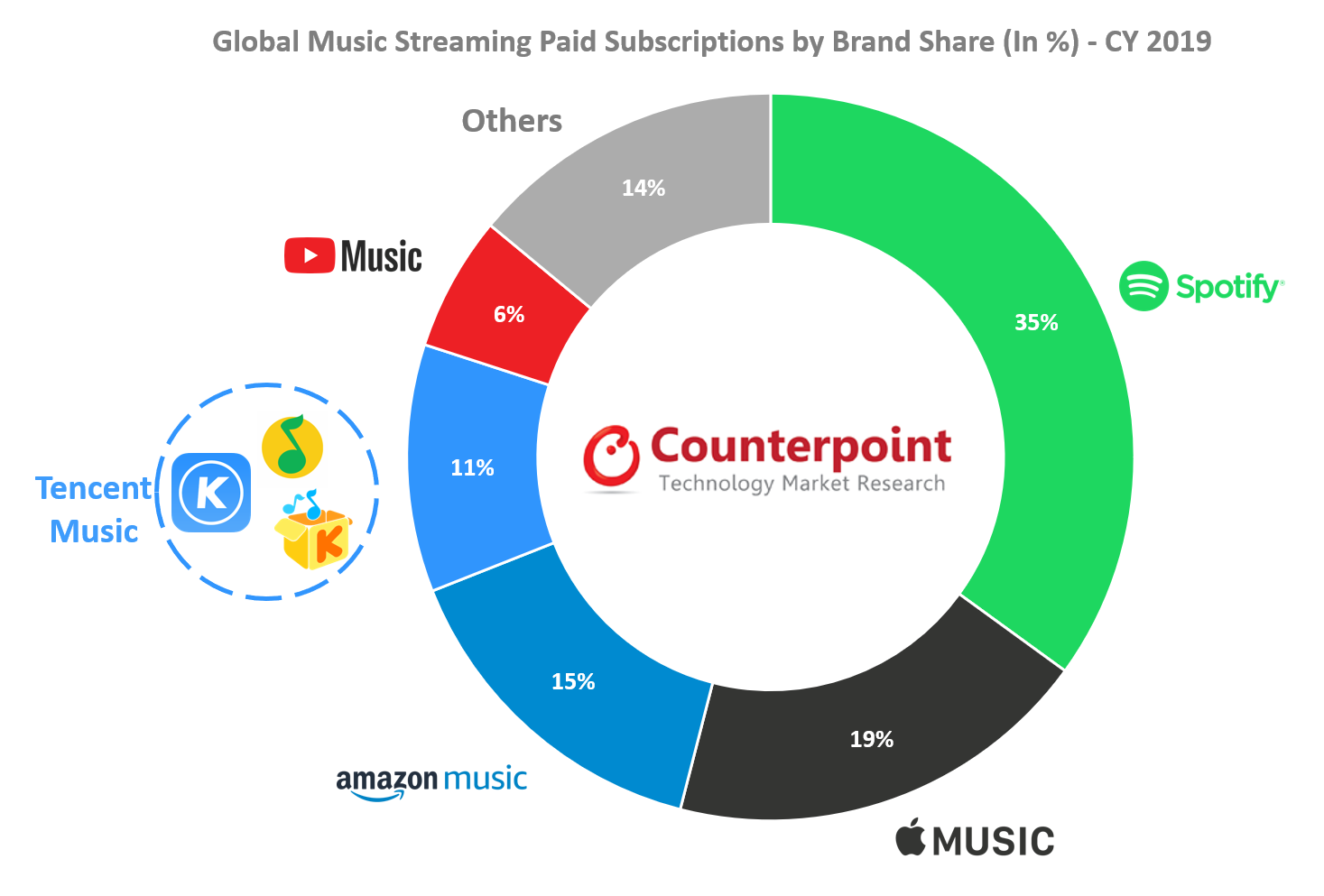
The rising number of podcast listeners in addition to the growing market revenue has led to a number of new entrants. The market which was earlier dominated by Apple Music is now witnessing new names.

Let us look at some of the most active platforms in the podcast industry.

Major Players of the Podcast Streaming Industry 

Podcast: What Drove Paid Music Subscription Growth in 2019?

In June of 2005, Apple added podcasting in iTunes 4.9 and started building podcasts directory at the iTunes Music Store. Under the new iTunes, users could subscribe, download, and organize podcasts. The popularity of podcasts has been on a rise since then. While the growth has been steady for some years, the coronavirus-driven lockdown has increased the rate of new entrants.

Here are some of the most used podcasting apps which are being seen as the reference points when an entertainment app development company builds a podcast app.

Now that we have given you a peek into the podcast industry and the market players that act as a reference when you build the app, let us look into the primary podcast mobile app development cost factor.

Must-Have Features of Podcast App Development

There are a number of features that come together when you create the app – an immersive search functionality, option to record and upload your own podcast, a live podcast, integration of payment gateway, etc. But the ones we are going to discuss here are the MVP-level features of building a podcast.

1.  Category-wise Search Functionality

How to Display Categories in WooCommerce

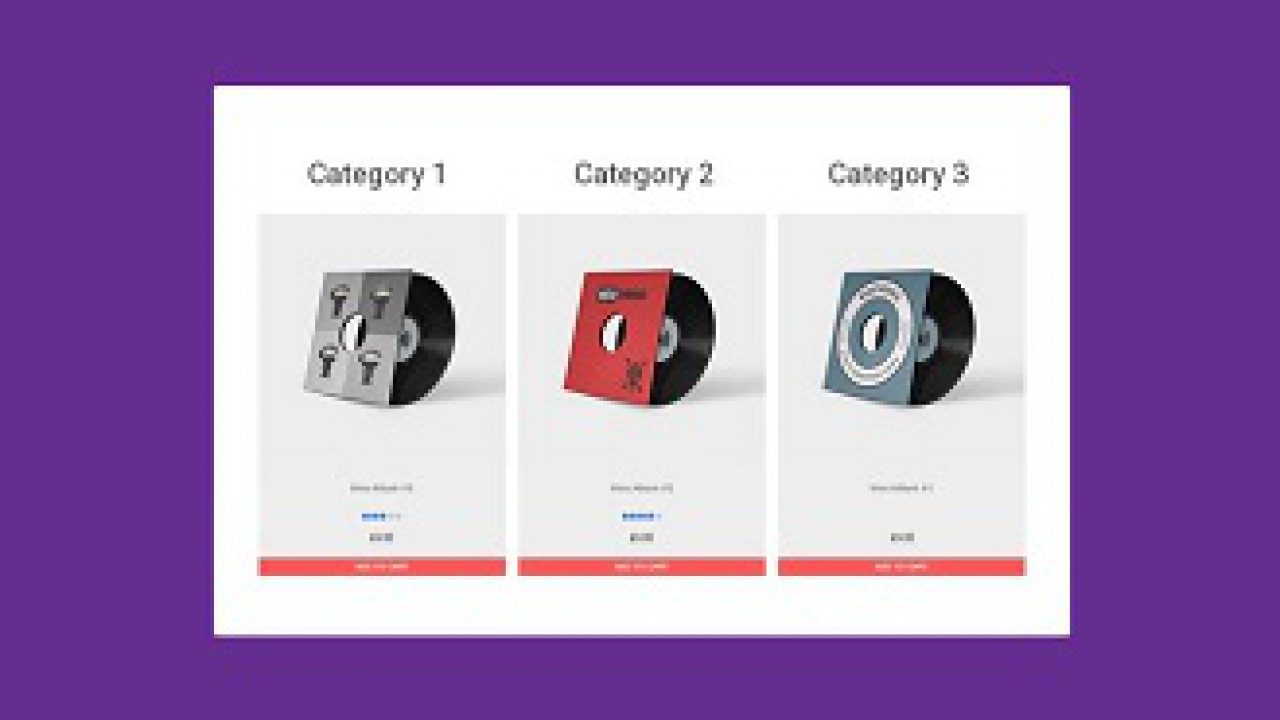
The first way users look for a podcast is through the application. The search functionality when developing a podcast app should allow users to find a podcast through podcast name, episode, genre, how frequent it is, RSS feed, etc.

2.  Discover Tab

Report Clipart Researcher - Discover Clipart , Free Transparent Clipart - ClipartKey

The discover tab of a podcast application generally consists of the podcasts being divided around genre and categories like ‘trending’, ‘featured’, ‘free of cost’, etc. The aim is to help users find their next podcast with utmost ease. What we recommend is using AI integration at this stage that would refer to what to watch next to the users.

3.  Library

Spotify is working on a new Library design for the Android app, with an option for switching between Grid view and List view. (Jane Manchun Wong) : truespotify

This is the part of the podcast app that enables users to keep track of their downloaded podcasts, new episodes, their favorite podcasts, and playlists.

You can think of it as a bigger version of Netflix’s watchlist and Continue Watching section.

4.  User Profile

How to customise and share your Spotify User Profile - RouteNote Blog

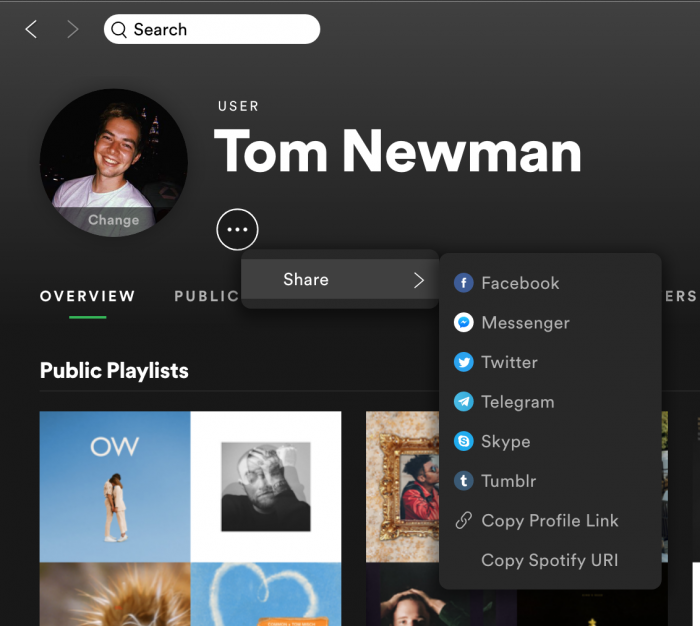
The user profile of a podcast application contains tabs like account details, listening statistics, help center link, settings, etc.

5.  Offline Mode

How to Enable Offline Mode in Spotify on an iPhone 11 - Support Your Tech

When developing a podcast app, a key feature that every media and entertainment app development company suggests is taking the offline-first mobile app development approach. The reason we have kept the feature in the MVP mode is that even as an MVP you will be able to give your users the feasibility of being active on your app when on an airplane mode.

How Much Does Podcast App Development Costs?

The podcast app development cost is dependent on a number of different factors. Let us look at each of them.

1.  Features

Top 10 Features of Office 365 That Competitively Set You Apart

Podcast app features are the first thing that contributes to its development cost. The more advanced features you add to the application, the higher would be the cost. An example of it can be seen in the podcast recording or live stream feature. At the MVP stage, we advise integration features that are a must-have for your app’s functioning.

2.  Technology Stack

Front End, Back End, Mean Stack & Full Stack Developers | Codementor

The next cost-impacting factor is the technology stack. Although the choice of tech stack varies from app idea to idea, the general rule of thumb is if you develop APIs and SDKs from the scratch, the cost would be greater unlike if you use third-party integrations.

3.  Podcast App Design

Podcast App designs, themes, templates and downloadable graphic elements on Dribbble

It can get very easy for a designer to crowd the app since the number of podcasts that make an app successful is generally on the higher side. Designing a minimal app should be the aim of the developers working on the project. However, creating a design that showcases all the multiple podcasts in an organized manner requires expertise, which in turn comes with a cost.

4.  Technology Integration

6 Mistakes You Might Be Making with Technology Integration | Getting Smart

The other key factor that has a direct impact on the podcast app development cost is technology integration. Although we do suggest using AI in the app if you add in technologies like IoT or Blockchain the cost would automatically increase.

5.  Location of the agency

African Real Estate Agent Showing House Location. Stock Vector - Illustration of background, location: 114155053

The last element is the location of the agency. As you move from East to West, the cost of app development generally increases. The average hourly rate of development in the US is generally in the range of $100 to $120, while in case of India it can be anywhere near $60 to $80. The number one reason why there is demand for remote developers.

Everything you have read up until this point is in terms of the amount you would have to spend for the development of the podcast application. But noting that the end goal of any application is to generate revenue, let us dwell on that point.

Podcast App Monetization Models

1.  In-app advertising

A Beginner's Guide to In-app Advertising - Applift

One of the top ways for a business to earn money from an app is through in-app advertisements. By showcasing brand videos or images in the podcast screens or even after a few chapters of an audiobook, you can get the option of earning a good sum of money.

2.  Subscription

5 Best WooCommerce Subscriptions Plugins for 2021

A monthly subscription is the next best way to earn money on your application. Although we would advise against it since there are a number of free apps available in the market, if you feel that the content you are offering is truly off the charts, add a subscription feature.

3.  Premium content

Premium Content Marketing Tools to Boost Blog Engagement

The one option that we 100% back is the premium content mode. You can offer your users a no-advertisement listening experience, access to the most trending podcasts and first look of hottest podcasters at the back of monthly or quarterly charge.

With this, you are now ready to make yourself the next big name in the podcast industry. The next steps? Get in touch with a media app development company and initiate the process.

Make COVID-19 the Springboard for Your next Mobile App Idea

Top 52 App Ideas for 2020-2021 - The App Ideas

The world was sucker-punched as it continues to reel from the ongoing economic paralysis of COVID-19. But fighting to keep businesses alive is not a lost cause. The impact of the pandemic on businesses has sure been merciless, but as we turn the page to a socially distant and digital reality obvious business models are presenting themselves.

Mobile app development services have the proverbial doses to inject new life in dying ventures. It is an opportune time, more so for a few app categories than others, to reassess their strategy or better, reintroduce themselves to the masses in a new nutshell.

COVID-19’s Impact on the Mobile App Economy

Mobile app spending to double by 2024, despite economic impacts of COVID-19 | TechCrunch

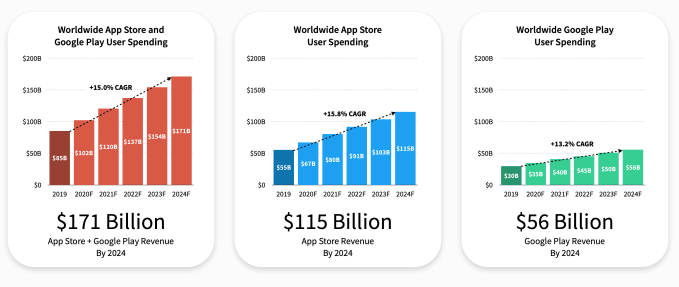
  • Approximately 1.6 trillion hours were spent on mobile apps in the first quarter of 2020. People increased their mobile usage as part of the stay home quid pro quo. And while COVID-19’s effect on the economy presents a mixed picture, the by-product results for the mobile app industry are anything but.
  • In April 2020, users spent 27% of the waking hours on mobile phones, an increase from 20% in 2019. The period between February and April saw impressive spikes in app downloads. Combinedly, iOS, and Android app stores recorded 12 billion downloads, up from 9.1 billion for the same slot last year.
  • The download spikes weren’t without cause and translated into higher consumer app spends. For H1 2020, the combined consumer purchases on the Apple Store and Google Play Store reached $50.1 billion. Of this $32.8 billion was claimed by Apple and $17.3 billion by Google Play.

But what were the people downloading and spending on exactly?

For starters, Tinder is the highest-grossing app on both the play stores raking in $433 million followed by YouTube. For the States, we get a good idea of people’s tastes during the initial part of the pandemic in the following graph. You cannot forego education, essential commodities, and work. Apparently, these were the most downloaded categories by Americans from March 2 – March 16. Such was the effect of COVID-19 on mobile apps, making now the best time to start a mobile app startup.

Impact of the Pandemic on Mobile Apps

The scale of economic uncertainty that the virus has unleashed on the planet is parallel to none in human history. It exposed the shortcomings of interdependent countries that shook to the core due to their reliance on a centralized supply chain hub, China. As trading routes were disrupted, few app categories absorbed and began relishing the rising consumer interest. They make the highlight reel of the impact of COVID-19 on mobile apps.

E-commerce Apps

12 Genius Ecommerce App Designs That Drive Revenue - Unlimited Graphic Design Service

Due to the mandatory stay/work from home (whichever is applicable) stance of the federal agencies, people shifted their preferences to order essential items online rather than step out. Given that the E-commerce locale constitutes multiple categories, the ones that made the priority list of people were food, hygiene products, clothing, and medications. This is evident from a survey in which 52% of Americans admitted to shopping more online due to COVID-19 restrictions.

Another survey revealed the itinerary checklist of items that more and more people have opted to order online.

The impact of the pandemic on mobile app development has been such that we experienced a surge in requests to develop MVPs for eCommerce vendors. Some aim to diversify by launching newer subsidiaries, others taking their first steps in the field. It was recorded that global eCommerce sales at the height of the lockdowns hit 66% and that has now flattened at 7% above last year’s sales levels for the same time. In keeping with such forecasts, we think the demand for such apps will continue to rise.

Fitness Apps

Top 10 Fitness Apps That You Can Use To Be Fit and Active

Forced to put up at home, people are conscious of the role a healthy body plays in hosting a complimenting mind. There were about 656 million health & fitness app downloads in August 2020 making the total downloads for Q2 47% higher than the same time last year. Strava was the highest gainer with 179.2 million downloads within the first 5 months of 2020. The bottom line is that even couch potatoes are acknowledging the benefits of boosting immunity be it through a robust exterior or vis-a-vis a diet planning and monitoring app.

As a result of the impact of coronavirus on mobile apps development, the health & fitness apps marketplace is expected to grow at a CAGR of 21.30% from 2020 – 2027.

Our 600+ team (also working from home) has immense insight into developing healthcare apps such as Soniphi, Mutelcor, and Health-e-People. No matter the impact of COVID-19 on mobile apps development, we know exactly what on-demand e-commerce solutions need especially in times like these.

Messaging Apps

The Future of Messaging Apps | TeleMessage Mobile Messaging

One of the immediate COVID-19 effects on mobile, or rather the impact of it shall we, is that people want to stay connected. And that can happen either through video (more on it later) or messages. Yes, we already have messenger apps like Facebook and WhatsApp, but their rate of adoption differs from one country to another. But one thing is certain until things normalize everyone will make note of maintaining online connectivity through chats.

Factoring in COVID-19, US adults will spend about 24 minutes each day on mobile messaging from 2020 – 2022. Also, considering the next big idea is just around the corner, perhaps it’s still not too late to consider entering the online chat marketplace.

Video Calling Apps

Video Calling App Reviews from the Reference Staff | Library

Following a flattening of the curve at many locations and the subsequent lifting of restrictions there has been an upsurge in second waves. Community transmission hasn’t been culled and the majority of people have resorted to the hope of a vaccine, an approved lot of which is expected by the end of 2020, latest. But issues in distribution will remain therefore mandating social distancing to sustain.

Offices could remain shut for a long time, a possibility that has been jumped on to by video calling apps. This impact of the pandemic on technology has been such that online meet-ups are the new normal. Whereas Zoom and Skype have been the go-to apps for businesses there are others like Houseparty and Hangouts Meet, that are designed for lighter occasions.

The video conferencing apps marketplace is expected to grow at a CAGR of 9.7% from 2020 – 2027 and possibly attain a size of $10.92 billion by the end of the forecast period. You can bifurcate the business model of the video conferencing app based on:

  • Conference type – service-based video conferencing, integrated, desktop, and telepresence
  • Deployment – Cloud, on-premises
  • Target Group – Small Medium Enterprises (SMEs), and large enterprises
  • Application – Rooms, huddles, middle room, large room

EdTech Apps

5 Apps to Empower College Students' Study Skills | EdTech Magazine

Globally, as much as 1.3 billion students were impacted by national school closures due to the virus. Considering the staggering growth rate, it’s not a secret as to why EdTech is a profitable domain.

Google Classroom topped the charts for the most downloaded app for July with 14.8 million downloads. This growth was 13.5 times higher than the same time last year. It was followed by YouTube Kids, Duolingo, Tips for File Transfer 2020, and Cake.

There are multiple ways you can differentiate your app based on the target audience. To give you an overview you, with the help of a mobile app development company like Anteelo, you can design the following types of Edtech Apps based:

  • Online Learning Management Systems – e.g. CenturyTech, Edmodo, Google classroom, Skooler
  • EdTech Apps for Smartphone Users –  e.g. Ubongo, Funzi, KaiOS
  • Apps with Offline Accessibility – e.g. Kolibri, Rumie
  • Massive Online Open Courses – e.g. EdX, Udemy, Coursera
  • Self-directed Learning – e.g. Byju’s, Code It, Discovery Education
  • Mobile Reading Applications – e.g. Worldreader, StoryWeaver
  • Apps for Teachers for Content Creation – e.g. Buncee, Kaltura, Trello
  • Apps for Distance Learning – e.g. EdSurge, Brookings, Education Nation

Online Food Delivery Apps

All In One Food Ordering App, Online Food Delivery - Apps on Google Play

The market for online food delivery apps reached a valuation of $107.44 billion in 2019. The impact of the pandemic on the global mobile apps market, especially its food delivery sector, has been mostly affirmative. As more people opted to order essential groceries online due to COVID-19, the market value for such apps in 2020 is projected to touch $111.32 billion. This spells a CAGR of 3.61% in one year.

But experts believe this is the lower-end of the ceiling that was adversely affected due to global economic frailties. As public spending power enters its regenerative state the CAGR would grow by 11.51% through 2023, bringing the cumulative valuation of such apps to $154.34 billion, meaning it is time for on-demand brands to start preparing for the post-COVID world.

As a top mobile app development company, we’ve had the privilege of partnering with brands like Domino’s and working closely to help them grow their business. Based on such exclusive experiences, we know which premium specifications and user tastes help brands stand out.

Bringing It to a Close   

By now you would have understood that the impact of Coronavirus on the mobile economy will be far better off than the impact of the pandemic on businesses operating in the retail space. If you need (honest) suggestions on how to improve your app idea or you plan to undertake a makeover of an existing app, then do get in touch. Our experts would be happy to do their bit in your success, as they’ve done on previous occasions in taking handkerchief ideas to million-dollar valuations.

Technology Contributing to Real Estate During Pandemic

Coronavirus impact on real estate: Real estate has lost Rs 1 lakh crore so far due to Covid-19: NAREDCO, Real Estate News, ET RealEstate

For a few years now technology has been a driving force behind innovations in the real estate sector. But when it comes to complete digitalization, real estate tech has not been one of the pacesetters.

A situation that the industry was forced to correct in 2020.

COVID-19 driven traveling restrictions and the fact that it brought open houses to a halt brought the usage of technology to the forefront, marking a new beginning for several real estate tech firms on the way.

As the present situation stands, the longer the pandemic stays, the greater will be the chances of digitalization efforts sticking with the real estate software development process in the long run. For an industry whose technology adoption spotlight was substituting home viewing with a video, the technological advancements in store will be nothing less than a true revolution.

When you look at these forced real estate technology advancements from a real estate tech firm front, will be nothing less than good news. By using next-ge technologies like Blockchain, AI, AR/VR, etc. the proptech industry will be able to keep its growth momentum intact.

Let us, deep-dive, into the state of real estate and technology combination and how it is setting a new trend for the real estate technology startups – one that would continue post-pandemic.

The pandemic has dramatically expedited the merger of real estate and technology in a way that the sector is on the path of becoming contactless and technologically rich. With a plethora of new efficiencies been brought about by technological innovations, the functioning of property management stands to change for the good.

Here are some of the most glaring technologies which are helping the sector sail through the coronavirus crisis:

1.  Automation of business practices

The Best Practices Used in Business Process Automation

One of the most important and yet common examples of technology in the real estate industry has been the arrival of automation. Touted as the by-product of artificial intelligence in real estate, automation can be seen across marketing, engagement practices, and business processes. Here are a few automation areas that have risen in popularity during the pandemic:

  • Lead generation through website forms
  • Omni-channel syncing of leads
  • Lead nurturing through drip emails or automated workflows
  • Transaction and tasks management
  • Financial and accounts automation
  • Property inspection automation through Spectora

2.  Virtual home tours

How To Show Your Home During the Pandemic: The Definitive Seller's Guide to Virtual Tours and More - Perfect Agent

By far one of the most loved pandemic-driven technology in the real estate industry is the virtual home tour. Going by an AppFolio survey, “71% of property management companies said their priority of virtual showings has increased,” and “64% believe they’re here to stay.”

The technology going beyond 2D photographs, video conferencing tools, and interactive 3D models pose to be a tool that makes COVID showing process an unprecedented success.

Virtual showings come with the value of extending beyond the current climate. It offers prospects greater flexibility in the apartment hunting process. With conveniences ranging from easing schedules, visiting houses in far-away areas virtually, etc. virtual property showing is something that is going to stay.

3.  Cloud adoption

Government Cloud Adoption Use Case | Riverbed

The one issue that real estate technology ventures have been trying to solve across the years is the reliance on papers. Streamlining real estate procedures keeping digital platforms at the center is a grand step businesses could take for continuing to serve buyers/sellers through stay-at-home orders.

The benefits of this disruptive technology in real estate can be seen in:

  • Reliable security and storage
  • Reduction of operational costs
  • Gives real-time sharing and accessibility feasibility

4.  Streamline paperwork with Blockchain

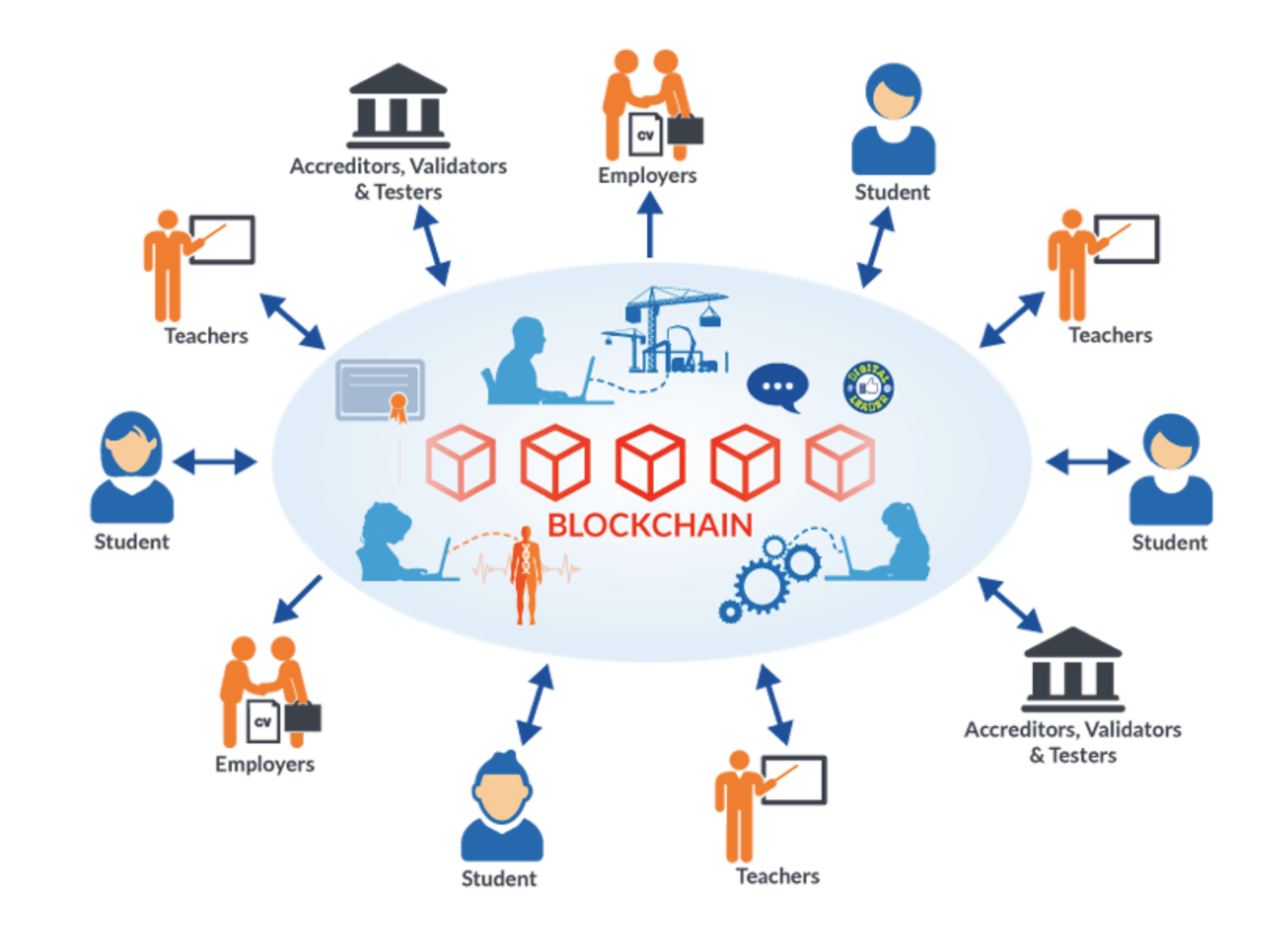
20 Ways Blockchain Will Transform (OK, May Improve) Education

In a traditional real estate economy, the property management process is considered to be highly complex, especially since multiple stakeholders are a part of it.

Property management can either be done offline through manual paperwork or through independent software. A result of this is that information remains confined to a database – a problem that property technology startups aim to solve.

However, with the increasing role of blockchain for property transactions, the future of real estate can be changed.

Real estate mobile app development done on the premise of a blockchain-based property management system uses smart contracts that can ease the process surrounding signing the lease agreements to complying with filing maintenance requests and cash flow.

A secondary field where a real estate software development company can see Blockchain impacting the real estate apps sector is deed management.

Defect in deed paperwork can make it illegal to proceed with the deed management process until the issue is resolved. In case an issue emerges, property owners are liable to pay heavy legal fees ensuring the accuracy of property titles. The application of Blockchain in real estate can be applied here to make the paperwork secure and transparent.

Parting Words

The Top PropTech Trends: 6 Technologies Disrupting The Property And Real Estate Industry

Looking at the future of the real estate sector, technology inclusion would continue to grow and restructure how transactions are conducted, thanks to COVID-19. One key factor that pandemics won’t change however is the need for personal relationships. Property agents, investors, brokers, and lenders must continue to develop their influence sphere. When you partner with a real estate app development company you must keep the human part of the process into consideration.

Enterprises Piloting the New Normal with Next-Gen Applications

How to generate more money from your mobile application? - 15779 | MyTechLogy

Remote working, physical distancing, travel limitations, and the psychological effect of isolation have together changed stakeholders’ behaviors in every organization while creating unexpected challenges along the way. This pandemic has not just disrupted everything once denoted normal but has also been forcing enterprises to navigate the recovery period and develop a new normal for the post-crisis era. Even amidst the clear need for digital transformation, enterprises are grappling to remain competitive in a world filled with nimble startups. These enterprises were once dependent on their IT models as a key to a competitive edge. Now, however, the same IT cores have made it difficult for them to adopt a new normal centered around flexibility, speed, and efficiency.

With being nimble now accounted as the only way to survive and scale in the COVID-19 world, enterprises have turned their focus on the development of next-gen apps.

Table Of  Content

  1. The Need for Next-Gen Apps
  2. What Does Next-generation application development Mean for Enterprises? Speed, Efficiency, and Flexibility
  3. Key Transformation Areas for Enterprises
  4. The Best ADM Approaches for the Creation of New Normal Enterprise Applications
  5. Schedule a Discussion

The Need for Next-Gen Apps

Custom Mobile Application Design and Development Services | Dhiyam

Businesses need apps that will be able to adapt to changing demands and scale to meet customers’ and employees’ needs in real-time. An enterprise application development company by building next-gen apps based on business understanding and customers’ requirements gives enterprises a platform to transform digitally.

Next-generation mobile apps and other software help enterprises:

  • Lower the time to market when meeting the changes in customers’ needs.
  • Lower product complexity by utilizing a cross-platform, scalable ecosystem.
  • Make smarter business decisions through analytics-backed insights.

What Does Next-Generation Application Development Mean for Enterprises? Speed, Efficiency, and Flexibility 

Business Hand Writing Rising Reliability, Quality, Efficiency,.. Stock Photo, Picture And Royalty Free Image. Image 24952351.

The need of the business hour for enterprises, as we noted before, is to look for next-generation application management services. This new normal in enterprise software revolves around a trio – Efficiency, Speed, and Flexibility.

Speed – Pre-COVID, release cycles came with a months-long completion time. Now, with customers’ needs changing by the minute, enterprises don’t have the leverage of taking up months for deployment. There is no guarantee of a problem staying a problem by the end of those months. The new normal enterprise will have to bring in agile methodology in its application development and maintenance process to offer its stakeholders value in real-time.

Efficiency – The success of every nimble enterprise lies in automation, a well-planned business integration, and the adoption of agile methodologies. And all of this can be achieved through practices like the integration of AI in mobile apps, re-prioritization of business processes, and weeding out unnecessary feature sets.

Flexibility – Zero downtime has become a success mantra. But its adoption is a lot easier written or said than done. In order to become truly flexible, enterprises must modernize or replace their outdated applications. However, letting go of the legacy system is one of the biggest digital transformation issues.

What enterprises need is a next-generation application maintenance program that would make proper use of the modernization spend while enabling digital transformation.

Before we get down to the nitty-gritty of what that next-gen application would look like, let us look at the areas that enterprises would have to work on to compete within themselves and with the startups flooding in the business ecosystems.

Key Transformation Areas for Enterprises

The best thing about enterprises is that they understand how COVID-19 would change them – on some grounds, better than their startups’ counterparts.

The speed of automation will expedite

The automation of design | TechCrunch

The automation of key processes and routine tasks has remained at the center of business development for some time now. This need for task and process automation is not new. Back in 2017, McKinsey & Company forecasted that 30 percent of key tasks across industries will get automated by 2030. “Before the pandemic, automation was looked upon as a way to boost efficiency while cutting costs,” said H.I. Executive Consulting. “With social distancing directives likely to stay in place for a while, more and more businesses are accelerating their automation efforts in order to reduce close human contact to a minimum, free up employees to manage crisis response and focus on providing essential services.”

The movement towards remote digital service

The future of remote work: An analysis of 2,000 tasks, 800 jobs, and 9 countries | McKinsey

The new normal for business after covid will be organizations changing their support and service delivery plans to meet the digital reliance of their employees and customers.

Here are some examples of what a remote digital service looks like.

The digital-powered Russian bank Tinkoff created a cloud-based call center with several freelance employees. The bank focuses completely on virtual servicing. To date, they have expanded into a team of 14,000 call center operators of which 6,000 of them make an average of 500,000 customer calls every day from homes. The bank’s cost of managing and training operators gets offset by the savings made from rental offices and equipment.

In the telecommunication industry, companies have started launching digital-only offerings that redefine customer experiences and gather considerable attraction. The USP of these services lies in customers signing themselves and moreover with more than 80% of customer-care activities being conducted online. In this digital-first model, online referral act as the biggest source for customer acquisition – estimated to be 15% of the total sales.

The success examples are prevalent across  multiple industries. This has turned remote service into a trend that has a high-profit potential.

Supply Chain Disruption May Continue

Who Gets What When Supply Chains Are Disrupted?

Global lockdowns have resulted in a massive scale of supply chain disruption. Back in February, Fiat Chrysler Automobiles NV stopped production in their Serbia factory for they weren’t able to obtain automobile manufacturing parts from China.

The majority of the enterprises understand the manufacturing and delivery process of their Tier 1 suppliers while having little visibility on further the line. The business need is to make the supply chain resilient for the post-COVID period. And in order to do that, enterprises would have to:

  • develop strong backend infrastructure – possibly by combining blockchain and supply chain processes
  • remove the dependency from paper-based processes
  • share data with suppliers for gaining manufacturing stages visibility.

Partnerships will become collaborative and lean 

Building strategic business partnerships | by Nima Torabi | Medium

Enterprises can meet the changing partners and vendors’ preferences by shifting to a more collaborative and flexible set of partnerships. These partnerships can be multi-form. Example: An IT consultancy firm could work with remote vendors to decrease their office and travel cost. There can also be enterprises providing agreements with their vendors for long-term opportunities. For example, how Alibaba supports SME suppliers with an extended line of credit.

As a part of the new normal for the marketplace, we are seeing partnerships brewing on the basis of an understanding of customer needs, wherein both the partners can mix knowledge and create value. For example, recently, WhatsApp started enabling its customers to directly connect with brands and make purchases through a simplified mobile experience on WhatsApp.

Management systems of a new model

Management System Stock Illustrations – 38,926 Management System Stock Illustrations, Vectors & Clipart - Dreamstime

Met with the unsurity of the new reality, enterprises have started looking for ways of adopting virtual management systems in enterprise application development services.

For effectively responding to a fast-changing environment, businesses will consider making use of advanced analytics tools, automation, and digitalized processes to meet customer demand fluctuations in semi-real-time. We can also envision enterprise application development solutions being built on human-technology interactions which would help businesses collect insights for IT-driven productivity rise.

To meet with the changes that a post-COVID world would pose, businesses would have to take a modernized approach – one that would help them become cognitive. While this can be achieved through the creation of new-age technologies backed next generation mobile applications services, it would need enterprises to get back to their legacy systems.

Here are some of the application development and maintenance approaches that we have been offering to enterprises coming to us seeking digital transformation consultancy.

The Best ADM Approaches for the Creation of New Normal Enterprise Applications

Optimizing the current IT systems 

Best Image Optimization Techniques: Expert Roundup

Enterprises can optimize their present IT systems with modern approaches and tools to cut costs and heighten efficiency. We advise organizations to make use of AI and automation capabilities for ensuring quality and following DevOps steps to lower the development cycle.

By deploying new-generation capabilities and features around existing systems enterprises will be able to innovate and keep their competitive edge – even when they are not prepared for complete cloud transformation. They can attain easier access and modification of the legacy systems through the use of technologies like containers, API integrations, and microservices.

Gather data and convert it into an actionable product in a minimal time range

Product Discovery: ​A Practical Guide for Agile Teams (2021)

When we build enterprise applications, we focus on benefiting from cloud-native, digital-first technologies to deliver growth at speed. Deploying speed-focused innovation abilities are generally backed with an MVP, small feedback loop, test-driven development, and a fail-fast approach.

The intent of this approach is to help enterprises take key business decisions and turn them into products that their stakeholders need in as close as real-time.

error: Content is protected !!