ARC for iOS Development

Coming from a .Net background, I wanted to understand how iOS or OS X does memory management. Here’s brief post on what I’ve read and understood so far.Until a few years ago, Apple developers had to manually manage memory while writing Objective-C code. It was called the Manual Retain-Release model, and is exactly what developers have been doing all this while for C/C++.
But managing memory manually has always been painful and error prone, and takes up valuable time of application developers, which could instead be used for building useful features.An Introduction to ARC for iOS Development | Humble Bits

Enter ARC, acronym for Automatic Reference Counting.

Apple introduced ARC in 2011 along with Max OS X Lion and iOS 5.

With ARC, Apple has tried to make the compiler mimic what disciplined C/C++ developers would do. They would manually track the memory they are allocating for their code, and then ensure they release that memory whenever the objects go out of scope, and their memory is no longer required. So instead of the developers, now the compiler is doing all the hard work.

Its not like ARC was entirely Apple’s creation, Reference Counting has been around for a long time, and is one technique of implementing Garbage Collection.


How is ARC different from a Garbage Collector?
Garbage Collection vs Automatic Reference Counting — — — — - | by Mohanesh Sridharan | Computed Comparisons | Medium


Garbage Collector:

— Is part of the runtime infrastructure – i.e. part of CLR, JVM, and the runtime is responsible for running and monitoring the Garbage Collector (GC)

— Is indeterministic, so objects stick around until the GC runs, and therefore are not released as soon as they go out of scope

— Affects application performance when it runs, as other threads are paused, while it is runnning

— Is able to clear entire Object graphs, as it is able to figure out the application root object references while the application is running

— Is less prone to memory leaks

ARC

— It is not part of the runtime

— Instead the compiler injects reference tracking and clean-up code, similar to what a developer would do

— Deterministic reclamation of memory, at the time when the object goes out of scope

— Since there is no background or runtime processing, it requires less CPU and RAM, making it efficient on mobile devices

— Cannot cope with retain cycles/object graphs – gets stuck with an object graph, whereas a GC would look for an external reference to an object graph, and if not found would clear up the entire object graph

— Is more prone to memory leaks based on the quality of code written

Retain Cycles

A Retain Cycle is created when two or more objects are referencing each other in a circular fashion. For e.g. when we have a Parent – Child relationship between two objects, both instances would be referencing each other until they both go out of scope. This creates a circular reference and ARC is not able to figure out when to release these objects as it does not do a stack walk which a GC would do to find external references to these objects, instead ARC just tracks the count of the references to a particular object.

To solve this issue, Apple came out with Strong and Weak references. The Parent object creates a Strong reference to the Child object, which means that until the Parent object is deallocated, the Child object needs to remain alive. And the Child object creates a Weak reference to the Parent object, which breaks the circular reference cycle, and now the Parent object can be cleared whenever it goes out of scope, which in turn will also clear the Child object.

However, for the scenario above, developers need to handle missing or nil Parent objects in the Child object implementation, for when the Parent object gets deallocated and before the Child object is cleared, Child object code might be executed.

There is a concept of unowned references as well to prevent retain cycles, which I left out for now.

LLVM and Clang

Components involved in exception support in the standard clang/LLVM... | Download Scientific Diagram

Apple has used the LLVM compiler toolset to implement ARC.
“The LLVM Project is a collection of modular and reusable compiler and toolchain technologies”

The aim of LLVM is to provide a common backend compiler infrastructure to different compiler front-ends for different languages.

At a high level LLVM accepts code in an Intermediate Form and then is able to emit machine code based on the target architecture.
Ultimately we should be able to write code in different programming languages, run it through LLVM to generate native code for different platforms.

Apple developed the Clang frontend for C, C++, Objective-C and now Swift to use with LLVM. Clang is where the ARC magic happens.

Earlier Apple was using the GCC compiler for Objective-C and XCode, however as GCC is old and has a massive codebase to allow easy addition of new features and advancement, Apple decided to switch to the LLVM toolset. GCC also uses the GPL license, which would have forced Apple to GPL XCode’s source whereas LLVM uses the more lenient BSD license to protect proprietary software.

The modular nature of LLVM has helped Apple create Swift, implement ARC, improve XCode to easily target different platforms like Mac OS X and iOS. Seems they are also using components of LLVM to optimise Javascript bytecode in the WebKit browser engine.

This was a short introduction to how iOS uses ARC to manage its memory, and about the tools that are used for ARC, do send in your feedback via comments. In future, I am planning to write a post on the tools which are available with XCode, which help diagnose memory related issues.


Designing with Code

It is an old saying- “A picture speaks a thousand words”. But not everyone can understand that language. So to make a design understandable we use code for designing.Code takes the design more near to the real product functionally/behaviorally. As in terms of professional language for a customer-“Interface is the product”. So the interface need to be interactive. And for a better interactivity a designer should design a functional layout. And to make those functional layouts functioning we use code, combination of -Markup language(HTML, XML etc.), Styling language(CSS, LESS, SASS), Scripting language(Javascript, jQuery, AJAX etc.).Should designers code or developers design? | by Anna Arteeva | The Startup | Medium

There are lots of experiments, inventions that are done to give more life to designs, the mockups are now no longer used or are not enough to satisfy the customer to sell a product. No matter how much strength you put to design a beautiful template, unless it is interactive, even a group of static layouts can’t tell the whole product story. I am saying this because our interface now became more device independent, transitional and alive like a real product.

If we think of a human body, then design is skin and interface are bones, which gives shape to skin and gives it a meaningful body structure.

Let’s stop talking shit and let me show how code do magical designing…

Suppose we have a layout for which our client wants that, it should be viewed properly on all browser supportive devices. So, here comes the magic of code and we will code it once and it will work on all devices automatically. Let’s see how:
Just copy all the code and paste in a text editor and save it as, lets say test.html. And test it on browsers (advanced browsers).

There is a lot more stuff, like a new term which has evolved now a days is “RAPID PROTOTYPING“. It is something we do after design and before we start working on interface designing. The need of this is to demonstrate 20% of the actual product which users use 80% in the product most of the time.

Feature Extraction and Transformation in ML

Features

Any machine learning algorithm requires some training data. In training data we have values for all features for all historical records.  Consider this simple data set

Height         Weight         Age            Class

165                 70                   22             Male

160                 58                   22             Female

In this data set we have three features for each record (Height, Weight and Age).

Any algorithm takes into account all the features to be able to learn and predict. However all the features of the data set may not be relevant.

Suppose we have 1000 features in a large training data set, using all features may exhaust all the system memory and computational power. So we must choose most relevant features and transform them according the the input required to algorithm. After this process we may find that only 100 of 1000 features are contributing to labels.

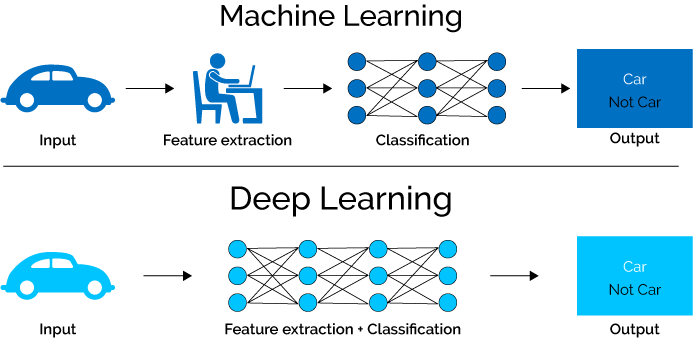
CNN application on structured data-Automated Feature Extraction | by Sourish Dey | Towards Data Science

We can prepare training data by following  two techniques

  1. Feature Extraction
  2. Feature Selection

Feature Extraction

Feature extraction is the process of extracting important, non-redundant features from raw data. Suppose you have 5 text documents. Suppose there are 10 important words that are present in all 5 document. Then these 10 words may not be contributing in deciding the labels for those documents. We can omit these words and create new features excluding those words.

TF-IDF technique

TF-IDF technique is a feature extraction technique based on frequency of features in documents

Suppose there is set of documents D(d1, d2, d3)

TF(t,d) is term frequency = frequency of a term/feature value t in document d.

IDF(t,d,D) is inverse document frequency of term t for document d in set D. Here N is the number of documents N = |D|.

inverse document frequency

TF(t,d) x IDF(t,d,D) is a measure based of which we can say that term ‘t’ is important in document ‘d’. The words for which this measure is really low, we can omit those words in features.

Feature Selection

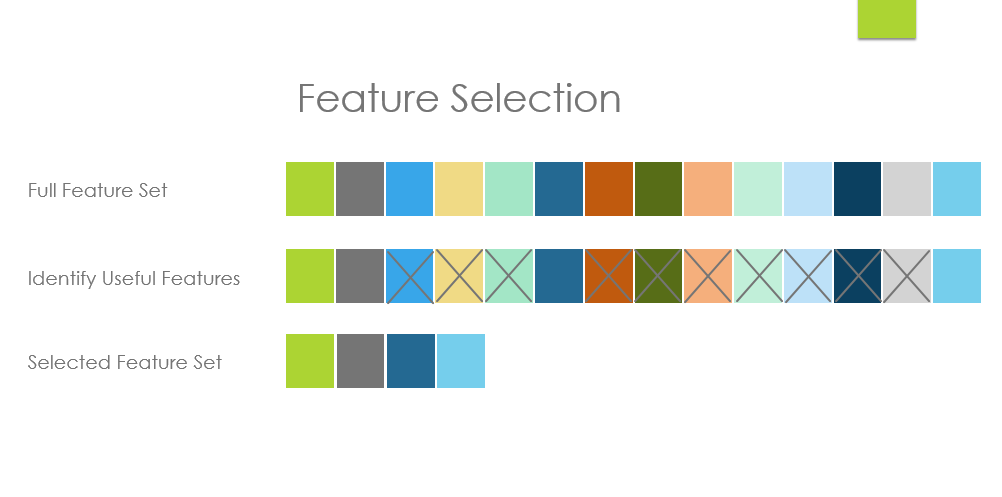
Feature Selection and Feature Extraction in Machine Learning: An Overview | by Mehul Ved | Medium

Feature selection process tries to get most important features that are contributing to decide the label.

Chi Square Test

Chi Square test is a test that tests feature’s independence from class/label and then select ‘k’ features that depend most on class.

Example

Suppose there are some people living in four neighborhoods A, B, C and D and they are labelled as White Collar, or Blue Collar or no Collar

Chi Square test  may determine that 90 people living in neighbourhood A are living by chance and not because they are White collar. Chi Square test depends on probabilities.

Chi Square is calculated by below formula for a feature.

chiformula

Where O values are observed and E are expected.

In the above example, expected values for neighbourhood A for each class can be calculated as

E(A,White Collar) = (150/650) * 349

E(A,Blue Collar) = (150/650) * 151

E(A,No Collar) = (150/650) * 150

After Chi Square has been calculated, its closest value is located in below table for probability in the degree of freedom row.

In the above example for neighbourhood A the chi Square is equal to 2 (rounded off)  and degree of freedom here are (no of rows – 1) x (no of columns – 1) = 6

We get 2.20 in 6th row that is most close to 2, it gives us p = 0.9.

This means there is a 90% chance that deviation between expected and observed is due to chance only.

So we can conclude that labelling doesn’t really depend on neighbourhood A.

On the other hand if p values come to 0.01, it means there is only 1% probability that deviation is due to chance, most of the deviation is due to other factors. In this case we can not really ignore Neighbourhood A in our predictive modelling and it has to be selected.

Animation: JavaScript vs CSS3

Use of internet is increasing day by day. According to a Survey in 2014, 40% of the population of the world is using internet. According to Cisco, in next five years the Global internet traffic is expected to increase thrice and hence it is important to give user a better user experience on the web to be in the competition. Animation is one of the method we can achieve that.

Now the question arises why animation?

Animation or interactivity helps to attract user’s attention, it helps to narrate the product story and yes it is also fun looking at those transitional effects.

“By offloading interpretation of changes to the perceptual system animation allows the user to continue thinking about the task domain, with no need to  shift contexts to the interface domain. By eliminating sudden visual changes, animation lessens the chances the user is surprised.”
Scott e.Hudson and john T.Stasko(1993).

But animation is quite difficult on web in respect to other media, the reason is we have to make it compatible in different browser (The devils IE8 and its predecessors too) and different devices (mobiles, tablets, desktops). Some of the feature like canvas is not yet supported in IE8, iOS doesn’t allow flash, and we can’t use lots of images and because it will reduce the site speed.

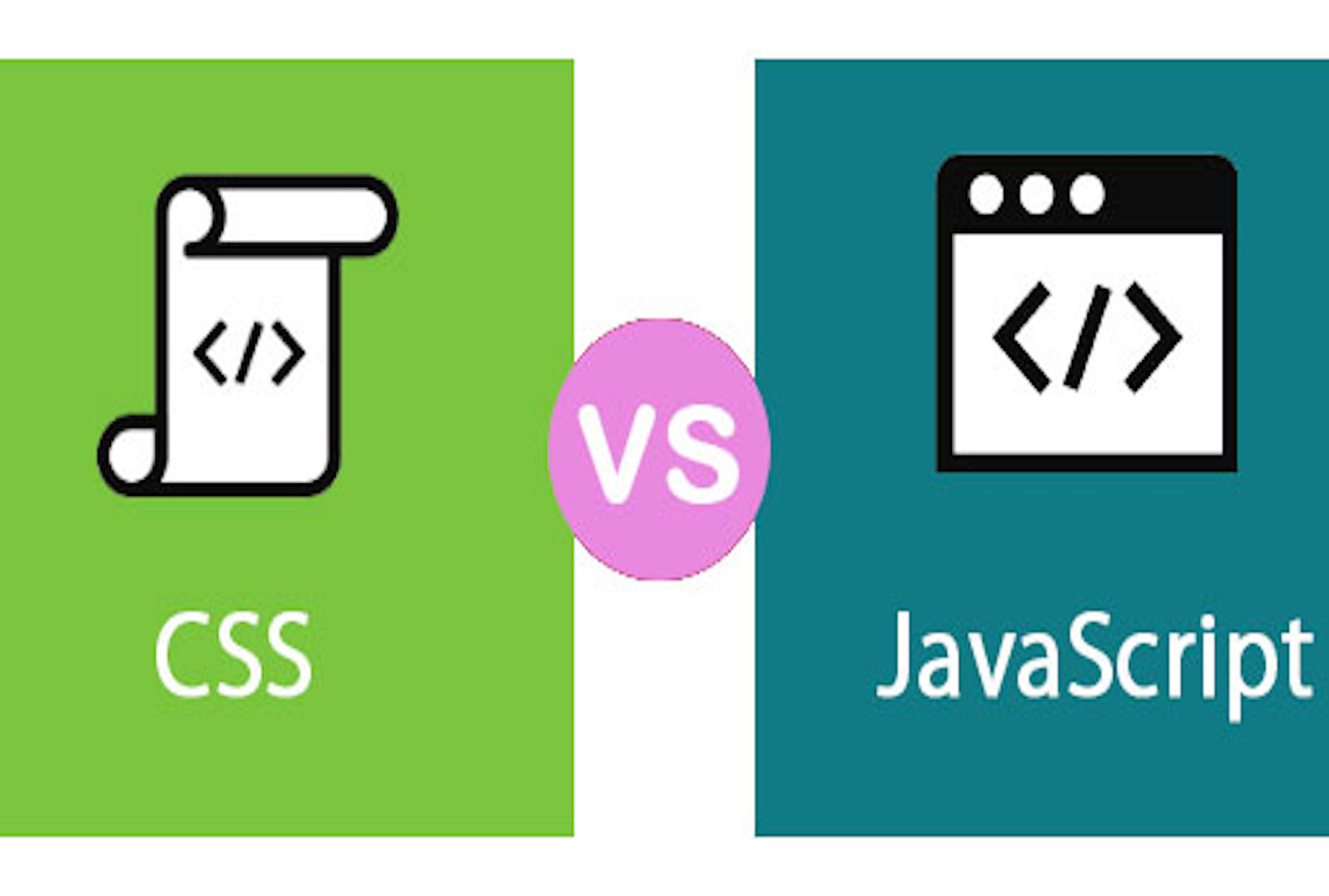
JS and CSS3 are usually two methods of adding animations on the web. Let’s see how we can use them because people are usually confused over their usage in web.

CSS Animations vs Javascript Animations – TA Digital Labs

Animate with CSS3

IN 2007, Webkit introduced animation in CSS, that changed the whole scenario of the web animation.

Below is some CSS that will move an element 150px and 120px in both the X & Y axes in 500ms.

Animate with JavaScript

Writing Javascript is quite difficult. Below is the JavaScript that you would need to write to recreate the CSS transition we discussed earlier.

As you start adding more cases it will become more complex.

If you are using jQuery in your project already, you will likely benefit from sticking with it and using the animate() functions.

10 Best CSS3 and Javascript Animation Libraries | GrayGrids

Both CSS3 and Javascript have their pros and cons. We can code some basic animation either through Javascript or CSS3 but it is important to know which one should be used when:

  1. If we have some simple effects like color changes on hover, changing dimensions of an element, simple fading effects, or combination of these types of simple effects, we can use CSS3.
  2. But if we want more controls over animation like images slider, or calling animation on some custom events, effects on mouse movement, parallax effect etc. we should use Javascript.
  3. Instead of using core javascript we should use javascript framework like jQuery that can ease our task. These days we have  lots of javascript libraries available to ease our animation process. Some of them are-
  1. Tween JS
  2. Jsanim
  3. Animo.js
  4. Move.js
  5. Collie
  6. Minified.js
  7. Rekapi
  8. Snap.svg
  9. Favico
  10. Textillate.js
  11. Firmin
  12. AliceJS
  13. SVG.js
  14. Motio
  15. Anima.js
  16. Velocity.js
  17. Parallax.js

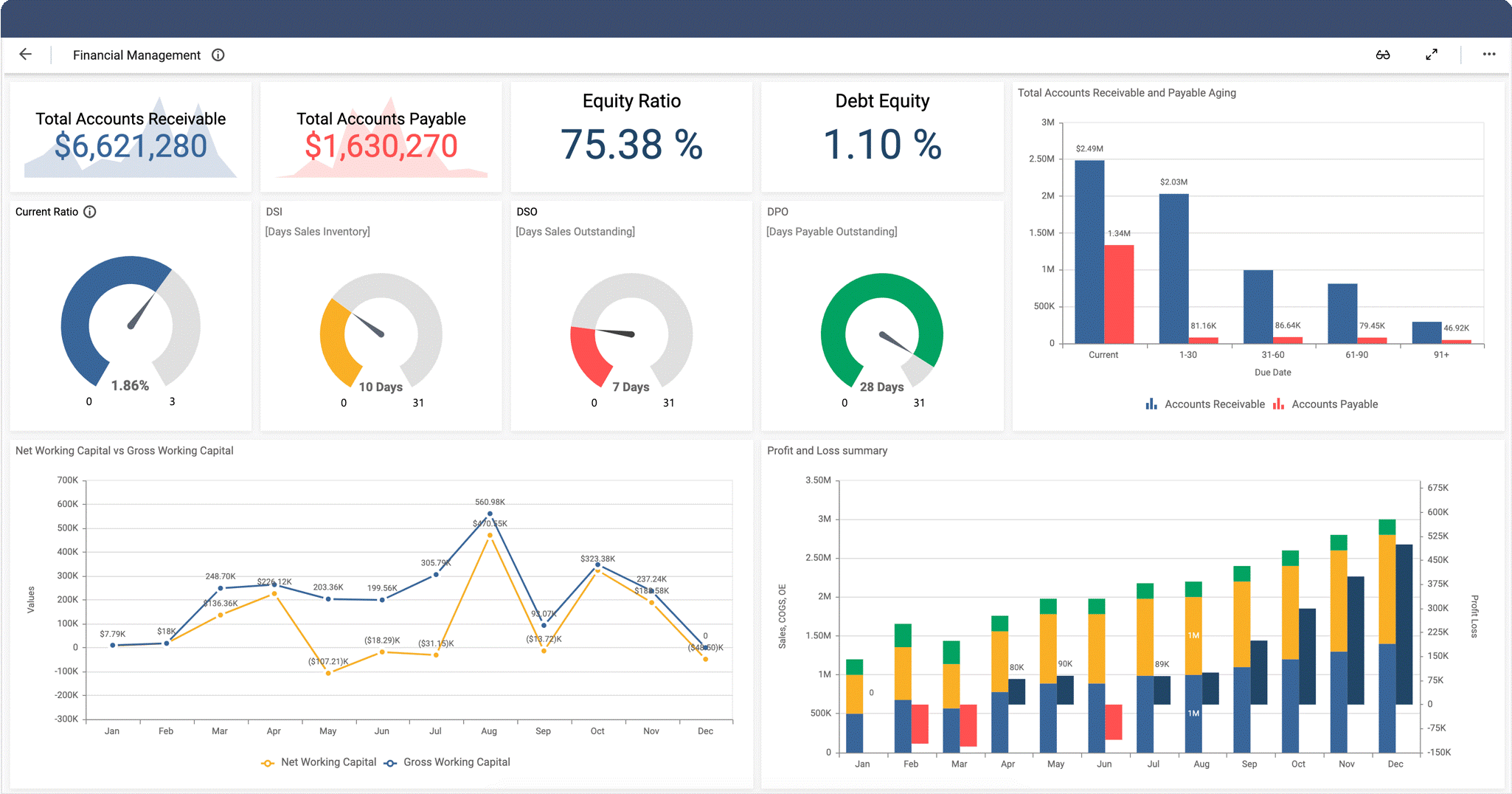
CREATE WONDERS IN A DASHBOARD UI? HERE’S HOW!

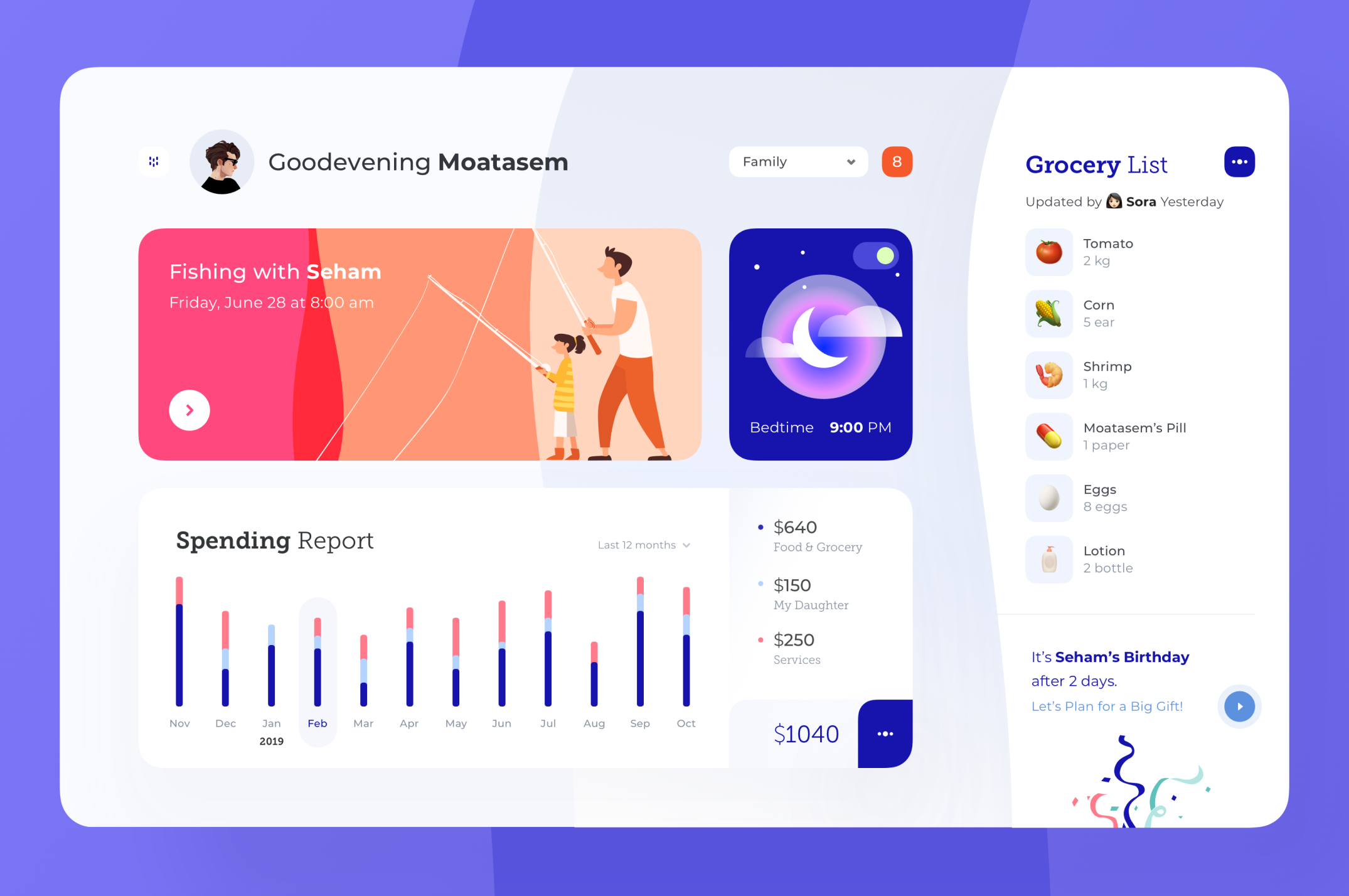
The world that we’re living in today, is almost entirely technological. And it is evolving every day with the wonders of Artificial Intelligence (AI), Business Intelligence, BlockChains (like NFT), etc. In order to make people’s lives easier, these smart technologies use complex algorithms and theories to quickly compute and summarize data. This data is then provided to users in the name of ‘useful information’. But a question that needs to be asked here is that what is the point of this data if the users can’t understand it? And if so, they might not even find it beneficial for themselves or their purpose. Hence, this is one of the most important reasons as to why dashboard design has grown significant over the last few years. 

One of the first things to understand is that as much as UX of the dashboard is important, so is the UI of the dashboard. They are both equally essential. Before jumping into our main motive, let’s take a quick sneak peak into the most prominent features of a great dashboard:

  1. A good dashboard allows its users to interpret, analyse and present the key pointers, or say insights.
  2. What an efficient dashboard do is present the user with useful information that can be put to use. As well as compile a visual representation of the otherwise complex set of data.
  3. The desired dashboard will always be customizable and it generally is quite intuitive. 
  4. As an additional point, they are always organized when it comes to use of space. There might be a lot of data on the dashboard but it won’t seem like a mess that is cluttered all in one little space. Rather it looks neat.

NOW WE’RE AT THE HERE’S HOW SECTION

CONSISTENCY MAKES IT EASY

The dashboard should always be consistent. Considering that the users access the dashboard through different devices that also vary in screen size. It is important that the design looks consistent, whether it’s with respect to the colours, font, style of charts or navigation. The user should not get distracted because of the inconsistency in the dashboard design and so sheer attention should be paid to how the design dashboard looks on multiple screen sizes. The key is to start with smallest screen size and then move up along the way. This way of approaching the design is a golden rule, this helps in creating a visually appealing dashboard, which gives both a great UX and a great UI.

SIGNIFICANT INFORMATION APPEARS FIRST

Let’s talk about the heart of designing a dashboard, ‘content hierarchy’. Although this goal is achieved at the UX stage of designing, but is essentially through visual design that conveys the most important information in the most efficient way. This not only guides the layout but also the design guidelines. A couple of things to note here is that; (a) Centre alignment is the most recommended as found out from the users’ behaviour pattern on the dashboard. They acquire that part of the information in the first place ; (b) Another thing is that 18 pixel font is the maximum to be employed and information should be highlighted through the use of distinctive colours.

COMFORTABLE CUSTOMIZATION

Never use the ‘one size fits all’ approach. There are different users with varying business needs and requirements. Designs should be scalable, so that the user experiences customized dashboard. Now this in turn will empower the users, which is the designers’ ultimate goal. Users should feel that they can adjust their fit in consideration to their individual business requirements. This can be as simple as adding or deleting a column, or even adding a whole new table or sheet. The things to remember here are: (a) Always allow for easy modifications like addition/deletion of modules; (b) Give different yet comfortably usable options for viewing and deleting data separately; (c) And lastly, try using easy drag and drop interaction for the users to experience customizable dashboard design.

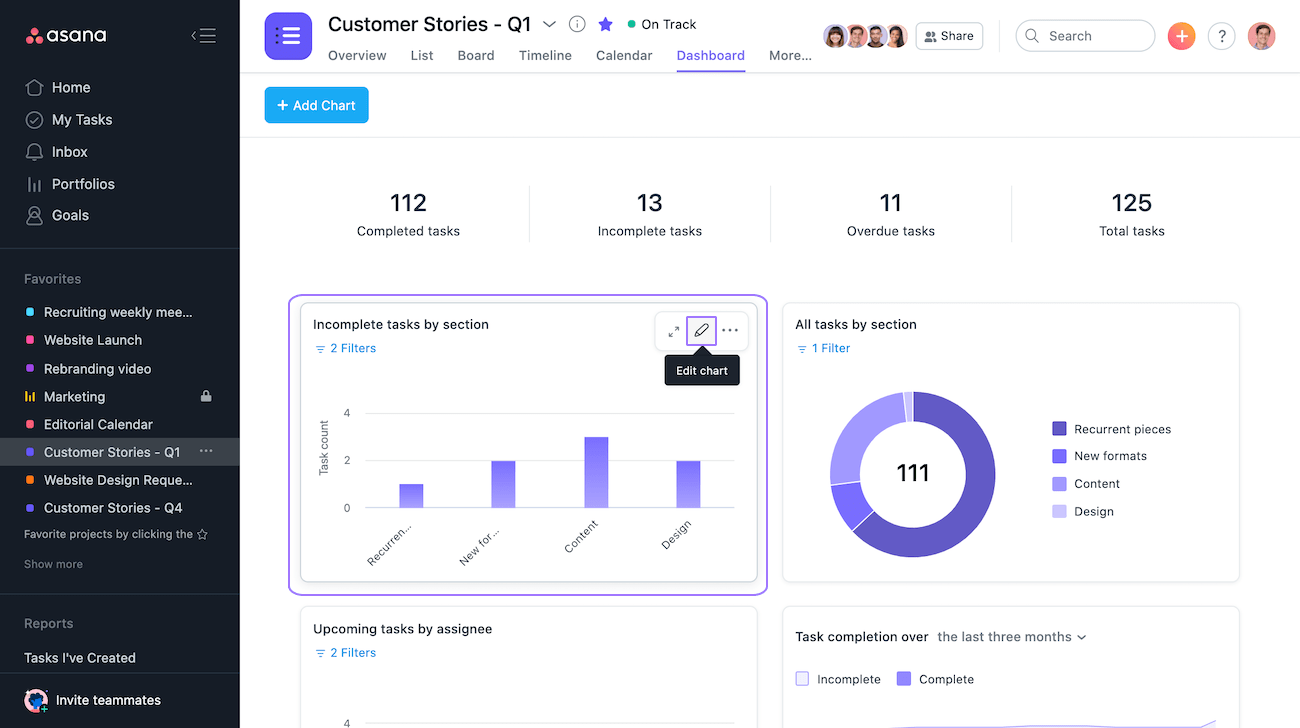
CHARTS? LESS IS MORE!

When it comes to presenting data visually, i.e., via pie charts, bar graphs etc., they should always be put in simpler form. Cluttering the charts with heavy tools and representation techniques only hinders the user from understanding and using the said data. Instead of using 3D graphs and animation, using flat-laid charts and graphs makes it a lot more comfortable for the users. Colour differentiation although, is sheerly appreciated, since it allows the users to understand the separate sets of data clearly. 

ICONS CATCH THE EYES

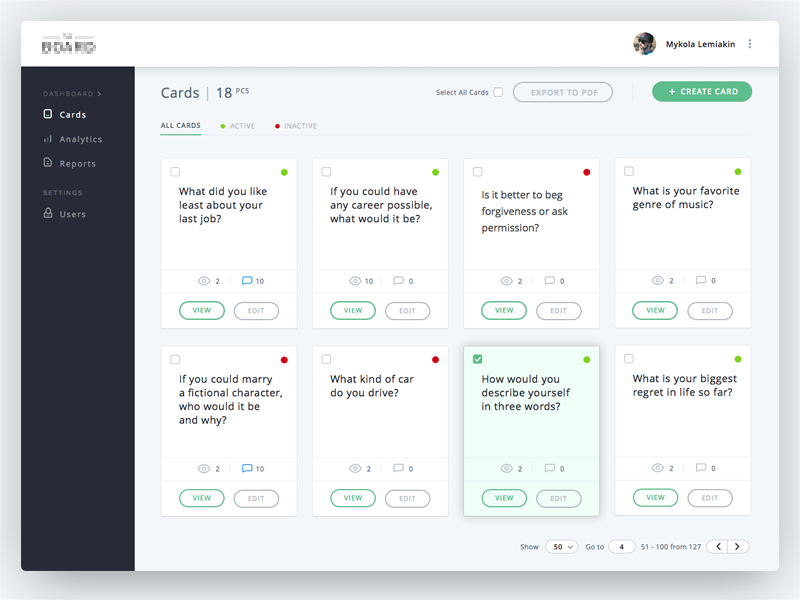
What is generally ignored in the process of designing a dashboard UI is the ‘icons’. The best dashboard designs always include icons that are familiar to the users. For example, the pen/pencil icon is usually the edit tool. Likewise, the trash icon is for the option of deleting anything. This way, the user would have less time wasted in processing what the icon means and would have more utilized time in wrapping up their work. Thus, familiar icons help create great UX and UI.

RIGHT FONT REMAINS IMPORTANT

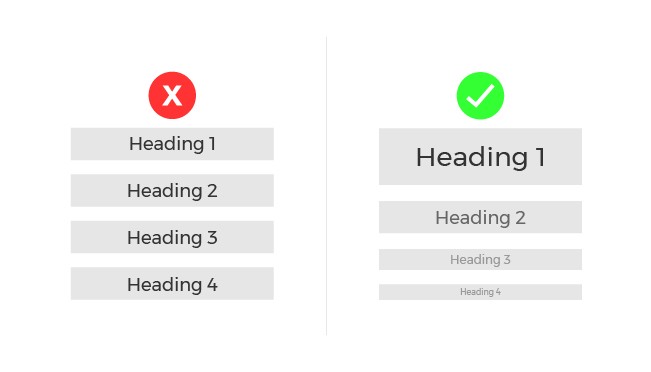
Employing the right style of the font and its size is equally important in both the UX and UI designs. It is advisable that while designing, not more than two fonts shall be employed. This is done in order to maintain a clean dashboard design. Creating a visual hierarchy by employing the inverted pyramid style in all the written content is quite significant. This can be done by putting the most important sets of information in the largest and the not-so-important sets of information in the smaller font, along with a hint of colour differentiation.

FILL COLOURS IN DESIGN AS MUCH AS IN LIVE

The concept of colours is such that, it might seem simple, but it also has a complex side. Different colours signify different things. Just like red colour is usually employed to denote danger and green colour is used to denote ease and agreement. Now, imagine if their use is reversed, won’t it be confusing? Therefore, designers are required to be really mindful whilst working on the colour palette of their designs. Besides, it is best not to go overboard with the colours, even if you’re tempted to do so. A good start would be picking two colours in the initial stage, that too something like contrasting contemporary colours. 

MAKING THE FINAL POINTS

All of this would be worthless if you don’t know your users’ preferences. Whatever the studying concept maybe, if you don’t have the emotional connection with your users and if you don’t know their choices and requirements, then the whole work would just remain pointless. Therefore, besides knowing the tips and right ways of employing the tools to create a great dashboard, you should also know your users. Research, understand, analyse and imply your methodologies and tools. 

Taking your leave with, 

“Graphic design will save the world right after rock and roll does.”

– David Carson

How to measure success of a conversational AI chatbot

Last year when one of our healthcare partners (we refer to our clients as partners) was looking to build a conversational AI chatbot, I was apprehensive about guiding them. I had only worked on the level 2 (out of the 5 levels of conversational AI) type of bots. But this time our partner wanted to build a contextual/consultative AI-powered chatbot assistant.
To Build a Successful Chatbot…. Start with these 5 questions. | by Yogesh Moorjani | Chatbots Magazine

I was concerned about how the bot would understand end users’ problems. What features can we build to make it more humanistic? Would it be successful in replacing human care and compassion? Would it replicate the same emotions of empathy, compassion, and care?

And even if we managed to do everything, how would we know if the conversational AI chatbot is working the way we designed it? How would we define the ‘success’ of our initiative?

My apprehensions became real when I read a Forbes article about chatbots killing customer service with their clumsy conversations and limited learning capabilities. After reading the below paragraph, I realized the problem-

“The AI didn’t always get it, which was frustrating. Even more irritating — the company using the chatbot seemed to shrug the problem off. I detailed my own experience using Skyscanner’s chatbot, which often misunderstood my requests. Some of the companies I mentioned in the column appeared to shrug off my concerns.”

The problem is with organizations/management who choose to look away and see the importance of data analytics in chatbots for healthcare. They think that understanding the users’ behavior, what disappoints them, what makes them happy, is beyond the scope of their work. Because of this mindset, chatbots are still a lost cause.

Is there a solution in sight?

Yes, indeed there is. We’re at a very interesting place where we hold the future of chatbots in our hands. To make chatbots more welcoming and user-friendly, we not only need to make its software side–engineering, UX design, security– more robust. Rather, we should strive to make data analysis a part of the development process– i.e. we must constantly monitor chatbot’s effectiveness and improve features as per users’ needs.

How can we measure a chatbot’s efficiency?

Building a good conversational AI healthcare chatbot is a daunting task. Even after launching it as a service, one can’t be sure of its success. That’s why it’s crucial to measure every interaction with the end users.

There are certain indicators that one can track to see if the chatbot is serving its purpose.

8 Ways to Improve Chatbots and Boost Customer Satisfaction

Botanalytics

Botanalytics - Event / Speaker Platform

If you’re looking for a tool that gives you an overview of the user’s lifecycle, then Botanalytics is for you. It’s a great tool for identifying bottlenecks in the user’s journey. You can deep dive into every conversation (transcripts are available for each conversation) and see where your bot failed to respond.

You can set various goals and categorize chats into conversation paths. This is a great feature as it helps you examine which conversation attained its goal and which didn’t.

For example- if your goal is to make users download your mobile app through the link provided in the chat, then this tool will show you how many conversations ended up in accomplishing that goal.

You can also set conversation paths and check how many conversations were successfully handled by the chatbot.

Grafana

GitHub - grafana/grafana: The open and composable observability and data visualization platform. Visualize metrics, logs, and traces from multiple sources like Prometheus, Loki, Elasticsearch, InfluxDB, Postgres and many more.

Grafana is not a bot-analytics tool. Rather, it’s an open source platform that can be used to monitor applications, websites, and even custom data sources. We integrated it with our platform to use it as a chatbot analytics tool.

One of the advantages of using Grafana is that it’s very easy to customize and you can tweak its dashboard to suit your needs.

If you have a chatbot where there is a lot of data to understand, analyze, and dissect, then you must explore Grafana. Icing on the cake? It’s free. And like I mentioned earlier, highly customizable. You can create dashboards, add panels, change visualizations as per the need of evaluators and stakeholders.

Chatbase

Chatbase : New ChatBot Analytic Tool by Google | by Aydın Fevzi Özçekiç | Chatbots Magazine

Chatbase is a free cloud-based tool that allows you to integrate your bot into the analytics platform. One of the best features of Chatbase is that it helps you both analyze and optimize your bots.

In the analytics part, Chatbase has every possible feature that you can imagine- session flows, creating funnels, the grouping of not-handled messages, chat transcripts, and so on. The UI of the dashboard is quite similar to Google Analytics. So if you’re a GA user, you’ll find it easier to use it.

In the optimization part, Chatbase provides insights to understand your users by tracking how they behave and what works (or not) for them. This is especially helpful when you want to target a specific audience and you want to improve your messaging and promotions according to specific inputs from the analytics tool.

When it comes to building chatbots, including analytics in the strategy is often sidelined. It’s considered an additional responsibility, something that can be easily avoided. However, measuring the performance metrics of a chatbot must be included in the development strategy because it’s the only way to define if your chatbot is working as you imagined it to be.

I hope you learn to integrate these tools and use analytics to enhance the experience of the chatbot for your end-user. In case you begin to feel that it’s a sponsored post, let me tell you it’s not. All these recommendations are personal and I have learned through trial and error. I hope you find the best tool suited to your needs.

Making Web Accessible

Web should be accessible to a vast majority of people including those with different kind of disabilities. It is not only about those who can’t see or can’t hear or any other specific category of disability. We can make positive impact on the lives of people by making web accessible to them.

Primarily there are 4 main types of disabilities that highly affect the use of web.

How to Incorporate Accessibility in Your Website

1. Vision

People with low vision or those who are completely blind mostly rely on using the screen readers and keyboard. Specially designed keyboards are available in the market which blind users can easily use. In earlier days people with vision impairment had to use external bulky screen readers attached to their computers but these days browser extension like Chromevox and Fangs are available.

Websites should be designed and coded in a way that these should be easily recognizable for the screen readers. For example: putting appropriate alt tags in images help screen readers to read the image loud to blind users so that they get to know what that image is all about.

Also, there are huge number of people in the world who are color blind. This term may be confusing for some people. It doesn’t mean that the person is blind or can not see anything. Color blind people can see the colors but they see them differently. Green and red are the highly affected colors.

As per the survey results, 8% of men and 0.5% of women are color blind. You may wonder why this huge gender based difference. The reason why men are highly affected than woman by color blindness is: X-Chromosomes. These X-Chromosomes are responsible for sending color signals to the human brain. Men are born with one X-Chromosome whereas women are privileged to be born with two X-chromosomes and in case one is defective then the other one comes handy for women. Nature has offered extra privileges to women. :D.

Some of the famous celebrities to name with color blindness are- Mark Zuckerberg, Bill Clinton, Keanu Reeves, Prince William Windsor.

There are many ways in which we can make web accessible for color blind people. For example: include color names and show example, please see the image “Color Names

Don’t rely on color coding only, instead try to use a combination of color texture or pattern. Please see the image “Colors and Patterns”.

You can also proof to color blindness in Photoshop and Illustrator while designing. Please see the image “Color Proof”.

Web Accessibility: By making your website accessible, you automatically increase the target audience. - DEV Community

2. Hearing

Making web accessible for deaf and hearing impaired people is relatively easy. The best solution at the moment is the use of closed captioning whenever a sound appears. This technique is widely used in television where a text is displayed whenever a sound appears.

Use of signs and symbols is also a very useful technique for this category of people. Captioning the videos on web pages also ensures that search engine will more accurately index them leading to more people finding your content. There are certain tools that can help create captioning to our videos like Overstream.net that allows to caption videos hosted on other sites like YouTube.

3. Motor

The requirement for motor impaired web users is generally overlooked or poorly implemented. The main reason for motor impairment is stroke, Parkinson’s Disease, a broken arm/wrist/palm. To help this category of people we should always ensure to increase the width and height of the clickable area. This can greatly help the motor impaired people who can use the mouse but with limited mobility.

Some of the other easier ways are to include images for text links. Clicking images is far more easier than to click text links. Assign CSS command display:block to each link in the vertical list. This way full width is clickable instead of just the link. Use of padding on left and right of the text links can also increase the clickable area. Assigning a background color to focused links is also a very useful technique we can do to help the keyboard-only user tabbing through the web.

4. Cognitive

This type covers the difficulty with understanding, inability to focus and distractibility. We should follow universal design principles to make websites accessible to individuals with cognitive disabilities therefore making it more accessible to everyone. Mainly there are 3 principles that come handy to design the web for cognitive disabled people as explained below:

  1. Content of the website should be simple. We should refrain from using complicated language, technical terms, legal jargon, and professional buzzwords. If it is necessary to display complex information we must use a glossary of sections targeting different people.
  2. Placement, styling and consistency of navigation links. We should make sure all the navigation links are at the same location and are not scattered on different places. It becomes very uneasy for cognitively impaired people to try to locate what they are looking for.
  3. Using illustrations, icons and other visual cues to communicate the key idea. Images can be very effective in communicating the complex information otherwise this information may be lost in the middle of a long in-depth content.

Making Web Accessible for All | Humble Bits

There are also impairments that are directly not associated with the users. Environmental factors also have huge effect on how people use and interact with the web. Some of them are mentioned below:

  • Low bandwidth, intermittent internet connection
  • Bright light, rain or other weather conditions
  • Noisy environments
  • Only option to browse the web on mobile devices

There are different legal acts in effect in different countries to give equality right to disabled people and help them use the web without discrimination. Section 508 requires US federal agencies to ensure that employees and members of public with disabilities should have equal opportunity to access government information.

Target.com: In February 2006 a student of University of California-Berkley, Bruce Sexton in conjunction with “National Federation for Blind” sued Target.com because it’s website was inaccessible for the blind. This lawsuit was used as a spotlight to many corporate websites that don’t play well. Target.com had to settle the case with $6 million.

Key to better communication skills: READING

One evidence of a flatter world today is the rise of geographically distributed teams. This isn’t something new, distributed teams have been around since ages and have given us a lot of Open Source software. Imagine not having Linux, Firefox, Apache, VLC, … ad infinitum.Distributed teams have also aided the software outsourcing industry to prosper.However, today even companies who do not outsource their work have their team members distributed across the globe.

So, what do you think is the number one skill required to work in a distributed team?

9 Effective Communication Skills

Effective communication.

Effective communication requires us to have a good hold on the various modes of communication – Reading, Writing, Listening and Speaking.

And I believe if we read more, we can improve our writing, listening and even speaking.

I’m sure all of us do a lot of work-related reading. However, I find that reading books not directly related to our work is also required.

Apart from just vocabulary and grammar, reading books on various topics improves one’s general knowledge, imagination, and creativity among other things. And these benefits can also help bridge gaps in distributed teams, between team members from different countries.

Getting into the habit of reading is not easy; given how we are always catching up with our fast-paced and hectic lives.

However, I believe that like any habit, the habit of reading books can be picked up with just a little bit of effort. By the way, to understand more about habits, please read – The Power of Habit by Charles Duhigg.

As per Charles Duhigg, more than 80% of what we do in a day is driven by habit, which means that most of the times we are on auto-pilot, except when we are exerting ourselves mentally or physically in order to pick up a new habit.

Really, an interesting book, I highly recommended it!

Enough meandering, let’s see how we can read more.

How to start reading more?

How to Perform a Close Reading: Elementary School - Learning Essentials

One of the ways to build a habit of reading books is to set aside some time in your day. It could be anything as per your convenience – 20 mins, 30 mins, or 1 hour.

I recommend scheduling it in your calendar so that it’s harder to skip it.

Remember, you need to make reading a daily habit.

What kind of books should I read?

Find a book on a topic that interests you. It could be fiction or nonfiction. I would recommend reading both. There are many writing genres, pick any.

What if I find the book boring?

Google says there are an estimated 145 million books in the world today. So if you are not enjoying a book, even after reading forty – fifty pages, leave it and move to another book.

And if you’re enjoying it, stick with it to the end.

Blogs vs Books?

ARE BLOGS BETTER THAN BOOKS? | Sanstonz

Blogs are great, some blogs are just awesome. However, usually, blogs are about a specific topic, whereas books usually contain various related topics.

Blogs are typically written by one person, whereas a book usually has a team behind it. Apart from the author, there are reviewers, editors, people who want to make sure that the book should be good enough to sell so that it can make money.

How to find good books?

  1. Hunt for bestselling books under various topics on Amazon or GoodReads
  2. Ask friends, family, and colleagues

Fluid spaces in design organisations

Back in 2010, when we were a handful of designers working in an apartment, there was just one spare wall where we had mounted a huge whiteboard and named it “The divine wall of ideas”. Whenever we were stuck, we thronged to that wall and drained all our shitty thoughts. And after hours of brainstorming, it would bless us with some great ideas.As our team grew, more designers joined our team. With more people in our tribe, our hearts grew but our rooms shrank. Our “divine wall of ideas” was no more divine. When all of us were together, we felt like chickens in a coop. Everyone blocked each other’s view and we heard frequent elbow-knocks and sounds of ouch and oops when someone tried to reach the wall.Why it's important to have fluid spaces in a design organization | by Quovantis | UX Planet

We began to realize that limited space was causing hindrance to our creativity and lowering our productivity. We wanted everyone to participate in our design thinking sessions, wanted them to see user personas, snapshots of the existing UI, and sketches of proposed solutions so that they could critique it. But we realized that our paraphernalia needs physical space. One can’t just do all of this effectively without any board to draw/sketch and without any space for people to sit/stand.

And this isn’t some fancy thought that we made up ourselves. It’s backed by research and many design leaders agree that fluid design spaces improve creativity. Scott Witthoft, author of Make Space: How to Set the Stage for Creative Collaboration shared in an interview with HBR–

“When you’re generating ideas, it becomes really important to be very fluid and have the ability to move in and out of different concepts and different people’s voices as an idea’s coming to fruition. So creating a space that allows movement, allows active posture to really help collaboration move more smoothly, and can forward creativity by allowing people to participate when they want, step out when they don’t, and allow leadership to move throughout the group.”

So, we did something big. We moved our entire office to a bigger, better place. Well, there were other reasons too which aided our decision. But, you could say that it was mainly because we realized that we can’t trade our happiness with anything. If people aren’t happy with their workplace, then they’re probably dragging their feet to work. We couldn’t bear that thought!

It’s been almost a year now that we’re in our ‘new’ office. We used this opportunity to rethink how we wanted to make the best use of the available space. We have made conscious choices in making design thinking sessions more productive and interactive. Most of it was inspired by companies like Apple who have made commendable efforts in popularizing the idea of such fluid spaces to espouse creativity. We owe it to them.

So, let me take you around our office then-

Elevated tables and chairs

Collaborative & Social Space Design After COVID-19 | Steelcase

This is my favorite spot. It especially works during mid-day design sessions when people are caught up with deadlines and it’s hard to get their attention. The high-tables, as we call them, allow them to take a break and stand together close in the upright position. It’s a space where people can get comfortable, but not too much.

You can spread your ideas, sketches or prototypes on the table and open the discussion for everyone. When you have this setting, it makes people aware that you are open to critique and they feel more inclined to share their honest feedback.

Also, these tables are located at places where people have high chances to bump into each other while walking around. So, imagine you’re sitting at the high table, working on some design and a fellow designer walks past you carrying her coffee mug. She stops by and appreciates the color gradient you’ve used, asks you to teach her how good gradients are made and also tips you on two new Sketch shortcuts to speed up your execution. Isn’t that a great conversation?

Whiteboards and Glassboards

Glass Whiteboards and Glass Dry Erase Boards by Clarus | Whiteboard wall, Glass dry erase, Glass dry erase board

At Quovantis, we value simplicity in the processes that can help us get our ideas out quickly. So despite all the digital tools that are out there, we still are a huge fan of whiteboards and glass boards where we can draw, doodle, write and paste Post-its quickly- a fast and efficient way to communicate.

So when an idea bubble appears, we quickly gather on the nearest wall and put it up for people to see and critique. And then we let it stay there so that everyone can see it, reference it, and can go back and share their thoughts on the pile. The visibility and accessibility are very important in every design session.

Meeting rooms

Our meeting rooms are a manifestation of the fantasy world we admire. They were named after voting democratically within the organization. One wall of each meeting room has the famous quote of that fictional hero/place. For instance, Diagon Alley and Shire have quotes about Hogwarts and the mystical land of Narnia.

From the design point of view, we’ve kept the visibility of meeting rooms neither too protective nor too revealing. It’s such that people who are inside the room don’t get distracted by what’s going outside. And, people who are outside can steal a glance and get to know if the meeting room is available or occupied. Such visual cues help people in overcoming mental blocks to rush into a room and start a discussion.

Abundant open space

We all have this natural tendency to crumble to negativity when things don’t go as we plan. And that’s why we have tried to keep the office interior spacious, happy and uplifting. The empty space allows us to make use of what Scott refers to as “impromptu pop-up team spaces”

There is one corner near the bookshelf and plenty of space near the couch to sit and have a discussion if one is bored with their sitting space. One can even walk around with some hilarious quotes and illustrations around. I remember, one of our teammates, told me about how he found creative inspiration in the office cafeteria.

Pro Growth Hacking Strategies for Startups

In A Small Group, - Icon Meeting Png , Free Transparent Clipart - ClipartKey

So as to scale a business, it’s indispensable to advertise the products viably. There are numerous difficulties along the path; in any case, adaptability is conceivable with these best development hacking methodologies.

To connect with an enormous crowd, companies need to embrace distinctive development hacking procedures. Although some among these procedures have just been around for a couple of years, in any case, they demonstrate to assume a crucial job in the growth of cutting edge organisations. Numerous business visionaries have made them a necessary piece of scaling their business since they saw productive outcomes, and it’s about time you do so as well.

Entrepreneurs look for different growth hacks and need to develop rapidly by collecting as many clients as possible to expand their income. Growth Hacking has been proven as a practical and trusted approach for a sure shot success of budding startups. Yet, only a few businesses are able to execute these growth hacks in an ideal manner. This article gives you an insight into the 12 best growth hacking strategies which have been proven successful for various ventures. Let’s take a look:

1. A/B Testing

Multiple Hypothesis Testing/Comparisons Problem: How Adding More Variations To Your AB Test Will Impact Your Results?


A/B Testing draws its way wherever there is traffic. No matter what it is; a blog title, email headline, popup CTA, or a million different things. There’s an A/B test that can assist you with streamlining that crusade. Regardless of whether it’s A/B testing your landing page content or seeing which email headlines resound with perusers, experimentation can reveal handy solutions that lead to tremendous outcomes.

2. Add hidden form fields to your lead-generation forms

Defining & Understanding Hidden Form Fields Plus the 5 Main Benefits

The more you think about your leads, the better you can cater and support them in your promoting down the line. One technique used to catch much more data about your leads is to pass a parameter in a URL which can be acknowledged by a hidden field on one of your forms. Utilising this technique, you can catch much more data about your leads without frustrating them out with various forms that you as of now gathering data from. Regular employments of this can incorporate area, crusade, and intrigue classification.

3. Conduct Giveaways

Running next level Facebook giveaways with Recart

Free giveaways can be a significant approach to promote your business. By showcasing your product to customers, you can rapidly and effectively create familiarity with your image, and it may spur them to return for more. The second time a client appears, their buy won’t be free. A giveaway is much similar to other advertising activities – it’s a method to create more exposure for your merchandise and ventures. Like it or not, all promoting costs money. Regardless of whether it’s an announcement on the interstate or a flag promotion on a site, you should be ready to spend on the off chance that you need to draw attention to your brand. In view of that, a giveaway can really be a less expensive approach to promote than other marketing strategies.

4. Create a referral program

Premium Vector | Illustration referral marketing

Referral advertising permits your users to turn into your organisation’s pioneers by referring your business to their loved ones. While referral advertising requires marketing endeavours and the motivation of remunerations to get users to participate, there are numerous advantages of referral programs, and you ought to undoubtedly be utilising this technique to grow your audience base.

5. Go Freemium

How to Translate Freemium to Any Business Model

In the event that you own an application or software business, you should seriously mull over building up a freemium model. This works incredible for applications of numerous sorts. Offer something for nothing. It probably won’t do a lot; however, it’ll give people a taste of your product. When they see that they can profit by your product, they’ll need a greater amount of it. A few people will never change over into paid clients. However, you need to concentrate on the onboarding procedure. It’s simpler to hold clients than to acquire them. That is the reason the freemium model works so well. You, as of now, have leads on the line. You simply need to persuade them that they need the paid adaptation of your product.

6. Guest Posting

The Complete Guide To Guest Posting (2019) - WebKu

Guest Posting administrations help to create new links. There are various guest posting services accessible on the web. Practically each one of them has their own sites going. These specialist organisations make it simpler to get abundant natural leads through the content by giving a connect to your site, which eventually helps in boosting up your SERP rankings. Visitor/Guest blogging is an incredible growth development hack which bloggers will in general use to increase natural site traffic and connecting with various crowds by improving their SEO rankings.

7. Collaborate with other brands

Five Tips For Collaborating With Other Brands

Talking about the customer base, brand collaborations are the uncelebrated protagonists of the growth hacking world. In the event that you have a user base of around 100,000 individuals and another brand in the related field has about 80,000 users, you can cooperate to contact 180,000 customers. You’re not searching for an immediate contender. Rather, center around finding a business that supplements your own. For example, possibly you sell handcrafted soaps. You could join forces with a business that sells body scrubs or shampoos. Contact forthcoming accomplices with an email or call. Come prepared with thoughts for approaches to mixing your users in natural manners, for example, by tagging each other via Instagram or Facebook, offering product packages that consolidate your products, or in any event, something as simple as cross-posting on each others’ websites.

8. Host and Attend Events

BigMarker

A genuine Growth Hacker doesn’t dispose of any potential roads that may lead them towards an objective. This incorporates going offline to energise development. On the off chance that you have niche-related events in your vicinity — or even away — think about visiting. You can go as a visitor or save a corner for your business. Meeting individuals up close and personal, shaking their hands, and getting some information about their needs can make you a more alluring arrangement than a nondescript organisation. Proceed, gain from the best, create associations, find out about your industry, and get some motivation. You don’t have anything to lose. Uncovering your business on pertinent business occasions and meetings will permit you to make connections with minimum exertion.

9. Start a Blog

Blog SEO Tips - Pierre Zarokian

Clients can’t cherish you on the off chance that they can’t discover you. If you haven’t started with a blog yet, get started with it ASAP! Blogging is one of the most economical, least complicated approaches to get before a group of people and connect with influencers. The present shopper goes directly to the Internet for information before beginning the purchasing procedure before they ever think about conversing with a human. Don’t dispatch an excellent blog with half a month’s worths of awesome content and afterwards disregard to compose another word.

10. Use Urgency and FOMO

8 Best FOMO Marketing Examples to Boost Your Conversions

Urgency and FOMO which is the abbreviation for the “Fear Of Missing Out” are two great psychological tools for amplifying your growth. FOMO exploits an individuals’ mental idea of not being deprived of something great. What’s more, it’s a conceivable piece of the reasons why utilising an invite-only framework for your organisation or new element discharges is so successful.

Identified with that is Urgency, which is likewise attached to human brain science. Essentially, we feel constrained to act if a circumstance is dire. So in case you’re opening beta access to your new help temporarily, it turns out to be all the more engaging potential clients. Rolling out offers like a limited-time deal or rapidly expiring discounts make people want to act fast and shop thinking they might miss a great deal. Utilise Email Marketing:

11. Hire a growth hacker

How to Hire a Growth Hacker That Will Actually Get the Job Done

This is by far the best and one of the most straightforward growth hacking strategy: Hire a Growth Hacker. A growth hacker knows exactly what techniques to utilise to take your company to the top. Employing a professional implies you’ll get somebody proficient at showcasing your organisation as well as deciphering the information that outcomes from those endeavours. Regardless of whether you have an advertising plan set up, you could profit by employing a growth hacker.

CONCLUSION

Growth Hacking is, in any case, more effective than traditional marketing. In today’s cut-throat competition, Growth hacking is the only way through which a new business can ride on the high tide and grow exponentially. Revolve all your strategies around taking care of issues, developing your audience and improving your image. Incredible products and services positively help sell themselves; however, you have to get that growth plan in motion. Enlist client evangelists, join forces with similar organisations, make content with wild relinquish, set yourself apart with world-class client assistance. With such vast numbers of basic approaches to dispatch growth, there has never been a more energising time to perceive what your business can genuinely do.

error: Content is protected !!