5 partnering trends for global systems integrators in 2020 that will benefit enterprise customers

Why Dell Boomi Is the Leading Integration Partner for Software Vendors | Boomi

Businesses have been doing some form of partnering for decades, but as companies seek to modernize and turn their organizations into digital enterprises, partnering has become more important than ever. With all the different technologies and systems that have to integrate, digital transformation can’t happen unless all parties are in sync and cooperating with one another.

In today’s business environment, true partnering means that all parties in the relationship are tightly aligned to the core. We’ve all read something similar to that before – it’s nearly cliché, but in this case it’s a real and absolutely critical distinction. When they step into a room, nobody should care if the person wears a badge from the global systems integrator (GSI), technology partner or the enterprise customer — they should all be on the same page working towards the same goal: delighting customers.

Partnering starts with the executive suites of all the parties fully on board and headed in the same strategic direction. It then continues through every part of the organization, where business partners work on joint operating plans, joint marketing campaigns and joint software and app development projects.

Here are five important trends we see as GSIs, technology partners and enterprise customers look to grow their businesses in the 2020s.

System Integrator | EzInsights

1. Deeper relationships. As these deeper business relationships develop in the 2020s, tech partners, GSIs and enterprise customers will operate in unison, seamlessly sharing information and jointly developing solutions designed to solve end-user customer issues. For example, in an IDC FutureScape report focused on Australia, the research group predicts that by 2022, empathy among brands and for customers will drive ecosystem collaboration and co-innovation among partners and competitors, which will drive 20 percent of the collective growth in customer lifetime value.

Strategic partners will develop a more cooperative relationship at all stages of the customer lifecycle, from recognizing an opportunity, to sales, developing a solution, delivering that solution, and finally, managing the long-term customer relationship. On the back-end, there will be more joint training between partners in areas such as sales, including becoming conversant in the products and services that each partner delivers.

Enterprise customers benefit from these deeper partnerships by having everyone working together as a single entity throughout the entire end-user customer lifecycle.

Technology Stocks | Sramana Mitra

2. Vertical offerings. Once key strategic partnerships are established, the partner teams can jointly develop full-featured solutions tailored to vertical industries. If gaps appear, a GSI must demonstrate that they can assemble the right people and get them working together on a project. For example, at a medical services provider, the GSI may have a strong relationship with the CIO or CTO, but it’s the niche medical technology partner that has worked closely with the chief medical officer and all the nurse and physician teams over the years. Enterprise customers look for GSIs that can identity the right players and get them in a room where they can talk through the challenges and meet the customer’s goals.

How to Make Data-Driven Decisions Fast - Heap

3. Data-driven decisions. Enterprise customers will use data analytics to make decisions on the GSIs and technology companies with which to partner. These global businesses are looking for the technology processes and solutions that deliver efficiencies and the most profitability. They also look for industry-specific customer success stories in which the GSIs and technology partners have a proven track record working together and can show clear metrics to back up their use cases.

How to Maximize the Potential of Marketing Agility

4. Agility. It’s likely that many enterprise customers already have preferred technology partners in areas such as cloud services, ERP, CRM, and IT security. GSIs must be agile enough to pivot quickly, responding to customer preferences and established relationships. They must demonstrate that they can match the right partner for each specific project and be ready to respond to an enterprise customer’s mission critical issues – whether those issues are already identified or lurking around the corner. Partnering allows the GSI the agility and speed to respond to the customer, in many cases, faster than through M&A activity or developing a new capability in-house.

Challenges in Implementing a Continuous Monitoring Plan - Delta Risk

5. Continuous monitoring. The GSI must be on top of all of the new features and upgrades that its technology partners develop. An enterprise that works with a GSI shouldn’t have to keep up with all of the tech upgrade cycles, and should never worry about missing out on important new capabilities. The integrator will understand the new features and benefits coming from tech partners, and also have unique insight into the enterprise customer’s environment so it can make informed recommendations as to whether an upgrade to a new release makes good business sense.

Partnering trends deliver business benefits

With the deeper integration between GSIs, technology partners and enterprise customers, important global businesses will reduce costs, make their customers more efficient and successfully transform their organizations, becoming digital enterprises that can compete and thrive in the 2020s and beyond.

How is NDA a Crucial Part of Mobile App Development Process

NDA: How to Use an NDA for App Development Outsourcing?

Suppose you have a brilliant idea, one that you think would revolutionize the whole mobile app industry. Now, of course, you will get a sense of urgency when it comes to protecting the idea from getting copied, right? Well, you are not alone. Almost all the entrepreneurs who enter the mobile app industry with a revolutionary idea do so only after they have ensured that their idea will not be copied or stolen or modified by those with whom they share it. This need to ensure that the idea is protected is what calls in the need of bringing a Non-Disclosure Agreement for mobile app into the picture. But believe it or not, NDA for mobile app development is one of the most controversial topics in the mobile app industry. While on one side there are entrepreneurs who believe that they have a revolutionary idea that needs to be protected, on the other, there are agencies which, having seen it all, have come to an understanding that no idea is actually a one-of-a-kind idea, and so the presence of NDA only restricts them.

In this article, we will be looking into the whole NDA protection for mobile app conundrum in much detail, by giving you an answer to how to protect your app idea.

But, let us start with the basics first.

What is NDA for Mobile App Development

Non Disclosure Agreement Document With Signature And Stamp Stock Vector - Illustration of access, information: 156786939

Non Disclosure Agreement or NDA for app development is a contractual agreement that states both the parties involved – Client and the Mobile App Development Agency will work to safeguard the confidentiality of the app idea and no matter what the situation is, they will not disclose the idea to any third party.

Now that we are done with the NDA for Mobile App Development definition, the next thing to look at is why do businesses even ask the mobile app development agencies for an NDA?

Is it because they want to be doubly sure that their idea is protected till indefinite time or is it because there are trust issues in the picture.

Let’s find out.

Why do Businesses Ask Mobile App Development Agencies for NDA

Even in the present day time when there is rarely an idea that has never been heard before, we get client queries almost on a daily basis asking for an NDA before they get on the introductory call. The reason behind this emphasis on NDA for app development can be many but the ones that we have analyzed over the development of more than 700+ apps are –

Follow up on a Tradition

Free Signing Contract Cliparts, Download Free Signing Contract Cliparts png images, Free ClipArts on Clipart Library

In the service industry, it has become the norm to ask for the signing of NDA before any mobile app idea is shared and the trend has gotten so instilled in the whole industry that it has become a part of every mobile application development process guide.

And now, without even taking a moment back to analyze if it is even required, the mobile app industry has made NDA a quotient of an agency’s transparent work culture. But the fact that there is nothing specifically wrong in giving the promise of safeguarding the app idea is something that has led to us carrying forward the tradition.

The Distrust on Mushrooming App Development Agencies

The present-day truth of the mobile app development industry is that there are a number of mobile app development agencies in the market, all competing to close the biggest and most innovative deals coming their way.

In an ode to winning the race, small-level mobile app development agencies tend to suggest the idea, which should have been protected, to clients in order to appear well sound – something which gets protected when the idea is safeguarded with an NDA.

Now that we have seen the reason why businesses insist on the signing of NDA for app idea protection, let us now delve into the contents of the NDA to see exactly what is there in the document which would give businesses or entrepreneurs the guarantee that their idea is protected.

Clauses Included in a Mobile App Development Centric NDA

1.NDA Timeframe

There should be a clause highlighting the timeline of safeguarding the idea. Generally, the NDA is signed for the time that ranges from the day when the idea is shared to when the mobile app development work starts.

2.Information that has to be Protected

What is information security? Definition, principles, and jobs | CSO Online

In this section, the information or data which has to safeguarded by the agency is mentioned in black and white.

3.Duty and Obligation of Parties to NDA

Business people discussing a contract - Free Stock Photos | Life of Pix

This section will talk about the obligations and duties that the parties will have to cover to ensure that the app idea is safeguarded. This is the place where the actionable elements of how to protect your app idea are mentioned. It can have elements like the mode of communication that will be followed by the agency, the tools that they are supposed to use for development, etc.

4.Consequences of NDA Breach

All you need to know about non-disclosure agreements - iPleaders

The after-effects of NDA breach of app idea protection are clearly specified in the agreement. Usually, the consequences are in the sense of monetary terms but at times the grieving party can seek an injunction as well, thus holding the right to make a legal case if the agreement is breached.

5.Return of the Information

This clause makes it necessary for the agency to return or destroy the information or data that they have gathered from the client once the introductory call does not turn into a closed deal.

Type of NDA in App Development

NDA for Software Development: Free Templates & Tips on How to Sign It

There are three types of NDA that are usually signed between the entrepreneurs and their mobile app development agencies –

Unilateral NDA:

It involves two parties – one disclosing the information and one receiving it. It restricts the receiving party from disclosing information to anyone else.

Bilateral NDA:

Both the involved parties sign the NDA declaring that they both won’t reveal the information to the world.

Multilateral NDA:

The agreement involves three or more parties where all the involved parties are abided by law to not reveal the content of the information shared with them.

Now that we have seen the basics of the NDA concept, it is time to hit upon the questions that the mobile app industry faces with almost every deal – Should NDA be signed or should it be passed?

Without releasing the dragon of debate, let us simplify it by giving you the situations where NDA makes the most sense and where they don’t.

When Should You Insist on the Mobile App Development Agency to Sign an NDA

A. When you have a Proprietary Information

If you or your organization represent some concrete proprietary data which may be eligible for patent or copyright, it becomes mandatory for you to get an NDA signed.

B. When the contractor or freelancer is not against the idea

If the agency or freelancer you are getting associated with is not against the idea of signing an NDA, go ahead and sign it, but ensure that the agreement terms are too restrictive for either one of you.

C. If the project has to remain a secret

If there is a situation where the whole project has to remain hidden from the public eye, insist on getting an NDA signed. Doing this will prevent the agency from placing your project in its portfolio.

D. There is a need to maintain short-term secrecy

There might be instances that you would need your idea to be protected for short-term or a fixed period of time, in cases like these, it is best to get an NDA signed so that the information remains protected till the short-term passes.

When Should You Not Ask the Mobile App Development Agency to Sign an NDA

A. When all you have is an idea

I have an idea, now what? How to make your website/app idea a reality

It is not uncommon for businesses to believe that their idea is something that will create a dent in the industry. But the truth remains, that rarely happens. So, until you have practical, statistical reasons to believe that the idea is indeed pioneering, don’t insist on an NDA.

B. When the Project is Short Termed

3 short strategies for long-term projects

Having an NDA signed makes sense when you are working on a long-term project or on some revolutionary feature, but if your project is short-term and something that the world has already seen, choose to stay away from NDA signing.

C. When your dream agency is against the idea

What is Your Dream? | SUCCESS

As entrepreneurs who are willing to get their idea transformed into a business, it is not uncommon for them to get fixated on one agency who they feel would do it best justice. If you too have an agency of this sort insight and they are not willing to sign an NDA, take a few steps back and analyze if it’s really that important in the first place.

D. The information that you are trying to protect is public information

How to access information from a public body | ICO

Let us explain this through an example. Suppose your next big idea is a take on the Uber app. Now, the industry has already seen a lot of those, so much so that it has become public information or an idea that the masses have already seen. In a situation like this, it is best to stay away from the formality called NDA.

After all said and done, the one innocent question remains. Let us attend it now.

How long does a Mobile App Development Centric NDA last

Don't Sign a Non-Disclosure Agreement Just to Buy Software – Roompact

There is no direct answer to it, it varies from one client requirement to another. Usually, the NDA lasts until the project and some months after that. Also, every once in a while there are instances where the clients insist on signing an NDA for an indefinite period of time, but it is not recommended on the grounds of plain unjustification.

So, ideally, you should add the NDA tenure to just a few months after the app is developed or till the day of it getting published in the stores.

With this, you now know everything about NDA – What it is – clauses and types, why do entrepreneurs like you generally emphasize on having it signed, and the situations where they make the most sense and situations where they don’t, the time has now to keep our promise and give you the Sample NDA for Mobile App development that we use here Anteelo factory.

Our team has prepared an NDA template for app development that you are free to use, you can download it here.

To make the whole decision of to-do or not-to-do a lot easier for you, our team of business development executives has also created an FAQ that answers some of the most common questions associated with the Non-Disclosure Agreement.

Don’t go digital unless you can guarantee continuous delivery.

Continuous integration | ThoughtWorks

Want to succeed in a digital world? You’re going to need agility, agility, and more agility – and that means building your business on an agile infrastructure and using agile software methodologies that include continuous delivery (CD), a technique designed to infuse users’ input and experience.

What is CI/CD?

CD extends the automated testing used in continuous integration (CI) all the way into production environments, where feedback can be captured directly from users. It relies on an automated infrastructure that provides on-demand capacity and API-based integration.

CI is typically implemented as a pipeline where committed code runs through automated unit and integration tests.

CD allows code that passes CI tests to be deployed directly into production. It’s important to note that there’s a deliberate process break so decisions can be made about which version — and hence which features — will be deployed into production. This differs from continuous deployment, where code that passes tests is automatically deployed into production without human intervention.

Large enterprises, particularly those that are regulated, tend to prefer continuous delivery over continuous deployment because the act of deciding which versions to promote into production aligns well with segregation of duties, change management practices, and a general sense of being in control. Continuous deployment is more favoured by consumer internet companies seeking to optimize the speed of their feedback loop regarding new features.

DevOps needs continuous delivery

Continuous Integration | Continuous Delivery | What is DevOps | CI CD

CI pipelines can be built entirely by development teams. But this can lead to the phenomenon known as deploy to shelf, where engineers complete multiple sprints without their code ever being deployed into production, thus denying themselves of the user feedback that’s essential to proper agile development. If developers do two-week sprints, and operations does quarterly releases (13 weeks), then six or seven sprints will stack up before getting any user feedback.

By extending a CI pipeline into production, it becomes a CD pipeline and crosses the traditional divide between Dev and Ops, and the decisions about which versions get deployed to production happen at the border. The pipeline extension may rely on the same tools as CI, such as Jenkins, or on tools specifically built for CD, such as Spinnaker.

Continuous delivery needs automated infrastructure

How to Build a CD Pipeline – BMC Software | Blogs

CD pipelines use automation that spans dev-test-production, so they need an automated, cloud-enabled infrastructure. There are two important cloud characteristics that come into play:

  1. Capacity on demand – Integration tests are, by their very nature, transient. An environment is spun up to verify something works or fails, and then its work is done. Such activity naturally lends itself to parallelisation, where it’s possible to get quick feedback and queuing as needed, so the maximum number of tests can be run on a minimum-resource footprint.
  2. API-based consumption – APIs connect pipelines to infrastructure. Without them, there are more process breaks, slower flows through pipelines and an overall lack of automation. So-called ticket clouds, where a request for resources becomes a queued ticket requiring action by a human operator, quickly get overwhelmed by the throughput of even a relatively trivial CD pipeline.

Is CD worth the effort?

CD Interest Rate Calculator - How Much Is Your CD Worth

As organizations advance their DevOps initiatives and consider CD, they may ask whether it provides the necessary resources to ensure that the code being developed is ready to deploy. Does it slow development times because of the need to ensure code is deployable? And is the customer feedback on deployed software worth the effort?

We believe organizations need CD capabilities to be truly agile so, yes, CD is worth the effort. Digital business demands agility at three levels — how the business responds to customer needs, how software is built to meet those needs, and how infrastructure is made available to run that software. CD pipelines let modern organisations connect customer needs to their infrastructure, and that infrastructure must be automated to provide sufficient flow through the CD pipeline.

Is programming required for a Data Science career?

AWS's Web-based IDE for ML Development: SageMaker Studio

This is a common dilemma faced by folks who are beginning their careers. What should young data scientists focus on — understanding the nuances of algorithms or faster application of them using the tools? Some of the veterans see this as an “analytics vs technology” question. However, this article agrees to disagree with this concept. We will soon discover the truth as we progress through the article. How should you build a career in data science?

Analytics evolved from a shy goose, a decade back, to an assertive elephant. The tools of the past are irrelevant now. Some of the tools lost market share, their demise worthy of case studies in B-schools. However, if we are to predict its future or build a career in this field, there are some significant lessons it offers.

The Journey of Analytics

What is Customer Journey Analytics? – Pointillist

A decade back, analytics primarily was relegated to generating risk scorecards and designing campaigns. Analytical companies were built around these services.

Their teams would typically work on SAS, use statistical models, and the output will be some sort of score -risk, propensity, churn etc. Its primary role was to support business functions. Banks used various models to understand customer risk, churn etc. Retailers were active in their campaigns in the early days of adoption patterns.

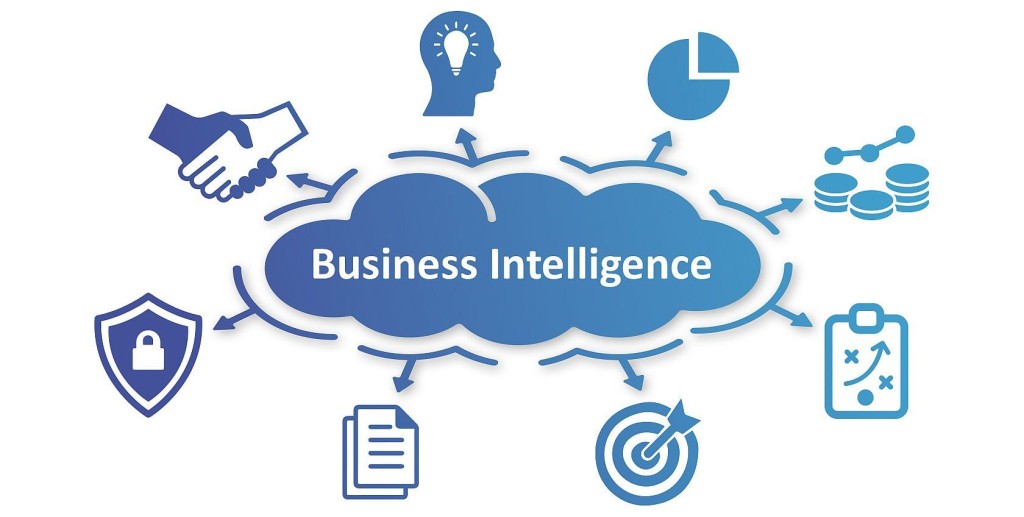
And then “Business Intelligence” happened. What we saw was a plethora of BI tools addressing various needs of the business. The focus was primarily in various ways of efficient visualizations. Cognos, Business Objects, etc. were the rulers of the day.

How Business Intelligence can Fuel Digital Transformation | MindForest - Managing Change

But the real change to the nature of Analytics happened with the advent of Big Data. So, what changed with Big data? Was the data not collected at this scale, earlier? What is so “big” about big data? The answer lies more in the underlying hardware and software that allows us to make sense of big data. While data (structured and unstructured) existed for some time before this, the tools to comb through the big data weren’t ready.

Now, in its new role, analytics is no more just about algorithmic complexity. It needs the ability to address the scale. Businesses wanted to understand the “marketed value” of this newfound big data. This is where analytics started courting programming. One might have the best models, but they are of no use unless you trim and extract clean data out of zillions of GBs of data.

This also coincided with the advent of SaaS (Software as a service) and PaaS (Platform as a service). This made computing power more and more affordable.

Forms of Cloud computing. SaaS, Software as a Service; PaaS, Platform... | Download Scientific Diagram

By now, there is an abundance of data clubbed with economical and viable computing resources to process that data. The natural question was – What can be done with this huge data? Can we perform real-time analytics? Can the algorithmic learning be automated? Can we build models to imitate human logic? That’s where Machine Learning and Artificial Intelligence started becoming more relevant.

Machine Learning: definition, types and practical applications - Iberdrola

What then is machine learning? Well, to each his own. In its more restrictive definition, it limits itself to situations where there is some level of feedback-based learning. But again, the consensus here is to include most forms of analytical techniques into it.

While the traditional analytics need a basic level of expertise in statistics, you can perform most of your advanced NLP, Computer vision etc. without any knowledge of their details. This is made possible by the ML APIs of Amazon/Google. For example, a 10th grader can run facial recognition on a few images, with little or no knowledge of Analytics. Some of the veteran’s question if this is real analytics. Whether you agree with them or not, it is here to stay.

The Need for Programming

Why need of programing language?

Imagine a scenario where your statistical model output needs to be integrated with ERP systems, to enable the line manager to consume the output, or even better, to interact with it. Or a scenario where the inputs given to your optimization model change in real-time, and model reruns. As we see more and more business scenarios, it is becoming increasingly evident that embedded analytical solutions are the way forward. the way analytical solutions interact with the larger ecosystem is getting the spotlight. This is where the programming comes into the picture.

Guide on Using Predictive Analytics for Mobile Apps

How to Use Mobile Analytics to Increase Your App Downloads

Imagine yourself as Stephen Strange a.k.a as Doctor Strange for a minute. Suppose it to be your alternate ego, different from your primary Mobile App entrepreneur personality. Imagine being given the power to know what is going to happen even before it does. The power to know the bad things – when your users would abandon the app, what would drive them to leave your mobile app for some other app and the power to know the opportunity that is waiting to be explored – which device and operating system version will they visit your app from and even how many times in a day would they visit your app. Sounds like a modern-day mobile app business-centric scene from Marvel Franchise, doesn’t it? But what if we tell you that you have the ability to estimate what is going to happen next in your app and how your users will react, all before it does? Believe it or not, estimating your app users’ moves before they make them is possible. Imagine what this knowledge would get you – Lower Churn Rate, Skyrocketing User Engagement, and a Revenue Scale flying off the roof. The superpower that will get you all these and so many other benefits – the one we are going to looking into in much detail today – is Predictive Analytics.

Being one of the four most insight offering Analytics forms – Descriptive Analytics, Diagnostic Analytics, Predictive Analytics, and Prescriptive Analysis – Predictive Analytics is one that gets you the information on how users are going to act within the app.

The ultimate aim of incorporating Predictive Analytics in a mobile app is simple: Know what is going to happen and prevent/boost the action.

Let us look at what Predictive Analytics is before we move on to the mobile app development stages in which it can be incorporated, the benefits it would bring \+-


hs,ingto the mobile app-centered businesses, and some use cases on how the analytics can be added to different industries.

Predictive Analytics Definition

What is Predictive Analytics? How does it work? Examples & Benefits

The Predictive Analytics Definition goes somewhere like this – The Analytics form tells what is going to happen. The estimation form analyzes data and statistics to create a pattern which then helps in doing the guesswork on what is going to happen next.

With predictive analytics definition now attended to, it is now time to look at the impact of the insightful analytics technique in the two phases of Mobile App Journey – Mobile App Development and Post Mobile App Launch.

Starting with mobile app development first.

How Does Predictive Analytics Expedite Mobile Application Development

12 Mobile App Development Trends to Look For in 2021

Mobile app developers generate a huge amount of data specific to mobile app testing and quality check, running of a build, and a number of other daily tasks; these data mainly dictates short and long-term project success. Mainly, mobile app developers who have integrated Predictive Analytics in their development process gather data and then create a predictive analytics framework to find out patterns that are hidden in the many unstructured and structured data sets.

The end result: The mobile app developers get an algorithm using which they can forecast problems that the development cycle might face.

While this is the high level explanation of how Predictive Analytics in Mobile App Development Process works, let us now give you a practical insight by showing how we use Predictive Analytics in our mobile app development cycle to make the whole process a lot faster and quality ensured.

How Anteelo Uses Predictive Analytics For Mobile App Development

1. Predictive Planning

5 Project-Planning Tips to Help You Meet Your Goals

Mobile app developers and project managers very often underestimate the time, resources, and money it would require to deliver code. They might run into same delivery issues time after time, especially when they work on similar projects.

We use predictive analytics to identify the repetitive mistakes that result in buggy codes. We also factor the number of code lines delivered by the developers and time that it took them to write them earlier. It gives us the information to predict whether or not we would be able to meet the scheduled delivery date.

2. Predictive Analytics DevOps

Has the Time Come for IT Predictive Analytics? - DevOps.com

The merger of mobile app development and operations – DevOps is known to expedite the mobile app delivery time. When the production environment data flows back to the developers, predictive analytics can help identify which coding approach is causing bad user experience in the market.

We analyze the data specific to the usage and failure pattern of the mobile app to then predict which features or user movement are going to make the app crash, then we fix the issue in future releases.

3. Predictive Testing

Instead of testing every combination of the user actions and interfaces with other systems, we use predictive analytics to find the path that users commonly take and identify the stage where the app is crashing. We also, at times, use algorithms to measure commonalities between all user execution flow and identify and focus on overlap which indicates common execution paths.

Now that we have looked at how Predictive Analytics in Mobile App Development works, it is time to look at the benefits that the analytic framework has to offer to the mobile app centered businesses and entrepreneurs.

How to Use Predictive Analytics for Bettering Your Mobile App Experience

There are a number of ways businesses can leverage predictive analytics for bettering the overall experience their mobile app leaves.

From giving them better insights on the research front, in terms of which geographical region should they promote their app more in to identifying the devices they should get the apps designed according to,  there are a number of ways Predictive Analytics come in handy for the future centered mobile app businesses.

1. For Greater User Retention

The Mobile Marketer's Guide to Mastering User Retention | CleverTap

Predictive Analytics helps in bettering the user retention number to a huge extent. By giving the app admin a clear statistical based picture of the problem areas of the mobile app, giving them the time to get it corrected before it becomes a persistent issue making app users abandon the app.

By giving the businesses an exact picture of how users are interacting with their app and the ways they wish to interact with the app, Predictive Analytics help entrepreneurs correct issues and amplify the features that are attracting the users.

2. For Personalized Marketing

Personalized Marketing: 5 Simple Rules for Better Mobile Marketing Personalization | CleverTap

Personalized Marketing is the biggest sign of how companies use analytics to lure customers to use their app.

Ever wonder how Spotify gives you recommended song playlist or how Amazon shows you Customer who bought this also bought list? It is all a result of predictive analytics. By implementing it in your mobile app, you will be able to give your users a more personalized listing and messages, thus making the whole experience a lot more customized for the end users.

3. For Identifying which Screen’s Content Need to be Changed

Predictive Analytics help identify which element of the app is turning down the users or which screen are they using before leaving the app, this information helps mobile app entrepreneurs immensely as they get face to face with the problem area. And now, instead of changing the whole application, they are only concentrated on improving a particular segment/ section.

4. For Identifying the Time to Make Device Switch

When employed right, Predictive Analytics in mobile apps gives entrepreneurs insight into which device and in fact which operating system their users are getting active on to use the app. This information is a goldmine for the tech team as they can then get the app designed according to the specificity of that specific application.

5. For Making Their Notification Game Better

Predictive Analytics helps businesses identify which notification message is causing what reaction and if there is a difference between varying time and content. This information helps marketers plan their notification push in a way that it gets a maximum positive outcome.

By categorizing the mobile app users in segments like those who are interacting most with the app, those who are most likely to abandon the app, and those who have simply made your mobile app the case of install and forget, Predictive Analytics help mobile app marketers with a platform where they know how to segregate their push notifications and between what people.

With this, we have now looked at the contributing role that Predictive Analytics plays in the mobile app development industry, both from the end of the mobile app development agency and the mobile app centered business, it is now time to look at some use cases with respect to how you can add the analytics form in your mobile app, across industries.

Predictive Analytics Use Cases in the Real World

While there are a number of Predictive Analytics examples around us, let us look at those areas that are more prone to give instant high returns when incorporated with Predictive Analytics.

1. Predictive Analytics in Healthcare

3 Trends That Will Influence Healthcare as Staff Return to Work | HealthTech Magazine

The reason this is one of the prominent Healthcare Trends in 2019 in beyond is that it has expanded itself from its once prominent role of being a personalized healthcare enabler.

Earlier used only to help send a personalized recommendation to the patients in terms of health and care considerations that they would have to make, it is now being incorporated in the healthcare industry for three crucial requirements – For risk estimation, Geo-mapping, and for planning out the what-if scenarios in terms of both surgery and patient inflow in the hospital.

The prospect that Predictive Analytics in Healthcare comes with is one that promises mass transformation of a complete industry.

2. Predictive Analytics in eCommerce

How Ecommerce Stores Can Care About Customers During the Pandemic

When we talk about Predictive Analytics examples, it is important to have a discussion without the mention of the eCommerce industry. The analytics not just help users by giving them listings related to ‘Customers who bought this also bought’ but also in showing them ads of offers that have arrived on the products that they were looking to buy earlier or have in their shopping cart.

The benefit of keeping the users hooked to the website by giving them offers and discounts on the products that they actually wish to purchase and at the same time helping them decide what to buy next are the two factors that have drawn eCommerce giants like Amazon, eBay etc. integrate Predictive Analytics in their website and mobile apps.

3. Predictive Analytics in On-demand

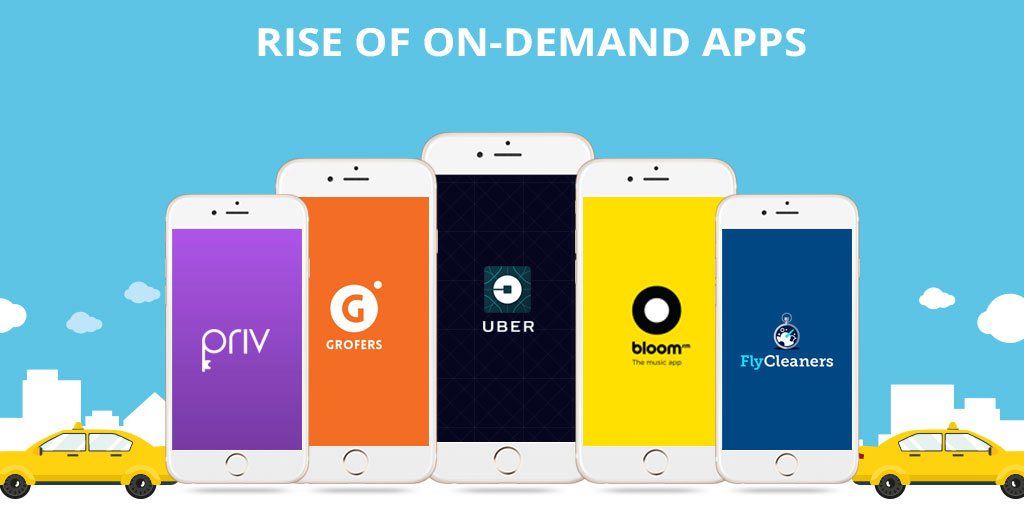
The rise of on-demand mobile apps - Fullestop Blogs

In the on-demand economy specific to transport and commutation, predictive analytics come in very handy in terms of estimating the areas that are going to ask for maximum fleet demand, the price that users are most likely to pay for a tip, the stage at which they are cancelling the ride, etc.

Apart from this, it also helps in estimating the accident scenario in terms of drivers who are most likely to rash drives, the geographical area that is most prone to accident, etc.

The on-demand fleet economy has a lot to take advantage of from the predictive analytics algorithms. The industry-wide realization has led to brands like Uber and Didi Chuxing apply Predictive Analytics and Machine Learning in the business model.

4. Predictive Analytics in Enterprises

Reasons why most enterprises haven't embraced the cloud

The what would happen next information that Predictive Analytics offers to the company’s business team comes in as a golden opportunity for enterprises who are struggling in their CRM domain and also in the HR area.

Predictive Analytics can give insight into the stage at which a customer is most likely to take their business elsewhere and the performance-based analysis of employees, giving the HRs an insight into whether or not the employee should be kept associated.

By researching on the skills that are most demanded by the industry, predictive analytics and enterprise mobility can together up the employees’ skills to a huge extent.

Now that we have seen all – Impact of Predictive Analytics in Mobile App economy (an impact that both mobile app development company and the mobile app businesses face) along with the real world use cases, it is now time to bring the guide to an end by giving you an insight into the Predictive Analytics tools that offer the most calculated inferences.

Predictive Analytics Tools

While a quick search on the internet will get you a great list of predictive analytics tools, here are the ones that we rely on to help our partnered entrepreneurs get a better hang on where their app business is headed –

Ionic1-flurry-analytics - Ionic MarketplaceLocalytics to MySQL in minutes | AloomaAmplitude SDK Reviews, Pricing, Alternatives | DiscoverSdkUrban Airship Push Notifications | The Couchbase Blogsap logo transparent - sap leonardo logo PNG image with transparent background | TOPpng

This brings to an official end to our 10 Minutes guide to Predictive Analytics in Mobile Apps. If you need more information on how to integrate predictive analytics into your mobile app and reap the benefits of low churn rate and minimize the app abandonment instances, get in touch with our team of Predictive Analysis Experts, today!

Model Factory in the age of AI

Competing in the Age of AI

AI has become the pillar of growth for companies when it comes to maintaining relevance as well as an edge over the competition. What’s more, AI based models have become the new revenue drivers for companies looking to capitalize on data as a competitive advantage. The rise in algorithmically driven successes can be attributed primarily to enhancements on the hardware side. Big data tools, and an infrastructure based on both on-premise and cloud services, have paved the way for this fully evolved AI ML ecosystem.

According to a study, AI is the next digital frontier and organizations that leverage models have a 7.5% profit margin advantage over their peers. With AI models becoming the key pillar for building valuable IP and revenue, Anteelo shows the way with a new approach to model management.

With more research being plowed into tweaking neural networks, businesses face a bunch of tricky questions-how profitable it is to go full ML? Is the available compute infrastructure sufficient enough to take the leap? Can the deployed model adjust to the changing grounds and business requirements?

From training personnel to acquiring tools, business leaders are also grappling with critical questions related to model management — model validity in the face of changing business realities. Models lose validity over time as market realities change, new contingencies emerge, and new variables come into the picture. Hence all models need to be revamped and refreshed regularly to ensure they remain relevant. However, the refresh process is often manual and possesses a lot of scope for improvement.

Anteelo employs machine learning algorithms to develop analytics solutions for its customers. Our solutions range from providing prediction frameworks for online retailers in the US to cutting costs for manufacturers of thermal insulation materials. We are embracing a factory approach to building AI models.

Need For A Move to a Factory Approach

The Factory of the Future

There are multiple reasons models needs to move to a factory approach. Setting up models for the first time is a highly ad hoc process which is over-dependent on the skill of the data scientist building the model. The process is also highly susceptible to human biases and is very labor intensive. Model refreshes, on the other hand, are reactive and end up following a blind process, and remain labor intensive.

The term ML model refers to the model artefact that is created by the training process. The training data must contain the correct answer, which is known as a target or target attribute.
The learning algorithm finds patterns in the training data that maps the input data attributes to the target (the answer to be predicted), and it outputs an ML model that captures these patterns. A model can have many dependencies and to store all the components to make sure all features available both offline and online for deployment, all the information is stored in a central repository.

The new set up for a model factory approach should start with a strong clarity about the business requirements and environment. When building the model for the first time, the bounds for the model should be clearly defined, and the best model identified. If necessary, an ensemble of multiple models should be used. A good model can be identified basis multiple criteria, such as quality metrics, cumulative gains, heat maps, bootstrapping methods and other techniques.

The model refresh process should go through the following steps:

  • Define frequency of refresh, as well as exception conditions under which an out-of-turn refresh must be done
  • Define when the refresh will occur – is it when the current scenarios repeat, or when new scenarios emerge
  • Automate the refresh process, with clear bounds of the process defined. Data collection, splitting the dataset into training and validation samples, running the models, and validating and analyzing them for accuracy, are all steps than can be automated.

Importance of the AI-human Interface

The ultimate goal of any AI research is to derive insights about the business. Highly accurate AI models are usually harder for a human (especially a non-data scientist) to interpret, so the right model which balances accuracy vs. interpretability should be deployed. Since the eventual value of a model lies in its usage by business teams to meet targets or achieve goals, human review and understanding of models is essential. The model factory is intended to save human time in refreshing models through automation. This human time can in turn be used to analyze and derive the right insights from the mode results.

Future Direction

Traditional data storage and analytic tools can no longer provide the agility and flexibility required to deliver relevant business insights. An AIML based factory model approach augmented within human intelligence can help organizations overcome maintain competitiveness and relevance. Organizations seeking transition to an AIML based model factory setup can get an idea of how to scale by looking at Anteelo’ s approach.

Common issues while using Azure’s next-generation firewall

Getting the most out of your next-generation firewall | Network World

Recently I had to stand up a Next Generation Firewall (NGF) in an Azure Subscription as part of a Minimum Viable Product (MVP). This was a Palo Alto NGF with a number of templates that can help with the implementation.

I had to alter the template so the Application Gateway was not deployed. The client had decided on a standard External Load Balancer (ELB) so the additional features of an Application Gateway were not required. I then updated the parameters in the JSON file and deployed via an AzureDevOps Pipeline, and with a few run-throughs in my test subscription, everything was successfully deployed.

That’s fine, but after going through the configuration I realized the public IPs (PIPs) deployed as part of the template were “Basic” rather than “Standard.” When you deploy an Azure Load Balancer, there needs to be parity with any device PIPs you are balancing against. So, the PIPs were deleted and recreated as “Standard.” Likewise, the Internal Load Balancer (ILB) needed this too.

I had a PowerShell script from when I had stood up load balancers in the past and I modified this to keep everything repeatable. There would be two NGFs in two regions – 4 NGFs in total and two external load-balancers and two internal load-balancers.

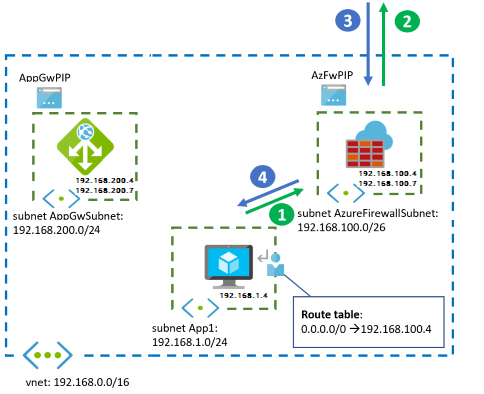
A diagram from one region is shown below:

Firewall and Application Gateway for virtual networks - Azure Example Scenarios | Microsoft Docs

With all the load balancers in place, we should be able to pass traffic, right? Actually, no. Traffic didn’t seem to be passing.  An investigation revealed several gotchas.

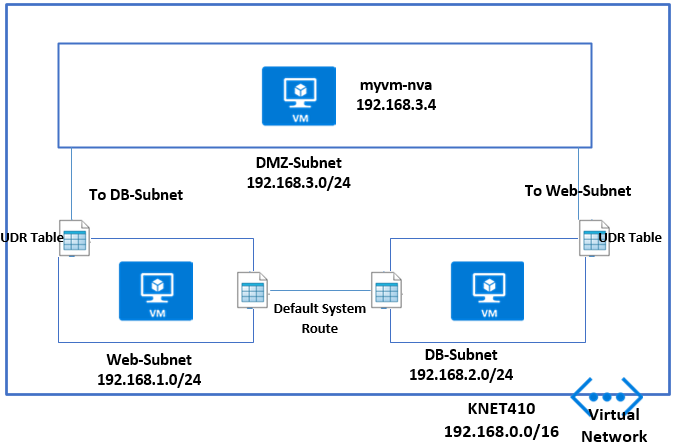
Gotcha 1.  This wasn’t really a gotcha because I knew some Route Tables with User Defined Routing (UDR) would need to be set up. An example UDR on an internal subnet might be:

User Defined Route (UDR) – MyKloud

0.0.0.0/0 to Virtual Appliance pointing at the Private ILB IP Address. Also on the DMZ In subnet – where the Palo Alto Untrusted NIC sits, a UDR might be 0.0.0.0/0 to “Internet.” You should also have routes coming back the other way to the vNets. And, internally you can continue to allow Route Propagation if Express Route is in the mix, but on the Firewall Subnets, this should be disabled. Keep things tight and secure on those subnets.

But still no traffic after the Route Tables were configured.

Gotcha 2. The Palo Alto firewalls have a GUI ping utility in the user interface. Unfortunately, in the most current version of the Palo Alto Firewall OS (9 at the time of writing) the ping doesn’t work properly. This is because the firewall Interfaces are set to Dynamic Host Configuration Protocol (DHCP). I believe, as Azure controls and passes out the IPs to the Interfaces Static, DHCP is not required.

The way I decided to test things with this MVP, which is using a hub-and-spoke architecture, was to stand up a VM on a Non-Production Internal Spoke vNet.

Gotcha 3.  With all my UDRs set up with the load balancers and an internal VM trying to browse the internet, things are still not working. I now call a Palo Alto architect for input and learn the configuration on the firewalls is fine but there’s something not right with the load balancers.

At this point I was tempted to go down the Outbound Rules configuration route at the Azure CLI. I had used this before when splitting UDP and TCP Traffic to different PIPs on a Standard Load Balancer.

But I decided to take a step back and to start going through the load balancer configuration. I noticed that on my Health Probe I had set it to HTTP 80 as I had used this previously.

Health probe set to http 80

I changed it from HTTP 80 to TCP 80 in the Protocol box to see if it made a difference. I did this on both internal and external load balancers.

Hey, presto. Web Traffic started passing. The Health Probe hadn’t liked HTTP as the protocol as it was looking for a file and path.

Ok, well and good. I revisited the Azure Architecture Guide from Palo Alto and also discussed with a Palo Alto architect.

They mentioned SSH – Port 22 for health probes. I changed that accordingly to see if things still worked – and they did.

Port 22 for health probes

Finding the culprit

So, the health probe was the culprit — as was I for re-using PowerShell from a previous configuration. Even then, I’m not sure my eye would have picked up HTTP 80 vs TCP 80 the first time round. The health probe couldn’t access HTTP 80 Path / so it basically stopped all traffic, whereas TCP 80 doesn’t look for a path. Now we are ready to switch the Route Table UDRs to point Production Spoke vNets to the NGF.

To sum up the three gotchas:

  1. Configure your Route Tables and UDRs.
  2. Don’t use Ping to test with Azure Load Balancers
  3. Don’t use HTTP 80 for your Health Probe to NGFs.

Hopefully this will help circumvent some problems configuring load balancers with your NGFs when you are standing up an MVP – whatever flavour of NGF is used.

Key Skills You should know: Successful Mobile App Developers

How Much Does It Costs to Hire a Mobile App Developer? | BuildFire

We often marvel at the fact about the unbelievable progress our world has made in terms of technology. We are literally living with all the gadgets and apps that only existed in sci-fi movies like it’s no big deal. But the truth is, it has taken years to research and development to reach a point where advanced technology has become the normalcy of our lives. From Amazon’s Alexa to Google Assistant, AI software are doing our daily chores for us. In the end, all these software are mobile applications developed by a mobile application developer. This shows us that mobile app development has reached the peak of its evolution and that there are endless innovation opportunities in the mobile app development field. Also, it tells us that for the success of any mobile application, it requires the developer to be outstanding. This is because although there are over 5 million applications in the major app stores, less than 1% of them make it to the 1 million downloads mark. Whether as an app development agency you are looking for app developers or you are a mobile app developer, looking forward to making a breakthrough mobile application, either as a freelancer or in association with an enterprise, there are a few mobile application development skills that you need to learn in order to make your app revolutionary.

Let us take a look at what special skills you can gather to become a successful Android and/or iOS app developer.

Skills required for Mobile App Developers

  • Cross-Platform App Development – Learning to be the best Android or iOS developer is a long-forgotten agenda in the mobile app development industry. Today, every app developer knows better than choosing just one platform. The skill-set required for a mobile application developer consists of the knowledge of all the platforms available for app development. In fact, Google’s play store has, unarguably, a higher number of active users but the real app engagement comes from the App Store users. That is why it is understandable that being the master of only one of the platforms may not help you capture all of your audience. To be a successful app development company, you should know how to find mobile app developers that are best for your team. Therefore, you need to look for developers who are eminent in Cross-platform mobile app development skills. And as a developer, having knowledge of cross-platform app development opens up a larger market for you along with benefits like:– Less usage of resources in terms of time, efforts and money because the development of apps for different platforms separately is not required as Cross-platform app development allows the reuse of code across multiple platforms. The best mobile app developers are the ones who don’t settle for either Android or iOS but go for both. And Cross-platform development is the best way to do it because it gives the app uniformity across different platforms which results in higher user engagement.

Kotlin Multiplatform Project for Android and iOS: Getting Started | raywenderlich.com

  • UI/UX Skills – The ardent purpose of an experienced mobile application developer is to make a mobile application that will attract and engage as many users as possible. And user engagement is a skill that can be acquired by having knowledge about how to make an app likable for users. And that can only be done by learning UI/UX skillsets. Although, the mobile app development team in a company consists of UI/UX designers who are solely responsible for the designing part of the mobile application as a developer, having the basic knowledge of front-end design and development is important. And as a mobile app development company, you should be hiring developers with UI/UX design skills.

Ui Ux Skills - Lightroom Everywhere

  • Knowledge of popular programming languages (Preferably multiple) – As we all know that there are several programming languages in the in the app development world and each and every one of the languages has some unique characteristics which can be applied in specific situations. As an experienced mobile application developer, having the knowledge of multiple programming languages gives you an edge over the developer who is a specialist. Languages such as Java, Python, C#, Javascript, PHP for Android and Swift and Objective-C for iOS are some of the most widely used languages. It does not matter, which language you choose to go forward with, it is important to know at least two of the languages. And while some professions give you the liberty to learn things on your own based on experience. And the answer to how to become a mobile application developer is that it requires you to be updated with the prevalent trends in the app development industry.

Best Programming Languages to Learn in 2021

  • Experience in Agile Methodologies – Mobile app development is a highly organized sector to work in. For the ease of the processes, there is a planning methodology defines for developers that make things simple and more systematic to follow, which is Agile Methodology. Agile methodology is a set of different software development methods based on iterative processes and standalone routines that facilitate the overall development process. A successful mobile app developer should be well versed and experienced in mobile application development skills and methodologies such as XP (Extreme programming), Scrum, DSDM, etc.

The Agile Methodology and Its Benefits | WAM

  • Cybersecurity Guidelines – As a mobile app developer, you develop a specialty in app development, but still, every project is unique in itself. Apart from that, there are clients reaching out to you from different geographies, with diverse government and cyber security guidelines. Therefore, integrating app security in mobile app development is crucial. The growing news about malware attacks all around the world has peaked the need of cybersecurity professionals. And if you’re one the app developers who can make sure that along with being aesthetically and operationally outstanding, your app is also categorically safe from malware, you can be in great demand. Apps like FinTech or apps which need the banking information of users require plenty of safety precautions as it deals with the most sensitive user information. Therefore, there are many opportunities for developers who are experienced in data encryption and mobile app development skills and safety.

Creating and rolling out an effective cyber security strategy

Mobile app development is a highly dynamic profession that is constantly evolving and upgrading, thus it becomes indispensable for mobile app developers’ qualifications to be up-to-date in the latest practices and trends of the industry.

Apart from the above-stated skills, developers should also possess data processing skills. And As a part of a mobile app development company, you also need to have an aptitude for working in teams and delivering your best. Even being a client means that to hire a mobile app developer, you need to know which skill-set to look for.

NoOps automation eliminating toil in the cloud.

How to Reduce Operations Toil for Site Reliability Engineers | by Arun Kumar Singh | Adobe Tech Blog | Medium

A wildlife videographer typically returns from a shoot with hundreds of gigabytes of raw video files on 512GB memory cards. It takes about 40 minutes to import the files into a desktop device, including various prompts from the computer for saving, copying or replacing files. Then the videographer must create a new project in a video-editing tool, move the files into the correct project and begin editing. Once the project is complete, the video files must be moved to an external hard drive and copied to a cloud storage service.

All of this activity can be classified as toil — manual, repetitive tasks that are devoid of enduring value and scale up as demands grow. Toil impacts productivity every day across industries, including systems hosted on cloud infrastructure. The good news is that much of it can be alleviated through automation, leveraging multiple existing cloud provider tools. However, developers and operators must configure cloud-based systems correctly, and in many cases these systems are not fully optimised and require manual intervention from time to time.

 Identifying toil

Toil is everywhere. Let’s take Amazon EC2 as an example. EC2 provides Amazon Elastic Block Store (EBS) compute and storage capacity to build servers in the cloud. The storage units associated with EC2 are disks which contain operating system and application data that grows over time, and ultimately the disk and the file system must be expanded, requiring many steps to complete.

The high-level steps involved in expanding a disk are time consuming. They include:

  1. Get an alert on your favourite monitoring tool
  2. Identify the AWS account
  3. Log in to the AWS Console
  4. Locate the instance
  5. Locate the EBS volume
  6. Expand the disk (EBS)
  7. Wait for disk expansion to complete
  8. Expand the disk partition
  9. Expand the file system

One way to eliminate these tasks is by allocating a large amount of disk space, but that wouldn’t be economical. Unused space drives up EBS costs, but too little space results in system failure. Thus, optimising disk usage is essential.

This example qualifies as toil because it has some of these key features:

  1. The disk expansion process is managed manually. Plus, these manual steps have no enduring value and grow linearly with user traffic.
  2. The process will need to be repeated on other servers as well in the future.
  3. The process can be automated, as we will soon learn.

The move to NoOps

Traditionally, this work is performed by IT operations, known as the Ops team. Ops teams come in variety of forms but their primary objective remains the same – to ensure that systems are operating smoothly. When they are not, the Ops team responds to the event and resolves the problem.

NoOps is a concept in which operational tasks are automated, and there is no need for a dedicated team to manage the systems. NoOps does not mean operators would slowly disappear from the organisation, but they would now focus on identifying toil, finding ways to automate the task and, finally, eliminating it. Some of the tasks driven by NoOps require additional tools to achieve automation. The choice of tool is not important as long as it eliminates toil.

Figure 1 – NoOps approach in responding to an alert in the system

In our disk expansion example, the Ops team typically would receive an alert that the system is running out of space. A monitoring tool would raise a ticket in the IT Service Management (ITSM) tool, and that would be end of the cycle.

Under NoOps, the monitoring tool would send a webhook callback to the API gateway with the details of the alert, including the disk and the server identifier. The API gateway then forwards this information and triggers Simple Systems Manager (SSM) automation commands, which would increase the disk size. Finally, a member of the Ops team is automatically notified that the problem has been addressed.

 AWS Systems Manager automation

Resetting SSH key access to your EC2 Instance through Systems Manager Automation - BlueChipTek

The monitoring tool and the API gateway play an important role in detecting and forwarding the alert, but the brains of NoOps is AWS Systems Manager automation.

This service builds automation workflows for the nine manual steps needed for disk expansion through an SSM document, a system-readable instruction written by an operator. Some tasks may even involve invoking other systems, such as AWS Lambda and AWS Services, but the orchestration of the workflow is achieved by SSM automation, as shown in this table:

Step # Task Name SSM Automation Action Comments
1 Get trigger details and expand volume aws:invokeLambdaFunction Using Lambda, the system must determine the exact volume and expand it based on a pre-defined percentage or value.
2 Wait for the disk expansion aws:waitUntilVolumeIsOkOnAws Disk expansion would fail if it goes to the next steps without waiting for time to complete.
3 Get OS information aws:executeAwsApi Windows and Linux distros have different commands to expand partition and file systems.
4 Branch the workflow depending on the OS aws:branch The automation task would now be branched based on the OS.
5 Expand the disk aws:runCommand The branched workflow would run commands on the OS that would expand the disk gracefully.
6 Send notification to the ITSM tool aws:invokeLambdaFunction Send a report on the success or failure of the NoOps task for documentation.

Applying NoOps across IT operations

Is NoOps the End of DevOps? Think Again | Blog | AppDynamics

This example shows the potential for improving operator productivity through automation, a key benefit of AWS cloud services. This level of NoOps can also be achieved through tools and services from other cloud providers to efficiently operate and secure hybrid environments at scale. For AWS deployments, Amazon EventBridge and AWS Systems Manager OpsCenter can assist in building event-driven application architectures, resolving issues quickly and, ultimately, and eliminating toil.

Other NoOps use cases include:

  • Automatically determine the cause of system failures by extracting the appropriate sections of the logs and appending these into the alerting workflow.
  • Perform disruptive tasks in bulk, such as scripted restart of EC2 instances with approval on multiple AWS accounts.
  • Automatically amend the IPs in the allowlist/denylist of a security group when a security alert is triggered on the monitoring tool.
  • Automatically restore data/databases using service requests.
  • Identify high CPU/memory process and kill/restart if required automatically.
  • Automatically clear temporary files when disk utilization is high.
  • Automatically execute EC2 rescue when an EC2 instance is dead.
  • Automatically take snapshots/Amazon Machine Images (AMIs) before any scheduled or planned change.

In the case of the wildlife videographer, NoOps principles could be applied to eliminate repetitive work. A script can automate the processes of copying, loading, creating projects and archiving files, saving countless hours of work and allowing the videographer to focus on core aspects of production.

For cloud architectures, NoOps should be seen as the next logical iteration of the Ops team. Eliminating toil is essential to help operators focus on site reliability and improving services.

8 Strategies to Boost Your Instagram Sales

9 Types of Instagram posts Proven to Increase Sales

When Facebook bought Instagram in 2012, it sent a clear signal that this was a platform with real potential. Since then, Instagram has gone from strength to strength and its increasing usage has made it a place where businesses can have a real marketing impact. In this post, we’ll look at the platform and show you eight tips to help boost your Instagram sales.

A growing platform

Instagram has grown massively in recent years, expanding its monthly user base to over one billion. That’s three times as many users as Twitter. This has made it a very appealing place for businesses to advertise their products and to run social media campaigns. Indeed, half of all businesses now use Instagram as a marketing tool and in 2017, they spent almost £2 billion on advertising. With this amount of investment, it is obvious that these businesses are seeing great returns.

Advantages of Instagram for online retailers

Instagram is a media that focuses on high-quality images and video, making it ideal for posting highly visual and creative product photographs and marketing that can link directly to your online store. In this sense, Instagram becomes an extension of that store – people stumble upon a product they like and can click through to buy it. Nothing could be easier.

And with such a large and growing audience, it can massively expand your company’s reach, enhancing user engagement while helping to improve your brand’s positioning. Add to this the option to link Instagram and Facebook accounts, so that posts which appear on Instagram also appear on Facebook, and the potential for spreading the word is even higher.

Tips on boosting Instagram sales

  1. Set up an Instagram business profile

Why you Need an Instagram for Business Account (and How to Do It Right Now!)

Instagram now lets you set up a business profile, so you won’t need to rely on using a personal account to do your marketing. One great feature of the pro-style, business profile is that you can import all your Facebook contacts. It also gives you analytics data to help you see how well your posts are doing.

  1. Take advantage of the selling tools

Solution Selling: The Comprehensive Guide | Pipedrive

There are many tools now available that help you to sell products on Instagram. Essentially, these use a variety of techniques to let users click on your photo and go buy what they see. These clickable shopfront tools include ‘available to buy’ icons, item prices or ‘shop now’ buttons. All a user has to do is click on an icon or button and they are taken directly to the store or to your Instagram bio URL.

  1. Post photos that attract attention

25 Social Media Posts That Are Sure to Grab Attention/Get the Likes

With millions of photographs added every day on a platform that aims to promote great photography, you need to post images which stand out. The better the visual experience you provide for users, the more your brand will get noticed. Experiment with different techniques of taking photographs and use filters and editing tools to create an identifiable brand style of your own.

  1. Promote your website in your pictures

9 Ways to Advertise Your Website for Free

A creative way to get people to visit your website is to show your URL in the photos you post. Some do this with added text or through watermarking, however, there are more ingenious ways to do this – have someone wear it on a t-shirt or have it graffitied on a wall in the background, for example. Subtlety like this is intriguing and will develop curiosity without users feeling over-marketed to.

  1. Make the most of your captions

300 Instagram Caption Ideas (2021)—Great Captions for Instagram

Aside from the image, you can also add a textual caption to your photo. With up to 2,200 characters available, including the use of emojis, captions are a valuable opportunity to develop your brand’s identity, engage your audience and slip in those important calls to action. You can also add numerous hashtags, too, helping your post turn up in relevant searches.

  1. Use hashtags wisely

Twitter for Lead Generation: 19 Clever Ways to Explode Your List

Just as on Twitter, hashtags are widely used on Instagram, enabling people to search for them. For this reason, all your marketing images need to have relevant keyword-style hashtags added to their captions. Doing this helps your products get seen by a wider audience and ensures that searchers have a better chance of finding them.

  1. Attract Instagram influencers

Best Ways To Attract Instagram Influencers - PopTribe

Influencers are a big deal on social media. If they like or share your marketing material, it can have a massive and instant effect on your sales. This is why many of the famous vloggers and bloggers now have lucrative sponsorship deals with major brands. However, if you can grab their attention they may like your products without you having to pay them huge sums of money. To do this, mention them in your captions and give some positive responses to the things they post in order to try to establish a relationship. While getting a positive response back is never guaranteed (these people have millions of followers) the potential results can be worth the work.

  1. Use Instagram ads

How brands are using Instagram ads | Econsultancy

Finally, you should consider paying for advertising on Instagram in the same way you would on Facebook. Instagram ads are more direct than a social media campaign and can have a quicker impact, helping businesses get established on the platform sooner.

One reason for advertising on Instagram is that, statistically, its users are sixty times more likely to engage with your ad than users on Facebook, leading to a much higher ROI.

Conclusion

As you can see, Instagram is a highly useful platform on which to market your products. Is it ideal for every business? No, you’ll need to research whether your target audience is part of the Instagram diaspora. If they are, however, following the tips given above should help you boost your online sales.

error: Content is protected !!