8 Facts About CTR That Will Make You Reconsider Your SEO

Click-Through Rate (CTR)

Visitors are the lifeblood of a website. Its why site owners spend a fortune on PPC ads and invest heavily in social media campaigns. The holy grail for websites, however, is organic traffic, that which comes free from search engines. Getting that organic traffic depends on two key things: first, ranking high enough to be seen and, secondly, getting the user to click through to your site. To highlight the importance of ranking and clickthrough rates, here are eight eye-opening facts you might want to consider.

1. Top spot gets over 30% of clicks

Top Google Result Gets 36.4% of Clicks [Study] - Search Engine Watch

When it comes to Google, the world’s most popular search engine, the site which ranks number one in the results gets, on average, a whopping 31.7 percent of all the clickthroughs. That means, if there are 1,000 daily searches for that term, that website will get 317 visitors. Things aren’t too bad for places two and three, either, with the top three results, between them, getting a combined average of 75 percent of all the clickthroughs.

The bad news for all the other sites is that once the lions’ share has been taken away, they are left with only 25 percent of clickthroughs between them – and the share diminishes the further down the results they go.

2. Disparity of clicks on first page

CTR

While getting on the first page might seem like an achievement, the number 10 position is far less lucrative in terms of clickthroughs than the page hitting the top spot. Indeed, it will only receive 10 percent of the traffic that the number one site gets. In this case, 1,000 daily searches will only bring in 31 visitors: a trawl that may need backing up with PPC advertising.

3. Rising one place brings big benefits – most of the time

An All-In-One Guide To Boost Employee Job Satisfaction

The higher your page ranks in search engine results, the more visitors you’ll get. On average, each step up will increase clickthroughs by around a third, however, this isn’t evenly distributed. While jumping from 6th to 5th will boost your CTR by 53 percent, going from 9th to 8th will only bring you a 5 percent increase.

The duff position on Google’s top page is number 9. Moving from 10th to 9th position will actually see your clickthroughs drop by almost 4 percent.

4. A question is the answer to higher rankings

CTR

With searchers often asking questions in their queries, websites that provide the answer are always going to perform better in search results. In addition, pages that include the question in their title get a bigger slice of the visitors – on average, 14 percent more than those which don’t have the question. This may influence how you decide to title your pages.

5. Middling title lengths do better

Hefty history of Cold War middling - Winnipeg Free Press

Google doesn’t stipulate a maximum number of characters in webpage titles and what gets displayed is dependent on the device on which it is viewed. In general, most SEO websites tell you to keep it to a maximum of 60 characters if you want the bulk of your titles displayed in full. The result is that many website owners try to fill up the 60 characters by adding keywords if they have additional room.

Research shows, however, that short to medium length titles perform best for clickthroughs, with those between 15 and 40 characters getting almost 9 percent more visitors than those with longer or shorter titles. It may be worth re-examining your titles and making the overly long ones a little more succinct.

6. URL keywords boost traffic  

CTR

With all the important information in the title and the snippet, it’s likely that the user will only cast a glancing eye over the URL. That said, URLs that contain keywords included in the search query perform 45 percent better than those which don’t when it comes to clickthroughs rates (CTR). This is probably because having a keyword in the URL helps the page rank better.

7. Title wording affects clicks

10 keywords to get more clicks on your titles

The language you use in your titles can have an impact on your CTR. If you want to improve clickthroughs, try adding emotive language. Those with both positive and negative feelings gained a 7 percent increase in traffic. However, those that seek to draw users’ attention through the use of power terms (e.g. 8 Ways to Instantly improve SEO or Amazing new website tool) achieved 14 percent fewer clickthroughs.

8. Meta descriptions give click boost
How to Write High-Converting Meta Descriptions to Boost Rankings

The two advantages of writing a meta description are that search engines use the keywords you place within it to help determine if your page should rank and that, if it does rank, the snippet often displays the information from the meta description.

Careful writing of the meta description so that it appeals to your readers and includes keywords can help it rank better and lead to a 5.8 percent improvement in CTR.

Conclusion

The more organic traffic your website receives from search engines, the less reliant you will need to be on expensive PPC advertising. While ranking highly is important for page visibility, increasing your traffic is entirely dependent on getting users to click on your links. Hopefully, the facts mentioned here will help you improve your CTR.

How to Improve Cloud Cost Management in 7 Easy Steps

Save on cloud spending: Five essential AWS cost management strategies that work - Site24x7 Blog

The economic turmoil following in the wake of the global pandemic means most companies will be looking to cut costs. While migration to the cloud has long been seen as a way for businesses to reduce capital expenditure and overheads, with careful management, it is also possible to minimise cloud expenditure too. Here, we’ll look at seven ways that cloud cost management can save you money.

1. Opt for pay as you go cloud

Pay-As-You-Go Added To VAD Cloud Marketplaces | Oracle PartnerNetwork Blog

Cloud services are available in two pricing models: fixed and scalable. Companies which have a fixed price package will have bought a stated amount of storage, compute and networking resources and committed to a minimum period over which they will pay for them. Like purchasing a dedicated server, this often leaves companies paying for resources that are seldom or never used and means money not being spent cost-effectively.

Scalable models charge for resources on a pay as you go basis, enabling companies to scale up instantly when there are spikes and scale back again when the need is no longer there. This way, companies only pay for the resources they use.

2. Assign a gatekeeper

If individuals or departments within a company have the ability to increase the cloud resources they want to utilise, there is the potential for costs to rise unexpectedly.

Creating the post of a cloud manager, someone who acts as a gatekeeper and who ensures that additional provisioning is only allowed if it follows procedure and meets company criteria, can significantly keep costs under control.

This becomes more complicated if departments can purchase cloud services independent from the IT department. To enable this to work cost-effectively, the cloud manager should have oversight of the ordering and approval process as well as monitoring individual departments’ cloud spend.

3. Monitor, analyse and automate

Process Monitor | Process Automation | Interfacing

Even companies which utilise pay as you go cloud services can save money through monitoring, analysis and automation. Using a combination of application performance and user-experience monitoring, you can know if the application is performing effectively in the cloud environment and if this is providing end-users with a quality experience.

Together, these two forms of monitoring will clearly indicate resource usage, including during peaks, and give a better idea of the cost-effectiveness of running the applications. With insights from cost optimisation tools, companies can quickly find areas to cut spending.

What’s more, with continuous monitoring taking place, the process of both maintaining performance and saving money can be automated. Automation tools can use the data gathered during monitoring to scale up or down when required. This way, the company can always have the resources it needs and keep a tight rein on expenses.

4. Improve storage management

Do You Really Need Storage Management Software? -- Virtualization Review

While companies can easily scale up and down their processing resources, the amount of data collected generally just keeps on growing, leading to ever-larger storage costs. A close inspection of that data often reveals that much of it is duplicated, frequently the result of departments and even individuals keeping siloed versions of files and datasets for their own purposes.

Changing the way the company uses and stores its data can enable these unnecessary duplications to be deleted and thus make a significant dent in storage costs.

5. Remove overprovisioning

When companies migrate applications from dedicated servers to the cloud, they often provision the same resources as were available on the dedicated server, even if these were seldom utilised. Through monitoring, it becomes much easier to understand what resources the application actually needs and then identify and remove incidents of overprovisioning. Not only can this cut costs; the monitoring can also help improve memory and CPU performance.

6. Software efficiency

Maximise efficiency with service management software | Service Geeni

Where software makes more demands on the server, the amount of resources increases and so can the cost of your cloud service. This can be altered by making your software work more efficiently. On websites, for example, minimising scripts, compression, deleting unnecessary plugins – all the things that can speed up loading times, can also reduce network traffic and decrease costs.

7. Check your software licences

Why You Need to Have Your Software Licenses in Check - IT Support Guys

Software licences can be expensive and, in many cases, your cloud vendor can provide them much cheaper than purchasing your own. That said, if you already have a licence for using an application in your datacentre, there are some software developers which will let you continue to use this in the cloud. While this is not always the case, it is worth checking so that you don’t end up paying twice.

Conclusion

While the cloud has proven itself to be a cost-effective IT solution, there are ways to make sure it can be run even more efficiently. Hopefully, the seven points raised here can help your company to cut cloud costs during the current period of economic uncertainty.

The rationale for MRO change from a business standpoint

4 tips to navigating the changing maintenance, repair, and overhaul (MRO) market - Aerospace Manufacturing and Design

Without sophisticated maintenance, repair and overhaul (MRO) systems, airlines couldn’t operate as the global enterprises they are today. Yet recent studies of aircraft IT MRO systems have revealed a long list of shortcomings.

For example, older systems lack the ability to minimize the impact of scheduled and unscheduled maintenance. They maintain a dependence on manual workflows and paper-based systems. But the effects from a forward-looking perspective are even more important. Older systems lack the ability to optimize business processes or drive operational improvements from a growing body of data generated by next-generation aircraft now entering service.

Despite the growing list of limitations, existing MRO systems have continued to hang on because they are highly customized and tightly woven into many other operational areas. Replacement isn’t a point-and-click upgrade. And because migration to a new MRO solution can be a multiyear process, many airlines still choose to bear the growing expense of maintaining existing systems.

That no longer needs to be the case. Airlines can break from the cycle of escalating costs and diminishing returns by adopting a new vision for what an MRO system can be and the value it can deliver.

Digitizing and transforming maintenance operations

What is the Value of Digitization, Digitalization & Digital Transformation (DX) in Manufacturing?

Central to this shift is the transition to a connected transportation platform. Airlines want to analyze data to better predict maintenance events, minimize unplanned maintenance, react more swiftly to scheduling changes, increase resource efficiency, and ultimately become more agile. A platform for MRO services enables airlines to accelerate their business transformation.

Airlines that digitize and transform maintenance operations will be positioned for growth. They can gain visibility into the scheduling needs and compliance of maintenance requirements, maximize aircraft maintenance yields, improve agility to adapt to operational business process changes, increase the productivity and job satisfaction of their workforces, and offer a superior experience for passengers by reducing aircraft delays. A next-generation, connected MRO solution can help airlines achieve this by:

  • Improving connectivity across systems, enabling airlines to make agile decisions based on accurate data
  • Shifting equipment maintenance from scheduled or condition-based maintenance to analytics-based predictive maintenance
  • Delivering productivity gains through automation and digitization of manual maintenance processes
  • Optimizing maintenance execution by enabling just-in-time delivery of materials
  • Improving the ability to gain insight into historical maintenance
  • Offering increased flexibility to swiftly adapt to operational and regulatory compliance process changes
  • Empowering technicians and simplifying their work via mobile applications and virtual assistants
  • Reducing the potential for expensive delays through improved visibility of maintenance variables when making scheduling changes

At the scale airlines operate at today, small changes add up to big savings. For example, shaving a half-percent off the number of daily flight delays due to maintenance results in annual cost savings of $4 million to $18 million for 1,000 to 4,000 flights per day. Or, consider this: a 10 percent staff productivity gain could result in annual savings of $15 million to $70 million.

Want to Know How Digital Transformation in Manufacturing is Driving Interconnection Growth? - Interconnections - The Equinix Blog

A connected transportation platform is the key element that airlines require to develop a deeper understanding of their maintenance needs, while providing the foundation for delivering innovative services. A connected transportation platform enables a forward-looking operation to enhance quality and achieve the level of agility, flexibility, and speed needed to transform capabilities such as long-term planning, staff scheduling and task execution.

As airlines look for ways to grow and deliver new value to customers, success hinges on embracing solutions that lead to their desired business outcomes: maximizing the availability and reliability of aircraft while minimizing maintenance costs.

The 6 Best Free Places To Help Promote Your business

9 Tips on How to Promote Business Online in 2021 | Paldesk

If you want your business to be a success, you need to promote it to as wide an audience as you can. Getting the message out there, however, can be expensive. The cost of pay per click advertising and other forms of paid promotion can soon use up your marketing budget. To help, we’ve put together a list of the top free to use places that can seriously boost your marketing reach.

1. Google My Business

Google My Business – Drive Customer Engagement on Google

Google My Business is a very useful place to list your business as it makes it highly visible on the world’s most used search engine. As Google search is available on Android phones, it’s also great for local businesses. Not only does the listing increase your chances of being found; it also provides searchers with a wide range of information about your business. They can use the listing to visit your website, send messages, read reviews, get directions and call you. You can also upload images, offers and deals, display your opening times and more. It even lets users follow you.

2. Bing Places

Get Your Business Found With Bing Places For Business |

Bing Places is Microsoft’s version of Google My Business and is available on Bing. Though It doesn’t offer all the same features or have the same reach as Google, it still enables you to create a profile with a company description, directions and links to your website and Facebook page. Unlike Google which features its own reviews, Bing lets you display reviews from other sites, like Facebook or Yell.

3. Apple Maps Connect

Apple Maps Connect - Apple's Local Online Business Directory

Apple Maps Connect is the place to list your business for viewing on Apple devices like iPhones, Macs and iPads. With millions of iPhone users, this is also ideal for local businesses. Just like the two examples above, you can display your basic business information, including address, phone number, business category and opening hours, as well as providing links to your website and social media pages. You can’t upload images (yet) and the reviews Apple uses are taken from third-party sites like Trip Advisor.

4. Yell

Yell (company) - Wikipedia

The services mentioned above mean that fewer people need to visit sites like Yell to find businesses. However, quite a lot still do and it can attract visitors and generate new business. As businesses listed on Yell are also indexed by search engines, the link to your website from it can help your website to rank better.

The free listing enables you to display name, address, opening times and photos. Reviews can be made through Yell and these are displayed on your profile page. There is a map, but it doesn’t give directions.

Yell has a paid-for premium service. At some point, its representatives will call you to try and persuade you to upgrade.

5. Facebook

15 Hidden Facebook Features Only Power Users Know | PCMag

With over 2.6 billion active users, Facebook is a place you can’t afford not to promote your business. Setting up a Facebook Business Page is free and easy, though you will need a personal Facebook account first. Facebook business pages give you lots of potential to share company information, contact details, directions, website links, videos, images and blog posts. You can use it to communicate with other users, answer questions and show reviews. What’s more, Facebook is developing a storefront which will enable you to sell products directly from the site and now has a Facebook Manager service which lets you control all aspects of managing your business on the platform.

6. Instagram

What Is Instagram and How It Works: a Beginner's Guide

Owned by Facebook, Instagram Business offers a broadly similar suite of features to those of its parent company. The key difference between the platforms is in the type of content used on the sites and the types of people who use them. Generally speaking, Instagram is very popular with younger people and is mainly used for sharing videos and images. For companies that promote themselves using these forms of media and are targeting younger people, this makes it an ideal choice. The platform even provides tools to enhance the content you create.

Instagram is also developing a storefront to sell products directly from your business page, but this is likely to be launched sometime after the Facebook version.

Conclusion

Savvy businesses need to take every opportunity to promote themselves and the six places listed here offer plenty of opportunities for doing that. They all have large numbers of users and are established places where people go to search for businesses. They provide a range of means to display business details, give directions, provide reviews, get contacted and showcase your products and services. What’s more, they are free and won’t put a dent in your marketing budget.

7 Ways to Make Your Linux VPS More Secure

13 Steps To Increase CentOS Linux VPS Security - OperaVPS

Offering superb performance, greater storage and increased reliability for a minimal increase in costs, Linux VPS has quickly become the go-to hosting solution for those upgrading from shared hosting. Just like with any other hosting solution, it’s vital that you keep your VPS secure. In this post, we’ll provide some important tips on how to do that.

1. Set up and configure a firewall

Firewall configuration with system-config-firewall - TechRepublic

Firewalls are essential to keep your VPS secure. They protect you against cyberattacks by blocking malicious network traffic and prevent malware from accessing your server via the internet. To work effectively, they need to be correctly configured.

Anteelo firewalls provide robust security, offering custom firewall rules and application defence, together with protection against DDoS, intrusion and malware.

2. Disable root logins

How to Disable SSH Root Login in Linux

Hackers love default usernames which is why brute force attacks always begin by trying the username ‘admin’. With a Linux VPS, there’s also the default username ‘root’ which hackers are familiar with. Disabling logins that use the username ‘root’ prevents it from being targeted by a brute force attack. To do this, first create a new admin-level user with a different username and then disable the ‘root’ login.

3. Keep your OS software updated

How to keep your business software up-to-date | Tech Donut

While vulnerabilities in operating systems are usually found and patched very quickly, not everyone updates to the latest version swiftly and this leaves their VPS at risk of attack. Cybercriminals use sophisticated bots to seek out those vulnerable servers so they can be targeted.

Unless your applications require you to run a legacy OS, it is essential that you update your OS as soon as an update or patch is released as this will remove any vulnerability. If you are a customer of Anteelo, our managed service means we’ll take care of this on your behalf. We’ll also update your control panel and the virtualisation software that the VPS runs on, too.

4. Take control of your software

6 Steps To Take Control of Your Software Quality | by Emre Dundar | Devops Türkiye☁️ ? ? ☸️ | Medium

Just as with your operating system, hackers will seek out vulnerabilities in all the software you use. One of the ways to minimise risk is to delete any unnecessary applications that came bundled with your server and only install apps and add-ons that you actually need.

For the software that you do need, setting up automatic updates from within your control panel will ensure that, should a security patch be released by the developer, your server will have the latest, secure version as soon as it is available.

5. Use strong passwords

How to Create Stronger Passwords - businessnewsdaily.com

Brute force hackers now use AI-enabled software that accesses databases of stolen usernames and passwords to help them find the right login credentials. A weak username/password combination can be cracked in seconds. Forcing users to choose strong passwords is the easiest way to prevent these advanced techniques from being successful. Even better, implement two-factor authentication.

It is also worth remembering that this type of hacking will need multiple login attempts before it is successful. A further layer of protection can be achieved by using the ‘faillog’ command to limit the number of attempts a user makes before they are locked out. Hacking software will make continuous and very quick attempts to log in, so setting a limit will prevent this from happening.

6. Partition your server

How to automate Table Partitioning in SQL Server

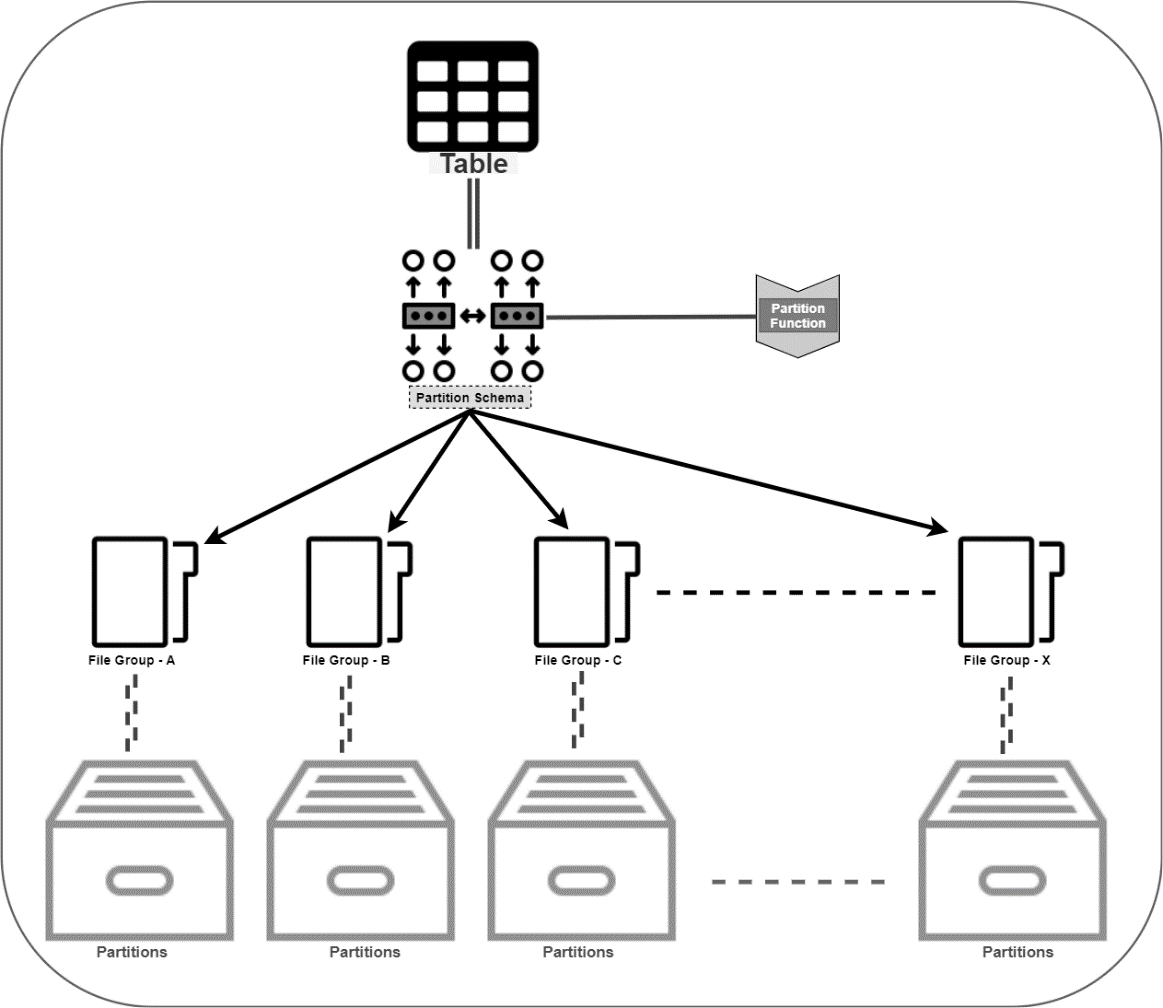
Security can be enhanced by partitioning your server’s SSD. This will enable you to separate the operating system from applications, files and other data. Essentially, this means that if one of your partitions is compromised, the damage that is done is limited. It also means any restoration needed can be carried out quicker.

7. Back up your VPS regularly

How to Backup VPS [5 Tips to Make it Simple] | Liquid Web

Aside from data theft, the other major issue caused by a cyberattack is not the attack itself but how long it keeps your business offline. With your applications down, you will be unable to carry out the operations that your business relies on, such as your website, email, manufacturing or other critical IT processes.

The key to swift recovery is having an up-to-date backup in place which can quickly restore all your affected applications, files and data. Without a backup, some data could be irretrievably lost and restoration of services could take too long for your business to survive.

At Anteelo, we provide a backup solution that stores your data remotely, encrypts it for security and checks it for integrity so you know that it works. What’s more, you can schedule backups to occur automatically so that you always have an up-to-date copy of your files or even your entire server.

Conclusion

A VPS provides exceptional hosting for growing businesses, but like all hosting solutions needs to be protected from the growing number of cyberattacks. The seven tips discussed here should help you make your VPS far more secure. Of course, with the right web host, much of the security will be taken care of on your behalf and you’ll have 24/7 technical support to provide expert assistance if the worst happens.

Which is Better: Cloud or On-Site Servers?

The Pros and Cons of Cloud vs in house servers - Arrow Voice & Data

On-site servers are the traditional way to run business applications. Today, however, they face stiff competition from the cloud, a platform that has revolutionised the way companies operate. While the ultimate decision about which is best depends on the needs of the individual company, here, we’ll examine the pros and cons of both, to give you a more informed understanding.

Costs

Mobile App Development Cost Breakdown: 10 Biggest Hidden Costs

Though on-site servers are exceptional pieces of high-performance equipment and can be built to your own specification, they are very expensive to purchase. What’s more, as technology quickly advances, they can soon become obsolete. The use of more resource-heavy apps and the increasing amount of data being stored means businesses regularly need to upgrade to more powerful servers with bigger drives – a constant burden on budgets, especially when you need to keep redundant backup servers ready to take over in case of a hardware failure or other disaster. In addition, there are all the associated costs of running servers in-house: energy, premises, security, insurance, maintenance and management.

The cloud offers a completely different type of model: Infrastructure as a Service (IaaS). IaaS allows an organisation can dispense with its own datacentre and run its applications on the infrastructure of its service provider. There is no need to buy the hardware, maintain a datacentre or pay any of the associated costs. These are all taken care of by the vendor. Of course, the service isn’t free but the costs are paid monthly making it easier on cash flow.

Furthermore, it’s the cloud vendor who will cover the costs of hardware upgrades and ensure that the hardware is maintained. Unlike on-site servers, the virtualisation used in cloud computing means your applications will remain online for 100% of the time even in the event of hardware failure.

Software

Software 101: A Complete Guide to Different Types of Software

Businesses with on-site servers have complete freedom over their choice of software and this enables them to keep using legacy applications which may not work in a cloud environment. That said, the majority of applications can be migrated to the cloud without issue and there are many cloud-native applications, including advanced tools like artificial intelligence and machine learning that work best in a cloud environment.

Another consideration is accessibility. With the cloud, a business will need internet connectivity to access applications. While this was a drawback many years ago, today, nearly all businesses and their machines have internet connections and users will be able to just log in and go, whether they are in the workplace or working remotely. Applications that run on an on-site server don’t need an internet connection for users to access them. However, users will need to be connected to the business network and this means they won’t be able to access the apps remotely.

Though not every business needs quick deployment, cloud-based applications can be deployed in minutes. With an on-site server, they may need to be installed on the server and, in some instances, on each users’ workstation. For companies that need to move quickly, the cloud can provide accelerated development.

The final thing to consider is software cost. Most applications used in the cloud are open-source and free. When it comes to proprietary software, those with on-site servers will have to pay the full cost of the software licence, while in the cloud, you’ll often find the vendor has purchased a licence that enables them to share the software with clients for a reduced cost and this will be spread over their monthly payments.

Security

Security Policy

While some companies might worry over the security of the cloud, it’s worth remembering that cloud providers have to comply with stringent regulations to keep their infrastructures secure.

The chief security benefit of an on-site server is that its single tenancy offers potentially greater compliance for the storage of sensitive data. Of course, that all depends upon how secure the on-site server is. Implementing advanced security measures comes at a cost that is too high for many businesses. With cloud vendors investing heavily in security expertise and the latest tools, like next-gen firewalls and intrusion and malware prevention, they often provide more robust security than can be implemented in-house.

Scalability

Scalability in Cloud Computing & Why We Love AWS | Logicata

As mentioned earlier, businesses are using more resource-hungry applications and collect more data. Scaling up horizontally in a datacentre can be very expensive, whereas scaling vertically by upgrading your server will mean taking it offline and paying for the new components. Neither of these is ideal, especially when peaks in demand require additional resources to be instantly available.

In the cloud, scaling up just means using more of your vendor’s vast datacentre resources and this can be done at the click of a button. What’s even better is that scaling up and down can be done on demand and is charged for on a pay as you go basis, so there is no long term charge for additional resources which aren’t used. This is far more cost-effective than paying for additional on-site hardware that largely remains redundant.

Conclusion

Cloud and on-site servers are both powerful solutions. On-site dedicated servers are best suited for high-performance applications and single tenancy storage compliance whereas the cloud is ideal for high availability, scalability and swift deployment. Additionally, the cloud is less expensive, offers access to digital transformation technologies and provides internet connectivity for users to access the system remotely.

Ways how IoT can be an asset for businesses

All about the Internet of Things (IoT) | Tridens Technology

IoT devices enable businesses to generate large volumes of valuable data. This real-time information gives them a better insight into their performance, helping them to be more productive and efficient and have a better understanding of their customers while opening the door to innovation in workflow and new services. Here we’ll look at seven ways businesses can benefit from the IoT.

1. Asset tracking

Asset Tracking, Asset Management, एसेट ट्रैकिंग सिस्टम, संपत्ति ट्रैकिंग सिस्टम in Borivali West, Mumbai , Vaborion Ventures Private Limited | ID: 20781475462

The tagging of items using inexpensive Bluetooth or RFID tags and the use of internet-connected readers to track them means almost any asset can now be connected to the Internet of Things. This enables companies not only to know where all their assets are but also to check their usage, maintenance history and, in some industries, an asset’s health.

Preventing assets from getting misplaced can improve efficiency and cut down on unnecessary repurchases. In sectors like healthcare, where critical equipment can be located across a hospital, it can be life-saving. The ability to check usage and maintenance ensures compliance with regulation and helps companies understand when assets need upgrading. The monitoring of asset health is critical in many industries and can help prevent manufacturing processes coming to a complete standstill or, as in the case of inflight aircraft engine monitoring, prevent catastrophes.

2. Inventory Tracking

Inventory Tracking System | Inventory Tracker by Winn Solutions

Tagged inventory can also be connected to the internet using the same Bluetooth or RFID technology, giving companies real-time stock level data. This can reduce the cost of manual stock taking while providing more accurate, up to date information. This provides much better inventory management and, as it is connected over the internet, can be used across multiple sites. It is ideal for retailers and for the manufacturers, wholesalers and logistics companies that serve them.

Indeed, using Low Power Wide Area Networks (LPWANs) and satellite tracking, the location of tagged inventory can even be tracked during transit.

3. Better communication with customers

Proactive communication with customers: what benefits can it give to your business? | Provide Support

The vast amount of data being collected using the IoT provides companies with the opportunity to give valuable information to their customers. In retail, for example, it enables them to offer omnichannel personalised marketing. Personalised marketing has proved very successful for online companies who use data from their websites to provide tailored offers to individuals. However, for businesses with both online and bricks and mortar stores, the IoT enables data from all forms of interaction to be collected. Supermarkets, for example, can learn about a customer’s in-store habits from their loyalty cards and send them online offers tailored around this.

Other types of IoT device can also help companies send valuable communications. Smart meters, for example, can help energy companies show customers where money is being wasted or where they can save from a different energy package.

4. The development of new services

8 Steps to Assembling the Most Talented Startup Team | SmallBizClub

Not only does IoT data help companies send valuable data to their customers, it can also create opportunities to offer them new services. The ability to monitor asset health, as mentioned above, means businesses can also track the health of the products they sell and offer their customers add-on maintenance services.

We get our boilers serviced annually as a precaution but wouldn’t it be useful if the service company knew in advance that a part was about to fail and contacted us to replace it before it packed in? The same service could be applied to cars, televisions, computers, vacuum cleaners and many other items we use.

It is not just with breakdowns where additional services could be offered. Manufacturers of products which use consumable parts could monitor when those parts were due for replacement and offer a service to send them before they ran out. This would be ideal for replacing ink cartridges, lightbulbs and batteries, etc.

5. Improved security

How to improve your online security and privacy in 10 easy steps

Today’s IoT-enabled CCTV cameras bring many security advantages. Any business owner can now view multiple premises, internally and externally, from anywhere. And the advancement in CCTV technology means these systems use AI to identify suspicious activity, send out warning notifications and use facial and other visual recognition signals to track and record perpetrators.

6. Visual analytics

Visual analytics: quick insights into a world of data

The same IoT technology is also helping businesses to gain greater insight into customer and employee behaviour. Connected cameras using artificial intelligence can gather valuable data which enables retailers to better understand how their customers interact with their store layouts, promotional materials and product displays. With employees, it is possible to learn how individuals interact with machinery, use their time and undertake processes. This can help improve workflows and lead to greater efficiencies on the shop floor.

7. Efficiencies and improvements

How to Improve Process Efficiency | Lucidchart Blog

IoT data can help businesses make major efficiencies and develop improvements. It helps manufacturers speed up workflow and cut bottlenecks. It enables logistics companies to reduce energy costs, reroute vehicles when there are traffic jams or organise deliveries for the quickest routes. It even helps theme parks know which attractions are most popular and when: ensuring adequate numbers of staff are available and that unpopular attractions are replaced.

Conclusion

The data gathered from IoT devices is enabling companies to make important changes to the way they operate. It can improve asset and inventory management, enable better communication with customers and offer the potential for new services. It can also improve security, offer insights into customer and employer behaviour and help introduce efficiencies and improvements.

What role do voice search statistics play in your website

Voice Search Statistics and Emerging Trends | DBS Interactive

Leading SEO site, Backlinko, recently undertook a major study of over ten thousand voice search results. Its findings were not only interesting but informative, highlighting the things which websites need to do to rank highly for voice searches. When you take into consideration the growth in the number of voice searches, these actions become crucial if companies want to maintain their organic traffic levels in the future.

How voice search is increasing

The growth in voice search is powered by the wide number of devices that can now recognise speech. These include laptops, phones, watches, smart speakers and other smart devices like TVs. It is estimated that by the end of next year, half of all searches will be done by voice and a third of them on devices which have no screen.

The key user of voice technology is the younger generation. 66% of voice searchers are under 35 and these are also the demographic that owns most of the smart speakers and other devices. Important, also, is the fact that according to a 2018 Global Web Index survey, 75% of mobile voice searchers made an online purchase in the previous month – a key indication that voice search is being used for shopping.

With this growth in mind, here are eight important statistics and their implications for websites.

1. The average spoken search result is around 30 words

We Analyzed 11.8 Million Google Search Results. Here's What We Learned About SEO

This figure indicates the average number of words spoken back by a device when a voice search is given. It is the vocal equivalent of a knowledge graph or featured snippet shown on a screen. The importance here is that it underlies the need for sites to provide succinct rich snippets or answers to questions which search engines can use to give spoken answers. Those sites that do this have a better chance of being chosen.

2. 36% of voice search results are from sites which use structured data

How to Add Structured Data to Your Website

Google has been asking webmasters to use structured data to markup their websites for several years as it gives it a clearer understanding of what the site’s content is about. Many sites, however, have failed to make progress with this. The fact that over a third of voice research results come from those sites, is a clear indication that it’s helpful in getting you ranked.

3. Voice results come from sites with high domain ratings

Voice Search Optimization – The Ultimate Guide - SiteProNews

The company Ahrefs has a globally acknowledged rating system that is used to rank all websites from high (100) to low (0) based on the quality and size of their backlinks. In voice results, the average site had a rating of 77. This figure is a key element of your domain authority as it signifies how well your content is linked to by other high authority domains.

A score of 77 means a website has around 6,000 to 7,000 backlinks from other authority domains. The hint here is that creating quality content that others want to link to is a crucial long-term strategy for those who want to do well in voice results.

4. The average voice search result performs well on social media

Voice Search SEO Study: Results From 10k Voice Searches

It is not just getting backlinks that has an impact on voice search results. A page’s performance on social media has an influence too. The average result has almost 1200 shares on Facebook and over 40 Tweets. This is a key indication that search engines are taking other people’s views into consideration when they produce their results.

5. The average reading age is 14

With the average voice result having a reading age of just 14, it means making the vocabulary of your content accessible if you want to rank well in voice searches. However, that doesn’t mean dumbing down too much. A reading age of fourteen might not seem very sophisticated but the average UK reading age is said to be nine to eleven and The Sun newspaper has a reading age of around eight. Fourteen is the reading age of the Guardian which is by no means a dumbed down read. Bear this in mind when creating your content.

6. Few voice results had the exact search term in their title

Voice Search SEO Study: Results From 10k Voice Searches

This is further evidence that advances in Google’s algorithm have reduced the importance of keywords. Using RankBrain, Google can understand the whole of your page without having to focus just on the keywords in the title, meta descriptions and headings. The good news is that this allows you to concentrate on creating content for the user and not for the search engine.

7. The average page had a word count of over 2000 words

While the number of words spoken back by a device averages at around 30 words, the pages from which they come often have over 2000 words in their content. The implication here is that when voice searches are carried out on devices with screens, Google is focusing on providing detailed, long-form content.

If this includes product pages on eCommerce sites, then one can only assume that those products with lots of customer reviews perform best. Normally, very few product pages have anywhere near such detailed content.

8. 70% of results on smart speakers are from sites which use HTTPS

How to test secure (https) services from localhost | by Satish Verma | 47Billion | Medium

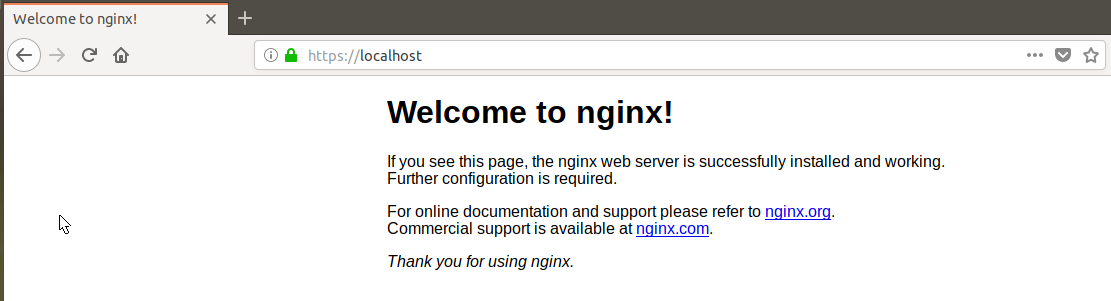
HTTPS is the secure form of HTTP, the protocol that controls how information is formatted and transmitted across the internet. The difference between them is that HTTPS encrypts data, making the transfer of personal information, such as banking details, secure during purchases. Those companies that use HTTPS are labelled as secure on browsers with the green padlock icon. Those using old fashioned HTTP are labelled ‘not secure’.

The 70% figure is a clear indication that search engines have a preference for HTTPS in their voice searches and that companies wishing to rank well need to adopt it. To do so is simple, all you need to do is purchase and install an SSL certificate for your site.

Conclusion

As voice search becomes more widely used, it is increasingly important that websites optimise for it. The statistics produced in this survey shows the factors that influence how a website performs in search results and hopefully, the finding shown here can help you to make your site perform better for voice searches.

Enterprise cloud hosting migration challenges

Why you should switch to Cloud hosting - IONOS

Despite the enormous benefits that the cloud brings, there are several issues that many enterprises face as they transition to this new technology. These include making choices about the right time to migrate, the best way to do it and which services to move. Other issues concern security, the use of managed services and whether to opt for a multi-cloud or hybrid cloud approach. Here we’ll look at these challenges in more depth.

Planning the move to the cloud

Planning to Move to the Cloud, But Are You Ready?

Research by the Cloud Industry Forum shows that 88 per cent of UK enterprises have now adopted cloud technology with two-thirds expected to expand their use during the next 12 months. In doing so, many will shrink their in-house data centres or close them entirely. The result is that they can scale down or eliminate the expense of paying for the physical premises, hardware, applications and security that a data centre requires and replace this setup with a more agile cloud infrastructure.

The issue is that planning the migration of many different applications from the data centre to the cloud can be a challenge that takes considerable time to carry out and which often stretches already busy IT teams beyond capacity. Indeed, many IT teams lack the skills needed to carry out a successful migration.

The solution is not to undergo this process in isolation. You should find a provider that will carry out the necessary assessments, assist you in designing and developing the infrastructure you will need and which will then plan and undertake the migrations on your behalf.

Finding the right cloud solution

Finding the Right Cloud Solution for Your District's Storage Needs | EdTech Magazine

The cloud provides a range of benefits for enterprises, it’s cost-effective, secure and provides the scalability businesses need to be agile. Finding the right cloud solution, however, can be a challenge. Crucial requirements include ensuring all your applications are ready for migration and finding the best platform on which to host them.

The complexities involved often means that, for some enterprises, standard-package cloud service setups might not provide the best solution for their needs. Increasingly, businesses are looking for service providers that can offer bespoke cloud or hybrid solutions that provide the ideal environment for all their applications.

Managed solutions

IT Managed Solutions - ITMS

Many companies that migrate to the cloud attempt to keep costs down by managing their IT in-house. However, moving parts of your infrastructure to the cloud or to a multi-cloud/hybrid cloud environment can make managing these integrated services more complex. Add to this the constant development of new applications and technologies means that maintaining a highly trained IT team can be very expensive.

By outsourcing your IT management to a credible provider, not only are the on-going training costs reduced, it also frees up your IT staff to concentrate on more business orientated projects which can drive the company forward. Service providers employ certified IT teams who are able to expertly manage all aspects of your solution and are compliant with a wide range of regulations and industry standards.

Cutting IT costs

Industry News – Valet Technologies

As enterprises expand their use of and reliance on IT, one of their biggest challenges is to prevent the costs becoming excessive. Cloud services help reduce costs in a number of ways. Firstly, they reduce the requirement for a large-scale data centre, its ongoing operating costs and the capital expenditure on hardware. The use of managed services can also reduce the need for such a large IT team and the associated training costs. Additionally, the pay as you use pricing of cloud means that costs, as well as services, are scalable, helping you to keep them to a minimum when IT requirements are low.

Data storage and security

Used Data Storage Devices Have Security Flaws

The storage and security of data is a key challenge for enterprises, especially with the increasing number of threats and regulations. Data breaches can lead to huge fines but, perhaps more importantly, can have a devastating impact on the company’s reputation.

While there have been concerns about data stored in the internet accessible cloud, service providers have to comply with strict standards and regulations to ensure customers’ data, such as personal and mission-critical information and intellectual property, is secure.

Conclusion

Migrating to the cloud can bring many benefits, giving enterprises access to the latest technologies, such as the IoT, artificial intelligence, machine learning and big data analysis. With so many businesses already employing cloud IT, maintaining competitiveness may rely on such a move. However, migration is not without its challenges as we hope this post has shown. That said, by choosing the right hosting partner, these can be overcome. If you are looking for a cloud hosting provider who can offer the services mentioned in this post, check out our enterprise cloud hosting page.

So Here is what Android borrowed from Apple’s iOS

Android vs iOS: Which mobile OS is right for you? | IT PRO

As the mobile world is getting overflowed with new devices and mobile apps, the users’ demand for more innovative features is touching the sky. It has become imperative for all mobile companies to introduce a WOW factor to their operating system for gaining the limelight in the market. In this constant race of engaging their target audience with convenience and innovations, many times Google and Apple have been found to get inspired by each others’ ideas and features. They, in different instances, have shown that they pick the best features of each other and introduce them in their devices. Remember when Tim Cook said he relies on Google Search? This give and take of inspiration is something that is still in practice in the year 2019. While, we have heard a lot about the features Apple copied from Google’s Android, today we will be looking at the other side of the coin. Meaning, the features that Google has cloned from Apple’s iOS in 2019 and earlier. Features that have traditionally played a role in defining the Android mobile app development cost.

Android Features that Have Been Inspired from Apple

1. Fast Sharing Feature

Google Fast Share gets a revamped share sheet and new settings location

Google is introducing a ‘Fast Share’ feature on Android devices that will work similar to AirDrop in Apple. This feature will combine WiFi and Bluetooth functionalities together to send files, URLs, and text snippets to people nearby.

However, there will be a difference. Unlike AirDrop, the transfer functionality will not be confined to your contact list and device. You will be able to share files with anyone using Chromebooks, iOS smartphones and who wear AndroidOS smartwatches.

2. Battery Saving Features

Save battery life by using Android's built-in dark mode - CNET

Google has announced that Battery Saver will be one of the significant Android Q features that will hit the market in 2019. This feature will turn off the battery saver mode automatically when the battery is charged up to 90%. Likewise, it will turn the Battery saver mode ‘on’ again when the charger is unplugged.

It is again a feature that is much like the ‘Low Power Mode’ of iOS, where the battery saving option is turned off automatically when the iPhone is charged to up to 80%.

3. Facial Recognition

How to unlock your Android device with camera-based face recognition - 9to5Google

The feature of unlocking devices and apps using facial recognition or better say Face ID is again a feature that Apple brought into the market. They first introduced the idea of scanning faces for authentication purposes, which is now considered as the main element for Android devices.

In fact, as per the sources, Android Q is coming up with an advanced level of facial recognition features that will give heads on challenges to Apple’s Face ID feature.

4. Native AR

Augmented Reality & React Native. It all started with Google Glass' and… | by Rody Molenaar | Medium

Google has proven to be the best in the market to try different AR-based features on smartphones and other devices. They have brought various new opportunities in the market with respect to AR technology. A recent proof of this is that Google, as per the sources, is introducing AR effects into their messaging app to make it competitive to Apple’s iMessaging app.

However, it was Apple IOS who took the first step in the direction of integrating Augmented Reality in the mobile world and give us the best of both the real and virtual worlds.

5. DND (Do Not Disturb)

How to Customize Do Not Disturb Settings on Android

Again, Apple introduced the idea of making the process of DND (Do not Disturb) accessible and visible to users. They took the first step of giving users an opportunity to customize the DND activities and manage them. Google just followed the footsteps of Apple to give this freedom to Android users and give them a peace of mind during meetings and in other such situations.

6. Gesture Controls

How to set up and use (very hacky) gesture navigation controls on any Android phone - 9to5Google

The gesture control facility that we are enjoying on Android devices is also one of the features copied from Apple devices. It was Apple who ditched the home screen button and introduced the idea of using gestures for operating devices. And now, Google has brought this feature into the Android market.

7. Emojis

Emojis: The Complete History ?? | by Tory Walker | Medium

Not just the technical features, Apple has also proven to be the first in the market for making app experience enjoyable. They have introduced a series of realistic emojis right from the beginning. And Google is known to be trying to bring improvements in their emojis every year to make it aligned to Apple’s emojis.

8. App Store Features

How Will The iOS 11 App Store Affect Your App? | Instabug Blog

Asking users for a one-time and all-or-nothing request before installing any application is an old Apple approach. And now, Google has also introduced Apple’s features of apps asking for users’ permission for the first time for accessing the camera, or other such features.

9. Performance Improvements

Improve Appraisal Reports in 10 Steps | The Appraiser Coach

Google again turned towards Apple for learning how to deliver higher performance and user experience to their target audience.

Just like Apple, Google has also started showing no support for older devices to cut down the efforts of Android app developers to make their app features available for all the devices. And this way, the tech giant has come up with a solution to fight against the challenge of platform fragmentation, while ensuring that the performance is not compromised.

Bonus: Ecosystem

It was Apple that introduced the idea of making an ecosystem where all the Apple products function in sync with each other. They initiated the concept of building a synergy between products and brand services to ensure users never leave the ecosystem and the ROI numbers remain intact.

Google has recently embraced this concept of connecting all of their services to encourage users to leverage their services and thus, add to their profits directly or indirectly.

So, these were some of the significant features that came to Apple’s iOS first before they were applied in the Android market, making both the platforms appear similar to some extent.

error: Content is protected !!