HTTPS is no longer secure: says FBI

FBI warns users to be wary of phishing sites abusing HTTPS – Naked Security

The investigation bureau FBI has issued an alert warning to internet users that “HTTPS” and a padlock icon in the address bar might not be enough to prove if a website is authentic or not. It has been observed that cyber-criminals are increasingly abusing the trust in TLS-secured websites for improving the success rate of phishing attacks.

“They [phishing attackers] are more frequently incorporating website certificates – third-party verification that a site is secure – when they send potential victims’ emails that imitate trustworthy companies or email contacts.”

In 2016, a report by the Ponemon institute revealed that nearly half of all the cyber-attacks used SSL encryption to evade detection within the period of last 12 months. Two-thirds of the organizations admitted that their organization was not prepared to detect malicious SSL traffic.

For many years, there has been a push toward adopting the HTTPS protocol on the web since it ensures a secured communication between the website and user’s browser.

Most of the browsers mark websites that use HTTPS with a padlock icon which indicates that the browser traffic is encrypted, and attackers cannot access the data in the transit. These websites also display warnings in case the user accesses a non-secured website.
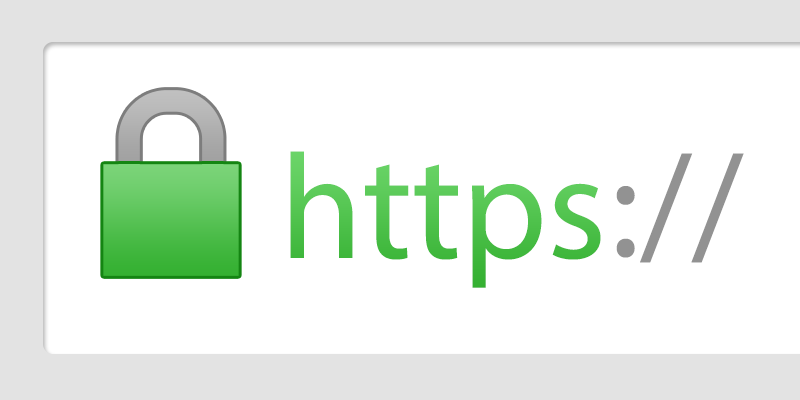
Google Pushes Business Websites to Use HTTPS (SSL) - Prometheus PPC

With the advancement in the security measures, attackers have also started adopting HTTPS protocol to deploy sophisticated phishing attacks since the use of this secured protocol allows attackers to psychologically trick the victim into believing that the malicious emails or links that they received in their inboxes are coming from authentic sources.

They are designed with the motive to acquire sensitive login details or other information by redirecting victims to malicious websites that looks secure due to the padlock icon.  However, only connection to these websites is secure and the HTTPS protocol is unable to authenticate the content on the website.

What is the reason behind the increasing use of HTTPS?

Graph - Increasing Graph Clip Art - Png Download - Full Size Clipart (#931804) - PinClipart

To deploy a successful cyber-attack, cyber criminals leverage the latest technology. With the number of websites that use SSL encryption, cyber attackers have started encrypting the phishing websites, making it harder for IT administrators to identify the difference between bad and good traffic. Attackers are increasingly using SSL to encrypt the communication between the compromised endpoint and command-and-control systems to hide payloads, instructions as well as other information that is being sent.

As an increasing number of attacks are using HTTPS to avoid the scrutiny by the traditional methods of cyber security, organizations should take steps to ensure that they are protected against bad traffic.

What is the solution?

Where are the people with solutions? - Reputation Today

Lack of awareness among employees is one of the major reasons for the success of such attacks. In recent years, attackers have shifted their focus from individuals to employees. Statistically, 90% of the cyber-attacks are a result of employee negligence. During the year 2018, there has been a 76% increase in the number of phishing attacks. 54% of the companies had experienced cyber-attacks that compromised with their IT infrastructure and data. According to a survey conducted by McAfee on 19,000 people, 97% of the people were unable to identify such cyber attacks.

This is where the cyber security awareness and training tool comes in handy. The tool helps in creating awareness among employees to combat real-life cyber-attacks. With the power of reporting tool TAB, employees become capable to protect the entire organization against probable cyber-attacks.

Every day the number of reported cyber-crimes are increasing. It is, therefore, important for organizations to invest in cyber security awareness and training programs which should be continuous and must be followed with the regular assessment of the employees’ knowledge on cyber-attacks.

Cybersecurity for Remote Work: 10 Ways to Boost It

Cybersecurity Solutions That Boost Remote Work Security

Many companies use cloud-based platforms that enable their employees to work remotely, whether from home or out in the field. While this brings benefits to both the company and its employees, it does create challenges which need to be addressed for the company’s systems and data to remain secure. Here, we’ll look at the best practices to ensure cybersecurity for your remote employees.

1. Vet your employees

4 ways to find the right employees for your startup | The Burn-In

If you are going to keep your data and systems secure, you need to know that the people who have access to it are trustworthy. Vetting employees can highlight anyone with a background that makes you think twice about giving them access. This doesn’t merely relate to someone’s criminal history; it also means looking at employees who have a record of flouting the company’s IT policy.

2. Train your employees

Why It's Crucial To Train Your Employees - The Yellow Spot

All employees can pose a security risk if they do not understand how to keep your system and data safe. While most companies undertake cybersecurity training for their staff, there are differences between using an in-house system which is not connected to the internet and a remote system which is. If you have recently begun to implement remote work, you will need to update your training to cover the new procedures and best practices that your employees need to follow.

3. Store remote user data securely

10 Secure File Sharing Options, Tips and Solutions | Varonis

If a hacker gets hold of information about your employees, such as their usernames, passwords and privileges, it makes it very easy for them to undertake even wider and more damaging hacks. For this reason, the data you keep on these employees should be stored very securely.

4. Provide your own devices

BYOD – Bring Your Own Device | Class Teaching

While many companies operate a Bring Your Own Device (BYOD) policy, this gives you far less control over security. As the device your staff access your system with is also for personal use, you are unable to manage how that device is used or even who it is used by. If your employee lends their laptop to their child who unwittingly clicks on a malicious link, your data may be put at immediate risk.

Although it is more expensive, providing your own devices means you can set up firewalls and security settings in-house, install antivirus and internet security, and ensure that the employees are obliged to follow security protocols when using the devices.

5. Know where devices are

Find All Devices Connected to Your Home Network the Easy Way

One of the biggest issues with remote work is that lots of devices get lost. Even the UK government lost over 2000 devices in the year up to June 2019, nearly 800 of which belonged to the Ministry of Defence. For this reason, devices must be fitted with a location finder, be securely locked and, where possible, be set up for remote deletion.

6. Secure internet connections

What Is Network Security? - Cisco

Where your employee connects to the internet can also be an issue. Public wi-fi hotspots, for example, can be easy to hack into and this makes it possible for data transmitted across them to be stolen. Although you may insist employees do not connect from an insecure connection, you can further increase security by preventing company data being accessible when the device is not logged into a secure network.

7. Encrypt data and emails

Data Encryption: Why You Should Protect Your Business | Aureon

Encryption prevents data from being stolen when it’s in transit or at rest, so even if a hacker gets to the data, they will not be able to access it. Using VPNs, SSL and TLS are important ways to protect your data, as are Personal Signing Certificates that encrypt emails and their attachments.

8. Two-factor and multi-factor authentication

What is Multi-Factor Authentication (MFA) – RSA

No matter how unique and strong username and passwords are, on their own, they are not robust enough to guarantee that whoever is logging in to your system is who they say they are. Adding further levels of security, such as a passcode sent to a user’s mobile phone or a biometric fingerprint scan, offer a far greater degree of authentication that can prevent hackers from getting access.

9. Control access privileges

What Is Network Access Control? Solutions and Explanations

Limiting what employees can access on your system also limits what a cybercriminal can access if they hack into an employee’s account. By setting privileges so that employees only have access to the information they need to carry out their remote work, you minimise the risk of data being stolen or the system being taken down.

10. Use a secure cloud provider

7 Cloud Security Best Practices to Keep Your Cloud Environment Secure

Your cloud provider can provide significant help in keeping your system and data safe. At Anteelo, our team can develop and implement a security policy that meets both your internal and regulatory requirements. We use next-gen FortiGate firewalls with built-in intrusion prevention systems and in-flow virus protection, while also offering extensive VPN features, server and network monitoring, personal signing and SSL certificates, application firewall configuration, DDoS protection, email security, industry-leading remote, encrypted backups and more.

Conclusion  

Remote work provides companies with opportunities to save money, improve collaboration, offer flexible working conditions and cope with crises like Coronavirus. However, it is critical that systems and data remain secure. Hopefully, the ten points raised here will show you ways that such security can be put in place.

Data Warehouse Benefits and Drawbacks

What Is the Benefit of Modern Data Warehousing?

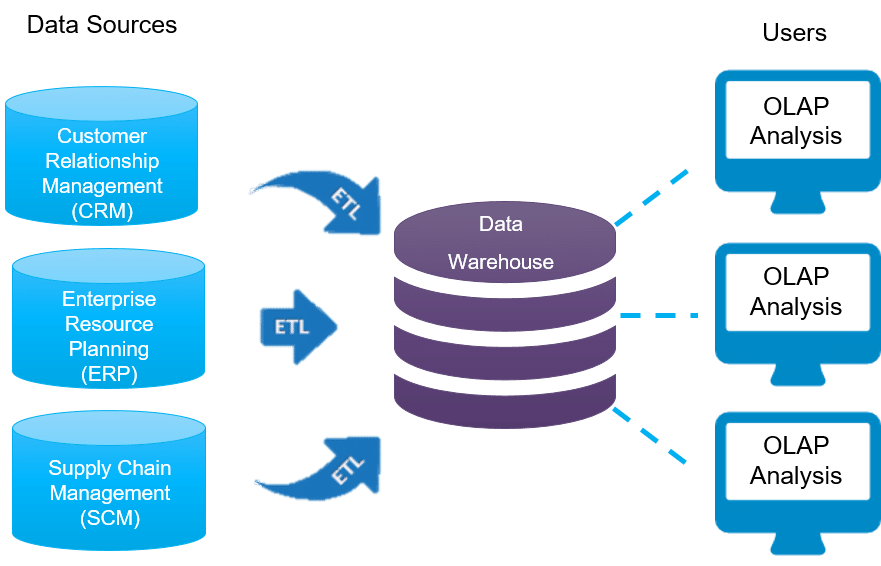
As businesses gather and store ever greater quantities of data, managing it becomes increasingly challenging. To get the maximum value from it, it needs to be easily accessed and compiled so that it can be analysed. However, when it is stored in separate silos across numerous departments, this is hard to achieve. The solution that many companies are opting for in order to overcome these issues is data warehousing. In this post, we’ll look at the pros and cons of setting up a data warehouse.

What is a data warehouse?

Data Warehouse Overview - Data Warehouse Tutorial | Intellipaat.com

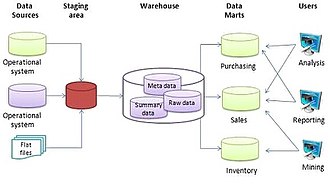
A data warehouse is a centralised storage space used by companies to securely house all their data. As such, it becomes a core resource from which the company can easily find and analyse the datasets it needs to generate timely reports and gain the meaningful insights needed to make important business decisions.

The pros of data warehousing

Pros and Cons of Snowflake Data Warehouse - Saras Analytics

The growing popularity of data warehousing is down to the benefits it provides business. Key, here, is that a unified data storage solution enhances decision making, enabling businesses to perform better in the marketplace and thus improve their bottom line. As a data warehouse also means data can be analysed faster, another advantage is that it puts the company in a better position to react to opportunities and threats that come their way.

With the entire array of the company’s data available to them, data managers can make more accurate market forecasts and do so quicker, helping them implement data-driven strategies swiftly and before their competitors. The accuracy of market forecasts is improved due to the warehouse’s ability to store huge amounts of historical data that can highlight patterns in market trends and shifting consumer behaviours over time.

Data warehousing can also help companies reduce expenditure by enabling them to make more cost-effective decisions, whether that’s in procurement, operations, logistics, communications or marketing. It can also massively improve the customer experience, with end to end customer journey mapping helping the company personalise product recommendations, issue timely and relevant communications, deliver better quality customer service and much more.

The cons of data warehousing

Data warehouse - Wikipedia

While the centralised storage of data brings many benefits, it does have some drawbacks that companies need to consider. For example, with such vast amounts of data in one place, finding and compiling the datasets needed for analyses can take time. However, not as long as would be needed if they were all kept in different silos.

Another potential issue is that when data is stored centrally, all the company’s data queries have to go through the warehouse. If the company’s system lacks the resources to deal with so many queries, this can slow down the speed at which data is processed. However, using a scalable cloud solution for data warehousing, where additional resources, charged on a pay per use basis, can be added as and when needed, eradicates this issue.

For many companies, the biggest obstacle for setting up a data warehouse is the cost. When undertaken in-house, there is often significant capital expenditure required for the purchase of hardware and software, together with the overheads of running the infrastructure. Additionally, there are ongoing staffing costs for experienced IT professionals. Again, the solution comes in the form of managed cloud services, like Infrastructure as a Service (IaaS), where the hardware and operating systems are provided without the need for capital expenditure and where software licencing can be significantly less expensive. What’s more, the service provider manages the infrastructure on your behalf, reducing staffing requirements. Even where specialised IT knowledge is required in-house, such as with integrating different systems, the 24/7 technical support from your provider will be there to offer expertise when needed.

Conclusion

Any company undergoing the process of digital transformation needs to consider the benefits of data warehousing. The centralised storage of all the company’s data is essential for companies that wish to integrate their existing business processes with today’s advanced digital technologies. Doing this means you can fully benefit from big data analytics, artificial intelligence and machine learning, and all the crucial insights they offer to drive the company forward.

Setting up a data warehouse in-house, however, presents several major challenges. There is significant capital expenditure required at the outset, together with on-going overheads. In addition, integrating a diverse set of company systems so that data can be centralised is not without its technical challenges. By opting for a cloud solution, however, cap-ex is removed, costs are lowered and many of the technical challenges are managed on your behalf.

How Analytics Can Assist Businesses in Ensuring Safety

The Ultimate List of Free Analytics Tools | Quantcast

the growing threat of cyberattacks, many are turning to analytics to help protect their systems and comply with regulations. Here, we’ll take a close look at what security analytics is and how it can benefit businesses.

Security analytics – an overview

How to improve security analytics and operations | CSO Online

Like all forms of data analytics, security analytics involves the collection and aggregation of a wide range of data from numerous sources. The purpose, however, is to analyse this data to discover vulnerabilities and threats to the security of a company’s systems and data. Data can be gathered from firewalls, routers, network traffic, antivirus software, OS event logs, businesses apps, cloud resources, ID verification and access management logs and endpoint data. It also uses employee and user behaviour data and third-party threat intelligence information. This is then analysed using specially developed security algorithms which seek out patterns and sequences that give insights into potential, emerging or existing threats.

Modern cybersecurity analytics tools also employ AI and machine learning, which enables them to learn from past experiences to continually improve their ongoing threat detection. So, as new threats evolve, they will be able to detect these too. Of crucial importance is that this is done in real-time so that threats can be dealt with proactively and stopped before an attack inflicts damage.

Ways in which security analytics can be used

Stay Ahead of the Security Analytics Market With These Best Practices

Security analytics can be used for a wide range of measures. It can detect links in network traffic activities which signify the emergence of a potential attack. It can discover attackers threatening to infiltrate a system’s endpoints, such as its laptops and mobile phones. It identifies vulnerable, compromised or prohibitively shared user accounts. It blocks unfamiliar communications channels, preventing data being copied, downloaded or transferred without authorisation. It can also safeguard against identity theft by stopping users from sending their details to other sites.

Security analytics can even be used to protect against internal threats; monitoring employee activity to identify intentional or negligent behaviours which put the system’s security at risk. It does this by employing algorithms that uncover suspicious actions which indicate threats or vulnerabilities.

Compliance is another area in which security analytics can play an important role. Here, it can help automate compliance requirements, such as the gathering of log data, the management of data networks and the monitoring of data actions, enabling the company to compile reports and detect users not working in compliance with internal IT policies. Where incidents occur, security analytics can also assist in any forensic investigation, unearthing the activities and sources of the related events.

The benefits of using security analytics

6 Benefits of Security Analytics for Security and Risk Professionals - Download Whitepaper (PDF) » OnlineWhitePapers.com

The chief benefit of using security analytics is that, aside from detecting threats and potential security breaches, it also alerts the company when these incidents are likely to happen and before they actually do. In this way, its insights enable the company to be proactive in its security.

With threats coming from a wide range of sources, such as hacking, malware, ransomware, phishing, internal sabotage and negligence, and with cybercriminals using far more sophisticated tools, some of which also make use of AI and machine learning, many businesses can see real value in security analytics.

Security in the cloud

What is cloud security? | Kaspersky

For businesses using cloud-based systems, it is possible that your vendor already provides a wide range of robust security measures to protect your systems from cybercrime. Here at eukhost, for example, our cloud servers are protected with enterprise-class security. We work in partnership with Fortinet to offer next-gen FortiGate firewalls which feature intrusion prevention and inflow virus protection systems that detect and isolate threats before they reach your server.

In addition, we provide extensive VPN features, DDoS protection, email security, SSL certificates, email signing certificates and more. For added peace of mind, we also provide the industry-leading Veeam backup solution, designed for cloud infrastructures. It features virtual machine backups, replication and encryption which keep your data secure in case of system failure, data corruption, bad updates, ransomware or human error.

When it comes to compliance, the security we provide helps companies meet regulations such as GDPR and PCI DSS. With regard to the latter, all our cloud servers are PCI compliance capable and we can provide the server environment required for this purpose.

Conclusion

As threats become increasingly more advanced, it is good to know that technologies to protect IT systems, such as security analytics, are being developed and deployed to combat them. The best place to host such big data analytics, of course, is in the cloud. It’s reassuring, therefore, that the cloud, itself, already comes with a range of robust security measures to protect you, whether you use security analytics or not.

Here’s how a cloud-based platform can assist banks leverage data!

Banks' Inevitable Race To The Cloud

Banks are finding exciting new ways to turn their data into valuable insights. To succeed in this new data-driven world, banks of all sizes are turning to the cloud. Cloud-based solutions provide the optimal storage and tools needed to manage vast data requirements while making data and insights easily accessible for analytics and the business.

Enterprise data and the insights extracted from that data are the fuel for business transformation, and banks are increasingly looking for a platform with robust analytics capabilities, self-service tools, centralized data governance and the ability to meet regulatory requirements.

Banks are in an era where they must modernize or risk failure. Legacy environments have high support costs, siloed IT environments and face challenges in finding skilled resources to support them.

Often, disparate technology stacks prevent the enterprise from being truly connected through data and insights, underscoring the need for an enterprise-wide, integrated solution. To address these challenges, Anteelo and Google are focusing on ways to create an optimal data-centric ecosystem, combining Google Cloud’s native tools with managed services ; thus, simplifying the management of cloud resources and optimizing analytics programs.

Power of the cloud

Power of the Cloud on Your Terms

Much of the power of the cloud comes from creating a single platform that combines management, monitoring and automation features with security and compliance capabilities at the core of banking operations. This foundation, along with access to analytics products that underpin some of the world’s most widely used services, gives banks the ability to extract valuable business insights from large data sets.

Actionable insights that can be gained as enterprise data, such as transaction information and customer behavior trends, is processed using Google Cloud’s automation capabilities — driving operational efficiency, new revenues and the ability to compete more effectively.

Google analytics tools such as Dataflow, BigQuery, Bigtable and Looker enable organizations to advise, implement and operationalize artificial intelligence (AI) to yield competitive business intelligence. Much of this can be automated and integrated into actively managed business processes that ultimately produce tangible, repeatable business outcomes.

Why move to the cloud?

What Does It Take to Power the Cloud?

Analytics from a cloud-based platform can deliver benefits on many different levels. For a chief marketing officer, for example, real-time information on marketing campaign ROI is a valuable metric that is not as readily available or actionable with today’s on-premises systems. Or a chief information security officer could get access to data that improves a bank’s governance capabilities, which delivers benefits in areas such as security and compliance.

Banks are also using open APIs enabled by Google Cloud to authenticate and secure financial communications to customers, enabling a transition from face-to-face transactions to digital channels.

Banks also can use a wide range of cloud-native services for data warehousing and data management. Plus, a wealth of AI and machine learning tools that are integrated effectively can help automate tasks and improve personalized experiences. For example, cloud computing’s elastic capabilities have been shown to cut the training time of data models by more than 50 percent over traditional on-premises systems. Data models converge faster, enabling more rapid delivery of services to markets and enhanced services to consumers.

Another key benefit of moving to the cloud and engaging managed services is that applications can be managed consistently across different environments. Operating in a more efficient development environment means banks can rapidly introduce new products and services to the market and update them more easily.

Banks also have access to high-performance computing (HPC) resources for large processing needs. The use of cloud computing provides banks with modern alternatives for HPC that are manifested in containers and special hardware devices that are purpose-built such as graphical processor units and tensor processing units.

Traditional and legacy on-premises data architectures simply cannot support the variety of data or real-time data streams necessary for advanced enterprise analytics and AI. A modern data architecture is needed. Plus, a cloud environment enables banks to dynamically scale infrastructure up or down to meet demand, which is essential for digital success.

Trust, transform and thrive

Using digital transformation to thrive rather than survive | IT PRO

Progressing data into actionable insights can be visualized as a process following these three keywords: trust, transform and thrive (see figure). Underpinning that process is a cloud platform tuned to improve visibility, security, scalability, speed and agility.

Analytics: Progressing data to actionable insights

Actionable Insights | seoClarity

In this model, data from many different sources, including unstructured and siloed data, is collected and ingested. The built-in security features of Google Cloud Platform keep data secure and help build trust in the enterprise. In a Google Cloud Platform deployment managed by Anteelo, for example, security and regulatory compliance are given the highest priority. Google Cloud Platform’s capabilities in areas such as network monitoring and identity access management help banks maintain a high level of data security and compliance.

A trusted partner

Technology Partners: What a trusted partner can bring to your organization

Choosing the right partner is crucial when moving to a modern cloud banking platform. It is preferable to have a trusted advisor with extensive experience and IT expertise in banking, capital markets and financial services. Anteelo has been providing banking services at an enterprise level for more than 40 years.  Through our unmatched industry expertise we offer a robust set of data services using simplified tools and automation for rapid data acquisition and insights. We help banks identify patterns that can be used to drive business insights in a way that fits their needs. The key is to then prepackage these patterns so organizations can reuse them.

The potential is endless for a cloud platform and the analytics capabilities it delivers to help banks build trust, transform and thrive. A managed cloud platform, purpose-built for banking, provides a consistent surface for accessing the most accurate, up-to-date version of your enterprise’s data. And the technology now exists for analytics to be integrated into daily workflows so banks can extract maximum value from that data.

5 Worst-Case Scenarios of Not BackUp Your Website

Why we shouldn't be afraid of nightmares - BBC Future

If you’ve never had a serious problem with your website, backups are probably something you don’t lose much sleep over. But just because you haven’t seen your website go down or lost data in the past doesn’t mean you are immune in the future. There are plenty of ways you can suffer such a disaster, with server failures, hacking and the accidental pressing of the delete button being just some of the potential causes. Without a backup, restoring your website would be a long, difficult and expensive process. Not convinced you need them? Here are five potential nightmares that might change your mind.

1. To err is human

To Err is Human; To Edit, Divine - Writing.Com

Even with the best will in the world and all the right procedures in place, people still make mistakes. All it takes is for someone to accidentally click on the wrong button and important website files can be wiped. As a result, your website might cease to function. It’s bad for your reputation and you’re losing business while it’s offline.

While restoring your website is possible, it may take a long time to get it back online, especially if you are using bespoke software or a theme that has been customised for your needs. Installing a fresh version of WordPress and your theme, for example, might not take that long. However, if you’ve edited the code to change the look or functionality of the site, all these tweaks will need to be carried out from fresh, once more.

The longer restoration takes, the more your company will suffer and for some, the damage can put them out of business. With a backup in place, everything can be restored, as it was, very quickly indeed.

2. Disappearing content and data

Data Loss Prevention: How to Prevent Your Data From Disappearing

Perhaps more important than the website is the actual content that goes on it and the data you store. If you lost your content there’d be no product pages, landing pages, blog posts or any of the other important information you need to share with your customers. If you lost your data, you may lose all your existing orders, customer details and inventory information.

Losing content or data is more problematic than losing your website files. With content, you may have to start creating it again from scratch which can be a massive task if you sell large numbers of products or have a substantial blog. If you lose customer data, you may never be able to get it back and may be in breach of regulations too.

3. Killed off by infection

The Secret Life Cycle of Mosquitoes

According to Hiscox, there are 65,000 cyberattacks on UK businesses every day. One of the main forms of attack is to attempt to infect a company’s website with malware. Malware can do many forms of damage to a website, from putting your site at ransom to installing hidden programs that infect your customers’ computers when they visit your site. As a result, they can take your website offline or corrupt your files. If your site is corrupted, you host may have to take it offline to prevent the spread of malware to others while search engines will stop listing it until the issue is fixed.

Finding the corrupted files (sometimes the infection replicates itself) and getting rid of the infected code can be a long process and the easiest thing is to delete the entire website and install a backup. Of course, you cannot do this without a recent backup in place.

4. When great plans backfire

How to Avoid the Backfire Effect When Handling Objections | Nutshell

A common time for issues to happen with websites is when people make changes to them. There are quite a few things that can go wrong, for example, software compatibility issues, tweaks to coding breaking your software or new themes making your content appear all wrong. Indeed, any major modification to the functionality or design of your website can result in unforeseen issues, which is why many companies carry them out in an experimental environment before letting them go live. Unfortunately, lots of other companies choose to make the changes to their live website and when plans go wrong, the site can easily be put offline. With a backup in place, you can restore your old, fully working website straightaway.

5. The vendor trap

How to get out of a debt trap - The Economic Times

The success of your website relies to a great extent on the quality of your web hosting provider. A good provider offers faster loading times, increased reliability, enhanced security, managed services, 24/7 expert technical support and the right packages and prices for the growing needs of your business. There may be a time, therefore, that you consider migrating your website to a new host.

Moving to a different provider means moving your entire website to a new server. Without a backup, this means starting from scratch and for lots of businesses, this is just too much hassle to consider. As a result, many stay with their existing provider even if the services they receive are not up to the standard they require. If you do have a backup, migrating is simple. Indeed, so simple that some web hosts will do it for you.

Backing up your site

How to Back Up Your Website | PCMag

You can back up your site in numerous ways, such as doing it manually to a computer or using a plugin that saves your site to places like Google Drive or Dropbox. However, depending on your website’s needs, you may need to back up more frequently or keep several copies of older backups (e.g., if your latest backup took place after your website became corrupted, you’ll need to restore an earlier version). Your backups will also need to be stored remotely, i.e. not on the same server where your website is stored. If you don’t and the server fails, you’ll lose your website and your backup at the same time.

The ideal solution is to use a backup service provided by your web host. Here, you automate backups and control the frequency and number of backups kept. You’ll also be safe in the knowledge that the backups will be stored securely and will be backed up themselves by the host.

Conclusion

As you can see, there are numerous nightmares that can occur if you do not backup your website. All of them can result in your website being taken offline and even the loss of your critical content and data. For many businesses that operate online, such issues can have a significant impact. A backup is an inexpensive solution that enables your site to be restored regardless of the problem which caused it. For that reason, creating regular backups is indispensable.

The platform to focus on the most valuable asset: Data-Centric Architecture.

Building a Data-Centric Architecture to Power Digital Business | Pure Storage Blog

The value proposition of global systems integrators (GSIs) has changed remarkably in the last 10 years. By 2010, it was the waning days of the so-called “your mess for less” (YMFL) business model. GSIs would essentially purchase and run a company’s IT shop and deliver value through right-shoring (moving labor to low cost places), leveraging supply chain economies of scale and, to a lesser degree, automation.

This model had been delivering value to the industry since the ‘90s but was nearing its asymptotic conclusion. To continue achieving the cost savings and value improvements that customers were demanding, GSIs had to add to their repertoire. They had to define, understand, engage and deliver in the digital transformation business. Today, I am focusing on the value GSIs offer by concentrating on their client’s data, rather than being fixated on the boxes or cloud where data resides.

In the YMFL business, the GSIs could zero in on the cheapest, performance compliant disk or cloud to house sets of applications, logs, analytics and backup data. The data sets were created and used by and for their corresponding purpose. Often, they were tenuously managed by sophisticated middleware and applications for other purposes, like decision support or analytics.

Getting a centralized view of the customer was difficult, if not impossible. First, it was due to the stove piping of the relevant data in an application-centric architecture. In tandem, data islands were created for analytics repositories.

Data-Centered Architecture - Design Your Software Architecture Using Industry-Standard Patterns - OpenClassrooms

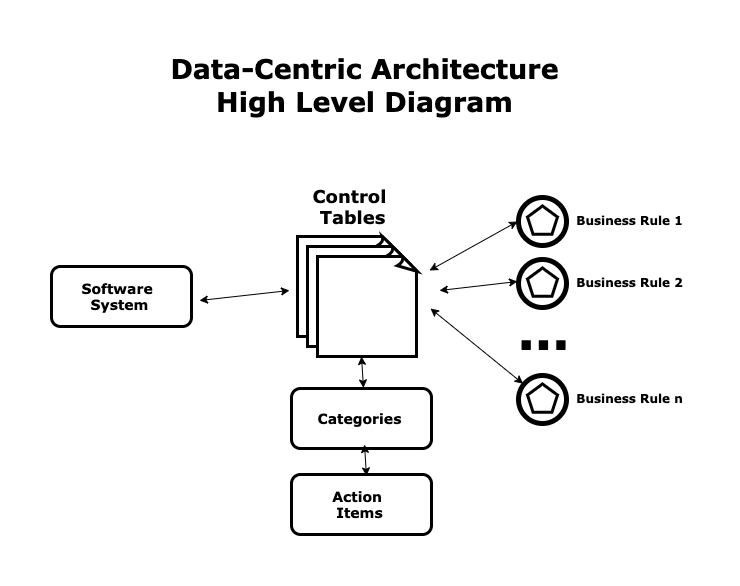
Now enters the “Data Centric Architecture.” Transformation to a data-centric view is a new opportunity for GSIs to remain relevant and add value to customer’s infrastructures. It is a layer deeper than moving to cloud or migrating to the latest, faster, smaller boxes.

A great way to help jump start this transformation is by rolling out Data as a Service offerings. Rather than taking the more traditional Storage as a Service or Backup as a Service approach, Data as a Service anticipates and provides the underlying architecture to support a data-centric strategy.

It is first and foremost a repository for collected and aggregated data that is independent of application sources. From this repository, you can draw correlations, statistics, visualizations and advanced analytical insights that are impossible when dealing with islands of data managed independently.

It is more than the repository of the algorithmically derived data lake. A Data as a Service approach provides cost effective accessibility, performance, security and resilience – aimed at addressing the largest source of both complexity and cost in the landscape.

What Is Data-as-a-Service (DaaS)? | Hazelcast

Data as a Service helps achieve these goals by minimizing, simplifying and reducing the data and its movement within and outside of the enterprise and cloud environments. This is achieved around four primary use cases, which range from enterprise storage to backup and long-term retention:


Each of the cases illustrates the underlying capabilities necessary to cost effectively support the move to a data-centic architecture. Combined with a “never migrate or refresh again” evergreen approach, GSIs can focus on maximizing value in the stack of offerings. This approach is revolutionary.  In past, there was merely a focus on the refresh of aging boxes, or the specifications of a particular cloud service, or the infrastructure supporting a particular application. Today, GSIs can focus on the treasured asset in their customer’s IT — their data.

Don’t let your data backup services go bankrupt like a wheel of fortune.

Why does bankruptcy seem to come in long strings on Wheel of Fortune? - Quora

Data backup is one of those daily tasks that resembles Wheel of Fortune. If a backup fails occasionally or you forget to swap media once in a while, the odds are good that the spinner on your wheel of fortune won’t cost you anything. Until the day it settles on “bankrupt,” and all those occasional backup glitches will come back to haunt you.Piecing together transactional data is a major hassle. But the value of lost data goes way beyond that now. Analytics are making fast inroads into every part of the value chain. As they do, the value of a company’s non-transactional data grows. All that info you’ve been using to serve customers more effectively, operate more efficiently and develop innovative new products—gone. Losing that kind of data is like burning stacks of cash. When it’s gone, you can’t get it back. That can seriously complicate your day. Trying to decide how much backup capacity you need isn’t completely straightforward either. It’s a wasted effort if you keep too little and miss something important, so many companies tend to err on the side of caution. And they err more than they realize. When we ask clients about their backup capacity, many estimate they’re using 80% or more of their capacity. When we survey their actual consumption, utilization rates average around 54% of their storage footprint. The other half sits idle.

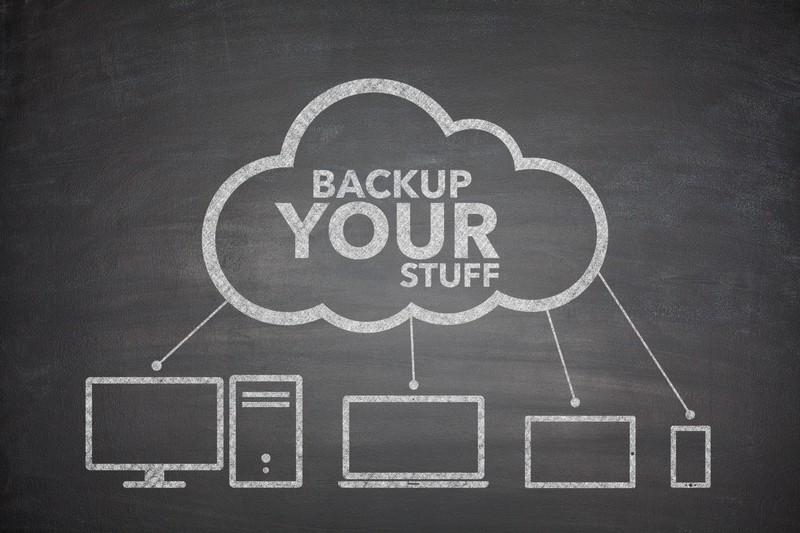
There’s a better way to do this. Instead of guessing at what you need, spending more than you should, and having to maintain a vigil to insure it’s working, take a look at the compelling BackUp as a Service (BUaaS) offerings that are becoming more prevalent. When you harness the power of virtual infrastructure, you subtract many of the issues that make backup a hassle and you get a more reliable service that you don’t need to think about. Here are four benefits of BUaaS that deserve consideration:

* BUaaS always offers the right capacity. Companies routinely overestimate their backup capacity needs because budget approval happens only periodically. Procurement can take six months or more so, when you budget for backup capacity, you make sure you have more than enough. With BUaaS, you don’t need to sweat that. Capacity can be added or subtracted as needed, so you never have too much or too little.

Backup as a Service - Architecting IT

* It’s always up to date. The problem with dedicated backup infrastructure isn’t just the money you have parked in a rack. Buying backup means you’ve bought into a level of performance and features for the duration of time you own the hardware. If your needs change, you’re effectively held hostage to a decision you made earlier. Because BUaaS is highly virtualized, it experiences ongoing improvement as both the infrastructure is refreshed and as new versions of the backup service code are released.

Always-up-to-date software for Logistic Service Providers |

* It’s more flexible. Backup as a Service allows you to dial up compressions and deduplication if you need to expand storage, or adjust for more speed if you need higher performance. You don’t need to change hardware, just settings. And, if your needs change, adjustments are just a mouse click away.

30 Companies Switching to Long-Term Remote Work | FlexJobs

* You get more expertise as part of the bundle. While the advantages might not be readily apparent, the additional staffing and add-on services included in BUaaS offerings make the service more reliable and less expensive. The growing intelligence of BUaaS solutions helps separate minor issues from those that can truly affect the quality of your backups. Automation enables the provider to offer services with fewer people that are scalable, predictable and less expensive than maintaining the same capacity in a fixed physical environment.

15 Key Skills You Can Gain from Work Experience

5 Data Security Tips for Working From outside Office

Data Privacy vs. Data Security [definitions and comparisons] – Data Privacy Manager

One of the biggest advantages of the internet is that it has enabled business users to work away from the office. With technology such as laptops and smartphones, we can work from home and when commuting and take our data with us when we go to meet clients. While this brings a range of benefits, it also creates an increased responsibility to keep that data secure. In this post, we’ll give you some tips on how to achieve that.

1. Backup regularly

How to select a data backup system - TechRepublic

Imagine that one of your employees develops a lucrative project for a client and is travelling to meet them. Imagine, too, that the only copy of the project is stored on the employee’s laptop. There are numerous weaknesses in this scenario. The laptop can break, it can get stolen or it can become one of the many that get mislaid by travellers every day. 12,000 laptops a week are left abandoned just at US airports.

The possible consequences of this are that the months of work put into the project are wasted and the lucrative contract is lost.

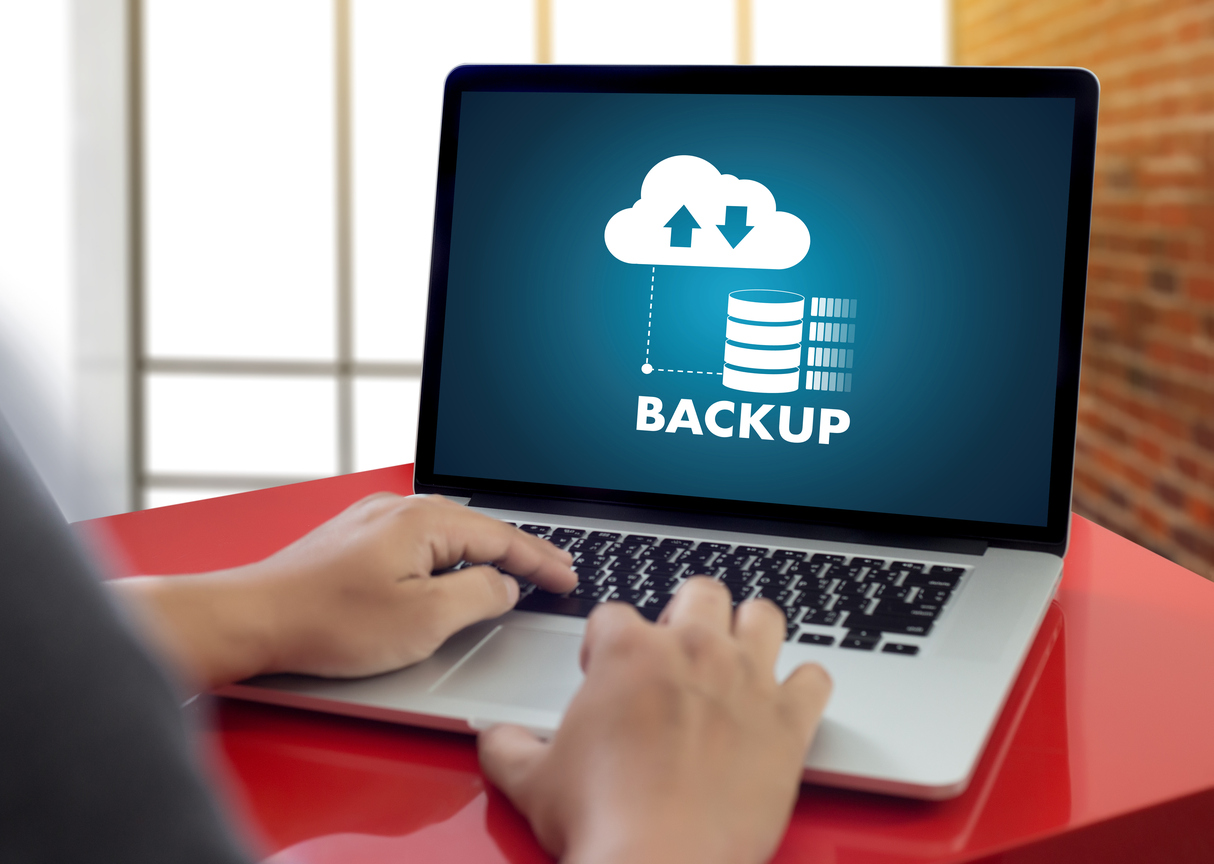
By backing up your data regularly, however, this problem can be completely eradicated. If the laptop is lost, you’ll still have another copy of the data to use. While backing up can be done simply by saving data to a USB drive, the best option is to use a cloud backup service. You can’t lose cloud storage like you do a pen drive and you’ll be able to access the data from any machine with an internet connection.

2. Turn unused devices off

The Fact on Whether Turning Off The Main Power of Unused Appliances Would Save Electricity - Goody Feed

Another data security loophole is that people don’t always realise that a laptop with the lid shut is still vulnerable to attack. Closing the lid simply initiates a low-power sleep mode designed to bring the machine back to life quicker than rebooting. While the hard disk powers down, the laptop’s memory continues to be active and can be accessed and copied using an external USB port. What’s perhaps worse, is that for encrypted laptops, the vulnerable memory can contain the encryption keys giving hackers access even to encrypted data.

The solution is simple, when devices are not in use, they should be shut down, not put into sleep mode.

3. Use encryption

What Is Encryption? Explanation and Types - Cisco

Encryption turns your data into an unintelligible string of characters that even the boffins at GCHQ couldn’t unscramble without an encryption key. It means that even if your raw data was hacked or stolen, no-one would be able to make sense of it.

As a safety precaution, all devices used out of the office should be protected with encryption software. Such apps can keep personal files, contacts, notes, wallets and multimedia files secure, as well as backing up your passwords, recording unauthorised login attempts and sending notifications of attempted hacks.

At the same time, those companies which store their data in the cloud should make sure that this too is encrypted, so that if a user gains access to the machine, there is another layer of protection to prevent them getting hold of the data stored online.

4. Network protection

Exploring Network Security (+8 Ways to Protect Your Network)

Another potential vulnerability is someone getting access to data via an attack on the network. Devices are particularly vulnerable when they connect to mobile hotspots with weak data security and it is here, in places like transport stations and public areas that hackers may make attempts to steal your data.

One of the first steps you should take is to ensure employee’s devices have a properly configured firewall that will block suspicious connection requests. As a company, you should ensure the firewall configuration is put in place by your own IT team, whether this is on a company device or on a personal device that an employee uses for work.

Another data security feature is the use of Virtual Private Networks (VPNs) which will protect the users’ devices when they connect to any network away from the business premises. Though the connection is not as fast, the data will be automatically encrypted, preventing it being compromised by those seeking out victims on public networks.

5. Use cloud storage

How to Use Cloud Storage for Memory

Using cloud storage can really help boost the data security. For a start, as data is held centrally on the server, there is no need to have a separate copy of it stored on the laptop or other device. This way, if the device is lost or stolen, there is no data to steal. As data stored in the cloud can be encrypted, even if someone has access to the laptop, they will not be able to access the data without the encryption key, for which further authentication should be needed. The other benefit, of course, is that keeping data stored centrally means that should one person update a file, everyone else will have access to the latest version. When separate versions are stored across many different devices, it can be difficult to know which is the most up to date.

Conclusion

While the internet has given us better ways to work and communicate and freed us from the confines of the office, it does create risks that we need to manage effectively. Data stored on devices can be stolen by hackers accessing the hardware or from intrusion over a network. Hopefully, the tips provided here will help prevent this happening and keep your company’s devices and data secure.

7 Steps to a More Effective Data Management

6 Tips for Making Better Data Management Decisions

Data has become one of the most valuable resources for business, providing key insights about the company and its market. However, with so much data available for analysis, the need for effective data management is becoming increasingly important. Here are some the steps you can take to ensure your company is using best practice when it comes to managing your data.

1. Know what you want to use data for

11 Steps For Asking The Right Data Analysis Questions

Today, companies are gathering enormous quantities of data. Much of that, however, will never be used. To make data management easier, it is important to know what you want from your data so that you keep that which helps meet your objectives and get rid of that which does not. This will help reduce storage costs and make it easier to organise and manage what data is kept. If you have data which is not useful at present but which you want to keep in case it becomes useful in the future, you can always condense it and store it separately.

There are many things you may wish to use your data for. These include data-driven decision-making, automation and processing improvement, customer journey mapping and personalisation, audience targeting, product recommendations and so forth. Knowing what your objectives are will help ensure you only gather and collect the data that you need.

2. Security and compliance are key priorities

What is an IT Security Audit? The Basics | Varonis

All companies are obliged to comply with data protection regulations, such as GDPR, and this means compliance should be foremost on your list of priorities. Failure to comply or implement stringent security measures can have devastating consequences. Under GDPR, businesses can be fined up to €40 million or 4% of annual global revenue, whichever is the greatest. For British Airways, this was an eye-watering €204.6 million. On top of any fines, there are also reputational damage and case actions to consider.
Working with the right hosting provider, implementing robust security policies and using secure data management software can help your data to be more secure.

3. Data quality is vital

Data Lineage and Data Quality: Two Vital Elements for Enterprise Success - DATAVERSITY

The quality of the insights your data can provide is based upon the quality of the data you are using. While the first step to improving quality is to limit data to that which meets your company’s goals, it is also vital that data is accurate and up-to-date. Inaccurate or out-of-date information can provide  misleading insights and lead to companies making the wrong decisions. For this reason, cleansing data should be something undertaken regularly.

Quality can also be improved by ensuring that employees know how to accurately gather and input data or that systems which collect data automatically are configured to do so correctly.

4. Eradicate duplicate data

This is Why Duplicate Data is Bad for You

Not only does duplicate data means you’ll pay for more storage than you need; there’s also the chance that it will be counted twice during any analysis and will, thus, skew the accuracy of any report generated using it. As there are various ways to receive duplicate data, companies need to put processes in place to discover and prevent it from being inputted into the data management system.

5. Managing access to data

What is access control? A key component of data security | CSO Online

There are two important things to consider when looking at access to data. The first is that, for data analytics to be effective, team members need access to all relevant datasets. This is incredibly difficult to achieve when it is stored in departmental silos where access is restricted to departmental members. Unifying data in a centralised repository, like a data warehouse, removes silos and ensures everyone can have the big picture. It also means data security can be centrally managed.

The second consideration is balancing security with ease of access. This means setting up logical access control where permission to access data and tools is granted on an individual basis depending on the employee’s needs. Not only does this ensure employees only use data they have the authorisation to access; it also means that if their accounts are hacked, hackers won’t have unlimited access to the company’s entire data or its applications.

6. Make sure data can be recovered

7 FREE Data Recovery Software That Actually Work (2020 Update)

Data loss can happen for a whole host of reasons, including human error, malware, hardware failure, natural disasters, hacking and so forth. While losing personal data can get the company into hot water over compliance, all the other data your company relies on will have significant value too. Losing that data can put a company out of business. To ensure it doesn’t happen, having a remote backup system in place is crucial.

Ideally, you should schedule automated backups to be taken at the intervals which the company needs. For the increasing numbers of businesses who receive data continuously, this will mean having continuous backups taking place, so that, if the worst happens, you have as much recent data as possible to restore. Cloud storage is often the best solution as it is scalable, secure, integrity tested, can be encrypted and is easily accessed for restoration.

7. Choose the right hosting provider

4 Tips for Choosing the Right Hosting Company – Valcato Internet

The hosting provider plays a vital role in ensuring good data management. They will provide and manage the infrastructure needed and implement a range of stringent security measures including firewalls, encryption, intrusion protection, backup services, etc. Those opting for a cloud solution will also benefit from the scalability and payment model of cloud when it comes to storage and processing capacity. Crucially, however, is choosing a host that understands your goals and your needs and which can supply the expertise and computing environment your data management requires.

Conclusion

Effective data management is essential for businesses to make the best use of big data analytics and the insights it provides. Knowing what you want to use that data for, improving its quality, eradicating duplications and making it easier to access are key elements in that management strategy. So, too, are ensuring the data is secure, setting up logical access, making remote backups and choosing the right hosting provider.

error: Content is protected !!