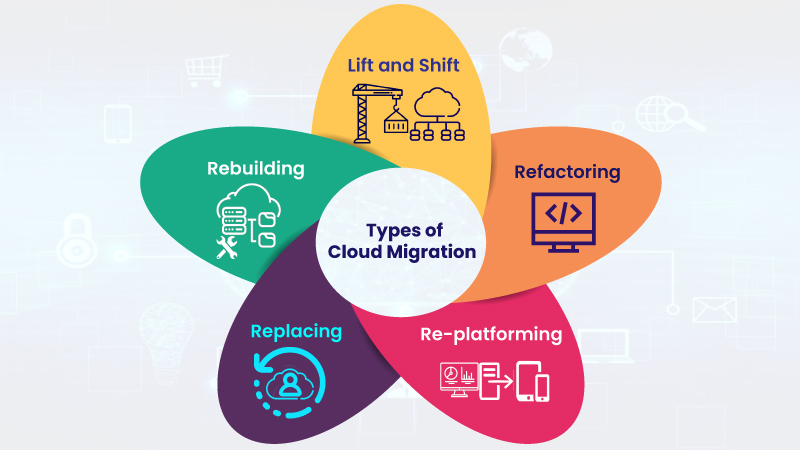
When should you abandon your ‘lift and shift’ cloud migration strategy?

How Can Organizations Make Best Use of Lift and Shift Cloud Migration?

The easy approach to transitioning applications to the cloud is the simple “lift and shift” method, in which existing applications are simply migrated, as is, to a cloud-based infrastructure. And in some cases, this is a practical first step in a cloud journey. But in many cases, the smarter approach is to re-write and re-envision applications in order to take full advantage of the benefits of the cloud.

By rebuilding applications specifically for the cloud, companies can achieve dramatic results in terms of cost efficiency, improved performance and better availability. On top of that, re-envisioning applications enables companies to take advantage of the best technologies inherent in the cloud, like serverless architectures, and allows the company to tie application data into business intelligence systems powered by machine learning and AI.

Of course, not all applications can move to the cloud for a variety of regulatory, security and business process reasons. And not all applications that can be moved should be re-written because the process does require a cost and time commitment. The decision on which specific applications to re-platform and which to re-envision is a complex risk/benefit calculation that must be made on an application-by-application basis, but there are some general guidelines that companies should follow in their decision-making process.

What you need to consider

Lift and Shift Cloud Migration Strategy

Before making any moves, companies need to conduct a basic inventory of their application portfolio.  This includes identifying regulatory and compliance issues, as well as downstream dependencies to map out and understand how applications tie into each other in a business process or workflow. Another important task is to assess the application code and the platform the application runs on to determine how extensive a re-write is required, and the readiness and ability of the DevOps team to accomplish the task.

The next step is to prioritize applications by their importance to the business. In order to get the most bang for the buck, companies should focus on applications that have biggest business impact. For most companies, the priority has shifted from internal systems to customer-facing applications that might have special requirements, such as the ability to scale rapidly and accommodate seasonal demands, or the need to be ‘always available’. Many companies are finding their revenue generating applications were not built to handle these demands, so those should rise to the top of the list.

Re-platform vs. re-envision

Application Migration Strategies: Rehost vs Replatform vs Refactor

There are some scenarios where lift and shift makes sense:

  • Traditional data center. For many traditional, back-end data center applications, a simple lift and shift can produce distinct advantages in terms of cost savings and improved performance.
  • Newly minted SaaS solution. There are many customer bases that have newer SaaS offerings available to them, but perhaps the functionality or integrated solutions that are a core part of their operations are in the early stages of a development cycle. Moving the currently installed solution to the cloud via a lift and shift is an appropriate modernization step – and can easily be transitioned to the SaaS solution when the organization is ready.

However, there are two more scenarios where lift and shift strategies work against digital transformation progress.

Top 10 Must-Use Apps in Microsoft Teams | AvePoint Blog

  • Established SaaS solution. There is no justification, either in terms of cost or functionality, to remain on a legacy version of an application when there is a well-established SaaS solution.
  • Custom written and highly customized applications. This scenario calls for a total re-write to the cloud in order to take advantage of cloud-native capabilities.

By re-writing applications as cloud-native, companies can slash costs, embed security into those application, and integrate multiple applications. Meanwhile, Windows Server 2008 and SQL Server 2008 end of life is fast approaching. Companies still utilizing these legacy systems will need to move applications off expiring platforms, providing the perfect impetus for modernizing now. There might be some discomfort associated with going the re-platform route, but the benefits are certainly worth the effort.


5 partnering trends for global systems integrators in 2020 that will benefit enterprise customers

Why Dell Boomi Is the Leading Integration Partner for Software Vendors | Boomi

Businesses have been doing some form of partnering for decades, but as companies seek to modernize and turn their organizations into digital enterprises, partnering has become more important than ever. With all the different technologies and systems that have to integrate, digital transformation can’t happen unless all parties are in sync and cooperating with one another.

In today’s business environment, true partnering means that all parties in the relationship are tightly aligned to the core. We’ve all read something similar to that before – it’s nearly cliché, but in this case it’s a real and absolutely critical distinction. When they step into a room, nobody should care if the person wears a badge from the global systems integrator (GSI), technology partner or the enterprise customer — they should all be on the same page working towards the same goal: delighting customers.

Partnering starts with the executive suites of all the parties fully on board and headed in the same strategic direction. It then continues through every part of the organization, where business partners work on joint operating plans, joint marketing campaigns and joint software and app development projects.

Here are five important trends we see as GSIs, technology partners and enterprise customers look to grow their businesses in the 2020s.

System Integrator | EzInsights

1. Deeper relationships. As these deeper business relationships develop in the 2020s, tech partners, GSIs and enterprise customers will operate in unison, seamlessly sharing information and jointly developing solutions designed to solve end-user customer issues. For example, in an IDC FutureScape report focused on Australia, the research group predicts that by 2022, empathy among brands and for customers will drive ecosystem collaboration and co-innovation among partners and competitors, which will drive 20 percent of the collective growth in customer lifetime value.

Strategic partners will develop a more cooperative relationship at all stages of the customer lifecycle, from recognizing an opportunity, to sales, developing a solution, delivering that solution, and finally, managing the long-term customer relationship. On the back-end, there will be more joint training between partners in areas such as sales, including becoming conversant in the products and services that each partner delivers.

Enterprise customers benefit from these deeper partnerships by having everyone working together as a single entity throughout the entire end-user customer lifecycle.

Technology Stocks | Sramana Mitra

2. Vertical offerings. Once key strategic partnerships are established, the partner teams can jointly develop full-featured solutions tailored to vertical industries. If gaps appear, a GSI must demonstrate that they can assemble the right people and get them working together on a project. For example, at a medical services provider, the GSI may have a strong relationship with the CIO or CTO, but it’s the niche medical technology partner that has worked closely with the chief medical officer and all the nurse and physician teams over the years. Enterprise customers look for GSIs that can identity the right players and get them in a room where they can talk through the challenges and meet the customer’s goals.

How to Make Data-Driven Decisions Fast - Heap

3. Data-driven decisions. Enterprise customers will use data analytics to make decisions on the GSIs and technology companies with which to partner. These global businesses are looking for the technology processes and solutions that deliver efficiencies and the most profitability. They also look for industry-specific customer success stories in which the GSIs and technology partners have a proven track record working together and can show clear metrics to back up their use cases.

How to Maximize the Potential of Marketing Agility

4. Agility. It’s likely that many enterprise customers already have preferred technology partners in areas such as cloud services, ERP, CRM, and IT security. GSIs must be agile enough to pivot quickly, responding to customer preferences and established relationships. They must demonstrate that they can match the right partner for each specific project and be ready to respond to an enterprise customer’s mission critical issues – whether those issues are already identified or lurking around the corner. Partnering allows the GSI the agility and speed to respond to the customer, in many cases, faster than through M&A activity or developing a new capability in-house.

Challenges in Implementing a Continuous Monitoring Plan - Delta Risk

5. Continuous monitoring. The GSI must be on top of all of the new features and upgrades that its technology partners develop. An enterprise that works with a GSI shouldn’t have to keep up with all of the tech upgrade cycles, and should never worry about missing out on important new capabilities. The integrator will understand the new features and benefits coming from tech partners, and also have unique insight into the enterprise customer’s environment so it can make informed recommendations as to whether an upgrade to a new release makes good business sense.

Partnering trends deliver business benefits

With the deeper integration between GSIs, technology partners and enterprise customers, important global businesses will reduce costs, make their customers more efficient and successfully transform their organizations, becoming digital enterprises that can compete and thrive in the 2020s and beyond.

Is programming required for a Data Science career?

AWS's Web-based IDE for ML Development: SageMaker Studio

This is a common dilemma faced by folks who are beginning their careers. What should young data scientists focus on — understanding the nuances of algorithms or faster application of them using the tools? Some of the veterans see this as an “analytics vs technology” question. However, this article agrees to disagree with this concept. We will soon discover the truth as we progress through the article. How should you build a career in data science?

Analytics evolved from a shy goose, a decade back, to an assertive elephant. The tools of the past are irrelevant now. Some of the tools lost market share, their demise worthy of case studies in B-schools. However, if we are to predict its future or build a career in this field, there are some significant lessons it offers.

The Journey of Analytics

What is Customer Journey Analytics? – Pointillist

A decade back, analytics primarily was relegated to generating risk scorecards and designing campaigns. Analytical companies were built around these services.

Their teams would typically work on SAS, use statistical models, and the output will be some sort of score -risk, propensity, churn etc. Its primary role was to support business functions. Banks used various models to understand customer risk, churn etc. Retailers were active in their campaigns in the early days of adoption patterns.

And then “Business Intelligence” happened. What we saw was a plethora of BI tools addressing various needs of the business. The focus was primarily in various ways of efficient visualizations. Cognos, Business Objects, etc. were the rulers of the day.

How Business Intelligence can Fuel Digital Transformation | MindForest - Managing Change

But the real change to the nature of Analytics happened with the advent of Big Data. So, what changed with Big data? Was the data not collected at this scale, earlier? What is so “big” about big data? The answer lies more in the underlying hardware and software that allows us to make sense of big data. While data (structured and unstructured) existed for some time before this, the tools to comb through the big data weren’t ready.

Now, in its new role, analytics is no more just about algorithmic complexity. It needs the ability to address the scale. Businesses wanted to understand the “marketed value” of this newfound big data. This is where analytics started courting programming. One might have the best models, but they are of no use unless you trim and extract clean data out of zillions of GBs of data.

This also coincided with the advent of SaaS (Software as a service) and PaaS (Platform as a service). This made computing power more and more affordable.

Forms of Cloud computing. SaaS, Software as a Service; PaaS, Platform... | Download Scientific Diagram

By now, there is an abundance of data clubbed with economical and viable computing resources to process that data. The natural question was – What can be done with this huge data? Can we perform real-time analytics? Can the algorithmic learning be automated? Can we build models to imitate human logic? That’s where Machine Learning and Artificial Intelligence started becoming more relevant.

Machine Learning: definition, types and practical applications - Iberdrola

What then is machine learning? Well, to each his own. In its more restrictive definition, it limits itself to situations where there is some level of feedback-based learning. But again, the consensus here is to include most forms of analytical techniques into it.

While the traditional analytics need a basic level of expertise in statistics, you can perform most of your advanced NLP, Computer vision etc. without any knowledge of their details. This is made possible by the ML APIs of Amazon/Google. For example, a 10th grader can run facial recognition on a few images, with little or no knowledge of Analytics. Some of the veteran’s question if this is real analytics. Whether you agree with them or not, it is here to stay.

The Need for Programming

Why need of programing language?

Imagine a scenario where your statistical model output needs to be integrated with ERP systems, to enable the line manager to consume the output, or even better, to interact with it. Or a scenario where the inputs given to your optimization model change in real-time, and model reruns. As we see more and more business scenarios, it is becoming increasingly evident that embedded analytical solutions are the way forward. the way analytical solutions interact with the larger ecosystem is getting the spotlight. This is where the programming comes into the picture.

Common issues while using Azure’s next-generation firewall

Getting the most out of your next-generation firewall | Network World

Recently I had to stand up a Next Generation Firewall (NGF) in an Azure Subscription as part of a Minimum Viable Product (MVP). This was a Palo Alto NGF with a number of templates that can help with the implementation.

I had to alter the template so the Application Gateway was not deployed. The client had decided on a standard External Load Balancer (ELB) so the additional features of an Application Gateway were not required. I then updated the parameters in the JSON file and deployed via an AzureDevOps Pipeline, and with a few run-throughs in my test subscription, everything was successfully deployed.

That’s fine, but after going through the configuration I realized the public IPs (PIPs) deployed as part of the template were “Basic” rather than “Standard.” When you deploy an Azure Load Balancer, there needs to be parity with any device PIPs you are balancing against. So, the PIPs were deleted and recreated as “Standard.” Likewise, the Internal Load Balancer (ILB) needed this too.

I had a PowerShell script from when I had stood up load balancers in the past and I modified this to keep everything repeatable. There would be two NGFs in two regions – 4 NGFs in total and two external load-balancers and two internal load-balancers.

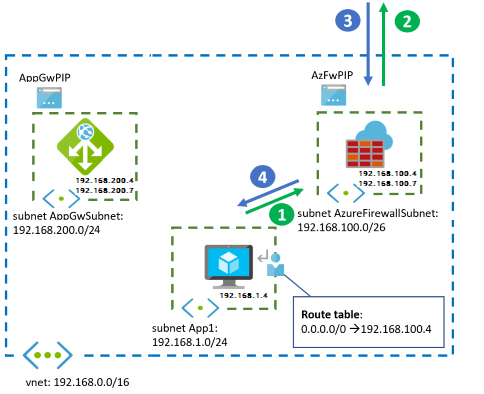
A diagram from one region is shown below:

Firewall and Application Gateway for virtual networks - Azure Example Scenarios | Microsoft Docs

With all the load balancers in place, we should be able to pass traffic, right? Actually, no. Traffic didn’t seem to be passing.  An investigation revealed several gotchas.

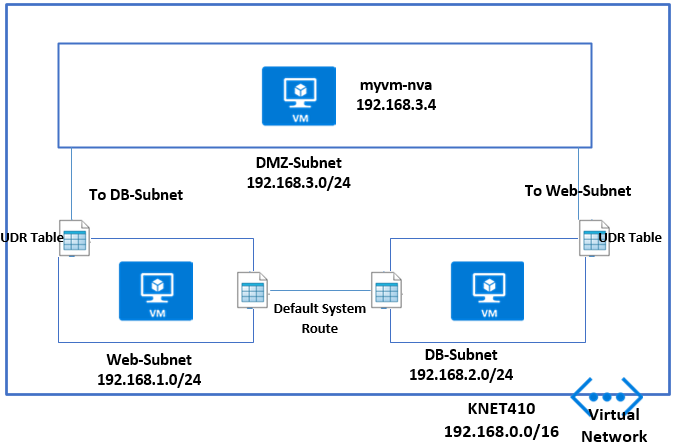
Gotcha 1.  This wasn’t really a gotcha because I knew some Route Tables with User Defined Routing (UDR) would need to be set up. An example UDR on an internal subnet might be:

User Defined Route (UDR) – MyKloud

0.0.0.0/0 to Virtual Appliance pointing at the Private ILB IP Address. Also on the DMZ In subnet – where the Palo Alto Untrusted NIC sits, a UDR might be 0.0.0.0/0 to “Internet.” You should also have routes coming back the other way to the vNets. And, internally you can continue to allow Route Propagation if Express Route is in the mix, but on the Firewall Subnets, this should be disabled. Keep things tight and secure on those subnets.

But still no traffic after the Route Tables were configured.

Gotcha 2. The Palo Alto firewalls have a GUI ping utility in the user interface. Unfortunately, in the most current version of the Palo Alto Firewall OS (9 at the time of writing) the ping doesn’t work properly. This is because the firewall Interfaces are set to Dynamic Host Configuration Protocol (DHCP). I believe, as Azure controls and passes out the IPs to the Interfaces Static, DHCP is not required.

The way I decided to test things with this MVP, which is using a hub-and-spoke architecture, was to stand up a VM on a Non-Production Internal Spoke vNet.

Gotcha 3.  With all my UDRs set up with the load balancers and an internal VM trying to browse the internet, things are still not working. I now call a Palo Alto architect for input and learn the configuration on the firewalls is fine but there’s something not right with the load balancers.

At this point I was tempted to go down the Outbound Rules configuration route at the Azure CLI. I had used this before when splitting UDP and TCP Traffic to different PIPs on a Standard Load Balancer.

But I decided to take a step back and to start going through the load balancer configuration. I noticed that on my Health Probe I had set it to HTTP 80 as I had used this previously.

Health probe set to http 80

I changed it from HTTP 80 to TCP 80 in the Protocol box to see if it made a difference. I did this on both internal and external load balancers.

Hey, presto. Web Traffic started passing. The Health Probe hadn’t liked HTTP as the protocol as it was looking for a file and path.

Ok, well and good. I revisited the Azure Architecture Guide from Palo Alto and also discussed with a Palo Alto architect.

They mentioned SSH – Port 22 for health probes. I changed that accordingly to see if things still worked – and they did.

Port 22 for health probes

Finding the culprit

So, the health probe was the culprit — as was I for re-using PowerShell from a previous configuration. Even then, I’m not sure my eye would have picked up HTTP 80 vs TCP 80 the first time round. The health probe couldn’t access HTTP 80 Path / so it basically stopped all traffic, whereas TCP 80 doesn’t look for a path. Now we are ready to switch the Route Table UDRs to point Production Spoke vNets to the NGF.

To sum up the three gotchas:

  1. Configure your Route Tables and UDRs.
  2. Don’t use Ping to test with Azure Load Balancers
  3. Don’t use HTTP 80 for your Health Probe to NGFs.

Hopefully this will help circumvent some problems configuring load balancers with your NGFs when you are standing up an MVP – whatever flavour of NGF is used.

NoOps automation eliminating toil in the cloud.

How to Reduce Operations Toil for Site Reliability Engineers | by Arun Kumar Singh | Adobe Tech Blog | Medium

A wildlife videographer typically returns from a shoot with hundreds of gigabytes of raw video files on 512GB memory cards. It takes about 40 minutes to import the files into a desktop device, including various prompts from the computer for saving, copying or replacing files. Then the videographer must create a new project in a video-editing tool, move the files into the correct project and begin editing. Once the project is complete, the video files must be moved to an external hard drive and copied to a cloud storage service.

All of this activity can be classified as toil — manual, repetitive tasks that are devoid of enduring value and scale up as demands grow. Toil impacts productivity every day across industries, including systems hosted on cloud infrastructure. The good news is that much of it can be alleviated through automation, leveraging multiple existing cloud provider tools. However, developers and operators must configure cloud-based systems correctly, and in many cases these systems are not fully optimised and require manual intervention from time to time.

 Identifying toil

Toil is everywhere. Let’s take Amazon EC2 as an example. EC2 provides Amazon Elastic Block Store (EBS) compute and storage capacity to build servers in the cloud. The storage units associated with EC2 are disks which contain operating system and application data that grows over time, and ultimately the disk and the file system must be expanded, requiring many steps to complete.

The high-level steps involved in expanding a disk are time consuming. They include:

  1. Get an alert on your favourite monitoring tool
  2. Identify the AWS account
  3. Log in to the AWS Console
  4. Locate the instance
  5. Locate the EBS volume
  6. Expand the disk (EBS)
  7. Wait for disk expansion to complete
  8. Expand the disk partition
  9. Expand the file system

One way to eliminate these tasks is by allocating a large amount of disk space, but that wouldn’t be economical. Unused space drives up EBS costs, but too little space results in system failure. Thus, optimising disk usage is essential.

This example qualifies as toil because it has some of these key features:

  1. The disk expansion process is managed manually. Plus, these manual steps have no enduring value and grow linearly with user traffic.
  2. The process will need to be repeated on other servers as well in the future.
  3. The process can be automated, as we will soon learn.

The move to NoOps

Traditionally, this work is performed by IT operations, known as the Ops team. Ops teams come in variety of forms but their primary objective remains the same – to ensure that systems are operating smoothly. When they are not, the Ops team responds to the event and resolves the problem.

NoOps is a concept in which operational tasks are automated, and there is no need for a dedicated team to manage the systems. NoOps does not mean operators would slowly disappear from the organisation, but they would now focus on identifying toil, finding ways to automate the task and, finally, eliminating it. Some of the tasks driven by NoOps require additional tools to achieve automation. The choice of tool is not important as long as it eliminates toil.

Figure 1 – NoOps approach in responding to an alert in the system

In our disk expansion example, the Ops team typically would receive an alert that the system is running out of space. A monitoring tool would raise a ticket in the IT Service Management (ITSM) tool, and that would be end of the cycle.

Under NoOps, the monitoring tool would send a webhook callback to the API gateway with the details of the alert, including the disk and the server identifier. The API gateway then forwards this information and triggers Simple Systems Manager (SSM) automation commands, which would increase the disk size. Finally, a member of the Ops team is automatically notified that the problem has been addressed.

 AWS Systems Manager automation

Resetting SSH key access to your EC2 Instance through Systems Manager Automation - BlueChipTek

The monitoring tool and the API gateway play an important role in detecting and forwarding the alert, but the brains of NoOps is AWS Systems Manager automation.

This service builds automation workflows for the nine manual steps needed for disk expansion through an SSM document, a system-readable instruction written by an operator. Some tasks may even involve invoking other systems, such as AWS Lambda and AWS Services, but the orchestration of the workflow is achieved by SSM automation, as shown in this table:

Step # Task Name SSM Automation Action Comments
1 Get trigger details and expand volume aws:invokeLambdaFunction Using Lambda, the system must determine the exact volume and expand it based on a pre-defined percentage or value.
2 Wait for the disk expansion aws:waitUntilVolumeIsOkOnAws Disk expansion would fail if it goes to the next steps without waiting for time to complete.
3 Get OS information aws:executeAwsApi Windows and Linux distros have different commands to expand partition and file systems.
4 Branch the workflow depending on the OS aws:branch The automation task would now be branched based on the OS.
5 Expand the disk aws:runCommand The branched workflow would run commands on the OS that would expand the disk gracefully.
6 Send notification to the ITSM tool aws:invokeLambdaFunction Send a report on the success or failure of the NoOps task for documentation.

Applying NoOps across IT operations

Is NoOps the End of DevOps? Think Again | Blog | AppDynamics

This example shows the potential for improving operator productivity through automation, a key benefit of AWS cloud services. This level of NoOps can also be achieved through tools and services from other cloud providers to efficiently operate and secure hybrid environments at scale. For AWS deployments, Amazon EventBridge and AWS Systems Manager OpsCenter can assist in building event-driven application architectures, resolving issues quickly and, ultimately, and eliminating toil.

Other NoOps use cases include:

  • Automatically determine the cause of system failures by extracting the appropriate sections of the logs and appending these into the alerting workflow.
  • Perform disruptive tasks in bulk, such as scripted restart of EC2 instances with approval on multiple AWS accounts.
  • Automatically amend the IPs in the allowlist/denylist of a security group when a security alert is triggered on the monitoring tool.
  • Automatically restore data/databases using service requests.
  • Identify high CPU/memory process and kill/restart if required automatically.
  • Automatically clear temporary files when disk utilization is high.
  • Automatically execute EC2 rescue when an EC2 instance is dead.
  • Automatically take snapshots/Amazon Machine Images (AMIs) before any scheduled or planned change.

In the case of the wildlife videographer, NoOps principles could be applied to eliminate repetitive work. A script can automate the processes of copying, loading, creating projects and archiving files, saving countless hours of work and allowing the videographer to focus on core aspects of production.

For cloud architectures, NoOps should be seen as the next logical iteration of the Ops team. Eliminating toil is essential to help operators focus on site reliability and improving services.

Important Points to Consider When Choosing a VPS Hosting Package

Tips for Finding the Best VPS Hosting Package

VPS is widely considered the natural progression for companies upgrading from shared hosting. Affordable, high-performance and inherently more secure, it provides exceptionally more resources for just a small increase in price. While VPS might be the right decision, finding the best hosting provider and package needs some consideration. Here are some important tips to help you make the right choice.

What are you going to use VPS for?

VPS hosting comes in a range of packages, each offering differing amounts of resources, such as storage, CPU and RAM. The needs of your business should dictate what resources you’ll need now and in the foreseeable future and this should be a key consideration when looking for a VPS package, otherwise, you might restrict your company’s development further down the line. Here are some of the main things VPS is used for.

Large and busy websites

Busy websites — Siteinspire

The extra storage and processing power offered by VPS makes it ideal for companies with large or multiple websites with heavy traffic. The additional resources enable your website to handle large numbers of simultaneous requests without affecting the speed and performance of your site, ensuring fast loading times, continuity and availability.

Deploy other applications

8 Best Practices for Agile Software Deployment – Stackify

As businesses grow, they tend to deploy more applications for business use. Aside from a website, you may want to utilise applications for remote working, employee tracking, access control or some of the many others which businesses now make use of. Not only does VPS give you the storage and resources to run these workloads; it also gives you the freedom to manage and configure your server in a way that best suits your needs.

Remember, the more apps you use and the more data you store, the bigger the package you’ll require.

Other common uses of VPS

A VPS can be utilised for a wide range of purposes. It can be used for developing apps and testing new environments, private backup solutions, hosting servers for streaming and advertising platforms, indeed, even some individuals use them to host gaming servers so they can play their favourite games with their friends online.

Whichever purposes you have in mind for your VPS, make sure you look carefully at the resources you need now and for growing space in the future.

Latency and location

Network Latency - Comparing the Impact on Your WordPress Site

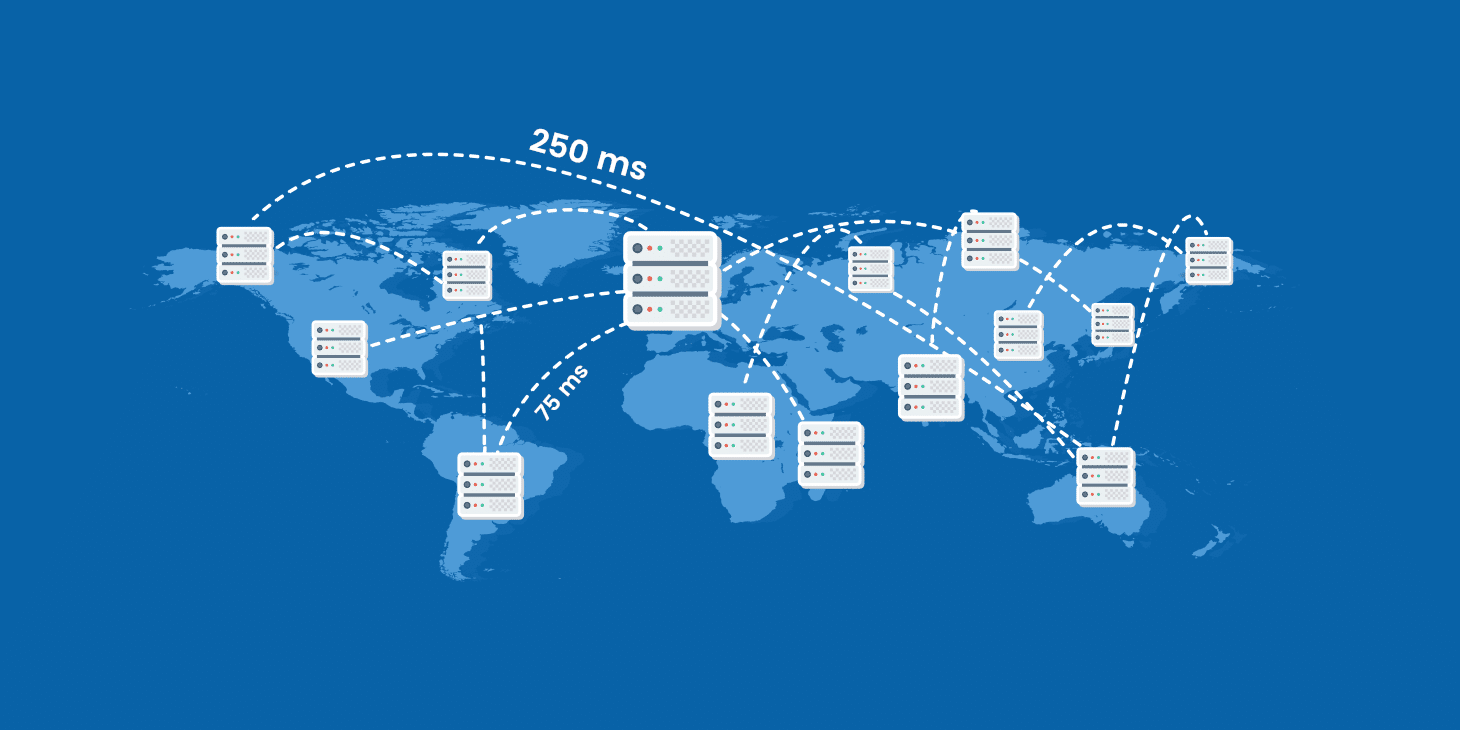
One issue that many businesses don’t fully consider is the location of their VPS server. This, however, can have an impact in a number of ways. As data has to travel from a server to a user’s machine, the further the two devices are apart, the longer communication takes. This latency can have big implications. Firstly, it can make your website load slowly on more distant browsers. This has been proven to increase the numbers of users who will abandon your website and, consequently, lower conversion rates. Secondly, it slows response times on your site, so when someone carries out an action, there is an unnecessary delay before the expected result occurs (a major issue for gaming servers) and, thirdly, when search engines measure latency times, they may downrank your website because it isn’t fast enough. As a result, your organic traffic can diminish.

Another vital consideration is compliance. To comply with regulations like GDPR, you have to guarantee that the personal data you collect about UK and EU citizens is kept secure. While you can ensure this in countries which are signed up to GDPR, like the UK, the bulk of the world’s servers are hosted in the US where the data on them can be accessed by US law enforcement for national security purposes. In such instances, companies cannot guarantee data privacy and, should the data be accessed, your business could be in breach of regulations.

The tip here is a simple one: for speed, responsiveness, SEO and compliance, ensure your VPS is physically hosted in the country where the vast majority of your users are located. Be careful though: just because your web host operates in your country doesn’t necessarily mean their servers are based there. This is why, at Anteelo, all our datacentres are based in the UK.

Expertise

Want To Make Money From Your Expertise? Start Here. | by Josh Spector | For The Interested | Medium

As your business develops its use of IT, you will start to need more in-house expertise to manage your system and make use of the applications at your disposal. Upgrading to VPS is a critical time for having IT skills in place, as you may need to learn how to use the new platform, migrate your website and other apps to it and deploy any new apps that you want to take advantage of.

IT expertise, however, is in short supply and training can be expensive. Even with it in place, there may be issues that you need help with. This makes it crucial that when choosing a VPS solution, you opt for a vendor that provides 24/7 expert technical support. A good host will not only set up the VPS for you and migrate your website; they will also manage your server so you can focus on your business and be there to deliver professional support whenever it is needed.
Security

Free Vector | Global data security, personal data security, cyber data security online concept illustration, internet security or information privacy & protection.

The proliferation of sophisticated cybercrime together with increased compliance regulations means every business needs to put security high on their priorities. While moving from a shared server to a VPS with its own operating system makes your system inherently safer, you should not overlook the security provided by your hosting provider.

Look for a host that provides robust firewalls with rules customised for VPS, intrusion and anti-DDoS protection, VPNs, anti-malware and application security, SSL certificates, remote backup solutions, email filters and email signing certificates.

Conclusion

VPS hosting offers growing business the ideal opportunity to grow its website, handle more traffic and deploy a wider range of business applications – and all at an affordable price. However, its important to choose a VPS package that offers enough resources, is located close to your customers, is managed on your behalf, comes with 24/7 expert technical support and provides the security your company needs.

Developing for Azure autoscaling

Microsoft Azure Review 2020 - business.com

The public cloud (i.e. AWS, Azure, etc.) is often portrayed as a panacea for all that ails on-premises solutions. And along with this “cure-all” impression are a few misconceptions about the benefits of using the public cloud.

One common misconception pertains to autoscaling, the ability to automatically scale up or down the number of compute resources being allocated to an application based on its needs at any given time.  While Azure makes autoscaling much easier in certain configurations, parts of Azure don’t as easily support autoscaling.

For example, if you look at the different application service plans, you will see the lower three tiers (Free, Shared and Basic) do not include support for auto-scaling like the top 4 tiers (Standard and above). And there are ways to design and architect your solution to make use of auto-scaling. The point being, just because your application is running in Azure does not necessarily mean you automatically get autoscaling.

Scale out or scale in

How to Autoscale Azure App Services & Cloud Services

In Azure, you can scale up vertically by changing the size of a VM, but the more popular way Azure scales is to scale-out horizontally by adding more instances. Azure provides horizontal autoscaling via numerous technologies. For example, Azure Cloud Services, the legacy technology, provides autoscaling automatically at the role level. Azure Service Fabric and virtual machines implement autoscaling via virtual machine scale sets. And, as mentioned, Azure App Service has built in autoscaling for certain tiers.

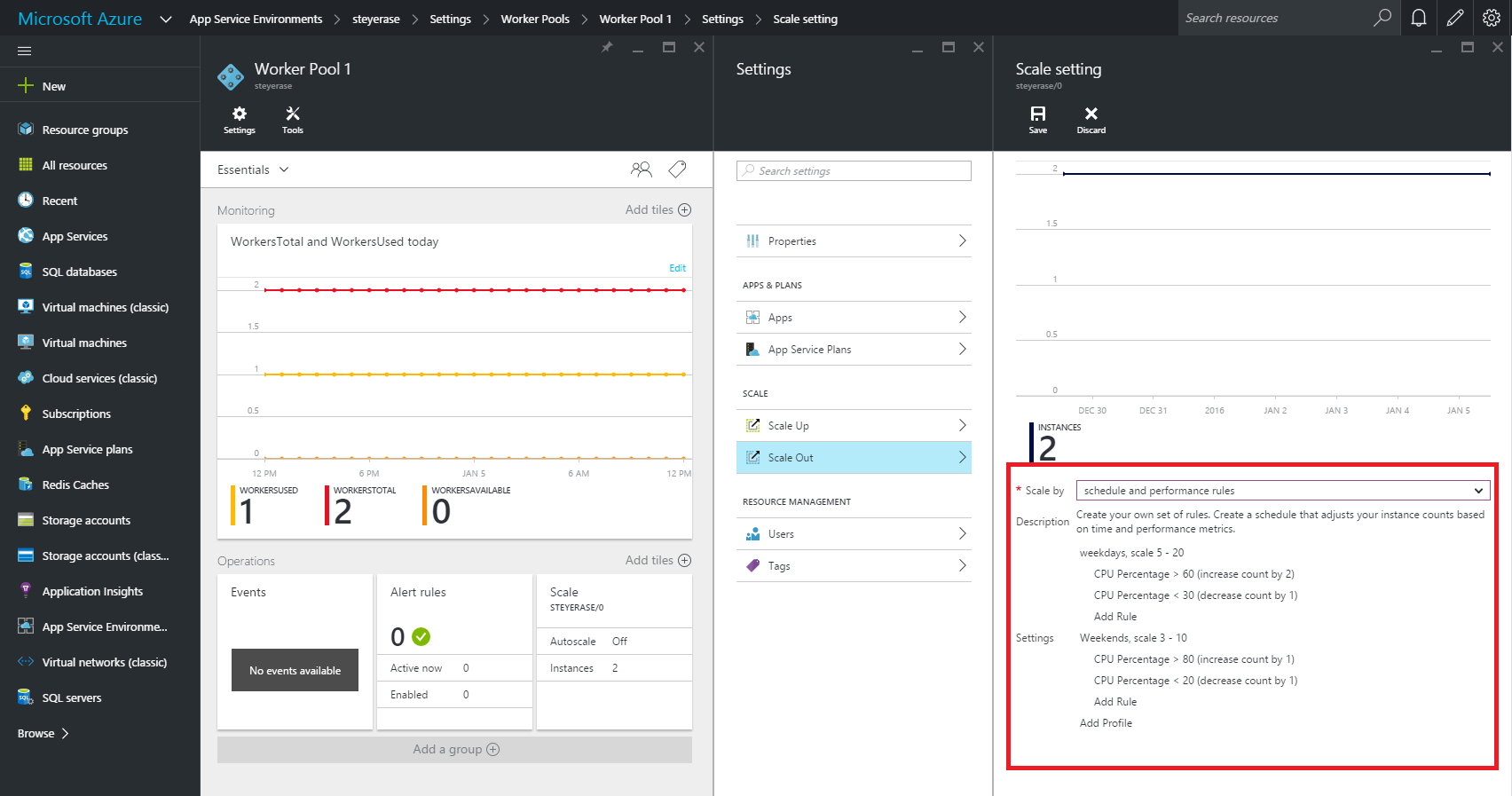
When it is known ahead of time that a certain date or time period (such as Black Friday) will warrant the need for scaling-out horizontally to meet anticipated peak demands, you can create a static scheduled scaling. This is not in the true sense “auto” scaling. Rather, the ability to dynamically and reactively auto-scale is typically based upon runtime metrics that reflect a sudden increase in demand.  Monitoring metrics with compensatory instance adjustment actions when a metric reaches a certain value is a traditional way to dynamically auto-scale.

Tools for autoscaling

Azure Monitor overview - Azure Monitor | Microsoft Docs

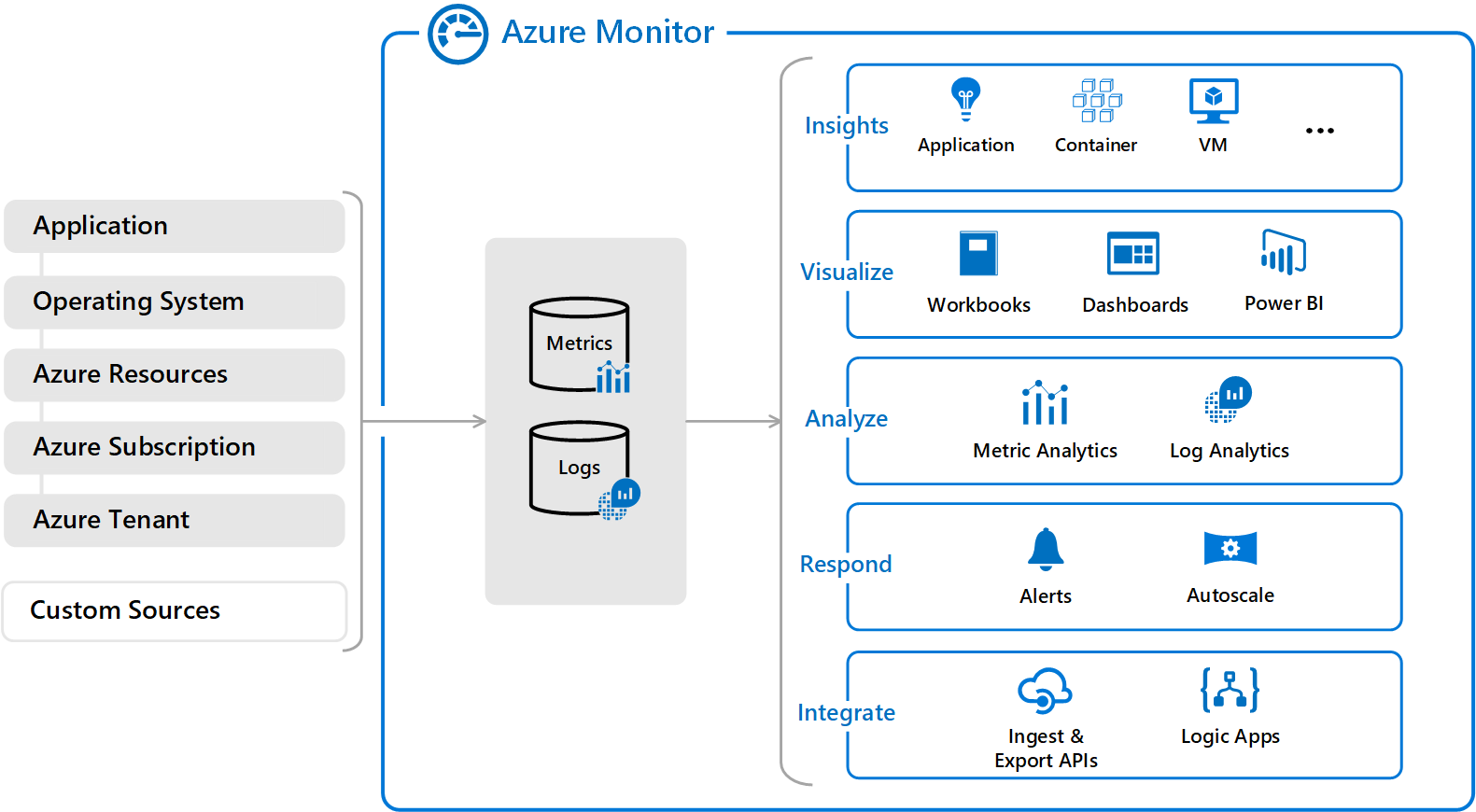
Azure Monitor provides that metric monitoring with auto-scale capabilities. Azure Cloud Services, VMs, Service Fabric, and VM scale sets can all leverage Azure Monitor to trigger and manage auto-scaling needs via rules. Typically, these scaling rules are based on related memory, disk and CPU-based metrics.

For applications that require custom autoscaling, it can be done using metrics from Application Insights.  When you create an Azure application and you want to scale it, you should make sure to enable App Insights for proper scaling. You can create a customer metric in code and then set up an autoscale rule using that custom metric via metric source of Application Insights in the portal.

Design considerations for autoscaling

Autoscaling v1 - Azure App Service Environment | Microsoft Docs

When writing an application that you know will be auto-scaled at some point, there are a few base implementation concepts you might want to consider:

  • Use durable storage to store your shared data across instances. That way any instance can access the storage location and you don’t have instance affinity to a storage entity.
  • Seek to use only stateless services. That way you don’t have to make any assumptions on which service instance will access data or handle a message.
  • Realize that different parts of the system have different scaling requirements (which is one of the main motivators behind microservices). You should separate them into smaller discrete and independent units so they can be scaled independently.
  • Avoid any operations or tasks that are long-running. This can be facilitated by decomposing a long-running task into a group of smaller units that can be scaled as needed. You can use what’s called a Pipes and Filters pattern to convert a complex process into units that can be scaled independently.

Scaling/throttling considerations

Autoscaling can be used to keep the provisioned resources matched to user needs at any given time. But while autoscaling can trigger the provisioning of additional resources as needs dictate, this provisioning isn’t immediate. If demand unexpectedly increases quickly, there can be a window where there’s a resource deficit because they cannot be provisioned fast enough.

An alternative strategy to auto-scaling is to allow applications to use resources only up to a limit and then “throttle” them when this limit is reached. Throttling may need to occur when scaling up or down since that’s the period when resources are being allocated (scale up) and released (scale down).

The system should monitor how it’s using resources so that, when usage exceeds the threshold, it can throttle requests from one or more users. This will enable the system to continue functioning and meet any service level agreements (SLAs). You need to consider throttling and scaling together when figuring out your auto-scaling architecture.

Singleton instances

Creating a Logic Apps Singleton Instance – Jeroen Maes' Integration Blog

Of course, auto-scaling won’t do you much good if the problem you are trying to address stems from the fact that your application is based on a single cloud instance. Since there is only one shared instance, a traditional singleton object goes against the positives of the multi-instance high scalability approach of the cloud. Every client uses that same single shared instance and a bottleneck will typically occur. Scalability is thus not good in this case so try to avoid a traditional singleton instance if possible.

But if you do need to have a singleton object, instead create a stateful object using Service Fabric with its state shared across all the different instances.  A singleton object is defined by its single state. So, we can have many instances of the object sharing state between them. Service Fabric maintains the state automatically, so we don’t have to worry about it.

The Service Fabric object type to create is either a stateless web service or a worker service. This works like a worker role in an Azure Cloud Service.

Five major cloud development to watch in 2021

5 Key Cloud Trends For 2021 | Hyperslice Cloud Blog - The latest in Cloud,Tech and Enterprise IT

We rang in 2020 with all the expectations that cloud computing would continue its progression as a massive catalyst for digital transformation throughout the enterprise. What we didn’t expect was a worldwide health crisis that led to a huge jump in cloud usage.

Cloud megadeals have heralded a new era where cloud development is a key driver in how organizations deploy operating models and platforms. In just the past 6 months, we saw 6 years’ worth of changes in the way businesses are run.

There has been a drastic shift to remote work – with the percentage of workers using desktop services in the cloud skyrocketing. Gallup estimates that as of September, nearly 40 percent of full-time employees were working entirely from home, compared to 4 percent before the crisis.

We are seeing renewed interest in workload migration to public cloud or hybrid environments. Gartner forecasts that annual spending on cloud development system infrastructure services will grow from $44 billion in 2019 to $81 billion by 2022.

In light of these underlying changes in the business landscape, here are some key cloud trends that will reshape IT in 2021:

Remote working continues to drive cloud and security services

The Cloud Is The Backbone Of Remote Work

The year 2020 saw a huge expansion of services available in the public cloud to support remote workers. Big improvements in available CPUs means remote workers can have access to high-end graphics capabilities to perform processing-intense tasks such as visual renderings or complex engineering work. And as worker access to corporate networks increases, the cloud serves as an optimal platform for a Zero Trust approach to security, which requires verification of all identities trying to connect to systems before access can be granted.

Latest system-on-a-chip technology will support cloud adoption

Today's System-on-Chip Platforms Have the Power to Drive Edge Computing – Rahi

The introduction of the Apple M1 in November marked the beginning of an era of computing where essentially the whole computer system resides on a single chip, which delivers incredible cost savings.  Apple’s Arm-based system on a chip represents a radical transformation away from traditional Intel x86 architectures. In 2020, Amazon Web Services also launched Graviton2, based on 64-bit Arm architecture, a processer that Amazon says provides up to a 40 percent improvement in price performance for a variety of cloud workloads, compared to current x86-based instances.

These advancements will help enterprises migrate to the cloud more easily with a compelling price-to-performance story to justify the move.

Move to serverless computing will expand cloud skills

7 Reasons Why Serverless Computing will Create a Revolution in Cloud T

More than ever, companies are retooling their operating models to adopt serverless computing and letting cloud providers run the servers, prompting enormous changes in the way they operate, provide security, develop, test and deploy.

As serverless computing grows, IT personnel can quickly learn and apply serverless development techniques, which will help expand cloud skills across the industry. Today’s developers often prefer a serverless environment so they can spend less time provisioning hardware and more time coding. While many enterprises are challenged with the financial management aspects of predicting consumption in a serverless environment, cost optimization services can play a key role in overcoming these risks.

Machine learning and AI workloads will expand in the public cloud

AI storage: Machine learning, deep learning and storage needs

As a broad range of useful tools becomes available, the ability to operate machine learning and AI in a public cloud environment – and integrate them into application development at a low cost – is moving forward very quickly.

For example, highly specialized processors, such as Google’s TPU and AWS Trainium, can manage the unique characteristics of AI and machine learning workloads in the cloud. These chips can dramatically decrease the cost of computing while delivering better performance. Adoption will grow as organizations figure out how to leverage them effectively.

More data will move to the cloud

Moving big data to the cloud - Rick's Cloud

Data gravity is the idea that large masses of data exert a form of gravitational pull within IT systems and attract applications, services and even other data. Public cloud providers invite free data import, but data export carries a charge.

This is prompting enterprises to build architectures that optimize for not paying that egress charge, which means pushing workloads and their data to reside in a single cloud, rather than multicloud environments. Data usage in the cloud can eventually amass enough gravity to increase the cost and consumption of cloud services.

However, as cloud technology continues to mature, organizations should not be afraid to duplicate data in the cloud – that is, it is perfectly fine to have data in different formats in the cloud. A key goal is to have your data optimized for the way you access it, and the cloud allows you to do that.

The journey continues

More sensitive data is moving to the cloud than ever | ITProPortal

So as the world around us changed in unprecedented ways in 2020, cloud computing continued its march to enterprise ubiquity and is a key layer of the Enterprise Technology Stack. Yet, by most measures, cloud is still only something like 5 to 10 percent of IT, so there is still a lot of room to grow. Getting the most out of cloud technology going forward is not a 5-year journey; it may take many years to truly tap into its full potential.

The shift in operational models and the organizational change needed to fully embrace cloud computing is significant. It is not a minor task to undergo that transformation journey. In early 2022, we will most certainly look back and be amazed again at how far cloud has progressed in one year.

How AI-powered ‘voicebots’ can benefit airline employees — and their employers

Emergence of Voicebots - The future of chatbots | KLoBot | AI

Airline workers have it tough.

A new generation of voice-driven software bots promises to make their work easier.

Airline employees, whether pilots, flight attendants or maintenance/repair/overhaul (MRO) technicians, are often called on to perform challenging tasks — and in a hurry. Think of a pilot dealing with mechanical failure, a flight attendant who can’t make a connection due to bad weather or a technician urgently needing a crucial part that’s out of stock.

To help solve these tough challenges in real time, a new generation of “voicebots” leverages two advanced approaches:

  • The first, natural language processing (NLP), lets machines and humans interact using “natural” (that is, human) languages.
  • The second, machine learning (ML), is a subset of AI that empowers computer systems to build mathematical models based on observed patterns.

How to Implement Voice Bots for Better Customer Support

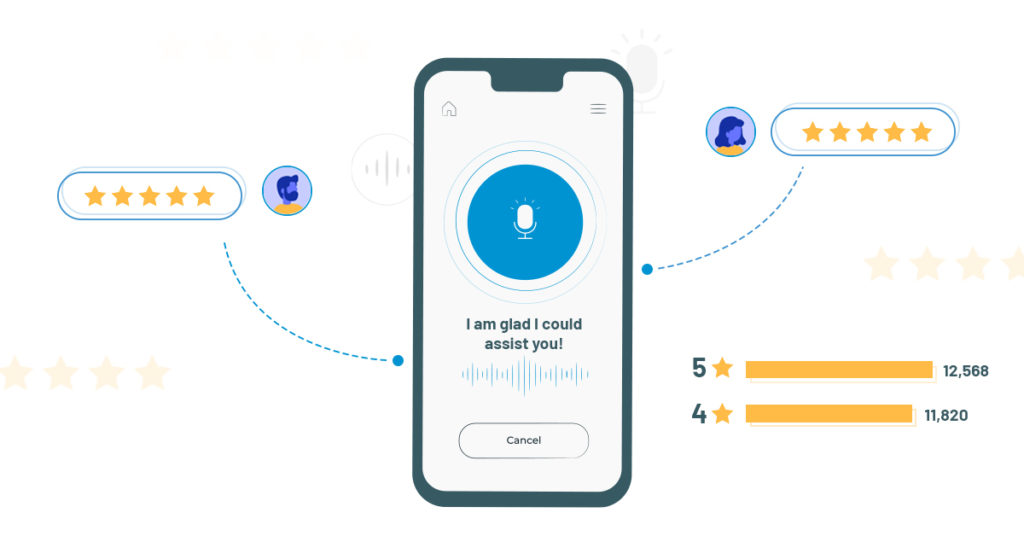
Voicebots eliminate the need to type, click or point. Instead, a worker can simply speak normally, then listen as the voicebot speaks back in response. What’s more, the latest voicebots can actually detect a speaker’s mood – for example, a sense of urgency – and then use that information to prioritize requests, such as ordering a new part.

Voicebots can also deliver important business benefits to the enterprise. For one, they empower airlines to automate tasks formerly done by hand, then expedite them based on priorities detected in a speaker’s voice. This can help airlines ease disruptions and delays, as well as lower costs and reallocate those savings to new and innovative projects. Imagine, for example, an airline that uses voicebots to ensure more efficient maintenance. If it could lower the number of flight delays by just 0.5%, the airline would enjoy total annual cost savings of $4 million to $18 million, depending on the number of daily flights.

By implementing this cutting-edge technology, airlines should also have an easier time attracting and retaining tech-savvy workers, possibly helping to mitigate the labor shortages forecast for the industry.

Voice technology soars — in the air and on the ground

Assisto Front

Voicebots for airline workers are part of the bigger trend of voice technology that consumers are already on board with. For example, market-watcher IDC predicts consumers worldwide will purchase more than 144 million voice-enabled smart speakers this year. The business market is ripening, too. Amazon, Google and Microsoft are all dedicating serious resources to expanding their voice technologies for B2B use.

Some airlines already use AI-powered chatbots to serve their customers. These chatbots can be programmed to understand the intent behind a customer’s request, recall an entire conversation history and respond to requests in a human-like way.

On the enterprise side, aircraft-maker Boeing is among manufacturers investing in AI and other voicebot technologies. The company is conducting research on NLP, speech processing, acoustic modeling, language modeling and speech recognition.

Real-life scenarios

How will airline employees benefit from using voicebots? Here are a few possible applications:

  • Pilots can use voicebots, both during preflight preparations and while actually flying. A complicated command from air-traffic control can take pilots up to 30 seconds to complete, turning all the knobs and hitting all the necessary buttons. A speech-recognition system can cut that time dramatically, allowing pilots to keep their eyes on the traffic and weather, and to keep the airplane safe.

How we used Voice to supercharge customer engagement - MetroGuild

  • MRO technicians can use voicebots to assist maintenance and repairs. A technician needing to replace a specific component could ask a voicebot, “Do we have this part in stock?” If the answer is negative, the bot could then find the nearest location where the part is available and arrange for it to be shipped. The voicebot could even select Express or Standard delivery based on the urgency detected in the mechanic’s voice.

MRO Labour Spotlight: The Aircraft Maintenance Technician Shortage

  • Flight attendants can use voicebots when encountering flight delays, cancellations and other common scheduling changes. For example, a flight attendant who is snowbound in Denver could tell a voicebot, “Notify Dallas that I’m going to miss my connecting flight today. Then find someone who can fill in for me on the next flight.” The airline’s crew-scheduling system could then make the necessary changes in real time.

Will "Flight Attendants" be replaced by AI & Passenger Service Robot?

Getting started

Airlines looking to equip their employees with voicebots may wonder how to begin. We suggest a three-step process:

Step 1: Ideation. Begin by brainstorming. Assemble your team and ask them: What are our biggest disruptions? How could voice technology help?

How to Run an Ideation Session. 15 Minutes | by Shay Namdarian | Medium

Step 2Proof of concept. With your biggest disruptions in mind, develop a potential solution using voicebots.

Five tips for a successful Proof of Concept - Bizztracker

Step 3: MVP. Borrow a tactic from the Agile approach — create a minimum viable product. This does not need to be a perfect, complete piece of software. Instead, create just enough for early tests and feedback. Then repeat as needed.

Making sense of MVP (Minimum Viable Product) – Digital Nimbler

Airlines looking to employ voicebots will also need to take on one more challenge: data access. Voicebots need quick access to all enterprise data. Yet many airlines keep their data protected in silos, mainly for security reasons. For voicebots, that makes gaining access to this data difficult and slow.

To resolve this issue, airlines need to find an acceptable balance between data security on the one hand and speedy voicebot data access on the other. This could be hard. But the alternative — doing nothing — could is even worse. Any airline that doesn’t adopt voicebots can be sure the competition will.

Part 1 of the Machine Learning Operations (MLOP) series

MLOps: Machine Learning Engineering | Towards Data Science

Introduction to Machine Learning Operations

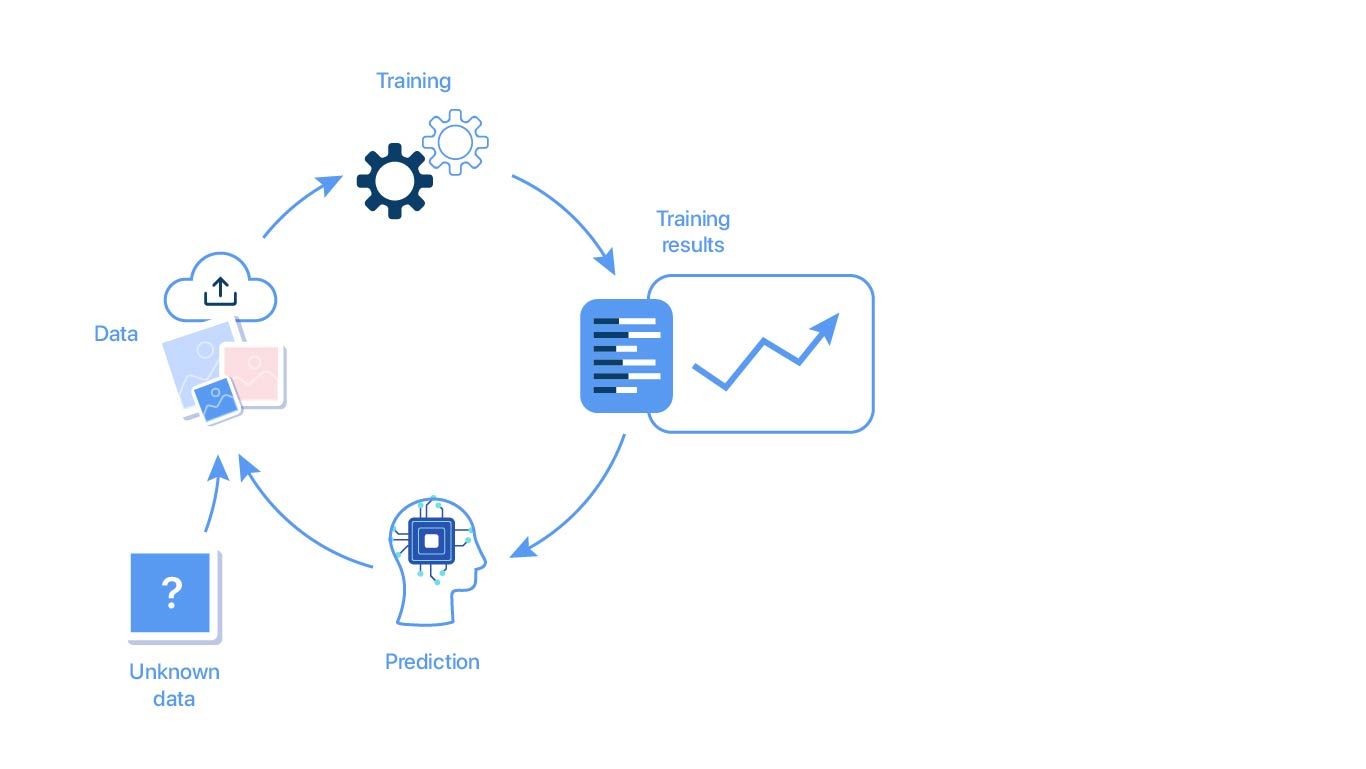
Machine learning – a tech buzz phrase that has been at the forefront of the tech industry for years. It is almost everywhere, from weather forecasts to the news feed on your social media platform of choice. It focuses on developing computer programs that can acquire data and “learn” by recognizing patterns and making decisions with them.

Although data scientists build these models to simplify and make business processes more efficient, their time is, unfortunately, split and rarely dedicated to modeling. In fact, on average, data scientists spend only 20% of their time on modeling; the other 80% is spent on the machine learning lifecycle.

Building

Why Prototype? | Starmark | Integrated Marketing Communications

This exciting step is unquestionably the highlight of the job for most data scientists. This is the step where they can stretch their creative muscles and design models that best suits the application’s needs. This is where Anteelo believes that data scientists ought to spend most of their time to maximize their value to the firm.

Data Preparation

Data preparation – is there a process to follow? - The Data Value Factory

Though information is easily accessible in this day and age, there is no universally accepted format. Data can come from various sources, from hospitals to IoT devices; to feed the data into models, sometimes, transformations are required. For example, machine learning algorithms generally need data to be numbers, so textual data may need to be adjusted. Statistical noise or errors in data may also need to be corrected.

Model Training

Machine Learning in production - A guide to model evaluation and retraining

Training a model means determining good values for all the weights and bias in a model. Essentially, the data scientists are trying to find an optimal model that can minimize loss – an indication of how badly the prediction is performed on a single example.

Parameter Selection

A guide to an efficient way to build neural network architectures- Part I: Hyper-parameter selection and tuning for Dense Networks using Hyperas on Fashion-MNIST | by Shashank Ramesh | Towards Data Science

During training, it is necessary to select some parameters that will impact the prediction of the model. Although most are selected automatically, some subsets cannot learn and require expert configuration. These are known as hyper parameters. Experts trying to configure hyper parameters have to implement various optimization strategies to tune the hyper parameters.

Transfer Learning

Introduction to Deep Learning : Transfer Learning in Deep Learning - YouTube

It is quite common to reuse machine learning models across various domains. Although models may not be directly transferrable, some can serve as excellent foundations or building blocks for developing other models.

Model Verification

At this stage, the trained model will be tested to see if the validated model can provide sufficient information to achieve its intended purpose. For example, when the trained model is presented with new data, can it still maintain its accuracy?

Deployment

8 Best Practices for Agile Software Deployment – Stackify

At this point, the model has been thoroughly trained & tested and has passed all requirements. The step aims to use this model for the firm and ensure that it can continue to perform with a live stream of data.

Monitoring

Automating Machine Learning Monitoring | RS Labs

Now that the model is deployed and live, many businesses generally consider the process to be final. Unfortunately, this is far from reality. Like any tool, the model will wear out after use. If not tested regularly, it will provide irrelevant information. To make matters worse, since most machine learning models work in a “black box,” they lack the clarity to explain the model’s predictions, making the predictions challenging to defend.

Without this entire process, models would never see the light of day. That said, the process often weighs heavily on data scientists, simply because many steps require direct actions on their end. Enter Machine Learning Operations (MLOps).

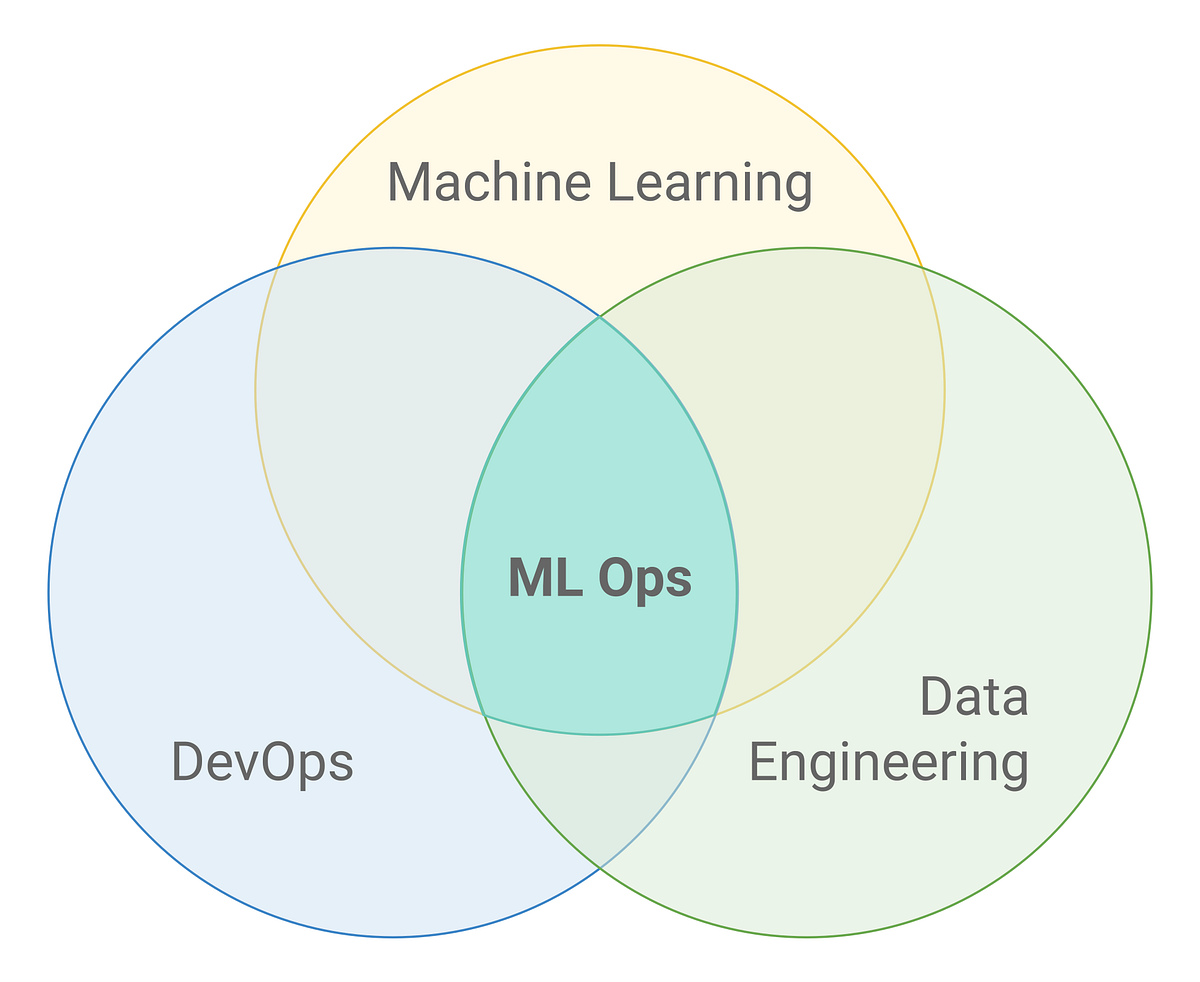
MLOps (Machine Learning Operations) is a set of practices, frameworks, and tools that combines Machine Learning, DevOps, and Data Engineering to deploy and maintain ML models in production reliably and efficiently. MLOps solutions provide Data engineers, scientists, and engineers with the necessary tools to make the entire process a breeze. Next time, find out how Anteelo Engineers have developed a tool that targets one of these steps to make the lives of data scientists’ easier.

error: Content is protected !!