Why is remote software development expensive?

Why is remote software development expensive?
While we are speaking to our prospective clients about their product development plans, one comparison that often gets discussed is why they should even outsource to us and not hire an in-house team?While there are many other factors in comparing remote vs in-house software development, one of the important factors in this comparison is the overall cost.Though seasoned entrepreneurs may understand this very well, as a first-time entrepreneur, it’s easy to miss out that when you are hiring a company for your software development, you’re paying for a finished product.

And a “finished product” is a lot more than the code that gets pushed on your servers. Here’s what all goes into building successful software:

  1. Team salaries: The salaries paid to the team working on your product is the most obvious expense and hence this is the first item on this list. Duh!
  2. Office space: A clean, well maintained IT office at an accessible location with all amenities including Internet connectivity, meeting rooms, projectors, whiteboards, pantry, etc. is a constantly recurring cost borne by the company.
  3. Hardware and software licenses: The employee’s laptops and networking equipment, both of which require routine upgrades as per market standards is an important recurring cost an IT company has to bear. In addition, many software licenses and SaaS tools and services (ex. email services, testing servers, OS licenses, etc.) have to be paid for on a month to month basis.
  4. Admin overheads: Admin and maintenance staff and office supplies needed for day to day office operations may seem like small expenses in isolation but quickly start to add up.
  5. CA and Accounts: Any software company will need an accounting and CA services to handle their routine compliances, taxes, and payrolls.
  6. Hiring and training costs: Hiring and training people is a stressful, expensive and time-consuming task. Not only is the hiring process difficult, but every organization also has to deal with the problem of employee churn. Every IT company also needs to spend considerable time in training and upgrading employee skills as per current trends and market expectations.
  7. Team activities: A happy and satisfied team is much more than just offering market-rate salaries. Today’s workforce looks for perks, team activities, etc. and as an employer, these are important team building and retention strategies.
  8. Operating profit: Over and above these costs, the software company will keep a profitability margin which will make the business sustainable over the long run.

If you are starting up, it may be a better idea to simply outsource all of the above to a software company so that you have only one thing to focus all your attention on – Your product

Android Architecture Components: Exploring

At Google I/O 2017, Google introduced new architecture components for Android. It is a new library which will help developers to maintain their activities or fragments lifecycle very easily.

This new library by Google provides some relief to the Android Developers by providing a complete solution to problems like memory leaks, data persistence during configuration changes and also helps in reducing some boilerplate code.

Exploring the new Android Architecture Components (Part 1) | Humble Bits

There are 4 Android Architecture Components :

  1. Lifecycle
  2. LiveData
  3. ViewModel
  4. Room

LiveData Clean Code using MVVM and Android Architecture Components | by Rohit Singh | AndroidPub | Medium

Lifecycle

Lifecycle class helps us in building lifecycle aware components. It is a class which holds all the information about the states of an activity or a fragment. It allows other objects to observe lifecycle states like a resume, pause etc.

There are 2 main methods in the Lifecycle class:

  1. addObserver() – Using this method, we can add a new instance of a “LifecyleObserver” class which will be notified whenever our “LifecycleOwner” changes state. For example: if an activity or a fragment is in RESUMED state then our “LifecycleObserver” will receive the ON_RESUME event.
  2. removeObserver() – This method is used for removing active “LifecycleObserver” from the observer’s list.

LifecycleObserver

With the help of this interface, we can create our Observer class which will observe the states of an activity or a fragment. We need to simply implement this “LifecycleObserver” interface.

LifecycleOwner

It is an interface with a single method called “getLifecycle()”. This method must be implemented by all the classes which are implementing this interface. This interface denotes that this component (an activity or a fragment) has a lifecycle.

Any class whose states we want to listen must implement the “LifecycleRegistryOwner” interface. And any class who wants to listen must implement the “LifecycleObserver” interface.

There are several events which we can listen with the help of the “LifecycleObserver” interface:

  • ON_CREATE – Will be called after onCreate() method of the “LifecycleOwner”.
  • ON_START – Will be called after onStart() method of the “LifecycleOwner”.
  • ON_RESUME -Will be called after onResume() method of the “LifecycleOwner”.
  • ON_PAUSE – Will be triggered upon the “LifecycleOwner” being paused (before onPause() method).
  • ON_STOP – Will be triggered upon the “LifecycleOwner” being stopped (before onStop() method).
  • ON_DESTROY – Will be triggered by the “LifecycleOwner” being destroyed (before onDestroy() method).

All these events are enough for managing the lifecycle of our views. With the help of these  “LifecycleObserver” and “LifecycleOwner” classes, there is no need to write methods like onResume(), onPause() etc in our activities or fragments. We can handle these methods in our observer class.

We can also get the current state of the “Lifecycle Owner” with the help of getCurrentState() method.

LiveData

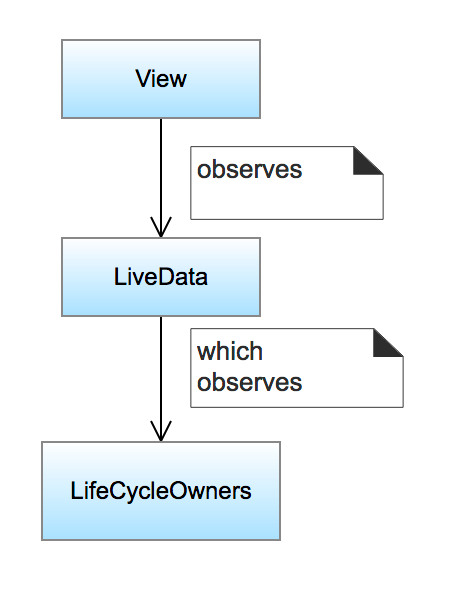
LiveData is a data holder class. It provides us the ability to hold a value and we can observe this value across lifecycle changes.

Yeah, you heard that right!

LiveData handles the lifecycle of app components automatically. We only need to observe this LiveData class in our components. That’s it and we are done.

There are some important methods of LiveData:-

  • onActive() – Called when there is an active observer. An observer is called active observer when its lifecycle state is either STARTED or RESUMED and the number of active observers changes from 0 to 1.
  • onInactive() – Called when there are no active observers. An observer is called inactive observer when its lifecycle state is neither STARTED nor RESUMED (like an activity in the back stack) and the number of active observers changes from 1 to 0.
  • setValue() – Used to dispatch the results to the active observers. This method must be called from the main thread.

In above method observe() we pass the Lifecycle Owner as an argument, this argument denotes that LocationHelperLiveData class should be bound to the Lifecycle of the MyActivity class. This bounding relationship of helper class with our Activity denotes that:-

  • Even if the value changes, the observer will not be called if the Lifecycle is not in an active state (STARTED or RESUMED).
  • The observer will be removed automatically if the Lifecycle is destroyed.

Whenever MyActivity is in either PAUSE or STOP state it will not receive location data. It will start receiving Location Data again once MyActivity is in either RESUME or START state.

There can be multiple Activities or Fragments which can observe LocationHelperLiveData instance and our LiveData class will manage their Lifecycle automatically.

There is no need to remove observer in onDestroy() method, it will be removed automatically once LifecycleOwner is destroyed.

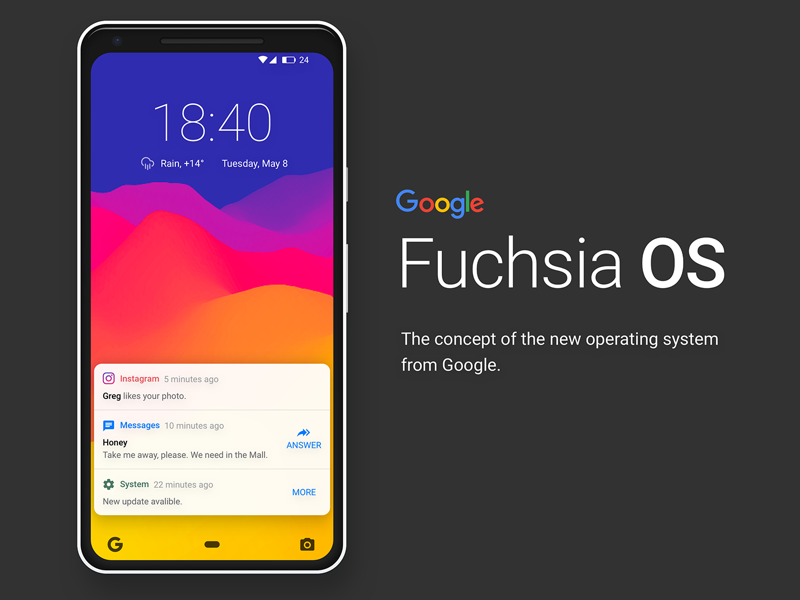
Google’s Fuchsia OS, why?

Talk about innovation and you’ll see Google at its forefront. This time Google is working to replace its existing operating system called Android. Google is working on its next OS after Android and Chrome which is called Fuchsia. Fuchsia is an open-source, real-time operating system. Earlier the OS was introduced only with commands but now they have created a new crazy UI called Armadillo.
Google Fuchsia OS: What's the story so far?

Fuchsia is not a Linux based OS like Android and Chrome. Android is primarily designed for smartphones and touchscreen phones. Fuchsia has focused on voice control and AI. It is designed to better accommodate voice interactions across devices. It has extremely fast processors and uses non-trivial amounts of RAM.

There are mainly two reasons why Google is working on a new operating system-

  1. Unlike Android and Chrome OS, Fuchsia is not based on Linux—it uses a new, Google-developed microkernel called “Zircon.” With Fuchsia, Google would not only be dumping the Linux kernel, but also the GPL: the OS is licensed under a mix of BSD 3 clause, MIT, and Apache 2.0
  2. People love to write cross-platform frameworks for two reasons: First, they want to run their apps to run on both platforms without doubling the effort. And second, because Android programming is still so painful even after the Kotlin.

About Fuchsia

  1. Fuchsia is based on newly developed microkernel called Zircon. The microkernel is basically a stripped down version of a traditional kernel (the core of an operating system that controls a computer’s underlying hardware).
  2. Fuchsia, is partially written in Dart which is an open source programming language developed by Google itself. Dart compiles to JavaScript.
  3. The fuchsia interface is written in Flutter SDK which is cross-platform and is also developed by Google.
  4. Fuchsia has a new UI called Armadillo that has a different home screen containing a home button, a keyboard, and a window manager. It supports vertical scroll system where the user can adjust other icons like battery, profile picture, weather report and so on accordingly.
  5. A user can also adjust the apps which are shown in the cards on the basis of how frequently or recently he/she is using the app.
  6. Armadillo can run on iOS and Android platform or any other platform that flutter supports easily.
  7. Google hasn’t made any public, official comments on why Fuchsia exists or what it is for but as per their documentation it will overcome all the shortcomings of the previous operating systems and will provide the high performance which is not possible to implement in the existing operating system (Android).
  8. The Fuchsia interface is written in Flutter SDK which generates cross-platform code that runs on Android and iOS.

Armadillo- The Fuchsia System Interface

Is Fuchsia OS the next Android? - Dignited

  1. Earlier, Fuchsia was based on commands but later its interface is designed in the language called Armadillo by Google which is pretty interesting now.
  2. According to the picture of its UI- here is the description of how things will work in case of Fuchsia.

The center profile picture is a clickable area that will open the menu which is similar to Android Quick Settings. Battery and connectivity icon will be shown on the top bar. There is also a horizontal slider for brightness and volume and also icons for do not disturb, auto rotate and airplane mode.

The bottom ‘Google Now’ panel will bring up a keyboard which is not the Android keyboard but instead it’s a custom Fuchsia keyboard which has the dark new theme. Fuchsia keyboard functions are different from Android keyboard.

Summary

So Fuchsia is a brand new Google project which may be the answer to “How we will start writing Android again if we need to end the era of earlier stable OS”.

The biggest challenge to bring the brand new OS might not be developing the new OS but the risk in the transition idea from the world’s most popular Android Operating system to the new one. We can not say anything about the future of the Fuchsia. It can be successfully launched to the consumers by 2020 as quoted by some source or can be entirely trashed by Google before it sees the light of the day.

The laid out path to responsive web design

With every second person using their mobile device to access information over the Internet, there’s no option left for business houses than to build websites customized for smaller screens; because if they don’t, they risk losing out on a substantial share of potential customers.

But building a website that fits on a smaller screen is a challenge in itself since with the variety of mobile devices currently available, there are a plethora of screen sizes for which websites need to be customized.

So do organizations need to build a different website for every different screen sizes?

Well, of course not!

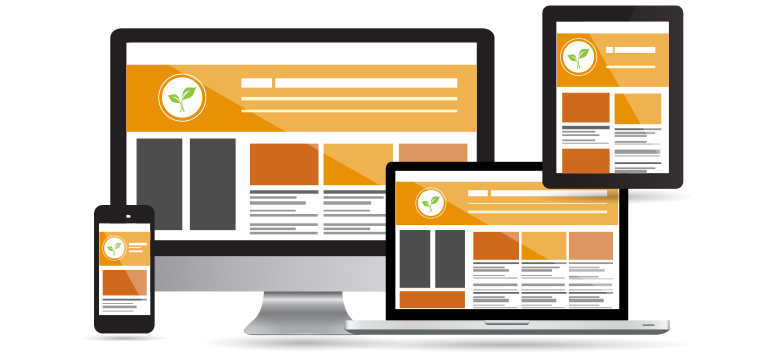
That’s where an approach called Responsive Web Design comes into the picture. Using this approach, an organization can suffice with creating one website that can fit onto any screen size. There are some code changes to be done to the programming of the website to make it mobile “responsive,” and that’s it!

So what is this Responsive Web Design approach, and what are its key benefits? Let’s find out.

What is Responsive Web Design?

Responsive website design - adapt, respond and overcome

Ethan Marcotte was the first person who came up with the term “Responsive Web Design,” and he also contributed significantly to developing the first mobile responsive websites. The man has deeply explained the basics of the design approach in a book called Responsive Web Design and also in this article on A List Apart.

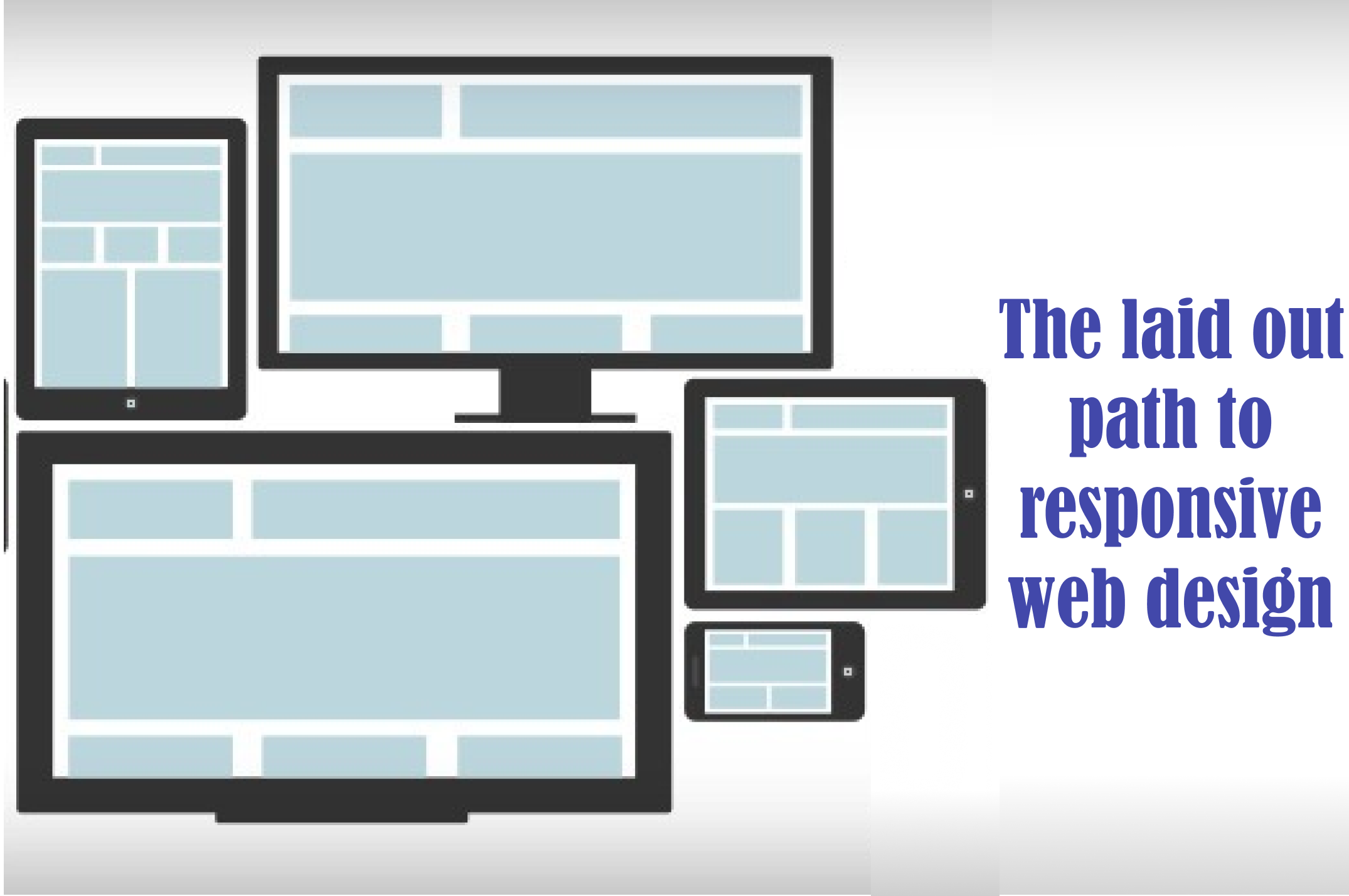
According to Marcotte, a truly responsive website is one that “responds” or adapts its layout according to the screen size on which it is being viewed. The layout of a website changes based on the size and capabilities of the device being used. For instance, suppose a website has content and images laid out in three columns on a desktop. Now for that website to become responsive, it needs to automatically show the same content in a layout with two columns on a tablet and one-column on a Smartphone.

For any website to deliver optimum user experience, it must be responsive. Imagine what impression a potential customer would carry of your organization if, on his first visit of your website on his Smartphone, all the images you carefully handpicked appear at haphazard positions with content broken up and displayed at non-matching locations.

We’re guessing it wouldn’t be that appealing!

Is a responsive website and a mobile website the same?

What is a Mobile Friendly Responsive Website? - Digital Consulting

Not really. A responsive website is one that changes continually and fluidly based on several factors and device capabilities. In such a case, the same website is equipped with code which enables it to transform its layout at run time to fit any screen size.

Alternatively, a mobile website is one that is explicitly built on a new domain for mobile users. Such websites have their code, which is usually pretty lightweight, but often barred by constraints like obtaining two separate domains (one for desktop and one for mobile), browser sniffing, and more.

While several organizations opt for having two separate websites to serve two different sets of customers, it is not a great idea to have a different mobile site for your business. Having the same site adapt to smaller screen sizes is better since it maintains standardization and upholds your brand’s unique identity through a common portal.

How to make a webpage responsive?

Responsive websites: 30 examples and 5 best practices - Justinmind

We need to program HTML and CSS to automatically resize, hide, shrink, or enlarge the webpages to make them look good on all the devices so that the website becomes responsive. To start, you need to include a meta viewport tag in the document’s “head” section, which acts as an indication to the browser instructions as to how to control the displayed page’s dimensions.

To make a webpage responsive, add the following <meta> element in it:

<meta name="viewport" content="width=device-width, initial-scale=1.0">

What this command does is this:

  • The “viewport” tag tells the browser that an instruction to control its width and scaling follows
  • “width=device-width” matches the screen’s width in device-independent pixels
  • “initial-scale=1.0” works to form a 1:1 relation between device-independent pixels and CSS pixels

Attempt to deliver the best user experience, mobile browsers render non-responsive pages at desktop screen width first and then attempt at making the content look better fit by increasing the font size and scaling it as per the screen size. Thus for such pages, the font-size may appear to be inconsistent, and users may have to double-tap or pinch-and-zoom to read clearly.

However, if you include the code mentioned above in your webpages, mobile browsers match the screen’s width in device-independent pixels. It enables the page to reflow content such that it matches varying screen sizes, whether displayed on a Smartphone or a desktop.

While this is just the first step towards making a website responsive, there are several other aspects involved, like auto-scaling images, text, and CSS, to become truly responsive. Here’s an excellent resource where you can read some more about this.

The Basic Principles behind Responsive Web Design

Key Principles of Effective Responsive Web Design | Web Design | Graphic Design Junction

The three critical principles detailed below are what makes responsive web design services possible:

1. Flexible Images

How many times have you visited a webpage where an image is so large you have to scroll horizontally to view it completely? While it is possible to view the image in this way, doesn’t it ruin the whole UX? Thus, resizing images such that they fit entirely into the screen on which they are being viewed is a necessity for making websites responsive.

A great way to make images responsive is to use CSS’s max-width property. Using this property ensures that images load in their original size unless the viewport is narrower than their width. If you set the width to a maximum value of 100 percent of the viewing area, images shrink proportionally as the screen or browser becomes narrow.

2. Fluid Grids

Fluid grids stand for grid systems, which scale based on a user’s screen size as opposed to fixed-width layouts that always appear the same. Although the term is frequently used interchangeably with “liquid layouts,” fluid grids ensure that all elements on a page resize concerning one another.

3. Media Queries

A majority of the modern browsers support CSS3 media queries that enable websites to collect data from individual visitors and apply CSS styles conditionally. The media feature “min-width” lets designers implement particular CSS styles once the browser window falls below a specified width.

Say hello to a few Responsive Web Design Frameworks

Best Framework for Responsive Website Designing

A great way to introduce responsive within your websites is by using existing CSS Frameworks that offer responsive design. Such frameworks are usually free and easy to use. Here’s a quick look at some great responsive web design frameworks:

1. W3.CSS

W3.CSS is a responsive stylesheet which makes it easy to develop sites that look nice at any size; desktop, laptop, tablet, or phone.

2. Bootstrap

Another popular framework is Bootstrap. It uses CSS, jQuery, and HTML for making responsive web pages.

Key Benefits of Responsive Web Design

10 Essential Benefits of Responsive Web Design - KeyCDN

Responsive Web Design brings many benefits to the table. Some of the most important ones are:

  • If your websites don’t distort at the change of screen size, there are more chances of users sticking around
  • Making a website responsive takes less time and resources than building a separate mobile website. It is also easier to maintain
  • A responsive website usually loads faster than a non-responsive one since it is optimized for smaller screen sizes
  • Responsive websites offer improved online as well as offline browsing experience

Along with the above mentioned vital benefits, having a single responsive website helps a business achieve better SEO rankings, analyze traffic reports better, convert more customers, and reduce bounce rates.

Summary 

Responsive web design means making websites that automatically adapt to the size of the visitor’s viewport. Modern businesses need to make websites responsive so that content can render them appropriately on the screen, depending on their size. The activity aims to ensure that visitors have an optimal experience no matter how they access a website. The key advantage of this strategy is that websites load quickly, and they do so without any distortions, such that users don’t need to resize anything to view content manually.

Why Cyber Security in Banking is Important?

man with key and laptop with digital bank 687720 Vector Art at Vecteezy

Since the last decade, cyber attackers have especially affected businesses that depend on computerized technology for conducting their daily business. Cyber crime is a significant threat to all businesses regardless of their sizes. Therefore, it is important to invest in cyber security in banking for protecting your business and data against malicious cyber criminals and hackers. It is important to build cyber resilience.

Cyber security in banking is of great importance. Since 2010, Indian banks have rapidly adopted newer technologies and digital channels while keeping up with the underlying objective of increasing revenues and footprints.  83% of CISOs agree on the increase in cyber attacks on banks since 2018.

Why is Cyber Security in Banking Important?

Since 2019, several banking institutions have been targeted by cyber attackers. Some of them include:

OTP Bank Data Leak

OTP Bank injects EUR 50 mln into Romanian subsidiary | Romania Insider

Database that was dated back to 2013 consisting of the personal data of approximately 800,000 clients including names, addresses, phone numbers, approved credit limit, work notes on client’s contract was made publicly available with. The database allegedly belonged to OTP Bank. According to the bank, there was no evidence on information leakage recorded in our bank, and the origin of this database remained unknown to the bank.

HCF Bank Data Leak

What Is Path Traversal Attack And How To Prevent It?

A database consisting of the data of the HCF bank customers was available on the internet with the personal information of the bank’s 24,400 customers. The database included customers’ names, phone numbers, passport details, addresses as well as the credit limit.

Alfa Bank Data Leak

Alfa-Bank - Overview, Competitors, and Employees | Apollo.io

Two databases belonging to Alfa Bank were found lying on the internet. The first database was dated back to 2014-15 and held the personal data of more than 55,000 customers. The database included customers’ names, their contact information, addresses as well as their place of work. It was speculated that these databases might have leaked during 2014 when the IT staff of the bank was going through mass layoffs.

Banks must be on their guard more than any other business since they are the custodian of money, which is the most valuable resource in the present times. In the case of a successfully deployed cyber attack, the results will be the most devastating. Since the foundation of banking lies in trust and credibility with the customers, it is very important to ensure cyber security in the banking sector.

The following are a few reasons why cyber security in banking is important and why should it matter to you.

  • The wave of digitalization: These days, the government is emphasizing ongoing digital. This means an increase in the population that is using digital money such as plastic cards and is going cashless. Therefore, it becomes important to employ precautionary measures that ensure cyber security for protecting your data and privacy.
  • Data breach leads to a breach of trust: Data breaches make it difficult for the customers to trust financial institutions. For banks, it is a serious problem since a weak cyber security system can lead to data breaches.
  • Financial Loss: When a bank suffers from a cyber attack, not only the bank but also, its customers suffer from financial loss. Recovering from this loss can be time-consuming. It will involve canceling cards, checking statements as well as confirming other minute details.
  • Your data is no longer yours: cyber security is extremely important when the attackers Once the attackers get a hold on your private data; it can be misused in any manner. Your data is sensitive and could reveal a lot of information about what might be leveraged by attackers.

How to Enhance Cyber Security in the Banking Sector?

GDPR will Help Enhance Cyber Security - IEEE Innovation at Work

  • Bank regulators should be allowed to examine third-party vendors that many credit unions are using these days for technology services.
  • Data breaches and cyber security incidents require a rapid response to mitigating the impact. Employ proactive measures to evade such cyber threats.
  • With security attack simulator and awareness tools, bank employees can learn about various forms of cyber attacks. This is ensured with the help of the tools four-step cycle. This includes simulated attack, knowledge imparting, an assessment which is followed by another simulated attack.

SQL injection attack: Your website might be undergoing one right away!

How to Prevent SQL Injection Attacks? | Indusface Blog

Injection, this word not only terrifies children but also, is a cause of immense worry for those who have suffered from ‘injection’ attacks. Last week, 90% of the deployed cyber-attacks were injection attacks. In an injection attack, attacker injects a malware or malicious code in a query or program. This allows the attacker to execute commands remotely that can read or manipulate a database. It can also enable the attacker to modify data that is lying on the website.

There are different forms of Injection attacks including XPath Injection, Blind XPath Injection, SSI Injection, OS Commanding, LDAP Injection, Format String Attack, Buffer Overflow, SQL Injection, Blind SQL Injection etc.

One of the most commonly deployed injection attacks is SQL injection. Considered as one of the top ten vulnerabilities, this injection attack is a code injection technique that targets data-driven applications by inserting malicious SQL statements into the entry field for execution. It was discovered in 1998 that is still being deployed by the attackers. SQL injection exploit security vulnerabilities in software of applications. This allows the attacker to manipulate, tamper, disclose or destroy data, changing the balances or voiding transactions etc.

What is an SQL injection attack?

Introduction to SQL Injections. SQL injection is an attack technique… | by Charithra Kariyawasam | Medium

SQL injection attack is deployed through parts of SQL statements in the web entry field for letting the website pass a freshly formed rogue SQL command to the database. It is an attack vector for websites that can be used to attack any type of SQL database.

Why are SQL injection attacks successful?

Protecting Against SQL Injection

The reason behind the success of SQL injection attacks is the weak codes. These vulnerabilities can be easily exploited by attackers for the execution of database queries thus, allowing attackers to access sensitive and confidential information, modify database entries and injecting malicious codes resulting in the compromise of the entire data. SQL injection attack can easily encrypt sensitive data. This attack can allow attackers to read information like username, passwords, card credentials. It can also allow attackers to delete the entire database.

What are the different types of SQL attacks?

SQL Injection Payload List. PayloadBox | by Ismail Tasdelen | Medium

SQL injection attacks can be categorized into four types. These are:

Blind based: In this form of SQL injection attack, attackers are not required to see any error message for running the attack. Even if the database error messages are disabled, attacker can still route the blind SQL injection attack. It can be further categorized into Boolean-based blind SQL injection attack and Time-based blind SQL injection attack.

Error based: This SQL injection attack is based on the error messages that are thrown by the database server for gathering information about the building of the database. Attackers can calculate an entire database.

Union based: In Union based SQL injection technique, attackers leverage the UNION SQL operator for combining the results of more than two SELECT statements. This attack helps in determining the structure of the main query with the help of blind SQL injection attack.

String based: This type of SQL injection attack takes place when the website is susceptible to SQL injection but does not show any consequences that would have otherwise shown after performing SQLi query.

How to prevent SQL injection attacks?

SQL Injection Prevention - A Practical Approach - Yeah Hub

Sanitization and Validation: Sanitization refers to ensure that no dangerous characters are passed to an SQL query in data. Validation confirms that the data is submitted in the form in which it is expected to be.

Updating and patching vulnerabilities: It is important apply patches and updates as soon as possible in order to prevent attackers from exploiting the vulnerabilities.

Encryption is important: Hashing or encryption of passwords as well as other crucial information including connection string is important for maintaining the confidentiality of your data.

Penetration testing: Cyber security companies like Anteelo provide managed services like web application penetration testing help in preventing SQL injection attacks with input validation testing.

SQL injection has been prevailing in the world of cyber-crime since two decades and is still strongly impacting industries. It is therefore, very important to examine each vulnerability and work in the direction to patch it.

Outsourcing your app? Ask Right!

When it is about outsourcing application development work, there’s no one-size-fits-all approach. It’s all about looking for the right partner that is the most appropriate fit for your team. As per the Computer Economics study IT Outsourcing Statistics 2014-2015, 62% of big organizations are outsourcing at least a part of their application development work.

As time-to-market needs increase and IT budgets decline, the trend of farming out development work is both rising and broadening to contain new services. In response, service providers have extended their offerings to comprise of product, technical, and process services. Notably, this runs the gamut from product management, information architecture and quality automation, analytics, and more.

If a mobile application is developed and executed in the right manner, it has the capability of offering increased efficiency, growth, and revenue for your business. That’s why development is so essential, as faults in this phase can lead to the development of a dysfunctional app that wouldn’t give you the preferred results.

To attain success in mobile app development, you need clarity of purpose and focus. To make this possible during outsourcing, you and your team have to sit down and ask some crucial questions before outsourcing, so you can attain success and avoid some of the most expensive pitfalls.

Things you Should Know Before Outsourcing an Apps

Here are some of the most critical questions that you must ask to select the correct partner for your organization’s specific outsourcing needs.

1. What is the purpose of the mobile app?

The Importance Of Mobile Applications In Everyday Life!

Are you developing an app just for building an app or because you are caught up in the hype about mobility? Will your application be a business version of your website, or will it have a particular purpose? Asking yourself the intent behind developing a mobile app can help you come up with a capable mobile app that aids a definite purpose. To make your mobile application successful, it must be extraordinarily focussed and address a specific purpose/function. You can discuss with the outsourcing team and narrow down on a definite problem that it is going to resolve or the particular purpose of your app. Ponder about why your mobile app is needed, how your customers can profit from it and how the application can be a more convenient alternative when compared to your website.

2. What should be a probable deadline for the completion of the app?

How to Create a Project Management Communication Plan | TeamGantt

Narrowing down to a deadline for the app is very important if the mobile app is to be developed for a particular event or occasion. If the mobile app is not finished before the event, the entire development is futile. Even a delay of a few days might make an enormous difference and cease the mobile app from serving its purpose — moreover, the plan for the release schedule for the app. In case your application is released in different versions, you have to prepare for the release date accordingly.

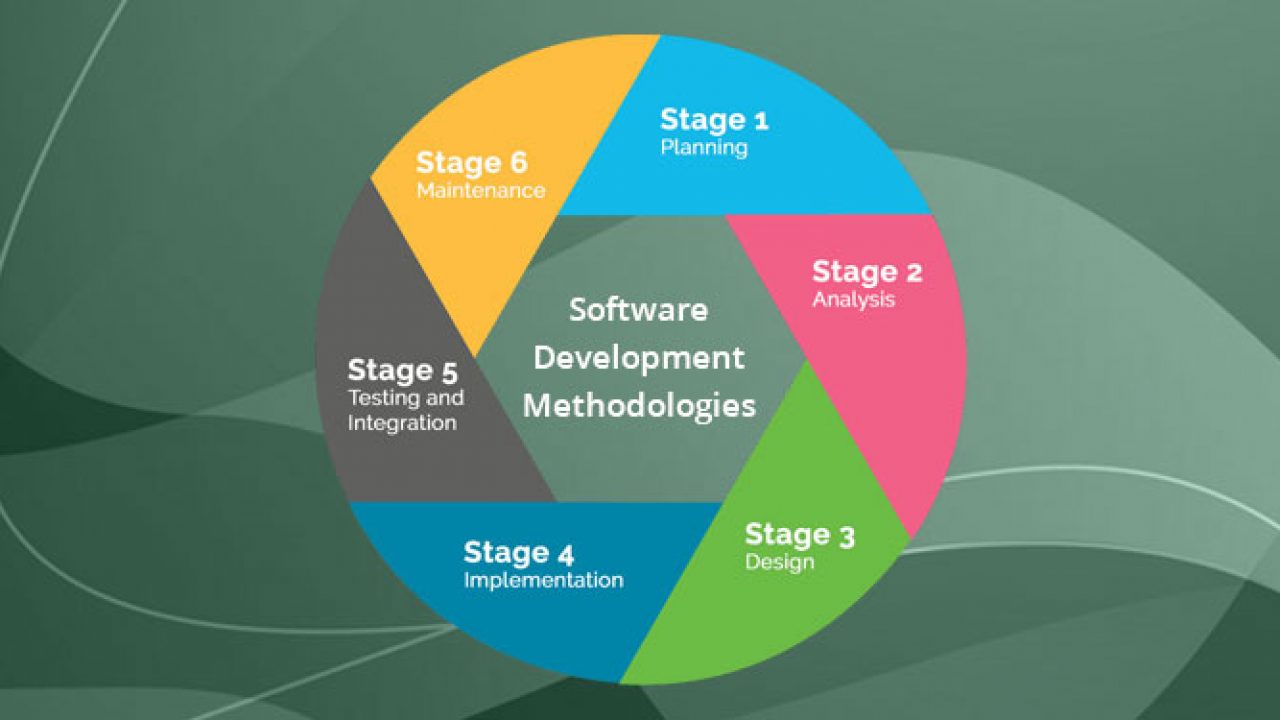
3. What programming methodology do you want?

Top 12 Software Development Methodologies & its Advantages & Disadvantages

How do you wish your end-users to interact with your application? This supports the outsourcing developers to create an appropriate wire-frame. Also, think about the visual design needs and User Experience. Briefing the developers about the non-functional and functional needs of your application can help them to develop product backlog. You would also want to explain the required programming interfaces, outside services/systems, and third-party vendors, sharing such details is important.

4. How do you need the app to be hosted?

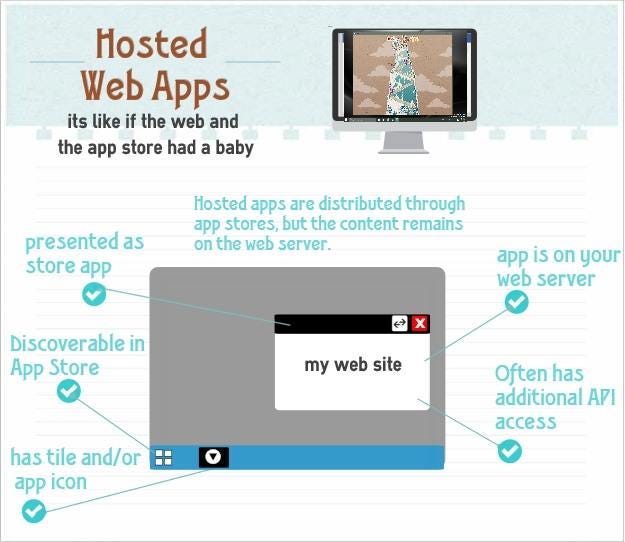
Hosted Web Apps explained | by Jeff Burtoft | ThisHereWeb

Do you need your mobile app to be plugged in to a new or preexisting infrastructure? Ponder about the hosting space that you would want. Brief the outsourcing developers beforehand about the post-launch support that you might need to fix the bugs and tweaks that you may get from users.

5. From where do you need the app to be downloaded?

How to Download and Update Apps on Android Phones and Tablets

Did you have an idea that the delivery channels of an application can significantly affect the design of the application? Getting listed on the App Store and Google Play is essential. You need to inform the developers in advance about your requirements for listing and get them talked at the development and design stage itself.

6. What level of security is needed?

Corporate network security levels

Tell the developers that you are expecting security protocols that ensure that is the app is protected and secure from hackers trying to attack and breakthrough code vulnerability. Also, ensure that you get the privacy policy of the application drafted.

7. Does your application need to adhere to guidelines?

8 steps in the selection process for hiring [A complete guide] | Workable

Ensure that your business app adheres to corporate guidelines like consistent screen design, design of icons, and branding conventions.

8. What are some of the risks involved?

Risks Involved in Forex Trading | Reputable Forex Regulators by Country

Through the course of mobile application development, you might face risks and uncertainties that can hinder the project. To steer clear of such hazards, make sure that you build a risk register at the onset of your application so that you can file the actions at every step. This way, you can hold your stakeholders responsible for each risk factor.

9. Who are the main stakeholders involved in the development process?

Key Stakeholders in Agile Product Development

It is crucial to identify the main stakeholders who are involved in the development and usage of your mobile application. Who would be funding it? Who would be owning it? Who would be benefiting from it? Who would keep the app active? Who would maintain the app daily? Asking such questions and trying to understand the involved decision-makers can lead to the successful development and running of the app. By comprehending the needs of the stakeholders, attaining clarity about their role, and taking responses to help in developing a successful application.

10. What budget can be allotted?

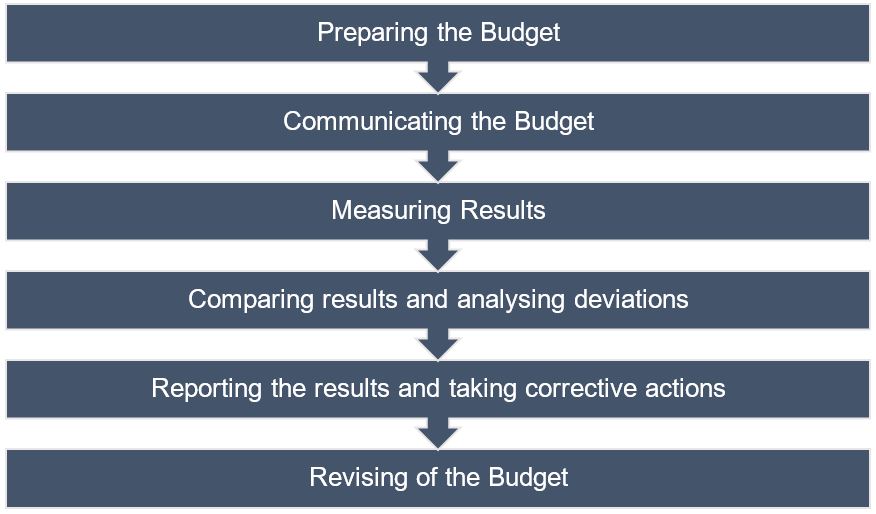
Budget, Budgeting, Budgetary Control - BBA|mantra

Many times the budget is overlooked when it comes to developing mobile apps. This is a significant reason why it becomes tough to estimate one. Make sure to sit down with the developers and discuss the various variables at play, be it multiple operating systems, testing environments, and more.

Summary

If you have made your mind to outsource your software development, you must have found some software development companies that you’re considering working with, and you are on the horns of a perplexity of making the correct choice. There is nothing better than talking to them and satisfying every query that you might have. Choose the web development company that passes all your parameters and comes out as reliable and trustworthy as a lot of your business now lies in their hands.

SQL Developer: A Career

Instance - Cloudbizz SQL Express Edition 10GB | Cloudbizz | NET Computer Group

What is SQL?

SQL is the most renowned Fourth Generation Programming Language (4GL). 4GL means that programmers only define what the result looks like as opposed to how the outcome ought to be calculated by the database. SQL is not a full-fledged programming language in which you can write applications and is a pillar of web development (back-end). Generally, this decisive programming paradigm has been a key component for ad-hoc queries run for data introspection carried out by human users directly with SQL rather than with a user interface.

SQL programming can be productively used to search, insert, delete or update database records. However, its functionalities do not end here. Actually, it can do plenty of things including, yet not constrained to, upkeep and streamline of databases. RDBMS like Oracle, MySQL Database, Sybase, MS SQL Server, and so on use SQL.

Beneath we’ve gathered a rundown of the most significant abilities for a SQL Developer. We positioned the top abilities dependent on the level of SQL Developer resume they showed upon. For instance, 15% of SQL Developer resumes contained Database as an aptitude. We should discover what abilities a SQL Developer entirely so as to be fruitful in the work environment.

What skills are required to be a SQL Developer?

If you’re planning to become a Structured Query Language Developer, (sometimes pronounced as “sequel”), now is the right time to make the move. These specialists are in high demand as corporations push to implement their digital revolution strategies and become data-driven organizations. This role requires you to plan, construct and maintain databases. You are responsible for all aspects of it which also includes:

Database

The database is an orderly assortment of data. Databases bolster stockpiling and control of information. Databases make information handling simple. For example, an online phone catalogue would utilize a database to store information relating to individuals, telephone numbers, other contact subtleties, and so on. Each company, service provider and organization around you utilize a database to manage billing, customer related issues, to deal with error information, and so forth. We should likewise consider Facebook. It needs to store, control and present information identified with individuals, their companions, part exercises, messages, promotions and parcel more. Likewise, there is an unending number of examples for the same.

It is utilized to screen the general execution of the database to prescribe and start activities to improve/enhance performance and make Snapshot Replication for the development and testing Databases across various Servers. It is used to make records and perspectives, put away techniques to upgrade database/application execution.

DBMS: An Intro to Database Management Systems – BMC Software | Blogs

SQL

Well, knowing SQL is the most fundamental and foremost requirement when you start on the path of becoming a SQL developer. SQL represents Structured Query Language and it allows you to control and access databases. SQL by expansion is truly adept at working with a lot of information. SQL is even useful for troublesome information control. It is used to test Performance Accuracy related inquiries under SQL Server and improve the exhibition of questions with adjustment in T-SQL questions, standardized tables, set up joins and create indexes wherever necessary. It facilitates the creation of complex queries using table joins (inner and outer), temporary tables and table variables.

المرجع المتقدم إلى لغة SQL - SQL - أكاديمية حسوب

SSIS

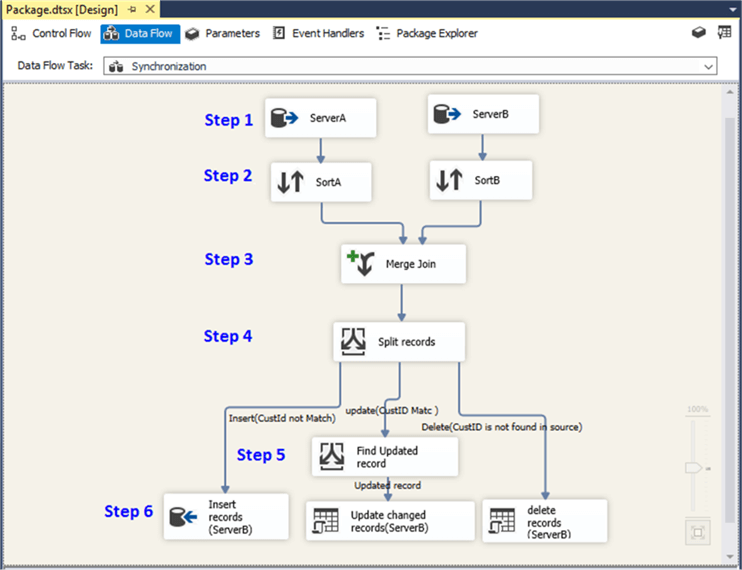
SQL Server Integration Service (SSIS) is a part of the Microsoft SQL Server database programming that can be utilized to execute a wide scope of information relocation assignments. SSIS is a quick and adaptable information warehousing instrument utilized for information extraction, stacking and change like cleaning, aggregating, merging data, and so forth. It makes it simple to move information starting with one database then onto the next database. SSIS can separate information from a wide assortment of sources like SQL Server databases, Excel records, Oracle and DB2 databases, and so on. SSIS likewise incorporates graphical instruments and wizards for performing work process capacities like sending email messages, FTP activities, data sources, and destinations.

Synchronize Table Data Using a Merge Join in SSIS


T-SQL

T-SQL (Transact-SQL) is a lot of programming expansions from Sybase and Microsoft that add a few highlights to the Structured Query Language (SQL), including transaction control, exception and error handling, row processing and declared variables. All applications that interact with SQL Server do as such by sending T-SQL proclamations to the server. T-SQL questions incorporate the SELECT articulation, labelling output columns, restricting rows and modifying a search condition. T-SQL identifiers, in the interim, are utilized in all databases, servers, and database protests in SQL Server. These incorporate the accompanying tables, imperatives, put away methodology, perspectives, segments and information types. T-SQL identifiers should each have a one of a kind name, is allocated when an article is made and are utilized to distinguish an item.

T-SQL Static Code Analysis & Security Review Tool | SonarQube

Other Programming Languages

If you haven’t worked with SQL previously, you’ll see it’s a moderately clear revelatory language where you compose queries that either adjusts the database or recover records. Ideally, proficient SQL engineers ought to have experience working in a development environment like Oracle SQL Developer. Other programming necessities differ across associations. For instance, you may be developing applications written in Java, C++ and C#, so information on these will assist you with working together with different groups. When working with MySQL, you in all likelihood need to have involvement in PHP. Similarly, recognition with the .NET system is helpful, particularly on the off chance that you’ll be having some expertise in Microsoft SQL Server. A foundation in Unix is another enormous addition to it. You ought to be efficient in CLI, so getting Bash or Windows batch scripts is another approach to enable your resume to stick out.

It’s a job that gets even more complicated as databases convert into data lakes, and you need to keep your skills updated. But with the right experience and certifications, you can assure a knock from the employers on your door.

Top 10 In-Demand programming languages to learn in 2020 | by Md Kamaruzzaman | Towards Data Science

Here’s an overview of the skills and educational background needed to dive into the SQL Developer role:

  • PL/SQL: A thorough knowledge of structured query language or correlated programming language to work effortlessly on database design.
  • SQL Server Reporting Services (SSRS): This service aids in report generation for several databases so that you can be sure of all database objects and units encompassed in the database.
  • SQL Server Integration Services (SSIS): This service helps you with the integration of multiple databases, database objects and entities as per your requirement.
  • Microsoft SQL Server: This is the most difficult yet intriguing job for SQL developer where he has to work on server performance, integrity as well as server maintenance. This is one of the highly paid SQL Developer skills where  developers get attractive remuneration and other opportunities too.
  • Analytical skills: Developers must analyze and understand the needs of the user and then design the software accordingly to meet those needs.
  • Creativity: Developers must be creative enough to find new solutions to conventional problems.
  • Detail-oriented: Developers usually work on several parts of an application or system simultaneously and therefore must be able to focus and pay attention to even the minute details.
  • Interpersonal skills: Developers must be able to work in harmony with others who help in developing and creating successful software.
  • Problem-solving skills: Since developers are in charge of software from beginning to end, they should be capable of solving problems that may occur along the design process.
  • Communication skills: Developers must be capable of giving able to give clear instructions to their teammates. They should also be able to explain to their customers how the software works and answer any queries that arise.

Systematic skills, smart organization skills, fine detailing, maximum accuracy, great knowledge of structured programming language, decent experience in RDBMS and knowledge of maintaining relationships between different data objects. You need to be a quick performer and you must know how to work under stress and constant pressure.  The future of SQL is really bright and most of the successful SQL professionals ensure that they know each and everything about current trends of the database and stay updated about the technical market.

What are the responsibilities of an SQL Developer?

  • Application of DML and DCL statements
  • Build appropriate and valuable report deliverables
  • Create procedures and scripts
  • Develop top-notch database solutions
  • Develop, execute and modify stored procedures
  • Examine SQL queries
  • Guarantee performance,  safety, and readiness of databases
  • Handle troubleshooting database problems
  • Provide reports
  • Research necessary data

Why should you choose SQL as your career?

Why You Need to Learn SQL If You Want a Job in Data (2021 Update!)

SQL is a massive technology. The future scope of being an SQL Developer it is not just limited to Computer Science, but you can see it revolving around Retail, Finance, Healthcare, Science & Technology, Public Sector, in short everywhere. All organizations need a database for the storage of their data. There are endless reasons why you could SQL career. A few are listed below:

  • Combine data from multiple resources: Integrating data from several resources may be consuming a lot of time, but with SQL, you may simply combine the specific fields or merge the complete database.
  • Everlasting: The image below shows a report of StackOverflow’s survey conducted in 2017  where SQL stands second in terms of popularity ensuring that SQL is here to stay for times to come.
  • Free: SQL is open-source which means that SQL is completely free to use and distribute. As far as learning is concerned, you just have to bear the initial training charges of SQL certification, later on, you need not pay for any tool or software to practice SQL. SQL is executed using XAMP/WAMP server, which is an open-source tool for executing the queries.
  • High in Demand: If you search the internet for jobs for SQL Developers, there are more than 25k results. According to an analysis, SQL has been mentioned in 35.7% of advertisements, which is 1.39 times higher than the advertisements of Python and other Data Analytical languages.
  • Integration: You can utilize SQL queries with the incorporation of other programming languages like PHP or Java depending as per your requirement.
  • Manage bulk of data: When you have a large collection of data, then it becomes really difficult for the conventional database software to manage them. In this case, SQL acts as a blessing. Whether there are a thousand records or a million, SQL is fully equipped to manage a huge amount of data of all types.
  • Simple: SQL is the simplest programming language as compared to its contemporaries. One can easily learn the basics and fundamentals of SQL within a week or two.
  • Standard: SQL development has been around for 30 years now and without any doubt, it is going to stay for a good 30 years or more too staying true to the old proverb, “Old is Gold”.
  • The base of data visualization tools: All data visualization tools utilize SQL for their functioning. Therefore learning SQL will help you get a better understanding of all such tools.

CONCLUSION

SQL Developers are sought after because of the expanding dependence on the information. Turning into a SQL engineer can be a fulfilling and satisfying vocation. The path towards it is generally simply contrasted with other specialized vocations. Microsoft SQL Server is among the best 3 RDBMS frameworks and getting the right skills for turning into a SQL Server developer will work well for you and open many job opportunities.

Most SQL developers are either database specialists or veterans in managing database advancement. There are various kinds of SQL relying upon the stage you use, however, they all play out similar essential capacities—recover, include, alter, and erase database information.

The “YOU MUST KNOW” of IT Companies

The “YOU MUST KNOW” of IT Companies

IT outsourcing is notoriously known for false promises, sub-standard quality of software and an inability to deliver products that can actually be used.

We discovered that more than half of our clients have burnt their fingers with such IT companies before choosing Anteelo and finally getting software delivered in the way it should have always been.

This post is based on true stories and is a compilation of the most common and shocking stories and experiences we have heard from our clients over the past few years.

1. False promises by sales teams

Sales Mistakes: 10 Mistakes Every Sales Rep Needs to Avoid!

Often, the first meeting with any IT company will be with people from their sales team, who are usually non-technical and may not understand your business problem, vision, and product at all. However, they have been trained and groomed to say the right set of words which sound convincing and make you decide in their favor.

In such meetings, the sales team also tends to commit and agree to many terms which are then rarely delivered in practice. Most of the times, the complexity and understanding of what is being committed to being completely missing.

2. Deep organizational hierarchies

Flat vs. Deep Website Hierarchies

Most companies will never get you in touch with the set of developers and designers who are going to ultimately work on your project. That communication is often forced to go through product managers, project managers, team leads and various such roles where everyone adds their own subjective interpretation leading to a lot of important decisions just getting lost in translation.

The reason for this obfuscation is that most companies would hire very junior or young developers with incompetent design and software development skills and provide them with zero training. Often they are learning on the job as they are building your product, which means that the code quality being delivered is poor and the product is riddled with a large number of bugs and issues, often leading to an unsatisfactory and unusable project.

Another common scam is further outsourcing your work to another company without your permission. That means that the quality of work goes down even further since the communication gap widens. Also, it can be assumed that in most cases, the second company will be even cheaper and that will reflect in their hiring and quality standards as well.

3. Not sharing source code with clients

How to Avoid Getting Scammed as a New Freelancer | Elegant Themes Blog

Since most clients of IT companies are non-technical, IT companies would often take advantage of the fact that the client’s entire source code is under their control. The unsuspecting client is also unaware of the importance of this ownership until things turn sour in the relationship. Source code transfer often becomes the hostage before the scores are settled.

4. Charging exorbitant hosting fees

SiteGround Review: A WordPress Developer's Honest Review

Taking advantage of the nontech awareness of their clients, many IT companies would charge a hefty monthly fee in the name of server hosting, etc. even if the same can be done at a much cheaper cost. Most clients will simply give-in because they will not understand the correct facts and have no option left but to believe what they chose IT company is suggesting.

5. Fake claims about skills and clientele

Recent Email Scam Awareness | Stigan Media Inc.

Websites of most IT companies claim to have great competencies, skills and clients listed. While most of them may be true, but most people get fooled into believing that the company has built the whole product for the clients they have listed.

As a client, always ask for the details of what the company did for that client. Did they work on their whole product or a part of it? What exactly was their role and how long was their engagement? Demand for answers to be explained to you in a simple non-technical way.

6. Delivering software as per spec, but not as per common sense

Software 101: A Complete Guide to Different Types of Software

Most companies will ask their clients to create a product spec or requirements document to define exactly what they are trying to build. And the IT company will share a time and cost estimate accordingly. But no company will bother to improve the spec or explain the shortcomings in the document to the client. Often there would be features in the spec which may not be that important to the client but would take significant development time. Nobody in the team (sales or development) would take the initiative of asking the client whether such features are important or can be skipped.

Eventually, a combination of a vague product spec and a team of incompetent developers means that the product will never be completed. Most companies will just get into a never-ending cycle of bug fixing where one bug fix leads to another and months go by and nothing is ever ready to ship.

Even in the rare case that the product is actually completed, it may tally to the spec document on a point by point level, but the overall product will be unstable and practically unusable.

7. Delivering software which will crash as soon as actual workloads start

Software Developer Job Description: Salary, Skills, & More

Lack of proper testing across a variety of devices and platforms leads to issues which can be hard to detect until it’s too late. Often the developers and sales teams will be smart enough to show you a product demo in a very limited and controlled environment but the moment the product will go live, everything will begin to fall apart. Your users will complain of your app crashing on their phones or not working as expected.

Such issues are even more devastating since by then you would have already announced your product to your connections and damage control would be nearly impossible.
It’s important to evaluate your IT company on multiple factors, not just the final price. Making a good choice could lead to an association that could last for years and helps you with your product and startup vision for a long time. A bad choice could mean that your startup ambition could fail even before it lifts off from the ground.


In 2021, should startups choose Android or iOS as their mobile platform?

Android vs iOS: Which mobile OS is right for you? | IT PRO

Back in 2008, the iOS App Store was launched with 500 apps. Today that number has skyrocketed to 1.85 million apps that are available for users to download. Android users have a bigger app universe to browse from that consists of over 2.56 million apps available in the Google Play Store. It is safe to say that we are living in the digital era!To prove we are in the digital era, let’s recall the numbers.

Did you know that the number of smartphone users worldwide surpasses 3.5 billion? As per the Statista- Smartphone User forecast, it is estimated to further grow by several hundred million in the next few years.

There are 7.94 billion devices connected worldwide and this number is more than the number of people in the globe! Hence, there is no denying the fact that mobile applications are an integral part of our daily lives.

Keeping the above data in mind, many entrepreneurs are planning to start a mobile app centred business.

If you are amongst those businessmen who are looking forward to creating a mobile app, then the first question to address is – which is better among Android vs iOS development?

In this article   you will walk through certain factors that will influence your choice, and embibe you with the iOS and Android App Development Platform.

Let’s get right to it.

Which Is Better For Your First Mobile App: To Launch On Android Or iOS?

Apple vs Android: Market Share

According to Statista, in 2020 the market share of Android and iOS was 86.6% and 13.4% respectively and these numbers are expected to reach 87.1% for Android and 12.9% for iOS in 2023.

Looking into the above graph, you can conclude that Android is a clear winner in the mobile operating system market share worldwide and is expected to remain so in the years to come. It is so because the Android startup apps are the most adopted ones for almost every smartphone vendor other than Apple.

Also, Android is an open source platform that allows and makes it easy for mobile phone manufacturers to add their own look to the operating system.

Android Vs. iOS : Which OS Scores Over The Other

Apple vs Android: App Downloads

According to Statista Market Forecast 2016–2021, there will be 196 billion annual downloads from Google Play store by 2021, all thanks to growing smartphone and app adoption worldwide.

While from the iOS store there will be 42 billion downloads. Android again wins when it comes to app downloads worldwide and it is expected to enormously grow in the years to come.

After reading all the above facts and data  it is highly advisable for you to  make yourself familiar with the process of startup app development.

We have curated a complete guide on apps for startups, with A to Z information about the process of getting your idea live on a mobile application. In this article, we will answer all the questions that every entrepreneur who is new to the app industry might have.

Which Is Better – iOS Or Android?

Android vs iOS development is a never ending debate between software developers. The quest to- Which platform should startups choose has no one word answer. There are solutions that depend on various factors that an entrepreneur should consider before making a decision.

Let’s go through all the factors one by one:

1. Demographics

There is no denying the fact that Android smartphones have a larger demographic than apple users.

Also, there is no denying the fact that Apple is considered a high end device in which users are willing to purchase apps. So, Apple users are generally found in prosperous parts of the world.

For example: The USA is considered among the highest revenue making countries, thus you will find a larger number of iOS users there.

As per the reports by Statista, currently there are more than 113 million iPhone users in the United States, accounting for about 47 percent of all smartphone users in the United States. So if you are targeting the western demographic, I suggest you to hire iphone app developers.

2. Fragmentation

In simple words, fragmentation refers to when users are running different versions of a mobile operating system and using different mobile hardware models or mobile devices.

We are aware that iOS devices and their release cycles are controlled by Apple alone. As a result, once a year Apple synchronizes iOS version releases with device releases. Hence, fragmentation issues are less.

However, when we talk about Android, fragmentation issues occur constantly, further making life of the android application developers difficult at the time of testing and quality control. Thus, Android fragmentation increases development cost and maintenance time.

3. Design and development

In terms of designing, Google Material Design has a greater influence on UI and UX. Mobile app developers feel that when it is about coding mobile apps then Swift is a much easier language to start as compared to Java.

However, design and development is one factor that depends less on the platform and more on the skills of your partnered mobile app development company. When you are linked with a brand that has it specialization in the development of both Apple and Android apps, it is of the least matter about which platform requires less developmental efforts as both are done within equal efforts.

Now that we are aware of the factors involved, let us discuss the reasons to go for android startup apps and iphone startup apps separately.

Why Choose Android Startup Apps?

You should go with Android first if your audience is not concentrated on any one specific demographic or target audience. Also, if there are a good number of customization elements in your mobile app, go with Android.

Below are the advantages of using Android.

1. Greater user base

Majority of users globally use Android devices as compared to other devices, which gives you a large pool of potential users.Not having an android app for business means losing limitless opportunities and audience for your product or services.

2. Open source platform

Android is an open-source platform which means Google doesn’t charge any fee for using this platform. Wherein, Google also provides Android app development tools and technology for free to the developers. Thus Android app cost is comparatively lesser than iOS app cost.

So, it is a cost effective solution for your startup budget.

Hardware device manufacturers such as Samsung, Oppo, Xiaomi, etc., all use Android as their default OS.

3. Customizable apps

Android app development allows the app developers to customize the applications as per the business requirement. This means your business app development will get done with the right requirements and required flexibility which might not have been possible with any other platform. It is always a good idea to hire an android app development company that can help you with your startup app.

4. High ROI

The moment you publish your app on the store, you get a big pool of potential users that you can tap into. Since you have such a wide market to target, the return of investment on your android app would be instant and always on a higher end considering your Android app development cost.

5. Compatibility

One of the biggest advantages of choosing an android app over iOS is that there’s no restriction on devices that is to be used for building an android app. You can build an app on any device, be it Windows desktop, Mac, or the Linux system.

The fact that makes Android a go-to platform for all the sectors with interoperability needs is that it allows you to expand your brand across devices and systems .

We now understand the advantages of choosing android apps. Let’s dig deep and see what are the reasons to go for iOS app development for your startup.

Reasons To Choose iPhone Apps

You should place your startup’s first mobile app on iOS by investing in a sound reputed iOS app development company if you wish to come in the sight of the app store’s target demographics.

Let us discuss the advantages of choosing iOS apps for startups:

1. Security

Security is the utmost requirement for any business because sensitive enterprise data is lodged in apps. Android apps are a big risk when it comes to security while iPhone users are cushioned against hacking and malware. When you compare the iPhone vs Android on the basis of security, iPhone apps protect firmware and software through stringent security measures such as :

  • Integrated data handling systems
  • Measures to prevent duplication of data
  • Measures for loss of security by data encryption

2. Revenue

The ones that have a greater ROI than Android apps are the iPhone apps.. The best revenue generation opportunities that you can get from your iOS application development process, is to keep an eye on the mistakes, tips and tricks, and other related information would be a big advantage. You can look for iOS app development services that can help you with your vision.

3. Established customer base

The biggest USP of Apple is its established customer base. Apple is a pioneer in technology and applications. Apple has a well-established niche of its customer base that swear by Apple’s quality and performance and are loyal to the brand. That’s why it is said that once a smartphone user experiences the iOS platform, they will never be satisfied by any other OS and will stick to Apple. 

4. Low fragmentation and testing

As discussed earlier, Apple generally develops just one updation on its existing OS every year. Also, the number of Apple devices are lesser than Android-based ones. Thus, Android apps should be tested comprehensively to get its better functioning on all the versions of Android OS.

On the other hand, iPhone apps just have to meet testing criteria of its previous iOS versions. This constantly reduces testing time and guarantees a rapid time to market for its apps. This also results in saving apple app development cost.

Wrapping Up

After reading the write up you must have understood that there is no right or wrong answer, it all depends on your requirements. We have seen specific scenarios favouring the iOS platform and others suggesting us to go for Android.

By keeping all the above information in mind, you can contact a mobile app development company that will help you build your app without worrying about the operating system.


error: Content is protected !!