What to Consider when Choosing a WordPress Hosting Plan

Global WordPress Hosting with OnlyDomains

While dedicated WordPress hosting is available from many service providers, the features offered can vary considerably from host to host. Knowing what to look for can help site owners make informed decisions about which provider to opt for, a choice that can have a significant long-term impact on the success of the website. Here, we discuss the essential features you should look for in a dedicated WordPress hosting solution.

WordPress optimised servers

24 Tips to Speed Up WordPress Performance (UPDATED)

The key difference between a standard hosting package and dedicated WordPress hosting is the server. By only hosting WordPress websites on a server, the service provider is free to configure it to boost the performance of the WordPress platform. This will include optimising the server with features like NGINX cache, PHP7+OPcache and HTTP2. The NGINX caching engine delivers frequently requested website files to users’ browsers in milliseconds, PHP7 together with OPcache enhances performance and the latest HTTP/2 protocol increases website responsiveness.

Another feature to look for is MySQL database management which, when powered by MariaDB, enables the server to be optimised for the read-heavy workloads which occur in WordPress. Users should also have access to tools like PHPMyAdmin, which enable easier management of their MySQL databases.

While PHP 7 currently provides the best performance, some WordPress sites still need to use older versions of PHP to maintain compatibility with legacy versions of WordPress, plugins or themes. The server should be configured to cater for these sites and the hosting package should give you the option to choose a version via a PHP version selector.

Additionally, users should also look for SSD storage, which offers far superior read-write speeds compared to more traditional HDD drives.

Advanced security

5 Web Security Ideas That Will Make Your Business So Much Better – News Anyway

Used to create 35% of the world’s websites, the popularity of WordPress makes it a regular target of cybercriminals. A good web host will know this and ensure that your WordPress hosting comes with first-rate security. This will include a WordPress application firewall that will detect and repel attacks from hackers and bots.

The most advanced service providers offer WordPress security toolkits, accessible on any device, that enable you to manage a wide range of security features from anywhere at any time. These toolkits will scan your website for security issues, let you know if you are following best practice and warn you when you need to carry out updates. For additional ease of use, look for 1-click hardening capabilities that ensure you follow best practice without having to put it into place yourself. This is ideal for those new to WordPress.

Beyond this, look for a hosting solution that provides free SSL certificates to encrypt data sent between your server and a user’s browser and which ensures the secure padlock icon is displayed next to your web address on browsers. Finally, to protect you against data loss, choose a host which carries out daily backups so your data can easily be recovered.

Ease of use features

IBM Takes Cognos to the SMB with Low Price Points, Ease-of-Use Features

Ease of use starts with a user-friendly control panel. Ideally, this should be a fully-featured toolkit that is accessible on all devices, enabling you to manage your websites wherever you are. With this, you should be able to install and manage multiple sites and the installation should be easy, using a one-click installer that can get the task completed in less than 30 seconds. Also, look for a plugin and theme manager that will allow you to install, patch and update themes and plugins directly from within the control panel.

Users should be able to easily carry out a wide range of other tasks from within the control panel. These include enabling automatic patching for WordPress core; creating development environments to test things like new plugins before going live; and cloning sites for use in development and staging and syncing these to production. To prevent major development issues, you should also look for features that enable you to create snapshots which you can restore to should changes not go to plan, putting the site into maintenance mode with a single click and having a debug mode for debugging code. Another helpful feature to look for is the ability to create, schedule and automate tasks using an inbuilt cronjob manager.

Service and support

Application Maintenance and Support at Esprit Solutions

First and foremost, you should expect that your web host provides 24/7 technical support. This will mean that, whenever you have an issue, a WordPress expert will be available to deal with it and help you put things right. You also need to look for guaranteed uptime, storage capacity, unlimited or unmetered bandwidth (data transfer) and the number of websites and mailboxes you can create in your package. If you are moving from another host, finding a web host that offers inbuilt migration management and who will migrate your site for free is a big plus.

Conclusion

WordPress is a unique CMS and has its own particular needs when it comes to hosting. A dedicated WordPress hosting package should fulfil those needs and make it easy for the site to be managed. Hopefully, the information given here will help you find a WordPress hosting solution that is right for you.

Why Is The Cloud the Best Option for Customer Data Management?

Cloud services on the growth path in India- Business News

The more a company understands its customers, the better it will be able to build relationships, enhance the customer experience and deliver accurate, personalised marketing. Today, the tool of choice for providing these insights is a customer data platform (CDP). In this post, we’ll look at the benefits of using CDPs and why, to get the most value from them, they need to be deployed in the cloud.

What is a CDP?

Four Things to Look for in a Data Management Platform

A CDP is a database application that organises and unifies data into a consistent record that can be used by all the company’s systems. In doing so, it provides a comprehensive, all-touchpoint overview of customers, either as individuals or as members of various groups, which is invaluable for the analytics needed to inform decision making. The results offer companies credible, real-time data on their customer’s behaviour which can be used to help personalise marketing, improve customer experience and thus strengthen relationships.

Businesses collect data from a wide range of sources, these include IoT devices, website and mobile app behaviour tracking, purchase histories, emails, live chat interactions and information provided by the customer about their personal circumstances, such as age, gender, occupation, family, income and so forth. Often, much of this information is gathered and stored separately, with access to it limited to individual departments. When data is stored in these silos, no-one in the company has the full picture and this can have a negative impact on any decision making.

The benefit of a CDP is that it can take data from all these sources and unify them, giving all decision-makers the complete perspective they need to develop successful strategies. It allows them to pool personal information with behavioural, attitudinal and engagement data to understand the needs of the individual and discover patterns in customer groups. It can even help discover new groups that hadn’t previously been conceived.

The insights provided by analysing unified data enable the company to develop models that predict how customers’ attitudes and behaviours react to different stimuli, for example, how their shopping habits change at birthdays, how their investments may change if they have children, or how they respond during crises like coronavirus. Having this data enables companies to pre-empt changes in the market, helping them to best meet customers’ changing needs and do so faster than their competitors.

More than this, analysis also provides essential feedback on the decisions which have been made and the strategies which have been implemented, indicating where monies can be saved and where improvements can be made.

The importance of cloud

Understanding the Importance of Cloud Security — Innovative Penetration Testing Services - Lean Security

While using a CDP brings obvious benefits, there are challenges to deploying it effectively. With so much data being collected and analysed today, businesses need increasingly larger data storage and processing capacity. Providing this in-house can be expensive, with companies needing to purchase the necessary high-spec hardware and applications, employ IT staff to manage the system and pay for ongoing overheads like maintenance and power. As more data is collected, additional hardware will be required, all of which will need to be replaced when it becomes obsolete.

A cloud solution eradicates any requirement to purchase hardware and can lessen the cost of software licencing. All the infrastructure required is provided on a pay-as-you-go basis and is managed, maintained and updated by the vendor. This means that when additional resources are needed to undertake large scale analytics, you only pay for them when you use them, making it the most cost-efficient way to undertake the process.

A cloud solution also makes it easier for your IT team to focus on more business-oriented projects as the vendor will provide a managed service, as well as offering 24/7 expert, technical support to help your team deploy and run your system and applications.

Once your cloud-based CPD is deployed, it will then be available over the internet, meaning team members who need access to it can do so from anywhere they have an internet connection. This improves collaboration and allows teams to work remotely, anywhere in the world.

Another factor to consider is that, for many businesses, the internet is the source of most of their customer data, such as from websites, apps, emails, live chat and IoT devices. As most of these touchpoints are cloud-based, it makes sense that the data they gather remains in the cloud as it can be stored in the same data warehouse and thus be better managed and more swiftly processed.

Finally, but also of crucial importance, is that the cloud provides exceptional data security. Data can be backed up continuously, with backups being checked for integrity and being encrypted, ensuring the data is not only secure but can be restored almost instantly should there be a data loss. Access to data can be restricted using logical access while logins can be protected using single sign-on or multifactor authentication protocols. The vendor also provides a wide range of security measures, including firewalls, malware monitoring, intrusion prevention and so forth. All these measures can help ensure companies comply with data protection regulations like GDPR.

Conclusion

A customer data platform provides one of the most useful tools for companies undergoing digital transformation, enabling them to have previously unattainable insights into their customers and the marketplace. To make the best use of this, a company will need significant data storage and processing capacity. Cloud offers the most cost-effective way to provide the infrastructure needed, while also providing scalability, security and IT expertise. For more information about our cloud services, visit https://anteelo.com/.

COVID-19 : Impact on the Hospitality Industry

The COVID-19 pandemic is fast becoming one of the biggest threats to human lives and the global economy. With governments across the world taking preventive measures of quarantine, social distancing and travel bans, hospitality is one of the first industries to be adversely hit. The impact is not just limited to Italy and China anymore but is increasingly visible across the globe resulting in steep decline in booking trends and occupancy rates.

Impact on US Hotels

The United States has seen an exponential growth in the number of COVID-19 cases in the past couple of weeks. The impact on hotels can be seen in the below chart.

Average hotel occupancy rate | Statista

The trends clearly indicate a continuous decline of room occupancy with a steep change over first two weeks of March. As of 2nd week of March, the industry reported a YoY decline of

  • 24.4% in Occupancy
  • 10.7% in Average Daily Rate (ADR) and
  • 32.5% in Revenue per available room (RevPAR).

Based on the research done by CBRE (Coldwell Banker Richard Ellis), below is the depiction of expected trends for US.

US is 2 weeks behind Italy and 8 weeks behind China in terms of being affected by the pandemic

  • impact on market demand on

If China and Italy are any indication on how the pandemic and its subsequent impact spreads, the major disruption is observed within the first 3 months. For the United States hotel industry, this translates to a steep fall in the occupancy rates reaching 25% to 30% in March and 10% to 15% in April.

A study by hotelAVE estimates that 15% to 20% of the hotels in the United States will close temporarily by the end of March because the fixed carry costs are less than the negative cash flow projected from staying open. While this might be true for certain properties, other hotels and properties are taking some temporary measures to reduce operational costs which include

  • Shutting down of floors
  • Cutting down on amenities and services
  • Cutting down and closing of F&B outlets
  • Encouraging hotel staff to go on unpaid vacation

Irrespective of the measure the properties undertake, there is a high risk of 10% properties to have a permanent shut down as they would not be able to sustain this period.

Past Demand Shocks – An Overview:

2001- During the recession of 2001-02, there was a noted decline in RevPAR by an alarming 10.2%

2008 -The period of 2008-09 saw the RevPAR plummet down by a shocking 16.8%.

2002 – The 2002 SARS outbreak saw occupancy rate decline by a 26% in a comparison between the April-June quarter in 2002 and 2003.

2013-2014 – The Ebola crisis saw a 15% decline in room occupancy rate in sub-Saharan Africa between 2013 and 2014.

The recession periods resulted in a slump in the consumer surplus and leisure travels took the hardest hit. In addition, with increased number of lay-offs, people undertaking business travels were also curtailed.

In contrary, during the SARS or the Ebola outbreaks, there was a consumer surplus, but also an aversion to travel because of perceived hygiene and safety issues.

Hotelchamp Blog: How hoteliers can navigate a demand shock during a crisis

How does COVID-19 outbreak compare to the past demand shocks?

  • Vs SARS/Ebola: The first difference is the sheer scale of COVID-19’s impact. Ebola and SARS epidemics were contained in certain geographical areas, but COVID-19, due to its highly contagious nature, has now permeated across the globe.
  • Vs Recession: Recession periods tend to have a time lag between the actual onset and the start of decline in revenue for the hotel and other industries.
    For COVID-19, the impact was instantaneous. In case there is a steady recovery from COVID-19 outbreak, the impact on hotel industry may not linger on for the whole year. But, it must be noted, that with the scale of economic loss across industries (and given that 2020-21 was already susceptible to a recession in the organic cycle of the business), there is a slight chance that as the COVID-19 outbreak is subdued, it may lead to a prolonged recession – which will in turn result in more losses for the hotel industry.

Time of Recovery in Past Demand Shocks:

In case of prior demand shocks like SARS or Financial crisis, there were at least two quarters before an indication of recovery was shown – in the form of positive monthly growth of occupancy rate.

It also must be brought to attention that metrics like Demand and Occupancy recovered earlier than revenue related attributes like ADR or RevPAR, indicating aggressive marketing and discounting of room prices to get traffic into the hotels.

Following table summarizes the time of recovery that was exhibited by prior demand shocks:

COVID-19 – Impact on Hospitality Industry - Tredence

Road to Recovery

Given that the revenue hit almost zero, most hotel businesses are focusing on reducing costs, and pursuing alternate ways of generating revenue to keep the properties up and running – eg: As some countries lift their lockdown with a mandate of 14-day quarantine period on the incoming travelers, hotel chains are offering quarantine zones for these travelers to ensure footfall. Similar avenues can be approached by other hotel chains to make sure that they do have some revenues trickling in through these tough times.

Once the situation returns to normal, we may see some consolidation amongst the hotel chains, especially amongst the boutique hotels. Businesses would be forced to take a hard look at any new investment they make, and they will be looking at ways to optimize cost.

To nudge customers into their travel patterns, we will see a co-opetition, where all the companies in an industry work together to benefit the industry.

We will witness a lot of re-defining of brands through AI and automation– e.g. Employ innovative usage of Internet of Things (IoT) to enable mobile check-in. This can be leveraged to give a zero-contact experience to the guests thus ameliorating their fears over the disease and its transmission.

Post-recovery, the landscape of the hotel industry will go through a massive overhaul. Given that urban hotels have been hit harder than their rural and sub-urban counterparts, we may see some of the urban properties going into a partial or total lockdown to recuperate some of the loss. Smaller hotel chains may be acquired by the hotel industry giants like Marriott, Hilton etc.

Overall, it is predicted that the world economy, despite taking a severe blow, will be back in positive direction in a years’ time, and will take around 3-4 years to completely nullify the losses accrued during this period.

What do you think? We would like to know your opinion.

Developing for Azure autoscaling

Microsoft Azure Review 2020 - business.com

The public cloud (i.e. AWS, Azure, etc.) is often portrayed as a panacea for all that ails on-premises solutions. And along with this “cure-all” impression are a few misconceptions about the benefits of using the public cloud.

One common misconception pertains to autoscaling, the ability to automatically scale up or down the number of compute resources being allocated to an application based on its needs at any given time.  While Azure makes autoscaling much easier in certain configurations, parts of Azure don’t as easily support autoscaling.

For example, if you look at the different application service plans, you will see the lower three tiers (Free, Shared and Basic) do not include support for auto-scaling like the top 4 tiers (Standard and above). And there are ways to design and architect your solution to make use of auto-scaling. The point being, just because your application is running in Azure does not necessarily mean you automatically get autoscaling.

Scale out or scale in

How to Autoscale Azure App Services & Cloud Services

In Azure, you can scale up vertically by changing the size of a VM, but the more popular way Azure scales is to scale-out horizontally by adding more instances. Azure provides horizontal autoscaling via numerous technologies. For example, Azure Cloud Services, the legacy technology, provides autoscaling automatically at the role level. Azure Service Fabric and virtual machines implement autoscaling via virtual machine scale sets. And, as mentioned, Azure App Service has built in autoscaling for certain tiers.

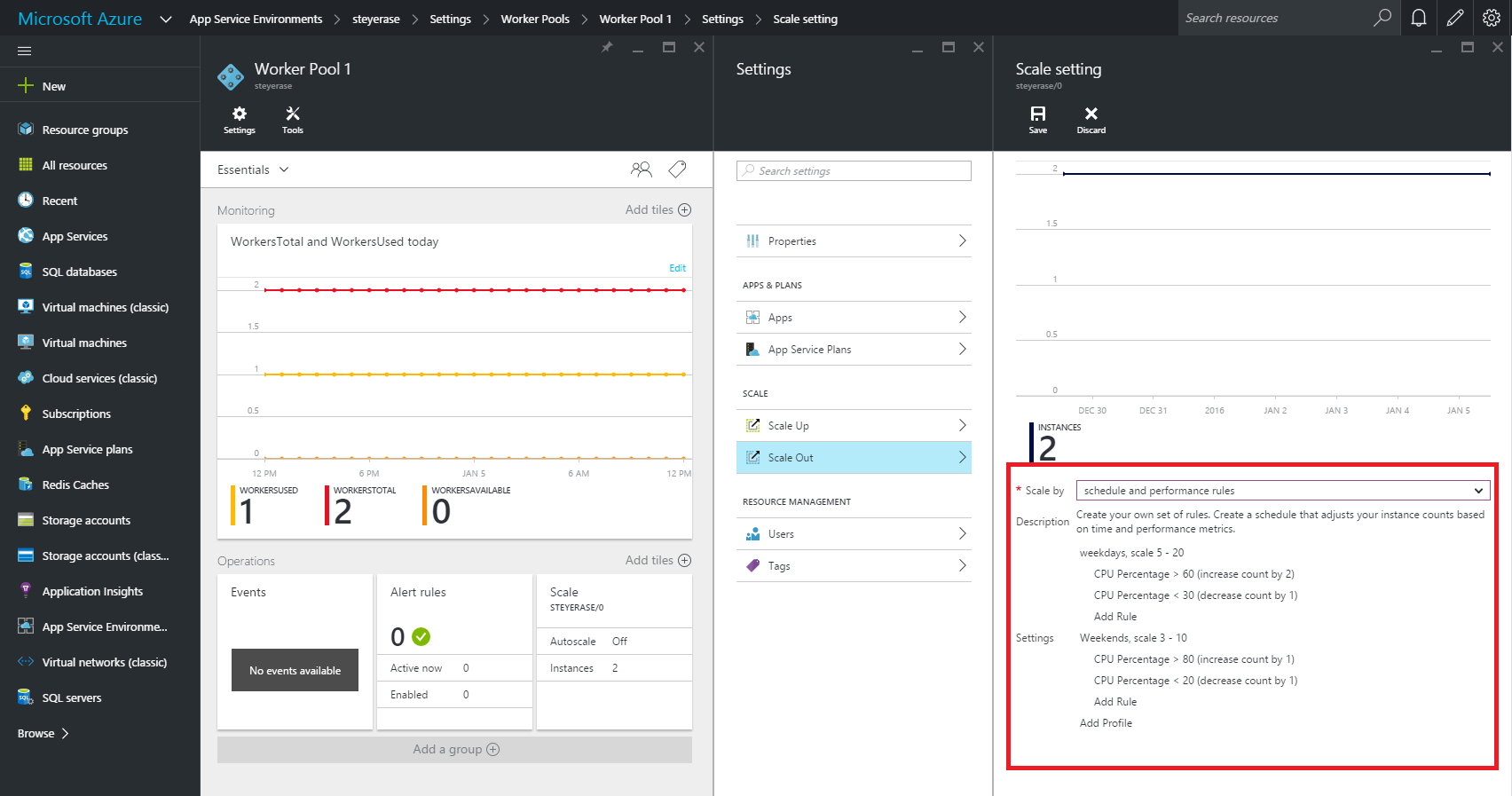
When it is known ahead of time that a certain date or time period (such as Black Friday) will warrant the need for scaling-out horizontally to meet anticipated peak demands, you can create a static scheduled scaling. This is not in the true sense “auto” scaling. Rather, the ability to dynamically and reactively auto-scale is typically based upon runtime metrics that reflect a sudden increase in demand.  Monitoring metrics with compensatory instance adjustment actions when a metric reaches a certain value is a traditional way to dynamically auto-scale.

Tools for autoscaling

Azure Monitor overview - Azure Monitor | Microsoft Docs

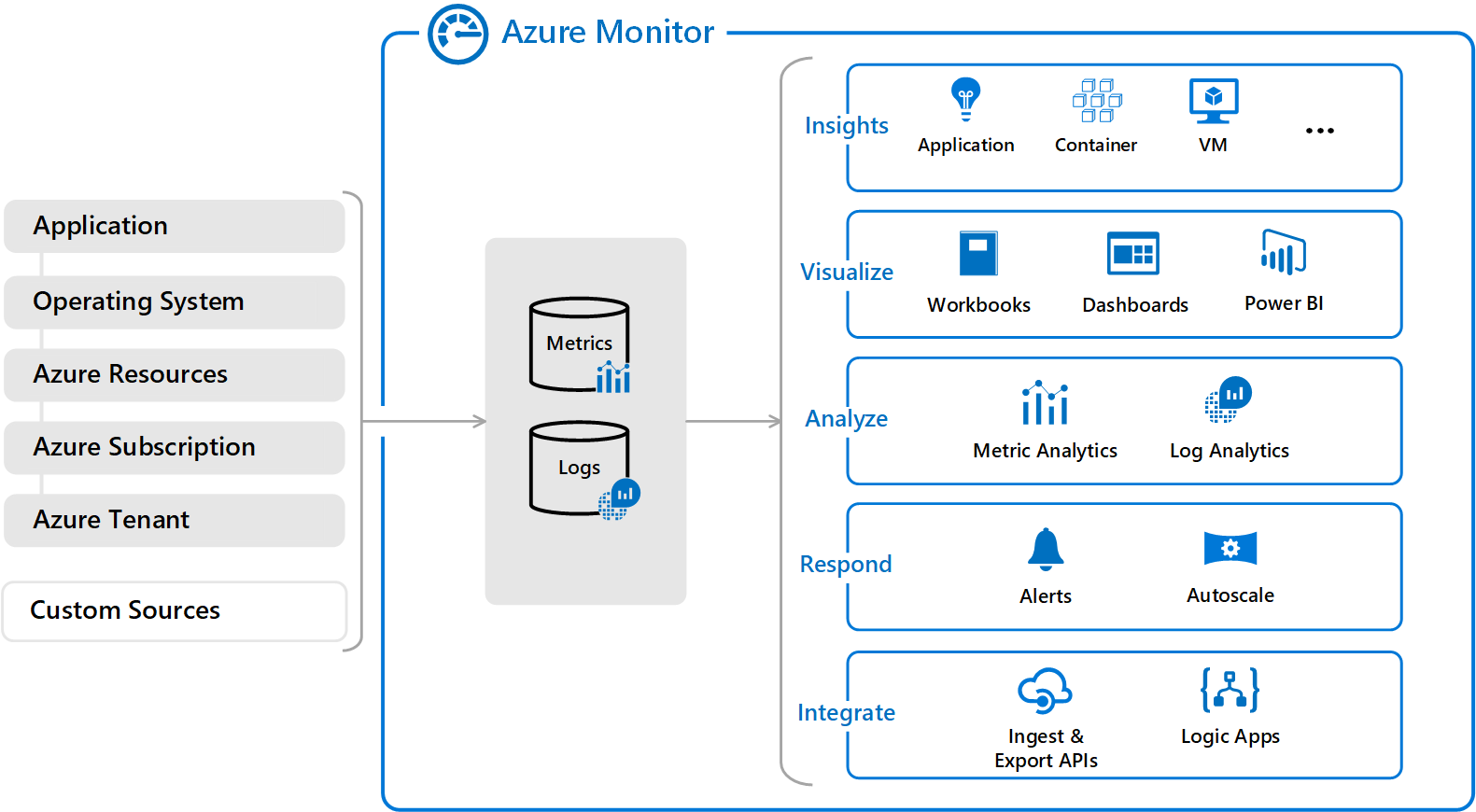
Azure Monitor provides that metric monitoring with auto-scale capabilities. Azure Cloud Services, VMs, Service Fabric, and VM scale sets can all leverage Azure Monitor to trigger and manage auto-scaling needs via rules. Typically, these scaling rules are based on related memory, disk and CPU-based metrics.

For applications that require custom autoscaling, it can be done using metrics from Application Insights.  When you create an Azure application and you want to scale it, you should make sure to enable App Insights for proper scaling. You can create a customer metric in code and then set up an autoscale rule using that custom metric via metric source of Application Insights in the portal.

Design considerations for autoscaling

Autoscaling v1 - Azure App Service Environment | Microsoft Docs

When writing an application that you know will be auto-scaled at some point, there are a few base implementation concepts you might want to consider:

  • Use durable storage to store your shared data across instances. That way any instance can access the storage location and you don’t have instance affinity to a storage entity.
  • Seek to use only stateless services. That way you don’t have to make any assumptions on which service instance will access data or handle a message.
  • Realize that different parts of the system have different scaling requirements (which is one of the main motivators behind microservices). You should separate them into smaller discrete and independent units so they can be scaled independently.
  • Avoid any operations or tasks that are long-running. This can be facilitated by decomposing a long-running task into a group of smaller units that can be scaled as needed. You can use what’s called a Pipes and Filters pattern to convert a complex process into units that can be scaled independently.

Scaling/throttling considerations

Autoscaling can be used to keep the provisioned resources matched to user needs at any given time. But while autoscaling can trigger the provisioning of additional resources as needs dictate, this provisioning isn’t immediate. If demand unexpectedly increases quickly, there can be a window where there’s a resource deficit because they cannot be provisioned fast enough.

An alternative strategy to auto-scaling is to allow applications to use resources only up to a limit and then “throttle” them when this limit is reached. Throttling may need to occur when scaling up or down since that’s the period when resources are being allocated (scale up) and released (scale down).

The system should monitor how it’s using resources so that, when usage exceeds the threshold, it can throttle requests from one or more users. This will enable the system to continue functioning and meet any service level agreements (SLAs). You need to consider throttling and scaling together when figuring out your auto-scaling architecture.

Singleton instances

Creating a Logic Apps Singleton Instance – Jeroen Maes' Integration Blog

Of course, auto-scaling won’t do you much good if the problem you are trying to address stems from the fact that your application is based on a single cloud instance. Since there is only one shared instance, a traditional singleton object goes against the positives of the multi-instance high scalability approach of the cloud. Every client uses that same single shared instance and a bottleneck will typically occur. Scalability is thus not good in this case so try to avoid a traditional singleton instance if possible.

But if you do need to have a singleton object, instead create a stateful object using Service Fabric with its state shared across all the different instances.  A singleton object is defined by its single state. So, we can have many instances of the object sharing state between them. Service Fabric maintains the state automatically, so we don’t have to worry about it.

The Service Fabric object type to create is either a stateless web service or a worker service. This works like a worker role in an Azure Cloud Service.

Five major cloud development to watch in 2021

5 Key Cloud Trends For 2021 | Hyperslice Cloud Blog - The latest in Cloud,Tech and Enterprise IT

We rang in 2020 with all the expectations that cloud computing would continue its progression as a massive catalyst for digital transformation throughout the enterprise. What we didn’t expect was a worldwide health crisis that led to a huge jump in cloud usage.

Cloud megadeals have heralded a new era where cloud development is a key driver in how organizations deploy operating models and platforms. In just the past 6 months, we saw 6 years’ worth of changes in the way businesses are run.

There has been a drastic shift to remote work – with the percentage of workers using desktop services in the cloud skyrocketing. Gallup estimates that as of September, nearly 40 percent of full-time employees were working entirely from home, compared to 4 percent before the crisis.

We are seeing renewed interest in workload migration to public cloud or hybrid environments. Gartner forecasts that annual spending on cloud development system infrastructure services will grow from $44 billion in 2019 to $81 billion by 2022.

In light of these underlying changes in the business landscape, here are some key cloud trends that will reshape IT in 2021:

Remote working continues to drive cloud and security services

The Cloud Is The Backbone Of Remote Work

The year 2020 saw a huge expansion of services available in the public cloud to support remote workers. Big improvements in available CPUs means remote workers can have access to high-end graphics capabilities to perform processing-intense tasks such as visual renderings or complex engineering work. And as worker access to corporate networks increases, the cloud serves as an optimal platform for a Zero Trust approach to security, which requires verification of all identities trying to connect to systems before access can be granted.

Latest system-on-a-chip technology will support cloud adoption

Today's System-on-Chip Platforms Have the Power to Drive Edge Computing – Rahi

The introduction of the Apple M1 in November marked the beginning of an era of computing where essentially the whole computer system resides on a single chip, which delivers incredible cost savings.  Apple’s Arm-based system on a chip represents a radical transformation away from traditional Intel x86 architectures. In 2020, Amazon Web Services also launched Graviton2, based on 64-bit Arm architecture, a processer that Amazon says provides up to a 40 percent improvement in price performance for a variety of cloud workloads, compared to current x86-based instances.

These advancements will help enterprises migrate to the cloud more easily with a compelling price-to-performance story to justify the move.

Move to serverless computing will expand cloud skills

7 Reasons Why Serverless Computing will Create a Revolution in Cloud T

More than ever, companies are retooling their operating models to adopt serverless computing and letting cloud providers run the servers, prompting enormous changes in the way they operate, provide security, develop, test and deploy.

As serverless computing grows, IT personnel can quickly learn and apply serverless development techniques, which will help expand cloud skills across the industry. Today’s developers often prefer a serverless environment so they can spend less time provisioning hardware and more time coding. While many enterprises are challenged with the financial management aspects of predicting consumption in a serverless environment, cost optimization services can play a key role in overcoming these risks.

Machine learning and AI workloads will expand in the public cloud

AI storage: Machine learning, deep learning and storage needs

As a broad range of useful tools becomes available, the ability to operate machine learning and AI in a public cloud environment – and integrate them into application development at a low cost – is moving forward very quickly.

For example, highly specialized processors, such as Google’s TPU and AWS Trainium, can manage the unique characteristics of AI and machine learning workloads in the cloud. These chips can dramatically decrease the cost of computing while delivering better performance. Adoption will grow as organizations figure out how to leverage them effectively.

More data will move to the cloud

Moving big data to the cloud - Rick's Cloud

Data gravity is the idea that large masses of data exert a form of gravitational pull within IT systems and attract applications, services and even other data. Public cloud providers invite free data import, but data export carries a charge.

This is prompting enterprises to build architectures that optimize for not paying that egress charge, which means pushing workloads and their data to reside in a single cloud, rather than multicloud environments. Data usage in the cloud can eventually amass enough gravity to increase the cost and consumption of cloud services.

However, as cloud technology continues to mature, organizations should not be afraid to duplicate data in the cloud – that is, it is perfectly fine to have data in different formats in the cloud. A key goal is to have your data optimized for the way you access it, and the cloud allows you to do that.

The journey continues

More sensitive data is moving to the cloud than ever | ITProPortal

So as the world around us changed in unprecedented ways in 2020, cloud computing continued its march to enterprise ubiquity and is a key layer of the Enterprise Technology Stack. Yet, by most measures, cloud is still only something like 5 to 10 percent of IT, so there is still a lot of room to grow. Getting the most out of cloud technology going forward is not a 5-year journey; it may take many years to truly tap into its full potential.

The shift in operational models and the organizational change needed to fully embrace cloud computing is significant. It is not a minor task to undergo that transformation journey. In early 2022, we will most certainly look back and be amazed again at how far cloud has progressed in one year.

How AI-powered ‘voicebots’ can benefit airline employees — and their employers

Emergence of Voicebots - The future of chatbots | KLoBot | AI

Airline workers have it tough.

A new generation of voice-driven software bots promises to make their work easier.

Airline employees, whether pilots, flight attendants or maintenance/repair/overhaul (MRO) technicians, are often called on to perform challenging tasks — and in a hurry. Think of a pilot dealing with mechanical failure, a flight attendant who can’t make a connection due to bad weather or a technician urgently needing a crucial part that’s out of stock.

To help solve these tough challenges in real time, a new generation of “voicebots” leverages two advanced approaches:

  • The first, natural language processing (NLP), lets machines and humans interact using “natural” (that is, human) languages.
  • The second, machine learning (ML), is a subset of AI that empowers computer systems to build mathematical models based on observed patterns.

How to Implement Voice Bots for Better Customer Support

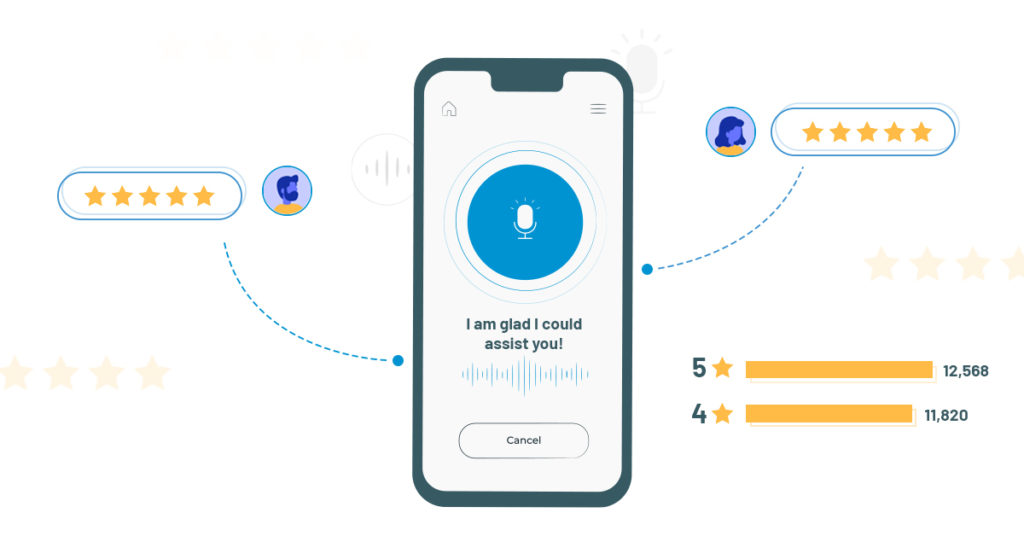
Voicebots eliminate the need to type, click or point. Instead, a worker can simply speak normally, then listen as the voicebot speaks back in response. What’s more, the latest voicebots can actually detect a speaker’s mood – for example, a sense of urgency – and then use that information to prioritize requests, such as ordering a new part.

Voicebots can also deliver important business benefits to the enterprise. For one, they empower airlines to automate tasks formerly done by hand, then expedite them based on priorities detected in a speaker’s voice. This can help airlines ease disruptions and delays, as well as lower costs and reallocate those savings to new and innovative projects. Imagine, for example, an airline that uses voicebots to ensure more efficient maintenance. If it could lower the number of flight delays by just 0.5%, the airline would enjoy total annual cost savings of $4 million to $18 million, depending on the number of daily flights.

By implementing this cutting-edge technology, airlines should also have an easier time attracting and retaining tech-savvy workers, possibly helping to mitigate the labor shortages forecast for the industry.

Voice technology soars — in the air and on the ground

Assisto Front

Voicebots for airline workers are part of the bigger trend of voice technology that consumers are already on board with. For example, market-watcher IDC predicts consumers worldwide will purchase more than 144 million voice-enabled smart speakers this year. The business market is ripening, too. Amazon, Google and Microsoft are all dedicating serious resources to expanding their voice technologies for B2B use.

Some airlines already use AI-powered chatbots to serve their customers. These chatbots can be programmed to understand the intent behind a customer’s request, recall an entire conversation history and respond to requests in a human-like way.

On the enterprise side, aircraft-maker Boeing is among manufacturers investing in AI and other voicebot technologies. The company is conducting research on NLP, speech processing, acoustic modeling, language modeling and speech recognition.

Real-life scenarios

How will airline employees benefit from using voicebots? Here are a few possible applications:

  • Pilots can use voicebots, both during preflight preparations and while actually flying. A complicated command from air-traffic control can take pilots up to 30 seconds to complete, turning all the knobs and hitting all the necessary buttons. A speech-recognition system can cut that time dramatically, allowing pilots to keep their eyes on the traffic and weather, and to keep the airplane safe.

How we used Voice to supercharge customer engagement - MetroGuild

  • MRO technicians can use voicebots to assist maintenance and repairs. A technician needing to replace a specific component could ask a voicebot, “Do we have this part in stock?” If the answer is negative, the bot could then find the nearest location where the part is available and arrange for it to be shipped. The voicebot could even select Express or Standard delivery based on the urgency detected in the mechanic’s voice.

MRO Labour Spotlight: The Aircraft Maintenance Technician Shortage

  • Flight attendants can use voicebots when encountering flight delays, cancellations and other common scheduling changes. For example, a flight attendant who is snowbound in Denver could tell a voicebot, “Notify Dallas that I’m going to miss my connecting flight today. Then find someone who can fill in for me on the next flight.” The airline’s crew-scheduling system could then make the necessary changes in real time.

Will "Flight Attendants" be replaced by AI & Passenger Service Robot?

Getting started

Airlines looking to equip their employees with voicebots may wonder how to begin. We suggest a three-step process:

Step 1: Ideation. Begin by brainstorming. Assemble your team and ask them: What are our biggest disruptions? How could voice technology help?

How to Run an Ideation Session. 15 Minutes | by Shay Namdarian | Medium

Step 2Proof of concept. With your biggest disruptions in mind, develop a potential solution using voicebots.

Five tips for a successful Proof of Concept - Bizztracker

Step 3: MVP. Borrow a tactic from the Agile approach — create a minimum viable product. This does not need to be a perfect, complete piece of software. Instead, create just enough for early tests and feedback. Then repeat as needed.

Making sense of MVP (Minimum Viable Product) – Digital Nimbler

Airlines looking to employ voicebots will also need to take on one more challenge: data access. Voicebots need quick access to all enterprise data. Yet many airlines keep their data protected in silos, mainly for security reasons. For voicebots, that makes gaining access to this data difficult and slow.

To resolve this issue, airlines need to find an acceptable balance between data security on the one hand and speedy voicebot data access on the other. This could be hard. But the alternative — doing nothing — could is even worse. Any airline that doesn’t adopt voicebots can be sure the competition will.

Cloud Adoption : Major Challenges

How to transition to a cloud-based analytics environment

Since the start of the pandemic, digital transformation has accelerated as more businesses see the need to adopt advanced technologies and do so quickly. Providing ways to propel businesses forward, adapt to new ways of working and cut-costs, digital transformation has many benefits. Cloud adoption, while a necessary element of that transformation, is not without its challenges. Before migration takes place, companies need to know what the main challenges are. Here, we explain.

Security in the cloud

What is cloud security? | Kaspersky

Cloud services, in themselves, are exceptionally secure. All cloud providers have to comply with stringent regulations and this requires them to put robust security measures in place, including the use of strict protocols and advanced security tools. However, companies still have concerns about multi-tenancy and data location.

Multi-tenancy can be a compliance issue for some organisations which hold sensitive data. The problem can be overcome by storing the data in a single-tenancy private cloud where they have dedicated use of the underlying hardware.

Data location is an issue for organisations which store data protected by regulations such as GDPR. Using a cloud provider that migrates data or backups between countries, puts the data at risk of being kept in a nation that doesn’t comply with those regulations. For example, EU citizen data is protected by GDPR, however, if it is stored on servers in the US, the government there has legal access to it for national security purposes. If it is accessed, the organisation will be in breach of compliance. The easy solution here is to opt for a cloud provider which locates all its datacentres in a single country, as Anteelo does in the UK.

Cost management

What Does a Successful Cost Management Program Look Like? | Clarizen

One of the biggest advantages of the cloud is the ability to reduce capital expenditure on hardware and in-house datacentres. The other financial advantage is that cloud resources are chargeable on a pay per use basis, enabling companies to scale up and down quickly so that costs can be minimised.

The financial risks here depend on how well a company manages its use of the cloud. Poorly managed, it is easy for the use of these on-demand resources to spiral and this can be costly. Companies need to implement use policies, monitor cloud usage and carefully analyse where the money is being spent.

Lack of IT expertise

Is the hybrid cloud's biggest challenge a lack of expertise? | CIO

Migration to the cloud not only presents a new type of infrastructure to an organisation; it also puts a host of new technologies at their disposal. While the benefits of using these are the prime reason for cloud adoption, one of the challenges faced by most companies is developing the expertise to make use of them.

Organisations adopting the cloud need a clear understanding of what they want to use it for and make sure they have the necessary expertise to help them meet their objectives. This could require the training of current staff or the recruitment of new ones.

Thankfully, many providers offer managed services and 24/7 technical support. There is also a wide range of tools which automate many of the tasks which not so long ago required expert manual input.

Multi-clouds and hybrid clouds

Pros of a Multi-Cloud Strategy – Xorlogics

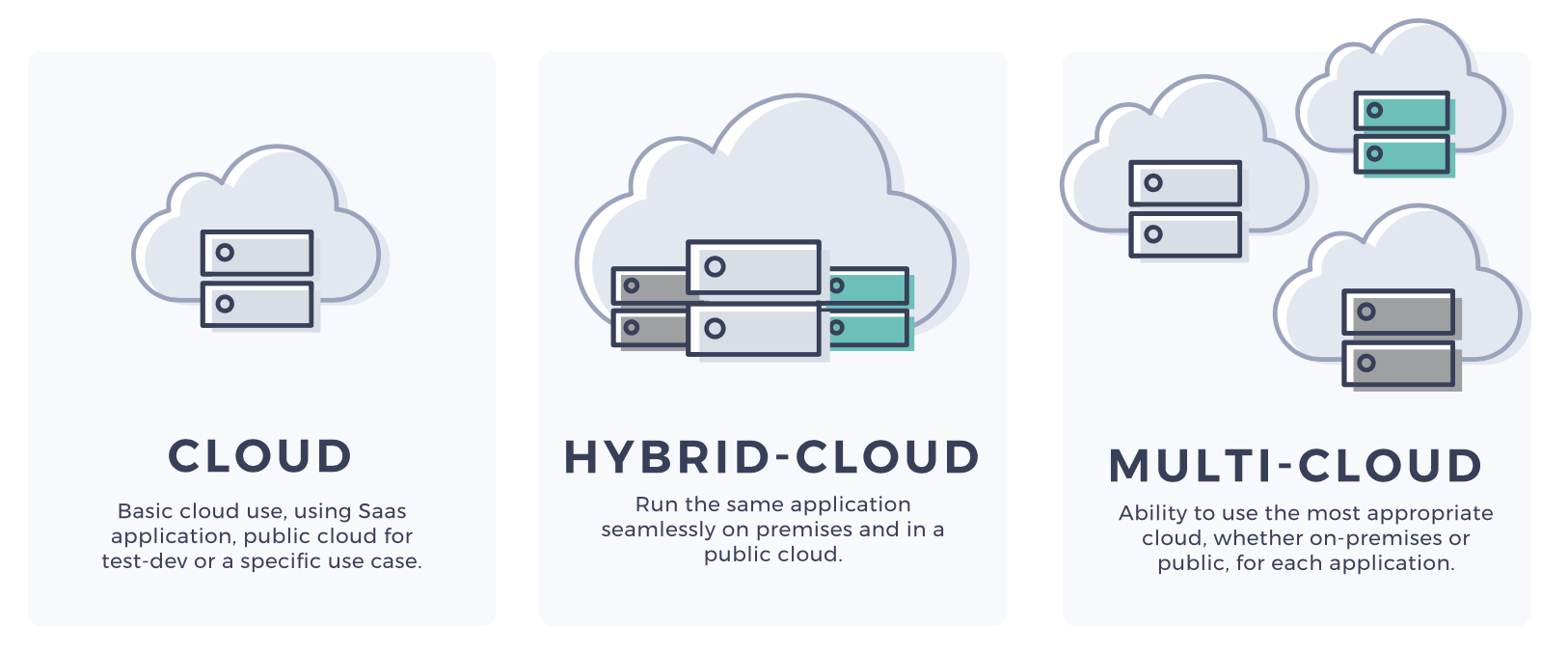
Over 80% of companies now use more than one cloud provider, some as many as five, to carry out different workloads. The reasons for this are numerous, but it boils down to choosing the most appropriate vendor for the specific workload being undertaken. At the same time, there is an increasing number of businesses developing hybrid-clouds, a mixture of public and private clouds together with dedicated servers.

While multi-cloud and hybrid cloud can be beneficial for financial, operational and compliance purposes, they add to the complexity of an organisation’s overall infrastructure. Here, there will be a greater need for governance, monitoring, expertise and security.

Migration

Step-by-Step Cloud Migration Checklist | by Manisha Mishra | DataDrivenInvestor

While the points above discuss the challenges of cloud adoption, the migration itself can also cause problems. A cloud environment can be markedly different from the one on which an application is hosted in-house. Issues with operating system compatibility and system configuration may mean an application might not work, or work as expected, in a cloud environment. Resolving these issues can have an impact on the speed of migration, project deadlines and budgets.

Thankfully, there are a wide and growing range of applications, many of them open-source, that have been developed for cloud environments, are quickly deployable and work straight out of the box.

The key to a smooth and speedy migration, however, is to find a vendor with the expertise and technical support to help you manage the migration process.

Conclusion

The pandemic has accelerated the pace of digital transformation across the globe with unprecedented numbers of companies migrating to and expanding workloads in the cloud. While for many organisations, this is a necessary part of the ‘new normal’, they should not underestimate the challenges that cloud adoption presents. The best way to prevent issues is to work closely with a cloud provider that will get to know your company and put tailored solutions in place for you.

ML Works with CI, CD, and CM

Continuous Delivery for ML Models | by Alvaro Fernando Lara | Onfido Tech | Medium

Most of us are familiar with Continuous Integration (CI) and Continuous Deployment (CD) which are core parts of MLOps/DevOps processes. However, Continuous Monitoring (CM) may be the most overlooked part of the MLOps process, especially when you are dealing with machine learning models.
CI, CD and CM, together, are an integral part of an end-to-end ML model management framework, which not only helps customers to streamline their data science projects, but to also get full value out of their analytics investments. This blog focuses on the Continuous Monitoring aspect of MLOps and gives an overview of how Anteelo is using ML Works, a model monitoring accelerator built on Databricks’ platform, to help customers build a robust model management framework.

Here are a few examples of MLOps customer personas:

ML

1.Business Org – A business team, which sponsors an analytics project will have the expectation that machine learning models are running in the background, helping them to get valuable insights from their data. However, these ML models are mostly in a black box and in a lot of cases, the business sponsors are not even sure if the analytics project will lead to a good ROI.

Data harvesting: what is it, and how can you benefit?

2.IT/Data Org – A company’s internal IT team, which supports business teams usually has a team of data engineers and data scientists who build ML pipelines. Their core mandate is to build the best ML model and migrate them to production. When doing so, they’re either too busy building the next best ML model to put it into production or managing production model support is not the right use of their time. Hence, there is a lack of streamlined model monitoring process in production and IT, and data leaders are left wondering how to support their business partners.

ML

3.Support Org – A company has an IT support organization, which takes care of supporting all IT issues. This team likely treats all issues the same, including similar SLAs, and may not differentiate between supporting an ML model and a Java web application. Hence, a generic support team may not have the right skills to support ML models and may not be able to meet the expectations of their internal customers

A well-designed MLOps framework will address the challenges of all three personas.

Anteelo not only has multiple experiences in end-to end MLOps implementations across tech stacks but has also built MLOps accelerators to help customers gain the full potential of their analytics investments.

Let’s drill down on our model monitoring accelerator in the Continuous Monitoring (CM) space and talk about the offer in more detail.

Model monitoring is not easy!

Unlike monitoring a BI dashboard or an ETL pipeline, the biggest challenge with ML models is that their results are probabilistic in nature and have their own dependencies like training data, hyper parameters, model drift, and the ability to explain the output of the model results. As a result, complications increase, and model monitoring becomes almost impossible when models are built on unstructured notebook formats that are used across multiple data science teams. This severely impacts Support SLAs and results in business users gradually losing confidence in the model’s predictions.

ML Works to the rescue

ML Works is our model monitoring accelerator built on Databricks’ unified data analytics platform to augment our MLOps offerings. After evaluating multiple architectural options, we decided to build ML Works on Databricks to leverage Databricks’ offerings like Managed MLflow and Delta Lake. ML Works is trained on thousands of models and can handle Enterprise scale model monitoring, or it can be used for automated monitoring within a small team of data scientists and analysts. Here is an overview of ML Works core offerings:

What is a Workflow Diagram: Definition and 3+ Examples - Tallyfy

1.Workflow Graph – Monitoring a ML pipeline along with its relevant data engineering tasks can be a daunting task for a support engineer. ML Works uses Databricks’ managed ML flow framework to build a visual end-to-end workflow monitor for easy and efficient model monitoring. This helps support engineers troubleshoot production issues and narrow down the root cause faster, significantly reducing Support SLAs.

machine learning model monitoring dashboard cheap online

2.Persona-based Monitoring – We understand that a ML model monitoring process should not only make the life of a support engineer easier but also help other relevant persons like business users, data scientists, ML engineers and data engineers to get visibility into their respective ML model metrics. Hence, we have built a persona-based monitoring journey using Databricks’ managed ML flow to make the model monitoring process easy for all personas.

GitHub - quantumjot/BayesianTracker: Bayesian multi-object tracking

3.Lineage Tracker – Picking up the task of debugging someone else’s ML code is not a pleasant experience, especially when there isn’t good documentation. Our Lineage Tracker uses Databricks’ managed ML flow and helps customers start from a dashboard metric and drill all the way to the base ML model, including the model’s hyper parameter values, training data, etc. thus giving full visibility into every model’s operations. This gets all relevant details about a model in one place, which improves model traceability. This feature is further enhanced when we use Delta Lake’s Time Travel functionality to create snapshots of training data

3.Drift Analyzer – Monitoring the model’s accuracy with time is critical for business users to gain trust in the insights. Unfortunately, a model’s accuracy will drift with time for various reasons including production data changing over time; business requirements changing and making original features no longer relevant and acquiring a new business which introduces new data sources and new patterns in the data. Our Drift Analyzer analyzes the Data Drift and Concept Drift automatically by reviewing the data distributions, which triggers alerts if the drift has exceeded a threshold and ensures that production models are continuously monitored for accuracy and relevance.

Using ML Works, business teams are able to monitor and track their relevant metrics on the Persona Dashboard and use Drift Analyzer to understand the impact of model degradation on metrics. This will help them to look at the underlying ML models as a white box solution. Lineage Tracking helps data engineers and data scientists obtain end-to-end visibility into ML models and their relevant data pipelines, which streamlines development cycles by taking care of the dependencies.

Support teams can use Workflow Graph and relevant metrics to troubleshoot production issues faster, significantly reducing Support SLAs. And finally, customers can now get full value from their analytics investments using ML Works, while also ensuring that ML deployments in production really work.

Part 1 of the Machine Learning Operations (MLOP) series

MLOps: Machine Learning Engineering | Towards Data Science

Introduction to Machine Learning Operations

Machine learning – a tech buzz phrase that has been at the forefront of the tech industry for years. It is almost everywhere, from weather forecasts to the news feed on your social media platform of choice. It focuses on developing computer programs that can acquire data and “learn” by recognizing patterns and making decisions with them.

Although data scientists build these models to simplify and make business processes more efficient, their time is, unfortunately, split and rarely dedicated to modeling. In fact, on average, data scientists spend only 20% of their time on modeling; the other 80% is spent on the machine learning lifecycle.

Building

Why Prototype? | Starmark | Integrated Marketing Communications

This exciting step is unquestionably the highlight of the job for most data scientists. This is the step where they can stretch their creative muscles and design models that best suits the application’s needs. This is where Anteelo believes that data scientists ought to spend most of their time to maximize their value to the firm.

Data Preparation

Data preparation – is there a process to follow? - The Data Value Factory

Though information is easily accessible in this day and age, there is no universally accepted format. Data can come from various sources, from hospitals to IoT devices; to feed the data into models, sometimes, transformations are required. For example, machine learning algorithms generally need data to be numbers, so textual data may need to be adjusted. Statistical noise or errors in data may also need to be corrected.

Model Training

Machine Learning in production - A guide to model evaluation and retraining

Training a model means determining good values for all the weights and bias in a model. Essentially, the data scientists are trying to find an optimal model that can minimize loss – an indication of how badly the prediction is performed on a single example.

Parameter Selection

A guide to an efficient way to build neural network architectures- Part I: Hyper-parameter selection and tuning for Dense Networks using Hyperas on Fashion-MNIST | by Shashank Ramesh | Towards Data Science

During training, it is necessary to select some parameters that will impact the prediction of the model. Although most are selected automatically, some subsets cannot learn and require expert configuration. These are known as hyper parameters. Experts trying to configure hyper parameters have to implement various optimization strategies to tune the hyper parameters.

Transfer Learning

Introduction to Deep Learning : Transfer Learning in Deep Learning - YouTube

It is quite common to reuse machine learning models across various domains. Although models may not be directly transferrable, some can serve as excellent foundations or building blocks for developing other models.

Model Verification

At this stage, the trained model will be tested to see if the validated model can provide sufficient information to achieve its intended purpose. For example, when the trained model is presented with new data, can it still maintain its accuracy?

Deployment

8 Best Practices for Agile Software Deployment – Stackify

At this point, the model has been thoroughly trained & tested and has passed all requirements. The step aims to use this model for the firm and ensure that it can continue to perform with a live stream of data.

Monitoring

Automating Machine Learning Monitoring | RS Labs

Now that the model is deployed and live, many businesses generally consider the process to be final. Unfortunately, this is far from reality. Like any tool, the model will wear out after use. If not tested regularly, it will provide irrelevant information. To make matters worse, since most machine learning models work in a “black box,” they lack the clarity to explain the model’s predictions, making the predictions challenging to defend.

Without this entire process, models would never see the light of day. That said, the process often weighs heavily on data scientists, simply because many steps require direct actions on their end. Enter Machine Learning Operations (MLOps).

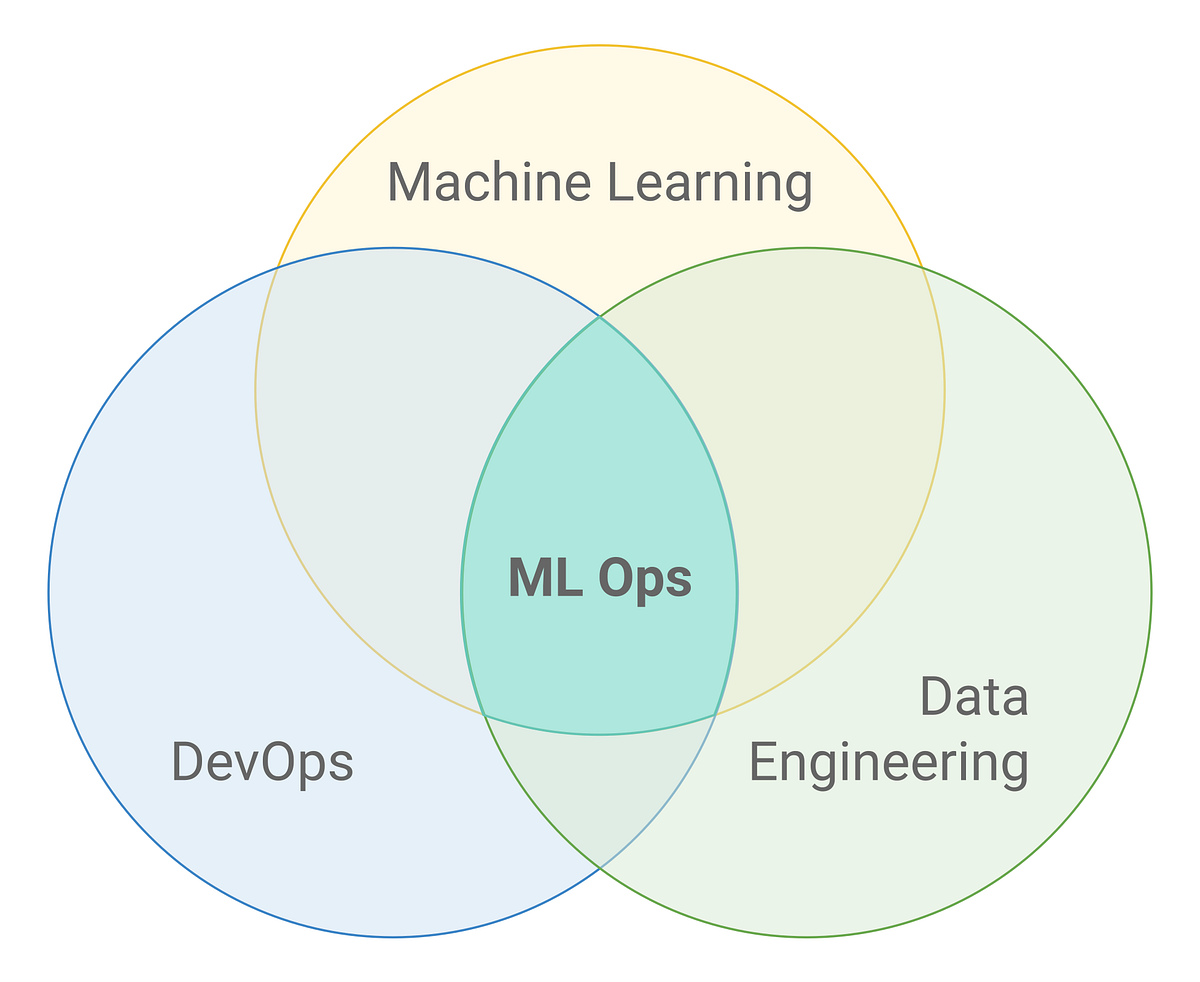
MLOps (Machine Learning Operations) is a set of practices, frameworks, and tools that combines Machine Learning, DevOps, and Data Engineering to deploy and maintain ML models in production reliably and efficiently. MLOps solutions provide Data engineers, scientists, and engineers with the necessary tools to make the entire process a breeze. Next time, find out how Anteelo Engineers have developed a tool that targets one of these steps to make the lives of data scientists’ easier.

Why Are So Many Small Businesses Adopting Cloud in 2020?

Six reasons why COVID-19 will accelerate the rush to cloud - Intelligent CIO Middle East

The impact of the pandemic has led to a dramatic rise in the number of small businesses adopting cloud technology. With nine out of ten companies now making use of cloud IT and 60 per cent of workloads being run in the cloud, it has become the go-to option for forward-thinking firms. By providing them with the same technologies used by larger rivals, but without the need for capital investment, the cloud delivers an affordable way to innovate, automate and become more agile. Here are just some of the ways small businesses are benefitting from cloud adoption.

Awesome power at low-cost

4 Tips For Low Cost Video Production - Bold Content Video Production

In the age of digital transformation, companies need hi-tech solutions to help them compete. While technologies such as data analytics, AI, machine learning, IoT and automation are widely used, a lack of financial resources has left many smaller businesses out of the loop. However, by migrating to the cloud, companies can have access to the necessary infrastructure without having to invest heavily in setting up an on-site datacentre. All the hardware is provided by the service provider and paid for on a pay-as-you-go basis.

Furthermore, the cloud offers the ideal set-up for fast and easy expansion, enabling companies to scale up or down their IT resources on-demand, helping them to increase capacity in line with growth and cope with spikes in demand in a convenient way. Expansion that would take considerable expenditure and days of work to set up in-house, can be had cost-effectively at the click of a button.

New normal adaptation

Adapting to a new world

The pandemic has led many companies to reassess the way they operate, especially with regard to their working practices. Across the globe, swathes of employees are finding themselves able to ditch the commute and work more flexibly from home as executives seek to downsize offices.

Cloud technology is a key enabler of remote working, giving employees the ability to access the company’s IT resources anywhere with an internet connection. Firms can also make use of software as a service (SaaS) packages, providing them with a multitude of business applications, such as Microsoft 365, with which to carry out their work.

These technologies enable employers to offer flexible hours, recruit staff from further afield and reduce office occupancy. What’s more, they can also monitor staff productivity and task progress, as well as tracking inventory and shipping.

Better collaboration

5 Keys to Better Collaboration in Healthcare | PreCheck

Over the course of the lockdown, the leading software companies have gone all out to improve the collaborative cloud-based applications that teams rely on. Existing apps have been enhanced and new ones created to provide far better video chat, messaging and document sharing platforms. Features such as group editing, instant syncing and project management, together with improved security, enable remote working teams to be assembled and collaborate on a wide range of initiatives.

Transformative technology in your hands  

Top 10 Digital Transformation Trends For 2020

The cloud is the ideal place to benefit from today’s must-have technologies, like artificial intelligence, data analytics and the Internet of Things. Indeed, many of these are cloud-native, with applications that can be deployed at the click of a button in a cloud environment. What’s more, a lot of these cloud-based apps are open-source, meaning that they are free to use.

This means small businesses can take advantage of the cloud immediately, accelerating their ability to benefit from data-driven insights. As a result, they can reduce costs, improve operations and discover new opportunities much quicker than before.

Solid security

Rock-Solid Security - Krimzen

While security is a concern for every business, small firms have an additional issue when it comes to providing the in-house security expertise and resources to keep their systems protected. Migration to the cloud removes many of these headaches as the service provider will undertake a great deal of this work on their customers’ behalf.

Cloud providers have to comply with stringent regulations to ensure their infrastructure is robustly secure. By migrating to the cloud, small businesses will be automatically protected by a wide range of sophisticated security tools, such as next-gen firewalls, intrusion prevention apps and malware scanners – all of which are managed and maintained by security experts.

Swift recovery

Top 10 Best Data Recovery Software That Worth Your Time (2021)

Data loss can have a devastating impact on a business: taking its services offline, preventing it from trading and damaging its reputation. Swift recovery is essential to minimise the impact.

Cloud-based backups are the ideal solution for disaster recovery: they store data at a geographically separate location to your cloud server; they are encrypted for security and checked for integrity, and they can be scheduled to occur at the frequency a company demands.

Perhaps most crucially, they enable companies to restore data, and even entire servers, quickly and easily, ensuring that disruption is kept to an absolute minimum. And with 24/7 technical support, the issue of internal expertise is easily overcome.

Conclusion

The pandemic has accelerated the pace of digital transformation, with growing numbers of small firms adopting cloud technology in order to adapt to the new business environment. Its cost-effectiveness and easy scalability, together with its wide range of open-source, easily deployable applications, make it highly attractive to companies that want to take advantage of the technologies and insights it offers.

error: Content is protected !!