When should you abandon your ‘lift and shift’ cloud migration strategy?

How Can Organizations Make Best Use of Lift and Shift Cloud Migration?

The easy approach to transitioning applications to the cloud is the simple “lift and shift” method, in which existing applications are simply migrated, as is, to a cloud-based infrastructure. And in some cases, this is a practical first step in a cloud journey. But in many cases, the smarter approach is to re-write and re-envision applications in order to take full advantage of the benefits of the cloud.

By rebuilding applications specifically for the cloud, companies can achieve dramatic results in terms of cost efficiency, improved performance and better availability. On top of that, re-envisioning applications enables companies to take advantage of the best technologies inherent in the cloud, like serverless architectures, and allows the company to tie application data into business intelligence systems powered by machine learning and AI.

Of course, not all applications can move to the cloud for a variety of regulatory, security and business process reasons. And not all applications that can be moved should be re-written because the process does require a cost and time commitment. The decision on which specific applications to re-platform and which to re-envision is a complex risk/benefit calculation that must be made on an application-by-application basis, but there are some general guidelines that companies should follow in their decision-making process.

What you need to consider

Lift and Shift Cloud Migration Strategy

Before making any moves, companies need to conduct a basic inventory of their application portfolio.  This includes identifying regulatory and compliance issues, as well as downstream dependencies to map out and understand how applications tie into each other in a business process or workflow. Another important task is to assess the application code and the platform the application runs on to determine how extensive a re-write is required, and the readiness and ability of the DevOps team to accomplish the task.

The next step is to prioritize applications by their importance to the business. In order to get the most bang for the buck, companies should focus on applications that have biggest business impact. For most companies, the priority has shifted from internal systems to customer-facing applications that might have special requirements, such as the ability to scale rapidly and accommodate seasonal demands, or the need to be ‘always available’. Many companies are finding their revenue generating applications were not built to handle these demands, so those should rise to the top of the list.

Re-platform vs. re-envision

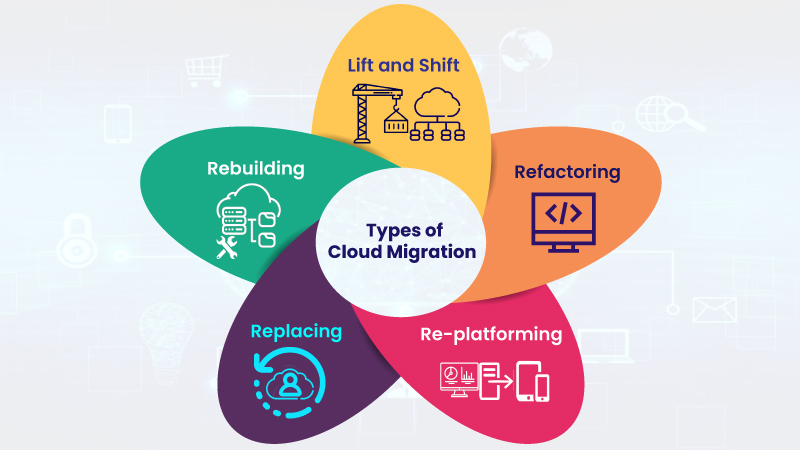
Application Migration Strategies: Rehost vs Replatform vs Refactor

There are some scenarios where lift and shift makes sense:

  • Traditional data center. For many traditional, back-end data center applications, a simple lift and shift can produce distinct advantages in terms of cost savings and improved performance.
  • Newly minted SaaS solution. There are many customer bases that have newer SaaS offerings available to them, but perhaps the functionality or integrated solutions that are a core part of their operations are in the early stages of a development cycle. Moving the currently installed solution to the cloud via a lift and shift is an appropriate modernization step – and can easily be transitioned to the SaaS solution when the organization is ready.

However, there are two more scenarios where lift and shift strategies work against digital transformation progress.

Top 10 Must-Use Apps in Microsoft Teams | AvePoint Blog

  • Established SaaS solution. There is no justification, either in terms of cost or functionality, to remain on a legacy version of an application when there is a well-established SaaS solution.
  • Custom written and highly customized applications. This scenario calls for a total re-write to the cloud in order to take advantage of cloud-native capabilities.

By re-writing applications as cloud-native, companies can slash costs, embed security into those application, and integrate multiple applications. Meanwhile, Windows Server 2008 and SQL Server 2008 end of life is fast approaching. Companies still utilizing these legacy systems will need to move applications off expiring platforms, providing the perfect impetus for modernizing now. There might be some discomfort associated with going the re-platform route, but the benefits are certainly worth the effort.

How Can Migrating to the Cloud Help Customers?

Debunking the multi-cloud myths - Information Age

There are many benefits of migrating to the cloud: financial savings, increased agility, tighter security and uninterrupted service, just to name a few. But one often overlooked benefit is the improvements it brings to the customer experience and the positive effects this has on user trust and satisfaction, brand engagement and a company’s online reputation.

Improving the user experience is increasingly important for an enterprise’s success. According to Bloomfire, over 80% of businesses see the user experience as something which helps differentiate between competitors and, by the end of the decade, it is projected to overtake price and product choices as the main reason why consumers choose one brand over another.

Online, where consumers expect immediate, unlimited and uninterrupted access to information, products or services, businesses that still use non-cloud systems may miss out on the opportunities that the cloud has to offer. Migrating to the cloud provides the tools and services businesses need to participate in today’s competitive, on-demand marketplace, enabling them to enhance the customer experience and reap the rewards of doing so. Here are the ways migrating to the cloud can improve your customers’ experience.

Give customers 24/7 access to your products and services

Still Not Providing with 24/7 Customer Service? Here Are 9 Reasons Why You Should Start Right Away! | CommBox

The days where customers were prepared to wait for usual business hours to get in touch with a company are over. Today, they expect online operations to be available 24/7, whether that is to buy products, contact customer support or access online services. They also expect that these things can be done from anywhere, using any type of connected device.

By migrating to the cloud, it means that businesses have a much greater flexibility to put these things in place. For example, as employees can connect with work-based applications anywhere they have a connection, it means they can deal with customer service enquiries even when they are out of the office, helping expand operations and keeping costs to a minimum. Indeed, by using AI chat boxes, many of the inquiries a company has out of hours can be automated with only a minimal need for any human interaction.

This 24/7 availability can be provided for many services, such as product sales, ticket ordering, delivery tracking and much more.

Provide a one-stop shop

Qt 6.0 to provide one-stop-shop for software design and development

Ever had the experience of waiting for ages in a phone queue and then, when you finally get through, to be told you need to call a different number? There is nothing more frustrating for a customer than finding out they cannot access all a company’s services from a single point of entry, whether this is on the telephone or online.

Thankfully, the tools and systems available to companies which migrate to the cloud enable them to provide the integrated services that their customers demand, without them needing to leave the website.

The applications available in the cloud provide customers with easy to use interfaces from which they can manage all their services from a single place, whether on a website or smartphone app. Just think of all the things that online banking customers can now carry out on a bank’s website or apps. And if they have a problem, they can have access to support using the same interface no matter where they are, what time of day or what device they are using.

Offer personalised experiences

The Importance of Digital Personalization in B2B Marketing

Despite all the concerns around data privacy, most customers prefer it when companies provide them with personalised shopping experiences. It’s great for consumers seeing products and services that are tailored to their needs and desires and putting these things directly in front of customers certainly helps improve sales. It’s a win-win situation for both consumer and company and something we are seeing a lot more of when we visit websites.

The reason companies can provide personalised shopping experiences is because of the vast amount of data that is made available. Websites can track browsing and shopping history; they provide wish lists to see what people like; if customers don’t inform them directly, their algorithms can quickly ascertain a consumer’s age, gender, family background, geographic location and similar data; and all these things can be compared with the data of those in a similar demographic. The result is that users of these websites see an increasingly accurate guess at the things they are looking to buy and this increases their chance of buying them – especially when the company uses this data to incentivise a purchase through offers and discounts.

To provide personalised shopping experiences, however, all that data needs to be collected, processed and analysed. And there is a lot of data to collect. Cloud computing offers the best way to do this, providing unlimited storage and processing capacity, charged for on a pay as you use basis while allowing the use of widely available big data and AI applications to undertake the data crunching.

Improve the trustworthiness of your brand

6 Ways to Establish a Trustworthy Brand | ZoomInfo Blog

The cloud provides several ways to improve the reputation of your brand. With high availability cloud hosting, the bad press associated with application downtime can be a thing of the past; the security features available from service providers means that there is a reduced risk of IT systems becoming victims of cyber attacks, infections or ransomware; and the choice of cloud-based tools on offer provides a range of ways to ensure that customers’ needs are dealt with quickly. Together, these things ensure that customers see your online provision as something that is both reliable and trustworthy.

Conclusion

Migrating to the cloud can greatly improve the user experience, helping to attract new customers and retain existing ones. With many tools available, the cloud can help businesses give their customers the online experiences they demand, providing 24/7 access to integrated services and personalised shopping from a reliable and trustworthy business. With these in place, businesses will have a clear advantage over their competitors.

On your journey to the cloud, choosing the proper implementation partner.

How to Choose the Right Partner for Your ERP Implementation?

When you are planning a move to the cloud, choosing the right partner is critical. Even though it can be difficult to know exactly what to look for, there are things you can do in your search for an implementation partner that can help you make informed decisions and mitigate risks along the way.

Learn to spot a re-badged reseller

Become A Reseller - Business Partner Icon Clipart (#1670043) - PinClipart

With the systemic shift to move IT infrastructure and applications to the cloud, there has been a dramatic increase in the demand for IT consulting services. This cloud economy has precipitated a situation where many vendors and resellers are re-inventing themselves as service providers rather than simply as technology sellers.

Organizations are setting themselves up as cloud service providers despite lacking the necessary qualifications to do so. These re-badged resellers will have a number of flaws including limited experience within the team, limited knowledge about specific industries and solutions and a lack of service-oriented culture. These flaws can put the companies that choose to work with these new services organizations at risk.

They have neither the knowledge nor the experience to deliver specialized, high-value services to customers. They may hire some experienced staff but, without a strong strategic direction set by management and reinforced by an entrenched services culture, they are unlikely to be able to deliver the business transformation organizations seek.

Meet with the people who are actually doing the work

5 scientifically proven ways to be happier at work - Happier

Organizations should beware of partners that introduce high-level consultants to the customer but get junior staff or offshore teams to execute the work. It is important to meet and speak with the team that is actually doing the work. The clarity and effectiveness of communications can suffer enormously when the team doing the work is not the same as the team speaking to the customer.

Come up with a list of demands

As an organization looking to move to the cloud – you may have a lot of questions and having a partner with the focus and experience deep enough to provide a high level of service is critical.

It is important to come up with a list of demands in your search for an implementation partner:

  • A mix of specific technology knowledge and business knowledge so the team can clearly understand the organization’s business imperatives and deliver cloud solutions accordingly
  • A strong physical presence and footprint in the industry with positive customer references, preferably from long-term customers in the same industry as your organization
  • A stable, well-qualified team with significant tenure at the organization, proving that the organization is a genuine player in the marketplace rather than a rebadged product reseller
  • Proven project control and governance methodologies that can be clearly explained
  • The ability to bring senior vendor representatives into any discussion to drive results

Ask questions

A Quick Guide To Asking Better Questions | by Marc Vollebregt | Medium

Organizations should ask the following questions to determine whether a potential partner is capable of delivering a successful cloud service:

  • What is your customer retention rate and how do you measure it?
  • Where will our data reside and what access controls are in place?
  • Is there a dedicated project manager for this implementation and what are his/her qualifications?
  • How will you ensure we have control of the system?
  • How will your team work with ours to ensure project success?

Once these questions are satisfactorily answered, the organization can move to the next stage of assessing whether the partner is suitable.

When it comes to defining a path to cloud, organizations should focus on providing increased business efficiencies, increasing user satisfaction and meeting business expectations, as well as addressing the risks identified. With the right partner in place, organizations can achieve enormous benefits and mitigate those risks.

5 partnering trends for global systems integrators in 2020 that will benefit enterprise customers

Why Dell Boomi Is the Leading Integration Partner for Software Vendors | Boomi

Businesses have been doing some form of partnering for decades, but as companies seek to modernize and turn their organizations into digital enterprises, partnering has become more important than ever. With all the different technologies and systems that have to integrate, digital transformation can’t happen unless all parties are in sync and cooperating with one another.

In today’s business environment, true partnering means that all parties in the relationship are tightly aligned to the core. We’ve all read something similar to that before – it’s nearly cliché, but in this case it’s a real and absolutely critical distinction. When they step into a room, nobody should care if the person wears a badge from the global systems integrator (GSI), technology partner or the enterprise customer — they should all be on the same page working towards the same goal: delighting customers.

Partnering starts with the executive suites of all the parties fully on board and headed in the same strategic direction. It then continues through every part of the organization, where business partners work on joint operating plans, joint marketing campaigns and joint software and app development projects.

Here are five important trends we see as GSIs, technology partners and enterprise customers look to grow their businesses in the 2020s.

System Integrator | EzInsights

1. Deeper relationships. As these deeper business relationships develop in the 2020s, tech partners, GSIs and enterprise customers will operate in unison, seamlessly sharing information and jointly developing solutions designed to solve end-user customer issues. For example, in an IDC FutureScape report focused on Australia, the research group predicts that by 2022, empathy among brands and for customers will drive ecosystem collaboration and co-innovation among partners and competitors, which will drive 20 percent of the collective growth in customer lifetime value.

Strategic partners will develop a more cooperative relationship at all stages of the customer lifecycle, from recognizing an opportunity, to sales, developing a solution, delivering that solution, and finally, managing the long-term customer relationship. On the back-end, there will be more joint training between partners in areas such as sales, including becoming conversant in the products and services that each partner delivers.

Enterprise customers benefit from these deeper partnerships by having everyone working together as a single entity throughout the entire end-user customer lifecycle.

Technology Stocks | Sramana Mitra

2. Vertical offerings. Once key strategic partnerships are established, the partner teams can jointly develop full-featured solutions tailored to vertical industries. If gaps appear, a GSI must demonstrate that they can assemble the right people and get them working together on a project. For example, at a medical services provider, the GSI may have a strong relationship with the CIO or CTO, but it’s the niche medical technology partner that has worked closely with the chief medical officer and all the nurse and physician teams over the years. Enterprise customers look for GSIs that can identity the right players and get them in a room where they can talk through the challenges and meet the customer’s goals.

How to Make Data-Driven Decisions Fast - Heap

3. Data-driven decisions. Enterprise customers will use data analytics to make decisions on the GSIs and technology companies with which to partner. These global businesses are looking for the technology processes and solutions that deliver efficiencies and the most profitability. They also look for industry-specific customer success stories in which the GSIs and technology partners have a proven track record working together and can show clear metrics to back up their use cases.

How to Maximize the Potential of Marketing Agility

4. Agility. It’s likely that many enterprise customers already have preferred technology partners in areas such as cloud services, ERP, CRM, and IT security. GSIs must be agile enough to pivot quickly, responding to customer preferences and established relationships. They must demonstrate that they can match the right partner for each specific project and be ready to respond to an enterprise customer’s mission critical issues – whether those issues are already identified or lurking around the corner. Partnering allows the GSI the agility and speed to respond to the customer, in many cases, faster than through M&A activity or developing a new capability in-house.

Challenges in Implementing a Continuous Monitoring Plan - Delta Risk

5. Continuous monitoring. The GSI must be on top of all of the new features and upgrades that its technology partners develop. An enterprise that works with a GSI shouldn’t have to keep up with all of the tech upgrade cycles, and should never worry about missing out on important new capabilities. The integrator will understand the new features and benefits coming from tech partners, and also have unique insight into the enterprise customer’s environment so it can make informed recommendations as to whether an upgrade to a new release makes good business sense.

Partnering trends deliver business benefits

With the deeper integration between GSIs, technology partners and enterprise customers, important global businesses will reduce costs, make their customers more efficient and successfully transform their organizations, becoming digital enterprises that can compete and thrive in the 2020s and beyond.

Don’t go digital unless you can guarantee continuous delivery.

Continuous integration | ThoughtWorks

Want to succeed in a digital world? You’re going to need agility, agility, and more agility – and that means building your business on an agile infrastructure and using agile software methodologies that include continuous delivery (CD), a technique designed to infuse users’ input and experience.

What is CI/CD?

CD extends the automated testing used in continuous integration (CI) all the way into production environments, where feedback can be captured directly from users. It relies on an automated infrastructure that provides on-demand capacity and API-based integration.

CI is typically implemented as a pipeline where committed code runs through automated unit and integration tests.

CD allows code that passes CI tests to be deployed directly into production. It’s important to note that there’s a deliberate process break so decisions can be made about which version — and hence which features — will be deployed into production. This differs from continuous deployment, where code that passes tests is automatically deployed into production without human intervention.

Large enterprises, particularly those that are regulated, tend to prefer continuous delivery over continuous deployment because the act of deciding which versions to promote into production aligns well with segregation of duties, change management practices, and a general sense of being in control. Continuous deployment is more favoured by consumer internet companies seeking to optimize the speed of their feedback loop regarding new features.

DevOps needs continuous delivery

Continuous Integration | Continuous Delivery | What is DevOps | CI CD

CI pipelines can be built entirely by development teams. But this can lead to the phenomenon known as deploy to shelf, where engineers complete multiple sprints without their code ever being deployed into production, thus denying themselves of the user feedback that’s essential to proper agile development. If developers do two-week sprints, and operations does quarterly releases (13 weeks), then six or seven sprints will stack up before getting any user feedback.

By extending a CI pipeline into production, it becomes a CD pipeline and crosses the traditional divide between Dev and Ops, and the decisions about which versions get deployed to production happen at the border. The pipeline extension may rely on the same tools as CI, such as Jenkins, or on tools specifically built for CD, such as Spinnaker.

Continuous delivery needs automated infrastructure

How to Build a CD Pipeline – BMC Software | Blogs

CD pipelines use automation that spans dev-test-production, so they need an automated, cloud-enabled infrastructure. There are two important cloud characteristics that come into play:

  1. Capacity on demand – Integration tests are, by their very nature, transient. An environment is spun up to verify something works or fails, and then its work is done. Such activity naturally lends itself to parallelisation, where it’s possible to get quick feedback and queuing as needed, so the maximum number of tests can be run on a minimum-resource footprint.
  2. API-based consumption – APIs connect pipelines to infrastructure. Without them, there are more process breaks, slower flows through pipelines and an overall lack of automation. So-called ticket clouds, where a request for resources becomes a queued ticket requiring action by a human operator, quickly get overwhelmed by the throughput of even a relatively trivial CD pipeline.

Is CD worth the effort?

CD Interest Rate Calculator - How Much Is Your CD Worth

As organizations advance their DevOps initiatives and consider CD, they may ask whether it provides the necessary resources to ensure that the code being developed is ready to deploy. Does it slow development times because of the need to ensure code is deployable? And is the customer feedback on deployed software worth the effort?

We believe organizations need CD capabilities to be truly agile so, yes, CD is worth the effort. Digital business demands agility at three levels — how the business responds to customer needs, how software is built to meet those needs, and how infrastructure is made available to run that software. CD pipelines let modern organisations connect customer needs to their infrastructure, and that infrastructure must be automated to provide sufficient flow through the CD pipeline.

Is programming required for a Data Science career?

AWS's Web-based IDE for ML Development: SageMaker Studio

This is a common dilemma faced by folks who are beginning their careers. What should young data scientists focus on — understanding the nuances of algorithms or faster application of them using the tools? Some of the veterans see this as an “analytics vs technology” question. However, this article agrees to disagree with this concept. We will soon discover the truth as we progress through the article. How should you build a career in data science?
Analytics evolved from a shy goose, a decade back, to an assertive elephant. The tools of the past are irrelevant now. Some of the tools lost market share, their demise worthy of case studies in B-schools. However, if we are to predict its future or build a career in this field, there are some significant lessons it offers.

The Journey of Analytics

What is Customer Journey Analytics? – Pointillist

A decade back, analytics primarily was relegated to generating risk scorecards and designing campaigns. Analytical companies were built around these services.

Their teams would typically work on SAS, use statistical models, and the output will be some sort of score -risk, propensity, churn etc. Its primary role was to support business functions. Banks used various models to understand customer risk, churn etc. Retailers were active in their campaigns in the early days of adoption patterns.

And then “Business Intelligence” happened. What we saw was a plethora of BI tools addressing various needs of the business. The focus was primarily in various ways of efficient visualizations. Cognos, Business Objects, etc. were the rulers of the day.

How Business Intelligence can Fuel Digital Transformation | MindForest - Managing Change

But the real change to the nature of Analytics happened with the advent of Big Data. So, what changed with Big data? Was the data not collected at this scale, earlier? What is so “big” about big data? The answer lies more in the underlying hardware and software that allows us to make sense of big data. While data (structured and unstructured) existed for some time before this, the tools to comb through the big data weren’t ready.

Now, in its new role, analytics is no more just about algorithmic complexity. It needs the ability to address the scale. Businesses wanted to understand the “marketed value” of this newfound big data. This is where analytics started courting programming. One might have the best models, but they are of no use unless you trim and extract clean data out of zillions of GBs of data.

This also coincided with the advent of SaaS (Software as a service) and PaaS (Platform as a service). This made computing power more and more affordable.

Forms of Cloud computing. SaaS, Software as a Service; PaaS, Platform... | Download Scientific Diagram

By now, there is an abundance of data clubbed with economical and viable computing resources to process that data. The natural question was – What can be done with this huge data? Can we perform real-time analytics? Can the algorithmic learning be automated? Can we build models to imitate human logic? That’s where Machine Learning and Artificial Intelligence started becoming more relevant.

Machine Learning: definition, types and practical applications - Iberdrola

What then is machine learning? Well, to each his own. In its more restrictive definition, it limits itself to situations where there is some level of feedback-based learning. But again, the consensus here is to include most forms of analytical techniques into it.

While the traditional analytics need a basic level of expertise in statistics, you can perform most of your advanced NLP, Computer vision etc. without any knowledge of their details. This is made possible by the ML APIs of Amazon/Google. For example, a 10th grader can run facial recognition on a few images, with little or no knowledge of Analytics. Some of the veteran’s question if this is real analytics. Whether you agree with them or not, it is here to stay.

The Need for Programming

Why need of programing language?

Imagine a scenario where your statistical model output needs to be integrated with ERP systems, to enable the line manager to consume the output, or even better, to interact with it. Or a scenario where the inputs given to your optimization model change in real-time, and model reruns. As we see more and more business scenarios, it is becoming increasingly evident that embedded analytical solutions are the way forward. the way analytical solutions interact with the larger ecosystem is getting the spotlight. This is where the programming comes into the picture.

Model Factory in the age of AI

Competing in the Age of AI

AI has become the pillar of growth for companies when it comes to maintaining relevance as well as an edge over the competition. What’s more, AI based models have become the new revenue drivers for companies looking to capitalize on data as a competitive advantage. The rise in algorithmically driven successes can be attributed primarily to enhancements on the hardware side. Big data tools, and an infrastructure based on both on-premise and cloud services, have paved the way for this fully evolved AI ML ecosystem.

According to a study, AI is the next digital frontier and organizations that leverage models have a 7.5% profit margin advantage over their peers. With AI models becoming the key pillar for building valuable IP and revenue, Anteelo shows the way with a new approach to model management.

With more research being plowed into tweaking neural networks, businesses face a bunch of tricky questions-how profitable it is to go full ML? Is the available compute infrastructure sufficient enough to take the leap? Can the deployed model adjust to the changing grounds and business requirements?

From training personnel to acquiring tools, business leaders are also grappling with critical questions related to model management — model validity in the face of changing business realities. Models lose validity over time as market realities change, new contingencies emerge, and new variables come into the picture. Hence all models need to be revamped and refreshed regularly to ensure they remain relevant. However, the refresh process is often manual and possesses a lot of scope for improvement.

Anteelo employs machine learning algorithms to develop analytics solutions for its customers. Our solutions range from providing prediction frameworks for online retailers in the US to cutting costs for manufacturers of thermal insulation materials. We are embracing a factory approach to building AI models.

Need For A Move to a Factory Approach

The Factory of the Future

There are multiple reasons models needs to move to a factory approach. Setting up models for the first time is a highly ad hoc process which is over-dependent on the skill of the data scientist building the model. The process is also highly susceptible to human biases and is very labor intensive. Model refreshes, on the other hand, are reactive and end up following a blind process, and remain labor intensive.

The term ML model refers to the model artefact that is created by the training process. The training data must contain the correct answer, which is known as a target or target attribute.
The learning algorithm finds patterns in the training data that maps the input data attributes to the target (the answer to be predicted), and it outputs an ML model that captures these patterns. A model can have many dependencies and to store all the components to make sure all features available both offline and online for deployment, all the information is stored in a central repository.

The new set up for a model factory approach should start with a strong clarity about the business requirements and environment. When building the model for the first time, the bounds for the model should be clearly defined, and the best model identified. If necessary, an ensemble of multiple models should be used. A good model can be identified basis multiple criteria, such as quality metrics, cumulative gains, heat maps, bootstrapping methods and other techniques.

The model refresh process should go through the following steps:

  • Define frequency of refresh, as well as exception conditions under which an out-of-turn refresh must be done
  • Define when the refresh will occur – is it when the current scenarios repeat, or when new scenarios emerge
  • Automate the refresh process, with clear bounds of the process defined. Data collection, splitting the dataset into training and validation samples, running the models, and validating and analyzing them for accuracy, are all steps than can be automated.

Importance of the AI-human Interface

The ultimate goal of any AI research is to derive insights about the business. Highly accurate AI models are usually harder for a human (especially a non-data scientist) to interpret, so the right model which balances accuracy vs. interpretability should be deployed. Since the eventual value of a model lies in its usage by business teams to meet targets or achieve goals, human review and understanding of models is essential. The model factory is intended to save human time in refreshing models through automation. This human time can in turn be used to analyze and derive the right insights from the mode results.

Future Direction

Traditional data storage and analytic tools can no longer provide the agility and flexibility required to deliver relevant business insights. An AIML based factory model approach augmented within human intelligence can help organizations overcome maintain competitiveness and relevance. Organizations seeking transition to an AIML based model factory setup can get an idea of how to scale by looking at Anteelo’ s approach.

Common issues while using Azure’s next-generation firewall

Getting the most out of your next-generation firewall | Network World

Recently I had to stand up a Next Generation Firewall (NGF) in an Azure Subscription as part of a Minimum Viable Product (MVP). This was a Palo Alto NGF with a number of templates that can help with the implementation.

I had to alter the template so the Application Gateway was not deployed. The client had decided on a standard External Load Balancer (ELB) so the additional features of an Application Gateway were not required. I then updated the parameters in the JSON file and deployed via an AzureDevOps Pipeline, and with a few run-throughs in my test subscription, everything was successfully deployed.

That’s fine, but after going through the configuration I realized the public IPs (PIPs) deployed as part of the template were “Basic” rather than “Standard.” When you deploy an Azure Load Balancer, there needs to be parity with any device PIPs you are balancing against. So, the PIPs were deleted and recreated as “Standard.” Likewise, the Internal Load Balancer (ILB) needed this too.

I had a PowerShell script from when I had stood up load balancers in the past and I modified this to keep everything repeatable. There would be two NGFs in two regions – 4 NGFs in total and two external load-balancers and two internal load-balancers.

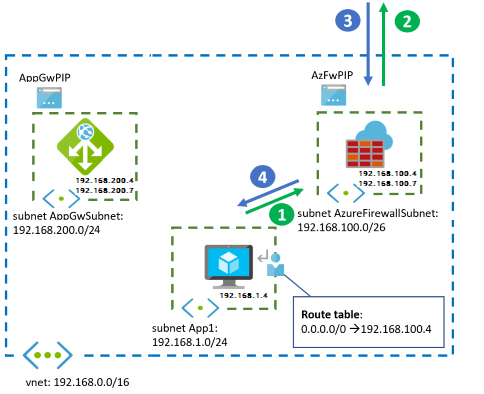
A diagram from one region is shown below:

Firewall and Application Gateway for virtual networks - Azure Example Scenarios | Microsoft Docs

With all the load balancers in place, we should be able to pass traffic, right? Actually, no. Traffic didn’t seem to be passing.  An investigation revealed several gotchas.

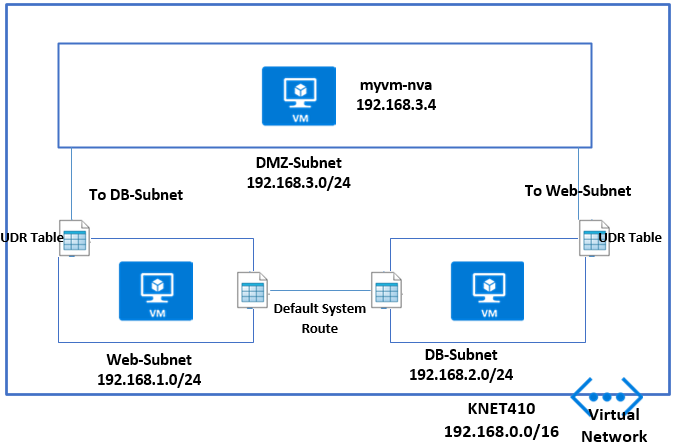
Gotcha 1.  This wasn’t really a gotcha because I knew some Route Tables with User Defined Routing (UDR) would need to be set up. An example UDR on an internal subnet might be:

User Defined Route (UDR) – MyKloud

0.0.0.0/0 to Virtual Appliance pointing at the Private ILB IP Address. Also on the DMZ In subnet – where the Palo Alto Untrusted NIC sits, a UDR might be 0.0.0.0/0 to “Internet.” You should also have routes coming back the other way to the vNets. And, internally you can continue to allow Route Propagation if Express Route is in the mix, but on the Firewall Subnets, this should be disabled. Keep things tight and secure on those subnets.

But still no traffic after the Route Tables were configured.

Gotcha 2. The Palo Alto firewalls have a GUI ping utility in the user interface. Unfortunately, in the most current version of the Palo Alto Firewall OS (9 at the time of writing) the ping doesn’t work properly. This is because the firewall Interfaces are set to Dynamic Host Configuration Protocol (DHCP). I believe, as Azure controls and passes out the IPs to the Interfaces Static, DHCP is not required.

The way I decided to test things with this MVP, which is using a hub-and-spoke architecture, was to stand up a VM on a Non-Production Internal Spoke vNet.

Gotcha 3.  With all my UDRs set up with the load balancers and an internal VM trying to browse the internet, things are still not working. I now call a Palo Alto architect for input and learn the configuration on the firewalls is fine but there’s something not right with the load balancers.

At this point I was tempted to go down the Outbound Rules configuration route at the Azure CLI. I had used this before when splitting UDP and TCP Traffic to different PIPs on a Standard Load Balancer.

But I decided to take a step back and to start going through the load balancer configuration. I noticed that on my Health Probe I had set it to HTTP 80 as I had used this previously.

Health probe set to http 80

I changed it from HTTP 80 to TCP 80 in the Protocol box to see if it made a difference. I did this on both internal and external load balancers.

Hey, presto. Web Traffic started passing. The Health Probe hadn’t liked HTTP as the protocol as it was looking for a file and path.

Ok, well and good. I revisited the Azure Architecture Guide from Palo Alto and also discussed with a Palo Alto architect.

They mentioned SSH – Port 22 for health probes. I changed that accordingly to see if things still worked – and they did.

Port 22 for health probes

Finding the culprit

So, the health probe was the culprit — as was I for re-using PowerShell from a previous configuration. Even then, I’m not sure my eye would have picked up HTTP 80 vs TCP 80 the first time round. The health probe couldn’t access HTTP 80 Path / so it basically stopped all traffic, whereas TCP 80 doesn’t look for a path. Now we are ready to switch the Route Table UDRs to point Production Spoke vNets to the NGF.

To sum up the three gotchas:

  1. Configure your Route Tables and UDRs.
  2. Don’t use Ping to test with Azure Load Balancers
  3. Don’t use HTTP 80 for your Health Probe to NGFs.

Hopefully this will help circumvent some problems configuring load balancers with your NGFs when you are standing up an MVP – whatever flavour of NGF is used.

NoOps automation eliminating toil in the cloud.

How to Reduce Operations Toil for Site Reliability Engineers | by Arun Kumar Singh | Adobe Tech Blog | Medium

A wildlife videographer typically returns from a shoot with hundreds of gigabytes of raw video files on 512GB memory cards. It takes about 40 minutes to import the files into a desktop device, including various prompts from the computer for saving, copying or replacing files. Then the videographer must create a new project in a video-editing tool, move the files into the correct project and begin editing. Once the project is complete, the video files must be moved to an external hard drive and copied to a cloud storage service.

All of this activity can be classified as toil — manual, repetitive tasks that are devoid of enduring value and scale up as demands grow. Toil impacts productivity every day across industries, including systems hosted on cloud infrastructure. The good news is that much of it can be alleviated through automation, leveraging multiple existing cloud provider tools. However, developers and operators must configure cloud-based systems correctly, and in many cases these systems are not fully optimised and require manual intervention from time to time.

 Identifying toil

Toil is everywhere. Let’s take Amazon EC2 as an example. EC2 provides Amazon Elastic Block Store (EBS) compute and storage capacity to build servers in the cloud. The storage units associated with EC2 are disks which contain operating system and application data that grows over time, and ultimately the disk and the file system must be expanded, requiring many steps to complete.

The high-level steps involved in expanding a disk are time consuming. They include:

  1. Get an alert on your favourite monitoring tool
  2. Identify the AWS account
  3. Log in to the AWS Console
  4. Locate the instance
  5. Locate the EBS volume
  6. Expand the disk (EBS)
  7. Wait for disk expansion to complete
  8. Expand the disk partition
  9. Expand the file system

One way to eliminate these tasks is by allocating a large amount of disk space, but that wouldn’t be economical. Unused space drives up EBS costs, but too little space results in system failure. Thus, optimising disk usage is essential.

This example qualifies as toil because it has some of these key features:

  1. The disk expansion process is managed manually. Plus, these manual steps have no enduring value and grow linearly with user traffic.
  2. The process will need to be repeated on other servers as well in the future.
  3. The process can be automated, as we will soon learn.

The move to NoOps

Traditionally, this work is performed by IT operations, known as the Ops team. Ops teams come in variety of forms but their primary objective remains the same – to ensure that systems are operating smoothly. When they are not, the Ops team responds to the event and resolves the problem.

NoOps is a concept in which operational tasks are automated, and there is no need for a dedicated team to manage the systems. NoOps does not mean operators would slowly disappear from the organisation, but they would now focus on identifying toil, finding ways to automate the task and, finally, eliminating it. Some of the tasks driven by NoOps require additional tools to achieve automation. The choice of tool is not important as long as it eliminates toil.

Figure 1 – NoOps approach in responding to an alert in the system

In our disk expansion example, the Ops team typically would receive an alert that the system is running out of space. A monitoring tool would raise a ticket in the IT Service Management (ITSM) tool, and that would be end of the cycle.

Under NoOps, the monitoring tool would send a webhook callback to the API gateway with the details of the alert, including the disk and the server identifier. The API gateway then forwards this information and triggers Simple Systems Manager (SSM) automation commands, which would increase the disk size. Finally, a member of the Ops team is automatically notified that the problem has been addressed.

 AWS Systems Manager automation

Resetting SSH key access to your EC2 Instance through Systems Manager Automation - BlueChipTek

The monitoring tool and the API gateway play an important role in detecting and forwarding the alert, but the brains of NoOps is AWS Systems Manager automation.

This service builds automation workflows for the nine manual steps needed for disk expansion through an SSM document, a system-readable instruction written by an operator. Some tasks may even involve invoking other systems, such as AWS Lambda and AWS Services, but the orchestration of the workflow is achieved by SSM automation, as shown in this table:

Step # Task Name SSM Automation Action Comments
1 Get trigger details and expand volume aws:invokeLambdaFunction Using Lambda, the system must determine the exact volume and expand it based on a pre-defined percentage or value.
2 Wait for the disk expansion aws:waitUntilVolumeIsOkOnAws Disk expansion would fail if it goes to the next steps without waiting for time to complete.
3 Get OS information aws:executeAwsApi Windows and Linux distros have different commands to expand partition and file systems.
4 Branch the workflow depending on the OS aws:branch The automation task would now be branched based on the OS.
5 Expand the disk aws:runCommand The branched workflow would run commands on the OS that would expand the disk gracefully.
6 Send notification to the ITSM tool aws:invokeLambdaFunction Send a report on the success or failure of the NoOps task for documentation.

Applying NoOps across IT operations

Is NoOps the End of DevOps? Think Again | Blog | AppDynamics

This example shows the potential for improving operator productivity through automation, a key benefit of AWS cloud services. This level of NoOps can also be achieved through tools and services from other cloud providers to efficiently operate and secure hybrid environments at scale. For AWS deployments, Amazon EventBridge and AWS Systems Manager OpsCenter can assist in building event-driven application architectures, resolving issues quickly and, ultimately, and eliminating toil.

Other NoOps use cases include:

  • Automatically determine the cause of system failures by extracting the appropriate sections of the logs and appending these into the alerting workflow.
  • Perform disruptive tasks in bulk, such as scripted restart of EC2 instances with approval on multiple AWS accounts.
  • Automatically amend the IPs in the allowlist/denylist of a security group when a security alert is triggered on the monitoring tool.
  • Automatically restore data/databases using service requests.
  • Identify high CPU/memory process and kill/restart if required automatically.
  • Automatically clear temporary files when disk utilization is high.
  • Automatically execute EC2 rescue when an EC2 instance is dead.
  • Automatically take snapshots/Amazon Machine Images (AMIs) before any scheduled or planned change.

In the case of the wildlife videographer, NoOps principles could be applied to eliminate repetitive work. A script can automate the processes of copying, loading, creating projects and archiving files, saving countless hours of work and allowing the videographer to focus on core aspects of production.

For cloud architectures, NoOps should be seen as the next logical iteration of the Ops team. Eliminating toil is essential to help operators focus on site reliability and improving services.

8 Strategies to Boost Your Instagram Sales

9 Types of Instagram posts Proven to Increase Sales

When Facebook bought Instagram in 2012, it sent a clear signal that this was a platform with real potential. Since then, Instagram has gone from strength to strength and its increasing usage has made it a place where businesses can have a real marketing impact. In this post, we’ll look at the platform and show you eight tips to help boost your Instagram sales.

A growing platform

Instagram has grown massively in recent years, expanding its monthly user base to over one billion. That’s three times as many users as Twitter. This has made it a very appealing place for businesses to advertise their products and to run social media campaigns. Indeed, half of all businesses now use Instagram as a marketing tool and in 2017, they spent almost £2 billion on advertising. With this amount of investment, it is obvious that these businesses are seeing great returns.

Advantages of Instagram for online retailers

Instagram is a media that focuses on high-quality images and video, making it ideal for posting highly visual and creative product photographs and marketing that can link directly to your online store. In this sense, Instagram becomes an extension of that store – people stumble upon a product they like and can click through to buy it. Nothing could be easier.

And with such a large and growing audience, it can massively expand your company’s reach, enhancing user engagement while helping to improve your brand’s positioning. Add to this the option to link Instagram and Facebook accounts, so that posts which appear on Instagram also appear on Facebook, and the potential for spreading the word is even higher.

Tips on boosting Instagram sales

  1. Set up an Instagram business profile

Why you Need an Instagram for Business Account (and How to Do It Right Now!)

Instagram now lets you set up a business profile, so you won’t need to rely on using a personal account to do your marketing. One great feature of the pro-style, business profile is that you can import all your Facebook contacts. It also gives you analytics data to help you see how well your posts are doing.

  1. Take advantage of the selling tools

Solution Selling: The Comprehensive Guide | Pipedrive

There are many tools now available that help you to sell products on Instagram. Essentially, these use a variety of techniques to let users click on your photo and go buy what they see. These clickable shopfront tools include ‘available to buy’ icons, item prices or ‘shop now’ buttons. All a user has to do is click on an icon or button and they are taken directly to the store or to your Instagram bio URL.

  1. Post photos that attract attention

25 Social Media Posts That Are Sure to Grab Attention/Get the Likes

With millions of photographs added every day on a platform that aims to promote great photography, you need to post images which stand out. The better the visual experience you provide for users, the more your brand will get noticed. Experiment with different techniques of taking photographs and use filters and editing tools to create an identifiable brand style of your own.

  1. Promote your website in your pictures

9 Ways to Advertise Your Website for Free

A creative way to get people to visit your website is to show your URL in the photos you post. Some do this with added text or through watermarking, however, there are more ingenious ways to do this – have someone wear it on a t-shirt or have it graffitied on a wall in the background, for example. Subtlety like this is intriguing and will develop curiosity without users feeling over-marketed to.

  1. Make the most of your captions

300 Instagram Caption Ideas (2021)—Great Captions for Instagram

Aside from the image, you can also add a textual caption to your photo. With up to 2,200 characters available, including the use of emojis, captions are a valuable opportunity to develop your brand’s identity, engage your audience and slip in those important calls to action. You can also add numerous hashtags, too, helping your post turn up in relevant searches.

  1. Use hashtags wisely

Twitter for Lead Generation: 19 Clever Ways to Explode Your List

Just as on Twitter, hashtags are widely used on Instagram, enabling people to search for them. For this reason, all your marketing images need to have relevant keyword-style hashtags added to their captions. Doing this helps your products get seen by a wider audience and ensures that searchers have a better chance of finding them.

  1. Attract Instagram influencers

Best Ways To Attract Instagram Influencers - PopTribe

Influencers are a big deal on social media. If they like or share your marketing material, it can have a massive and instant effect on your sales. This is why many of the famous vloggers and bloggers now have lucrative sponsorship deals with major brands. However, if you can grab their attention they may like your products without you having to pay them huge sums of money. To do this, mention them in your captions and give some positive responses to the things they post in order to try to establish a relationship. While getting a positive response back is never guaranteed (these people have millions of followers) the potential results can be worth the work.

  1. Use Instagram ads

How brands are using Instagram ads | Econsultancy

Finally, you should consider paying for advertising on Instagram in the same way you would on Facebook. Instagram ads are more direct than a social media campaign and can have a quicker impact, helping businesses get established on the platform sooner.

One reason for advertising on Instagram is that, statistically, its users are sixty times more likely to engage with your ad than users on Facebook, leading to a much higher ROI.

Conclusion

As you can see, Instagram is a highly useful platform on which to market your products. Is it ideal for every business? No, you’ll need to research whether your target audience is part of the Instagram diaspora. If they are, however, following the tips given above should help you boost your online sales.

error: Content is protected !!