6 Indicators that It’s Time to Switch WordPress Web Hosting

Here are the Attributes of Fully Managed WordPress Hosting You Ought to Know - blog-guru

Hosting is integral to the success of your WordPress website and something you should never be complacent about. A poor hosting provider or a wrongly chosen hosting plan can impact the performance of your site and the customer experience of your visitors. What’s more, they can result in lower search engine rankings and make it more difficult to manage your website. In this post, we’ll look at six signs that indicate it’s time to upgrade to a more powerful package or move to a better web host.

1. Your website keeps going offline

7 Ways Your Website Can Go Offline - VPS.NET Cloud Server Blog | VPS.NET

In a 24/7 marketplace, you need your WordPress website to be constantly online and available for your visitors. If it isn’t and your site goes down, even for short periods, visitors will become frustrated, damaging your reputation. What’s more, when search engines see your site’s availability decline, they’ll downrank it in their search results. Combine these and you’ll end up losing business and long term customers. If this is happening to your website, it’s a clear signal that you can no longer rely on your hosting solution to keep your site online.

To discover if your site is frequently going offline, you should monitor its uptime. As a WordPress user, you’ll find several plugins to do this which you can install directly from your admin panel. Recommended plugins include WP Umbrella and Site Uptime Monitoring, both freely available from the WordPress Repository.

Ideally, you should look for a host whose WordPress hosting packages guarantee a minimum uptime of 99.5%.

2. Your WordPress hosting lacks the features you need

Best WordPress hosting 2021 – Helpful comparison guide – Travelpayouts Blog – Travel affiliate network

WordPress hosting has moved on considerably over the last few years in order to meet the demands of today’s websites and the needs of their owners. If your hosting plan lacks these new features, it might mean you’re having to spend more time and effort than necessary managing your website.

At Anteelo, for example, you’ll find WordPress pre-installed and ready to go, you’ll get a free domain on annual accounts and free SSL certificates for your sites. You’ll even have use of our specially developed WordPress Toolkit that lets you install, secure, update and manage your WordPress sites all from a single, easy to use interface.

What’s more, we provide the advanced security that WordPress sites demand with our application firewall protecting you from hackers and bots and our daily backups ensuring that you can rest easy should you ever need to recover your data. There’s also 1-click website hardening, automatic WordPress patching and more.

3. Your website is slow

9 Ways on How to Improve Your Website's Loading Speed

Visitors and search engines expect websites to load quickly and respond swiftly to interactions, like clicks and data inputs. When they don’t, customers abandon the site and search engines downrank it. Ensuring the site performs well, therefore, is critical to its success.

WordPress does have some speed issues, often caused by the number of plugins working in the background and the size of the images used in a site’s content. While there are well-known actions you can take to speed up a site, such as caching, compression, image optimisation and content delivery networks, these only go so far.

By far the most important factor in driving the speed of a website is the performance of the server on which it is hosted. If you find your site sluggish, even when you have optimised its performance, it’s another sign you need to upgrade to a more powerful solution.

The WordPress hosting at Anteelo is built from the bottom up to provide enhanced WordPress performance. We use the latest Xeon processors and super-fast SSD hard drives in our servers and then configure them to provide optimal performance for WordPress using Apache + NGINX, PHP7.x + OPcache and HTTP/2. We even provide an in-built caching engine, so you don’t need to install a separate caching plugin.

4. Your host suspended your website

How to Fix “Your Account Has Been Suspended” Message on Your Website

There are only a few genuine reasons why a web host would take a site offline or suspend a user account, for example, if the site was infected with malware, if it was being used to carry out illegal activities or if the hosting bill hadn’t been paid.

Some hosts, however, will take a site down and even suspend an account if the host’s usage limits have been exceeded, such as reaching a maximum bandwidth allocation. Meeting a maximum bandwidth allocation is a sign that your website is doing well in terms of the visitors it receives. It’s a time when the company should be reaping the benefits of its success, not getting punished by finding its site offline.

If your hosting has bandwidth restrictions, it’s time to move to a solution where this isn’t an issue. At Anteelo, our WordPress hosting plans have unmetered bandwidth – in other words, there is no data transfer limit, just a simple, fair use policy.

5. You have outgrown your WordPress hosting package

Signs Your WordPress Website Has Outgrown Its Hosting

Over time, you’ll want your online venture to grow. This could mean having a bigger website, multiple websites, dealing with far more visitors or even running other applications on your server besides your websites. When this happens, there may come a time when the hosting plan you currently have lacks the resources (storage, CPU, RAM and bandwidth) or the features (number of websites, email addresses, databases, etc.) that you need.

This is one of the most obvious signs that you need to upgrade. And while there are bigger WordPress hosting packages you can upgrade to; at some point you’ll need to move on from shared hosting to a larger solution, like VPS. The issue for many WordPress owners is that dedicated WordPress VPS hosting is something of a rarity. This is not the case at Anteelo.

At Anteelo, we offer WordPress Starter and WordPress Standard shared hosting plans. However, for those making the move upwards, we also have a WordPress Pro-Server plan hosted on your own VPS. Unlike a standard VPS, this has been optimised for WordPress in the same way as our shared hosting solutions but with the added advantages of 50GB of storage, 4vCPU core processors, 4GB of dedicated RAM and unlimited websites and mailboxes.

6. Poor technical support

7 Examples of Bad Customer Service Experience (And How to Fix Them)

Who do you turn to when something goes wrong with your website or hosting? While there is a monumental amount of WordPress help available online, when the need is urgent you want a WordPress expert that can help you sort out issues quickly so that your site remains online and working as it should.

A key requirement of a good web host is providing technical support to its customers. At Anteelo, we go above and beyond. Our technical support is free with all accounts and our technical experts (not merely customer support) are available 24/7, 365 days a year. What’s more, you can contact them via online chat, phone, email or ticket – and about any problem you have with your site or hosting.

If you find your host lacking in the technical support department, then it’s another sign that you need to move on before you find yourself in a tricky situation with no one to help.

Conclusion

WordPress hosting is specially designed to improve the hosting of WordPress websites. However, not all plans or vendors are the same. Hopefully, the information given here will help you know when it’s time to make the move.
The 10 Steps to a Painless Website Migration

5 Website Migration Tips | Octiv Digital

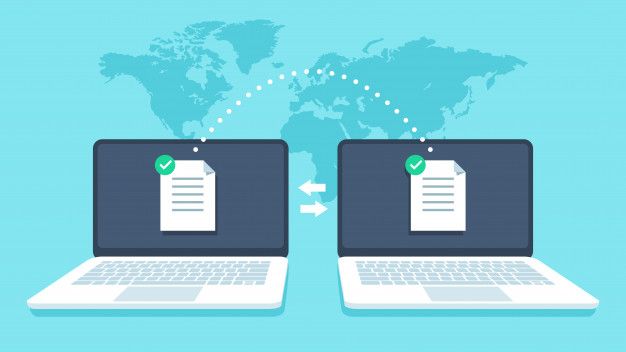
Migrating your website can be a technically challenging process and not without risk. Here, we’ll look at the potential risks involved and explain the process you need to go through to make sure everything goes smoothly.

Why migrate a website?

There are several reasons for migrating a website, the main ones being that you are upgrading to a better form of hosting, for example from shared hosting to VPS, or that you are moving to a new web host. Regardless of the reason, it will mean moving your website from one server to another and this is where the challenges and risks are to be found.

What are the risks of website migration?

The biggest risk is that the migration will not be carried out properly and that the website won’t function correctly after the move. There’s also the risk of losing data during the move so that elements of the website are missing. Moving to a different server can also affect your performance on search engines if not handled correctly and there’s the potential for your site to be offline while you fix any issues.

Here are the steps to ensure your migration goes smoothly.

1. Do not take down your existing website

What to do when you no longer need your website - Sumy Designs

Until you are 100% sure your new site is working, keep your existing site online. This way, if there are any issues, they won’t affect your users.

2. Make a copy of your website

How to Clone a Website Like a Pro (3 Easiest Ways to Do It)

The first stage of the migration is to copy your existing website and upload it to your new server. This will enable you to test how well it performs in its new hosting environment and give you an indication of any changes you will need to make.

As you will want to keep your existing website in operation during this time, you’ll need to do this on a different domain or subdomain.

3. Block search engines from indexing your test site

How to Discourage Search Engines from Indexing Your Site in 2021

You don’t want the test site to be accessed by users until its finished and this means preventing it from appearing in search engine results. You can block search engine crawlers in a number of ways, for example, using a robots.txt file, password protecting your site or by using a no-indexing tag.

4. Test the new site

Our New Website is Now Responsive | Roctest

Once you have reached this stage, you are in a position to test your website on the new server to make sure it does not have any technical errors and performs as expected. Testing should make sure that users can carry out all the interactions offered by the site, including searches, navigation, signing into user areas and making purchases. You should also make sure that all pages, posts, links, etc., display and perform properly. These tests should be carried out on both desktop and mobile versions of the website and on different types of browser.

5. Test if your new site can be crawled by Google

10 Ways to Get Google to Index Your Site (That Actually Work)

Although you blocked access to search engines earlier on in the process, you will need to give it temporary access just to make sure that once the new site goes live, it can still be indexed. If it can’t, then post-migration, you will lose your website ranking. To do this, temporarily add the test site to Google Search Console and check the site can be found. Once this has been successfully achieved, you can block the access once again.

6. Check site speed

How to Properly Run a Website Speed Test (You're Doing it Wrong)

It’s a good job to test the speed of the new site in comparison with the existing site before launch. You want your new site to be crawled and indexed quickly by Google and this will happen swifter if the server is performing well. It will also enable you to implement other speed enhancements, such as compression, CDN, minification and image optimisation. All of these can accelerate site speed, giving a better user experience and improving overall website ranking. You can check the speed of both the mobile and desktop versions of your site using Google’s PageSpeed Insight’s tool.

7. Update DNS settings

How to change DNS settings on your PC running Windows 10 | Windows Central

Once you are happy with the performance of your new website, it will be time to start sending users to it. To do this, you will need to change your DNS settings so that they point to your new IP address. You will need to contact your hosting company to ask for this change.

8. Unblock search engines

How to Block or Unblock Search Engines in WordPress 3.0

As soon as the DNS settings have been changed, it is important that you remove the blocks that prevent search engine crawlers accessing your site. This will enable search engines to continue to crawl and index all your pages and ensure that they don’t go missing in search queries. Double-check this is working by using the Google Search Console Coverage report.

9. Test redirects

301 Redirects for SEO: Everything You Need to Know

If you have any redirects enabled on your website, test they are still working on the new server and that there are no 404 errors.

10. Retest

ReTest GmbH | LinkedIn

Finally, carry out all the steps in point 4 above, once again. This will ensure that now the site is live, it is still working as expected.

Conclusion

Migration from one server to another can be a daunting experience for many. Hopefully, the steps discussed here will make it less traumatic and help ensure that things go smoothly.

Features to Look for in a Web Host for a Hospitality Business

5 Tech Solutions for a Better Hotel Guest Experience

As the hospitality sector prepares to bounce back after the lockdown, many companies are seeing the importance of their websites going forward. From marketing to customer experience, your online presence can make a dramatic difference to the success of your business. Here, we’ll look at some of the ways your website can benefit your company and what things you’ll need to include in your web hosting solution.

Better marketing

The medium is the message – Prime Creative Media

Having a website ensures your hospitality business is open 24 hours a day. Visitors who search for you, click on ads or see your social media posts can quickly find all the information they need about your business.

From a marketing perspective, you’ll be able to make a feature of your business’ services, whether that’s your menus, hotel rooms, spas and other services. You’ll be able to post detailed descriptions, interior and exterior photographs, videos, customer reviews, star ratings and all the other details that discerning customers want to know before making a reservation.

Improved customer experience

How to improve Customer Experience (CX) in 9 steps? | Feedier Blog

Websites are no longer just for promoting your business. Today, many hospitality companies are making them useful for customers throughout their journey with you. A website can enhance customer experience in many ways. A hotel, for example, can use it to take room bookings, enable customers at the venue to book restaurant tables, order room service, contact the concierge, find out about nearby amenities, take advantage of offers, check out and more. Even after they have left, you can use the website to create a members’ area to develop customer loyalty and promote future visits.

Customer experience has become increasingly important in hospitality and those venues that make things quicker, easier and more convenient for their customers will benefit from better reviews,  increased loyalty and a growth in revenue.

A website for staff

Design Trends For Company Team & Staff Pages - Vandelay Design

A further way to use your website is to create a separate area for your staff. This can be used to increase efficiency and improve the way you deliver services. Staff can use your site on their smartphones to sign in or notify you of absences, they can inform management about issues, such as low stock or maintenance requirements. It can be used to send messages, display notices and timetables, issue daily instructions and more. All of these can improve the way the venue is managed and enhance the service you provide your customers.

What to look for in a hosting solution

To put these things into place and get the most from your hospitality website, it is vital that you have the right hosting solution for your hospitality company. Here are some of the hosting features you should look for.

Strong security

9 rules for strong passwords: How to create and remember your login credentials - CNET

As a hospitality company, you will likely need to collect and store the personal data of your customers. In some cases, this may include names, addresses, contact information, payment details and even passport information. Legally, you are required to keep this data safe in order to comply with regulations, such as GDPR.

Hospitality companies are the targets of cyberattacks simply because the criminals know they keep this information and they are using increasingly sophisticated means to acquire it, including ransomware, phishing attacks, malware infections and hacking.

To keep your system and data protected, you need to choose a secure hosting solution. Make sure your web host provides a range of security tools, including a robust firewall, intrusion prevention, malware scanning, remote backups, SSL encryption, spam filtering, email scanning and more.

Growing room

GOING V/S GROWING: Are you GOING or GROWING through life? – NLP Training, NLP Coaching, NLP Master Practitioner,Motivational Speaker

As the hospitality sector becomes increasingly digitised and automated, your hosting needs will grow over time in order to provide a wider range of online services for both staff and customers. You might, for example, need to deploy website chatbots, virtual tours, customer-facing reservation tools and link your website to third party booking sites. Additionally, the increasing reliance on data for decision making means you may need to analyse more data to improve online and digital services for your customers.

To make use of these tools and technologies, you’ll need a hosting package with more storage and better performance, such as VPS, dedicated servers and cloud hosting. To make growth easy, look for a web host that provides all these services and will help you migrate from one to the other. This will save you the headache of having to move everything to a new host.

Guaranteed uptime

Does Kinsta Offer High-Availability Hosting and Guaranteed Uptime?

If you are going to offer 24/7 services to your customers, you need a website that remains constantly online and which can cope with the demand for your growing online services. Failure to do this can lose you custom, damage your reputation and lead to complaints and poor reviews. Look for a web host that guarantees an uptime of 99.9% and above and make sure your package is large enough to deal with the demand you expect.

24/7 technical support

The Importance of 24×7 Customer Service for Your Business

Managing a hospitality business is challenging enough without having to struggle with technical website problems. However, as the sector adopts more sophisticated online technologies, the demand on managers is likely to grow. To take away the stress and the challenge, it is important that your web host provides 24/7 technical support. This way, should you have an issue there will be a qualified expert there to help you, regardless of the time of day.

Conclusion

Finding the right hosting solution is critical if your hospitality company is to bounce back from the lockdown and remain competitive in a market that makes increasing use of digital technologies. The right hosting can ensure your website is capable of delivering a wider range of services to your customers, enables you to deploy tools to improve staff and operational effectiveness, keeps your systems and data secure and ensures your site stays online.

The cPanel Control Panel’s Key Characteristics

cPanel Reviews 2021: Details, Pricing, & Features | G2

The cPanel control panel is the leading web hosting control panel on the market today. Designed for use on Linux operating systems, it is often used for managing the hosting of WordPress, Magento, Drupal, Joomla and similar websites. With an intuitive and easy to use graphical interface, cPanel offers website owners a broad suite of tools and functions unrivalled by other Linux-based control panels. Here, we’ll provide an overview of cPanel and look at some of its main features.

An overview of cPanel

cPanel is a control panel that enables you to carry out a multitude of website and hosting management tasks. While the admin area of your website is where you can update content, change themes, install plugins, etc., cPanel enables you to carry out higher-level tasks, managing both your website and other aspects of your hosting, as well as offering other ways to carry out some of the things that can be done in the admin area.


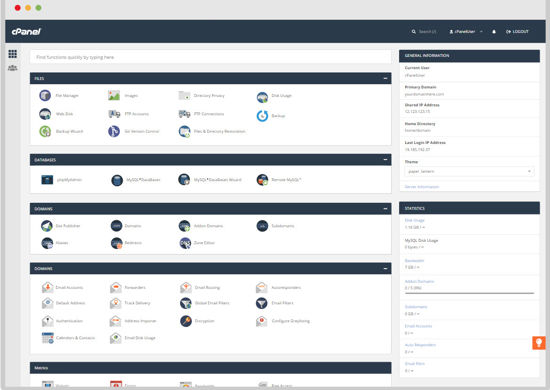
What is cPanel? How to use cPanel in WordPress hosting?cPanel organises its tools into 10 easily navigable sections. These are:
  • Files: for managing your website files and disk space.
  • Databases: for managing your databases.
  • Domains: for managing your domains and DNS.
  • Email: For managing email, email security, contacts, etc.
  • Metrics: For viewing website data, such as visitor numbers and resource usage.
  • Security: a suite of tools for securing your site, such as 2FA and SSL.
  • Software: to manage PHP, web platforms and to install new apps.
  • Advanced: More complex tools for things like cron jobs, error pages, etc.
  • Preferences: for cPanel management, such as user manager, passwords and interface personalisation.
  • Softaculous App Installer: Softaculous is a tool that lets you install hundreds of tools/apps directly from cPanel.

Main features-

Email

Transactional Email Provider SendGrid Continues Its Entry Into Marketing With Launch Of “Campaigns”
cPanel’s email tools help you to manage your email from directly within the control panel. They enable you to:

  • Add and remove email accounts
  • Set up email forwarding, mailing lists and auto-responders
  • Manage spam filters and global filters
  • Encrypt emails for security
  • Read and compose emails anywhere in the world via Webmail.

FTP Manager

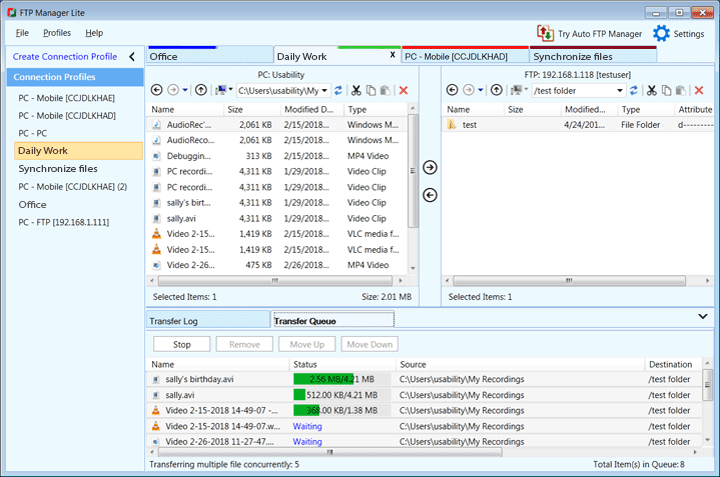
FTP Manager Lite - Free FTP Client Software - DeskShare
The FTP manager can be used to manage FTP access to your server directories and files. Features include:

  • Set up FTP accounts
  • Set up anonymous FTP access
  • FTP session control

File Manager

The 10 Best Android File Managers of 2021
The File Manager makes managing your files even easier than using FTP as you can do it directly from an interface within cPanel. You won’t need to make an FTP connection, use an FTP program or create additional usernames and passwords.

Backup

How to back up your iPhone, iPad, and iPod touch - Apple Support
Backups are essential to help you recover from lost data, corrupted files, hardware failure and cybercrime. cPanel has built-in backup functionality that lets you create a backup of your website with a single click, download it, and store it remotely from your server.

Domains

Why Secure More Than One Domain for Your Business? | Networksolutions.com
cPanel gives you complete control over your domains. It enables you to manage your domains and DNS settings, add new domains and subdomains, publish domains once your websites are completed, set up domain aliases and redirects.

Raw Log Manager

Raw Log Management in AlienVault USM Appliance
The Raw Log Manager lets you choose how raw logs are stored on your hosting account.

Raw Access Log
cPanel gives you the ability to download the raw access logs for any domain in your account. This information is useful for tracking user movements.

Error Log
cPanel’s Error Log helps you get to the bottom of 404 errors. The log displays all the “404 File does not exist” errors, helping you discover which files are missing from your website and quickly replace them or remove broken links.

MySQL Databases
CMS websites require a MySQL database and you may have multiple databases if you have more than one domain. The MySQL Databases tool enables you to manage your databases, creating new ones, modifying existing ones and creating, managing and removing database users.

Two Factor Authentication (2FA)

Two Factor Authentication (2FA) - Auth0
Take your cPanel security up a level by using the control panel’s 2FA tool. This will require anyone logging into your cPanel account to use an additional method of verification, sent to their phone, besides the username and password. 2FA helps prevent unauthorised users or brute force hackers gaining access to your control panel.

Softaculous

Softaculous Auto Installer
Make the installation of applications a breeze with Softaculous. Softaculous enables you to install hundreds of useful apps and tools, quickly and easily, to improve your website’s functionality. From CMS, such as WordPress, Joomla, Drupal, Magento, etc, popular eCommerce platforms, image galleries, social media tools, blogging tools, forums, ad managers, calendars, user polls, project management tools, customer support tools and much more –  all installed with a single click!

There are many more useful features available in cPanel. With such a rich variety of features, it’s no wonder that cPanel is the world’s most used control panel.

The Benefits of Cloud Computing for Real Estate Agents

Agent Image - Real Estate Agent Cartoon , Free Transparent Clipart - ClipartKey

The estate agency landscape has transformed over the last decade, with home buyers increasingly looking to the internet as their first port of call. This has led to the rise of disrupter startups that have stormed the market with nationwide online platforms and the promise of low-cost selling. To stay competitive and relevant, traditional estate agencies have had little option but to adopt new technologies themselves, a need accelerated by the impact of the pandemic. For those looking for the right solutions to their IT requirements, the answer lies in cloud technology. Here, we’ll explain why.

1. Better customer experience

15 Proven Techniques to Improve Customer Experience (CX)

For estate agencies concerned about competition from low-cost online agencies, it’s worth noting that, according to Gartner, 86% of consumers are willing to pay more for better customer experience (CX). The issue is that many online estate agencies have already begun to provide great online CX themselves. Migrating to the cloud, however, not just enables you to provide excellent CX yourself, but do so swiftly and cost-effectively.

Migrating to the cloud enables you to provide both buyers and sellers with all the information and help they need without having to visit your premises. There are a growing number of cloud-based tools and technologies to help estate agents offer great CX. These include financial calculation tools, virtual tours, online form completion and submission, customer service chatbots, omnichannel messaging and much more. These provide great CX in that they make the buying and selling of property quicker, more convenient, less stressful and highly engaging. Who wants to look at a photo of a house when they can put on a VR headset? Who wants to wait for a phone call when information can be accessed and answers provided instantly?

All these cloud-based technologies make customers more confident about your services, foster strong relationships and lead to better reviews and online reputations.

2. Using data to improve your business

How To Use Data To Improve Your Business | NewsGram

Data is now a critical component of decision making for businesses, providing insights that can help improve marketing, website design, productivity, cost-effectiveness and more. Analysing that data needs cloud technology. Cloud enables you to cost-effectively store and centrally manage your data and provides you with the AI and analysis tools that can find those insights needed to drive your business forward.

It can help you map customer journeys across all touchpoints, ensuring that communications are consistent and that whoever is dealing with a client is always up to date; it can pinpoint weaknesses in your website, such as poorly performing calls to action or quickly abandoned pages; and It can show you whether your communications are being opened and accessed and if not, predict which channels and times of day are most effective. It can even help predict shifts in the market, changes in consumer behaviour and the impact of changes in regulation, such as the return of full stamp duty, all of which can help you react quickly and make gains before your competitors.

3. Cost-effective

Behavioral 'Nudges' Offer a Cost-Effective Policy Tool – Association for Psychological Science – APS

As digital transformation takes place in the housing market, estate agents will face growing IT needs. Developing an in-house infrastructure can be highly expensive, requiring the hiring of IT talent and the purchase of servers. Not just in real estate but across all sectors, businesses large and small have migrated to the cloud in a bid to keep IT costs to a minimum.

In the cloud, you are using the infrastructure of your service provider and this means there is no need for capital investment in hardware. And while there is a monthly fee for your cloud services, this is charged for on a pay-as-you-go basis, so you only pay for the resources (storage, CPU, RAM, bandwidth) that you actually use. This is an exceptionally cost-efficient way to procure your IT.

What’s more, the cloud gives you the flexibility to scale up or scale down on-demand, so if your website gets very busy or you need to carry out a process-heavy data analytics workload, you can be assured that you’ll always have enough IT resources to carry it out without your system crashing. When your period of high demand is over, you can simply scale down again and save money. Doing this in-house would require you to purchase additional hardware which might sit idle except for at the busiest of times.

4. Managed services

A complete guide to adopt successful IT managed services within your organization

As an estate agent, you’ll want to focus on the needs of your business and not spend too much time dealing with IT. With an in-house system, every aspect of your IT will need to be dealt with by your own staff and this includes server management and maintenance tasks that detract IT staff from implementing better services.

In the cloud, server management comes with the service. Your provider will update and patch the operating system on your behalf and ensure that your server is working optimally and remains constantly online for your customers.

What’s more, a good service provider will also offer 24/7 technical support, which means if you have an issue with your cloud services or any of the applications you run on them, you have an expert available, there and then, to help you get it fixed.

5. Remote working

Transition to Remote Working During the Outbreak: 3+1 Strategies | Geekbot

With cloud-based tools at your disposal, the days of telling a customer ‘I’ll check that when I get to the office and get back to you,’ are over. In the cloud, your systems and files are available anywhere with an internet connection and on any device, including smartphones and tablets. This means when carrying out the remote aspect of your job, such as visiting a client’s home, you can access the tools you need and ensure that you have up-to-date information at your fingertips.

It also means you and your staff can work more flexibly and stay productive during disruptions like the lockdown and bad weather days.

6. Stronger security

Why the office of the future will demand stronger security measures | Zimbabwe Information & Communication Technologies (ZICT) Divisions

With the constant risk of hacking, malware, ransomware, DDoS attacks and other threats and a need to comply with regulations like GDPR, IT security is a major concern for all businesses. Putting robust security in place is both expensive and challenging, especially for companies with limited IT budgets.

Cloud vendors, however, employ security experts and utilise the most advanced tools to protect their datacentres and their customers’ systems. They deploy next-gen firewalls with intrusion and malware protection to keep cybercriminals away from your servers and data. They also provide essential security services, such as SSL certificates, email encryption, VPN, 2FA, data encryption and remote backups.

What’s more, when your data is stored in the cloud, you don’t need to keep copies on removable drives, laptops or other devices that can easily be lost or stolen. This helps prevent the risk of your customers’ personal data being breached.

Conclusion

The shift towards a digital market means estate agents need to digitally transform to remain competitive and relevant. To offer the services that customers want, benefit from the advantages of the latest technologies, stay secure and remain cost-effective, this means migrating to the cloud.

Reasons Home Improvement Service Firms Need a Website

Web Design for Home Service Companies | Contractor Websites

The home improvement service sector provides essential services to homeowners and landlords, covering everything from building and gardening to bathroom and kitchen installations. It’s a sector that includes interior design, decorating, window replacement, flooring installation and more. The demand for home improvement service also means that there is considerable competition, not just from other local companies but from national DIY chains that are adding design and installation to their retail services. This, together with the change in how consumers now shop for home improvements means its more important than ever for local suppliers to have a website. Here, we’ll explain why.

Online convenience

Complete Guide to Starting an Online Convenience Store Selling Groceries

The reality of the modern market is that everyone looking for a home improvement service wants a convenient way to find it. This means they will begin by looking online. Some may find you in local printed directories or the classifieds, however, even if they do, they’ll want more information than the ad can deliver. The most convenient way to find out more is to visit your website and they will expect you to have one.

Having a website, first and foremost, means your business will appear in search results so more new customers can find you. From here, they can visit your site where they can easily access all the information they need to decide whether you are the right company for their project. Without a website, you make finding this information inconvenient, increasing the likelihood that customers will simply find a competitor that does provide that information.

An online showroom

The Virtual Showroom: The New Normal of Customer Engagement

Customers with home improvement projects want to be able to visualise the finished product and see the standard of installation work that your company can deliver. What’s more, they want to see this from the comfort of their own homes and before getting in touch.

A website enables you to provide a portfolio of your previous work and if you sell products like kitchens and bathrooms, a gallery of the items you offer. This will give them a clear idea of the standard of your services and the quality and design of your products. Such portfolios play a vital role in establishing leads with potential customers or in convincing them to visit your physical showroom.

Offer other online services

online: 6 online services that are worth paying for - The Economic Times

The modern website can do so much more than provide information about your products and services. There is now a multitude of website tools and add-ons that can be installed to provide exceptional customer experiences, such as price calculators, design and measurement tools and virtual tours of previous work. Indeed, virtual and augmented reality tools are increasingly used to help customers create the designs they want to achieve.

Customers also want the ability to book services online, such as reserving a slot for you to visit their homes or schedule the delivery of products. They also want the convenience of being able to pay online and have access to user accounts where they can see the progress of their order.

All these things can be achieved with a modern website. What’s more, they are available 24 hours a day, even when your physical business is closed, so that regardless of when a customer is looking, everything they need is always there.

These additional online services can make your business far more competitive in today’s market where 82% of consumers are willing to pay more for a better customer experience.

Build your company’s reputation

How a Business Can Create and Maintain a Good Reputation

Online reputations play a critical role in purchasing decisions. Customers no longer take a company’s marketing at face value and will look to verify what they say by checking out reviews and asking for recommendations on social media.

The star ratings, reviews and recommendations you receive are solely down to what your previous customers think. However, many companies getting excellent feedback fail to take full advantage of it. Although they can be found on Google, Facebook and sites like Trustpilot, these independent reviews that have so much influence on customers can also be linked to and displayed directly on your website.

If you have great reviews, let your visitors know by displaying them prominently on your site and providing a link to the independent site where they can read them for themselves. Here’s what we display on our website.

Such a move can immediately put cautious customers at ease and ensure them that your company and the work it does is highly regarded by its previous and existing customers.

Dispelling myths about websites

Dispelling 5 Common Myths About MS - Multiple Sclerosis News Today

Some of the reasons business owners don’t have a website include the expense of building and running a site and the belief that they need highly technical skills to run one. This, however, is definitely not the case.

A business domain name (e.g. yourbusiness.co.uk) can be registered for around £10 – £20 a year, web hosting can cost from just a few pounds a month and the software used by the vast majority of the world’s websites is free. Such software, like WordPress, has been created to be used by those with only basic computer skills. Indeed, building a professional website is no more difficult than creating a PowerPoint presentation.

What’s more, at eukhost, you’ll be able to install WordPress with a single click and our 24/7 technical support team, knowledgebase and customer forum provide all the help you need to overcome any challenges. Our cPanel control panel also means you’ll be easily able to carry out any website management tasks and even automate many of them.

Conclusion

In the digital economy of the 2020s, having a website is essential for home improvement service businesses that want to stay relevant to today’s consumers and remain competitive. Hopefully, the points raised here will have convinced you of the benefits of creating a site and shown you that doing so is not an overly difficult or expensive process.

Which is Better for You: Managed or Unmanaged Hosting?

Managed VS Unmanaged Hosting - Hosting Plans Compared

If you have been looking for a hosting plan, you’ll no doubt have seen some packages described as ‘managed hosting’. If you are unsure what managed hosting is, how it differs from unmanaged hosting and whether it’s the right choice for you, this post will hopefully provide the answers you need.

The difference between managed and unmanaged hosting

Managed vs Unmanaged VPS- Which is The Right Choice For You?

Web hosting is the act of installing your website software and content on a web server so that it can be found and accessed over the internet. The web servers belong to your web host and are housed in a datacentre. Keeping your website or applications online is, therefore, a joint venture between the host and the website owner. The host takes care of the physical hardware and infrastructure and the website owner looks after the website software and content.

There is, however, a middle ground that can either be undertaken by the host or the site owner. This includes actions such as making backups, monitoring and optimising the performance of the server, installing and updating the server’s operating system and setting up and maintaining server security software, such as firewalls and malware and intrusion detection.

Managed hosting is when these things are carried out by the web host. Unmanaged hosting is when they are carried out by the customer.

It needs to be understood, however, that not all managed services are the same. Web hosts can offer different managed hosting solutions to each other and provide different managed services for different types of hosting. At the same time, some of these managed services are included in the basic price of a package while others can be purchased as an add-on service. Some enterprises even choose to work with their hosts to create bespoke managed services that are tailored around their specific needs.

When to choose unmanaged hosting

Web hosting 101: managed vs. unmanaged hosting | Tom's Guide

Choosing unmanaged hosting can be less expensive than managed hosting, but its biggest attraction for businesses is that it gives them far more control over their hosting. Apart from keeping the machines running, they take responsibility for everything else. Companies that have very complex IT infrastructures and which often rely on legacy software can find it easier to manage their applications when they have this level of oversight and control.

Of course, to do this, these companies need to have the extensive IT expertise to undertake all these management tasks themselves. This is usually achieved through a combination of employing experts and buying in third-party technical support.

When to choose managed hosting

Managed Hosting Services: How Can Customers Benefit? - ITSM.tools

The vast majority of companies choose managed hosting because it is more convenient and because they lack specific server management skills. While running a website has got easier, thanks to the development of user-friendly admin panels in platforms like WordPress and through the wide range of functions offered in control panels like cPanel and Plesk, the workings of a web server have, for many companies, remained an area over which they have little knowledge. If you have never had an in-house server and employed someone who can run it, unmanaged hosting can cause real problems.

With managed hosting, you can forget all about the more complex issues, such as installing PHP modules, load balancing, database optimisation or troubleshooting a server issue when something goes awry.

Indeed, today, even companies that have the in-house expertise in place to manage their own hosting choose to opt for a managed hosting solution. With a shortage of IT expertise available in the recruitment market and those that work in the sector demanding high salaries, it is far more cost-effective, productive and convenient to hand server management to the web host so that IT staff are freed up to work on more business-focused projects.

What to look for in a managed hosting plan

7 Best Managed WordPress Hosting Compared [2021]

What you need to look for depends upon the type of hosting you choose. If you have shared hosting, for example, the simple fact that multiple customers share space on a single server means no individual customer could be responsible for server management – it’s always carried out by the web host. However, even with shared hosting, you should look for other server management solutions being included in a managed package – these include website backups and 24/7 technical support.

For more advanced forms of hosting where users have their own operating system, you’ll need to look for automated backup solutions, real-time performance monitoring, updating of OS, control panel and other server software and security software management.

Conclusion

Today, the advantages and convenience of managed hosting make it the number one choice for businesses. It removes all the burdens of managing your server and the calamities that can happen when a lack of know-how causes issues. At the same time, it allows smaller companies to get on with running their websites and larger organisations to put their IT expertise to more productive use.

Why Do SMEs Need to Be Digitally Transformed?

Why SMEs face a difficult time undertaking digital transformation | by Enrique Dans | Enrique Dans | Medium

Digital transformation is just something for big business, right? Erm, no! In fact, it’s not completely true that bigger organisations led the way: many of the early movers were the disrupter startups that were digital from the offset. Indeed, it’s being digital that enabled them to become disruptors and forced their larger competitors to react. Today, as more businesses and consumers shift towards digital technology, it’s more important than ever for SMEs to consider how digital transformation can help them stay relevant and competitive. Here, we’ll examine why.

Reacting to change

Why Digital Transformation Matters in SMEs – Business Frontiers

Shifting consumer behaviours, the evolution of new ways of working and the constant roll-out of new technologies means SMEs are consistently having to adapt quickly to change. Not only are more consumers moving online; they are demanding digital services that provide better customer experiences. Employees, meanwhile, are increasingly seeking to work with companies that enable them to work flexibly and away from the office. To acquire and keep new customers and talented employees, and keep up with competitors, SMEs need to be able to adopt new technologies quickly, for example, deploying remote working platforms for staff or personalisation engines for customers.

To do this, they need to be agile, and its digital transformation that enables this. In particular, it’s the adoption of cloud technology, an infrastructure that allows companies to deploy new servers and applications instantly and which provides them with all the scalable resources they need to undertake their workloads. Indeed, by migrating to the cloud, SMBs eradicate the need for expensive, in-house infrastructures, making them even more agile and putting them on a level playing field with their larger competitors.

Taking advantage of AI

How Using Artificial Intelligence (AI) in Business Can Improve Efficiency

Artificial intelligence is starting to permeate all areas of business operations and its easy accessibility means it’s increasingly being utilised in all sectors. Today, SMEs can use AI for a myriad of purposes. It can help find better ways to procure products or materials, make industrial processes faster and more efficient, monitor machine and system health, provide data insights that identify new opportunities in the marketplace, streamline logistics, deliver human-like chat conversations with customers and identify risk, whether that’s financial risk or risk to life.

A key element of digital transformation, AI is something most SMEs can gain enormous benefit from. The good news is that adopting AI is no longer the major technological leap it used to be. Its popularity means there is a growing number of both open-source and proprietary AI applications that are designed to integrate with company systems – the majority of which are cloud-based. For SMEs that have migrated to the cloud, such technology is merely a click away.

Cyber defence

From cybersecurity to cyber defense? | Kaspersky

Being an SME doesn’t protect a company from cyberattack, nor does it remove the obligation to comply with regulation and ensure that data is safe. For this reason, SMEs need to develop a robust security strategy and put disaster recovery and business continuity plans into place.

Though ransomware attacks grab the headlines, there are various other ways companies can fall victim, such as through hacking, phishing, malware infection and DDoS attack. Data can be stolen, systems taken offline, websites taken control of and money syphoned from company accounts. It’s a serious issue: 60% of companies that fall victim to a cyberattack fold within 6 months.

The growing sophistication of cyberattacks means criminals can now buy ransomware as a service or brute force software with built-in AI. As a result, SMEs need advanced tools to defend against them. The adoption of these tools is also a key element of digital transformation. Providing this level of security in-house, however, is not only expensive but requires expertise and this puts it beyond the means of many SMEs. In the cloud, however, both the expertise and advanced technologies like next-gen firewalls, intrusion and malware prevention, etc., are part of the service. Companies will also find that vendors provide backup, disaster recovery and business continuity solutions to help them recover swiftly should the worst happen.

Data storage

How to Choose the Best Data Storage Solution for an Enterprise? - Technology

Data is essential for digital transformation as it provides the information that applications need to process in order to deliver improvements. Today, businesses gather huge quantities of data, not just from customers and their online activity, but from the monitoring of machinery, vehicles, IoT devices, LED lighting systems, energy usage, inventory systems and more. For digital transformation to work, finding the right storage solution for all that data is essential.

SMEs will need to centralise data in order to control access, create customer journeys and ensure employees have access to the latest versions of documents and files. As data grows, businesses need expandable storage rather than having to go through the risk or rigmarole of upgrading to a bigger server whenever capacity is low. That storage also needs to be secure. Cloud storage is ultra-fast, can be expanded easily, has security features like encryption and access control, and is more cost-effective than buying dedicated servers. Crucially, being in the cloud, it enables remote workers to access data wherever they have an internet connection.

Conclusion

More SMEs are undergoing digital transformation than ever before. Indeed, to stay agile and adapt to change, it is becoming a necessity rather than an ambition. It is, however, a necessity that brings with it many rewards. The starting point for digital transformation lies in the adoption of cloud technology, as it is cloud infrastructure with its robust security and cost-effective pricing, on which the applications, tools and platforms of digital transformation are best run.

4 Essential Features a Website Must Have in 2020

42 Must-Have Features for Your Business Website

When it comes to running a website, you can’t afford to keep still while your competitors are making those all-important improvements. Advancements in hosting and web design, changing customer expectations and shifts in search engine algorithms are just some of the challenges that webmasters have to tackle to keep their sites fit for today’s marketplace. Here, we’ll look at what we consider to be the essential features of a website in 2020.

1. First-class hosting

First Class Web Hosting - Kajoe Projects

Your choice of hosting package underpins every aspect of your website’s performance on the internet. A modern solution, like VPS hosting, for example, can ensure your site is always online, loads quicker on users’ devices and that it can handle spikes in demand without performance being affected. At the same time, a good web host can also provide you with exceptional security and backup solutions, improved compliance with regulations, reliable business email and 24/7 technical support to help you quickly tackle any problems which may arise. It can also make it easier to manage your website and your business with the use of advanced control panels like cPanel or Plesk.

With a first-class host and hosting package in place, a website can rank better in search engine results and reduce the number of visitors abandoning the site, while improving its reputation for being a reliable and secure place for people to visit and shop.

2. Mobile first design

How is mobile-first web design different from adaptive and responsive design? - Pepper Square

Smartphones have become the most popular way to search the internet, with people browsing on them for twice as long as they do on laptops. Improved public wi-fi and 4G and 5G networks mean they are increasingly used when out and about to find local businesses or to search for information. At the same time, many more people are using mobiles to shop. According to analysts, GlobalData, mobile shopping is the fastest growing area in UK retail and will account for 40% of all UK online spending by 2024, with a value of over £33 billion.

With smartphones becoming such a key technology for consumers, website owners have little choice but to adapt. While responsive websites have been around for years, many earlier themes were geared up to create a desktop site and then simply repurposed this for display on mobile. This way of working, however, doesn’t always provide the mobile user with ease of use or best display. Today, it is important to develop a website where mobile use takes precedence; what Google calls the mobile first approach.

3. Personalisation

Why Personalisation Is the Future of B2C Content Marketing – Cope Sales & Marketing

Personalisation has become one of the most important features of contemporary websites and provides benefits for both the user and the business. The process begins when a user signs in and, once done, the website transforms into one which is unique for that person. What they are presented with are the products, offers and information they most likely want to see. This improves their user experience, makes them feel valued, encourages engagement and generally makes them more interested in what’s on offer.

For the company, not only does this mean you are far more likely to make a sale; it also gets customers coming back over and over. It’s a technique that Amazon has mastered and which virtually every other online business wants to emulate.

While major companies invest heavily in advanced technologies, such as AI and product recommendation engines, to implement personalisation, it is possible to do it on virtually any website. There are numerous WordPress plugins, for example, that can personalise the website’s content and product recommendations, many using AI recommendation engines that analyse users browsing histories, etc., to ensure that those recommendations are highly relevant.

4. Ease of use

Top 3 Easy-to-Use Help Desk Software Systems

Customers expect every aspect of a website to be easy to use. This includes the fast-loading, mobile-friendliness and personalisation mentioned above, as well as a raft of other important features. Key here are simple navigation, so that whatever the user wants to find, they can do so quickly, and advanced product search, so that results can be filtered by size, colour, price or brand, etc. The checkout process should also be simple, without the need to fill in lots of information and with payment options to suit the user’s preferred payment methods.

Customers also expect finding information to be easy. This means providing FAQs or knowledgebases, while making it simple to get in touch and get speedy replies. Today, many websites feature chatbots, which have replaced live chat to customer service reps with interactions with AI-enabled software. Although the AI takes time to train, unlike a human, it can work around the clock and chat to multiple consumers simultaneously, answering the vast majority of queries that they ask of it. Importantly for generating sales, it can also initiate conversations and make product recommendations.

Conclusion

While this is by no means an exhaustive list of all the features a website should have, what we have included here are those four which we think are essential to help websites perform well in the modern marketplace. First-class hosting, mobile first design, personalisation and ease of use are vital to ensure your website meets modern user expectations and can compete with other sites.

The Smart Business Choice: Managed Hosting

Top 6 Benefits of Managed Hosting Services For Every Business

Sometimes it doesn’t make sense to do everything in-house. You wouldn’t deliver your own letters, service your company vehicles or rewire the offices; you’d pass those tasks on to expert third parties like the Post Office, a garage or an electrician. Surprisingly, not every company uses the same logic when it comes to the complex matter of managing their IT infrastructure. There are, however, several advantages of moving away from a DIY approach and opting for managed hosting services and in this post, we’ll explain what they are.

Managed hosting – the basics

Managed vs. unmanaged hosting | Tom's Guide

Managed hosting is a service designed to alleviate the server management burdens faced by in-house IT staff so that they can focus their time and efforts on business-related projects. Offered by leading service providers like Anteelo, it provides companies with all the hardware and computing resources they need (servers, high-speed storage, network, RAM, bandwidth, CPU, etc.) and provides a flexible range of management services which reduces the time, money and effort needed to carry them out in house.

With the hardware being housed securely at the service provider’s datacentre and its expert IT staff taking care of management, admin and technical support, companies find it easier and more cost-efficient than operating their own system on-site.

Range of managed hosting services

Best managed web hosting services of 2021 | TechRadar

Different service providers offer different ranges of service. In general, however, the typical managed hosting package will include datacentre operations such as server housing, site security, national grid and back-up power, air-conditioning, building maintenance and IT engineers, etc., together with hardware and networking.

Aside from managing the infrastructure, other aspects of the provision will include the operating system (including updating and patching), application infrastructure, application installation, real-time server monitoring, performance optimisation, Next-Gen firewalls, intrusion prevention and remote backups. In addition, there is expert technical support on tap, 24/7.

Many hosts offer a flexible range of services, extending beyond those mentioned above to include such things as application management. Here at Anteelo, it is even possible to create bespoke IT solutions to meet the precise needs of your organisation.

Versatile uses of managed hosting

Managed Hosting: Managed Servers, Yönetilen Sunucular - Mitues

Managed hosting is ideal for a wide range of computing scenarios, offering practical solutions for website hosting, running legacy applications, extending company infrastructure and more. By providing single tenancy hosting, it is also beneficial for companies which need outstanding IT performance, significant data storage and which wish to make use of data analytics. Many organisations also use it to back up data and for disaster recovery.

The single-tenant hosting that comes with managed services also provides better compliance for organisations which need sensitive or personal data stored securely.

Aspects of managed hosting to consider

Managed Hosting Services: How Can Customers Benefit? - ITSM.tools

Aside from the information mentioned above, when looking at different managed hosting solutions, organisations should also consider the following aspects:

  • High availability: If you are hosting mission-critical apps on your managed service, it is crucial that they stay online all the time. Make sure you opt for a provider which guarantees 100% uptime.
  • Control panel: Although a managed solution, there are still aspects of your IT that you will need to take care of in-house, such as managing user accounts. A quality control panel, like Plesk or cPanel, will make this much easier to do.
  • Firewall: Not all firewalls offer the same level of protection. Next-Gen firewalls, like FortiGate, offer the most advanced protection from a wide range of threats.
  • Port speed: Port speeds of 1GB offer the network performance needed for faster loading websites.
  • Highperformance: Whether carrying out data analytics or handling thousands of customer requests simultaneously, you want hardware that can perform exceptionally, such as Intel Xeon CPUs and SSD hard drives.
  • Full root access: You should have total control of your server, so make sure your provider enables full root SSH / RDP access.
  • Technical support: IT issues happen for a variety of reasons and when you least expect them. For this reason, 24/7 expert technical support is absolutely essential to help you get things sorted in the quickest possible timeframe.

Conclusion

The range of services included in a managed hosting package can make it more expensive than unmanaged hosting, however, it can work out significantly cheaper than managing your system in-house. You won’t, for example, need to spend capital on hardware or pay for overheads such as server housing, IT staff time, power or insurance. Aside from the savings, many of the technical headaches caused by IT management will be taken care of on your behalf, freeing up your staff for more critical tasks. In addition, you’ll benefit from tighter data security, enhanced compliance and servers which perform better.

error: Content is protected !!