Begin now: AWS Cognito

Most real-world applications need a user login. However, setting up user authentication and management can take considerable time. And it is like reinventing the wheel every time.Here comes to our rescue a managed service from Amazon Web Services: COGNITO USER POOLSAmazon Cognito | AWS Security Blog

What is a Cognito User Pool?

Amazon Cognito User Pool makes it easy for developers to add sign-up and sign-in functionality to web and mobile applications. It serves as your own identity provider to maintain a user directory. It supports user registration and sign-in, as well as provisioning identity tokens for signed-in users.

By using Cognito, you can set up your own user sign in, signup flow with MFA. All this without writing a single line of backend code.

And integrated with AWS ecosystem, it opens up a whole lot of possibilities for front end applications as you can connect with AWS S3, AWS App sync, APIs, Analytics, Push notifications, etc.

AWS also provides an SDK: Amplify in order to connect with some of the AWS services. So all you need to do is call SDK methods from your application and voila! it’s done.

So let’s get started with setting up Cognito.
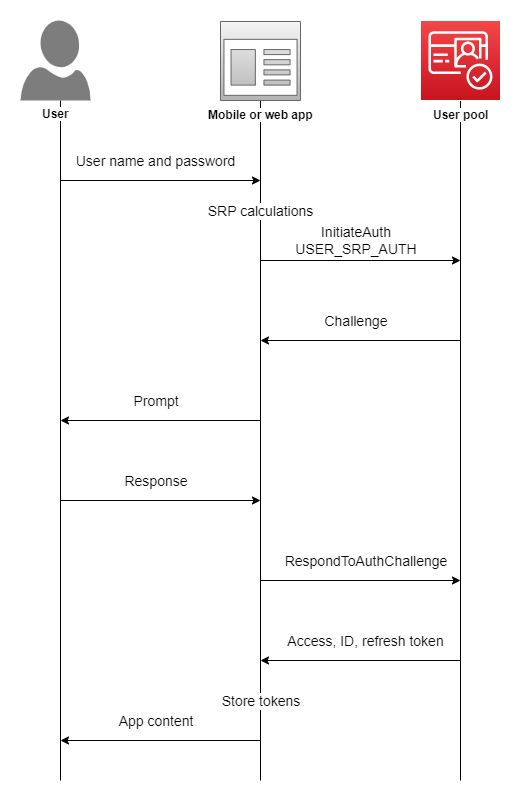
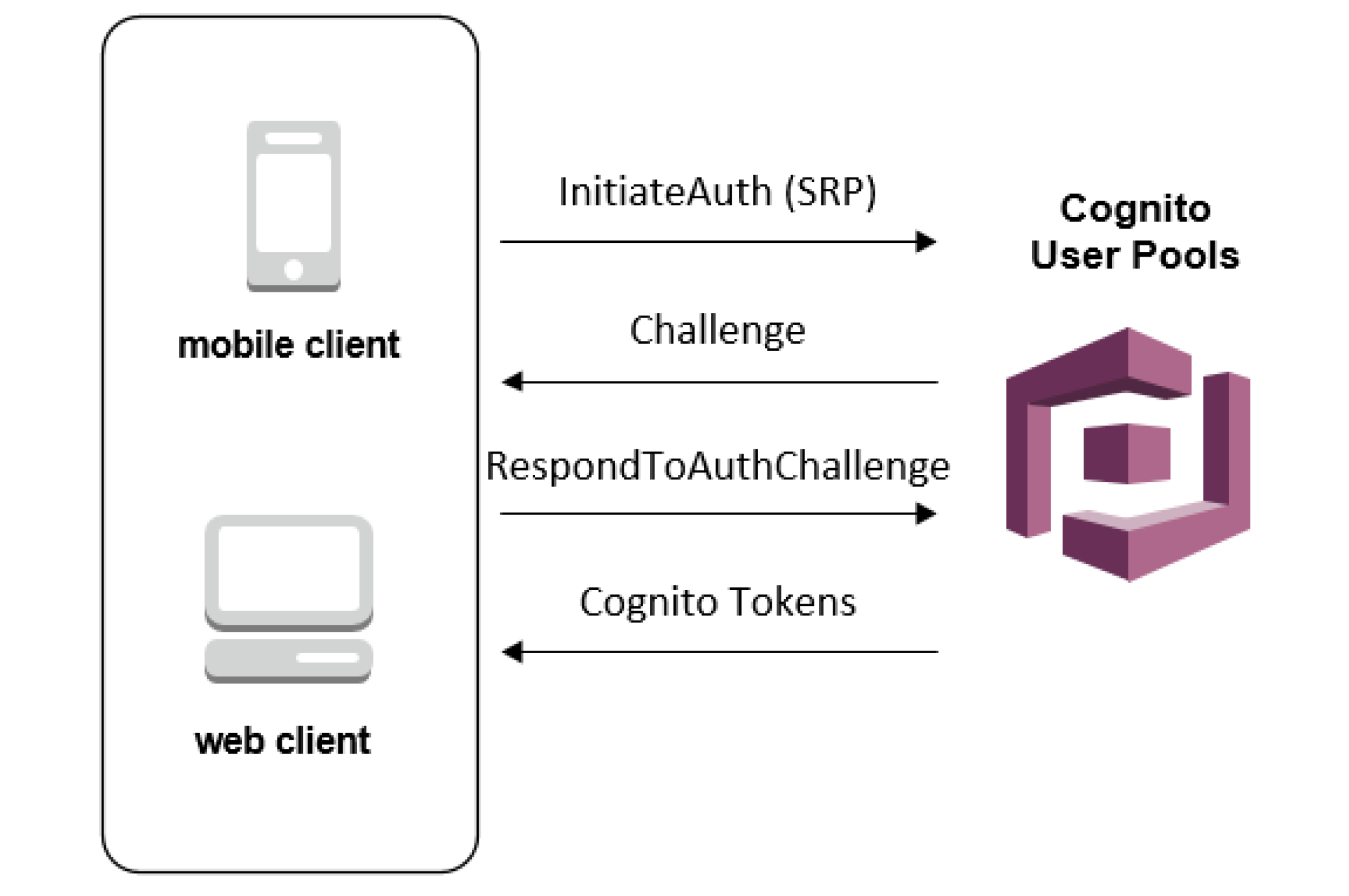
User Pool Authentication Flow - Amazon Cognito

Initial setup

We will be using the User Pools to setup custom login for our application.

User pool is basically the collection of users on your application. You can also add users in different groups, like for a healthcare application, you can create 2 groups: Patients and Doctors which can be used to allow different actions for both types of users.

Let’s first make a user pool by clicking on “Manage your User Pools”.

We’re gonna walk through this process step by step, so enter the Pool name of “App Users” and click “Step through settings”.

The next step is “Attributes”, where we define the attributes that our “App Users” will have.

Here you can select how do you want your users to sign in: using a username, or an email, or a phone number.

Here we will select login using email as their username.

Next Cognito provides a list of standard user attributes which you can select to add in your user details. You can also add any custom attributes if you want.

Next, on Policies, we can select a password policy for the users. Currently, we have selected only a minimum length of password but you can add more conditions also.

We can also select whether we want to allow users to sign themselves up or only admin can add a user. We will cover the differences in the final application flow later depending on the choice made.

Under MFA and verifications, we can enable multi-factor authentication if needed. And we can also select if we want the users to verify their email in order to confirm their account.

So the last important bit for our application is adding a client application which will be using Cognito in order to authenticate its users. We will set the refresh token to 30 days, which means each login attempt will return a refresh token that we can use for authentication instead of logging in every time. We un-click “Generate Client Secret” because we intend to log into our user pool from the front end instead of the back end (therefore, we cannot keep secrets on the front end because that is insecure)

Click “Create App” and then “Next Step” to move on to–Triggers.

We can trigger different actions in user authentication and setup flow which can be configured here. A simple example could be to send the user a welcome message on signing up.

For the scope of this tutorial, we will not be using any AWS Lambda triggers. Let’s move on to the final step: Review.

  • Here we review all the setup configurations we have made. And hit “Create” to generate the user pool.
  • Take note of the PoolID from the Pool details tab.
  • And the app id from the Apps tab. You will need these in your front end application to connect to this user pool.
  • The last thing left to setup is an identity pool.

Amazon Cognito identity pools (federated identities) enable you to create unique identities for your users and federate them with identity providers. With an identity pool, you can obtain temporary, limited-privilege AWS credentials to access other AWS services. Amazon Cognito identity pools support the following identity providers:

  • Public providers: Login with Amazon (Identity Pools), Facebook (Identity Pools), Google (Identity Pools).
  • Amazon Cognito User Pools
  • Open ID Connect Providers (Identity Pools)
  • SAML Identity Providers (Identity Pools)
  • Developer Authenticated Identities (Identity Pools)

In short, we can say that while User Pool is used for authentication and user registration, identity pools are responsible for authorization to allow different users access to different AWS services by assigning them different IAM roles.

Go to Federated Identities and begin the process to create a new identity pool. Give it an appropriate name.

Now under the Authentication providers section, we will add the Cognito user pool that we just created. Copy the pool id and the app client id. And if we wanted to allow Facebook login or any other login, we just need to add the app id in the respective section and that’s all.

On saving the identity pool, you are redirected to the next screen which creates the IAM roles. Here we can assign different roles to authenticated and unauthenticated users to authorize them to access other AWS services like S3, SNS, etc.

We just need to note one more thing that is used in our front end applications, i.e. the identity pool id which can be found at the below location.

This was all for the Cognito setup. With this our backend system to manage users and authentication is complete. We now have a fully functional User authentication and authorization service with the following features and without any code:

  • Users can sign themselves up
  • User creation by admin with temporary passwords
  • Multi-factor authentication
  • Phone number and email verification
  • Forgot password
  • Social login

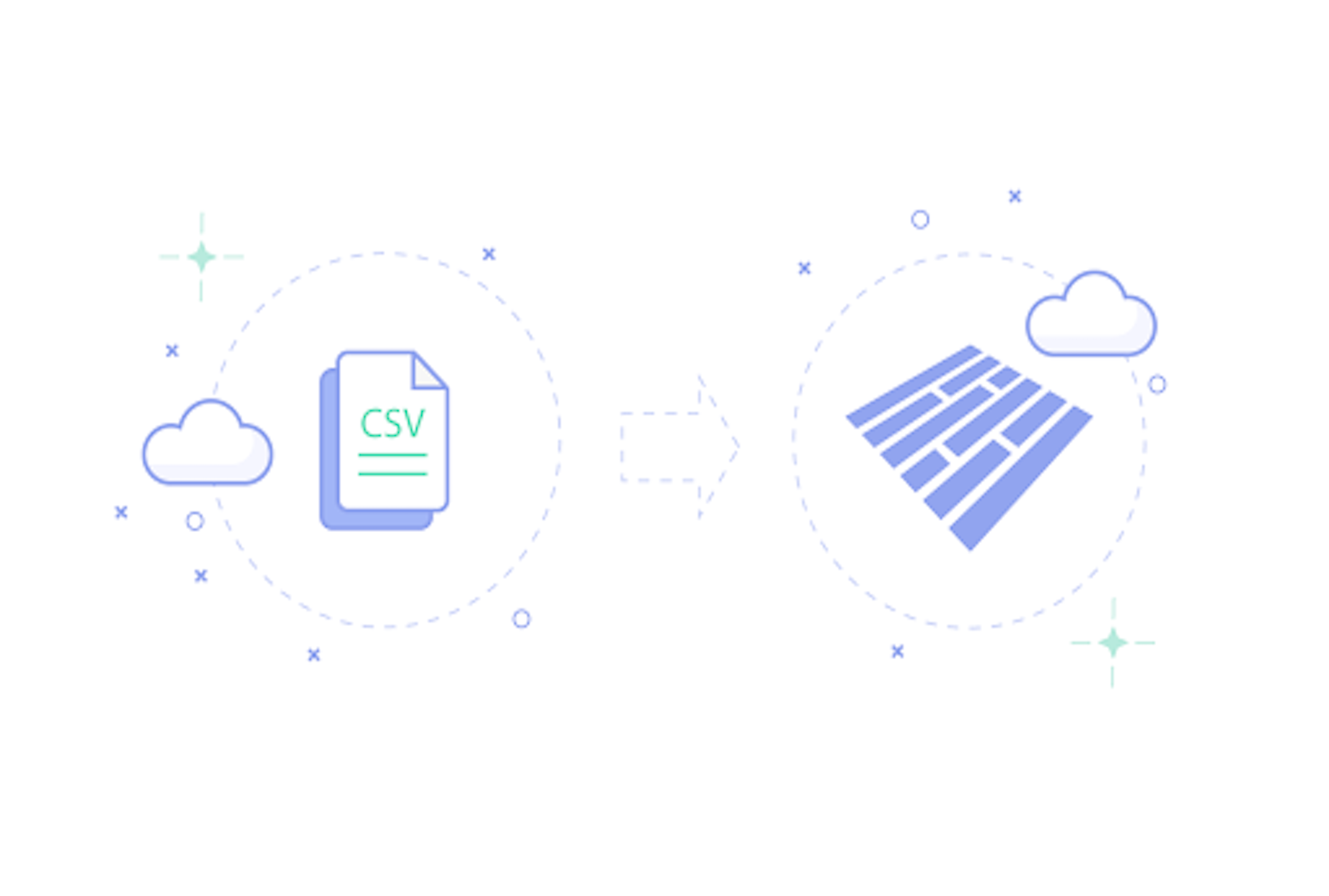
Convert CSV to Parquet Files

Apache Parquet

Apache Parquet is a columnar data storage format, which provides a way to store tabular data column wise. Columns of same date-time are stored together as rows in Parquet format, so as to offer better storage, compression and data retrieval.

What is Row Oriented Storage Format?

In row oriented storage, data is stored row wise on to the disk.

Columnar Storage Format

In columnar storage format above table will be stored column wise.

As you can see in this format all the IDs are together and so are names and salaries. A Query selecting Name column will require less I/O time as all the values are adjacent unlike in row oriented format.

Using Apache Parquet

Using Parquet format has two advantages

  1. Reduced storage
  2. Query performance

Depending on your business use case, Apache Parquet is a good option if you have to provide partial search features i.e. not querying all the columns, and you are not worried about file write time.

Apache Parquet format is supported in all Hadoop based frameworks. Queries selecting few columns from a big set of columns, run faster because disk I/O is much improved because of homogeneous data stored together.

To use Apache spark we need to convert existing data into parquet format. In this article we will learn to convert CSV files to parquet format and then retrieve them back.

CSV to Parquet


We will convert csv files to parquet format using Apache Spark.

Below is pyspark code to convert csv to parquet. You can edit the names and types of columns as per your input.csv

Above code will create parquet files in input-parquet directory. Files will be in binary format so you will not able to read them. You can check the size of the directory and compare it with size of CSV compressed file.

For a 8 MB csv, when compressed, it generated a 636kb parquet file.

How-to-convert-CSV-to-Parquet-Files – Humble Bits

The other way: Parquet to CSV

You can retrieve csv files back from parquet files.

You can compare the original and converted CSV files.

You can provide parquet files to your Hadoop based applications rather than providing plain CSV files.

Realm vs SQLite

While starting a new application, we often wonder which database to use, especially if the application is database intensive. Recently I came across Realm, which is really well-built and surprisingly very fast compared to SQLite. In this post, I aim at showing how Realm compares to SQLite.Choosing Database For Android: Realm vs SQLite | by JetRuby Agency | JetRuby

Let’s start with looking at basic CRUD operations in Realm.

Create:

Read:

Update:

Delete:

Now let’s look at the comparison between Realm and SQLite.

1. Architecture

Realm does not use SQLite as its engine, rather it is a database built from scratch to run directly on phones, tablets and wearables. Realm is an object oriented database that uses C++ as its core. However, SQLite uses a transactional SQL database engine.

2. Easy to Use

Realm is easy to use as it uses objects for storing data. Realm data models are defined using normal Java classes that are a subclass of RealmObject. This class can define properties of primary keys, required fields etc. using simple annotations. Also, there is no requirement for converting the Realm query results into objects for further use, this conversion is handled automatically by Realm. Realm query results are returned in a generic RealmResults instance which is a collection of the model class. This RealmResults instance is iterable like a List. However, the SQLite query results are returned in a Cursor object.

3. Cross Platform

Realm stores its data in a native object format where the objects are stored in a universal table-based format using C++ as its core, rather than storing them as is in their language specific format. This makes Realm easy to use across multiple languages, platforms and queries.

4. Speed

Realm performance is faster than SQLite, almost 10x faster according to the benchmark results. An example of this is- data fetched by Realm queries have a better performance enhancement than the insert queries as compared to SQLite.

5. Data Synchronization

The data in Realm is never copied, it works on live objects. Using Realm queries, we get a list of object references thereby working on the original Realm data. Thus, any changes made to the queried data is reflected in the actual stored data as well after a simple commit. However, in SQLite, we get a copy of the data from the database through a query. Thus, using SQLite, any changes made on the queried data need to be persisted by writing them back to the database again.

Companies using Realm:

A few companies using Realm are Amazon, Google, Starbucks, Intel, Ebay, Adidas, Zynga, Nike, IBM, and CISCO.

Realm Customers: See how our customers are using Realm

Limitations:

Realm currently has a few limitations:

  1. Realm does not have support for auto-incrementing ID’s and composite keys.
  2. In order to maintain a balance between flexibility and performance, Realm imposes a certain limitations on various aspects of storing information in a Realm which include:
    1. The upper limit on the name of a class is 57 characters, which includes the _class prefix.
    2. The field names have an upper limit of 63 characters.
    3. There is no support for nested transactions.
    4. String and byte arrays cannot be greater than 16 MB.
  3. There is no support for final, transient, and volatile variables.
  4. Realm model classes can only extend the Realm object.
  5. Realm model class must include the default empty constructor.
  6. There is currently support for only ‘Latin Basic’, ‘Latin Supplement’, ‘Latin Extended A’,  and ‘Latin Extended B’ (UTF-8 range 0-591) in sorting and case-insensitive string matches. Further, setting the case insensitive flag in queries when using equalTo(), contains(), endsWith() or beginsWith() will only work on characters from the English locale.
  7. Although Realm files can be handled concurrently by multiple threads, we cannot hand over Realms, Realm objects, queries, and results between threads.
  8. Realm files cannot be accessed by concurrent processes, they can only be accessed by one process at a time. Different processes should either copy Realm files or create their own.
  9. RealmObject are live objects, and might be updated by changes from other threads. Although two Realm objects returning true for RealmObject.equals() must have the same value for RealmObject.hashCode(), the value is not stable, and should neither be used as a key in HashMap nor saved in HashSet.

Use JMeter for Mobile Performance Testing

What comes to our mind for the very first time when we hear about JMeter? Is it Performance Testing? Or Web App Load Testing? Well, most of us are unaware that JMeter can also be used for performance testing of Android/iOS apps. It’s quite similar to recording scripts like in case of web apps, all we have to do is to configure a proper proxy on mobile devices. So here in this blog post, we would be listing down the process to record a performance test script in JMeter for Android and iOS platforms.

Best Performance Testing Practices For Mobile Apps In 2021

Prerequisites: JMeter version 3.0, Android phone (versions above Jellybean) or iPhone (version 8.0 onwards)

JMeter Configurations

How to Make Use of JMeter tool for API Testing in Mobile App Development?

1.  Launch JMeter -> Navigate to File option ->  Templates -> Select Recording -> Click on Create (So now we have added all the necessary parameters for Recording scripts)

2. Go to HTTPS Test Script Recorder -> Set port to 8080

Now find your IP Address by ifconfig for Linux and ipconfig for Windows. We will load up this IP address on our phone Android/iOS phone to setup proxy.

Mobile side Configurations

iOS proxy configuration:

  • Go to Settings–>Wi-Fi option.
  • Click on your connected network.
  • Select ‘Manual’ option from the HTTP Proxy section.
  • Set ‘Server’ value as your computer’s IP address and ‘Port’ value to 8080 as JMeter configuration. Refer above image to get an idea about this setup.
  • We need appropriate JMeter Certificate and save it to our phone.
  • Install this certificate on your iPhone.

Android proxy configuration:

  • We need appropriate JMeter Certificate and save it to our phone.
  • Download the zip file for the certificate and send the certificate on mail. And install through the mail. Once the certificate is installed phone will ask to apply a lock. And a notification appears showing Network may be monitored.
  • Now click on Wi-fi Settings -> Long press on the Network you are connected to -> Click on Modify Network -> Advanced Settings -> Change Proxy to Manual -> In Proxy Host name enter the IP of your computer -> Set Proxy to 8080 -> click save
  • Now we are set to start recording and running the scripts.
  • Go to Jmeter -> HTTP(S) Test Script Recorder click Start (this would start the recording). Remember that the port  in JMeter Global Settings and Mobile must be the same.
  • Add a Listener -> Add Result Tree to HTTP(S) Test Script Recorder
  • Perform any actions on mobile devices and the user can see the actions getting recorded on JMeter.

How to Use JMeter for Performance & Load Testing

Replay the actions by increasing the load and monitor the performance

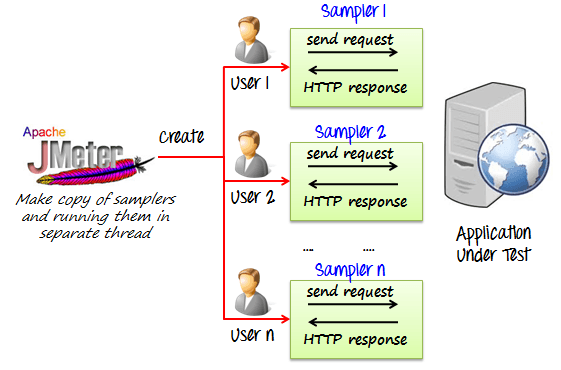
In JMeter go to thread groups and alter the number of threads, Ramp up period and Loop count.

  • Thread means the number of active users.
  • Ramp-Up is the amount of time JMeter must take to send threads for execution.
  • Loop Count is used to specify the number of times to execute the Performance Test.

Adding Appropriate Listeners and analyzing the performance on different loads. Listener that we have used here is Response time over time Listener.

These Listeners don’t come by default with JMeter we need to download the jar and put it into JMeter’s lib/ext directory.  Now restarting JMeter shows these Listeners in JMeter’s list of Listeners.

Advantages of using JMeter for mobile performance testing

  • First of all, JMeter is an open source software. So zero investment.
  • It’s very user friendly with a interactive UI
  • It’s easy to learn
  • Every test script results can be best monitored using different Listeners in JMeter
  • By far the easiest though effective way to check the mobile performance


Kotlin Programming Language now supported in Android

Google has just unveiled in their I/O 2017 conference that Android will officially support Kotlin programming language and got huge applause from the IT world. It is an open source project under Apache 2.0 license and built by JetBrains who earlier built IntelliJ. Google has announced that Kotlin is brilliantly designed, mature and will take android development to the next level as it is fast and fully supported by Java. Using Kotlin in Android development will be more fun.

For Android developers, Kotlin as a “first-class” language, is a chance to use a modern, powerful and mature language. It will help to solve the run-time exceptions and source code verbosity. Kotlin provides the flexibility which means it can be easily introduced into an existing project. Kotlin emits the java bytecode and can call java and vice versa out of the box. “The effortless inter-operation between the two languages” was a large part of Kotlin’s appeal to the Android team.

Covariance, Contravariance & inline function | The Startup

Developers can play around the Kotlin using Android Studio 3.0 and there is no need to install any extra plugin or worry about the compatibility issue. You can open the existing Java file, and then choose the option “Convert Java File to Kotlin File”. Android Studio will then add all required Kotlin dependencies into your project and the equivalent Kotlin code. Isn’t this cool?

Kotlin’s major goal is to be available on multiple platforms. Also, they are pretty much busy on working on native platforms like iOS, IoT, macOS, embedded systems.

As said by Google, some of the apps have already started using Kotlin like Expedia, Flipboard, Pinterest, Square. They are getting very positive feedback.

Kotlin has a lot in common to Java in structure as it’s object oriented and statically typed. It is designed for the problem that actually Java solves.

Some of the cool features of Kotlin

Features of Kotlin - DEV Community

  1. Nullability is a very common problem in Java. Basically having null references in the application can kill it. Kotlin finds the difference between the reference that can hold the null or that can’t, effortlessly.
  2. Switching from Java is easy as there is an option to convert Java files in Kotlin directly from the plugin in Android Studio.
  3. Kotlin is versatile and interoperable with Java as developers can write their own module that will work with Java code. It’s compatible with the existing Java library.
  4. Kotlin’s architecture is written in such a way that one has to write less code; at least 20% less while development, which is fascinating.
  5. A common problem in Android development that causes inefficiency to Java code is extra garbage collection. So Kotlin does a fabulous job to avoid this problem.
  6. The Lean syntax in Kotlin language is very convenient. Kotlin balances terseness and readability in syntax which helps to write the code faster and allows better productivity.
  7. Kotlin also provides Functional programming support with zero-overhead Lambdas.
  8. It imposes no runtime overhead.
  9. Kotlin’s extension functions are helpful in building really clean APIs and solve a bunch of other problems.
  10. The == operator does exactly what the community expects.

To learn more about Kotlin, check out their official website.

Setting a PHP Project in Jenkins

Continuous Integration (CI) is the process by which a developer makes his/her contribution a part of the whole and ensures that it fits well in the whole, regularly. Using CI, its easy to cross-check all the updates/check-ins into the project automatically with pre-defined validations. Their are number of CI tools available that are either free or very cheap.Most popular CI tools available are Jenkins, Travis CI, Cruise Control, Teamcity etc.After some deliberations and discussion I short-listed Jenkins to use for CI in one of our PHP projects. Here are my experiences for the benefit of any one else trying to accomplish the same.

First time ever when I started evaluating Jenkins, following questions came to my mind:-

A) How to install Jenkins with basic configuration?

B) Plugins used to build a PHP project?

C) How to create a PHP project in Jenkins?

A. Commands used to install Jenkins in Linux:-

  1. yum install -y wget
  2. sudo wget -O /etc/yum.repos.d/jenkins.repo http://pkg.jenkins-ci.org/redhat/jenkins.repo
  3. sudo rpm –import https://jenkins-ci.org/redhat/jenkins-ci.org.key
  4. sudo yum install jenkins
  5. sudo yum install java-1.7.0-openjdk
  6. firewall-cmd –zone=public –add-port=8080/tcp –permanent
  7. firewall-cmd –reload
  8. sudo /etc/init.d/jenkins restart
  9. systemctl restart jenkins.service
  10. Open http://localhost:8080 URL in browser and the below screen will open. It shows Jenkins is installed and running successfully.

B. Their are number of php plugins, the following are the basic ones those can be used:-

  • PHPUnit : – allows running automated tests on code (required).
  • PHP_CodeSniffer : analyse our code and detect errors in the coding standards.
  • PHPLOC : is used to analyse the size and structure of the code.
  • PHP_Depend : does static code analysis and provide metrics to evaluate the quality of code.
  • PHPMD : detects problem in the code. For analysis it use s the PHP_Depend analysis data.
  • PHPCPD : detects the duplicacy or copy/paste instances throughout the code base.
  • Clover PHP Plugin : used to provide code coverage reports from PHPUnit.
  • xUnit Plugin : This tools is used to publish the build execution results into Jenkins tool.

C. Set up PHP job into Jenkins:-

Before doing that, we have to check whether Ant installed on our server or not. If not, please install it.

Commands used to install Ant in Linux:
  1. sudo apt-get install ant
Now, what is ANT?

It helps in automating the software build process. It reads and processes a configuration file (contains tasks to be performed), also defines our project’s dependencies. Most used ANT configuration file name is build.xml. I also created the same and added to our project, so that Ant will work during Jenkins build creation process.

PHPUnit Configuration:

We can also configure the PHPUnit XML details into build.xml. So during the build process, the PHPUnit xml configuration also gets processed and the PHP unit test cases will be executed.

After all these set-ups, lets start creating/configuring our first PHP job in Jenkins.

Step 1: Click on “New Item” from the left menu. Enter the Item Name like “testPHPProject” and select “Freestyle project” option and hit the “OK” button.

Step 2: A new project with name “testPHPProject” created and its configuration page opens. Here we need to configure our PHP project.

In below screen, basic details are shown which has to be filled to configure the project. The details are as follows:-

1: In “Source Code Management” section, we have to provide how would Jenkins fetch the code base. For example, from GIT or the File System. Here, I have shown an example using a File System.

2: In “Build Triggers” section, we specify which method should be used for automatic build creation. If we have used GIT as “Source Code Management” tool, then we can choose an option to create build when anything changes in the repository. But in our example, we selected “Build periodically” and added vaue as “0 14 * * *”, which means everyday at 2 PM the build creation process will be started.

3: In “Build” section, a number of “build step” options are provided. Here since we are using Ant for build process, please choose “Invoke Ant” option and provide the absolute path of the Ant configuration file path in “Build File” textbox.

4: Jenkins also provides an option to add multiple “Post-build Actions”. Using this we can add multiple actions like Publish HTML, JAVADoc, Clover PHP coverage report and many others.

Here, I have chosen “Publish Clover PHP Coverage Report”. To publish it we have to provide the Clover XML Location.

Step 3: Click Save. The project will be configured.

Step 4: Click use Build Now option to create our first project build.

What’s in Store with Android O: Here ye, Android Developers!

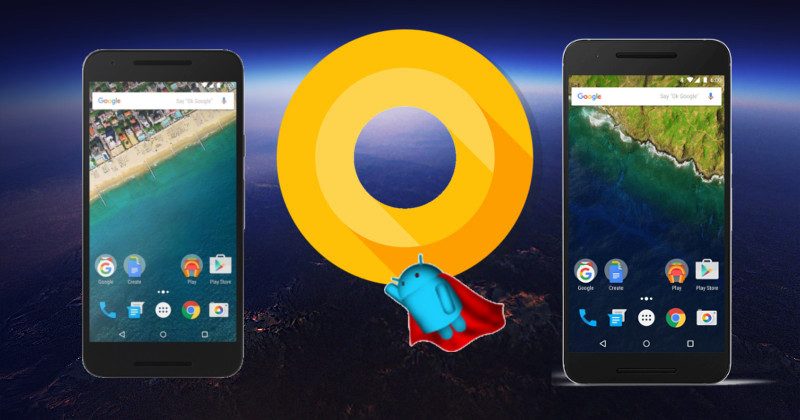
Google team has announced the preview release of Android O, here are some changes for the developer with documentation and API differences.

  1. In new API changes, each page which is returned by the Content provider will be counted as a single Cursor object.
  2. Android O will allow you to customize the pairing request dialog when trying to pair with companion devices over Bluetooth, BLE, and Wi-Fi.
  3. There is a specific disk space for each app for caching data. You can get it using-getCacheQuotaBytes(File).
  4. Introduced OpenJDK Java language features in Android.

Here Comes the Android O : Everything About Upcoming Android OS. - Wildnet

Fonts using XML file

You can now use fonts as resources as it is a new feature introduced in Android O. There is no need to keep all fonts in assets. You can access these fonts with the help of newly introduced type, font.

Adaptive Icons

There is this new feature of adaptive launcher icon in Android O that supports visual effects and can display a variety of shapes across different device models. For example– you can configure launcher icon circular on one device and square on another device, it’s totally up to you.

Autosizing TextViews

Android O allows you to let the size of the text expand and contract automatically based on the boundaries of the TextView.

You can set up the TextView auto sizing via code or XML. The two types can be setup like:

  1. Granularity- By using this, you can set up the minimum and maximum range of the text size.
  2. Preset Size- By using this, you can auto size the TextView from the list of predefined sizes.

Generic findViewById

Say goodbye to casting views after findViewById().

Snoozing of Notifications

You can now snooze the notifications and can see later. Developers can also get all the snoozed notifications using- getSnoozedNotifications().

setToolTipText

Set the text on the tooltip that will be displayed in a small popup window. The tooltip will be displayed:

  1. On Long Click, unless is not handled otherwise.
  2. On hover, after a brief delay since the pointer has stopped moving

Android O may release on August 21 | Lifestyle News – India TV

Progress Dialog is no longer there, it’s deprecated now

Progress Dialog is now deprecated in Android O. It uses a progress indicator such as ProgressBar inline inside of an activity rather than using this modal dialog.

A dialog shows a progress indicator and an optional text message or view. Only a text message or a view can be used at the same time. The progress range is 0 to max and cancelable on the back press.

Notification.Builder() is now deprecated

Now we have to use Notification.Builder (context, channelId). ChannelId is a string value and mandatory for all posted notifications.

It’s time to remove BroadCast Receiver from the Manifest

In Android O, they have set the limit on the background executions. You should remove all implicit broadcast that is for intents. If you keep them in place then it will not crash your app but will be of no use when your app will run on Android O.

Autofill Framework

Autofill will save user’s time to fill the information in forms, like details such as credit card or personal account in their devices. The Autofill Framework manages the communication between the app and autofill service.

Developers can start using Android O by setting up the compileSdkVersion as ‘android-O’, targetSdkVersion as ‘O’ and buildToolsVersion as ‘26.0.0-rc1’.
You must set the support dependency as-

dependencies {
compile ‘com.android.support:appcompat-v7:26.0.0-alpha1’
}

Designing a kick-ass checkout experience

They confessed that they dreaded checkout as if some unknown calamity would fall upon them and they’d be forced to leave their cart. Sometimes they indeed had to abandon their cart because they didn’t get upfront information about shipping or tax charges. Other times, the steps were too hard to follow and they had a hard time placing the order.You think I am making this up? Below is an image which shows the results of a survey done with people in the US who gave reasons for abandoning their e-commerce cart-Among all the reasons, Extra costs (60%) and Create an account (37%) are the two topmost areas where users feel dejected.

Think of it this way- you go to a brick-and-mortar store, you put everything you need in your cart and stand in the long queue to wait for your turn. But just when you reach there, the person at the counter says that you need to pay 13% convenience tax as a first time customer. And, in case you want to waive it off, you need to register at the store. Isn’t that abominable?

Moving ahead, the third most cited reason for abandonment is- “too long/complicated process”. This is the area where, I feel, that designers can greatly help improve the user experience.

How?

By designing with the utmost care and keeping your end users in mind. You need to understand how people accomplish tasks and the role human psychology plays when people are browsing on the internet. It will help you design better interfaces.

For the checkout page, I have figured out five ways that can help you design a better experience.

How to design a user-centered online checkout experience | by Tanya Nativ | Prototypr

Design a checkout flow that customers can see

You know how trekkers gather the strength to climb to the top? They look at the summit and it gives them the adrenaline rush to conquer the mountain. A bit overboard of an example because the checkout process is nothing like mountain hiking. But you get the drift, don’t you?

In short- If you can see it, you can achieve it!

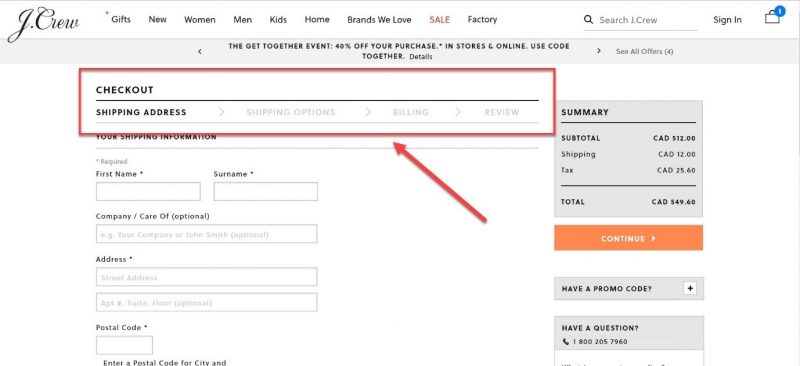
For example- once a user has added all the items in the bag and wants to go ahead and purchase, display the entire checkout flow up front. Show it with a progress bar so that the user knows what information s(he) has to fill at each stage. This also breaks down the process into chunks and the user is not burdened with everything on one page.

The above example of the checkout page of Myntra shows that there are three steps- BAG, ADDRESS, and PAYMENT. Each stage is highlighted so that as the users proceed in the flow, they know which stage they’ve reached and can review their order.

Display the right visual hierarchy

Visual hierarchy helps the users in two ways- it gives them the clarity on the items they are buying and it gives them control over their actions. When done right, visual hierarchy helps users understand what needs their attention.

For example- if they need to review their order or if they need to proceed to the payment page.

Visual hierarchy can also be used to attract the user’s attention to some promotional offer (eg- free shipping on orders over $X) or to motivate them to check out an interesting offer which can be clubbed with their existing one.

For example- in the screenshot below, the “bank offer” is highlighted so that users who are eligible (and interested) can look at it and decide whether they want to use it or not.

Keep the form fields minimal and clear

Designing forms that result in better conversations is an art. The number one principle that you need to keep in mind while designing forms is- don’t ask for unnecessary information.

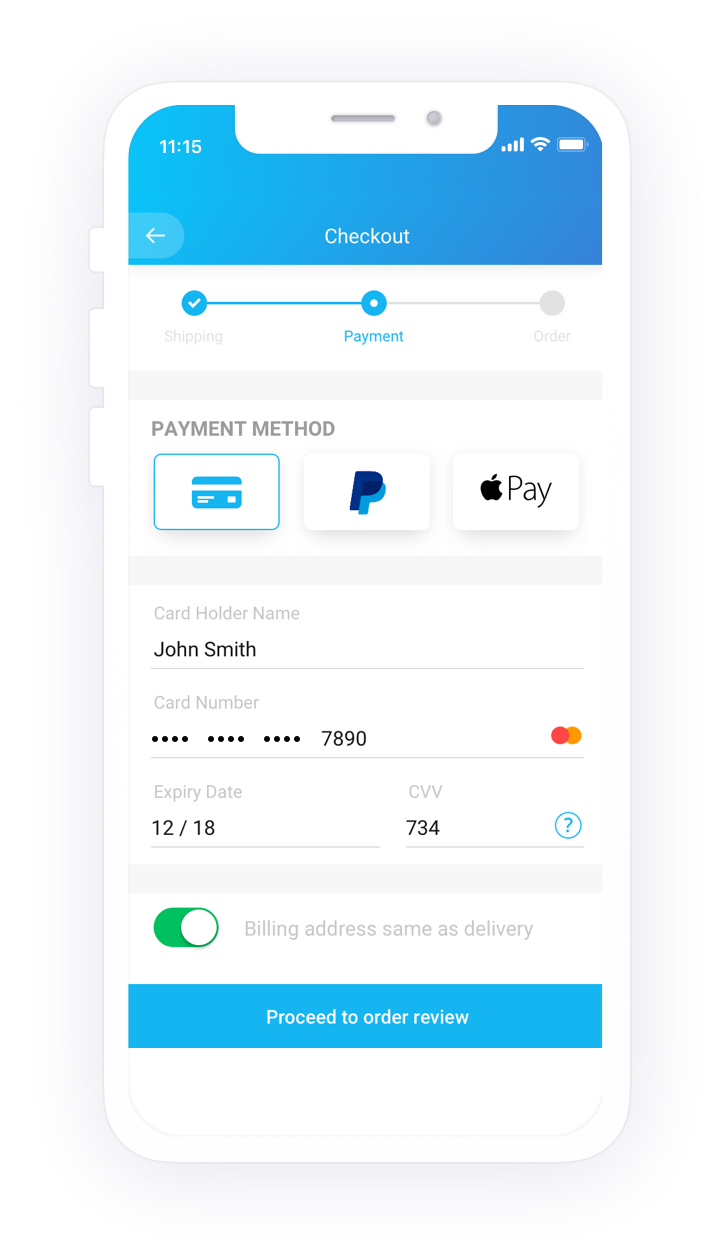
For example, in the screen below, the payment form is precise and it helps users fill out the card details in the same sequence as they appear on the card. All payment options are listed in the left navigation menu and in case the user is unable to remember the card details, (s)he can use the other options.

The labels are correctly placed and they help the user enter the right information in the right input field. Apart from that, the security marks on the right-hand side (‘verified by VISA”) leave a positive impact on the user and they are assured of their money going in the right hands.

However, there is one more aspect which can be taken care of in this particular interaction. When I enter the card number (I entered an incorrect one), it didn’t show me any error.

Instead, it allowed me to move ahead in the journey. It was only after clicking on “make payment” that it showed me the error message on the top of the form. That too, incorrect. The error message is misleading and I can’t spot a “red” field anywhere.

A better approach is to handle errors on the go. It’s possible to validate the card number as soon as users enter it. So, why not make them aware of their mistake right when they make it?

How to Design an E-commerce Checkout Flow - 23 Tactics to Boost Sales

Make customer sign up optional

It happens to most of us. We look at something and we instantly want to buy it. But then we change our mind the moment the merchant portal asks us to sign up. Even in the survey conducted by Baymard Institute, “the site wanted me to create an account” is the reason given by 37% of people for cart abandonment. As customers, it’s natural to feel uncomfortable sharing our personal information (name, address, phone number) during the first interaction with a new store. Moreover, it’s tedious to create a new account on every site we browse.

A better option to fix this problem is to offer them guest checkout. By giving them the freedom to choose their way, you enhance their user experience. If they are already flattered by your service, they’ll make an account. If they are yet to discover that you’re awesome, you’ve given them a reason to love your page by giving them the “guest checkout” option.

Here’s an example from Nike’s website. When you “proceed to checkout”, it asks for your shipping details directly (no login required). However, it also gives you an option to sign-up in case you want faster sign up in the future.

Offer them all good things, including your help

Not all users sail smooth. Some hit a dead end, some get confused and some become frustrated. Even after taking care of everything (forms inputs, error messages, etc), it’s fair to assume that some users will still face problems.

In such situations, it’s crucial to provide users with assistance instead of sending them to help pages (that are not always helpful) or FAQ-pages that are hardly specific to their problems.

Nike’s website takes care of this aspect of user experience.

Knowing that someone is there to help you out brings more credibility and confidence in users and they can peacefully shop to their heart’s delight. It may not be a grand feature in the bigger scheme of things, but it’s the small things that matter the most.

The design of the checkout page is crucial in the consumer journey. If the design is good, it can help convert a customer into a returning user. However, if the design is bad, it not only causes loss of business but also gives people a chance to badmouth your website’s experience.

Therefore, it’s important to design a well-thought-out checkout page. There are many other methods that can guide you to create easy and creative checkout pages which delight users and make their shopping experience fun. But I believe that if the ways listed above are followed it can drastically increase the conversion rate through the checkout process.

ReactJS gains power with Flux

I recently started learning ReactJS. With a very good documentation available on GitHub I found it very easy to learn. I created a sample application in ReactJS & it was working fine!!With some experience in the same I would like to begin by mentioning two of its salient points :

  1. HTML and Javascript in a single file which makes it easy to maintain
  2. Component Driven Development in which DOM is divided into components to make it reusable and easily testable

Then I heard about React with Flux and I was intrigued to know why do we need Flux when React is fine on its own. I did not have much development experience in ReactJS which is why I didn’t realize the power of Flux. Eager to learn, I told myself let’s pull our socks a little, learn Flux and also help train others.

I created an application using ReactJS but initially didn’t use Flux in order to understand its additional benefits like:

  1. Maintainability
  2. Readability
  3. Unidirectional data flow

To see the same in practice, Let’s take a look at developing an application first without using Flux and then using Flux.


Let’s start by understanding basic definition/architecture of Flux –

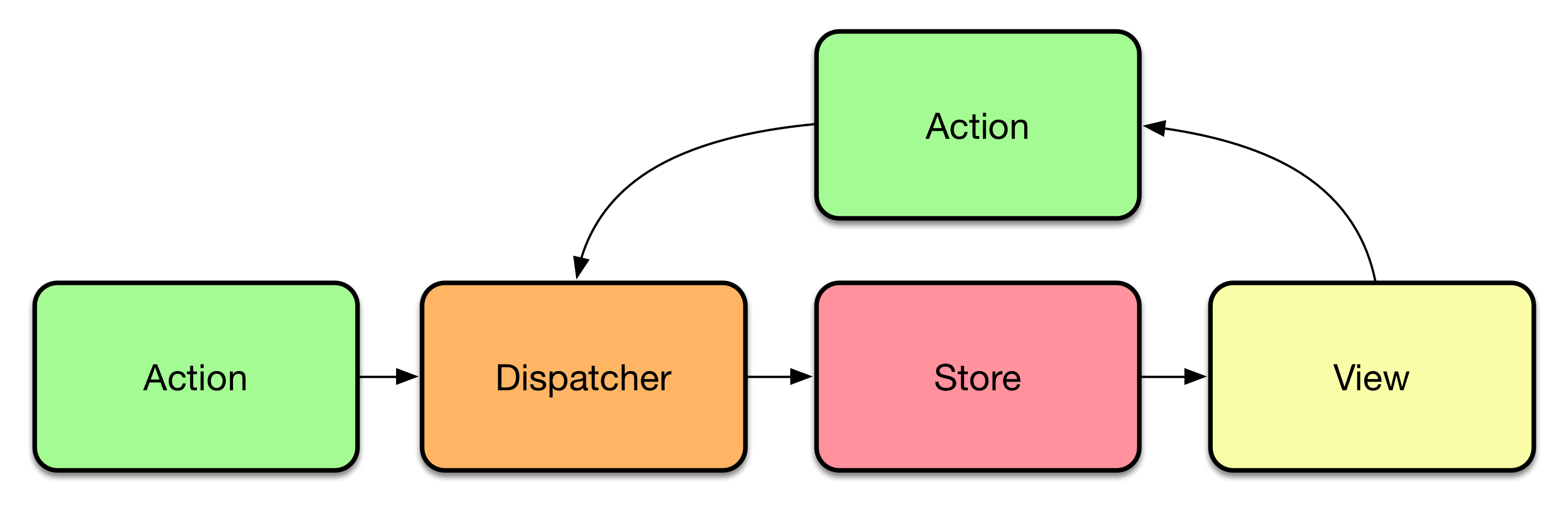
Flux Architecture

There are four key points to Flux

  1. Action  – Actions are very simple because they only need to take request from View and pass it to the Dispatcher. It acts as mediator between View and Dispatcher.
  2. Dispatcher  – Dispatcher is responsible to pass information to Store. It does that via <this.dispatch> method in dispatcher.
  3. Store – Stores plays with data. It communicates with backend server as per request from View.
  4. View – Views are for displaying information. If views need some information then they get it from Store and if it needs to perform some action or update/add any information then it informs Action.Action calls Dispatcher which in turn fetches data from Store.

React and Flux

Let’s say we have to create a TODO application. It would be a single page application divided into following components

  • Header
    • Todo Count
  • Todo Form
  • Todo List
    • Todo Item

Expected behaviour

  • Todo Count will display the total count of Todo Items.
  • Todo Form will have input field.
  • On submitting the form, new Todo Item should be appended to Todo List and count should be increased in Todo Count.

Application without using Flux

Let’s create a TodoItem Class which will render individual todo item. It will receive information of todo item from its parent component

The below component is TodoList which is responsible for rendering all todo items. This component gets “data” from its parent class via props. “this.props.data” is a list of items which iterates and call TodoItem which we created above.

TodoCount component is responsible to display the count of items. It will get count from TodoHeader component.

TodoHeader component displays the header of an application and it calls the TodoCount component to display the count of total items.

Below is the TodoForm component. Let’s focus on the same because it creates the data in addition to rendering.

The handleSubmit method is called when Submit button is clicked and it calls TodoSubmit method which it got from the Application component.

When I was doing this I had questions –

  •      Why are we doing it this way?
  •      Why Application component submits the form and not TodoForm?

The reason is that Application Component is the parent/grandparent of all components. And data flows from parent to child and child can’t change the state of Parent. Also, there can’t be any communication flow between siblings.

Now if TodoForm will submit the form then how will this information be passed to TodoList or TodoHeader component?

That’s why we made Application component to be responsible for submitting the form.

The Application component is parent of all. It has methods on which we need some discussion.

loadDataFromServer – It will load data from server but in our example there isn’t any server so we have hard coded the data.

handleTodoSubmit – This method would be called by the TodoForm as explained in TodoForm component.

When this method would be called then it will change the state with new created Todo item which will trigger re-rendering of Application component and all child components will be updated with the new information.

As you can see that if sibling components want to communicate with each other then they need to pass data to their parent component.

Like in our example Todo Form wants to tell Todo List that new item has been added.

That’s why Application component is passing callback handleTodoSubmit. So on submit of Todo Form it is calling handleTodoSubmit method of Application component via callback. And handleTodoSubmit is updating the state of Application which causes the re-rendering of Application component by updating Todo Item and Todo Header.

In our example there is only 1 hierarchy but in real time scenarios there could be multi level hierarchy where the innermost child would want to update the other level of innermost child. Then you have to pass the callback method over all the hierarchies.

But that would make it less maintainable and it also impacts readability in negative ways which will result in losing the power of React.

Now Let’s try this same application using Flux

As we have seen there are 4 layers in Flux. Let’s write a code according to its structure.

Action

Actions are called by Views. If View wants to update data in Store then View tells about this changeto Action. Here we have created AppAction. In this, there is only 1 action i.e addItem.

This would be called when we want to add a new todo Item. This action further calls handleViewAction of dispatcher(AppDispatcher)

Dispatcher

In AppDispatcher, handleViewAction is defined which is called by AppAction. In handleViewAction action is passed which will tell what action is performed.

There is a this.dispatch inside handleViewAction which is a pre-defined method of Dispatcher. This method will internally call the Store.

Store

Let’s discuss methods of Store one by one.

dispatcherIndex – Execution starts from here because of the AppDispatcher.register. Whenever dispatch method of Dispatcher is called then it would pass the action information wherever AppDispatcher.register is defined.

In our example we have only one action “ADD_ITEM” but in most of the cases there would be multiple actions. So we have to first define the type of action and based on that we will perform actions and will call emit method.

Here, we are calling addTodoItem method from dispatcherIndex method and after that emitChange

addTodoItem – In this method we are not doing anything except pushing new todo item to the todoItems array.

emitChange – In emitChange, we are using this.emit(CHANGE_EVENT) method, this will let listeners of CHANGE_EVENT know that something is changed.

addListener – This method is used by Views to listen to the CHANGE_EVENT.

removeListener – This method is used by Views to remove listener.

getTodoItems – This method will return all the todos. This would be called by TodoList component.

getTodoCount – This method will return the count of all todos. This would be called by TodoCount component.

In TodoList component, we are fetching todo items from Store directly by calling AppStore.getTodoItems in getInitialState.

Now question is how will this component get to know when new todo item has been added?

The answer is in componentWillMount. In this method we are calling AppStore.addChangeListener which will listen to the event whichis defined in addChangeListener of Store. If there would be any change then it will call the _onChange which will reset the state.

Similar to TodoList, TodoCount will also get data from Store and there is a listener defined in componentWillMount.

Conclusion

On comparing both the codes you will find that creating application without using Flux is still easy ? But if you understand the flow of Flux then your choice would always be Flux because flow of Flux would be the same even when your application is getting complex. It provides us with additional benefits of maintainability, readability, unidirectional data flow.
To summerize, lets try again to understand the flow.

In TODO component, we are rendering 3 components <TodoHeader>, <TodoForm>, <TodoList>. There is no need to pass any callback, no need to define any state because <TODO> component is not doing anything except calling other components.

TodoHeader component is also not doing anything except rendering or calling other component.

In TodoCount component, we need to display the count of total items. We will get count from AppStore on rendering of TodoCount. But count may get update after rendering of TodoCount component. That’s why we have added listener in componentWillMount and removed in componentWillUnmount method. So if there would be any update in Store related to count than it would call _onChange method and will change the state of count accordingly.

TodoList component is displaying the list of Todo Items and for that it needs TodoItems. The behaviour is similar to TodoCount in terms of communicating with AppStore.

In TodoForm, we want to submit the form and want to tell other components that new item has been added. So on submit, instead of telling other components it is just passing information to AppAction which will dispatch it to store with the help of AppDispatcher. And AppStore will update/add the data.

In AppStore, there is emit method called in emitChange which will allow listeners to know that information has been updated/added.

As you can see, components are not dependent on each other. If they need any information they will get it from Store and if they want to update anything then they will create an Action and it would be Dispatched to Store.

Clearly, the data flow is unidirectional so it would be easy to understand and maintain.

GraphQL – API interactions made efficient

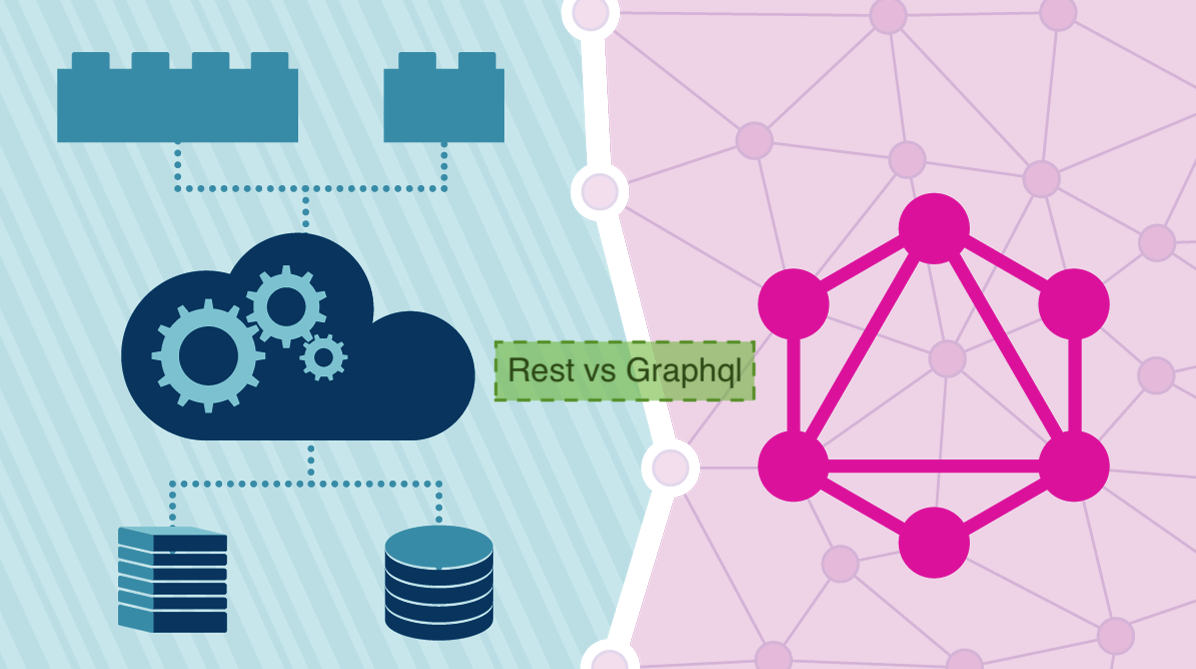
APIs have become ubiquitous with the advancement of mobility. All clients need to access data on the server and API’s define a contract to access that data.REST has been a popular way to expose data from a server after SOAP since it was lightweight and simple for clients. However, when the concept of REST was developed, client applications were relatively simple. With more rapid movements towards mobility, the client applications have grown in complexity and so has their data requirements from the server. And, REST APIs have shown to be too inflexible to keep up with the rapidly changing requirements of the clients that access them. And more often than not, it is very difficult to implement a fully REST compliant API. Most of the APIs are somewhat REST.GraphQL - API interactions made efficient | Humble Bits

There are 2 major factors that have been challenging the way API’s are designed:

  1. Increased mobile usage calls for efficient data loading. With REST, you often have to make multiple calls to fetch the complete details of a resource.
  2. Variety of different frontend frameworks and platforms. Each platform has need of different representation of the same data. As a REST API developer, we mostly send all the data and leave it up to the client to ignore the data that is not needed. But this puts a load on the user’s data plan.

How I learned GraphQL is the better REST | Codementor

GraphQL, unlike REST, is a more efficient, flexible and powerful new option. The new API standard was developed and open-sourced by Facebook. It is now maintained by developers and open source community from all over the world.

It was developed to cope with the need for more flexibility and efficiency. It solves many of the shortcomings and inefficiencies that developers experience when interacting with REST APIs.

GraphQL enables declarative data fetching where a client can specify exactly what data they need. Instead of multiple endpoints, which return fixed data structure, there is a single endpoint which returns precise data that the client asked for.

To better understand the difference between GraphQL and the REST, let’s consider a blogging mobile application where we want to show a user’s profile screen with the following details on the screen:

User’s name

User’s All blogs title

User’s followers

Remember how we used to gather data with a REST API? It was typically done by accessing multiple endpoints. In the example, /users/<id> endpoint can be used to fetch the initial user data.

Also, it’s likely to have a /users/<id>/posts endpoint that will return all the posts for a user.

Next, the third endpoint will be /users/<id>/followers that will return a list of followers per user.

This leads to the client sending multiple calls, waiting on all those calls, chaining their responses, and gracefully handling if any one of the calls fails.

This highlights the first problem stated above.

Now coming to the second problem-

In this case, at the first step, we are fetching not only user’s name, which we need, but we are also fetching other data which is not required putting more load on the user’s data plan. Similarly, a lot of additional data is being sent across in other calls. This must be to support other clients like a corresponding web application which displays more information as the real estate available increases.

A possible solution within REST realm to solve the above problems would be that you could design your API in a way that exposes the data that is required by this particular profile page. But this is, again, not an optimal approach.

Why, you ask? Especially in today’s times, you want to be able to iterate quickly on your designs and experiment with different features. If you have to tweak your API every time you change your designs on the front end, you are not able to move fast. And keep in mind the versioning you would have to handle in your APIs to keep serving previous versions of your application. And you are in a mess.

Another elegant solution

In GraphQL on the other hand, you’d simply send a single query to the GraphQL server that includes the concrete data requirements. The server then responds with a JSON object where these requirements are fulfilled.

Here only a single request is sent to the server with the query in the request’s body with the exact data requirements and it will return the exact data needed by the application.

This solves our problems of over and under fetching.

I am sure many of you must have had this question in your mind-

An iOS app is so different from an Android app and miles apart from even the web app. How would we return different data for each client?

If I didn’t know about Graph QL, my solution would be either of 2:

  • Let’s send all data required by either of apps and leave it on the application to parse as per their requirement. Over-fetching.
  • Let’s create different endpoints or get platform information from the client in request header and return application specific data. On your path to maintainability issues.

GraphQL solves this problem by giving the power to clients to write their own queries to get data that they need. It’s generous that way- always taking the smallest possible request. Whereas, REST generally defaults to the fullest.

Some of the advantages of GraphQL are-

Typed schema

How many time has it happened that the API does not return data in the correct data type? Numbers and booleans are wrapped as a string. And then you debug it to find out the correct data type. This is because REST API contract only defines the data and not the types for that data.

In contrast, GraphQL uses a strong type system to define the capabilities of an API. All the types that are exposed in an API are written down in a schema using the GraphQL Schema Definition Language (SDL). This schema serves as the contract between the client and the server to define how a client can access the data.

GraphQL is a Query Language first

REST APIs are often created initially simple, then slowly more and more query language-like features are tacked on over time.

The most reasonable way to provide arguments for queries in REST is to shove them in the query string. Maybe a ?status=active to filter by status, then probably sort=created, but a client needs sort direction so sort-dir=desc is added. This is all taken care of in GraphQL because it is foremost a query language so you can easily add in query parameters without affecting the readability or creating a chaos of different types of queries.

{

human(id: “1000”) {

name

height(unit: FOOT)

}

}

GraphQL removes “Include vs Endpoint” indecision

Another customization consideration that comes up a lot is when to offer included relationships, and when to use another endpoint. This can be a difficult design choice, as you want your API to be flexible and performant, but includes used past the most trivial uses can be the opposite of that.

You start off with overly simplistic examples like /users?include=comments,posts but end up on /trips?include=driver,passengers,passengers.avatar,passengers.itineraries and worse.

REST would call for a HATEOAS approach, which would need you to make one call to the /trips endpoint, then hit “links”: { “driver”: “https://example.com/drivers/123” }, and again for passengers, and again for child data of each of those passengers.

This is a big win for GraphQL, as forcing the include approach, the GraphQL will be both efficient and consistent.

And now the disadvantages of GraphQL-

REST makes caching easier at all levels

In an endpoint-based API, clients can use HTTP caching to easily avoid re-fetching resources, and for identifying when two resources are the same. The URL in these APIs is a globally unique identifier that the client can leverage to build a cache. In GraphQL, though, there’s no URL-like primitive that provides this globally unique identifier for a given object. However, you can cache your GraphQL results at the front end using Apollo Client and Relay.

GraphQL query complexity

GraphQL doesn’t take away performance bottlenecks when you have to access multiple fields (authors, articles, comments) in one query. Whether the request was made in a RESTful architecture or GraphQL, the varied resources and fields still have to be retrieved from a data source. As a result, problems arise when a client requests too many nested fields at once. Frontend developers are not always aware of the work a server-side application has to perform to retrieve data, so there must be a mechanism like maximum query depths, query complexity weighting, avoiding recursion, or persistent queries for stopping inefficient requests from the other side.

So to conclude, GraphQL is a powerful technology to make the front end applications easier and more efficient. It has its pros and cons and should be taken into consideration when making important architectural decisions based on the specific use cases.

error: Content is protected !!