How AI-powered ‘voicebots’ can benefit airline employees — and their employers

Emergence of Voicebots - The future of chatbots | KLoBot | AI

Airline workers have it tough.

A new generation of voice-driven software bots promises to make their work easier.

Airline employees, whether pilots, flight attendants or maintenance/repair/overhaul (MRO) technicians, are often called on to perform challenging tasks — and in a hurry. Think of a pilot dealing with mechanical failure, a flight attendant who can’t make a connection due to bad weather or a technician urgently needing a crucial part that’s out of stock.

To help solve these tough challenges in real time, a new generation of “voicebots” leverages two advanced approaches:

  • The first, natural language processing (NLP), lets machines and humans interact using “natural” (that is, human) languages.
  • The second, machine learning (ML), is a subset of AI that empowers computer systems to build mathematical models based on observed patterns.

How to Implement Voice Bots for Better Customer Support

Voicebots eliminate the need to type, click or point. Instead, a worker can simply speak normally, then listen as the voicebot speaks back in response. What’s more, the latest voicebots can actually detect a speaker’s mood – for example, a sense of urgency – and then use that information to prioritize requests, such as ordering a new part.

Voicebots can also deliver important business benefits to the enterprise. For one, they empower airlines to automate tasks formerly done by hand, then expedite them based on priorities detected in a speaker’s voice. This can help airlines ease disruptions and delays, as well as lower costs and reallocate those savings to new and innovative projects. Imagine, for example, an airline that uses voicebots to ensure more efficient maintenance. If it could lower the number of flight delays by just 0.5%, the airline would enjoy total annual cost savings of $4 million to $18 million, depending on the number of daily flights.

By implementing this cutting-edge technology, airlines should also have an easier time attracting and retaining tech-savvy workers, possibly helping to mitigate the labor shortages forecast for the industry.

Voice technology soars — in the air and on the ground

Assisto Front

Voicebots for airline workers are part of the bigger trend of voice technology that consumers are already on board with. For example, market-watcher IDC predicts consumers worldwide will purchase more than 144 million voice-enabled smart speakers this year. The business market is ripening, too. Amazon, Google and Microsoft are all dedicating serious resources to expanding their voice technologies for B2B use.

Some airlines already use AI-powered chatbots to serve their customers. These chatbots can be programmed to understand the intent behind a customer’s request, recall an entire conversation history and respond to requests in a human-like way.

On the enterprise side, aircraft-maker Boeing is among manufacturers investing in AI and other voicebot technologies. The company is conducting research on NLP, speech processing, acoustic modeling, language modeling and speech recognition.

Real-life scenarios

How will airline employees benefit from using voicebots? Here are a few possible applications:

  • Pilots can use voicebots, both during preflight preparations and while actually flying. A complicated command from air-traffic control can take pilots up to 30 seconds to complete, turning all the knobs and hitting all the necessary buttons. A speech-recognition system can cut that time dramatically, allowing pilots to keep their eyes on the traffic and weather, and to keep the airplane safe.

How we used Voice to supercharge customer engagement - MetroGuild

  • MRO technicians can use voicebots to assist maintenance and repairs. A technician needing to replace a specific component could ask a voicebot, “Do we have this part in stock?” If the answer is negative, the bot could then find the nearest location where the part is available and arrange for it to be shipped. The voicebot could even select Express or Standard delivery based on the urgency detected in the mechanic’s voice.

MRO Labour Spotlight: The Aircraft Maintenance Technician Shortage

  • Flight attendants can use voicebots when encountering flight delays, cancellations and other common scheduling changes. For example, a flight attendant who is snowbound in Denver could tell a voicebot, “Notify Dallas that I’m going to miss my connecting flight today. Then find someone who can fill in for me on the next flight.” The airline’s crew-scheduling system could then make the necessary changes in real time.

Will "Flight Attendants" be replaced by AI & Passenger Service Robot?

Getting started

Airlines looking to equip their employees with voicebots may wonder how to begin. We suggest a three-step process:

Step 1: Ideation. Begin by brainstorming. Assemble your team and ask them: What are our biggest disruptions? How could voice technology help?

How to Run an Ideation Session. 15 Minutes | by Shay Namdarian | Medium

Step 2Proof of concept. With your biggest disruptions in mind, develop a potential solution using voicebots.

Five tips for a successful Proof of Concept - Bizztracker

Step 3: MVP. Borrow a tactic from the Agile approach — create a minimum viable product. This does not need to be a perfect, complete piece of software. Instead, create just enough for early tests and feedback. Then repeat as needed.

Making sense of MVP (Minimum Viable Product) – Digital Nimbler

Airlines looking to employ voicebots will also need to take on one more challenge: data access. Voicebots need quick access to all enterprise data. Yet many airlines keep their data protected in silos, mainly for security reasons. For voicebots, that makes gaining access to this data difficult and slow.

To resolve this issue, airlines need to find an acceptable balance between data security on the one hand and speedy voicebot data access on the other. This could be hard. But the alternative — doing nothing — could is even worse. Any airline that doesn’t adopt voicebots can be sure the competition will.


Cloud Adoption : Major Challenges

How to transition to a cloud-based analytics environment

Since the start of the pandemic, digital transformation has accelerated as more businesses see the need to adopt advanced technologies and do so quickly. Providing ways to propel businesses forward, adapt to new ways of working and cut-costs, digital transformation has many benefits. Cloud adoption, while a necessary element of that transformation, is not without its challenges. Before migration takes place, companies need to know what the main challenges are. Here, we explain.

Security in the cloud

What is cloud security? | Kaspersky

Cloud services, in themselves, are exceptionally secure. All cloud providers have to comply with stringent regulations and this requires them to put robust security measures in place, including the use of strict protocols and advanced security tools. However, companies still have concerns about multi-tenancy and data location.

Multi-tenancy can be a compliance issue for some organisations which hold sensitive data. The problem can be overcome by storing the data in a single-tenancy private cloud where they have dedicated use of the underlying hardware.

Data location is an issue for organisations which store data protected by regulations such as GDPR. Using a cloud provider that migrates data or backups between countries, puts the data at risk of being kept in a nation that doesn’t comply with those regulations. For example, EU citizen data is protected by GDPR, however, if it is stored on servers in the US, the government there has legal access to it for national security purposes. If it is accessed, the organisation will be in breach of compliance. The easy solution here is to opt for a cloud provider which locates all its datacentres in a single country, as Anteelo does in the UK.

Cost management

What Does a Successful Cost Management Program Look Like? | Clarizen

One of the biggest advantages of the cloud is the ability to reduce capital expenditure on hardware and in-house datacentres. The other financial advantage is that cloud resources are chargeable on a pay per use basis, enabling companies to scale up and down quickly so that costs can be minimised.

The financial risks here depend on how well a company manages its use of the cloud. Poorly managed, it is easy for the use of these on-demand resources to spiral and this can be costly. Companies need to implement use policies, monitor cloud usage and carefully analyse where the money is being spent.

Lack of IT expertise

Is the hybrid cloud's biggest challenge a lack of expertise? | CIO

Migration to the cloud not only presents a new type of infrastructure to an organisation; it also puts a host of new technologies at their disposal. While the benefits of using these are the prime reason for cloud adoption, one of the challenges faced by most companies is developing the expertise to make use of them.

Organisations adopting the cloud need a clear understanding of what they want to use it for and make sure they have the necessary expertise to help them meet their objectives. This could require the training of current staff or the recruitment of new ones.

Thankfully, many providers offer managed services and 24/7 technical support. There is also a wide range of tools which automate many of the tasks which not so long ago required expert manual input.

Multi-clouds and hybrid clouds

Pros of a Multi-Cloud Strategy – Xorlogics

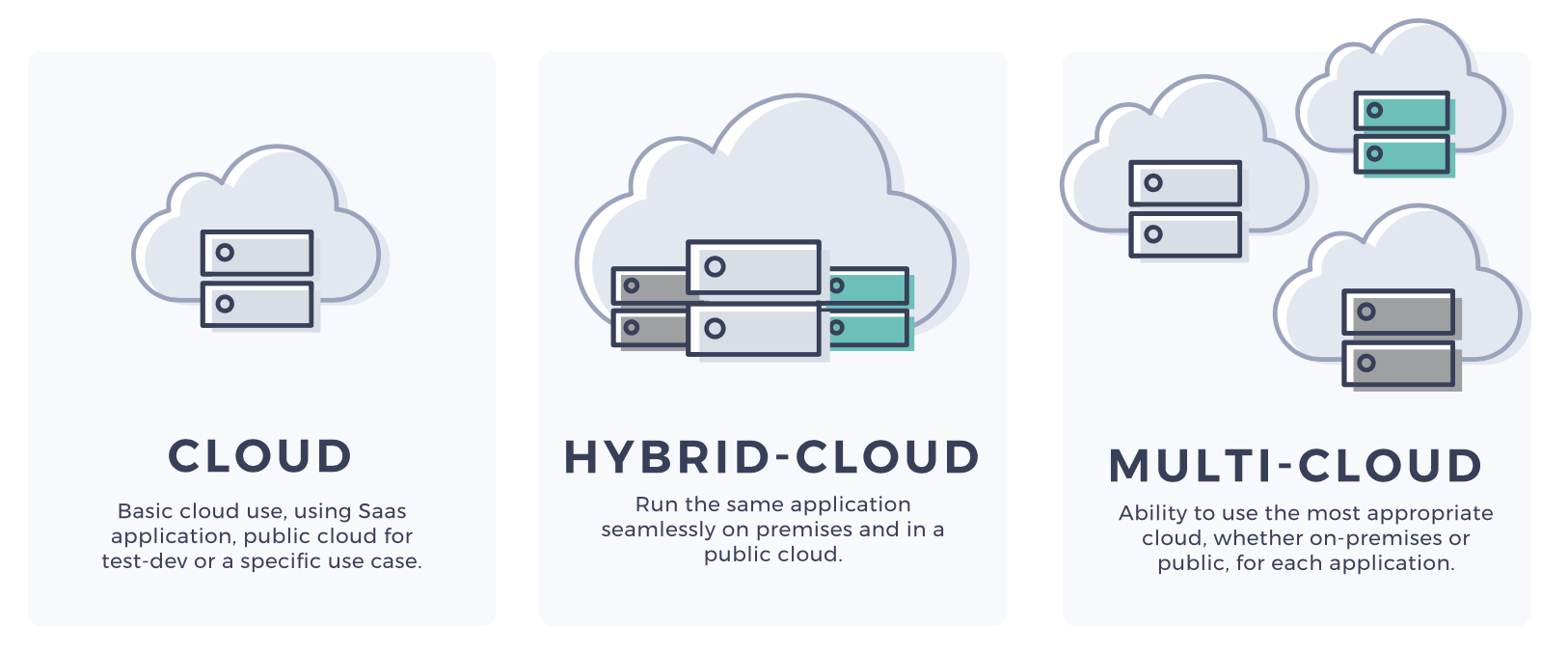
Over 80% of companies now use more than one cloud provider, some as many as five, to carry out different workloads. The reasons for this are numerous, but it boils down to choosing the most appropriate vendor for the specific workload being undertaken. At the same time, there is an increasing number of businesses developing hybrid-clouds, a mixture of public and private clouds together with dedicated servers.

While multi-cloud and hybrid cloud can be beneficial for financial, operational and compliance purposes, they add to the complexity of an organisation’s overall infrastructure. Here, there will be a greater need for governance, monitoring, expertise and security.

Migration

Step-by-Step Cloud Migration Checklist | by Manisha Mishra | DataDrivenInvestor

While the points above discuss the challenges of cloud adoption, the migration itself can also cause problems. A cloud environment can be markedly different from the one on which an application is hosted in-house. Issues with operating system compatibility and system configuration may mean an application might not work, or work as expected, in a cloud environment. Resolving these issues can have an impact on the speed of migration, project deadlines and budgets.

Thankfully, there are a wide and growing range of applications, many of them open-source, that have been developed for cloud environments, are quickly deployable and work straight out of the box.

The key to a smooth and speedy migration, however, is to find a vendor with the expertise and technical support to help you manage the migration process.

Conclusion

The pandemic has accelerated the pace of digital transformation across the globe with unprecedented numbers of companies migrating to and expanding workloads in the cloud. While for many organisations, this is a necessary part of the ‘new normal’, they should not underestimate the challenges that cloud adoption presents. The best way to prevent issues is to work closely with a cloud provider that will get to know your company and put tailored solutions in place for you.

ML Works with CI, CD, and CM

Continuous Delivery for ML Models | by Alvaro Fernando Lara | Onfido Tech | Medium

Most of us are familiar with Continuous Integration (CI) and Continuous Deployment (CD) which are core parts of MLOps/DevOps processes. However, Continuous Monitoring (CM) may be the most overlooked part of the MLOps process, especially when you are dealing with machine learning models.

CI, CD and CM, together, are an integral part of an end-to-end ML model management framework, which not only helps customers to streamline their data science projects, but to also get full value out of their analytics investments. This blog focuses on the Continuous Monitoring aspect of MLOps and gives an overview of how Anteelo is using ML Works, a model monitoring accelerator built on Databricks’ platform, to help customers build a robust model management framework.

Here are a few examples of MLOps customer personas:

ML

1.Business Org – A business team, which sponsors an analytics project will have the expectation that machine learning models are running in the background, helping them to get valuable insights from their data. However, these ML models are mostly in a black box and in a lot of cases, the business sponsors are not even sure if the analytics project will lead to a good ROI.

Data harvesting: what is it, and how can you benefit?

2.IT/Data Org – A company’s internal IT team, which supports business teams usually has a team of data engineers and data scientists who build ML pipelines. Their core mandate is to build the best ML model and migrate them to production. When doing so, they’re either too busy building the next best ML model to put it into production or managing production model support is not the right use of their time. Hence, there is a lack of streamlined model monitoring process in production and IT, and data leaders are left wondering how to support their business partners.

ML

3.Support Org – A company has an IT support organization, which takes care of supporting all IT issues. This team likely treats all issues the same, including similar SLAs, and may not differentiate between supporting an ML model and a Java web application. Hence, a generic support team may not have the right skills to support ML models and may not be able to meet the expectations of their internal customers

A well-designed MLOps framework will address the challenges of all three personas.

Anteelo not only has multiple experiences in end-to end MLOps implementations across tech stacks but has also built MLOps accelerators to help customers gain the full potential of their analytics investments.

Let’s drill down on our model monitoring accelerator in the Continuous Monitoring (CM) space and talk about the offer in more detail.

Model monitoring is not easy!

Unlike monitoring a BI dashboard or an ETL pipeline, the biggest challenge with ML models is that their results are probabilistic in nature and have their own dependencies like training data, hyper parameters, model drift, and the ability to explain the output of the model results. As a result, complications increase, and model monitoring becomes almost impossible when models are built on unstructured notebook formats that are used across multiple data science teams. This severely impacts Support SLAs and results in business users gradually losing confidence in the model’s predictions.

ML Works to the rescue

ML Works is our model monitoring accelerator built on Databricks’ unified data analytics platform to augment our MLOps offerings. After evaluating multiple architectural options, we decided to build ML Works on Databricks to leverage Databricks’ offerings like Managed MLflow and Delta Lake. ML Works is trained on thousands of models and can handle Enterprise scale model monitoring, or it can be used for automated monitoring within a small team of data scientists and analysts. Here is an overview of ML Works core offerings:

What is a Workflow Diagram: Definition and 3+ Examples - Tallyfy

1.Workflow Graph – Monitoring a ML pipeline along with its relevant data engineering tasks can be a daunting task for a support engineer. ML Works uses Databricks’ managed ML flow framework to build a visual end-to-end workflow monitor for easy and efficient model monitoring. This helps support engineers troubleshoot production issues and narrow down the root cause faster, significantly reducing Support SLAs.

machine learning model monitoring dashboard cheap online

2.Persona-based Monitoring – We understand that a ML model monitoring process should not only make the life of a support engineer easier but also help other relevant persons like business users, data scientists, ML engineers and data engineers to get visibility into their respective ML model metrics. Hence, we have built a persona-based monitoring journey using Databricks’ managed ML flow to make the model monitoring process easy for all personas.

GitHub - quantumjot/BayesianTracker: Bayesian multi-object tracking

3.Lineage Tracker – Picking up the task of debugging someone else’s ML code is not a pleasant experience, especially when there isn’t good documentation. Our Lineage Tracker uses Databricks’ managed ML flow and helps customers start from a dashboard metric and drill all the way to the base ML model, including the model’s hyper parameter values, training data, etc. thus giving full visibility into every model’s operations. This gets all relevant details about a model in one place, which improves model traceability. This feature is further enhanced when we use Delta Lake’s Time Travel functionality to create snapshots of training data

3.Drift Analyzer – Monitoring the model’s accuracy with time is critical for business users to gain trust in the insights. Unfortunately, a model’s accuracy will drift with time for various reasons including production data changing over time; business requirements changing and making original features no longer relevant and acquiring a new business which introduces new data sources and new patterns in the data. Our Drift Analyzer analyzes the Data Drift and Concept Drift automatically by reviewing the data distributions, which triggers alerts if the drift has exceeded a threshold and ensures that production models are continuously monitored for accuracy and relevance.

Using ML Works, business teams are able to monitor and track their relevant metrics on the Persona Dashboard and use Drift Analyzer to understand the impact of model degradation on metrics. This will help them to look at the underlying ML models as a white box solution. Lineage Tracking helps data engineers and data scientists obtain end-to-end visibility into ML models and their relevant data pipelines, which streamlines development cycles by taking care of the dependencies.

Support teams can use Workflow Graph and relevant metrics to troubleshoot production issues faster, significantly reducing Support SLAs. And finally, customers can now get full value from their analytics investments using ML Works, while also ensuring that ML deployments in production really work.

Part 1 of the Machine Learning Operations (MLOP) series

MLOps: Machine Learning Engineering | Towards Data Science

Introduction to Machine Learning Operations

Machine learning – a tech buzz phrase that has been at the forefront of the tech industry for years. It is almost everywhere, from weather forecasts to the news feed on your social media platform of choice. It focuses on developing computer programs that can acquire data and “learn” by recognizing patterns and making decisions with them.

Although data scientists build these models to simplify and make business processes more efficient, their time is, unfortunately, split and rarely dedicated to modeling. In fact, on average, data scientists spend only 20% of their time on modeling; the other 80% is spent on the machine learning lifecycle.

Building

Why Prototype? | Starmark | Integrated Marketing Communications

This exciting step is unquestionably the highlight of the job for most data scientists. This is the step where they can stretch their creative muscles and design models that best suits the application’s needs. This is where Anteelo believes that data scientists ought to spend most of their time to maximize their value to the firm.

Data Preparation

Data preparation – is there a process to follow? - The Data Value Factory

Though information is easily accessible in this day and age, there is no universally accepted format. Data can come from various sources, from hospitals to IoT devices; to feed the data into models, sometimes, transformations are required. For example, machine learning algorithms generally need data to be numbers, so textual data may need to be adjusted. Statistical noise or errors in data may also need to be corrected.

Model Training

Machine Learning in production - A guide to model evaluation and retraining

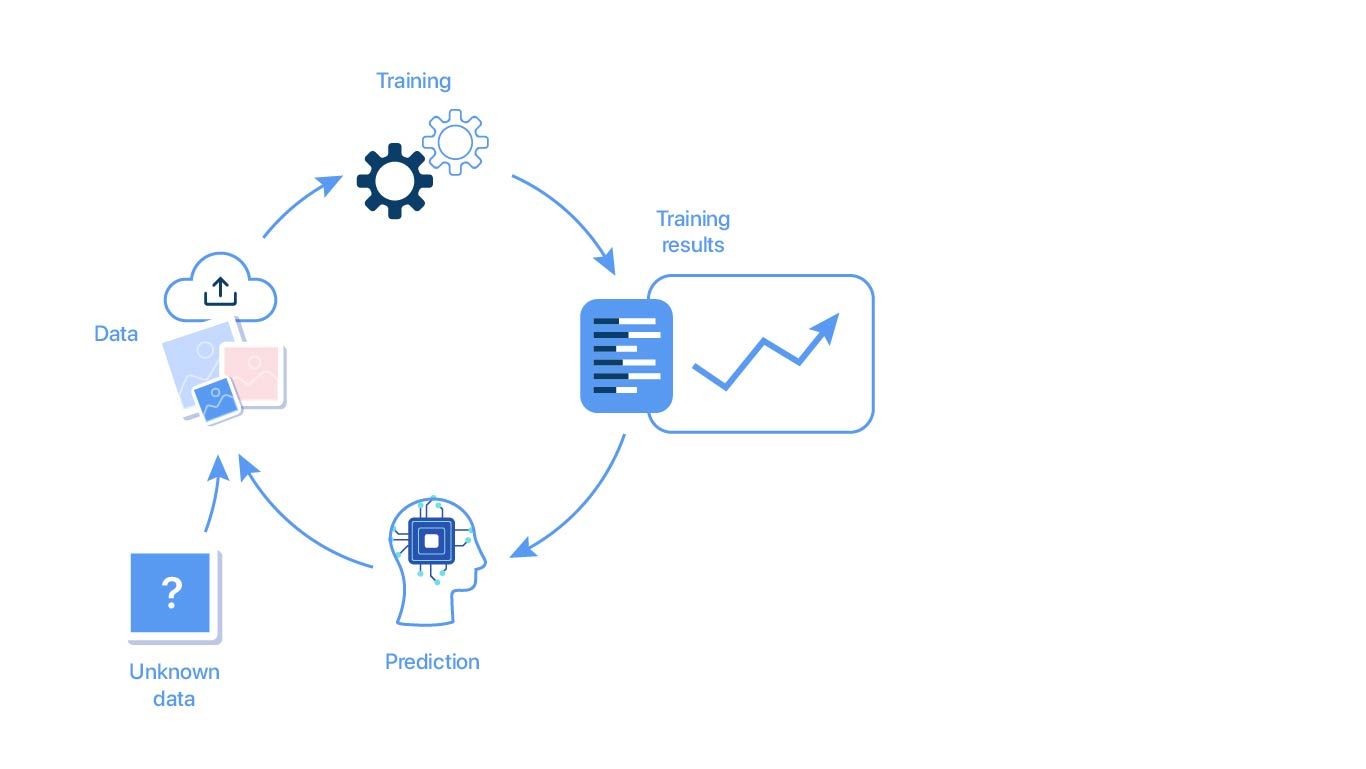
Training a model means determining good values for all the weights and bias in a model. Essentially, the data scientists are trying to find an optimal model that can minimize loss – an indication of how badly the prediction is performed on a single example.

Parameter Selection

A guide to an efficient way to build neural network architectures- Part I: Hyper-parameter selection and tuning for Dense Networks using Hyperas on Fashion-MNIST | by Shashank Ramesh | Towards Data Science

During training, it is necessary to select some parameters that will impact the prediction of the model. Although most are selected automatically, some subsets cannot learn and require expert configuration. These are known as hyper parameters. Experts trying to configure hyper parameters have to implement various optimization strategies to tune the hyper parameters.

Transfer Learning

Introduction to Deep Learning : Transfer Learning in Deep Learning - YouTube

It is quite common to reuse machine learning models across various domains. Although models may not be directly transferrable, some can serve as excellent foundations or building blocks for developing other models.

Model Verification

At this stage, the trained model will be tested to see if the validated model can provide sufficient information to achieve its intended purpose. For example, when the trained model is presented with new data, can it still maintain its accuracy?

Deployment

8 Best Practices for Agile Software Deployment – Stackify

At this point, the model has been thoroughly trained & tested and has passed all requirements. The step aims to use this model for the firm and ensure that it can continue to perform with a live stream of data.

Monitoring

Automating Machine Learning Monitoring | RS Labs

Now that the model is deployed and live, many businesses generally consider the process to be final. Unfortunately, this is far from reality. Like any tool, the model will wear out after use. If not tested regularly, it will provide irrelevant information. To make matters worse, since most machine learning models work in a “black box,” they lack the clarity to explain the model’s predictions, making the predictions challenging to defend.

Without this entire process, models would never see the light of day. That said, the process often weighs heavily on data scientists, simply because many steps require direct actions on their end. Enter Machine Learning Operations (MLOps).

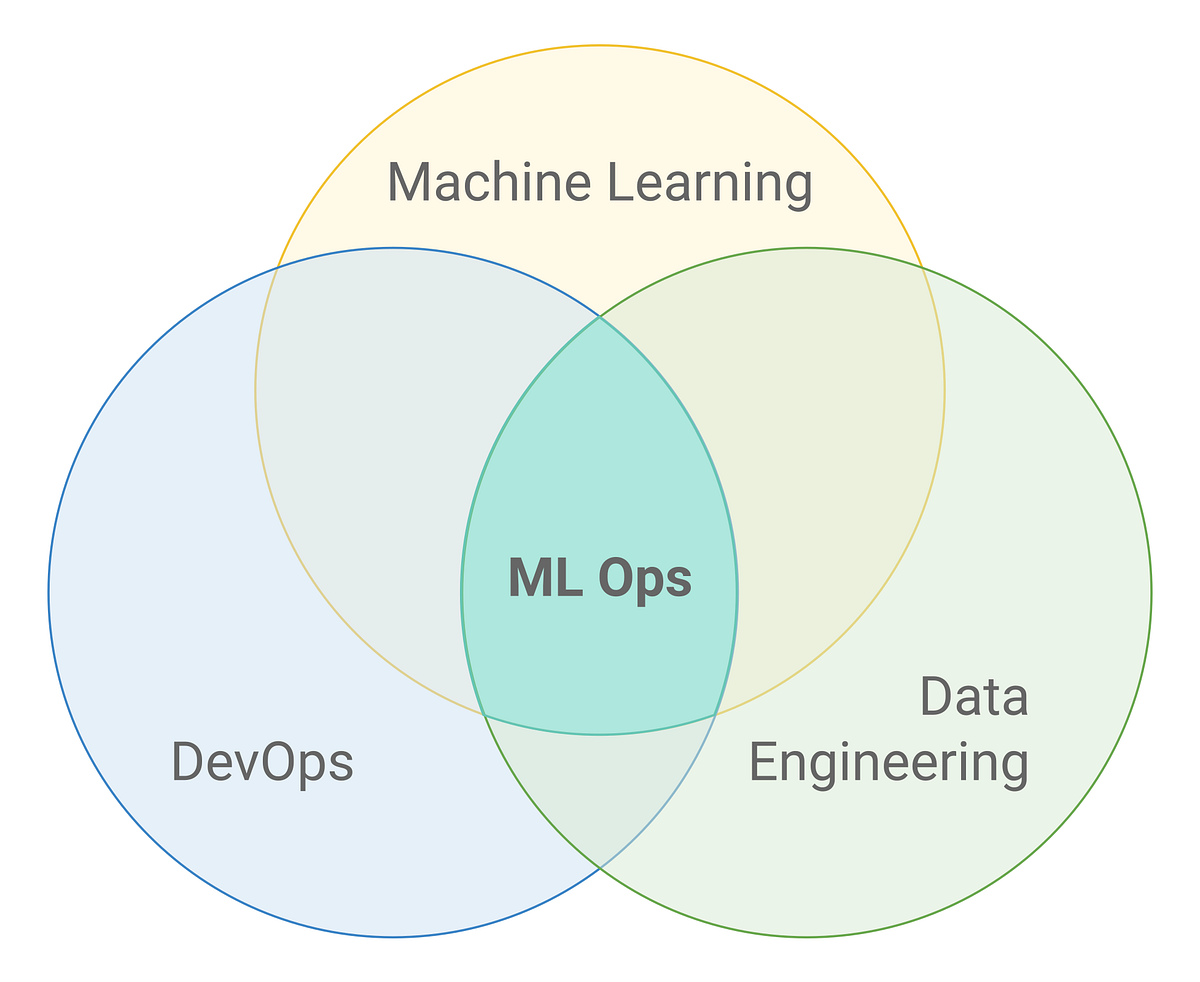
MLOps (Machine Learning Operations) is a set of practices, frameworks, and tools that combines Machine Learning, DevOps, and Data Engineering to deploy and maintain ML models in production reliably and efficiently. MLOps solutions provide Data engineers, scientists, and engineers with the necessary tools to make the entire process a breeze. Next time, find out how Anteelo Engineers have developed a tool that targets one of these steps to make the lives of data scientists’ easier.

Why Are So Many Small Businesses Adopting Cloud in 2020?

Six reasons why COVID-19 will accelerate the rush to cloud - Intelligent CIO Middle East

The impact of the pandemic has led to a dramatic rise in the number of small businesses adopting cloud technology. With nine out of ten companies now making use of cloud IT and 60 per cent of workloads being run in the cloud, it has become the go-to option for forward-thinking firms. By providing them with the same technologies used by larger rivals, but without the need for capital investment, the cloud delivers an affordable way to innovate, automate and become more agile. Here are just some of the ways small businesses are benefitting from cloud adoption.

Awesome power at low-cost

4 Tips For Low Cost Video Production - Bold Content Video Production

In the age of digital transformation, companies need hi-tech solutions to help them compete. While technologies such as data analytics, AI, machine learning, IoT and automation are widely used, a lack of financial resources has left many smaller businesses out of the loop. However, by migrating to the cloud, companies can have access to the necessary infrastructure without having to invest heavily in setting up an on-site datacentre. All the hardware is provided by the service provider and paid for on a pay-as-you-go basis.

Furthermore, the cloud offers the ideal set-up for fast and easy expansion, enabling companies to scale up or down their IT resources on-demand, helping them to increase capacity in line with growth and cope with spikes in demand in a convenient way. Expansion that would take considerable expenditure and days of work to set up in-house, can be had cost-effectively at the click of a button.

New normal adaptation

Adapting to a new world

The pandemic has led many companies to reassess the way they operate, especially with regard to their working practices. Across the globe, swathes of employees are finding themselves able to ditch the commute and work more flexibly from home as executives seek to downsize offices.

Cloud technology is a key enabler of remote working, giving employees the ability to access the company’s IT resources anywhere with an internet connection. Firms can also make use of software as a service (SaaS) packages, providing them with a multitude of business applications, such as Microsoft 365, with which to carry out their work.

These technologies enable employers to offer flexible hours, recruit staff from further afield and reduce office occupancy. What’s more, they can also monitor staff productivity and task progress, as well as tracking inventory and shipping.

Better collaboration

5 Keys to Better Collaboration in Healthcare | PreCheck

Over the course of the lockdown, the leading software companies have gone all out to improve the collaborative cloud-based applications that teams rely on. Existing apps have been enhanced and new ones created to provide far better video chat, messaging and document sharing platforms. Features such as group editing, instant syncing and project management, together with improved security, enable remote working teams to be assembled and collaborate on a wide range of initiatives.

Transformative technology in your hands  

Top 10 Digital Transformation Trends For 2020

The cloud is the ideal place to benefit from today’s must-have technologies, like artificial intelligence, data analytics and the Internet of Things. Indeed, many of these are cloud-native, with applications that can be deployed at the click of a button in a cloud environment. What’s more, a lot of these cloud-based apps are open-source, meaning that they are free to use.

This means small businesses can take advantage of the cloud immediately, accelerating their ability to benefit from data-driven insights. As a result, they can reduce costs, improve operations and discover new opportunities much quicker than before.

Solid security

Rock-Solid Security - Krimzen

While security is a concern for every business, small firms have an additional issue when it comes to providing the in-house security expertise and resources to keep their systems protected. Migration to the cloud removes many of these headaches as the service provider will undertake a great deal of this work on their customers’ behalf.

Cloud providers have to comply with stringent regulations to ensure their infrastructure is robustly secure. By migrating to the cloud, small businesses will be automatically protected by a wide range of sophisticated security tools, such as next-gen firewalls, intrusion prevention apps and malware scanners – all of which are managed and maintained by security experts.

Swift recovery

Top 10 Best Data Recovery Software That Worth Your Time (2021)

Data loss can have a devastating impact on a business: taking its services offline, preventing it from trading and damaging its reputation. Swift recovery is essential to minimise the impact.

Cloud-based backups are the ideal solution for disaster recovery: they store data at a geographically separate location to your cloud server; they are encrypted for security and checked for integrity, and they can be scheduled to occur at the frequency a company demands.

Perhaps most crucially, they enable companies to restore data, and even entire servers, quickly and easily, ensuring that disruption is kept to an absolute minimum. And with 24/7 technical support, the issue of internal expertise is easily overcome.

Conclusion

The pandemic has accelerated the pace of digital transformation, with growing numbers of small firms adopting cloud technology in order to adapt to the new business environment. Its cost-effectiveness and easy scalability, together with its wide range of open-source, easily deployable applications, make it highly attractive to companies that want to take advantage of the technologies and insights it offers.

Take a first look at the Spark 3.0 Performance Improvements on Databricks

Spark 3.0 is now available in Databricks | element61

On June 18, 2020, Databricks announced the support of Apache Spark 3.0.0 release as part of the new Databricks Runtime 7.0. Interestingly, this year marks Apache Spark’s 10th anniversary as an open-source project. The continued adoption for data processing and ML makes Spark an essential component of any mature data and analytics platform. Spark 3.0.0 release includes 3,400+ patches, designed to bring major improvements in Python and SQL capabilities. Many of our clients are not only keen on utilizing the performance improvements in the latest version of Spark, but also expanding Spark usage for data exploration, discovery, mining, and data processing by different data users.

Key improvements in Spark 3.0.0 that we evaluated:

  • Spark-SQL & Spark Core:
  1. Adaptive Query Optimization
  2. Dynamic Partition Pruning
  3. Join Hints
  4. ANSI SQL Standard Compliance Experimental Mode
  • Python:
  1. Performance improvements for Pandas & Koalas
  2. Python type hints
  3. Addition to Pandas UDF
  4. Bettered Python error handling

SQL Engine Improvements:

Javarevisited: Top 5 Websites to Learn SQL Online for FREE - Best of Lot

As a developer, I wish the Spark engine was more efficient with:

  • Optimizing the shuffle partitions on its own
  • Choosing the best join strategy
  • Optimizing the skew in joins

As a data architect, I spend considerable time optimizing the issues above as it involves conducting tests on different data volumes and settling on the most optimal solution. Developers have options to optimize by:

  • Reducing shuffle through coalesce or better data distribution
  • Better memory management by specifying the optimum number of executors
  • Improving garbage collection
  • Opting to use join hints to influence the optimizer when the compiler is unable to make a better choice

But, it’s always a daunting task to choose the correct shuffle partitions on varying production data volumes, handle the join performance bottlenecks induced by data skewness, or choosing the right dataset to be broadcasted before the join. Even after many tests, one can’t be sure about the performance as data volumes change over time, and data processing jobs take time, which results in missing the SLAs in Production. Even with optimal design and build combined with multiple test cycles, performance problems may come up in Production workloads, which significantly reduces the overall confidence among IT and the business community.

Spark 3.0.0 has the solutions to many of these issues, courtesy of the Adaptive Query Execution (AQE), dynamic partition pruning, and extending join hint framework. Over the years, Databricks has discovered that over 90% of Spark API calls use DataFrame, Dataset, and SQL APIs along with other libraries optimized by the SQL optimizer. It means that even Python and Scala developers route most of their work through the Spark SQL engine. Hence, it was imperative to improve the SQL Engine and, thus, the 46% focus, as seen in the figure above.

We did a benchmark on a 500GB dataset with AQE, and dynamic partition pruning enabled on 5+1 node Spark cluster with 168GB RAM total. It resulted in a 20% performance improvement of a ‘Filter-Join-GroupBy using four datasets’ and a 50% performance improvement on ‘Cross Join-GroupBy-OrderBy using three datasets.’ On average, we saw an improvement of 1.2x – 1.5x with AQE enabled. A summary of the TPC-DS benchmark for the 3TB dataset can be found here:

Advanced Query Engine

This framework dramatically improves performance and simplifies query tuning by generating a better execution plan at runtime, even if the initial plan is suboptimal due to the loss/inaccuracy of data statistics. Three major contributors to this are:

  • dynamic coalescing shuffle partitions
  • dynamically switching join strategies
  • dynamically optimizing skew joins

Dynamic Partition Pruning

Trino | 11: Dynamic filtering and dynamic partition pruning

Pruning helps the optimizer avoid reading the files (in partitions) that cannot contain the data your transformation is looking for. This optimization framework automatically comes into action when the optimizer cannot identify the partitions that could have skipped at compile time. This works at both the logical and physical plan levels.

Python Related Improvements

Cool New Features in Python 3.8 – Real Python

After SQL, Python is the most commonly used language in Databricks notebooks, and hence it is the focus of Spark 3.0 too. Many Python developers rely on Pandas API for data analysis, but the pain point of Pandas is that it is limited to single-node processing. Spark has been focusing on the Koalas framework, which is an implementation of Pandas API on Spark that can gel well with big data in distributed environments. At present, Koalas covers 80% of the Pandas API. While Koalas is gaining traction, PySpark has also been a hot choice amongst the Python community developers.

Spark 3.0 brings several performance improvements in PySpark, namely –

  1. Pandas APIs with type hints – Introduction of new Python UDF Interface, which takes the help of Python type hints to increase the UDF usage among developers. These are executed by Apache Arrow to facilitate the data exchange between the JVM and Python driver/executor with near-zero (de)serialization cost
  2. Addition to Pandas UDFs and functions API – The release brings two major additions: Iterator UDFs and Map functions, which will help with data prefetching and expensive initialization
  3. Error Handling – This was always the developer town’s talk because of the poor and unfriendly exceptions and stack trace. Spark has taken a major leap to simplify the PySpark exceptions, hide unnecessary stack trace, and make them more Pythonic.

Below are some notable changes being introduced as part of Spark3.0 –

  1. Java 8 prior to version 8u92 support, Python 2 and Python 3 prior to version 3.6 support, and R prior to version 3.4 support is deprecated as of Spark 3.0.0.
  2. Deprecating MLLib – based on RDD, not data frames.
  3. Deep learning capability – Allows Spark to take advantage of GPU hardware if it is available. It also allows TensorFlow on top of Spark to take advantage of GPU hardware.
  4. Better Kubernetes integration – introduces new shuffle service for Spark on Kubernetes that will allow dynamic scale up and down.
  5. Support for binary files – loads the whole binary file into a binary file of a data frame, useful for image processing.
  6. For graph processing, SparkGraph(Morpheus), not GraphX, is the way of the future.
  7. Support for delta lake out of the box and can be used just as it is used, for example, with parquet.

All in all, Databricks fully adopting Spark 3.0.0 helps developers, data analysts, and data scientists through the significant enhancements to SQL and Python. The introduction of Structured Streaming Web UI will help track the aggregated metrics and detailed statistics about the streaming jobs. Significant Spark-SQL performance improvements and ANSI SQL capabilities accelerate the time to insights and improve adoption among the advanced analytics users in any enterprise.

Knowing how to use Azure Databricks and resource groupings

6 Reasons to Use Azure Databricks Today

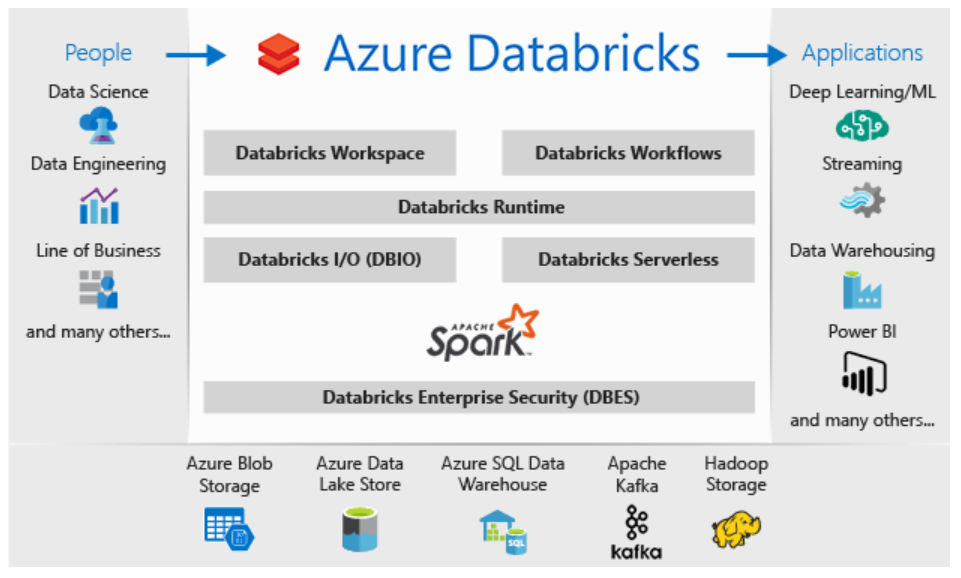
Azure Databricks, an Apache Spark-based analytics platform optimized for the Microsoft Azure cloud, is a highly effective open-source tool, but it automatically creates resource groups and workspaces and protects them with a system-level lock, all of which can be confusing and frustrating unless you understand how and why.

The Databricks platform provides an interactive workspace that streamlines collaboration between data scientists, data engineers and business analysts. The Spark analytics engine supports machine learning and large-scale distributed data processing, combining many aspects of big data analysis all in one process.

Spark works on large volumes of data either in batch (rest) or streaming processing (live) mode. The live processing capability is how Databricks/Spark differs from Hadoop (which uses MapReduce algorithms to process only batch data).

Resource groups are key to managing the resources bound to Databricks. Typically, you specify which groups in which your resources are created. This changes slightly when you create an Azure Databricks service instance and specify a new or existing resource group. Say, for example, we are creating a new resource group, Azure will create the group and place a workspace within it. That workspace is an instance of the Azure Databricks service.

Along with the directly specified resource group, it will also create a second resource group. This is called a “Managed resource group” and it starts with the word “databricks.” This Azure-managed group of resources allows Azure to provide Databricks as a managed service. Initially this managed resource group will contain only a few workspace resources (a virtual network, a security group and a storage account). Later, when you create a cluster, the associated resources for that cluster will be linked to this managed resource group.

The “databricks-xxx” resource group is locked when it is created since the resources in this group provide the Databricks service to the user. You are not able to directly delete the locked group nor directly delete the system-owned lock for that group. The only option is to delete the service, which in turn deletes the infrastructure lock.

A beginner's guide to Azure Databricks

With respect to Azure tagging, the lock placed upon that Databricks managed resource group prevents you from adding any custom tags, from deleting any of the resources or doing any write operations on a managed resource group resource.

Example Deployment

Let’s talk a look at what happens when you create an instance of the Azure Databricks service with respect to resources and resource groups:

Steps

  1. Create an instance of the Azure Databricks service
  2. Specify the name of the workspace (here we used nwoekcmdbworkspace)
  3. Specify to create a new resource group (here we used nwoekcmdbrg) or choose an existing one
  4. Hit Create

Results

  1. Creates nwoekcmdbrg resource group
  2. Automatically creates nwoekcmdbworkspace, which is the Azure Databricks Service. This is contained within the nwoekcmdbrg resource group.
  3. Automatically creates databricks-rg-nwoekcmdbworkspace-c3krtklkhw7km resource group. This contains a single storage account, a network security group and a virtual network.


Click on the workspace (Azure Databricks service), and it brings up the workspace with a “Launch Workspace” button.

Per-workspace URLs - Azure Databricks - Workspace | Microsoft Docs

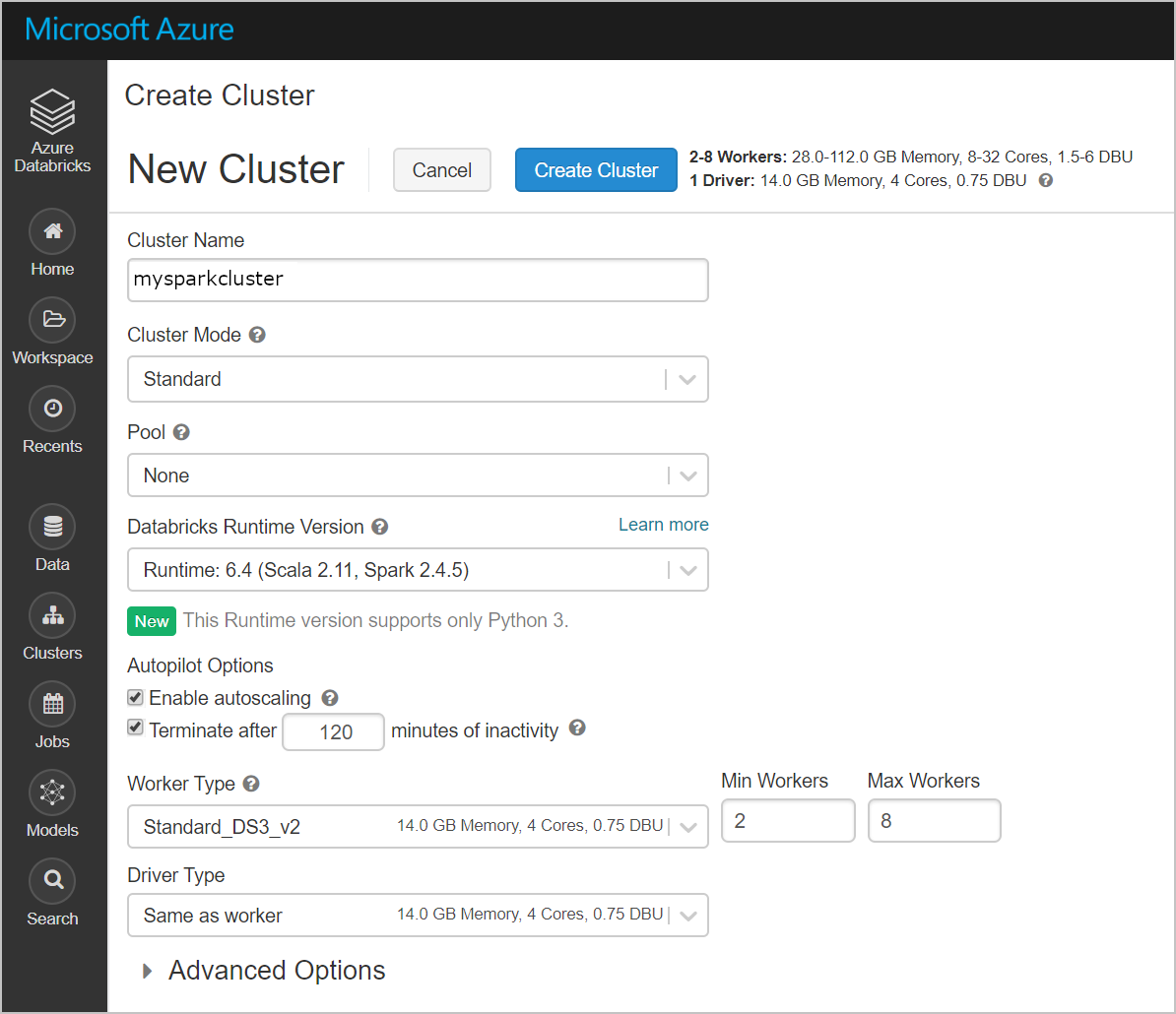
Launching the workspace uses AAD to sign you into the Azure Databricks service. This is where you can create a Databrick cluster or run queries, import data, create a table, or create a notebook to start querying, visualizing and modifying your data. I decided to create a new cluster to demonstrate where the resources are stored for the appliance. Here, we create a cluster to see where the resources land.

Azure Databricks - create new workspace and cluster | SQL Player

After the cluster is created, a number of resources were created in the Azure Databrick managed resource group databricks-rg-nwoekcmdbworkspace-c3krtklkhw7km. Instead of merely containing a single VNet, NSG and storage account as it did initially, it now contains multiple VMs, disks, network interfaces, and public IP addresses.

Quickstart - Run a Spark job on Azure Databricks Workspace using Azure portal | Microsoft Docs

The workspace nwoekcmdbworkspace and the original resource group nwoekcmdbrg both remain unchanged as all changes are made in the managed resource group databricks-rg-nwoekcmdbworkspace-c3krtklkhw7km. If you click on “Locks,” you can see there is a read-only lock placed on it to prevent deletion. Clicking on the “Delete” button yields an error saying the lock was not able to be deleted. If you make changes to the original resource group in the tags, they will be reflected in the “databricks-xxx” resource group.  But you cannot change tag values in the databricks-xxx resource group directly.

Quick Tip:How to prevent your Azure Resources from accidental deletion? – Beyond the Horizon…

Summary

When using Azure Databricks, it can be confusing when a new workspace and managed resource group just appear. Azure automatically creates a Databricks workspace, as well as a managed resource group containing all the resources needed to run the cluster. This is protected by a system-level lock to prevent deletions and modifications. The only way to directly remove the lock is to delete the service. This can be a tremendous limitation if changes need to be made to tags in the managed resource group.  However, by making changes to the parent resource group, those changes will be correspondingly updated in the managed resource group.

Want to reap the full benefits of cloud computing? Reconsider your journey.

Rethink your cloud migration to get more benefits | Linktech Australia

There’s no denying that companies have realized many benefits from using public clouds – hyperscalability, faster deployment and, perhaps most importantly, flexible operating costs. Cloud has helped organizations gain access to modern applications and new technologies without many upfront costs, and it has transformed software development processes.

But when it comes to public cloud migration, many organizations are acting with greater discretion than it might at first appear. Enterprise IT spending on public cloud services is forecast to grow 18.4 percent in 2021 to total $304.9 billion, according to Gartner. This is an impressive number, but it’s just under 10 percent of the entire worldwide IT spending projected at $3.8 trillion over the same period. While cloud growth is striking, it pays to heed the context.

The data center still reigns

DATA CENTER Services - Bluebird Network

In 2021, spending on data center systems will become the second-largest area of growth in IT spending, just under enterprise software spending. And while much growth is attributed to hyperscalers, significant increase also comes from renewed enterprise data center expansion plans. Based on Anteelo Technology’s internal survey of its global enterprise customers, nearly all of them plan to operate in a hybrid cloud environment with nearly two-thirds of their technology footprint remaining on-premises over the next five years or longer. Uptime Institute’s 2020 Data Center Industry Survey also shows that a majority of workloads are operating in enterprise data centers.

Adopting cloud is a new way of life

How Cloud Computing Is Changing Management

Deciding what should move to the public cloud takes careful planning followed by solid engineering work. We are seeing that some enterprises, in rushing to the public cloud, don’t have an exit strategy for their current environments and data centers. We have all come across companies that started deploying multiple environments in the cloud but did not plan for changes in the way they develop, deploy and maintain applications and infrastructure. As a result, their on-premises costs stayed the same, while their monthly cloud bill kept rising.

Not everything should move to the public cloud. For example, many enterprises have been running key mission-critical business applications that require high transaction processing, high resiliency and high throughput without significant variation in demand due to seasonality. In these cases, protecting and supporting existing IT infrastructure investments and an on-premises data center or a mainframe modernization is more practical as moving such environments to the public cloud is complex and costly.

To achieve the full benefits, including cost benefits, let’s not forget the operational changes that using the public cloud requires — new testing paradigms, different development models, site reliability, security engineering and regulatory compliance — all of which require flexible teams and alternative ways of working and collaborating.

The key point: Enterprises are not moving everything to the public cloud because many critical applications are better suited for private data centers, while potentially availing themselves of private cloud capabilities.

How can Anteelo help?

6 ways cloud improves speed and performance - Work Life by Atlassian

With ample evidence that hybrid cloud is the best answer for large enterprise customers to successfully adopt a cloud strategy, employing Anteelo as your managed service provider, with our deep engineering, and infrastructure and application management experience, is a good bet. We hold a leading position in providing pure mainframe services globally and have the skills on hand to help customers with complex, enterprise-scale transformations.

Our purpose-built technology solutions, throughout the Enterprise Technology Stack, can reduce IT operating costs up to 30 percent. In running and maintaining mission-critical IT systems for our customers, we manage hundreds of data centers, hundreds of thousands of servers and have migrated nearly 200,000 workloads to the hybrid cloud, including businesses that use mainframe systems for their core, critical solutions. A hybrid cloud solution is the ideal, fit-for-purpose answer to meet many unique business demands.

The path to modernizing mission-critical applications - Cloud computing news

Customers want to migrate or modernize applications for many reasons. Croda International is a good example, with its phased approach for cloud migration. Whether moving to the public cloud, implementing a hybrid approach or enhancing non-cloud systems, Anteelo’s proven, integrated approach enables customers to achieve their goals in the quickest, most cost-effective way.

The lesson here: Be careful about drinking the public cloud-only Kool-Aid. With many cloud migrations falling short of their full, intended benefits, you need to assess the risks and rewards. More importantly, a qualified, experienced engineering team will not only help design the right plan, but will ensure that complications are quickly resolved — making for a smoother journey.

And most importantly, every enterprise should look at public cloud as part of its overall technology footprint, knowing that not everything is right for the cloud. Modernizing the technology in your environment should not be overlooked, since it may bring more timely results and better business outcomes, including improving your security posture.

WordPress 5.5 – Guide

WordPress 5.5 is here! 5 things you need to know • Yoast

WordPress has just released version 5.5 and it’s one of the most feature-packed updates since the launch of version 5.0 in December 2018. Here, we’ll look at some of its most useful and helpful advancements.

1. Gutenberg enhancements

WordPress Gutenberg 9.2 - Dozens of Improvements

The latest update sees further enhancements to the popular Gutenberg block editor which was first launched with WordPress 5.0. The interface has been tweaked to make it more user-friendly, more blocks have been added to build pages with and there are two new features: block patterns and block directory.

Block patterns are predefined block layouts that can be inserted onto your pages with settings already in place. They can save users a great deal of time and effort and can be tweaked if required. What’s great about the feature is that patterns can be created and shared, so while there are not many available at the moment, the intention is that developers will begin to create these predefined blocks and make them available in the same way that plugins are available now.

With the expectancy that the number of blocks and block patterns will rise dramatically, WordPress has introduced the block directory. Similar to the plugin and theme directory, it is designed to help users browse and search for the blocks and patterns they want to use.

2. Easier image editing

How to Easily Edit Images in WordPress

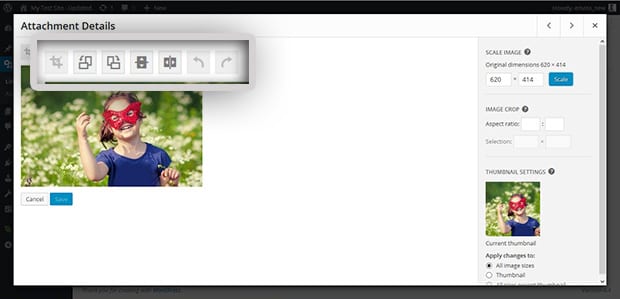
Any images inserted into the standard image block can now be edited without having to open them in the media library. Instead, they can be cropped, resized and rotated within the block itself. The biggest benefit of this is that you can see the changes straight away, saving users the hassle of going back and forth to the image library until they get the image exactly as they want it. Unfortunately, this doesn’t happen on other types of block, though it may be something seen in a future update.

3. Lazy-loading images

How to Implement WordPress Lazy Load on Images and Videos

Good news for those wanting their WordPress website to load faster is that version 5.5 makes lazy-loading the default image setting. This means images are only downloaded to a user’s browser as they scroll down the page towards them. By delaying the download of image files, the rest of the site can load on the browser much quicker. Not only is this great for the user experience; it will also help with SEO, with page speed being an important ranking factor.

4. Responsive content previews

Previewing Site Responsiveness in the Customizer – Make WordPress Core

While page previews have always been possible in WordPress, version 5.5 gives you the chance to view how your unpublished page will look on smartphones and tablets as well as on PCs. With Google’s drive towards ‘mobile-first’ website development, this can help the pages you publish to meet the search engine’s high expectations for how a website looks and works on mobile devices. Even more importantly, it will ensure your site continues to communicate effectively as the use of mobile browsing grows.

5. Default XML sitemaps

WordPress Sitemap Guide: What It Is and How to Use It

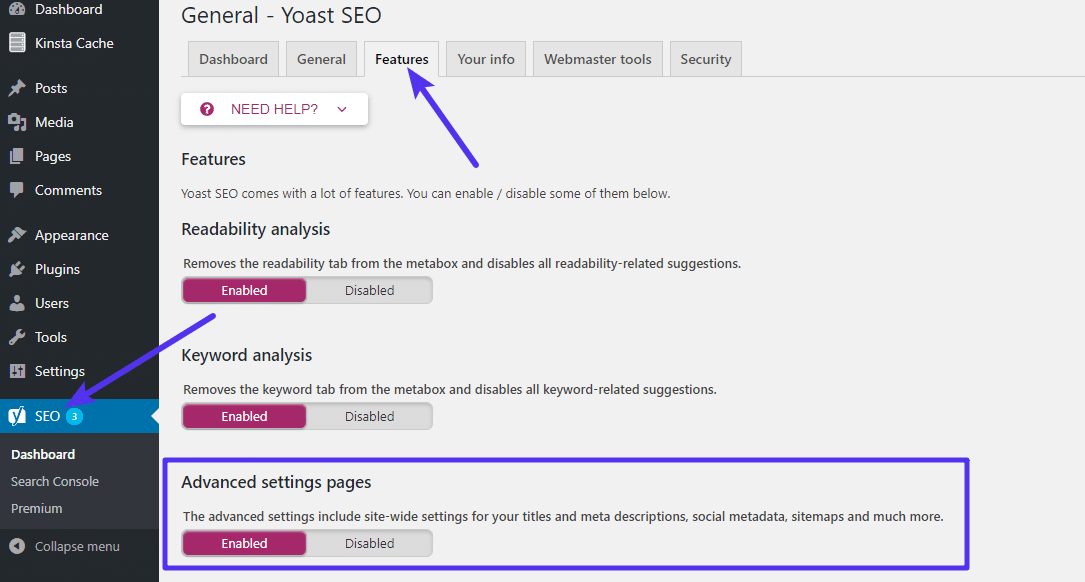
XML sitemaps are highly valuable files that enable search engine crawlers to index every part of your website. Without them, there’s a chance that parts of your site might not get indexed and, as a result, not be searchable on the internet. Indeed, it is possible to upload these files to Google’s Search Console so that any changes you make to your site can be indexed automatically without you having to wait for the search engine crawlers to seek them out.

Prior to this version, users needed a plugin to generate an XML sitemap, however, the 5.5 update generates them automatically.

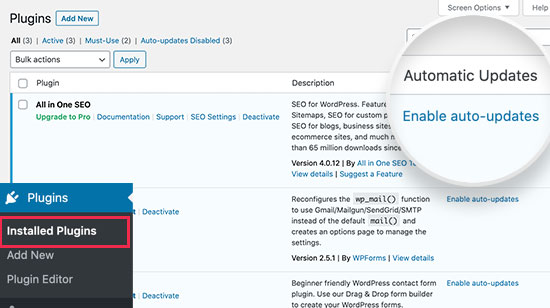
6. Automatic updates for plugins

How to Enable Automatic Updates for WordPress Plugins

Finally, we come to our favourite feature: automatic updates. As a web host, the security of our customers’ websites is a major concern and one of the biggest threats comes from vulnerabilities in plugins. While these vulnerabilities are usually spotted and patched very quickly by developers, millions of websites don’t update to the newer versions quickly enough and this leaves them open to cyberattacks.

The easiest solution is to enable automatic updates and this has been possible for some time using plugins like Jetpack or, for users of cPanel, in the actual control panel. Thankfully, this feature has now been built into the WordPress core and so is available to every user without the need for third-party software, and this should make millions of websites far more secure.

However, as some WordPress websites rely on legacy plugins, the new version does not make automatic updates the default setting. Indeed, there is always a remote possibility that an update might cause a compatibility issue which you may wish to test before going live with it. However, if you are confident about the plugins you use and wish to enable automatic updates, you can do so in the ‘Plugins’ area of version 5.5.

Conclusion

As you can see, WordPress 5.5 is a major update providing some very useful new features. It will make it easier to build better pages and edit images, help websites to perform better, especially on mobile sites, it will improve SEO through faster loading and XML sitemaps, and it will enhance security by offering automatic updates.

What is commonly overlooked in B2B dynamic pricing solutions?

Dynamic Pricing in B2B eCommerce: Why it Matters

Nowadays, corporate executives recognize that analytics is pivotal for pricing teams to create solutions that enable them to achieve their firm’s pricing objectives.

In the B2B domain, ‘dynamic pricing’ is a critical approach to bring substantial benefits to companies.

  1. It enables them to predict when to raise prices to capture upside or reduce costs to avoid volume losses that eventually speed up their decision-making process.
  2. It considers various variables vital to determining a product’s desired price, such as demand, deal size, customer type, geography, competitors’ product price, product type, and many more.

With the appropriate set of technologies, advanced analytics, agile processes, and problem-solving skills, one can build a powerful dynamic pricing engine. During the design and development phase, the vendor(s) or internal team works closely with the pricing department to understand their objectives and get inputs on pricing solutions. After completion, price recommendations are passed on to the sales representatives. And the way they follow the recommendations determines the solution’s success.

Now, suppose a higher price is recommended for some customers, but the root cause is not explicit. In such a case, the sales representatives may be reluctant to use the recommendation for fear of losing sales.

The effectiveness of dynamic pricing depends on sales representatives

Dynamic Pricing: Benefits, Strategies and Examples : Price2Spy® Blog

Although pricing instructions are available to the sales reps, for them, the dynamic pricing solution is still a black box. Quite rightly, if they do not understand the rationale behind the price fluctuation for specific products/solutions, how will they negotiate with customers?

Many pricing teams overlook this aspect, which impacts the effectiveness of pricing solutions. However, there are multiple ways to get salespeople to accept dynamic pricing. Here’s how:

  1. The team responsible for building new dynamic-pricing processes and tools needs to incorporate the sales team’s knowledge into the system.
  2. Throughout the decision cycle, the sales representatives should be treated as partners, and the sales managers should be involved in the solution building process.
  3. Once the solution is ready, the pricing team and sales managers must explain the rationale behind the new price recommendations.
  4. This way, the salespersons can justify the new price.

All of this requires collaboration and extra time, but it is worth the extra effort.

Collaborative Overload

Besides, sales staff can also feed win and loss information back into the system to steadily improve the model’s accuracy and uncover new insights, thereby making Dynamic pricing self-reinforcing. This kind of involvement boosts their confidence in the solution and makes their experience countable. Moreover, incentive structures also need to be realigned so that sales reps are rewarded for following the recommendations. It means that agents will be compensated based on the recommended results generated by the pricing tool – Analytics can also help design this kind of Incentive Compensation.

A significant impact cannot come only from having a robust solution. The sales reps are equally crucial in enabling the last mile adoption of your dynamic pricing solution.

error: Content is protected !!