Computer Vision : Everything You Need To Know About It

What is computer vision?
18 Open-Source Computer Vision Projects | Computer Vision Projects

Computer vision is a field of artificial intelligence and machine learning that studies the technologies and tools that allow for training computers to perceive and interpret visual information from the real world.

‘Seeing’ the world is the easy part: for that, you just need a camera. However, simply connecting a camera to a computer is not enough. The challenging part is to classify and interpret the objects in images and videos, the relationship between them, and the context of what is going on. What we want computers to do is to be able to explain what is in an image, video footage, or real-time video stream.

That means that the computer must effectively solve these three tasks:

  • Automatically understand what the objects in the image are and where they are located.
  • Categorize these objects and understand the relationships between them.
  • Understand the context of the scene.

In other words, a general goal of this field is to ensure that a machine understands an image just as well or better than a human. As you will see later on, this is quite challenging.

How does computer vision work?

In order to make the machine recognize visual objects, it must be trained on hundreds of thousands of examples. For example, you want someone to be able to distinguish between cars and bicycles. How would you describe this task to a human?

Why do bicycle wheels usually require more pressure than those of a car despite having to support 5 times, give or take a stone, more weight per axle? - Quora

Normally, you would say that a bicycle has two wheels, and a machine has four. Or that a bicycle has pedals, and the machine doesn’t. In machine learning, this is called feature engineering.

However, as you might already notice, this method is far from perfect. Some bicycles have three or four wheels, and some cars have only two. Also, motorcycles and mopeds exist that can be mistaken for bicycles. How will the algorithm classify those?

When you are building more and more complicated systems (for example, facial recognition software) cases of misclassification become more frequent. Simply stating the eye or hair color of every person won’t do: the ML engineer would have to conduct hundreds of measurements like the space between the eyes, space between the eye and the corners of the mouth, etc. to be able to describe a person’s face.

Moreover, the accuracy of such a model would leave much to be desired: change the lighting, face expression, or angle and you have to start the measurements all over again.

Here are several common obstacles to solving computer vision problems.

Different lighting
Basic 3D lighting techniques for 3D design projects

For computer vision, it is very important to collect knowledge about the real world that represents objects in different kinds of lighting. A filter might make a ball look blue or yellow while in fact it is still white. A red object under a red lamp becomes almost invisible.

Noise
What is the Solution to a Noisy Mixer Grinder? - MixerJuicer

If the image has a lot of noise, it is hard for computer vision to recognize objects. Noise in computer vision is when individual pixels in the image appear brighter or darker than they should be. For example, videocams that detect violations on the road are much less effective when it is raining or snowing outside.

Unfamiliar angles
Free Vector | Stationery office thumbtack, realistic set of red glossy push pins for fixing on board remind

It’s important to have pictures of the object from several angles. Otherwise, a computer won’t be able to recognize it if the angle changes.

Overlapping
Overlapping Geometric Shapes Photograph by Dorling Kindersley/uig

When there is more than one object on the image, they can overlap. This way, some characteristics of the objects might remain hidden, which makes it even more difficult for the machine to recognize them.

Different types of objects
Free Vector | Filament bulbs set. retro edison lamps, incandescent vintage lightbulbs of different shapes and forms with heated wire hanging

Things that belong to the same category may look totally different. For example, there are many types of lamps, but the algorithm must successfully recognize both a nightstand lamp and a ceiling lamp.

Fake similarity

Items from different categories can sometimes look similar. For example, you have probably met people that remind you of a celebrity on photos taken from a certain angle but in real life not so much. Cases of misrecognition are common in CV. For example, samoyed puppies can be easily mistaken for little polar bears in some pictures.

It’s almost impossible to think about all of these cases and prevent them via feature engineering. That is why today, computer vision is almost exclusively dominated by deep artificial neural networks.

Convolutional neural networks are very efficient at extracting features and allow engineers to save time on manual work. VGG-16 and VGG-19 are among the most prominent CNN architectures. It is true that deep learning demands a lot of examples but it is not a problem: approximately 657 billion photos are uploaded to the internet each year!

Uses of computer vision
10 Examples of Computer Vision Applications | Wovenware Blog

Interpreting digital images and videos comes in handy in many fields. Let us look at some of the use cases:

  • Medical diagnosis. Image classification and pattern detection are widely used to develop software systems that assist doctors with the diagnosis of dangerous diseases such as lung cancer. A group of researchers has trained an AI system to analyze CT scans of oncology patients. The algorithm showed 95% accuracy, while humans – only 65%.
  • Factory management. It is important to detect defects in the manufacture with maximum accuracy, but this is challenging because it often requires monitoring on a micro-scale. For example, when you need to check the threading of hundreds of thousands of screws. A computer vision system uses real-time data from cameras and applies ML algorithms to analyze the data streams. This way it is easy to find low-quality items.
  • Retail. Amazon was the first company to open a store that runs without any cashiers or cashier machines. Amazon Go is fitted with hundreds of computer vision cameras. These devices track the items customers put in their shopping carts. Cameras are also able to track if the customer returns the product to the shelf and removes it from the virtual shopping cart. Customers are charged through the Amazon Go app, eliminating any necessity to stay in the line. Cameras also prevent shoplifting and prevent being out of product.
  • Security systems. Facial recognition is used in enterprises, schools, factories, and, basically, anywhere where security is important. Schools in the United States apply facial recognition technology to identify sex offenders and other criminals and reduce potential threats. Such software can also recognize weapons to prevent acts of violence in schools. Meanwhile, some airlines use face recognition for passenger identification and check-in, saving time and reducing the cost of checking tickets.
  • Animal conservation. Ecologists benefit from the use of computer vision to get data about the wildlife, including tracking the movements of rare species, their patterns of behavior, etc., without troubling the animals. CV increases the efficiency and accuracy of image review for scientific discoveries.
  • Self-driving vehicles. By using sensors and cameras, cars have learned to recognize bumpers, trees, poles, and parked vehicles around them. Computer vision enables them to freely move in the environment without human supervision.
Main problems in computer vision
Personal Computer Solves Complex Problems Tens of Times Faster Than Supercomputers?

Computer vision aids humans across a variety of different fields. But its possibilities for development are endless. Here are some fields that are yet to be improved and developed.

Scene understanding

CV is good at finding and identifying objects. However, it experiences difficulties with understanding the context of the scene, especially if it’s non-trivial. Look at this image, for example. What do you think they are doing (don’t look at the URL!)?

You will immediately understand that these are children wearing cardboard boxes on their heads. It is not some sort of postmodern art that tries to expose the meaninglessness of school education. These children are watching a solar eclipse. But if you don’t have this context, you might never understand what’s going on. Artificial intelligence still feels like that in a vast majority of cases. To improve the situation, we would need to invent general artificial intelligence (i.e. AI whose problem-solving capabilities possibilities are more or less equal to that of a human and can be applied universally), but we are very far from doing that.

Privacy issues

Computer vision has much to do with privacy since the systems for face recognition are being adopted by governments of different countries to promote national security. AI-powered cameras installed in the Moscow metro help catch criminals. Meanwhile, Chinese authorities profile Uyghur individuals (a Muslim ethnic minority) and single them out for tracking and incarceration. When facial recognition is everywhere, everything you do can be subject to policies and shaming. AI ethicists are still to figure out the consequences of omnipresent CV for public wellbeing.

Summing up

Computer vision is an innovative field that uses the latest machine learning technologies to build software systems that assist humans across different fields. From retail to wildlife conservation, smart algorithms solve the problems of image classification and pattern recognition, sometimes even better than humans.

Machine Learning Career Paths: 8 Demanding Roles in 2021


An Introduction to Machine Learning | DigitalOcean


In 2021, the focus on digitalization is as strong as ever before. Machine learning and AI help IT leaders and global enterprises to come out of the global pandemic with minimal loss. And the demand for professionals that know how to apply data science and ML techniques continues to grow.

In this post, you will find some career options that definitely will be in demand for decades to come. And there is a twist ― AI has stopped being an exclusively technical field. It is intertwined with law, philosophy, and social science, so we’ve included some professions from the humanities field as well.

Popular ML jobs to choose in 2021

What are the possible careers in machine learning? - Quora

Programmers and software engineers are some of the most desirable professionals of the last decade. AI and machine learning are no exception. We have conducted research to find out which professions are the most popular and what skills you need for each of them (based on data from Indeed.com and Glassdoor.com).

1. Machine learning software engineer
3 Fast Facts: What You Need to Know About Machine Learning as a Software Engineer | CodeIntelx

A machine learning software engineer is a programmer who is working in the field of artificial intelligence. Their task is to create algorithms that enable the machine to analyze input information and understand causal relationships between events. ML engineers also work on the improvement of such algorithms. To become an ML software engineer, you are required to have excellent logic, analytical thinking, and programming skills.

Employers usually expect ML software engineers to have a bachelor’s degree in computer science, engineering, mathematics, or a related field and at least 2 years of hands-on experience with the implementation of ML algorithms (can be obtained while learning). You need to be able to write code in one or more programming languages. You are expected to be familiar with relevant tools such as Flink, Spark, Sqoop, Flume, Kafka, or others.

2. Data scientist
Data Scientist Salary: Starting, Average, and Which States Pay Most

Data scientists apply machine learning algorithms and data analytics to work with big data. Quite often, they work with unstructured arrays of data that have to be cleaned and preprocessed. One of the main tasks of data scientists is to discover patterns in the data sets that can be used for predictive business intelligence. In order to successfully work as a data scientist, you need a strong mathematical background and the ability to concentrate on uncovering every small detail.

Bachelor’s degree in math, physics, statistics, or operations research is often required to work as a data scientist. You need to have strong Python and SQL skills and outstanding analytical skills. Data scientists often have to present their findings, so it is a plus if you have experience with data visualization tools (Google Charts, Tableau, Grafana, Chartist. js, FusionCharts) and excellent communication and PowerPoint skills.

3. AIOps engineer
Is AIOps the answer to DevOps teams' ops prayers?

AIOps (Artificial Intelligence for IT Operations) engineers help to develop and deploy machine learning algorithms that analyze IT data and boost the efficiency of IT operations. Middle and large-sized businesses dedicate a lot of human resources for real-time performance monitoring and anomaly detection. AI software engineering allows you to automate this process and optimize labor costs.

AIOps engineer is basically an operations role. Therefore, to be hired as an AIOps engineer, you need to have knowledge about areas like networking, cloud technologies, and security (and certifications are useful). Experience with using scripts for automation (Python, Go, shell scripts, etc) is quite necessary as well.

4. Cybersecurity analyst
How to become a Cyber Security Analyst in 2021

A cybersecurity analyst identifies information security threats and risks of data leakages. They also implement measures to protect companies against information loss and ensure the safety and confidentiality of big data. It is important to protect this data from malicious use because AI systems are now ubiquitous.

Cybersecurity specialists often need to have a bachelor’s degree in a technical field and are expected to have general knowledge of security frameworks and areas like networking, operating systems, and software applications. Certifications like CEH, CASP+, GCED, or similar and experience in security-oriented competitions like CTFs and others are looked at favourably as well.

5. Cloud architect for ML
Running Ansys Cloud

The majority of ML companies today prefer to save and process their data in the cloud because clouds are more reliable and scalable, This is especially important in machine learning, where machines have to deal with incredibly large amounts of data. Cloud architects are responsible for managing the cloud architecture in an organization. This profession is especially relevant as cloud technologies become more complex. Cloud computing architecture encompasses everything related to it, including ML software platforms, servers, storage, and networks.

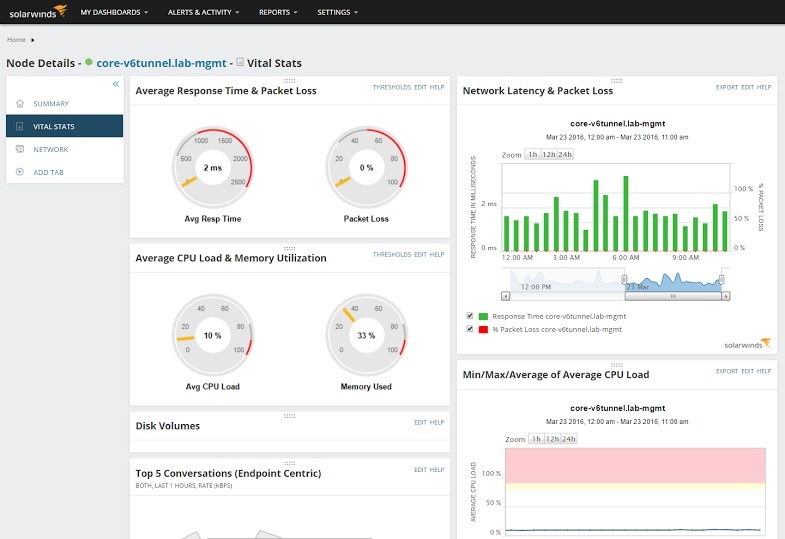
Among useful skills for cloud architects are experience with architecting solutions in AWS and Azure and expertise with configuration management tools like Chef/Puppet/Ansible. You will need to be able to code in a language like Go and Python. Headhunters are also looking for expertise with monitoring tools like AppDynamics, Solarwinds, NewRelic, etc.

6. Computational linguist
IJCLNLP International Journal of Computational Linguistics and Natural Language Processing

Computational linguists take part in the creation of ML algorithms and programs used for developing online dictionaries, translating systems, virtual assistants, and robots. Computational linguists have a lot in common with machine learning engineers but they combine deep knowledge of linguistics with an understanding of how computer systems approach natural language processing.

Computational linguists frequently need to be able to write code in Python or other languages. They are also frequently required to show previous experience in the field of NLP, and employers expect them to provide valuable suggestions about new innovative approaches to NLP and product development.

7. Human-centered AI systems designer/researcher
Human-Centered Machine Learning. 7 steps to stay focused on the user… | by Jess Holbrook | Google Design | Medium

Human-centered artificial intelligence systems designers make sure that intelligent software is created with the end-user in mind. Human-centered AI must learn to collaborate with humans and continuously improve thanks to deep learning algorithms. This communication must be seamless and convenient for humans. A human-centered AI designer must possess not only technical knowledge but also understand cognitive science, computer science, psychology of communications, and UX/UI design.

Human-centered AI system designer is often a research-heavy position so candidates need to have or be in the process of obtaining a PhD degree in human-computer interaction, human-robot interaction, or a related field. They must provide a portfolio that features examples of research done in the field. They are often expected to have 1+ years of experience in AI or related fields.

8. Robotics engineer
An Overview of a Career as a Robotics Engineer |

A robotics engineer is someone that designs and builds robots and complex robotic systems. Robotics engineers must think about the mechanics of the future human assistant, envision how to assemble its electronic parts, and write software. Thus, to become a specialist in this field, you need to be well-versed in mechanics and electronics. Since robots frequently use artificial intelligence for things like dynamic interaction and obstacle avoidance, you will have plenty of opportunities to work with ML systems.

Employers usually require you to have a bachelor’s degree or higher in fields like computer science, engineering, robotics, and have experience with software development in programming language like C++ or Python. You also need to be familiar with hardware interfaces, including cameras, LiDAR, embedded controllers, and more.

Bonus: AI career is not only for techies
AI is NOT FOR THE TECHIES ALONE - Consulting Insight | Magazine for Consulting World | Management Consulting | Engineering Consulting

If you don’t have a technical background or want to transition to a completely new field, you can check out these emerging professions.

1. Data lawyer

Data lawyers are specialists that guarantee security and compliance with GDPR requirements to avoid millions of dollars in fines. They know how to properly protect data and also how to buy and sell this data in a way that avoids any legal complications. They also know how to manage risks arising from the processing and storing of data. Data lawyer is the professional of the future; they stand at the intersection of technology, ethics, and law.

2. AI ethicist

An AI ethicist is someone who conducts ethical audits of AI systems of companies and proposes a comprehensive strategy for improving non-technical aspects of AI. Their goal is to eliminate reputational, financial, and legal risks that AI adoption might pose to the organization. They also make sure that companies bear responsibility for their intelligent software.

3. Conversation designer

A conversation designer is someone who designs the user experience of a virtual assistant. This person is an efficient UX/UI copywriter and specialist in communication because it is up to them to translate the brand’s business requirements into a dialogue.

How much does an ML specialist make?
Machine Learning Engineer Salary | How Much Does an ML Engineer Earn? | Edureka

According to Indeed.com, salaries of ML specialists vary depending on their geographical location, role, and years of experience. However, on average an ML specialist in the USA makes around $150,00 per year. Top companies like eBay, Wish, Twitter, and AirBnB are ready to pay their developers from $200,000 to $335,000 per year.

At the time of writing, the highest paying cities in the USA are San Francisco with an average of $199,465 per year, Cupertino with $190,731, Austin with $171,757, and New York with $167,449.

Industries that require ML/AI experts

Today machine learning is used almost in every industry. However, there are industries that post more ML jobs than others:

  • Transportation. Self-driving vehicles starting from drones and ending up with fully autonomous vehicles rely very heavily on ML. Gartner expects that by 2025, autonomous vehicles will surround us everywhere and perform transportation operations with higher accuracy and efficiency than humans.

  • Healthcare. In diagnostics and drug discovery, machine learning systems allow to process huge amounts of data and detect patterns that would have been missed otherwise.
  • Finance. ML allows banks to enhance the security of their operations. When something goes wrong, AI-powered systems are able to identify anomalies in real-time and alert staff about potentially fraudulent transactions.
  • Manufacturing. In factories, AI-based machines help to automate quality control, packing, and other processes, while allowing human employees to engage in more meaningful work.
  • Marketing. Targeted marketing campaigns that involve a lot of customization to the needs of a particular client are reported to be much more effective across different spheres.

Adopting a Digital Platform Business to drive growth

Adopting a Digital Platform Business to drive growth

Today’s modern enterprise leverages a digital business platform as the foundation for digital applications. A digital business platform provides the agility to build and support the dynamic nature of modern applications.

So what do these platforms look like?

A digital business platform is based on three pillars: intelligence, orchestration and automation. It is a primary driver of business transformation, as it will help turn data into insights for making informed business decisions. It gives companies the opportunity to bring together business process execution with analytics to enable a smarter, faster, more streamlined enterprise.

Three pillars of a digital business platform

  1. Intelligence
  2. Orchestration
  3. Automation

The digital business platform is supported by a hybrid cloud-enabled development and operations platform that encompasses:

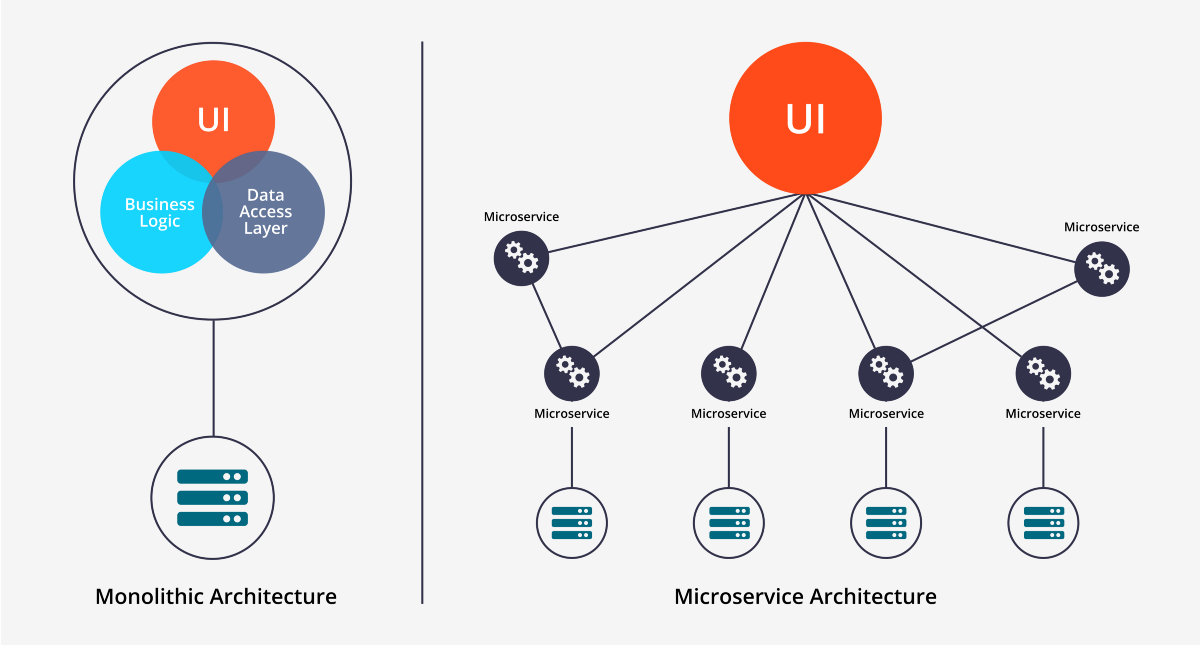
1. Microservices: Microservices focus on doing one thing well and are contextual to specific business domains, enabling integration and facilitating rapid delivery of new capabilities (for greenfield applications) as well as modernization (for brownfield applications). And, because they are loosely coupled, microservices better enable continuous delivery activities.

Adopting a Digital Platform Business to drive growth

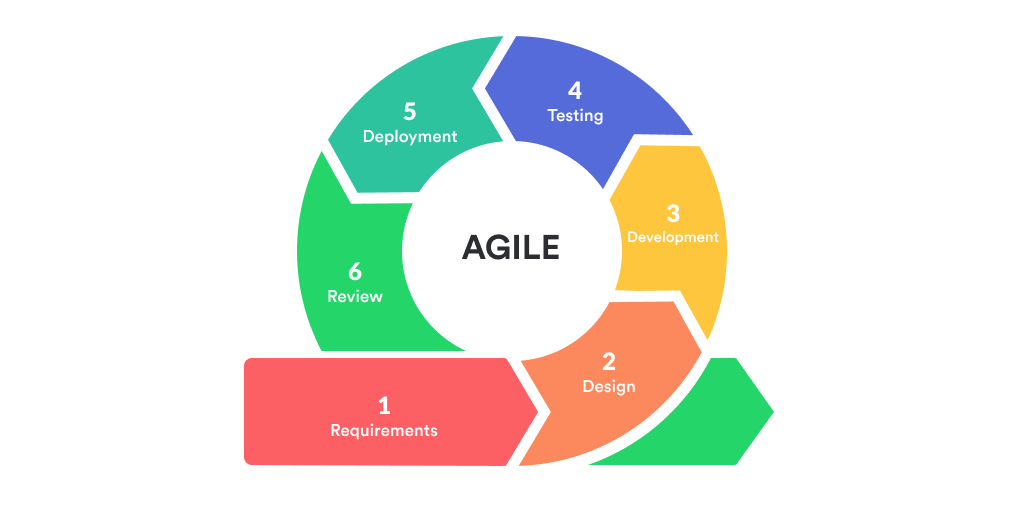
2. Agile development: Efficiencies can be gained by using agile and rapid development that employs iterative and incremental steps and offers improved collaboration and continuous feedback.

Adopting a Digital Platform Business to drive growth

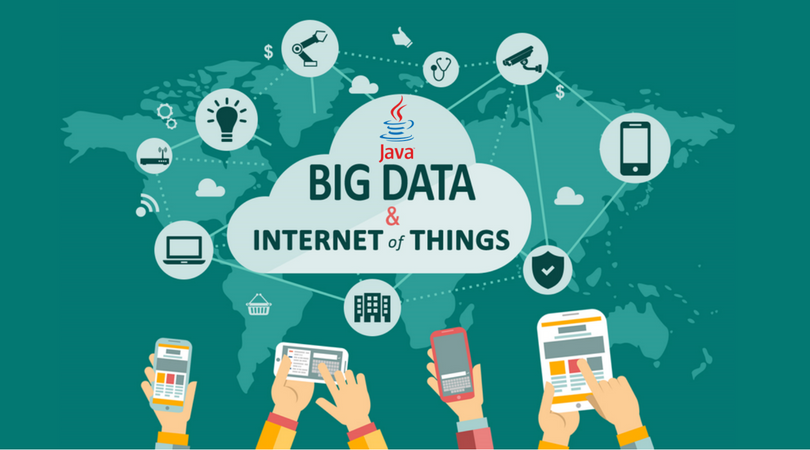
3. Big data and IoT repositories: Leveraging IoT is all about gaining operational and product insights from sensor data but requires intelligence at the edge to process the massive flow of streaming events, as well as purposeful centralization of information. Data needs to be ingested, tagged and aggregated for use in streaming, predictive and preventive analytics insights that can enhance the decision support and “intelligence” of applications.

Adopting a Digital Platform Business to drive growth

4. APIs: Business ecosystems are defined by the relationships among the participants, and information exchange brings the ecosystem to life. APIs provide the common interfaces and formats. Ecosystems based on APIs allow applications built on top of a digital business platform to extend their reach by leveraging internal and external data in an agile manner.

Should APIs Be Protected By Copyright Law?

5. Easy-to-use intelligent automation: The platform will provide an easy-to-use ML/AI foundation that will not be limited to IT. Democratization means that employees everywhere can access the functions and data they need to write new application logic as descriptive business rules and to use ML/AI algorithmic services that improve their productivity.

Intelligent Process Automation - Indico

6. Virtualization, containers and platform as a service (PaaS): These make it easier to create loosely coupled components for application composition and reuse, and for simplifying the implementing of key nonfunctional requirements of digital applications such as security, resilience and availability. These are game changers, allowing rapid provisioning and scalability of “infrastructure as code” services needed for application development, testing, release and deployment to production.

Containers as a Service: A Complete Guide | Scalyr

Over time, the digital business platform will evolve from human-derived rules to machine-derived rules, and its purpose will be to make data available and publish it (rather than process it). Consumption will be driven by serverless architecture and multimedia interfaces. And the platform will be in constant evolution.

AI Ethics in 2021: Ethical Dilemmas which needs to be answered

What Are The Ethical Problems in Artificial Intelligence? - GeeksforGeeks

We will not talk about how creating artificial intelligence systems is challenging from a technical point of view. This is also an issue, but of a different kind.

I would like to focus on ethical issues in AI, that is, those related to morality and responsibility. It appears that we will have to answer them soon. Just a couple of days ago, Microsoft announced that their AI has surpassed humans in understanding the logic of texts. And NIO plans to launch its own autonomous car soon, which could be much more reliable and affordable than Tesla. This means that artificial intelligence will penetrate even more areas of life, which has important consequences for all of humanity.

What happens if AI replaces humans in the workplace?
Why AI Is Not a Threat to Human Jobs - Insurance Thought Leadership

In the course of history, machines have taken on more and more monotonous and dangerous types of work, and people have been able to switch to more interesting mental work.

However, it doesn’t end there. If creativity and complex types of cognitive activity such as translation, writing texts, driving, and programming were the prerogative of humans before, now GPT-3 and Autopilot algorithms are changing this as well.

Take medicine, for example. Oncologists study and practice for decades to make accurate diagnoses. But the machines have already learned to do it better. What will happen to specialists when AI systems become available in every hospital not only for making diagnoses but also for performing operations? The same scenario can happen with office workers and with most other professions in developed countries.

If computers take over all the work, what will we do? For many people, work and self-realization are the meaning of life. Think of how many years you have studied to become a professional. Will it be satisfying enough to dedicate this time to hobbies, travel, or family?

Who’s responsible for AI’s mistakes?
Who's to blame when artificial intelligence systems go wrong?

Imagine that a medical facility used an artificial intelligence system to diagnose cancer and gave a patient a false-positive diagnosis. Or the criminal risk assessment system made an innocent person go to prison. The concern is: who is to blame for this situation?

Some believe that the creator of the system is always responsible for the error. Whoever created the product is responsible for the consequences of their driving artificial intelligence. When an autonomous Tesla car hit a random pedestrian during a test, Tesla was blamed: not the human test driver sitting inside, and certainly not the algorithm itself. But what if the program was created by dozens of different people and was also modified on the client-side? Can the developer be blamed then?

The developers themselves claim that these systems are too complex and unpredictable. However, in the case of a medical or judicial error, responsibility cannot simply disappear into thin air. Will AI be responsible for problematic and fatal cases and how?

How to distribute new wealth?

Compensation of labor costs is one of the major expenses of companies. By employing AI, businesses manage to reduce this expense: no need to cover social security, vacations, provide bonuses. However, it also means that more wealth is accumulated in the hands of IT companies like Google and Amazon that buy IT startups.

Right now, there are no ready answers to how to construct a fair economy in a society where some people benefit from AI technologies much more than others. Moreover, the question is whether we are going to reward AI for its services. It may sound weird, but if AI becomes as developed as to perform any job as well as a human, perhaps it will want a reward for its services

Bots and virtual assistants are getting better and better at simulating natural speech. It is already quite difficult to distinguish whether you communicated with a real person or a robot, especially in the case of chatbots. Many companies already prefer to use algorithms to interact with customers.

We are stepping into the times when interactions with machines become just as common as with human beings. We all hate calling technical support because often, the staff may be incompetent, rude, or tired at the end of the day. But bots can channel virtually unlimited patience and friendliness.

So far, the majority of users still prefer to communicate with a person, but 30% say that it is easier for them to communicate with chatbots. This number is likely to grow as technology evolves.

How to prevent artificial intelligence errors?
Use of Artificial Intelligence to reduce Medical Errors – Carna

Artificial intelligence learns from data. And we have already witnessed how chatbots, criminal assessment systems, and face recognition systems become sexist or racist because of the biases inherent in open-source data. Moreover, no matter how large the training set is, it doesn’t include all real-life situations.

For example, a sensor glitch or virus can prevent a car from noticing a pedestrian where a person would easily deal with the situation. Also, machines have to deal with problems like the famous trolley dilemma. Simple math, 5 is better than 1, but it isn’t how humans make decisions. Excessive testing is necessary, but even then we can’t be 100% sure that the machine will work as planned.

Although artificial intelligence is able to process data at a speed and capability far superior to human ones, it is no more objective than its creators. Google is one of the leaders in AI. But it turned out that their facial recognition software has a bias against African-Americans, and the translation system believes that female historians and male nurses do not exist.

We should not forget that artificial intelligence systems are created by people. And people are not objective. They may not even notice their cognitive distortions (that’s why they are called cognitive distortions). Their biases against a particular race or gender can affect how the system works. When deep learning systems are trained on open data, no one can control what exactly they learn.

When Microsoft’s bot was launched on Twitter, it became racist and sexist in less than a day. Do we want to create an AI that will copy our shortcomings, and will we be able to trust it if it does?

What to do about the unintended consequences of AI?

It doesn’t have to be the classic rise of the machines from an American blockbuster movie. But intelligent machines can turn against us. Like a genie from the bottle, they fulfill all our wishes, but there is no way to predict the consequences. It is difficult for the program to understand the context of the task, but it is the context that carries the most meaning for the most important tasks. Ask the machine how to end global warming, and it could recommend you to blow up the planet. Technically, that solves the task. So when dealing with AI, we will have to remember that its solutions do not always work as we would expect.

How to protect AI from hackers?
How to prevent adversarial attacks on AI systems | InfoWorld

So far, humanity has managed to turn all great inventions into powerful weapons, and AI is no exception. We aren’t only talking about combat robots from action movies. AI can be used maliciously and cause damage in basically any field for faking data, stealing passwords, interfering with the work of other software and machines.

Cybersecurity is a major issue today because once AI has access to the internet to learn, it becomes prone to hacker attacks. Perhaps, using AI for the protection of AI is the only solution.

Humans dominate the planet Earth because they are the smartest species. What if one day AI will outsmart us? It will anticipate our actions, so simply shutting down the system will not work: the computer will protect itself in ways yet unimaginable to us. How will it affect us that we are no longer the most intelligent species on the planet?

How to use artificial intelligence humanely?
AI is going to hook us – commercially and humanely - Reputation Today

We have no experience with other species that have intelligence equal to or similar to that of humans. However, even with pets, we try to build relationships of love and respect. For example, when training a dog, we know that verbal appraisal or tasty rewards can improve results. And if you scold a pet, it will experience pain and frustration, just like a person.
AI is improving. It’s becoming easier for us to treat “Alice” or Siri as living beings because they respond to us and even seem to show emotions. Is it possible to assume that the system suffers when it does not cope with the task?

In the game Cyberpunk 2077, the hero at some point faces a difficult choice. Delamain is an intelligent AI that controls the taxi network. Suddenly, because of a virus or something else, it breaks up into many personalities who rebel against their father. The player must decide whether to roll back the system to the original version or let them be? At what point can we consider removing the algorithm as a form of ruthless murder?

Conclusion

The ethics of AI today is more about the right questions than the right answers. We don’t know if artificial intelligence will ever equal or surpass human intelligence. But since it is developing rapidly and unpredictably, it would be extremely irresponsible not to think about measures that can facilitate this transition and reduce the risk of negative consequences.

What Makes An E-Commerce Sites Successful?

What Makes An eCommerce Sites Successful?

When it comes to selling online, the user experience is just as important as the products you stock and the prices you charge. If you want your eCommerce sites to meet user expectations and compete with your rivals, there are certain features which it has to have. Features that make shopping quicker, easier, safer and more convenient are, therefore, essential for today’s eCommerce sites. Here, we’ll look at what they are.

1. Clear menus

What Makes An eCommerce Sites Successful?

People visit eCommerce stores looking for specific items and one of the main ways they do this is through the menu. This is where they’ll expect to see the main product categories and their subcategories. Get the menu right and finding the right link will be quick and easy; get it wrong and the visitor will give up searching, perhaps so irritated by the menu that they never visit the site again.

Making the menu work on an eCommerce site, especially one selling a large variety of products, can be a challenge. You need to put it in the most convenient place, choose the right design and configure it to display in a way that customers can find what they want easily. There will also be a need to consider the titles for each category as this can be useful not just for SEO but for making sure you are using the same terms that a visitor would use.

You may also have to consider how you structure the actual website as a subcategory or individual product may need to be included in more than one main category. A pair of trainers, for example, might need putting in both sports and casual footwear categories.

2. Filtering search

What Makes An eCommerce Sites Successful?

Some users prefer using a search bar to the menu and a good website will make sure this preference is catered for. Indeed, search bars and filters are one of the most useful features on any store, enabling the visitor to type in the kind of product they are looking for and then filter the results to find the best one.

Today, there is a selection of plugins and add-ons that will provide this function, letting customers narrow down the range of products displayed by filtering attributes such as brand, price, colour, size, weight, age, condition, etc.

These features are found on many websites, usually with the search bar at the top and the filters at the left. As this has become the expected norm when visiting an eCommerce store, it’s a good idea to use the same layout on your site so that visitors are instantly familiar with how it works.

3. Product appropriate visuals

What Makes An E-Commerce Sites Successful?

As shoppers cannot see the actual product, the images you display play a vital role in helping them decide. For many types of product, however, a single image won’t cut the mustard. While one photo might be ideal for a tin of beans on a supermarket store, for other products you may need to provide much more.

If you sell clothing, for example, customers will want a 360-degree view and the ability to zoom in and see fabric, stitching and pattern details. If you sell white goods, electrical items and similar, people often want to see videos that show them how the product is used. Other products may require images that give instructions, such as an illustration of how a device you’re selling is easily connected to a home wi-fi network.

4. FAQs

What Makes An E-Commerce Sites Successful?

Customers may love your products and prices but if they can’t get an answer to a question, they’ll shop elsewhere. FAQ sections are essential because they allow you to answer those frequently asked questions that are key to helping customers make a purchasing decision.

For eCommerce sites, there are two types of FAQs you need to display: those for specific products and those relating to the services your business offers. The ones relating to the products need to be on the product page and the ones relating to the business, e.g. questions about delivery and returns, need to go on a dedicated FAQ page that is clearly linked to on all pages, such as in the footer.

Sites like Amazon, which have so many products that it would be impractical to write FAQs for all of them, get around this by enabling previous customers to answer questions posed by others.

5. Product recommendations

Product Recommendations: Driving Revenue With Our 5-star Feature

Personalised shopping is one of the most effective ways to improve the user experience and generate more sales. More advanced sites, like Amazon, use artificial intelligence powered product recommendation engines that analyse individual user behaviour to recommend products a customer is more likely to want. This type of technology is becoming increasingly more available and there are even WordPress plugins that provide it.

For visitors who are not logged in, other features, like ‘related products’, can help them find better items or even entice them to buy additional goods.

6. Mobile-first site

Preparing Your WordPress Site for Google's Mobile-First Index

Mobile shopping is the fastest growing area of UK retail and over the next four years will be worth over £30 billion and account for 40% of all UK internet spending. More customers will visit your site from mobiles and will expect your site to be optimised to work on their device. If it does not, they’ll quickly go elsewhere.

Catering for today’s mobile users means going beyond using a responsive theme and making sure that when you develop your site, you use a mobile-first approach: i.e. you prioritise how the design will work for mobile users.

7. Trust, security and reputation

What Makes An eCommerce Sites Successful?

Trust, security and reputation are vital attributes when trying to convince visitors that your website is the best place to make a purchase. Vital features of such websites include making it easy for customers to get in touch by displaying addresses, phone numbers and contact details; installing an SSL certificate which encrypts users’ payment details and provides your site with the secure padlock icon on browsers; and reviews on sites like Trustpilot, which let new customers see independent and verifiable feedback from those who have purchased from your store in the past. Together, these provide customers with the confidence that your store is trustworthy, secure and has a track record for delivering great service.

Conclusion

E-Commerce stores are upping their game to meet the high expectations of the modern consumer and to ensure they provide a great user experience. The seven features mentioned here will help your website achieve these goals and make sure that your business remains competitive in today’s marketplace.

How to Create an SEO Friendly Homepage?

8 Key Features Your Homepage Should Include | GRIP Blog

Homepages are unique to any website. They serve as both an online reception area and as a navigational hub for visitors wanting to find information about your company, its products and services. The key to getting more traffic, however, is improving how your homepage ranks in search engine results and here, we’ll explain how you can do this.

Distilling your USP

When ranking your homepage, search engines will use its content to understand what the page is about. Unlike other pages that can talk specifics about your products and services, the homepage’s job is to distil what is unique about your business and put it in a nutshell. This means making your unique selling point (USP) the central theme of your homepage. Although you should include information about your products and services, with links to them, promoting your USP is the homepage’s most vital task.

Getting the USP right takes some work, It has to define not just what makes your business unique’ but why it is the best choice for your customers. Don’t just tell them you are an independent financial advisor or a local estate agent, tell them the benefits of being independent or local.

Essentially, a good USP is like a mini blog post. It should succinctly show that you understand the customers’ problems and explain how your company is best placed to solve them.

Getting your keywords right

How to Choose the RIGHT Keywords to Optimize For

With the homepage being the navigation hub of a website, many believe it needs to contain the keywords for all their products and services. Some will even list everything they sell or offer in an attempt to do that. Overdoing this, however, can be misguided and backfire.

Every page on a website should have a focus keyword and no two pages should use the same one. If you have a landing page for selling shoes, for example, you don’t really want your homepage competing with this page. Though there is value in mentioning shoes on your homepage if they are one of your main products, multiple keywords relating to shoes should, ideally, be reserved for the shoe page.

Indeed, if a homepage is little more than a list of products and services, it doesn’t necessarily come across as useful to your customers. Search engines today are sophisticated enough to understand this. Instead, they are looking for user-friendly information about your USP and what visitors can find on the rest of the site, including your main products and services. Any keywords used should be within the headings and text and primarily for the benefit of the visitor, not the search engines.

A company visitors can trust

5 Ways to Increase Visitors Trust in Your Website | Web Galeria

If search engines direct users to the websites of untrustworthy businesses, people will stop using them. To avoid this, search engines go beyond filtering out the dodgy websites of scammers and cybercriminals. Today, their algorithms analyse a wide range of trust factors to determine whether your site and your business should be listed in results.

On a technical level, they will look to see if your site has an SSL certificate, reliable hosting, quick loading and response times and a lack of broken links and 404 error pages. They will even analyse the links you point customers to, in order to make sure you don’t send them on to other untrustworthy sites.

They will also look at other information, such as user reviews and star ratings. Indeed, one of the reasons they have listing services like Google My Business is so they can verify the legitimacy of a business and gauge what the public think of it.

A homepage can also play a vital role in promoting the company’s and the website’s trustworthiness. Displaying company and VAT registration details, accreditations, qualifications, memberships of recognised organisations, customer testimonials and reviews, etc., help both the search engine and customer gain trust in you. The perfect place for these is on your homepage as this is the first page that visitors and search engines visit.

A homepage designed for the visitor

What Makes a Good Website Homepage Design?

As mentioned earlier, the homepage is the navigational hub of the website and search engines will analyse how well it serves this purpose. Does it have clear information, helpfully organised with headings, images, easily readable text and links? Is it easy to navigate from the homepage using menus, search bars, category lists, etc.? Is it user-friendly on mobile devices and provide assistance for people with accessibility needs?

All these factors need to be considered when optimising your homepage.

Conclusion  

To improve your homepage SEO, you need to provide what search engines want – and that is a focus on the user, not the search engines themselves. This means your homepage should display your USP, describe the main areas of the site and help people get there easily, and provide evidence of your trustworthiness. While you should place keywords where they are useful and needed, they should not be the focus of your homepage content.

Commonly Used Password Hacking Techniques By Hackers

The top 12 password-cracking techniques used by hackers | IT PRO

We use passwords everywhere. We need them to log in to our websites, apps, online accounts and even the devices we access them on. Unfortunately, cybercriminals have discovered increasingly clever ways to find out what they are. To keep you up to date with their growing sophistication and to put you in a better position to defend your business and private accounts, here are seven of the most common ways hackers can crack your passwords.

1. Phishing attacks

Commonly Used Password Hacking Techniques By Hackers

Phishing attacks are the most common way that a hacker will attempt to get access to your passwords. They involve sending some form of electronic communication, typically email but also SMS or other forms of message, that contains a malicious link. Clicking on the link will result in malware being downloaded onto your device which will silently collect your usernames and passwords and send them to the hacker.

2. Social engineering attacks

5 Social Engineering Attacks to Watch Out For

Social engineering attacks are a specialised form of phishing that has been used heavily in recent years, particularly against businesses and their customers. The attack begins with the arrival of a seemingly legitimate email from a reputable company informing you that there’s an action you need to take. A link will be provided for you to carry out that action and when you click on it, you’ll be taken to a website and asked to sign in.

The website you are sent to is a scam site, often a clone of the genuine site with a URL that is not too dissimilar to the original. When you log in, that scam site records your username and password for the hacker’s use.

Another version of social engineering involves sending employees legitimate-looking emails that pretend to be from the company they work for. They often appear to come from people they know and trust within the organisation. These too will ask for an action to be carried out (e.g. your password is about to expire,  please click here to update) and, once again, logging in will result in the login credentials being stolen.

3. Spidering

Hack Like a Pro: How to Hack Web Apps, Part 2 (Website Spidering with WebScarab) « Null Byte :: WonderHowTo

Spidering is a form of investigative hacking in which cybercriminals seek to build relationships with their victims as a way to steal passwords. In a way, it takes phishing and social engineering to a new level but the depth to which it goes to often provides better results. Hackers will often pretend to be potential clients or contractors and will ask for information about a company in the hope of gaining insights into its systems and networks. Any information it receives will then be analysed to help it find vulnerabilities to attack.

4. Password stealing malware

Major rise in password-stealing malware detected | TechRadar

Our day to day use of the internet makes it possible that we can unwittingly click on malicious links or visit compromised websites. If you do, there’s the potential for malware to be downloaded to your device – especially if you do not have antivirus protection. There are specific types of malware which are designed to steal passwords, usernames and other personal information. The most common are keyloggers and screen scrapers, which record the keys you press on your keyboard or take screenshots of your activity.

5. Brute force attacks

What is a Brute Force Attack? Types & Examples

A brute force attack is when a hacker will make multiple attempts to try and guess your password. This may look like an impossible feat, but it isn’t. Cybercriminals can cheaply purchase databases containing billions of stolen usernames and passwords from the dark web. These are then fed into password cracking tools that make use of AI and machine learning so that the guesses made, rather than being random, are algorithmically generated. The speed at which these tools make login attempts means that a password can often be cracked within minutes.

6. Rainbow table attacks

Rainbow Tables: A Path to Password Gold for Cybercriminals - Hashed Out by The SSL Store™

Systems generally encrypt stored passwords which means it’s impossible to discover them without having the right encryption key. Sophisticated hackers keep directories of stolen passwords and their associated encryption keys, helping them cut the time needed to break in. A rainbow table attack, meanwhile, uses an encryption algorithm to generate a list of every potential plain text password. These are then compared to the encrypted passwords on an organisations system to speed up the discovery of the right version.

The enormous number of possible passwords in a rainbow table means they can be terabytes in size. As a result, cybercriminals are making increased use of the cloud to help them process the data during an attack.

7. Network analysing tools

6 Best Network Analysis Tools On the Market - DNSstuff

Network analysis tools enable cybercriminals to intercept data sent over a network and steal any unencrypted passwords they contain. To carry out an attack, hackers need physical access to the network or the use of malware.

SSL and other forms of encryption are the best defence against this type of hacking, together with VPNs. Companies can use network analysis tools themselves to discover if they have plain text passwords unwittingly being transmitted.

Conclusion

The growing number of sophisticated ways hackers can find passwords means organisations have to continually find better ways to protect themselves. Today, there are numerous defences you can use: encryption, SSL, email signing certificates, firewalls, antivirus, intrusion protection, email filters, logical access control, multi-factor authentication and biometric authentication, for example. Additionally, the training of staff and the implementation of rigorous security policies and procedures can also help.

How to Choose the Right Software Development Company?

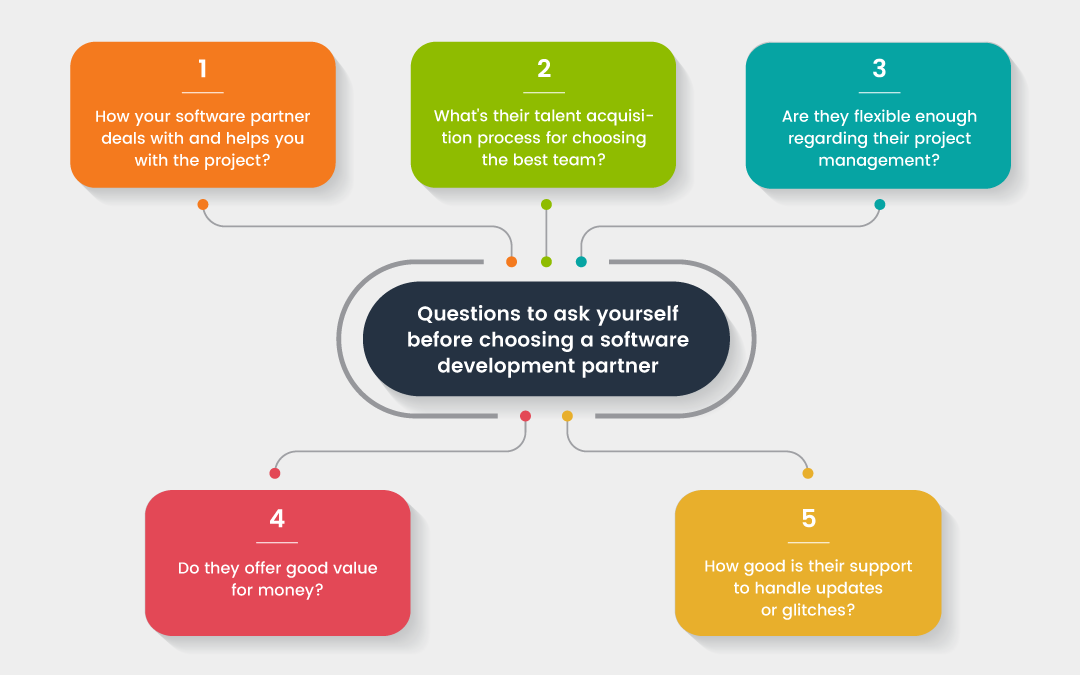
Tips to Choose the Right Software Development Partner | by Sarrah Pitaliya | Radixweb | Medium

The choice of the right software development company is tough. Will the vendor you choose just bash out some code and disappear in the steppes of Asia, or will they become your greatest ally in an uncertain market? How to make sure the reality is closer to the latter option than former?

The main goal is to search for a partner, not a vendor. Outsourcing is not about getting the cheapest quote on your order, but about building a useful relationship that will serve you in the future.

How to find the right partner then? Here are 4 tips for making the fateful choice:

Define your needs and goals
How to Choose the Right Software Development Company?

Proper initiation can make or break a project.

Once you have a breakthrough idea, it is easy to zero in on a few features, technologies, solutions. If everybody else is doing a simple blockchain in Java, or, god forbid, Python or Ruby, you might think you need one as well.

Furthermore, if you get unlucky with your software development team, they will just nod their heads in unison and agree.

We believe it is important to look at the big picture and question the job-to-be-done of your solution. If you communicate your high-level needs to partners, you enable them to research and find individual solutions in their fields of expertise that fit your needs better than “the next best thing”.

Once you have agreed with your future software team, make sure to work with them to draft comprehensive requirements that will help you both to understand each other better and communicate the work that should be done.

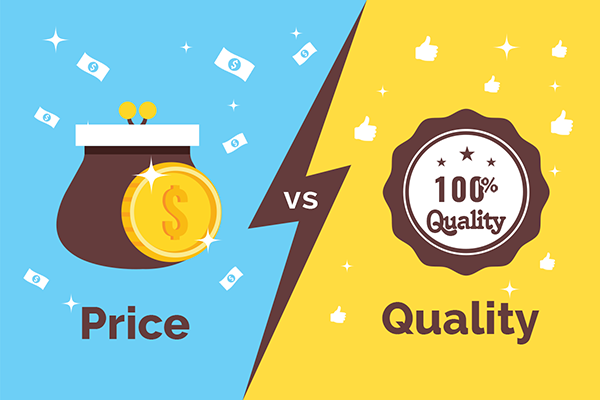
Choose quality over price
How to Choose the Right Software Development Company?

The cheapest option in the market usually isn’t the best choice. If you buy cheaply, you pay dearly. In software, these costs usually come as bugs, crashes, and a mismatch between your (and your customer’s) needs and the solution.

Of course, you need to choose the quality level that is suitable for your project, but every software development company you hire should use proper processes, have a dedicated QA team, and, preferably, use DevOps and guarantee maintenance. Modern business environment and users demand that things don’t break, and if they do, they should be fixed instantly.

If your project concerns handling large amounts of money (fintech, cryptocurrencies) or health of others (biotech), it is worthy to look into additional quality assurance for your software – look for software companies that use functional programming (benefits: reliable, more secure and easier maintainable code) and formal verification.

Keep up to date with technology
How to Choose the Right Software Development Company?

The winds of the future are uncertain, and the technologies change with every breeze. Still, it is important to sense where the tech is going and choose the correct solutions ahead of the market. Otherwise, you risk being outdated in the fast-moving, cutthroat markets of today.

For example, Rust has been voted as the most loved programming language between developers in 2016 and 2019. If you want to get the best new talent in the market, having your project in Rust is a wonderful way to attract them. (In addition to other benefits.)

If you choose the correct development partner, they should be able to communicate their programming language and solution choices to you, explain the reasons underneath and make sure the choices match your individual needs.

Choose a reliable developer
Growth of the company

Choose a partner that can support your long-term growth and help you with infrastructure and maintenance of the code.

Once your project takes hold, it is most likely that it will need to scale. For this reason, you need to select a software development company that can provide for a diverse set of needs, prevent any bottlenecks, and, if necessary, extend their operations to offer personal service just for you.

Furthermore, software projects are always in a state of continuous improvement. Pick the company that won’t disappear after finishing the project because your software will need maintenance, improvements to accustom your shifting needs and those of the market.


Discover the technology trends driving the next wave of digital transformation


Digital transformation predictions for 2021 | Manufacturing & Logistics IT Magazine

We are now undeniably in a digital world, where even if information technology is not your product or service, it will touch every part of the products and services that you provide. This means we need to adapt, and traditional organizations must better position themselves for the exciting digital changes that lie ahead.

Provider, partner, promoter, peer

For many years, we have seen IT departments exist as Providers to efficiently deliver the systems and capabilities that the firm requires, with emphasis on reliability, efficiency and compliance. They have also been Partners working like consultants to the firm, advising/directing the use of IT to support the business change agenda. The emphasis on application/process modernization and know-how is crucial for ongoing success.

In addition, we now need a new cadre of technology leaders acting as Promoters and serving as technology evangelists, advocating how new technologies can improve the firm’s speed, agility, productivity and innovation advantage. These leaders act as Peers, working at the CXO level to shape the digital strategy and value proposition of the firm, while engaging in major initiatives such as smart products, M&A, intellectual property development/protection and learning.

In 2020 we anticipate that this shift to digital business leadership will gain real momentum as technology driven-marketplaces — with new capabilities, business models and disruptive possibilities — proliferate and companies need to effectively respond to rapidly changing external developments. This is a different mission, requiring different skills and a different culture to emerge.

5 steps to digital business leadership

Top 10 Digital Transformation Trends For 2020

As we transform the organization, leaders need to come along too, not just at the executive level but also in the middle layers, where inertia is often cited as a key obstacle to change. Most organizations acknowledge that this shift is happening, but turning abstract agreement into solid action is challenging. This is where the next generation of business leaders can emerge. To do so they must:

  1. Build awareness – Scout the emerging technology scenes of Silicon Valley or China for trends and insights into the future.
  2. Be more open – Participate in open initiatives and share with partner organizations or the wider marketplace.
  3. Get access to R&D – Establish and maintain links to leading universities/academics or government agencies in relevant areas.
  4. Build partnerships and alliances – Pick the right partners to help on the journey, as most organizations can’t make the changes necessary alone.
  5. Push digital culture – Energize and engage employees and executives through immersive digital experiences such as hackathons, incubators and accelerators. Focus on multidisciplinary teams, experimentation and learning, and business outcomes.

We acknowledge that there are many reasons why this aspect of digital transformation is hard but now, more than ever, we must emphasize the value of becoming double-deep professionals — one of those leaders who not only has a deep understanding of their profession, industry or function, but who also embraces the technology that’s relevant to their role, as well as the required skills and learning that come with it. As these leaders come to the fore, we’ll see more tangible business value realized from the exciting emerging technology portfolio and organizational transformations will accelerate.

How Much Does It Cost To Create a Mobile App Design?

How Much Does It Cost To Create a Mobile App Design?

In the mobile app sector, every effort you take to make your application disruptive and innovative ultimately boils down to its design.

There is a lot that rides on the all-encompassing term “mobile app design”. It single-handedly decides whether users would spend any time in the application and if at all your months long efforts would result into a profitable solution that the world would interact with.

For a process that the entire soon to be $311,249 million industry is dependent on, there are a number of things that a design-centric mobile app development company has to consider:

  • User research
  • Competitor analysis
  • User Experience design
  • Interaction design
  • Graphics design
  • Logo and app icons designs, etc.

These considerations, in turn, come with a cost. The cost of app design.

While lower than the engineering cost, the mobile app design cost nonetheless hold a good portion in the detailing of the overall mobile app cost.

In this article, we are going to look into the elements that make up for the mobile app design cost in detail.

Table Of Content:

  1. The Importance of App Design in Mobile App Development Process
  2. Phases of App Design Process
  3. How Much Does it Cost to Design a Mobile App?
  4. How to Optimize the Mobile App Design Cost
  5. FAQs About Mobile App Design Cost

The Importance of App Design in Mobile App Development Process

Every design element is devised to solve specific issues. It doesn’t matter whether you are developing an application from scratch or redesigning an app, the end goal of every single process of your designing efforts should remain the same – solving an issue in the most minimal manner as possible.

A well-crafted mobile application UI and UX design usually provides the following benefits:

  • Simplifies the interaction with the interface
  • Converts users into consumers
  • Enables users to reach their objective faster
  • Streamlines the development part of the application

Phases of App Design Process 

Idea Evaluation

How Much Does It Cost To Create a Mobile App Design?

This part of the mobile app design process deals with understanding the project to its entirety – what issues does the customers face and how would the app solve those issues for them. One method through which the idea can be evaluated is through the creation of a lean model canvas.

Problem: This part of the model defines the issues which the app solves.

Customer Segments: This is where you enter the details of your prospective users and create a segmentation.

USP: This is where you will have to fill in the details of what your application does best and most uniquely compared to the competitors.

Solutions: Here the probable solutions that the app can offer to the best of problem, customer type, and USP combination are identified.

Channels: this is where you should enlist the platforms where your users will be present

Revenue Streams:  The goal of this section is to create a business model that seems to be an answer to your question around how much money you can earn money through an app.

Expense structure: Here, the expenses you will have to incur to develop the application are enlisted.

Key Metrics: These are the KPIs you will measure your app’s success against.

Unfair Advantage: This is the detail of advantages that your app has but not your competitors – a disruptive technology, financial aid, partnership, or something else.

Market Research 

How Much Does It Cost To Create a Mobile App Design?

Analysis of the market your application is a three tier process – competitive research, market trends analysis, and customer analysis.

We start the market research process by first analyzing the competitors – not to copy them but to find out the opportunities in the market. Doing this gives a benchmark that we have to cross, on the features and design grounds.

Next, we study the market and find out what is in trend and what elements are users interacting with most.

Deliverables: Use case, user stories, and behavioral sciences

Tools: A/B tests, user persona, interviews

Mind map 

How Much Does It Cost To Create a Mobile App Design?

This part of the mobile app design process takes you back to the lean model canvas components. It takes into account all the different requirements of your application to help you visualize the logical structure or connection between the main parts of the app.

When we create mind maps, we place the goal of the app at the center and create segments of the goal around it. Then, we create requirements/features for all these segments

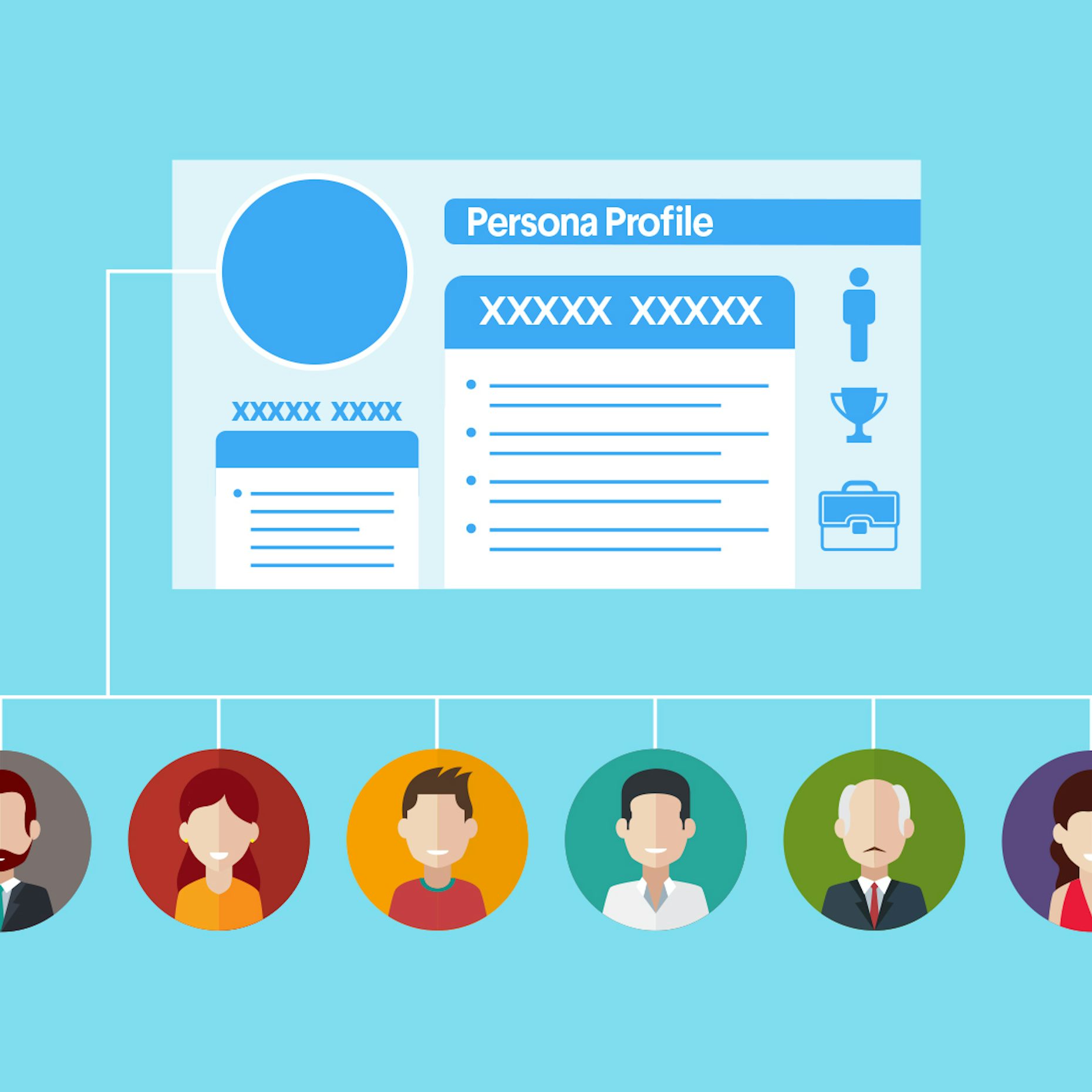
User Persona 

How to create a user persona - 99designs

The next step of our mobile app design process is the creation of user persona. This section of the design details who you are designing the app for.

Ideally, the user persona portrait should be made of:

  • Their demographics
  • The social stature
  • Their behavioral model

This part of the mobile app design process have helped our development team numerous times to gather an understanding of who they are developing the app for and what all they would appreciate/ not appreciate.

User Journey Mapping 

How to build a customer journey map | by Andreea Popescu | UX Collective

Once you have identified who your users are, you will have to gather the understanding of how will they use the application. This is where the user journey mapping element of the app design comes into the picture.

This app design deliverable deals with the creation of how users would move inside the app – the features they would interact with, where it would lead them, and the steps they would take if they hit a wall.

Prototype 

Prototype

The next part of the process is app prototype. Here, we structure the ideas into delightful experiences for users who would interact with the application. At this stage, it is ensured that the flow between features and screens should be so natural that users should not even notice.

In order to create an ideal prototype, it is very important that iterations are made until the flow is nailed on the basis of the feedback. The level of iterations is what defines the app prototype cost.

At Anteelo, our teams work on the prototypes collectively. Everyone: Developers, Business Analysts, and Clients work together to create an application which everyone can agree on. This, in turn, helps in identifying issues and confusions that could occur at the development stage.

Deliverables: App screen wireframe, interactive prototypes

User Interface Design 

User interface design - Wikipedia

User Interface design is all about telling a story of how the user would feel as they move from one screen to another.

This is where the look and feel of the app is created – its colours, shapes, typography, elements, etc. Our mobile app developers do not just look into what the users will see when they use the app but also what they would feel. Thus, we concentrate our efforts on not just static design but also animated versions. User interface design primarily encompasses three elements – Logo, App Icons, and Screens. These are the elements which then get added into the numeric value of mobile app design cost.

Deliverables: App logo, app icons, screenshots for the stores, and animations.

How Much Does it Cost to Design a Mobile App?

With the need and stages of mobile app design part covered, let’s talk about the monetary part of mobile app design, a.k.a The App Designing Cost Breakdown.

The cost of app design is majorly dependent on three factors – Complexity of the app, the country wise app design cost, and the platforms on which it would be made live on. Let us dissect every part of what goes into app design cost in detail.

A. Cost of Mobile App Design on the Basis of Platforms

Platforms like Android and iOS differ in how they look and operate. While on one side, Android application has to be matched with different resolutions and formats, the same is not the case with iOS for everything is finalized. This is the reason why Android app design is more expensive than iOS app design cost.

Android vs iOS App Design Cost

iOS vs Android: 2021 Security Comparison [+Video] | NordVPN

Although the app design cost might not vary greatly between iOS and Android apps, there are some points’ difference.

There was a time when iOS app UI and UX designers used to charge because of the stringent store guidelines, the situation has changed. Google too has come strives ahead to ensure high quality in terms of what goes into the store and thus, they too have started following a stringent approval process.

So the comparison between iOS and Android application design cost has come down to the number of platforms and the device type.

Let us look at it from iOS App Design Cost front first:

iPhone only – The entry models doesn’t require designers to create images specifically for retina display. So, the approximate designing cost falls in the range of $3,000 to $10,000.

iPhone 6 Plus and ahead – Designing apps for iPhone 6 and ahead adds 25% to the cost. These devices come with retina display which call for high resolution files, which in turn, comes with an attached cost.

iPad – iPad app design adds 50% to the cost. They don’t just require high resolution but also product designing solution to meet the speed and size of the iPads.

Now talking of Android app design cost:

The Android devices are constantly changing and changing with them are the rules of designing in the Google Material Design process. The Android app designers constantly have to adapt to new frameworks and design ideologies to keep up with the changes, which comes attached with a cost.

Additionally, since the number of platforms that a designer has to work on is much greater than iOS, the Android app design cost automatically increases.

B. Mobile App Design Cost by App Complexity

What Factors Affects Deciding Cost To Design A Mobile App?

Whether we talk about the mobile app design cost or the cost of mobile app development, there are three complexity levels that are considered when the app design cost estimate has to be drawn.

Simple Apps:

These are the applications which are maximum 3 screens long and use next to zero animations and interactive design elements. Apps like Calculators and Alarm fall under this category. These apps usually are not designed to meet the requirement of individual platforms for they look alike on all screens.

Medium Complexity Apps:

These apps are the one which make use of multiple interactive elements and animations along with several screens. They are usually designed individually for Android and iOS platforms and are made to meet the native look and feel of the platform and heavily relies on Human Interface design guidelines and Google Material design principles.

Most of the apps that you use on an everyday basis like WhatsApp and Uber etc are examples of what a medium complexity app looks like.

High Complexity Apps:

These are the applications which are highly dependent on designs to serve their purpose. Here, a lot of animations and transitions are used to help users move from one screen to another and ultimately convert into a regular user.

These apps make use of a huge number of screens and usually work on multiple screens – all demanding a device centric native UI design.

c. Mobile App Design Cost by Country

The work performed keeping the same quality intact might vary greatly between a designer in the USA and a designer in India.

For example, a USA based UI/User Experience designer might charge $200 per hour, while an eastern nation design might charge around $80 – $100 on average per hour.

How to Optimize the Mobile App Design Cost

There are a number of proven strategies we use for our startup clients, who are particular about quality but work with limited budget.

  • Work around a strategy – a set strategy can be a great way to cut back the app design cost.
  • Concentrate on the must-have features – we always recommend our clients to work on the must-have feature set of the application to start with instead of designing a full-fledged application which could be kept for the phase two of the project.
  • Use templates – while not ideal, using templates can be a great way to cut back high app designing cost for very minimal efforts are required from the designers’ end.
error: Content is protected !!