Cloud Computing : 6 Most Common Applications

Cloud computing: A brief history, where we are today and what's next

Cloud computing has become very popular for businesses. As of 2018, over three-quarters of enterprises were already using it and more are adopting it every day. If you haven’t considered it yet, that’s possibly because you’re not sure what you can use it for. To give you an idea, here we’ll show you the six main ways it is being put to good use.

1. Big Data analytics

Real-Time Big Data Analytics: A Comprehensive Guide

Today’s businesses collect vast amounts of data on all manner of things: customers, operational processes, logistics, machinery health, product condition and much more. The value of that data comes from making sense of it, using it to come up with solutions to problems or discovering new opportunities. To do this, however, you’ll need to conduct Big Data analytics and this requires the use of substantial computing resources, often over short periods.

Those resources would be incredibly expensive if you had to purchase them and for much of the time would stand unused. Convincing the finance director this was the wisest use of the company’s money would be a difficult challenge. The advantage of cloud computing is that its pay-as-you-go pricing means you can access all those resources for the times you do need them but not pay for them when you don’t. This way you can carry out Big Data analytics whenever you need but do so affordably.

2. File storage

Cloud File Storage, Store Files & Documents Online - Zoho WorkDrive.

While it’s true that you can store your files in many places, what makes the cloud so appealing is that files can be accessed, edited and shared anywhere with an internet connection and this opens up a variety of opportunities for mobile working, collaboration and even improved security.

What’s more, the cloud provides high-speed, high-availability access as well as offering scalability to increase or decrease storage as demand requires – again paid for on a per-use basis.

3. Testing and development

Why Use Automation Testing Tools in Accelerated Development cycles

Developing a new application or platform in-house can be an expensive and long-winded process. It involves significant spending, time and staff involvement and requires the procurement, installation and configuration of hardware. This means it takes longer to complete a project and can put your company at a disadvantage with competitors.

Cloud computing can make testing and development quicker, less expensive and less complicated. This is because there are various pre-existing and perfectly suitable cloud environments already built and ready to use out of the box.

4. Disaster recovery

The Importance of Planning for Disaster Recovery | Caylent

Lots of companies use the cloud as the solution for their disaster recovery needs. Continuous backups of your servers in the cloud mean that you’ll no longer need to pay for a separate, redundant DR site of your own. Not only is recovery much cheaper, it’s also far quicker, ensuring your business is back online in no time at all.

5. Data backups
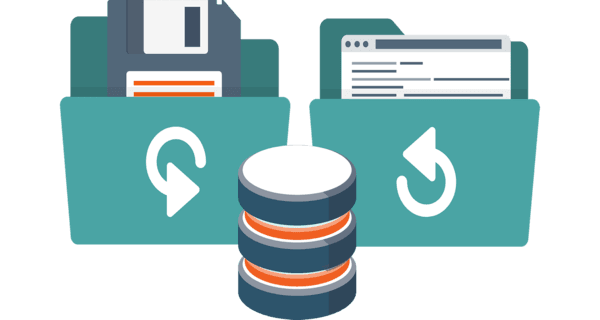
Data Backup and Recovery: 9 Benefits

Traditional methods of backing up data have tended to be complicated and time-consuming, often requiring portable drives or even tapes being shipped to remote sites for storage. This is also a technique that can back-fire if the drives are too small for the data or are discovered to be defective.

Cloud-based backup is far easier to carry out and more secure. You can schedule backups to meet your needs; store them remotely on virtual servers, knowing that if the physical hardware hits a problem the data is still available; they can be encrypted for increased security and checked to make sure the data is not corrupt. And as with all cloud storage, you can have as much space as you need without fear of running out.

6. The Internet of Things

An Introduction to the Internet of Things

The internet of Things is beginning to transform the way we live our lives and increasing numbers of enterprises are making use of it. An IoT system works by collecting data from large numbers of connected sensors and uses this to make intelligent decisions – often using artificial intelligence and machine learning.

To take advantage of the IoT, the cloud is needed to analyse that data and make insights from it. A smart traffic system, for example, can monitor traffic conditions across an entire area, discovering where issues arise and using AI to quickly reroute or slow down vehicles in order to prevent a hold up. This kind of intervention would be almost impossible to gather without the capabilities of cloud.

Cloud’s scalability is also important for IoT. As a company grows, so might the number of IoT devices it sends and receives information from. More devices mean it will need larger computing resources and this can be achieved quickly and easily in the cloud without the need for significant capital investment.

Conclusion

Cloud enables businesses to do many things that, without it, they would find more expensive, overly time-consuming or beyond their in-house IT capabilities. From basic solutions, like storing files and backing up data, to highly sophisticated processes, such as Big Data analytics and IoT data processing, the potential of the cloud is enormous. Indeed, what we have discussed here barely scratches the surface and there are even more developments yet to come.

Is It Time to Switch to a PCI-Compliant Server for Your eCommerce Store?

Six Goals of PCI-DSS [Overview for PCI Compliant Hosting] | Liquid Web

If you intend to take payments for goods or services on your website, you’ll be required to comply with Payment Card Industry Data Security Standard (PCI DSS) regulations. These are the security standards that companies which store, process or transmit payment card data have to meet. In this post, we’ll take a closer look at what they are and explain why you need a PCI-compliant server.

What PCI-compliance entails

What is PCI DSS | Compliance Levels, Certification & Requirements | Imperva

If you want your company to accept online card payments your server environment and eCommerce application have to comply with PCI DSS. This is the case even if you use a third-party payment processor. Failure to comply can have a significant impact, including ongoing fines or in the worst-case scenario, being prohibited from taking payments and thus finding your company unable to trade.

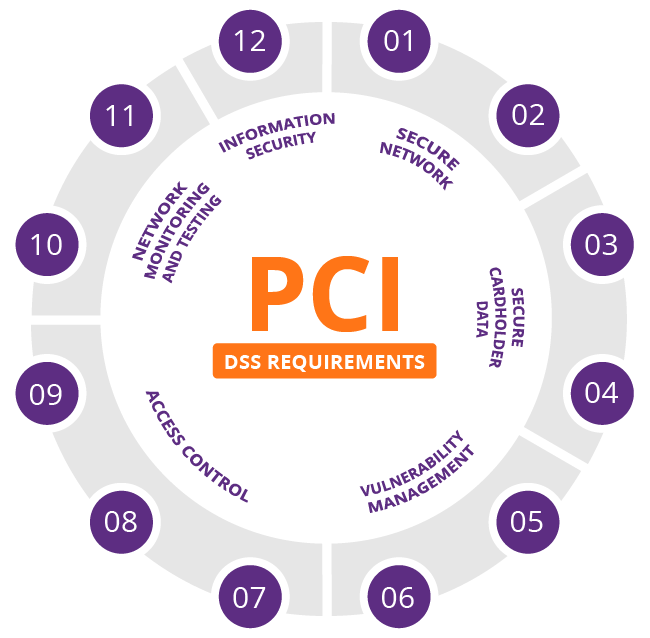
The standards you have to meet for PCI compliance are detailed and rigorous. They require you to build and maintain a secure network, protect cardholder data, maintain a vulnerability management program, implement strong access control measures, monitor and test networks on a regular basis and maintain an information security policy.

Ensuring these standards are met requires many other operations to be put into effect, such as the installation and maintenance of an appropriately configured firewall, the use of strong (non-vendor-supplied) system passwords, the encryption of cardholder data during transit, the secure storage of cardholder data and the use of anti-virus software. In addition, you’ll need to update and patch applications, restrict both system and physical access to cardholder data and create unique IDs for individual staff so that you can track and monitor all access to network resources and cardholder data.

It is obvious from this that the PCI DSS standards are stringent and the responsibility for implementing and maintaining them, as well as evidencing compliance, falls with the eCommerce company and any third-party service providers they use.

The challenges and solutions of PCI compliance

Top 5 Challenges of PCI DSS Compliance - Cipher

eCommerce companies face two major challenges when striving to comply with PCI DSS regulations. Firstly, is the cost of building an in-house system that meets the standards and, secondly, they often lack the expertise to attain compliance. A solution that makes compliance easier and less expensive to achieve is to use the services of a PCI-compliant hosting provider that can offer both the server infrastructure and the necessary expertise.

At eukhost, for example, we are geared up to ensure our data centres, networks and operations are PCI DSS compliant. Aside from ensuring robust physical and system security of all our data centres,  all our VPS, cloud servers and dedicated servers are PCI compliant-capable. In other words, we are able to carry out all the necessary configuration changes needed to meet PCI compliance upon request.

There are different levels of PCI compliance and the solutions put in place will depend upon the level your business is obliged to achieve. Most eCommerce sites, for example, have to meet either the SAQ A or SAQ A-EP levels. These are required for companies which process payments via a third-party payment gateway, such as Stripe or PayPal. As customers are transferred to the payment gateway to carry out these kinds of transactions, no card information is stored or transmitted by our servers. As a result, your compliance burden is dramatically reduced.

Putting the compliance process into action

To determine the exact requirements of making a server PCI compliant, your hosting vendor will need to know the application you are going to use and the level of PCI compliance you are required to meet. Here at eukhost, we carry out the following as standard:

  • Ensure you have a firewall enabled and have a robust firewall policy implemented.
  • Ensure that you have an SSL certificate installed and correct cyphers are set up.
  • Ensure that encryption is enforced for all services.
  • Disable any software which is not required to provide service.
  • Enable and configure intrusion prevention.
  • Enable an application firewall
  • Enable and configure anti-virus and anti-malware services.
  • Ensure logging and log retention policies are in place.
  • Apply an access and password policy.
  • Ensure a backup policy is in place and that backups are encrypted.

Once you have these features, plus any others you require, put into place, you will then be able to arrange for a PCI compliance assessor to undertake a compliance scan.

Remember, overall responsibility lies with the company

While a PCI DSS compliant vendor can help you comply and do so more economically, the ultimate responsibility lies with the company. Standards, such as assigning unique user IDs and maintaining an information security policy, which are carried out in-house, also have to be achieved. Furthermore, companies also need to ensure that any third-party hosting services they use also comply with the regulations.

Conclusion

PCI DSS is one of the most important regulations that an eCommerce company has to comply with. Designed to protect the consumer, it has a stringent set of requirements and is rigorously policed. One of the most effective ways to help you achieve compliance is to use the services of a hosting partner that has experience and expertise in PCI compliance and can provide the compliant server environment required.

Which Operating System is Best for You: Linux or Windows?

Windows vs Linux: What's the best operating system? | IT PRO

Whether you use shared hosting, VPS, a dedicated server or the cloud, when it comes to hosting your website or other applications, your choice of operating system (OS) boils down to either Linux or Windows. Which you choose depends on the needs of your business, the applications you wish to run, your technical expertise and your budget. In this post, we’ll take a look at both OS to see their advantages and disadvantages.

The Windows Server operating system

Windows Server 2016: The shifting role of server operating systems - Windows Server 2016: A first look

With Windows, you know you are getting an operating system created by the world’s leading software company, Microsoft. However, as a proprietary software with professional support, it comes with a cost. Linux, on the other hand, which is open-source and community-developed, is free.

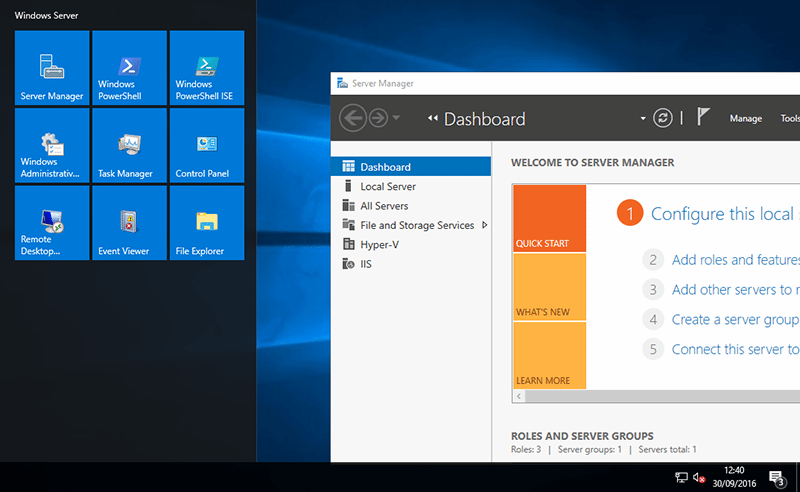
Relatively simple to set up, Windows is more or less a complete solution, offering the flexibility of remote desktop access with the intuitive user-friendliness of a graphical user interface. Additionally, and unlike Linux, it provides this without the need to undertake command-line programming.

Those companies using other Microsoft software, such as Office 365, find obvious advantages in using Windows, as the native OS is fully compatible, out of the box, with other Microsoft applications. The same goes for using Microsoft SQL databases. Indeed, these are incompatible with Linux unless you use a Windows emulator – and to do this you would still need to buy the Windows OS and the database software. As this is the case, it can make more sense for Microsoft SQL users to stick with Windows.

Similarly, Windows is the solution for those organisations that need to use scripting frameworks, such as ASP and ASP.NET, as the embedded scripts in an ASP can only run on Windows servers. Linux is unable to processes these scripts before a user’s page can load.

The Linux operating system

The state of Linux as a daily use OS in 2021 | Technorage

Linux benefits considerably from being open-source and this has enabled several operating system distributions to be developed, including Fedora, Ubuntu and CentOS. Additionally, and unlike Windows, developers can take its freely available source code and make any changes or enhancements to its software functions, which not only helps users to eradicate bugs and vulnerabilities, but to edit features in order for it to do new things and work with prototype applications.

From a financial perspective, being open-source means there is no software licence to pay for and so, in comparison to Windows, using it is more cost-effective as your provider won’t need to charge you for it.

While Windows is compatible with Microsoft software, Linux works with most open-source software, like WordPress, meaning software licencing can be less expensive across the board. What’s useful is that Linux also enables users to run Microsoft programs as well, giving it a broader versatility, including the ability to use legacy applications which require a Windows emulator – though obviously, the user will need to pay for using any proprietary software.

Linux servers also offer other advantages. Their applications generally aren’t as resource-hungry, making them less liable to become sluggish under heavy workloads, and if needed, the servers can be modified without rebooting.

Another advantage is that Linux is more secure than Windows. This is simply down to the fact that, as the World’s leading OS, Windows has become the main target for hackers. The vast number of PCs using Windows just means there are more Windows computers to attack and so this makes it a more attractive OS to target.

Other considerations

1.5 Some Legal and Other Considerations When Starting a Business Online - Biizly.com

Generally, Windows is easier to install and manage than Linux. However, as many companies are now making use of managed server hosting, this task is increasingly being done by the hosting provider. However, it may be a consideration for those purchasing an in-house system.

The same logic applies to technical support, which together with updates and patching comes included with a Windows package. If you use a Linux OS, in-house users will need to provide their own support or buy it in. Of course, this isn’t the case where the server is hosted for you, as with both systems, technical support, updating and patching will be included in the hosting package.

Conclusion

Windows and Linux are both excellent operating systems that have their own advantages and constraints. Your choice depends on the applications you use now and intend to use in the future, your expertise and familiarity with the systems and whether they provide you with the means to achieve your business goals. Pricing is also a consideration; however, if Windows is the best option in terms of what you need to achieve, then it is worth paying for.

Why Is Personalisation So Important in Online Business?

The 3 Big Problems with Personalization in Online Sales and Marketing

Personalisation is not the latest trend in online business. In fact, it has been around for a while. It is, however, becoming the norm, with more and more companies adopting personalisation as a strategy. Those who haven’t yet begun to use personalisation not only fail to reap its benefits; they risk losing customers and sales to their competitors. Here’s why you should consider personalisation for your business.

Why personalisation is important

The Benefits of Personalisation as Shown by Seven Statistics

Today we are bombarded by marketing messages. We find them on websites, social media, emails, television, radio, on the sides of vehicles, on street hoardings and tons of other places. There are so many fighting for our attention that, despite the millions that are spent on them, the majority go ignored. Personalisation has been proven to make customers take more notice and take more action, vastly increasing the effectiveness of marketing campaigns.

To give some substance to that claim, a recent article from SmarterHQ showed that over 90% of consumers would be more likely to buy from a company that provides them with relevant offers and recommendations. What’s more, they also discovered that, in 2019, more than 70% of customers only engaged with marketing messages that met their individual interests.

Since companies like eBay and Amazon started introducing personalisation, consumer expectations have increased. Indeed, if a website doesn’t offer relevant suggestions, almost half of its visitors will head to Amazon before making a decision. Overall, 70% of consumers feel marketing is too impersonal and 36% want even more personalisation than at present. Importantly, where personalisation makes buying less expensive or easier, 90% of consumers are willing to share their data to obtain those benefits – and it is that data which makes personalisation achievable.

The value of data

From data to value

Websites are able to obtain vast quantities of valuable data from their visitors. This gives marketing departments the ability to know when people shop, what and who they shop for, how much they spend and even why and how they shop. This, however, is just the tip of the data iceberg. Today, businesses go way beyond tracking website behaviour and create end to end journey maps that collect the data on every single interaction an individual has with the organisation, including customer service interactions, emails and responses, product ratings and reviews, social media interactions and so forth. This helps the company to know their customers better than ever before and thus provide them with a far better customer experience.

The insights gained from analysing such data can help a company procure the products their customers want and market them in the most effective, personalised ways. It can even help them send out marketing communications via the customers’ preferred channel and do so at the time that will have the greatest chance of a call to action being followed. And, of course, when the consumer arrives at the website, they’ll be greeted personally and find all the products they are most likely to be interested in and be given offers which are both relevant and appealing.

How to add personalisation capabilities to your website

Website Personalization: Your 6-Step Guide To Mastery

The growing demand for personalisation means there are an increasing number of plugins, tools and third-party services you can use to help implement it. The key tool is a Customer Relationship Management application that will enable you to do the essential collecting, tracking and analysis of your customer data as well as providing you with the ability to personalise recommendations on the site and send personalised marketing communications. Chatbots are another popular AI tool that act as personal shopping assistants to recommend products based on customer data.

Personalisation tools vary considerably in price. The WordPress Repository has several highly rated plugins with free and premium versions. More advanced tools dealing with bigger quantities of data can cost hundreds of pounds per month. A third-party provider will cost even more but will take the burden of managing the system off your hands and remove the need for in-house technical expertise.

Don’t forget your hosting

4 Things to Avoid When Transferring Your Website to a New Web Hosting Company - DEZZAIN.COM

Do remember that if you choose to offer personalisation, you will need the capacity to store all the data you are collecting and the processing power to run the apps that will analyse it. This means you may have to consider a more powerful hosting solution for your website, such as VPS, dedicated server or cloud.

At the same time, collecting large quantities of personal data means you will be obliged to ensure its safety and so you may need to enhance the security features that you use to protect your website and online storage.

Conclusion

Personalisation is becoming a necessity for competitive businesses, especially in the eCommerce sector. Offering personalised interactions improves the customer experience and makes marketing strategies far more effective. To do this, however, you need the right tools to collect and analyse the data and to generate the personalised content. You also need the hosting capabilities to deliver personalisation and maintain data security.

Hosting Perplexity? Explained: the Different Types of Web Hosting

How to choose Best Web Hosting Service for your Blog/Website – STA

Baffled by all the different types of web hosting? Unsure what they all are or which is the right one for you? You’re not alone. To help, this post will look at each different type of hosting and explain what they are.

What is web hosting?

Before we discuss the different types of hosting, it is helpful to understand what hosting is and why you need it. Essentially, your website is a set of files that you are sharing over the internet with other people. As a website, you want these files to be accessible all the time and easily found by anyone looking for the information you publish. To make this happen, your website content and the software that makes your website work have to be installed on a special kind of computer called a webserver. A webserver is connected to the internet 24/7 and enables your web pages to be downloaded to someone’s browser for viewing or interacting with. The webserver, therefore, is where your website is hosted and the company that provides the webserver is your web host or service provider.

The other important thing to mention is the operating system. Generally, all hosting is either run on Windows or Linux operating systems. While Windows is the most popular operating system for home computers, most website software is designed to run on Linux. When purchasing hosting, you will need to choose the operating system that your software needs.

Here’s an overview of different hosting types.

Shared hosting

What is Shared Hosting? Uses, Advantages, Examples and Plans of Shared Hosts

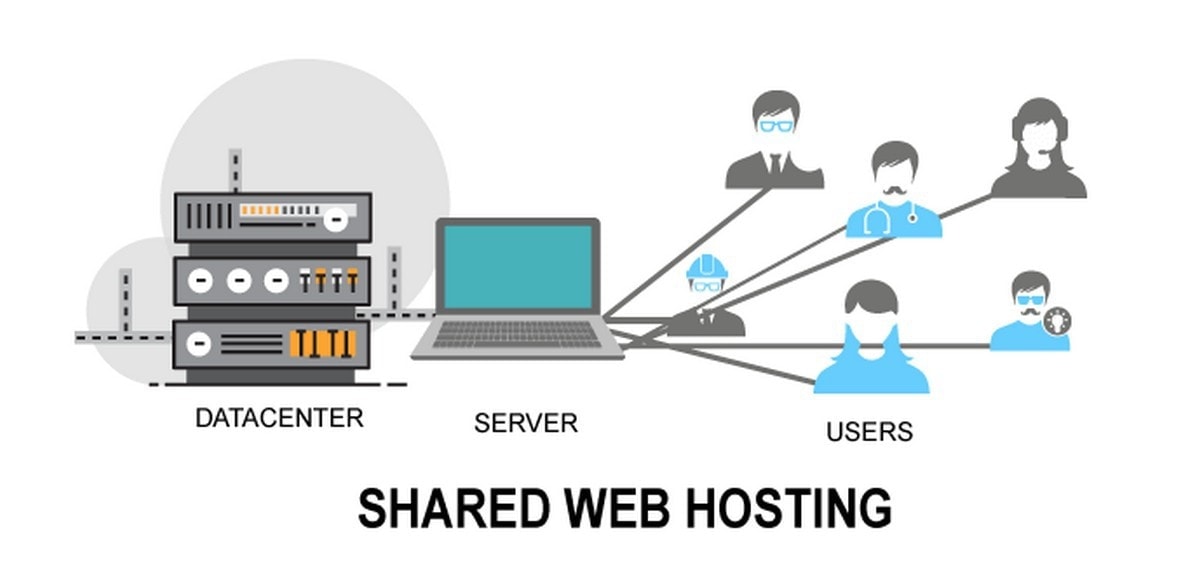
Shared hosting is the cheapest and most popular form of web hosting and is suitable for small business or personal websites. What makes it inexpensive is that the web host takes one large server and divides up the storage space for many different users. In effect, you will be leasing a small slice of a large hard drive.

While this slice can be big enough for all your website’s files and data, the downside of shared hosting is that you also have to share all the other web server resources, such as RAM and CPU. If lots of other users have busy websites, there may be times when your website is affected and loads slowly or performs poorly on people’s devices. It is similar to having too many programs running on your computer and finding that they lag or freeze.

Specialised shared hosting

The Best Shared Web Hosting Services for 2021 | PCMag

Today, lots of web hosts offer specialist forms of shared hosting. In many instances, this is done by configuring the web server so particular types of website software can perform optimally. You may, for example, see WordPress, Joomla, Magento or Drupal hosting and these packages will also include other features to improve the hosting or make things easier for users of those types of software.

Additionally, some hosts offer shared hosting with particular types of control panel, such as the cPanel hosting here at Anteelo. cPanel is a leading control panel whose user-friendly interface and comprehensive range of tools make it a breeze to manage your website. You may also find shared hosting packages that are specially designed for business users or bloggers.

VPS

VPS Hosting | Windows, Linux, & cPanel | Atlantic.Net

A virtual private server (VPS) is the next step up from shared hosting. It uses clever virtualisation technology to create several small, virtual servers on a single physical server. The difference between shared hosting and VPS is that your VPS is completely independent of all the other VPS on the physical server, so you don’t have to share resources or endure the issues this can cause. You even get your own operating system.

The other chief difference is that a VPS package is much bigger than a shared hosting package. In essence, it is like a mini dedicated server, giving you substantially more storage, CPU and RAM. This makes it ideal to run large websites, multiple websites or other types of application for your business. The surprising thing about VPS is that they are cheap, costing from as little as £15.59 a month (at time of publication).

Dedicated server

What Is a Dedicated Server? Learn the Basics

With shared hosting, a user gets a small share of a large webserver. The term ‘dedicated server’ simply means that you get that entire server dedicated for your own use. This provides you with enormous amounts of disk space together with substantial processing power and RAM. This is ideal for bigger businesses that need to run large websites, store lots of data and run critical business applications which need to be online all of the time. Compared to VPS, these can be much more expensive solutions.

Cloud hosting

5 Best Cloud Hosting Companies In 2021 - Productivity Land

The cloud is a vast network of interconnected servers hosted in huge data centres. Using virtualisation, websites can be moved instantaneously from one physical machine to another, even across geographical locations. This means if there is a problem with the physical hardware, a cloud-hosted website or application will never go offline.

Cloud’s virtual technology also means that companies that need extra computing resources at a moment’s notice, can instantly have it at their disposal – and in enormous quantities. What’s more, the cloud is paid for on a pay as you go basis, so you only pay for the resources you need as and when you need them. You can scale up or down at any time.

Accessible over the internet, cloud hosting brings with it many of the benefits of connectivity – flexible working, working from home, collaboration, etc. It’s scalability also makes it ideal for carrying out big data analytics or making use of technologies such as AI, machine learning or the Internet of Things.

There are three different types of cloud hosting: public, private and hybrid. Public cloud is where the hardware, software and other infrastructure are shared with all the other cloud tenants and managed by the web host, whereas in a private cloud those resources are used exclusively by you. Hybrid cloud is where a company makes use of both private and public solutions, often with dedicated servers included in the mix.

Managed hosting

Managed Hosting Services: How Can Customers Benefit? - ITSM.tools

Managed hosting is not a different type of hosting solution but a feature of many of the above. It is a service provided by the web host to manage your server for you. This will typically include looking after the physical hardware, ensuring the server is working optimally and updating the operating system on your behalf. For certain types of hosting, this form of server management is included in your package.

Enterprise hosting

7 Best Managed Hosting Service Providers 2020 - Cloud7

Some companies have extraordinarily complex IT needs which require bespoke hosting and support solutions. Service providers, like Anteelo, have the infrastructure and expertise to offer these tailored solutions, often referred to as enterprise hosting.

Conclusion

As you can see, there is a wide range of hosting solutions available, ranging from the basic shared hosting needed to run a small website to the complex solutions needed by large companies to run a range of critical applications. Hopefully, this post will have given you a clear idea of what these types of hosting are and which is most relevant to you.

What to Consider when Choosing a WordPress Hosting Plan

Global WordPress Hosting with OnlyDomains

While dedicated WordPress hosting is available from many service providers, the features offered can vary considerably from host to host. Knowing what to look for can help site owners make informed decisions about which provider to opt for, a choice that can have a significant long-term impact on the success of the website. Here, we discuss the essential features you should look for in a dedicated WordPress hosting solution.

WordPress optimised servers

24 Tips to Speed Up WordPress Performance (UPDATED)

The key difference between a standard hosting package and dedicated WordPress hosting is the server. By only hosting WordPress websites on a server, the service provider is free to configure it to boost the performance of the WordPress platform. This will include optimising the server with features like NGINX cache, PHP7+OPcache and HTTP2. The NGINX caching engine delivers frequently requested website files to users’ browsers in milliseconds, PHP7 together with OPcache enhances performance and the latest HTTP/2 protocol increases website responsiveness.

Another feature to look for is MySQL database management which, when powered by MariaDB, enables the server to be optimised for the read-heavy workloads which occur in WordPress. Users should also have access to tools like PHPMyAdmin, which enable easier management of their MySQL databases.

While PHP 7 currently provides the best performance, some WordPress sites still need to use older versions of PHP to maintain compatibility with legacy versions of WordPress, plugins or themes. The server should be configured to cater for these sites and the hosting package should give you the option to choose a version via a PHP version selector.

Additionally, users should also look for SSD storage, which offers far superior read-write speeds compared to more traditional HDD drives.

Advanced security

5 Web Security Ideas That Will Make Your Business So Much Better – News Anyway

Used to create 35% of the world’s websites, the popularity of WordPress makes it a regular target of cybercriminals. A good web host will know this and ensure that your WordPress hosting comes with first-rate security. This will include a WordPress application firewall that will detect and repel attacks from hackers and bots.

The most advanced service providers offer WordPress security toolkits, accessible on any device, that enable you to manage a wide range of security features from anywhere at any time. These toolkits will scan your website for security issues, let you know if you are following best practice and warn you when you need to carry out updates. For additional ease of use, look for 1-click hardening capabilities that ensure you follow best practice without having to put it into place yourself. This is ideal for those new to WordPress.

Beyond this, look for a hosting solution that provides free SSL certificates to encrypt data sent between your server and a user’s browser and which ensures the secure padlock icon is displayed next to your web address on browsers. Finally, to protect you against data loss, choose a host which carries out daily backups so your data can easily be recovered.

Ease of use features

IBM Takes Cognos to the SMB with Low Price Points, Ease-of-Use Features

Ease of use starts with a user-friendly control panel. Ideally, this should be a fully-featured toolkit that is accessible on all devices, enabling you to manage your websites wherever you are. With this, you should be able to install and manage multiple sites and the installation should be easy, using a one-click installer that can get the task completed in less than 30 seconds. Also, look for a plugin and theme manager that will allow you to install, patch and update themes and plugins directly from within the control panel.

Users should be able to easily carry out a wide range of other tasks from within the control panel. These include enabling automatic patching for WordPress core; creating development environments to test things like new plugins before going live; and cloning sites for use in development and staging and syncing these to production. To prevent major development issues, you should also look for features that enable you to create snapshots which you can restore to should changes not go to plan, putting the site into maintenance mode with a single click and having a debug mode for debugging code. Another helpful feature to look for is the ability to create, schedule and automate tasks using an inbuilt cronjob manager.

Service and support

Application Maintenance and Support at Esprit Solutions

First and foremost, you should expect that your web host provides 24/7 technical support. This will mean that, whenever you have an issue, a WordPress expert will be available to deal with it and help you put things right. You also need to look for guaranteed uptime, storage capacity, unlimited or unmetered bandwidth (data transfer) and the number of websites and mailboxes you can create in your package. If you are moving from another host, finding a web host that offers inbuilt migration management and who will migrate your site for free is a big plus.

Conclusion

WordPress is a unique CMS and has its own particular needs when it comes to hosting. A dedicated WordPress hosting package should fulfil those needs and make it easy for the site to be managed. Hopefully, the information given here will help you find a WordPress hosting solution that is right for you.

WordPress 5.5 – Guide

WordPress 5.5 is here! 5 things you need to know • Yoast

WordPress has just released version 5.5 and it’s one of the most feature-packed updates since the launch of version 5.0 in December 2018. Here, we’ll look at some of its most useful and helpful advancements.

1. Gutenberg enhancements

WordPress Gutenberg 9.2 - Dozens of Improvements

The latest update sees further enhancements to the popular Gutenberg block editor which was first launched with WordPress 5.0. The interface has been tweaked to make it more user-friendly, more blocks have been added to build pages with and there are two new features: block patterns and block directory.

Block patterns are predefined block layouts that can be inserted onto your pages with settings already in place. They can save users a great deal of time and effort and can be tweaked if required. What’s great about the feature is that patterns can be created and shared, so while there are not many available at the moment, the intention is that developers will begin to create these predefined blocks and make them available in the same way that plugins are available now.

With the expectancy that the number of blocks and block patterns will rise dramatically, WordPress has introduced the block directory. Similar to the plugin and theme directory, it is designed to help users browse and search for the blocks and patterns they want to use.

2. Easier image editing

How to Easily Edit Images in WordPress

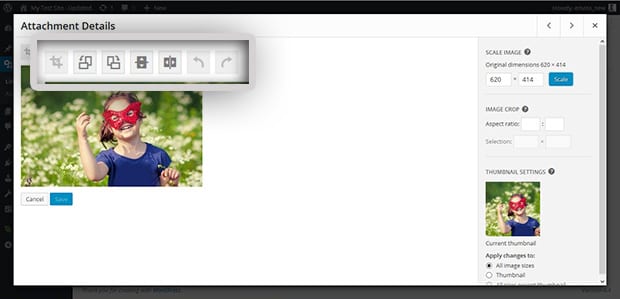
Any images inserted into the standard image block can now be edited without having to open them in the media library. Instead, they can be cropped, resized and rotated within the block itself. The biggest benefit of this is that you can see the changes straight away, saving users the hassle of going back and forth to the image library until they get the image exactly as they want it. Unfortunately, this doesn’t happen on other types of block, though it may be something seen in a future update.

3. Lazy-loading images

How to Implement WordPress Lazy Load on Images and Videos

Good news for those wanting their WordPress website to load faster is that version 5.5 makes lazy-loading the default image setting. This means images are only downloaded to a user’s browser as they scroll down the page towards them. By delaying the download of image files, the rest of the site can load on the browser much quicker. Not only is this great for the user experience; it will also help with SEO, with page speed being an important ranking factor.

4. Responsive content previews

Previewing Site Responsiveness in the Customizer – Make WordPress Core

While page previews have always been possible in WordPress, version 5.5 gives you the chance to view how your unpublished page will look on smartphones and tablets as well as on PCs. With Google’s drive towards ‘mobile-first’ website development, this can help the pages you publish to meet the search engine’s high expectations for how a website looks and works on mobile devices. Even more importantly, it will ensure your site continues to communicate effectively as the use of mobile browsing grows.

5. Default XML sitemaps

WordPress Sitemap Guide: What It Is and How to Use It

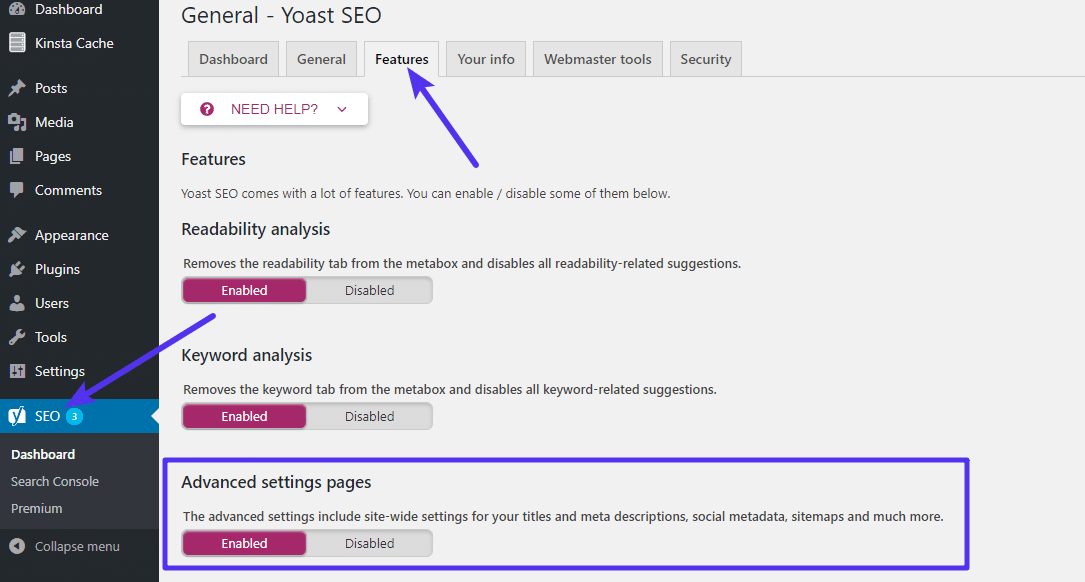
XML sitemaps are highly valuable files that enable search engine crawlers to index every part of your website. Without them, there’s a chance that parts of your site might not get indexed and, as a result, not be searchable on the internet. Indeed, it is possible to upload these files to Google’s Search Console so that any changes you make to your site can be indexed automatically without you having to wait for the search engine crawlers to seek them out.

Prior to this version, users needed a plugin to generate an XML sitemap, however, the 5.5 update generates them automatically.

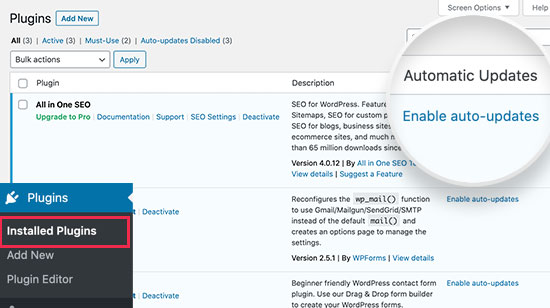
6. Automatic updates for plugins

How to Enable Automatic Updates for WordPress Plugins

Finally, we come to our favourite feature: automatic updates. As a web host, the security of our customers’ websites is a major concern and one of the biggest threats comes from vulnerabilities in plugins. While these vulnerabilities are usually spotted and patched very quickly by developers, millions of websites don’t update to the newer versions quickly enough and this leaves them open to cyberattacks.

The easiest solution is to enable automatic updates and this has been possible for some time using plugins like Jetpack or, for users of cPanel, in the actual control panel. Thankfully, this feature has now been built into the WordPress core and so is available to every user without the need for third-party software, and this should make millions of websites far more secure.

However, as some WordPress websites rely on legacy plugins, the new version does not make automatic updates the default setting. Indeed, there is always a remote possibility that an update might cause a compatibility issue which you may wish to test before going live with it. However, if you are confident about the plugins you use and wish to enable automatic updates, you can do so in the ‘Plugins’ area of version 5.5.

Conclusion

As you can see, WordPress 5.5 is a major update providing some very useful new features. It will make it easier to build better pages and edit images, help websites to perform better, especially on mobile sites, it will improve SEO through faster loading and XML sitemaps, and it will enhance security by offering automatic updates.

5 Worst-Case Scenarios of Not BackUp Your Website

Why we shouldn't be afraid of nightmares - BBC Future

If you’ve never had a serious problem with your website, backups are probably something you don’t lose much sleep over. But just because you haven’t seen your website go down or lost data in the past doesn’t mean you are immune in the future. There are plenty of ways you can suffer such a disaster, with server failures, hacking and the accidental pressing of the delete button being just some of the potential causes. Without a backup, restoring your website would be a long, difficult and expensive process. Not convinced you need them? Here are five potential nightmares that might change your mind.

1. To err is human

To Err is Human; To Edit, Divine - Writing.Com

Even with the best will in the world and all the right procedures in place, people still make mistakes. All it takes is for someone to accidentally click on the wrong button and important website files can be wiped. As a result, your website might cease to function. It’s bad for your reputation and you’re losing business while it’s offline.

While restoring your website is possible, it may take a long time to get it back online, especially if you are using bespoke software or a theme that has been customised for your needs. Installing a fresh version of WordPress and your theme, for example, might not take that long. However, if you’ve edited the code to change the look or functionality of the site, all these tweaks will need to be carried out from fresh, once more.

The longer restoration takes, the more your company will suffer and for some, the damage can put them out of business. With a backup in place, everything can be restored, as it was, very quickly indeed.

2. Disappearing content and data

Data Loss Prevention: How to Prevent Your Data From Disappearing

Perhaps more important than the website is the actual content that goes on it and the data you store. If you lost your content there’d be no product pages, landing pages, blog posts or any of the other important information you need to share with your customers. If you lost your data, you may lose all your existing orders, customer details and inventory information.

Losing content or data is more problematic than losing your website files. With content, you may have to start creating it again from scratch which can be a massive task if you sell large numbers of products or have a substantial blog. If you lose customer data, you may never be able to get it back and may be in breach of regulations too.

3. Killed off by infection

The Secret Life Cycle of Mosquitoes

According to Hiscox, there are 65,000 cyberattacks on UK businesses every day. One of the main forms of attack is to attempt to infect a company’s website with malware. Malware can do many forms of damage to a website, from putting your site at ransom to installing hidden programs that infect your customers’ computers when they visit your site. As a result, they can take your website offline or corrupt your files. If your site is corrupted, you host may have to take it offline to prevent the spread of malware to others while search engines will stop listing it until the issue is fixed.

Finding the corrupted files (sometimes the infection replicates itself) and getting rid of the infected code can be a long process and the easiest thing is to delete the entire website and install a backup. Of course, you cannot do this without a recent backup in place.

4. When great plans backfire

How to Avoid the Backfire Effect When Handling Objections | Nutshell

A common time for issues to happen with websites is when people make changes to them. There are quite a few things that can go wrong, for example, software compatibility issues, tweaks to coding breaking your software or new themes making your content appear all wrong. Indeed, any major modification to the functionality or design of your website can result in unforeseen issues, which is why many companies carry them out in an experimental environment before letting them go live. Unfortunately, lots of other companies choose to make the changes to their live website and when plans go wrong, the site can easily be put offline. With a backup in place, you can restore your old, fully working website straightaway.

5. The vendor trap

How to get out of a debt trap - The Economic Times

The success of your website relies to a great extent on the quality of your web hosting provider. A good provider offers faster loading times, increased reliability, enhanced security, managed services, 24/7 expert technical support and the right packages and prices for the growing needs of your business. There may be a time, therefore, that you consider migrating your website to a new host.

Moving to a different provider means moving your entire website to a new server. Without a backup, this means starting from scratch and for lots of businesses, this is just too much hassle to consider. As a result, many stay with their existing provider even if the services they receive are not up to the standard they require. If you do have a backup, migrating is simple. Indeed, so simple that some web hosts will do it for you.

Backing up your site

How to Back Up Your Website | PCMag

You can back up your site in numerous ways, such as doing it manually to a computer or using a plugin that saves your site to places like Google Drive or Dropbox. However, depending on your website’s needs, you may need to back up more frequently or keep several copies of older backups (e.g., if your latest backup took place after your website became corrupted, you’ll need to restore an earlier version). Your backups will also need to be stored remotely, i.e. not on the same server where your website is stored. If you don’t and the server fails, you’ll lose your website and your backup at the same time.

The ideal solution is to use a backup service provided by your web host. Here, you automate backups and control the frequency and number of backups kept. You’ll also be safe in the knowledge that the backups will be stored securely and will be backed up themselves by the host.

Conclusion

As you can see, there are numerous nightmares that can occur if you do not backup your website. All of them can result in your website being taken offline and even the loss of your critical content and data. For many businesses that operate online, such issues can have a significant impact. A backup is an inexpensive solution that enables your site to be restored regardless of the problem which caused it. For that reason, creating regular backups is indispensable.

5 Key Features to Look For in Developer Hosting Solutions

8 Best Web Hosting Services for Developers [2021 UPDATE]

When it comes to finding a hosting solution, developers have specific needs. Whether they are developing websites or applications, they’ll need a hosting solution that provides them with all the resources, features and control required to undertake their development projects and the storage space to keep all the projects they have worked on. Here, we’ll look at five important features that developers should look for in their hosting.

1. Putting resources in place

Why now is a great time to optimise your customer service – Part 3: Putting the right resources in place | Enghouse Interactive Eptica – Multi-channel communications – Self-Service, Voice, Email, Chat, Social Networks

Although each project will differ in its size, scope and complexity, developers will need hosting with the capacity to let them carry out their work unimpeded. This means finding a solution that provides all the server resources you need, including CPU, RAM, storage and bandwidth. You’ll also be looking for exceptional performance from your hosting as it can speed up development time for you and your client, as well as improving how well the application or website performs when you show it to your client during development. Reliability is also key, so look for a hosting that provides a minimum of 99.9% uptime.

Ideally, therefore, a developer needs to shy away from shared hosting and adopt a more powerful solution, such as VPS, dedicated server or for those developing cloud-based applications, cloud hosting. To ensure optimal performance, look for hosting that includes the latest Intel Xeon processors and SSD storage which can significantly boost speed.

You should also bear in mind that you may need to scale up resources beyond what your current package provides. Should there be a need to do so, you’ll want this to be as quick, simple and undisruptive as possible. While the cloud offers unrivalled and instant scalability at the click of a button, if you choose VPS or dedicated server hosting, you need to make sure that your provider allows you to upgrade easily.

2. Putting you in control

Making Life Easier By Putting You in Control - Take control with GMT

As a developer, the hosting solution you choose must give you the flexibility to work on any type of project. This starts with having control over the choice of the operating system. Not only do you need a choice between Linux or Windows; you’ll also want to choose from the range of these systems to find the one which best suits the application you are developing.

Furthermore, you’ll also need hosting that supports and provides easy integration for the programming languages or frameworks that you need to work with. Solutions that provide 1-click installations for the key software and frameworks you intend to use don’t just save you the time and effort of a manual install, they increase the pace of the development too.

3. Getting to the root of things

Getting to the Root of Things

Having root access is also vital for developers as it gives them complete control over their server. This gives you the freedom to configure the server in the most appropriate way for your projects and enables you to install and configure applications, run multiple websites and carry out various other important tasks.

4. Security built-in

Advanced security built in as standard - myairops

Cybercrime continues to be a major headache for the IT community and developers need to ensure that the applications and websites they are developing are secure. The last thing you need is to have your client’s intellectual property and data stolen from your development server or to hand them over an application that has been stealthily infected with malware. Neither do you want the project having to go back to square one because of infection, corruption or ransomware or stalling because of a DDoS attack.

For this reason, choose a host that provides robust protection, including custom firewall rules, intrusion prevention, anti-DDoS, anti-malware, VPM and application security, to ensure your server is always protected.

For peace of mind and quick, easy restoration, a backup solution is essential for any developer.

5. Expert technical support

Premium Vector | Technical support, customer service staff work

24/7 expert technical support is critical to developers whose projects may have them working with a range of different setups. Having an expert on tap to help you with any issues, regardless of the time of day, can provide indispensable assistance when you need it most. Make sure any hosting solution you choose has this included.

Conclusion  As a developer, you’ll want to provide your clients with a first-class service and to do this, you’ll need first-class service from your hosting provider. You’ll require a high-performance solution that provides you with all the resources to carry out your projects; you’ll want the freedom to deploy the operating system of your choice and have full control over your server; you need the ability to use the programming languages, frameworks and software that the job demands as well as an

The Dedicated Server : Role in Digital Transformation

10 Factors to Consider When Choosing a Dedicated Server

When businesses think of digital transformation, cloud migration is often the first thing that comes to mind. Indeed, the cloud is a necessary requirement: it’s cost-effective, easily scalable and puts the latest technologies, like data analytics, automation, AI, ML and IoT at your fingertips. However, if you intend to deploy the best technology for the task at hand, the dedicated server still has an important role to play. Here, we’ll look at why dedicated servers are a key element in digital transformation.

Security

Secure Element — securing contactless payments in smartphones | Kaspersky official blog

Data is the driving force behind digital transformation. Companies are collecting it in greater quantities than ever before to analyse it and discover the insights that lead to improvements in operations, marketing, finance, procurement and many other areas of the business.

However, while the cloud is the best place in which to carry out analytics, for some organisations, it is not necessarily the best place to store the data, especially personal and sensitive data. That’s not to say that the cloud is less secure than a dedicated server, both can be configured to the same exacting security standards. At eukhost, for example, we can offer the same protection for both, using next-gen FortiGate firewalls whose advanced security features include intrusion detection, anti-malware, DDoS protection, VPN and DMZ.

The difference lies in the needs of the individual company. If your business stores personal or sensitive information and has to comply with regulations such as GDPR, you may require a data storage solution that, unlike the public cloud, is not multi-tenancy. The role of the dedicated server here is that its single-tenancy storage offers greater compliance with stringent regulations. Additionally, some hosts, like eukhost, can develop and implement a security policy that meets both your internal and regulatory requirements, providing services that include intrusion detection and prevention, application firewall configuration, DDoS protection, email security and more.

In a world where cybercriminals are using ever more sophisticated tools, such as Ransomware as a Service, and where the number of cyberattacks involving data theft is continually on the rise, a dedicated server could be a wisely chosen component of your digital transformation infrastructure.

Performance

Lessons Learned in Performance Testing

The other chief reason for deploying a dedicated server is that digital transformation often requires organisations to run resource-heavy applications which they will need to perform flawlessly. While the cloud does offer very high performance, our cloud VM’s underlying hardware, for example, features Xeon E5-2600s with 8 to 12 cores, for organisations which need it, a dedicated server can offer even greater performance.

The main reason for this is that you can define your own specification and build a bespoke dedicated server that perfectly matches your CPU, RAM and storage requirements. You have a choice of core or frequency optimised CPUs or both; single, dual or quad processors; and SSD storage and PCIe based drives. You can choose the processor speed and the number of cores and disks, giving you complete control of your environment.

For organisations needing to run resource-heavy applications, a dedicated server offers the best performance. Your applications will run faster, with those which rely on database access, like CMS, carrying out non-cached queries and data writes much quicker. With SSDs installed, a dedicated server can perform thousands of simultaneous reads and writes without the application having to wait around for the storage, as it would with HDDs. In addition, backups and restoration will be performed quicker and your server will respond more rapidly.

Other benefits of dedicated servers

5 Advantages of Choosing a Dedicated Hosting Provider - Opus Interactive

Dedicated servers come as part of a hosting package and these provide organisations with other important benefits. This includes cost-effective server management with round the clock monitoring and maintenance of your system; geographical redundancy, off-site backup and replication services; and, importantly, 24 x 7 x 365 expert technical support, so that if you have an issue, it can be dealt with straight away.

Not a solution for every workload

How To Effectively Manage Your Team's Workload • Asana

Of course, a digitally transformed company needs to use the best technology for each workload and a dedicated server is not the number one choice for everything. While its single tenancy provides enhanced security and bespoke hardware offers superior performance, the virtualisation technology employed in the cloud makes it better for running mission-critical applications that need high availability rates of 100% uptime. Similarly, the cloud is also the better environment for workloads which need quick and easily scalable resources to cope with unexpected spikes in demand. Indeed, its pay as you go charging structure also makes this highly cost-effective.

Conclusion

For companies seeking the right technology for their digital transformation, dedicated servers have an important role to play. They offer the best solution for running resource-heavy applications and provide a secure, single tenancy storage environment for personal and sensitive data. The latest hosting packages ensure that companies have access to the best hardware and the most advanced security tools while being able to take advantage of server management solutions, backup and replication services, and around the clock support.

error: Content is protected !!