Which Operating System is Best for You: Linux or Windows?

Windows vs Linux: What's the best operating system? | IT PRO

Whether you use shared hosting, VPS, a dedicated server or the cloud, when it comes to hosting your website or other applications, your choice of operating system (OS) boils down to either Linux or Windows. Which you choose depends on the needs of your business, the applications you wish to run, your technical expertise and your budget. In this post, we’ll take a look at both OS to see their advantages and disadvantages.

The Windows Server operating system
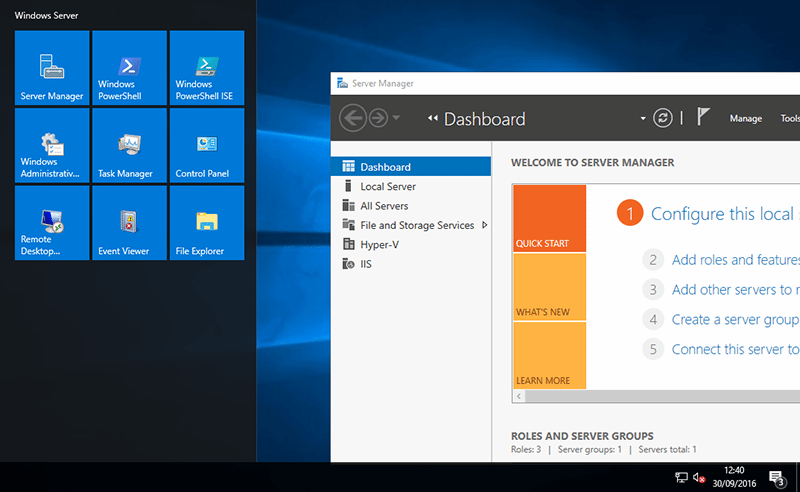
Windows Server 2016: The shifting role of server operating systems - Windows Server 2016: A first look

With Windows, you know you are getting an operating system created by the world’s leading software company, Microsoft. However, as a proprietary software with professional support, it comes with a cost. Linux, on the other hand, which is open-source and community-developed, is free.

Relatively simple to set up, Windows is more or less a complete solution, offering the flexibility of remote desktop access with the intuitive user-friendliness of a graphical user interface. Additionally, and unlike Linux, it provides this without the need to undertake command-line programming.

Those companies using other Microsoft software, such as Office 365, find obvious advantages in using Windows, as the native OS is fully compatible, out of the box, with other Microsoft applications. The same goes for using Microsoft SQL databases. Indeed, these are incompatible with Linux unless you use a Windows emulator – and to do this you would still need to buy the Windows OS and the database software. As this is the case, it can make more sense for Microsoft SQL users to stick with Windows.

Similarly, Windows is the solution for those organisations that need to use scripting frameworks, such as ASP and ASP.NET, as the embedded scripts in an ASP can only run on Windows servers. Linux is unable to processes these scripts before a user’s page can load.

The Linux operating system

The state of Linux as a daily use OS in 2021 | Technorage

Linux benefits considerably from being open-source and this has enabled several operating system distributions to be developed, including Fedora, Ubuntu and CentOS. Additionally, and unlike Windows, developers can take its freely available source code and make any changes or enhancements to its software functions, which not only helps users to eradicate bugs and vulnerabilities, but to edit features in order for it to do new things and work with prototype applications.

From a financial perspective, being open-source means there is no software licence to pay for and so, in comparison to Windows, using it is more cost-effective as your provider won’t need to charge you for it.

While Windows is compatible with Microsoft software, Linux works with most open-source software, like WordPress, meaning software licencing can be less expensive across the board. What’s useful is that Linux also enables users to run Microsoft programs as well, giving it a broader versatility, including the ability to use legacy applications which require a Windows emulator – though obviously, the user will need to pay for using any proprietary software.

Linux servers also offer other advantages. Their applications generally aren’t as resource-hungry, making them less liable to become sluggish under heavy workloads, and if needed, the servers can be modified without rebooting.

Another advantage is that Linux is more secure than Windows. This is simply down to the fact that, as the World’s leading OS, Windows has become the main target for hackers. The vast number of PCs using Windows just means there are more Windows computers to attack and so this makes it a more attractive OS to target.

Other considerations

1.5 Some Legal and Other Considerations When Starting a Business Online - Biizly.com

Generally, Windows is easier to install and manage than Linux. However, as many companies are now making use of managed server hosting, this task is increasingly being done by the hosting provider. However, it may be a consideration for those purchasing an in-house system.

The same logic applies to technical support, which together with updates and patching comes included with a Windows package. If you use a Linux OS, in-house users will need to provide their own support or buy it in. Of course, this isn’t the case where the server is hosted for you, as with both systems, technical support, updating and patching will be included in the hosting package.

Conclusion

Windows and Linux are both excellent operating systems that have their own advantages and constraints. Your choice depends on the applications you use now and intend to use in the future, your expertise and familiarity with the systems and whether they provide you with the means to achieve your business goals. Pricing is also a consideration; however, if Windows is the best option in terms of what you need to achieve, then it is worth paying for.


Vital Services A Managed Server Provider Should Deliver

Cloud Managed Service Providers: Four Considerations

The significant cost-savings offered by managed server hosting has led to a huge increase in the number of enterprises opting to use it. However, many of those still considering the move are unsure exactly what services are included. Indeed, while many vendors offer a similar raft of services, there are differences between them. In this post, we’ll look at the key services you should expect to see your host provide.

1. Initial server setup

Initial Server Setup with Ubuntu 20.04

Initial server setup can be a technically challenging process, especially if you have specific configuration requirements. If you don’t have the in-house expertise, this can also be an expensive procedure. With managed server hosting, however, the initial server setup should be carried out for you by the provider. Not only does this remove the technical burden; it also ensures your server will be configured as required and to the highest security standards.

2. Migration services

Migration Services

Migrating your applications from one host to another or from in-house to vendor hosting is another technically challenging procedure that puts many organisations off the idea of upgrading at all. You should expect a good managed server provider to undertake the migration for you on your behalf.

3. 24/7 server monitoring

Benefits of 24/7 Website Monitoring Services - WPCruiseControl - WordPress Fixes, Updates & Security

If your server goes down, the cost of downtime could be significant, especially if it happens at peak times. Your website will go offline and any other critical applications you need to stay operational will cease to work until the problem is resolved.

A competent managed hosting provider won’t let this happen. They will have 24/7 server monitoring in place which can detect potential issues, allowing them to be fixed before they become major problems and lead to an outage. Importantly, they will have failover servers in place, so that if a physical server needs to go offline for maintenance, a backup server will ensure continuity of your services. As a result, you should get 100% uptime, guaranteed.

4. Highly secure network

Microstar Info-Tech

Enterprises are obliged to comply with an increasing range of ever more stringent security regulations in order to protect the data they hold on customers and employees, such as PCI DSS and GDPR. Being the victim of a cyberattack that results in that information being stolen risks considerable reputational damage, substantial fines and potential lawsuits. Hacking, DDoS attacks, ransomware and other forms of malware infection can also lead to service disruption, financial loss, data corruption and application failure, all of which can have significant consequences. Indeed, 60% of businesses that fall victim to a cyberattack go out of business within six months.

While the responsibility for security ultimately lies with the enterprise itself, any responsible business will ensure that their managed hosting provider also takes security just as seriously – and key to this is that they deliver network security of the highest standards. Security measures should include the installation of mod_evasive to prevent DDoS attacks, firewall configuration, operating system updating and patching and security monitoring.

5. Scheduled remote backups

Windows Server Backup Schedule to Remote Shared Folder-Overcome the Limitation

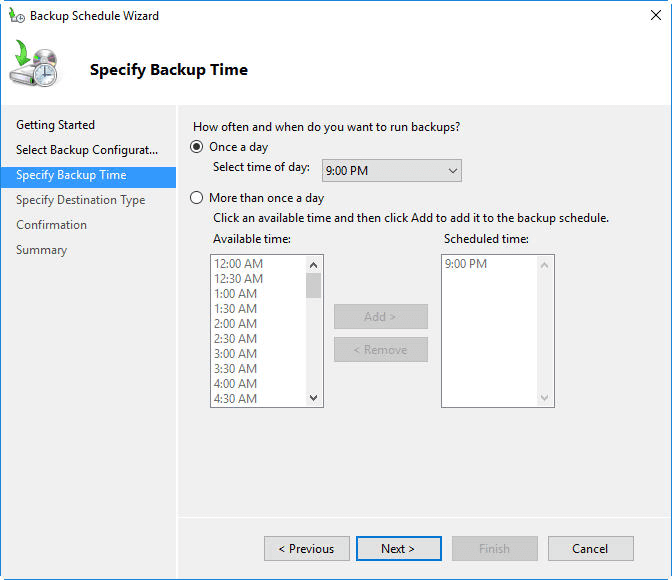
While the technology used in today’s servers, such as SSD (solid-state drives) makes them more reliable, this does not mean they are infallible. Your applications, files and data are still at risk from cyberattacks, accidental deletion and from major incidents like fires, floods and earthquakes.  Although your host will have remote backup datacentres in place to cover the latter, server backups are essential for ensuring that if a disaster does happen, you are able to recover swiftly in order to minimise the impact it can have on your operations.

Not only will a good host provide a backup solution for you; such a solution will give you the flexibility to backup as often as your business requires – which in some instances can mean continuously. In addition, those backups will be stored remotely to ensure that if the datacentre your server is based at goes offline, the backup is still accessible from another location. At the same time, the backup service should be able to encrypt your data for security purposes and check that none of the files have been corrupted so that if you need them, they will work.

6. 24/7 technical support

The Importance of 24×7 Customer Service for Your Business

Technical issues can happen at any time, so it is critical that in the event of a problem or even a technical question, there is an expert on hand to help. The quality of technical support is crucial when choosing a managed hosting provider as you need to be assured that whatever the level of challenge you face with your hosting, the issues can be dealt with quickly by someone who has the skills and experience to deal with them effectively.

Conclusion

Managed server hosting is designed to give an enterprise all the features and benefits that come from using a powerful dedicated server but without the expense and burden of having to manage it for themselves. To really take advantage, however, you need to know that your vendor can provide all the services you need and at the standards you expect. Hopefully, this post will have given you an idea of the services you should look out for.

Watch Out For These 5 Email Marketing Trends

Top 5 B2B Email Marketing Strategies For The Year 2018

Email is a tried and tested method of email marketing. Cost-effective to run and with the highest ROI of any form of marketing, it’s become an essential part of many companies’ marketing strategies, especially as it’s possible to grow huge subscriber lists over time. However, with more consumers now preferring other forms of communication, like texts, private messaging and app notifications, email is having to move with the times in order to keep recipients engaged. Here, we’ll look at some of the ways email marketing is expected to develop in the near future.

1. Personalisation on the rise

Social Shopping on the Rise as Personalisation Influences User Journey | PerformanceIN

In an effort to increase opening rates and conversions, many companies are now turning to personalisation in order to make marketing emails more relevant to their subscribers. The solution that makes this possible is the use of cloud-based AI and machine learning applications. Their ability to carry out big data analysis of customer behaviour provides insights that can be used to trigger automated, personalised emails, sent out at the optimal time, to improve the chances of conversion.

2. Intelligent campaign analytics

How 6 Top Brands Use Machine Learning Marketing to Create Smarter Campaigns | CleverTap

Email software used by webmasters has always included some metrical data on email campaigns, providing information about opening rates, clickthroughs and so forth. Today, however, technology has moved forward. With more campaign data being collected and AI and machine learning used to analyse it, companies are able to run far more successful campaigns. Even better, much of the work needing to be done is automated for them. Now, not only is it possible to track how effective a campaign is; you can also use the data to make automated optimisations throughout, enabling the campaign to be constantly tweaked in order to improve its effectiveness.

3. Email reviews

How to get people to review your product using email automation

Customer reviews are now essential to the success of a company, with over 70 per cent of all purchasers reading them before deciding to buy. What’s also true, is that the same proportion of customers are also likely to leave a review if you ask them to do so. Email offers a great way to do this as links to review sites can be built into the email copy. Indeed, feedback forms can also be embedded into the emails and the comments received here can be used as user-generated content to send out to other recipients. Not only will more companies do this; we’ll see them using AI to choose the customers who are most likely to write positive reviews.

4. Interactive email content

Interactive Email for Beginners: 6 Interactive Elements You Can Add to Your Emails Today - Litmus

While getting a user to open an email can be challenging enough, to be of any use, you really need them to read it and take action. With competition from other forms of marketing, emails will need to be far more engaging than the standard text, image and call to action content that most currently contain. Today, more companies are beginning to create emails that have dynamic content which can keep the user engaged and motivate them to click on the CTA, these include embedded videos, hamburger menus, product carousels, rollover images and even animated CTAs.

5. Alexa mail

Alexa Email Integration | Developing Email for Virtual Assistants

While efforts to improve the content of emails with dynamic visual content will work with many, an increasing number of people are beginning to abandon the visual email interface in preference for having them read out by smart speakers and voice assistants. This makes it more convenient for users who want to open messages while driving, walking around with their headphones on or wanting to multi-task while making dinner.

With the boom in the number of these voice-enabled devices being sold, an increasing number of emails are going to be opened in this way – though one can imagine that not all users who choose this method will use it all the time. This leaves marketers with a problem of how to communicate effectively with these users. If you send a traditional email, they won’t be able to see any images (only hear the alt-tag read out) and they’ll be unable to click through to any landing page. At the same time, neither you nor the user might know how the email will be accessed, until the moment it is. Overcoming these issues will be a major challenge to email marketers as the number of smart speakers grows.

Conclusion

While alternative modes of communication are challenging email as the preferred means of receiving marketing, the future promises to deliver some important developments that will make it even more appealing to both company and customer alike. Personalisation and interactive content will make emails more relevant and engaging and data-driven analytics will improve campaign performance. On the negative side, however, email needs to adapt to the smart speaker era.

Cloud Computing Advancing, According to New Statistics

What is cloud computing? Everything you need to know now | InfoWorld

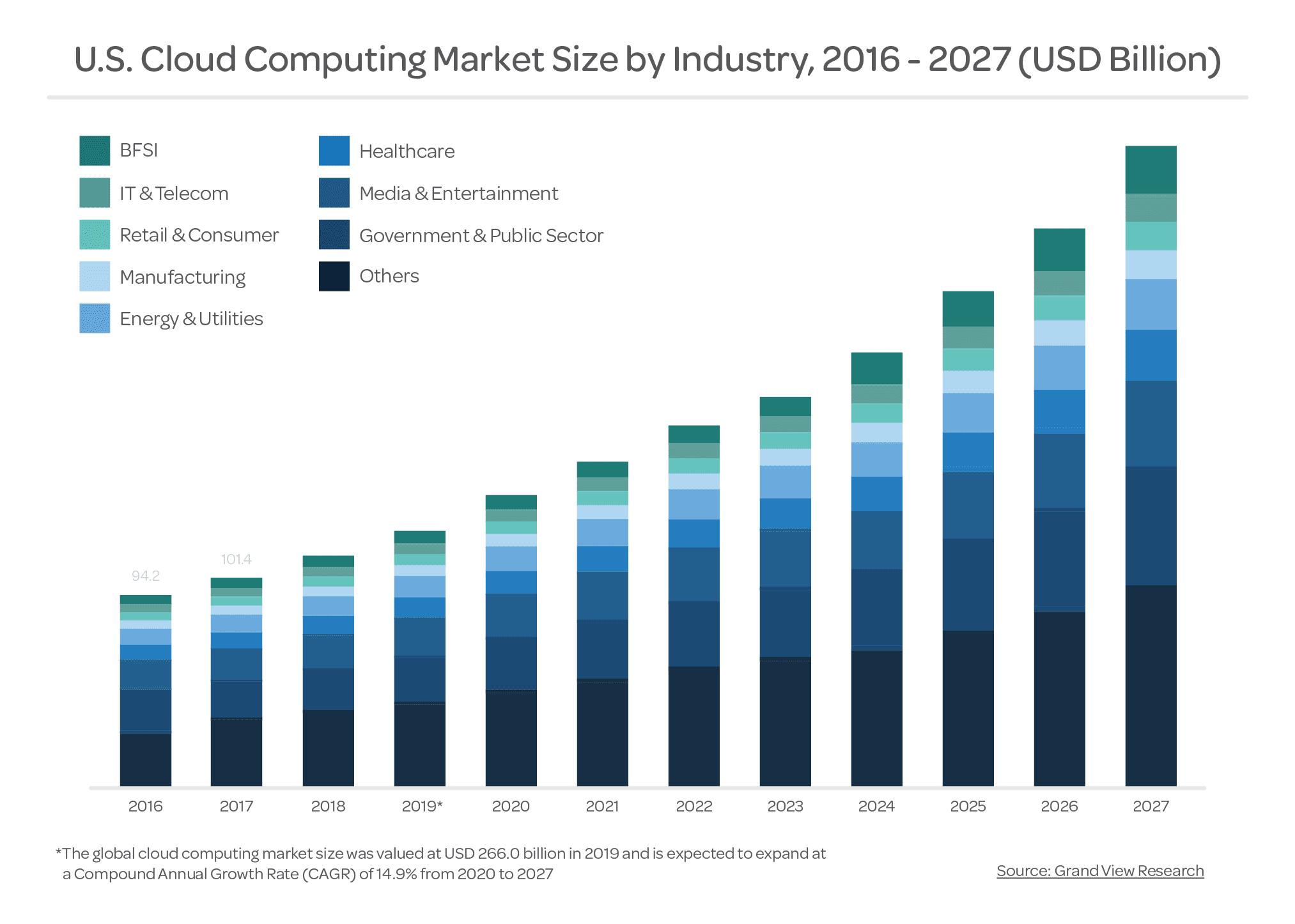
The annual round-up of statistics about cloud computing has now been published by the major research companies and these have provided a wealth of valuable insights into how the cloud landscape is changing. In this post, we’ve chosen some of the more relevant statistics which highlight the areas where cloud computing is developing and where companies are spending their IT budgets. Hopefully, you’ll find these informative.

1. Vast majority of companies using cloud

One Simple Chart: most companies use multiple cloud providers - Gradient Flow

The latest statistics figures from the 451 Research Group show that 90% of companies are now using cloud computing for some of their services. Indeed, the number of workloads running on cloud-hosted servers rose from 48% in 2018 to 60% in 2019.  According to Cisco, this will rise to over 90% within the next two years.

2. UK is a major investor in the cloud

Growing number of UK businesses will be cloud-only soon | ITProPortal

The UK is the world’s third-biggest investor in cloud computing, with companies spending £7.6 billion in 2019. This is just short of the £8 billion invested in China. Both countries, however, are well behind first placed US, which spent almost £100 billion on cloud computing last year.

3. Private vs public cloud

What is the difference between Public, Private and Hybrid Cloud? | by Karan Singh | Medium

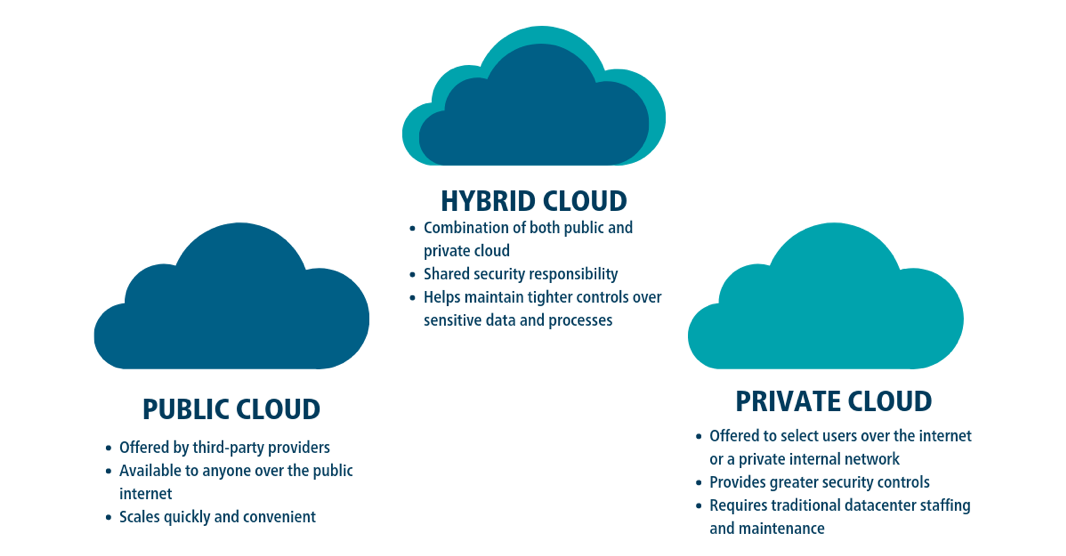
Though more expensive, the average company runs more workloads, 41%, in the private cloud compared to 38% in the public cloud. There is, however, a disparity between how larger businesses and SMEs use these forms of computing. Bigger organisations carry out 46% of workloads in the private cloud and 33% in the public cloud whereas SMEs do almost the opposite: 43% in public cloud and 35% in private. The fact that the spending on public cloud is increasing three times faster than that of private cloud indicates that more small and mid-sized companies are migrating and opting for the public solution when they do.

4. Popular cloud services on the rise

Top Cloud Service Providers & Companies 2021 | Datamation

According to tech media giant, IDG, almost 90% of companies use Software as a Service (SaaS) which enables them to access and make use of software, such as Microsoft 365, over the internet. Cisco predicts that, by 2021, SaaS will handle three-quarters of all cloud workloads.

Infrastructure as a Service (IaaS) has also become very popular with over 80% of companies now using it to provide them with resources, such as servers, virtualisation, data storage and networking, that they need to run apps and carry out workloads.

5. Clear reasons for cloud migration

Two Clouds Data Icon - 6457 - Dryicons

The cloud’s ability to give access to data from anywhere with a connection is the driving force behind over 40% of cloud migrations. The opportunities it provides for collaboration, global networking, BYOD environments and flexible, work-from-home working conditions, together with all the benefits these bring, has made this the primary reason for cloud adoption.

Other major factors to have influenced companies’ decisions include using the cloud for disaster recovery and for reducing the burden on IT staff so that they can concentrate on more business-oriented tasks.

6. Cloud more secure than in-house data centres

Cloud computing em contabilidade: quais os cuidados? | Contabilidade, fiscal e de departamento pessoal - Blog da J.F Granja

According to Gartner, this year will see workloads carried out in public cloud, IaaS environments experience 60% fewer security events than in-house data centres. The main reason for this is that the expense and complexities of maintaining secure in-house systems is difficult for most businesses to achieve. Public cloud providers, on the other hand, have the resources and the income to develop first-class security that uses a multi-faceted approach. As this security comes as part of the cloud service, customers who opt for IaaS can often forgo the issues of developing their own, in-house solution.

While there are still risks when using the cloud, Garner believes that within 2 years over 95% of problems will be caused by customers. Problems resulting from employee errors will be much reduced due to the increasing use of automation.

7. Main uses of cloud  

Five Downsides of Desktop Cloud Computing - Desktop Defenders

Analysis of companies’ cloud spend gives a clear indication about how companies are using it. Currently, large businesses spend a quarter of their IT budgets on cloud services compared to a fifth for SMEs. The biggest spend goes on remote, online backups and disaster recovery solutions, which account for 15% of all cloud expenditure. Web and email hosting, together with online productivity, each account for around 10% of overall spend. 2019 saw companies that had already adopted cloud increase their spending by a quarter. Much of this was to help them better manage the increasing number of workloads they were migrating to the cloud.

Conclusion

As these statistics show, cloud computing is now an integral part of almost every company’s IT strategy. With IaaS helping to drive down IT costs and increase security, SaaS opening the doors to access-anywhere data and flexible working conditions and the ability of the cloud to help with disaster recovery, it is not surprising that 90% of businesses now use it. And these figures don’t even take into consideration the cloud’s ability to provide companies with artificial intelligence, machine learning, big data analysis and all the other powerful technologies available.

7 Benefits of Virtualisation for Your Company

Top 5 Business Benefits of Server Virtualization

Virtualisation is one of the most exciting technologies being used by businesses today. It has revolutionised the IT world, bringing a range of benefits to both service providers and their customers. In this post, we’ll look at how virtualisation can help your company.

1 . A cool and eco-friendly IT solution

7 Eco-Friendly Solutions For Improving Indoor Air Quality

A server can generate a lot of heat and when it is not properly cooled it has the potential to overheat. This can lead to power outages, hardware failure and a resulting loss of data – all critical events that businesses strive to avoid. When you have banks of servers sitting in the same datacentre, the potential for disaster is even greater. One way to reduce the amount of heat generated is to reduce the number of physical servers being used and this can be done effectively by creating multiple virtual servers on each physical machine.

Not only is this a cooler solution; it’s also an eco-friendly one. Businesses are not only lowering the energy consumption needed to run so many physical machines; they are also reducing the energy required to power air-conditioning. As a result, virtualisation can help your drive to become carbon neutral while bringing about less expensive energy bills at the same time.

2. Less expensive to deploy and maintain

Mobile App Development Cost Breakdown: 10 Biggest Hidden Costs

The capital expenditure required to create an in-house datacentre can be very expensive when you add up the cost of the hardware. Servers are not cheap. With virtualisation, the number of physical servers needed is fewer, thus lowering the overall investment needed. Similarly, virtual servers require much less maintenance than their hardware counterparts and this lowers costs even more.

Those who opt to use virtual machines hosted by a service provider will also notice a significant difference in the price.

3. Blisteringly fast to deploy

The future of work: The blistering pace of digital transformation is only going to get faster | Fortune

Deploying a new virtual server is a swift and simple process that enables companies to get on with necessary tasks without disruption. This attribute is also excellent for preventing downtime. If a physical server crashed and there wasn’t a redundant backup available, getting back online could be a time-consuming process with a costly outcome. Using virtualisation, a new server could be online in the time it takes to boot up.

4. Faster up-to-date backups

6 Essential Best Practice for Data Backup | Liquid Web

Today’s virtual backup tools, like Veaam, enable not just the data stored on virtual machines but the entire virtual server to be backed up swiftly, securely and at automated schedules, ensuring that what you store is always up to date. As it is possible to migrate these virtual servers between physical machines, any necessary redeployment can be undertaken very quickly.

5. Disaster Recovery made simple and quick

Disaster Recovery Made Easy With LTFS

Being unable to recover quickly from a disaster situation can have a catastrophic impact on a company, potentially putting them out of business. Despite this, a 2019 survey discovered that 82% of businesses were not fully prepared for a DR incident, with only 27% confident they could ensure continuous availability and only half of them confident of restoring all their data. The majority believed it would take over 8 hours to fully restore services.

In a virtual environment, however, the DR process is both simplified and quicker. Regular backups ensure your virtual server and data are up to date and these can be migrated to another location to be restored within minutes of going offline.

6. Easier and safer DevOps and testing

Best Practices for Implementing QA Automation in DevOps

For those developing new applications or testing new environments, there’s always the risk that if something goes wrong you would have to restart the testing process from the beginning. The ability to create backup clones of virtual machines at any point during testing means that if the worst happens, you can restore the last working stage of your project almost instantly. As a result, testing is less arduous and can proceed at a quicker pace.

7. Avoid vendor lock-in

How you can avoid a vendor lock-in in the cloud

Reliance on the hardware configuration provided by your vendor can tie you to their services and prevent you from seeking better provision elsewhere. Virtual machines, however, work independently from physical servers so there is no reliance on any specific server type or platform. As a result, many of the complications that arise during migration to a new vendor are removed, meaning you can be free from vendor lock-in.

Conclusion

As you can see, virtualisation brings many benefits to businesses. It safer, greener, requires less energy and needs less capital expenditure and maintenance. Additionally, it offers swift backups, quick deployment, it simplifies and speeds up disaster recovery and makes testing easier. It even removes the potential for vendor lock-in.

Why Is Personalisation So Important in Online Business?

The 3 Big Problems with Personalization in Online Sales and Marketing

Personalisation is not the latest trend in online business. In fact, it has been around for a while. It is, however, becoming the norm, with more and more companies adopting personalisation as a strategy. Those who haven’t yet begun to use personalisation not only fail to reap its benefits; they risk losing customers and sales to their competitors. Here’s why you should consider personalisation for your business.

Why personalisation is important

The Benefits of Personalisation as Shown by Seven Statistics

Today we are bombarded by marketing messages. We find them on websites, social media, emails, television, radio, on the sides of vehicles, on street hoardings and tons of other places. There are so many fighting for our attention that, despite the millions that are spent on them, the majority go ignored. Personalisation has been proven to make customers take more notice and take more action, vastly increasing the effectiveness of marketing campaigns.

To give some substance to that claim, a recent article from SmarterHQ showed that over 90% of consumers would be more likely to buy from a company that provides them with relevant offers and recommendations. What’s more, they also discovered that, in 2019, more than 70% of customers only engaged with marketing messages that met their individual interests.

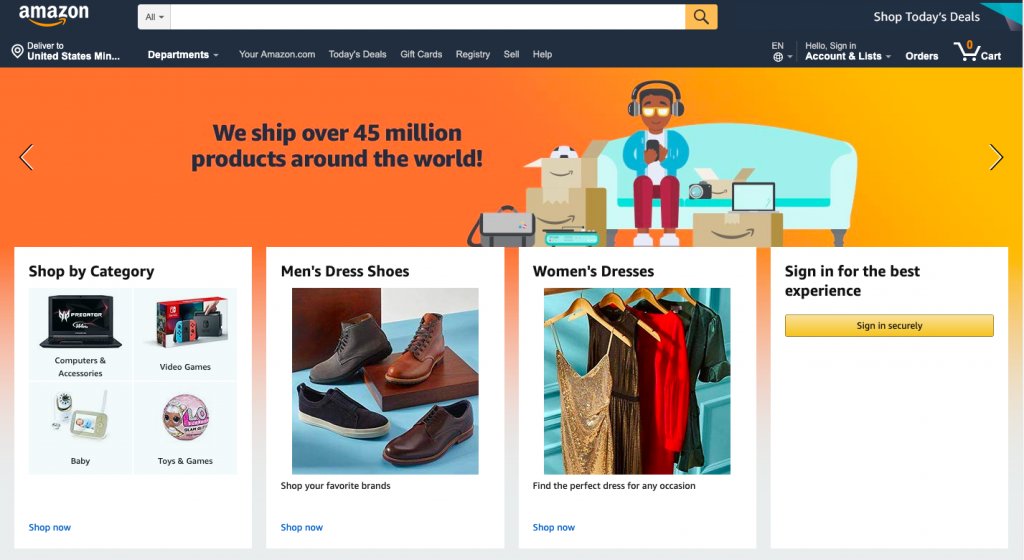
Since companies like eBay and Amazon started introducing personalisation, consumer expectations have increased. Indeed, if a website doesn’t offer relevant suggestions, almost half of its visitors will head to Amazon before making a decision. Overall, 70% of consumers feel marketing is too impersonal and 36% want even more personalisation than at present. Importantly, where personalisation makes buying less expensive or easier, 90% of consumers are willing to share their data to obtain those benefits – and it is that data which makes personalisation achievable.

The value of data

From data to value

Websites are able to obtain vast quantities of valuable data from their visitors. This gives marketing departments the ability to know when people shop, what and who they shop for, how much they spend and even why and how they shop. This, however, is just the tip of the data iceberg. Today, businesses go way beyond tracking website behaviour and create end to end journey maps that collect the data on every single interaction an individual has with the organisation, including customer service interactions, emails and responses, product ratings and reviews, social media interactions and so forth. This helps the company to know their customers better than ever before and thus provide them with a far better customer experience.

The insights gained from analysing such data can help a company procure the products their customers want and market them in the most effective, personalised ways. It can even help them send out marketing communications via the customers’ preferred channel and do so at the time that will have the greatest chance of a call to action being followed. And, of course, when the consumer arrives at the website, they’ll be greeted personally and find all the products they are most likely to be interested in and be given offers which are both relevant and appealing.

How to add personalisation capabilities to your website

Website Personalization: Your 6-Step Guide To Mastery

The growing demand for personalisation means there are an increasing number of plugins, tools and third-party services you can use to help implement it. The key tool is a Customer Relationship Management application that will enable you to do the essential collecting, tracking and analysis of your customer data as well as providing you with the ability to personalise recommendations on the site and send personalised marketing communications. Chatbots are another popular AI tool that act as personal shopping assistants to recommend products based on customer data.

Personalisation tools vary considerably in price. The WordPress Repository has several highly rated plugins with free and premium versions. More advanced tools dealing with bigger quantities of data can cost hundreds of pounds per month. A third-party provider will cost even more but will take the burden of managing the system off your hands and remove the need for in-house technical expertise.

Don’t forget your hosting

4 Things to Avoid When Transferring Your Website to a New Web Hosting Company - DEZZAIN.COM

Do remember that if you choose to offer personalisation, you will need the capacity to store all the data you are collecting and the processing power to run the apps that will analyse it. This means you may have to consider a more powerful hosting solution for your website, such as VPS, dedicated server or cloud.

At the same time, collecting large quantities of personal data means you will be obliged to ensure its safety and so you may need to enhance the security features that you use to protect your website and online storage.

Conclusion

Personalisation is becoming a necessity for competitive businesses, especially in the eCommerce sector. Offering personalised interactions improves the customer experience and makes marketing strategies far more effective. To do this, however, you need the right tools to collect and analyse the data and to generate the personalised content. You also need the hosting capabilities to deliver personalisation and maintain data security.

The Top 10 Search Engine Optimization (SEO) Trends To Drive More Traffic

Content marketing SEO strategy

Although most website owners are aware that SEO is essential if they want their site to rank well in search engine results, keeping up to date with the ways in which SEO should be done and then putting it into practice can be a time-consuming task. Search engines are constantly refining their algorithms in order to produce ever better results for their users and this means the Search Engine Optimization goalposts are constantly on the move. To help you stay up to date, here are the latest major developments in search engine optimization.

Optimising for search intent

How to Optimize Your Content for Search Intent - The Next Scoop

Search engines’ main priority is to give users the content they want to find. Doing this means they are using more sophisticated ways to understand the intent of the user when they carry out a search. When someone types in ‘paracetamol’, for example, the search engine will try to work out whether they are looking to buy paracetamol or whether they want to find information about it. This might seem impossible from a one-word search; however, by using all the information they have on that user, recent search history, browsing habits and so forth, and by comparison to other users, their incredibly sophisticated algorithms can ascertain intent to a far better degree.

What does this mean for website optimisation? It means you have to undertake a new form of keyword research looking for the intent of users when they use the keywords you want to rank for. Only when you understand what their intent is (to buy, to find information, etc.) can you create the content to match. Indeed, you should do this for all the content on your site, not just the things you publish in the future.

Redefining domain authority

Moz Domain Authority 2.0: Stronger, Sharper, Scarier | Techosaur

Domain authority has always been based on the quality of the content that a website provides. Once upon a time, search engines’ main measure of this was by the number of reputable websites that linked to it. Quality backlinks were priority number one.

Today, as search engines find more sophisticated ways to judge the quality of the content, the emphasis is on, to quote Google, ‘identifying pages that demonstrate expertise, authoritativeness and trustworthiness on a given topic.’ Expertise, authoritativeness and trustworthiness, often referred to by the acronym EAT, are therefore the new main priority when it comes to domain authority.

What does this mean in practical terms? It means your content has to illustrate expertise in your field and that any posts you publish need to be accredited to someone within your organisation with authority in that area, preferably people who can prove their trustworthiness by having their expertise mentioned on other leading websites (an actual link is not necessary). In other words, even if you have someone else write the content, the author by-line needs to be attributed to a recognised expert. Indeed, going much further, the website as a whole should be seen to specialise in its chosen topic.

Do backlinks still really matter? Yes – as long as they are from quality sites relevant to your own area. They help with what is known as PageRank and are taken by search engines as proof that the information your site provides is trustworthy.

Optimising for image searches

SEO Guide: How to Rank for “Near Me” Searches?

Image searches have begun to take off in a big way and websites which haven’t yet begun to optimise for them should do so. Why? Because tech native generations find it very user-friendly to take a picture of something rather than type in a search term and with Google Lens being able to identify over a billion items already, the technology is increasingly being used.

Websites should make sure that every image has a filename that reflects its subject matter (IMG001.jpg won’t suffice) and an alt-tag that describes the picture. Aside from that, domain authority is also a key factor in whether your images will be ranked. A picture of an owl from the RSPB will likely rank higher than one a blogger has taken on a day trip to an owl sanctuary. More up to date photos from sites that regularly post fresh content will also rank better, especially if the photograph is a featured image on a page.

Optimising for voice searches

Voice Search: The Definitive Guide

The growth of Google’s Search Assistant and the increasing numbers of Google Home devices means Google, in particular, is increasingly focussed on voice search. Chances are, it will be difficult for your content to feature in spoken search results, as Google will prioritise the top ranking sites. However, to give your content a better chance, you should consider putting questions and answers in your content, and to frame the questions in the way someone would ask them when speaking out loud.

As Google uses featured snippets in its voice search results, this is another area where you should concentrate. In particular, you need to include keywords in the snippet and these should be keywords that the page actually ranks for. In other words, if there are keywords you want to rank for but don’t, don’t use these in the snippet unless they are part of a long-tail keyphrase.

Conclusion

Doing well in organic searches is getting increasingly harder, especially as even the top results now get pushed aside by adverts, answer boxes and lists of related questions. Because of this, the developments in Search Engine Optimization mentioned here are all the more important to help you rank better. Hopefully, you will find the information of value to you.

If you are looking for faster website loading to improve your SEO, check out our wide range of high-performance hosting solutions.

7 Exceptionally Effective Online Business Management Tools

11 Powerful Cloud Management Tools | Network Computing

Though there is a lot of work involved in creating and managing an online business, there are plenty of useful tools around to help you do things quicker, smarter and more easily. Today, there are applications and services, many of them free to use, which can help you do everything from building professional standard websites and eCommerce stores, to ensuring you’re well prepared for the worst kind of emergencies. Here, we’ll look at seven of the most useful.

1. WordPress

WordPress: what is it, how can you use it, and the main secrets

WordPress is the perfect tool for creating fully functioning, professional websites. This completely free CMS platform has been used to create 35% of the world’s websites and has been developed over many years to make it easy for anyone with basic computer skills to use.

What’s more, with thousands of free themes and tens of thousands of free plugins, WordPress users can create websites that are uniquely designed and which have unparalleled functionality compared to other website creation software. With it, you can build any kind of website and have it perform any kind of function. The sheer scope of its plugins gives any website enormous potential.

If that’s not enough, its massive popularity means that beginners have a vast range of online support to help them with any issues, with many websites and web hosts offering specialist support in all areas of its use.

2. WooCommerce

WooCommerce - Wikipedia

If your main purpose is to sell products or services online, then you will need to create an eCommerce store. The ultimate tools for doing this is WooCommerce, which is actually a WordPress plugin rather than a standalone program. Essentially, once you have created your WordPress website, all you need to do is install and activate the free WooCommerce plugin and your site is transformed into an eCommerce store. All you have to do then is set up the store and add the products (physical or digital) or services (including bookings and reservations) that you want to offer.

WooCommerce is a user-friendly plugin that helps you manage sales, inventory, payment and delivery. It is so popular; it is one of the few WordPress plugins to have its own set of plugins. These provide additional functionality to enhance the customer experience and to make it easier for you to manage your store.

3. PersonalSign

Download and Install PersonalSign Certificate :: Download and Install PersonalSign Certificate :: GlobalSign Support

Many people fall victim to online scams like phishing because they are unable to tell the difference between a genuine email and one which scammers have tried to make look authentic. PersonalSign is an email signing certificate that puts a stop to this by letting recipients of your emails quickly verify that it is trustworthy. Additionally, the contents of your email and any attachments you send are encrypted, preventing them being stolen or tampered with during transit or at rest.

PersonalSign isn’t just of benefit to your customers, either. Many businesses fall victim to phishing because employees receive fake emails purporting to come from executives in their own company – often asking for money to be transferred to the scammers’ account or asking for sensitive data. Email signing certificates put an end to this, too.

4. cPanel hosting

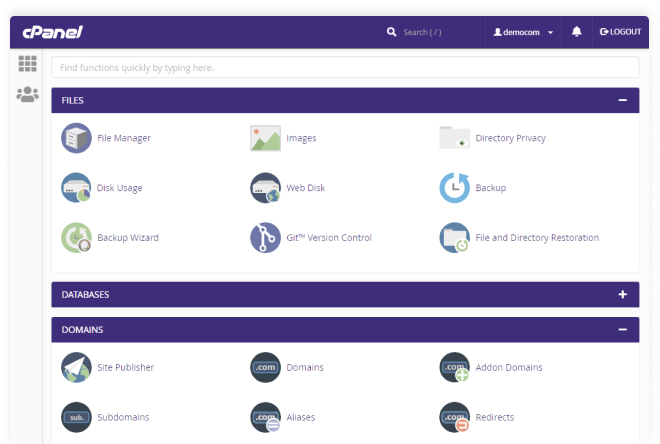
cPanel Hosting | Host With cPanel & Experience the Full Control

When setting up your online business, one of the first decisions you will need to take is on the type of hosting package tools you wish to use. While there are many different types of hosting to choose from (e.g. shared, VPS, dedicated server or cloud) one of the things you will need to consider is the type of control panel which your hosting will come with.

The control panel is the interface you will use to manage your hosting and your websites. The most common form of hosting uses Linux-based servers and the most popular control panel for Linux is cPanel. cPanel web hosting tools makes it easy to manage your web hosting and email; its user-friendly interface offers simple file management, 1-click application installs and a comprehensive suite of useful tools that enable you to carry out a wide range of management activities. Setting up new domains, automating updates, adding new email addresses, etc., is a breeze with cPanel.

5. Google Analytics

GA4] Search box in Google Analytics 4 properties - Analytics Help

Data has become the backbone of today’s decision-making processes and this is equally true of running a website. Google Analytics (GA) is a free tool, provided by Google, that gives you in-depth data on visitors to your website. Going way beyond telling you how many visitors your website gets, when they visit and where from; GA can be used to track where visitors have found you, which pages they visit, how long they spend on each page and what pages they exit from.

Perhaps most importantly, you can use GA to improve your marketing. You can set up goals to track visitor progress through your sales funnel, including analysing how effectively your ads and other online marketing techniques generate conversions.

What’s more, GA is incredibly easy to set up and integrate with your website. WordPress users can do the integration simply by using a plugin.

6. Yoast SEO

SEO for everyone • Yoast

The success of your online venture depends upon the number of visitors you get to your website. Unless you want to rely heavily on paid advertisements, the main way to get visitors is through ranking well in search engine results. Search engine optimisation, however, is a complicated and ongoing process covering everything from site speed and mobile-friendliness to website structure, keyword placement and domain authority.

When it comes to on-site SEO, there is no better tool than the free Yoast SEO plugin for WordPress. This plugin automatically looks after much of the optimisation you will need to do while providing wizard-like guidance to ensure any content you are creating meets the most up-to-date SEO requirements.

7. Automated remote backups

Why You Need Automated Website Backup - HostPapa Blog

The final tool you should consider is automated remote backups. A necessity rather than an option, a remote backup is the only fall back you will have if you lose your website data. Should your site be hacked, your server fail, your data be corrupted or even if you accidentally press the delete button, there’s the potential that you could lose the entire content of your website and the website files themselves. Failure to restore your website swiftly can have catastrophic consequences and even put you out of business completely. A remote backup can help you get your site back online quickly.

An automated backup service does more than just back up. It enables you to take backups as frequently as your business needs, it saves the files remotely from your own server, provides enough space for multiple backups and even checks that the backups are not themselves corrupted. You can also encrypt your backups to ensure that you comply with data protection regulations.

Conclusion

There are a huge number of tools you can use to create and manage your websites and it can be challenging to search through them all looking for the best ones. The tools and services we have shown here are those which we think provide great value and are exceptionally useful.

The 5 ways cloud computing will change in 2020

What is Cloud Security? Cloud Computing Security Defined | Forcepoint

Cloud computing is set to continue its remarkable development this year with technologies like 5G, Kubernetes, AI and machine learning increasing the scope and scale of the operational uses it can be put to. In this post, we’ll look at these technologies and see how they will change the face of cloud computing and how businesses use it.

1. IoT boosted by 5G

How 5G is becoming an Important Technology Ingredient for IoT

The long wait for 5G is finally over and, with its introduction, we’re set to see it play a critical role in the connectivity of IoT devices, extending that connectivity way beyond the limitations of wi-fi and enabling the development of edge computing.

The exponential growth in the number of IoT devices is coupled with an equally gargantuan collection of data. As the value of that data for delivering rich insights prevents enterprises from deleting it, companies are left to find a way to store and process it all. They need massive data storage capacity and vast compute capabilities. At the same time, some of the new technologies being developed for IoT use, self-driving vehicles being a prime example, require network latency to be almost eradicated.

5G can help with all these issues. It can connect devices where wi-fi and cabled connections are not available and at exceptional speed, it enables storage and compute services to be installed at the edge of 5G networks, shrinking latency to less than a millisecond while reducing the type and volume of data being stored in datacentres.

2. More stringent security standards for public cloud

An open, secure cloud with security standards you value - OVHcloud

Security is a critical concern for all enterprises and one new area to consider is the issue around 5G as it becomes part of the cloud network. The UK’s decision to use Huawei technology for its 5G network has already become a political hot potato. This, together with other concerns, is likely to lead to more stringent security standards, particularly over endpoint security, for cloud providers.

It is expected that tighter regulations will be introduced for the architecture of hybrid clouds requiring full data separation between on-site and public cloud environments. Brexit will also play a part, as the UK goes its own way in implementing standards regarding data protection.

3. More users adopting hybrid cloud

Multi-Cloud, Hybrid Cloud, and Cloud Spend - Statistics on Cloud Computing - ParkMyCloud

While many companies have considered hybrid cloud computing , its technological challenges have led to most of them adopting a purely public cloud model. And while there are workloads which are better suited to a hybrid solution, the lack of flexibility to deploy both on-site and cloud infrastructures is a hurdle which many enterprises are not equipped to overcome.

In 2020 and beyond, we’ll start to see new tools that can overcome these management and migration challenges. These tools will split migration into two separate processes where companies can first become familiar with their new programming and management models on-site before finally moving their infrastructure to the cloud. This is particularly helpful for those organisations that want to move to the cloud but don’t want to abandon the investments they have made in their datacentres and hardware.

4. Kubernetes to become the standard container

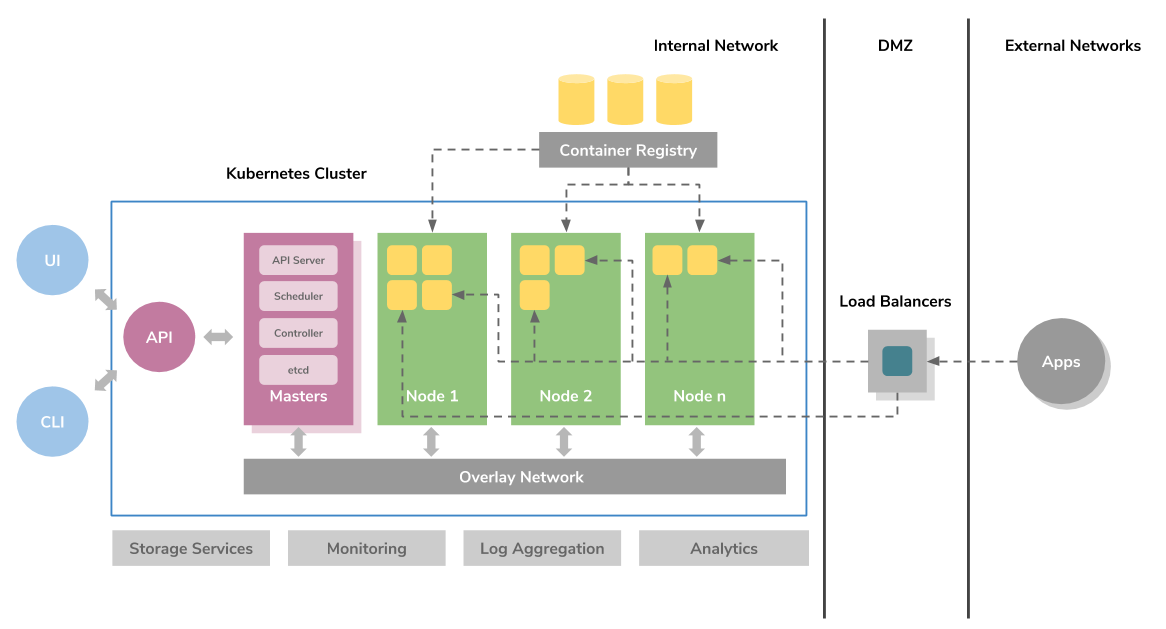
A Beginner's Guide to Kubernetes. Kubernetes has now become the de facto… | by Imesh Gunaratne | ContainerMind | Medium

Containers have become widely used by companies that need to run multi-cloud workloads. By providing a platform-agnostic solution for the packaging and management of applications, they have simplified the process of cloud adoption and migration.

Of all the container solutions available, Kubernetes has become the most widely adopted. The primary reason for this is that, aside from housing an application, it also specifies the app’s required infrastructure, including load balancing, networking and scaling. What’s more, the standardised way in which it does this means those specifications can be more easily transferred across providers. When it comes to deploying infrastructure for container-based workloads, Kubernetes is today’s go-to solution. Additionally, its popularity means there are also a growing number of tools being developed to support its use.

5. AI and machine learning used in networking

Cisco: How AI and machine learning are going to change your network | InsiderPro

AI and machine learning are now being deployed to carry out a wide range of operations and this means companies are reorganising their IT services to enable them to make deployment easier. One area where AI is beginning to bring developments is in networking, helping with such things as reducing energy consumption and in automating maintenance tasks. Expect to see even more examples of its uses coming into the spotlight in the next few years.

Conclusion

It is an exciting time for the cloud with technologies like 5G, containers, AI and machine learning enabling its users to undertake more operations and enhance their capabilities. However, with expanding uses comes an even greater need for security and higher standards in how data is used. Hopefully, the information given here will have shown you what developments are in store and how your company can benefit from them.

What Exactly Is Digital Transformation, and What Are Its Advantages?

Digital Transformation: Three Areas of Focus to Enhance Business Value

Digital transformation puts companies in a far more advantages, giving them all the benefits that the latest technologies bestow. However, while the adoption of new technologies is a key element of the process, deeper changes are needed before an organisation can truly reap the rewards. In this post, we’ll take a closer look at what digital transformation is and what it can offer.

What is digital transformation?

What AI and machine learning are and how they relate to IoT | Basefarm

Digital transformation puts companies in a far more advantages . On one level, digital transformation is the process of adopting technologies like cloud, artificial intelligence, machine learning and the IoT in order to make business processes more effective and efficient. What makes these technologies particularly beneficial is their ability to gather and process data. This enables companies to be more informed about their processes, strategies and activities while giving them data-driven insights to help with decision-making.

The adoption of these technologies, digital transformation puts companies in a far more advantages however, is not merely something that happens in the data centre or in IT, it brings change to the entire organisation, forcing the company to rethink its goals and strategies, reorganise its structures and roles, and to make changes to processes that affect all its workforce. Indeed, for many companies, some of these changes are often necessary before the process of digital transformation can commence. Key here is the corporate attitude to digital transformation. For it to be successful, the business needs to embrace new technologies and this often requires a shift in company culture.

The driving force behind successful digital transformation is the digital leader. This is someone who clearly knows the technologies needed to transform the company and who understands the changes their deployment will bring. These leaders don’t just have belief in the project, they are also able to communicate that belief in order to bring on the cultural shift that’s required – and that’s not just in the board room; it’s across the whole business.

What are the advantages of digital transformation?

Once the company is ready to embrace new technologies and the changes they will bring, there are numerous benefits that can result. Here are some of the main ones.

Making the most of data

Making the Most of Data Should Be a Priority for Business, Not Just for IT

Digitalisation helps break down departmental silos so that data can be unified and more easily analysed. As a result, end to end customer journey mapping is attainable, while other forms of unstructured data can be combined to gain previously unobtainable insights.

Cost savings

IT outsourcing customers cling to cost-savings mindset | CIO

While technologies like cloud, with its pay as you go pricing, can significantly reduce IT costs, this is just the tip of the cost-saving iceberg. New technology can help companies optimise a wide range of business processes, providing valuable data to show where efficiencies can be made

Consolidation

Consolidation of Meetings and Travel Functions on the Rise | MeetingsNet

Modern digital technologies can transform how a business goes about its operations, helping to streamline its workflows and, in the process, cut employee workloads and reduce overheads.

Creating customer-centric businesses

5 Key Considerations When Creating a Customer-Centric Culture - Acquire

One of the main benefits of digital transformation is that the data it provides about customers enables businesses to improve the customer experience. From websites that offer personalised products to communications sent at the right time and via the right channel and with the right message, digital transformation enables businesses to deliver experiences that the customer wants.

More attractive products and services

Product Description: 9 Examples of Product Descriptions that Sell

Understanding what the customer wants not only improves the customer experience, it also enables businesses to provide the products and services that the customer is looking for. It helps manufacturers with product design and retailers with inventory selection while enabling other companies to offer services which are more likely to appeal to their customers. As a result, companies become increasingly more effective in the marketplace.

Precise market segmentation

The Complete Guide to STP Marketing with Examples | Yieldify

The technology available to digitally transformed businesses enables them to have far more information about their customers, helping them to discover new market segments that, in the past, they would never have been aware of.

Omnichannel customer experiences

Designing Omnichannel Customer Experiences | by Momentum | Medium

Digital technology enables business-wide systems to be put into place so that your customers can interact and buy from you when, where and how they choose, whether that’s online or at your bricks and mortar store.

A more agile and innovative business

5 Examples of Agile Organisations | Clear Review

The modern technology that digital transformation provides is faster, more powerful and more capable than legacy IT systems. It makes it easier for teams to collaborate and enables businesses to react quickly to market changes. It also speeds up the development and launch of new products, services and strategies.

Conclusion

Digital transformation is not merely the process of deploying new technologies, it’s the adoption of a digital culture that embraces this technology and carefully manages the significant changes that it will bring to the company as a whole. As technology is in constant development, digital transformation, too, is an ongoing process. However, once the culture is in place and the technology is deployed, there are significant benefits to be had.

error: Content is protected !!