Product Development: User research methods

User research is one of the best ways to know what users want and how they interact with your product. It’s performed in order to improve the product as per the feedback gathered at different stages of product development.One of the mistakes that designers and PMs make is that they assume user research needs to be done only in the beginning. However, if you want to build a product that conforms to the needs of the user, research must be a continuous process. At the onset of the product development, user research is required to validate the idea. But when a product is out in the market, user research is needed to understand if users are liking it or not. It’s important to understand users’ needs and their pain points. It’s important to know how they interact and use your products/services, and what kind of challenges they experience while using them.Digital Product Development | Railsware Blog

For this reason, different user research methods are used at different stages of product development. In this blog, I’ll talk about the research methods in detail. But first, let’s see the various stages of product development


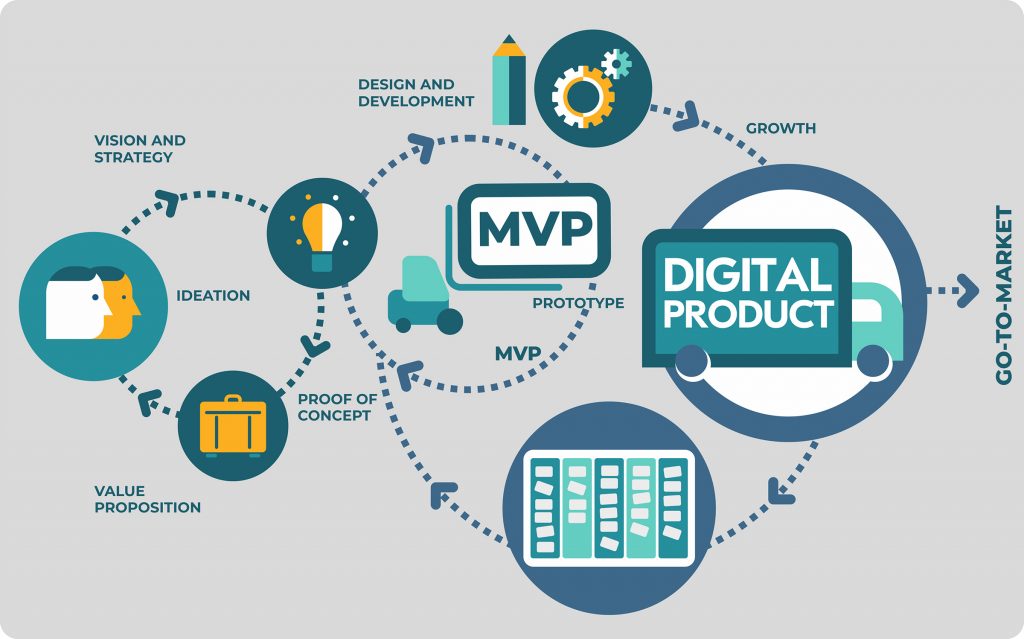
Discovery stage (from an idea to an MVP)

Discovery stage starts with an idea. You have a picture in mind about what you want, and the problems you want to solve. But you need to validate your hypothesis.

You need to collect and analyze information about your end users, and their problem areas. You need to get an in-depth understanding of their goals, and challenges that might arise in implementation.

User research in this phase is required to validate those product ideas/hypotheses. When user research is done right, it helps in gathering valuable feedback on the ideas and saves precious time from building unwanted features.

Growth and maturity stage (from MVP to a full-fledged product)  

The growth/maturity stage of the product is when the MVP is already launched in the market and people have already started using the product. The product/service has got enough traction and is on the verge of getting popular.

At this stage, user research is required to understand how users are interacting with the product– are they satisfied with the product, what more would they like to be included, how would they rate the product, where do they feel stuck while using the product, etc.

Good user research helps in iterating over the existing product to build new features, improve existing ones or remove unpopular features. It also helps in getting feedback on the existing features on the product.

Implementing user research in the discovery stage, one can visualize the real pain points of users and build a product that solves users’ problems.

In post-launch user research, one can see how users use a product and what are the gaps that prevent them from accomplishing their goals.

There are different user research methods for each stage. So, first, let’s see the whole spectrum of methods that are available.

A landscape of user research methods

Nielsen Norman Group has conceptualized a variety of user research methods. I’ll be talking about the most common ones used by Product Managers/Design Leaders.

If you want to understand user’s attitude or what users say, then most common methods are-

Surveys :- They consist of a series of questions which give you quantitative information from a large sample set.  It can be used for both validating a hypothesis or gathering feedback from users. Therefore, surveys can be used in both discovery and post launch stages.

User interviews:- They are one-on-one discussions with users to gather qualitative information. Interviews are usually conducted in a small sample set.

They can be used in various ways – exploration to discover the pain points of the users, discovering new ideas for products/features, to test a hypothesis or to know the likes or dislikes of a user.

User interviews can also be used in both discovery and post launch stages.

Contextual inquiries:- In these sessions, users are observed as they perform tasks in their natural environment. This is a method to gather first hand information from the users. In other methods, you only listen as the user tells how he/she performs a certain task. In this, you can observe the user doing these tasks.

This method can also be used in both discovery and post launch stages.

In the discovery phase, one can observe the end users of the product in their environment while they work. This could give insights on what is repetitive in nature and how technology can remove those brainless iterations.

In the post launch stage, we can observe the end user using the MVP and observe where users get stuck or what are the blockers for them. Is there something which is manual and can be easily automated to make users’ life easy?

User feedback:- In user feedback, users give their opinion on the product. This is typically gathered through a link, feedback form, recommend button, etc. One example of gathering user feedback is through Net Promoter Score (NPS) which is a form of user feedback used to know whether a user would want to recommend the product to others.

This is done in the post launch stage of the product in order to improve the existing features.

All of the above methods help build empathy with the users and understand their attitude, likes/dislikes towards product usage.

If you want to understand what people do or how people use your product (also called as usability of the product), then most common research methods are-

A/B Testing :- It’s a quantitative method that allows you to compare two versions of a product and figure out which one works better. It’s used in making incremental changes in a product. There are tools available that allow you to run 2 versions of the same thing. 50% of the users will see one version and another 50% will see another version. Therefore, with A/B testing you could experiment with headlines, button texts or two layouts of the same page.

A/B testing can be used only in the post launch stage of the product.

Eye tracking/Heat maps:- Heat maps allow you to evaluate which sections of the website or app users engage with the most. There are many tools available that allow you to track how users engage with a hyperlink, button, or in what pattern they read the content. This kind of study is very critical to understand what users really care about and what attracts their attention.

It can also be used for the post launch stage of the product.

A case study

To help you understand how research methods vary in different product development stages, let’s take an example of a hypothetical product.

We want to build a virtual mental-health helpline that would help people seek support for disorders like anxiety, depression, etc. This helpline is especially targeted for those who are bearing the brunt of the pandemic and are unable to go out and seek clinical help. Let’s call our hypothetical product –  “Lumos Solem”. (Lumos Solem is the incantation of a Harry Potter spell that produces a blinding flash of sunlight)

In the discovery stage

As a product owner/manager, we would first need answers to some basic questions to validate the idea.

  • Would users be comfortable in using SMS/video to share their problems?
  • How comfortable would the users be in a virtual setup?
  • Who would be my target audience? What age, demographics?
  • What are the most common mental health problems that the helpline would address?
  • Should we get experts on onboard? Who would talk to the people seeking help?
  • Would people get a choice on who they want to talk to? Or will there be an automatic redirection to the first available person?
Digital Product Development | Railsware Blog

At this stage the user research methods that one can use to get answers to above questions can be–

  1. Surveys
  2. Interviews

For conducting the survey–

  1. Define the objective of the survey
    • In our case, it could be “To understand the user behaviour towards a virtual mental health platform”
  2. Identify the target audience and the sample size you need
    • In our case, an example of the target audience could be the most vulnerable  age group – 30- 80 age group and living in metro cities. Sample size can be a mix of middle aged and senior citizens.
  3. Frame the questions in an open and non-leading manner to gather the maximum insights without bias. Questions for Lumos Solem could be –
    • What does mental and emotional health mean to you in your everyday dialogue?
    • Do you feel the urge to talk to someone and just blurt things out to lighten your head? If yes, then what kind of communication could help you in expressing your thoughts?
    • What kind of answers do you seek in your daily routine which affects your mental or emotional wellbeing?Make the answers as multi-choice so that analysis is easier.

After that carry out the survey using any available tool like Google Forms and analyze the data to derive insights. This will help validate the hypothesis we assumed.

For interviews, follow the same steps as above. The only difference here would be to make a rough script, inform the participants the purpose of the discussion.

In growth and maturity stage

Let’s suppose Lumos Solem is in the market and we’ve started getting our innovators & early adopters on the platform.

Now it’s the time to build/remove features and collect analytical data using usability tests. In the post-MVP stage you can ask questions like-

  1. Analytics shows that users are dropping at the onboarding. Why?
  2. Those users who get past user-onboarding, drop off at the payment link. What can we do to retain them?

The user research methods that one can use to get answers to above questions can be–

Feedback form:- Feedback form after every virtual session can help you collect useful information about the quality of interaction. It can be for both mental-health experts as well as the users. This will give users a chance to share what they like or dislike about the service. You are also likely to discover blind spots like technical glitches hampering the quality of conversations, etc.

A/B testing:- If consultation with health experts is paid, you can experiment with the wording of the payment link. The idea is to make users trust in the process. If users are dropping off at the payment link, then you can A/B test the features of Pay now/Pay Later and see if they stay when given an option to pay later.

Heatmaps:- Heatmaps can be used to see what common problems people look for in FAQs. The area where heatmap is densely colored will indicate that users are most interested in reading about a particular topic. This data will help you refine your features so that users can find it easier to accomplish their tasks.

User interviews:- Conducting 1:1 user interviews with experts and users can also help in understanding the problems they are facing in a virtual helpline. At times, people hesitate in sharing their opinion in written format but are more vocal about sharing it in person. In such cases, user interviews come handy.

To conclude,  each user research method has its advantages and disadvantages. The choice of the method will be based on the nature of the product, stage of the product, the users and the answers you’re looking for.

There is a difference between what users say/think and what users do. If you want to know what users say then surveys, interviews and contextual inquiries are suitable to get the information. But if you want to know what users actually do then methods like A/B testing and heat maps are helpful.

I hope I was able to pass on some clarity of which methods to use during a particular product development stage.


The ‘When’ of Unit Testing & GUI Testing

Software Testing is the process of verifying and validating if the software which we have built is working as per expectations. A software tester should have the intent to find defects and make sure that the application is working properly. In order to achieve this, different test techniques such as automation testing, performance testing, unit testing are used. As GUIs are critical components of today’s software, there is more emphasis on GUI testing.
Unit Testing or GUI Testing- When should you use what? | Humble Bits

A lot of people are automating their web applications. This is definitely a good thing for testing per se. But what happens is that they focus more on the tools rather than the testing.

Why is that a problem? Because testing of a web application shouldn’t be done through just the graphic user interface (GUI). Instead, the application should be thoroughly tested using unit testing as well. GUI tests tend to be slower and more fragile. Through unit testing, we can reduce the time effectively both in writing and execution of test cases. Also, there will be less chance of missing functional test cases which are to be executed as the focus will only be on the functionality in Unit Tests, whereas in GUI testing the focus is more on the integration of the functionalities.

An example of something that could be tested using unit tests is the Textbox validation. Data is entered in String format in the application. The logic that validates whether it is following all the validation applied should probably be a unit test. There will be some code that receives a String or something similar and returns true or false. There will be another unit test which will receive some numerical value and return true or false.

Unit testing aims to test small portions of your code (individual classes/methods) in isolation from the rest of the application which provides more focus on the functionality testing.

The concat method below accepts a boolean value as input and appends the two strings passed in only if the boolean value is true:

Here, if I try to test the same functionality by GUI, I would need to enter two different Strings in different text boxes e.g. text boxes for First Name and Last Name in any application and verify on some other page after navigating that the name after concatenation is displayed correctly. With a tool such as selenium, it would take much longer to write a simple test case to verify the above scenario.

However, some functionalities should only be tested through the user interface. GUI testing may consist of system/ functional/acceptance testing, where the whole system can be tested together to ensure it does what it is supposed to do under real-life circumstances.

In such cases, it is valuable to separate responsibilities. Selenium is not just a tool for verification but also allows navigation using an actual browser. Verification should be done using other tools. They include unit testing frameworks or BDD frameworks. Being a Quality Engineer I prefer to use Cucumber. It depends on the application and its usability.

Separating navigation from verification is one way to understand the problem. It leads to a methodology known as the Page Object Pattern. This means that using that page object makes it easier to adhere to the Single Responsibility Principle, SRP. Using page objects save a lot of problems when the layout, not the logic, is changed in a web application.

What is a page object?

It is a class that abstracts away interaction with a web page. An example could be entering values in a form and submitting it. The methods in the page object know the name of different widgets so the user can work at a higher abstraction level. Instead of working on the level send-keys to web element, the user can say, “buy three different types of Headphones” and not care about how the widget that is used is located in the code.

Instead of mixing the verification code and navigation code, the test writer is able to focus on the expected behavior and nothing else.

Unit tests are meant to be small, fast, encapsulated tools to test classes and methods in isolation. They don’t test what happens to your application under real-world conditions. How does your app behave under Windows 2000, Windows 8, Windows 10, Mac, Linux? What happens to your server when 10 or 1000 users access it simultaneously? How about the same test with 6 years of data on 70,000 accounts?

You know the answer- functional testing via the user interface is usually the most effective way to broaden the scope and depth of your testing to include real-world scenarios which integrate all the components of your application system, while unit tests are used to check whether units of applications are working as per design and handling error and exception more neatly. Both positive and negative conditions should handle properly.

Design ‘THE’ Patient Engagement

If you ask patients what is their biggest gripe with healthcare services, you’ll hear a lot of common responses– doctors’ indifference to patient’s problems, privacy during illness and treatment, more waiting times during hospital visits, and so on. But if you turn the tables on doctors and ask their biggest gripe with patients, you’ll get answers like lack of adherence to medication, failure to understand the implications of not following medical advice, missing regular checkups, and so on.

Digital healthcare applications that try to solve these problems (and fail) fall behind in understanding that they’re missing an important link- effective patient engagement.

When patients lack an understanding of ‘why’ of the treatment, they are less likely to follow it. They underestimate their own role in the recovery process which ultimately jeopardizes their health. For instance– if a person is on his weight-loss journey, then lack of information around how long will the program run, when would he start seeing results, how often he has to measure his vital stats, what would he achieve after 3-months of rigorous diet, prove to be demotivating.

Engaging actively with the patients is the only way to keep them motivated through the journey– whether it’s healing from a chronic illness or transformation into a new lifestyle. This is where we need to take action and design a holistic patient engagement solution.

So, what is patient engagement and how can we make it better?

Patient engagement is the communication that happens between the patients/users and healthcare services providers (doctors, insurance providers, pharmacy). To make patient engagement better, we need to design the app in a way that there is an active indulgence from patients’ side. We need to transform their experience in a manner so that they can take the leap from a passive care recipient to an active participant. We need to engage them with defined roles and responsibilities.

Don’t get me wrong. I don’t intend to say that we should offload all the responsibilities from the provider. My point is that we need to hold patients accountable for the outcomes and empower them to have the best health outcomes possible. To make patients adhere to the treatment and keep them engaged during the interactions certain aspects need to be kept in mind while designing the UI.

Invest time in user research


10 Signs It's Time to Invest in UX Research in 2021 | PlaybookUX

Healthcare is a vast and complex domain. There are many diseases and multiple ways to treat those diseases. The challenges are a mix of known unknowns and unknown unknowns. So, it is important to understand the market and the users.

To design a great patient experience, start at the beginning. Invest time in the discovery phase. Research various aspects of the problem statement. Understand the user demographics, what problems they face, and what solutions they imagine. After you have a first version ready, roll it out in the market to a limited target audience. Observe how the innovators and the early adopters receive it and gradually start including the rest of the audience.

Go beyond the happy scenarios

8 Best Customer Service Practices Every Company Should Adopt | CommBox

Healthcare organizations/service providers collect feedback from patients in the form of surveys and interviews and use them to form opinions– how was their experience with the doctor, how satisfied they feel with the treatment, and so on.

But often they miss out on collecting feedback on other aspects, such as– how much time did they spend in the waiting room, how easy/difficult it was for them to book an appointment, did they receive the right information on appointment rescheduling and so on.

To design a better patient engagement, think holistically and include all the touchpoints where the patients can get stuck or feel helpless. We need to design an experience that holds patients’ hands throughout their user journey.

The earlier example I shared is for an appointment booking system, but you can apply it to any healthcare product– be it pharmacy management or insurance management. Look for areas where your users face resistance in sharing their problems.

For instance- consider an insurance management application that allows people to purchase and renew their insurance. The happy scenario would be users buying the insurance as per their requirement. But we can think beyond that. What if we can inform and motivate users to fill in as much details about their health to book an insurance that suits their requirements.

 Make data security a priority

Data protection priorities differ, only 46% of leaders review cybersecurity: Study - The Economic Times


Technology is changing the way people perceive healthcare. But one thing hasn’t changed– concern over data protection and privacy. Healthcare products and digital apps carry lots of sensitive and confidential information that is prone to theft and misuse. This is why designing healthcare products is more complex than other digital applications.

But designing with an extra layer of security and privacy regulations makes products difficult to use and complex to understand. To design better patient engagement, think about the concerns of your users. Design your solutions while following safety protocols and compliance standards.

In addition to that, convey the security measures you’ve implemented to the users. When users understand that the application is safe and trustworthy, their engagement levels improve.

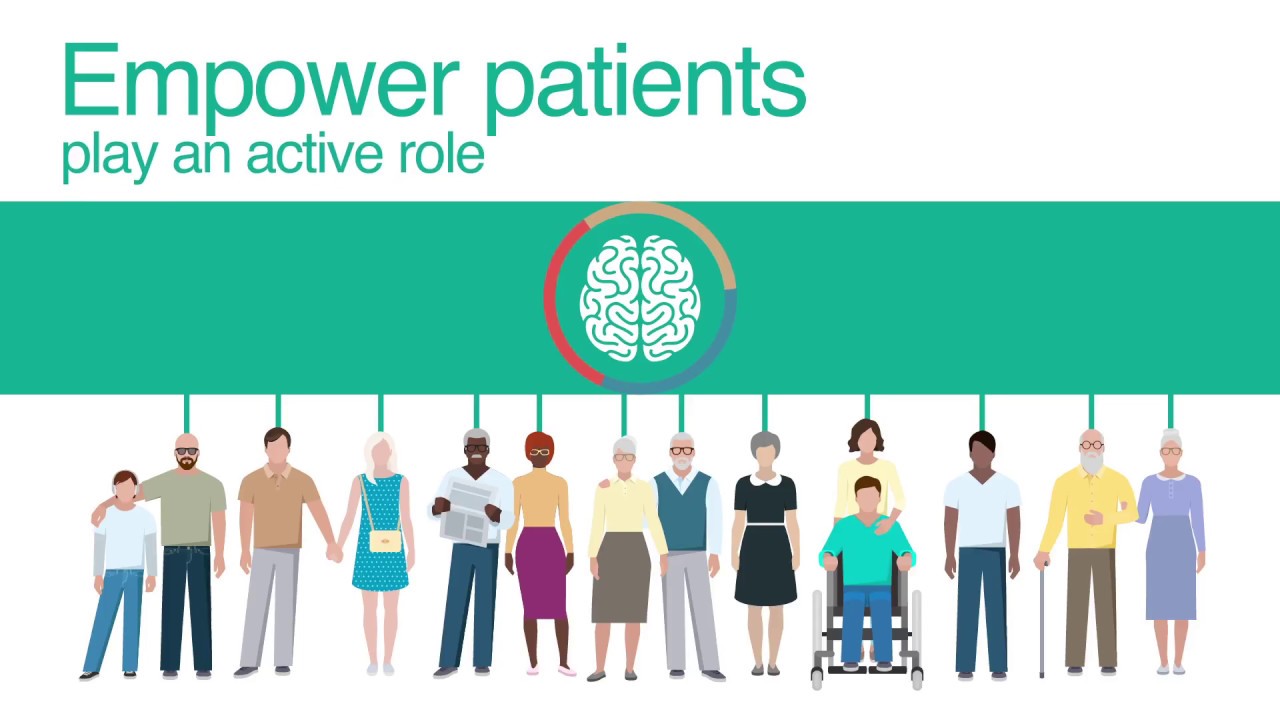
Empower patients to play an active role

i-PROGNOSIS: Intelligent Parkinson's early detection guiding novel supportive interventions - YouTube

Most patients lack understanding of their ailments which reduces their involvement in the treatment and decision-making process. The solution is effective patient education through multiple mediums so that they can select the medium as per their convenience and get a better understanding about their disease and the ongoing treatment.

Whether it’s patients or caregivers, empower them to play a key role in helping themselves/their family members, by teaching them how a given treatment is relevant. Patient engagement improves when users are educated, informed and onboarded in the process. This helps patients to be at the driver seat of their treatment.

Another way to empower patients is to provide them coordinated, accessible and customized information that suits their requirements. An example of this could  be- if they receive a push notification of reminder about renewal of their insurance policy, integrate it with the system that allows them to renew it right at that moment.

Practice empathy

How to Be More Empathetic - A Year of Living Better Guides - The New York Times

Every patient is different. Some are happy with new advancements in healthcare and are ready to try emerging technologies like AI, robotics to take charge of their health. Whereas, others are still hesitant in adopting new ways of treatment. Especially elderly and people with disabilities.

To offer better patient engagement to them, indulge with them in the traditional way. For example- an elderly having early signs of Parkinson’s disease might not feel comfortable in interacting with a virtual nurse assistant. There are two ways to help them- either you find a way to help them come out of their comfort zone or you offer help the traditional way, i.e. setting up an in-house visit.

Practice empathy to experience what they feel and go through every day. Support them in their journeys to enable better long-term treatment outcomes.

Enable communication

Using Shared Decision-Making to Improve Patient Engagement

Communication is a very important aspect to keep the patient adhere to the treatment. When patients go through a treatment, they have numerous questions in their mind. A good patient experience is when every question is answered. So, there should be a way where users can ask their questions and get answers.

To enable unhindered communication, an application must have a community where everyone keeps posting their queries and gets motivated by each other. In urgency, the patient should be able to connect with the support staff too for any assistance.

Make information accessible

The Technology of Making Your Business More Accessible - InfiniGEEK

It is very challenging for the patient and doctors to manage and remember every detail of the patient. So the system should be designed in such a way that it makes managing the clinical history of the patient easier. The doctor should be easily able to access the information from different patient care-related venues.

Deep dive into analytics

Adopting AI: Telecom industry takes a deep dive into data analytics -

Launching an application is never enough. One must look at the data and understand what’s working, what can be improved and what has failed. Patient engagement can be greatly improved if we care enough for the data and take action on improving the shortcomings. For example- analytics shows that most users drop at the payment CTA for booking an online appointment. This information can help us improve the payment flow. We can ask questions like- can we reduce the number of steps for payment, what security measures can we add in the payment gateway so that users can trust it, and so on.

Google’s HEART framework can also be used to measure task success in healthcare products.

H defines happiness which indicates if the patients and physicians are finding the app useful and easy to use.

defines engagement which shows if the patients and doctors are using the application to its fullest and are adhering to the treatment.

A defines adoption which shows how many users are signing-up for it and adopting the new features.

R defines retention which indicates if users are coming back to manage their appointments, refills, reminders, schedule.

T defines task completion which shows if patients and doctors are able to complete their tasks easily.

Using all these parameters, one can extract valuable information and use it to improve patient engagement.


Improving patient engagement is not a quick fix that one can do merely by desiring it. You have to do the hard work to understand the patient, interact with them and have an empathetic approach to understand their world view. A good patient experience improves engagement levels and is directly linked to the success of the application.

Your Guide to API testing: Postman, Newman & Jenkins

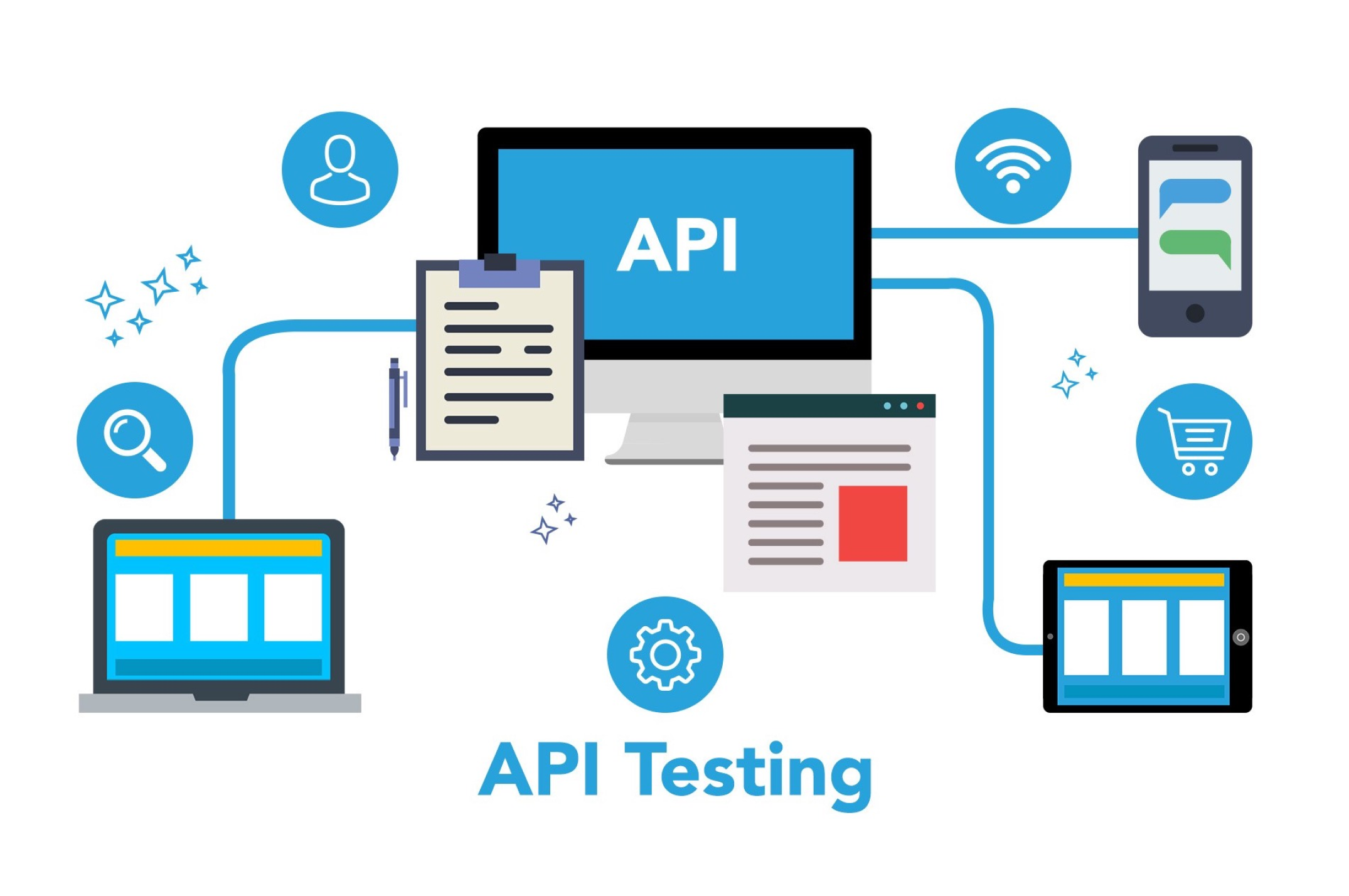
API testing is a type of software testing wherein an engineer tests not just the functionality but performance, reliability and security for an application. APIs are tested to examine if the application would work the way it is expected to, as APIs are the core of an application’s functionalities.

What Is API Testing?

API testing during development can reveal issues with API, server, other services, network and more, those which one may not discover or solve easily after deployment.

However, testing APIs is difficult. Instead of just verifying an endpoint’s response, one can have integration tests with Postman to examine and validate the responses. Teams these days may also want to automate running these tests as soon as a deployment is done. One approach we can take is to have our integration tests run every time a developer checks in code to the repo.

Adding this layer of Quality check, can ensure that the existing functionalities still work the way they were expected to, with an additional benefit for the developers to validate that their code is doing exactly what it was intended to.

Tools for API test automation in CI

CI refers to continuous integration. Integration of test scripts and a test tool with the continuous build system where the test scripts can be run along with every new deployment or on a regular basis (daily, weekly or fortnightly)

  1. Postman: Integration tests with Postman.
  2. Newman: Create a PowerShell file that runs these integration tests via command line.
  3. Jenkins: Add a Post Build step in Jenkins to execute the PowerShell script whenever a build is initiated.

How to use Postman with Newman & Jenkins for Continuous Integration


API Selection

I have implemented this procedure in our Project using the GPS APIs, but for instantiating here, let’s take up the following APIs:

Open Weather Map: Free public APIs.

I chose this as it is a free collection of APIs that anyone can subscribe to and have their own API keys to operate with.

Create Integration Tests

For the first test, let’s take up a simple GET request to get Weather by ID. To interact through the APIs, make sure to use the API key received on subscribing to the OWM services.

Steps to First Integration Test

Make an environment on Postman say, ‘Weather Map’ and define the environment variables in it. [Refer ‘Managing environments’].

Add the Prerequisites in the Pre-Req tab to set up the test.

Collections

Like the above API tests, one can have multiple test scripts for multiple endpoints. And these multiple test scripts can be run in sequence to have an end to end test suite. The way to have a test suite is to keep multiple test scripts in a place holder called as a Collection in Postman.

These collections can then further be executed through the collection runner in the tool.

Collection Runner

A collection runner can be used to have a collection of API endpoints with their test scripts at one place and therefore run them one by one in a sequential manner. The user just needs to run the collection just once with all the required test data, test scripts and for as many iterations one may want. The result of the collection run is a test report, comprehensive enough to monitor the performance of the APIs and also to re-try running the failed test scripts.

For elaborate study on Collection Runners, refer Link.

Though the user interface of Postman’s collection runner is good enough, yet, to integrate the system with Jenkins, we need to run our collections via command line. So, a way to run collections via the command line is through Newman.

Newman

Newman is a Node Package Manager (NPM) package that permits us to run and test collections directly from the command line.

Pre-requisites:

  • NodeJS and
  • NPM already installed.

Commands to be run on Windows Powershell

  • node -v [to verify the version of NodeJs installed]
  • npm -v [to verify the version of NPM installed]
  • $npm install -g newman [to install Newman]

Once the required installations are done, one needs to have his collections and Environment exported to JSON files in the local system. These files can then be passed as arguments to Newman.

Steps to get the environment and collections on the local system:

  • Click on the Download and Export button in Postman.
  • Download the collection
  • Download the environment
  • Open command prompt and raise your privileges. This is important for you to execute the script.

Adding Postman Tests to Jenkins

Testing REST APIs with Newman | R-bloggers

We first need to export our Postman files (Environment and Collections) and add them to GIT, along with our Powershell script to run the tests through Jenkins build.

“Add the Postman files to the root of the project.”

Telling Jenkins to run Newman

For this we write a script that calls Newman and passes it the Environment and Collection JSON files.

–  ‘exit $LASTEXITCODE’: On typing this command, you will see the result of the last command. We do this to make sure that on every loop, the Newman command is successful. If any of the tests fail, we have to stop the script and exit 1. It will result in a failed build on Jenkins.

Adding Script to Jenkins

Steps:

  • Login to Jenkins and create a Freestyle Project.
  • Start by configuring this project to pull your repo code from Git.
  • In the General Tab, go to build section

Running the build and monitoring Results

Try running the project and examine the results.

One can make out successful entrance into the powershell script with the statement ‘Inside Powershell script’ in the Jenkins output.

Conclusion

Improving continuous integration utilizing Postman, Newman and Jenkins adds another layer of quality assurance into our development life cycle. While this is a huge step in automation, we need to emphasize on the fact that our test coverage depends on the quality of our test scripts.

A Digital Divide has emerged as a result of Remote Working

Coronavirus reveals need to bridge the digital divide | UNCTAD

Like many others, my family and I have done our best to enjoy the unexpectedly large amount of time we have together at home due to social distancing guidelines. Adjusting to the new normal, we have relied heavily on Internet access not only for work and school, but to stay sane and keep the peace. My wife and I both continue to work from home, frequently videoconferencing and collaborating with colleagues. The kids finished the school year online and now they are starting the new school year with a mixed arrangement of physical and virtual learning. Many hours of streaming video have been consumed. This isn’t an experience we want to repeat, but I believe it would have been far more difficult and stressful if we lacked the connectivity needed to remain productive, informed, and entertained during these times. Without that high-speed connection to the digital realm, this experience would feel more like we were stranded in a country where we didn’t speak the language — surrounded by activity yet unable to participate. It would create the very real feeling of “looking in from the outside.” The rapid onset of social distancing or stay-at-home measures has created just this feeling for a large number of people. Across the world, many people were suddenly thrust into unfamiliar remote working situations. And with the global percentage of households connected to the internet at only 55%, many organizations, in turn, discovered a digital divide that needed to be bridged for some employees. For example, some companies successfully stood up the infrastructure and processes necessary to support new remote capabilities, only to find that some of their employees lacked the connectivity or technological proficiency to be productive remote workers.

These current circumstances have placed the digital divide –not always apparent to many companies previously — into sharp relief. They’ve shown that digital life skills and work skills – not to mention the access to technology and connectivity needed to enable those skills — are as essential to us now as hunting and horseback riding were to our ancestors. Like STEM education, an emphasis on digital skill-building could help many people be more productive and could provide them a better work environment, more income, and a brighter future.

Infrastructure and processes to bridge the digital divide

Other related questions around remote work abound, especially in terms of corporate infrastructure. Would employees be able to use devices they already owned to perform their jobs, or would they need to be supplied with equipment? Where would that come from and how would it be prepared to access corporate data? And many were unprepared and unsure if their network was up to the task when demand suddenly shifted from inside the enterprise to requests from remote workers.

Processes were another big issue. In addition to addressing where we work, enterprises have had to consider how we work. What tasks does a company perform that must continue and could those be adapted for remote access? For some, the work needed to turn this into a distributed, remote work process was well documented. Team-oriented jobs, however, required more reengineering and may not have been as well defined.

Remote working: temporary or permanent?

The future of work: How technology enables remote employees

Over the past few months, we have been helping our global enterprise customers adopt to this new environment and discussing the future of workplace. Many are debating whether remote work is a temporary fix or a permanent shift. In every case, I’m sure they will be reflecting on this experience and its challenges – and the digital divide in particular – to help them improve their resilience and that of their employees. These lessons will heavily influence the investments they make going forward in all areas of technology, training and business process reengineering.

Product Development: Cruciality of decisions & risk log

If you are a product manager you would have experienced at least one of the below scenarios.Scenario 1: During a meeting with partners (we refer to our clients as partners), a conflict surfaces while recalling the reasons for a particular decision in the past. You have one version of the story while the partner remembers an altogether different version or, worse, doesn’t remember anything about the decision.Scenario 2 : A new team member joins the team. During a discussion, he/she asks “why are we doing it this way” and you go blank. You need time to recollect your thoughts to give the right answer.

Scenario 3: Before starting the project, you identify risks that might arise during the development phase. Your partners ignore it and give you a go-ahead. Months later, when you start facing technical issues and convey it to them, your partners don’t remember the conversation you had at the beginning of the project.

Scenario 4: During knowledge transition sessions, you share everything that you know about the product’s development history. But you fail to remember when and why this decision came into existence. It’s difficult to recollect exact conversations that led you to take this decision. It’s all in the email threads but even those emails are hard to find.

Do you feel deja-vu reading the above scenarios?

I do. I have lost count of the times I’ve faced these scenarios. I am sure you would have faced them too sometime in your career. It’s not that I haven’t tried anything to overcome these challenges. I have tried different things apart from discussing over calls with our clients/partners-

  • Mentioning all the important decisions in emails
  • Mentioning all risks in the initial proposal
  • Mentioning new risks in the emails as they come
  • Sending MoMs with a defined structure- discussions, decisions, action items
  • For any kind of technical decision, attaching an analysis document in the respective JIRA ticket and adding a comment with the final takeaway.

But, the truth is, as the product grows and the team expands, searching emails for MoMs and referring to JIRA tickets doesn’t make the cut.

Especially if you are working on a big project that goes on for years. After a time, recovering JIRA tickets and long email threads feels like digging the Earth for a dead body. I myself have faced this while recalling why we decided using Inspectlet over Fullstory? Or, why did we decide to push the MVP deadline?

So, what’s the solution?

When I started looking for a solution to this problem, I discovered that I am not alone. A lot of PMs face this problem. Thankfully, there’s a solution to tackle this problem. A product manager can maintain registers/logs for a product that can help him/her remember important product decisions. These two logs are-

  1. Decision log
  2. Risk log

Decision log

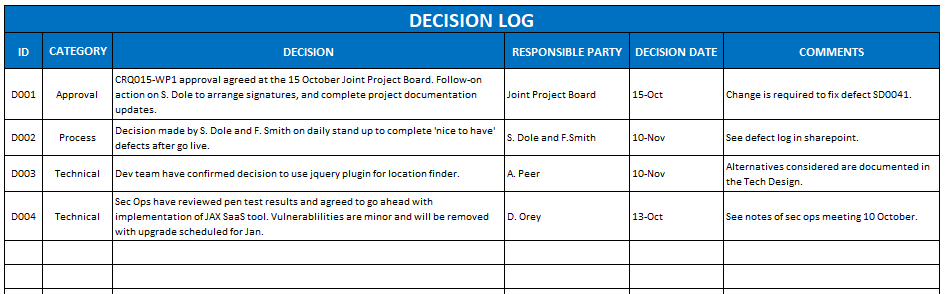
A decision log is a centralized list of all critical decisions taken throughout the product’s life cycle. It can be a business decision impacting the delivery, a technical decision, a process decision or a people decision.

This helps in effective communication in the present and then in future for recall times in conflicting situations.

Decision Log Template | FREE Download

What goes inside a decision log?

  • What is the decision about?
  • When was the decision made? (Date)
  • Why this decision? Pros and cons, if any.
  • Who are the contributors? Who is the approver?
  • Outcome of the decision?
  • When the decision was proposed?

Risk Log

It would be a centralized list of all potential risks and issues identified throughout the product life cycle. This includes all the information of the identified risk – nature of risk, level of risk, mitigation etc.

Many times, we maintain the product risk log for internal purposes only. But, keeping it open with all stakeholders really helps.

How do I create and use a Risk Log?

What goes inside a risk log?

  • What is the actual risk?
  • What is the impact of the risk?
  • When was this risk identified?
  • What is the impact level?
  • What is the probability level? (PB Level)
  • Priority level (PR level) = Impact level * Probability level  (PB Level)
  • Who is the owner?
  • Are there any mitigation notes?
  • What are the recent updates?

When to list a risk?

All the risks should be identified and communicated to the stakeholders using the Risk Log itself right at the beginning.

After that, risk identification should be a recurring activity. You can make it a part of your sprint rituals – sprint planning, retrospective or even in your daily scrum meetings.

Risks can be identified by anyone – Stakeholders, Leads, PMs, Designer, QAs or Developers.

Just as in decision log, a risk’s priority could change in future or a risk could become an issue (i.e. already occurred). You can read about Risks vs Issues. Hence, at a given time the risk register should show the updated risk information.

Also, once the risk becomes an issue it can go to the Issue Log which is the same as Risk Log and usually kept in parallel.

In short, maintaining Decision and Risk logs in your product might be an additional task for you in the starting. But, once it becomes a part of your process, it really proves beneficial in the long run. You can use it to-

  • Keep everyone on the same page.
  • Save time in debating/recalling the reasons for a particular decision.
  • Avoid “We told you so” situations that become the root cause of conflicts..

7 virtual onboarding practices in the new normal

One of my ex-colleagues left her job to move to a new organization in Feb 2020. She worked in her new workplace for one month before the world shut down. Just like everyone, her entire organization shifted to remote. A few weeks into the lockdown, I called her to catch up. We talked about random things and she told me that she badly missed Anteelo– the people, the culture, and the feeling of oneness.It wasn’t that her current organization didn’t have a good culture. No. In fact, she was happy in her new role. Her peers were friendly, the work was challenging, and her leader was supportive. She just missed the camaraderie in her new workplace.

My friend is one of those rare people who kickstarts conversations, takes initiatives, and makes friends easily. But in the new organization, she felt limited by the barriers created by remote work. Before lockdown, she hardly got much time to bond with her colleagues and now in the lockdown, whenever she tried a new initiative, it crashed after leaving her circle of influence (which by the way was limited to her team). All of this despritied her.

And she isn’t alone.

The feeling of ‘I don’t have any friends at work’‘I still feel like a stranger in a foreign land’‘I don’t think anyone likes me here’, is quite common. And though, it’s normal to feel these emotions in the initial few months when people are settling in, but beyond that, they are a RED FLAG.

A dissatisfied new hire is like a person standing at the edge of a mountain. We can’t let them slip.

One of the solutions to tackle this problem is to spend more time onboarding them — defining the relationship with the new hire sets the right foundation.

A good onboarding practice ensures that the new hire is aligned with the vision of the organization and has enough resources and support to wade through the nitty gritty of how things work in the organization. A good onboarding is like a first impression. If you get it right at the honeymoon phase, you’re likely to be together for a long time.

But all this was easy when a new hire joined in a physical workplace. The part where they met their peers, received a warm welcome at their desk, participated in onboarding rituals, all of this added a personal touch to their onboarding experience. If they had any concerns, they could easily reach out to people, or ask for help. Their problems were addressed in real-time, and were given importance (and precedence) over other regular day-tasks.

Those were old days. Sigh!

In the new world order, the physical distance has posed a new challenge to integrate the new hires into the organization’s soul. So how does one ensure that the new hires receive the same (or even better) virtual onboarding experience and feel welcomed.

I can share a few changes we made to Anteelo’ onboarding process. It’s not bullet-proof. But I like the fact that we acted fast and made changes well in time.

Interact with the new hires before they join


Hiring Process Steps for 2021 | SmartRecruiters

In the new normal, we started a new practice– after new hires accepted the offer to join the organization, we spent some time connecting with them informally. We shared our excitement about welcoming them in the team. We also gave them an overview of the project they’ll be working on and shared a little bit about the existing team members so that they knew whom they’ll be working with.

If you wish to imbibe this practice, you can add some extra elements like talking to them about their expectations, their feelings about joining your organization and so on. The idea is to make them comfortable and let them know you’re expecting them to join your tribe soon.

Involve the existing team members in the onboarding process

7 Mistakes to Avoid While Hiring Dedicated Development Team

In the old normal, team members were the first ones that got acquainted with the new joinee. The team was responsible for making sure they went together on lunch and coffee breaks and made the person comfortable.

In the virtual setup, none of this is possible. But that doesn’t mean that we shouldn’t make efforts to make the new hire feel welcomed. At Anteelo, we tackled this problem by taking turns on video calls and talking to the new team members on their first day. Every time a new Quant joined our team, we asked him/her about their day, and if they needed any help.

These are little things, and you might feel that you’re interrupting/disturbing the new person. But it’s the only way to ensure that he/she feels comfortable in the new setup.

Give them a virtual tour of your office

Accessibility in Agile Team Practices | Deque

We all are itching to go back to our cozy nook in the office, to feel the warmth of workplace vibes, to smile, greet, bump into each other. Imagine the enormity of this itch in new hires– how does my new workplace look, where would I sit when I join the office, would there be a coffee machine, a foosball table, a breakout area?

I bet there are other questions too that they go through in their mind while making the decision to switch. One of the solutions that we discovered is giving a virtual tour of the office through videos/photos. It not only settles their curiosity and piques their interest, but also helps build familiarity with the organization.

Retrospect on your onboarding kit

Is It Time to Fix Your Onboarding Process? | HRExecutive.com

Earlier our onboarding kit consisted of a laptop, a bag and a notebook. We thought of it as a whole because our other practices complemented the physical kit. We spent hours talking to the new hire– introducing them to everyone, aligning them to their peers, and being with them through every step of the onboarding.

This year, we asked ourselves– what else can we add in the virtual onboarding kit so that it brings a smile on their face? We wanted to keep the gesture small but impactful. So we designed a greeting card that welcomes the new team member and added a small potted plant in the virtual onboarding kit.

The card has a message to welcome them to our team. The potted plant is a gesture of how we wish to see them grow with us, just like the plant. It’s a small change, and we’re happy everyone likes it (so far).

Set up a central repository of resources

Recruitment Process - The Ultimate Guide to Hiring Top Talent | Jobsoid

The shift to the remote setup was abrupt. But, it made us realize the mistakes we were making earlier. We realized that it’s unfair to expect new people to remember everything. Going through all the information related to the organization in one go is exhausting.

So we made the shift to a digital setup by making a central repository of every information. Everything is now available on Zepplin — be it leave guidelines, WFH manual or core values of our organization. We let our new team members be the owner of how, when and through what medium they want to access information.

Engage with them regularly

What is Customer Engagement? A Complete Guide

A regular practice to engage with new team members is to give them a stack of PDFs, videos, and presentations about the organization. It’s easy to consider that the new team member will find what they need from this Pandora box of information.

We made a shift in our mindset. We started engaging with our new team members regularly through weekly, monthly 1:1s and began asking them how it was going. By making them participate in pop quizzes and activities around our practices and vision, we eased out their familiarity with the organization.

Couple them with a work-buddy

The Dos and Donts of Onboarding New Employees in a Call Center

A buddy at work is like a friend who can steer you through a freshman party and help you make new friends. At Anteelo, we always had the buddy system. In the remote setup, being a buddy to a new hire turned out to be an even bigger responsibility.

So we tweaked the guidelines a bit and motivated the work-buddy to be more open, approachable, and proactive in their conversations with the new Quant.

Apart from these virtual onboarding practices, you can even leverage social media to your advantage. By welcoming people on your social media platforms, introducing them in your network, you send them a message that you’re welcoming them wholeheartedly.

Good onboarding practices help you retain the talent for a much longer period. So, make sure a new hire’s first few months are positive and productive.
Blockchain Technology Revolutionizing Mobile App Economy

How to Start a Career in Blockchain Technology

Blockchain technology is progressively taking over the business world. The technology was once considered to be confined to bitcoins. But with time, it has proved that bitcoin is just the tip of the iceberg; the potential of the technology is beyond decentralized transactions and even our expectations. Blockchain technology revamped several industries, including Real Estate, Healthcare, Education, and Legal industry to name a few. It opened new doors of opportunities and profit for the entrepreneurs and established brands. However, the most surprising application of Blockchain is in the mobile app economy.

Wondering what is the need of Blockchain technology in the mobile industry? How can Blockchain revolutionize the world of mobile applications?

The mobile economy is undoubtedly growing rapidly and is expected to be of worth $6.3 trillion by 2021. The app stores are jammed with millions of apps and both the app developers and users are getting access to better facilities. However, despite this exponential growth and technological innovations, the mobile application development economy is still facing various issues which cannot be overlooked.

Major Mobile Economy Concerns and How Blockchain Technology Can Solve Them

Alike other centralized systems, the mobile economy also involves various intermediaries between the mobile app developers and users. These entities help in discovery, distribution, and financial transactions but at the same time, deters transparency. As a result, we face situations like security threats, inaccessible in-app purchases, data leaks, and malware-plagued downloads which not only have an adverse impact on the user experience but also affect the mobile app performance and ROI.

As we saw in our Entrepreneur’s Guide to Blockchain, the technology, with its decentralized, distributed and secure ledger feature, has the potential to revamp the way app economy functions and make the end user experience seamless and enticing. If applied correctly, blockchain can tackle the following major concerns related to mobile app economy:

App Approval

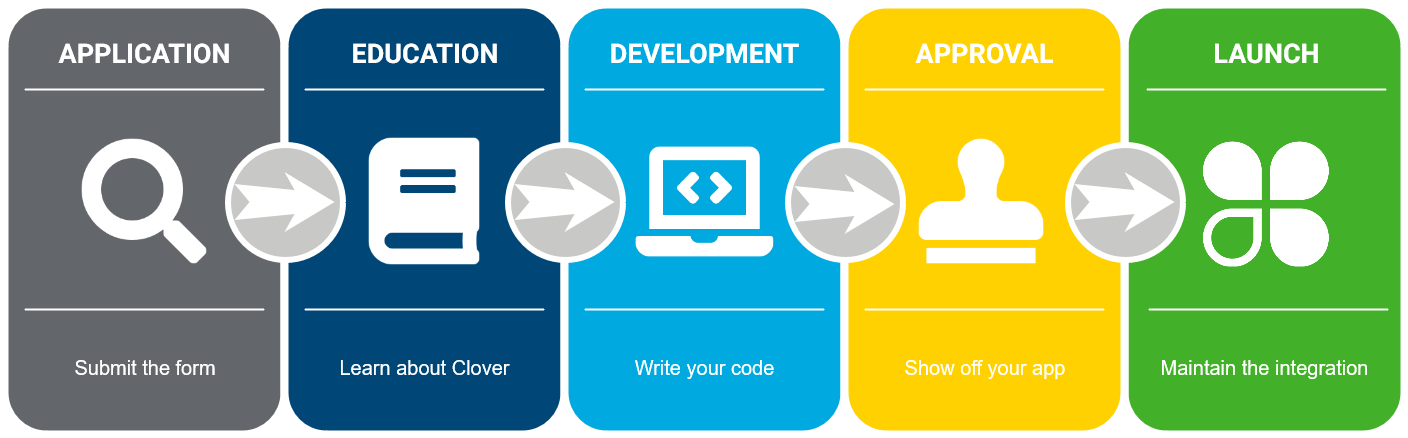
Integration development and approval process

With Google and Apple’s app store being the duopoly, the current app approval process is completely handled by them. They decide which mobile app will be published on their app store and which not, based on various non-transparent quality assurance processes and distribution policies. This not only makes the process cumbersome and time-consuming but also increases the confusion among mobile app developers in case of app rejection. On the flip side, less transparency app approval process raises the risk of distribution of malware-plagued apps by the users, and thus, lesser security in the app market. With the introduction of Blockchain technology into the process, the app approvals can be made universal and transparent through a developer reputation system. The reputation system will be directly linked to the financial transactions on the public ledger and will be available for investigation all the time (as you can see in the image below). Besides, various means will be employed for identity verification and users will be empowered to create rankings for the mobile app developers and the apps they create. This will streamline the app approval process and help the smartphone users take the decision of downloading the app based on the ranking (see the image below), which will ultimately build trust, enhance security, boost downloads, and uplift app revenue.

Advertising

Why You Need to Invest in Social Media Advertising

According to Statista, there are more than 2.8 million apps in Google Play Store and about 2.2 million apps in the Apple’s App Store. To reach the target audience and enjoy the limelight, the mobile app developers have to invest in CPI, i.e., Cost Per Installation campaigns. These campaigns are non-transparent and overpriced, which makes the situation shady and risky. Moreover, as you can see in the picture below, the profit gained by the mobile application developers from the advertising is divided and shared to middlemen because of which the developers get much lesser earnings than expected.

Blockchain technology can reinvent the advertising method by eliminating all the middlemen and establishing a new CPI campaign. Termed at CPA (Cost per attention), this campaign will let the mobile application developers directly reward the users for spending time on their mobile app (as you can see in the image below).

Blockchain technology, in the form of Smart contracts, will allow the developers to examine if the users spent required time on their app or not. Apart from this, the technology will let the users store their earnings in wallets and use to buy in-app items efficiently.

In-App Purchase

In-App Purchase - Apple Developer

A recent report by We Are Social and Hootsuite revealed that nearly two-thirds of the world’s population uses a smartphone now. However, only 2 billion of the mobile users have access to the payment methods that are necessary for in-app purchases. Apart from this, according to the traditional app in-app process system, the user pays to the app store, deal with the bank transfer fees, credit card fraud cases, circumstances of chargebacks, and so on. Then, the mobile app developer receives the payment from app store going through the same hassle. The consequence is that neither the end users are able to enjoy the perks of in-app purchase nor app developers are able to get the best out of their app monetization strategy (check the image below). Blockchain technology will let the mobile app users use and spend their CPAt reward even in the absence of credit card and other such payment solutions. In addition to this, the Blockchain will empower mobile application developers to get 85% instead of 70% of transaction value by eliminating the middlemen (as shown in the image below).

Other Applications of Blockchain in the Mobile Industry

Apart from solving the aforementioned concerns, blockchain technology will also generate new ways to streamline the mobile application development process and cater user needs significantly, such as:

Infrastructure Protection

Application Infrastructure Protection | Solutions | F5

By gathering DNS entries on a decentralized secure platform, the blockchain technology empowers the app developers to keep the whole domain records under their control – no one can alter the entries without their consent.

End of Passwords

The end of passwords – The New Economy

By investing in Blockchain app development, the app developers will be able to authenticate devices as well as users without asking for any password. Its network decentralization feature will help create consensus among the involved parties for the authentication of Blockchain based SSL certificates. This will ease the transaction process and again, boost trust among the two involved parties.

The Blockchain technology, though in its initial state now, will redefine the mobile app economy and offer the opportunities to the mobile app developers and users that they have been waiting years for. The technology will solve the three major concerns associated with the mobile economy, will build a trustable and transparent connection, and provide an open-standard platform where all could communicate and add value to the mobile world.

What can M-Commerce Apps do to Reduce Cart Abandonment Rate?

M-Commerce and Mobile Apps: Opportunities for SMEs

User privacy concerns and lengthy checkout processes often partake the accusation for high shopping cart abandonment rate of m-commerce apps. Whereas, the metrics on users consideration at different stages of virtual shopping, often skips the bare eye. In this read we will narrow down upon- What are the main reasons and how can m-commerce apps lower their cart abandonment rate?

Imagine you are at a shopping store. You pick all the stuff that you intend to buy, place it in your cart when suddenly your phone starts buzzing. It’s a call from your longtime friend. You lose focus from shopping, or rather forget about the shopping bucket altogether before you leave the store.

We all know that is very unlikely to happen in a brick and mortar store.

But for virtual shopping carts on mobile and web, this scenario is recurring,  common and obvious.

Even the slightest of interruption from calls, messages, notifications, or environment can make your buyers leave the cart without making an actual purchase.

Marketers must know that there is a reason for every cart abandoned!

13 Reasons for Shopping Cart Abandonment, and How to Fix Them

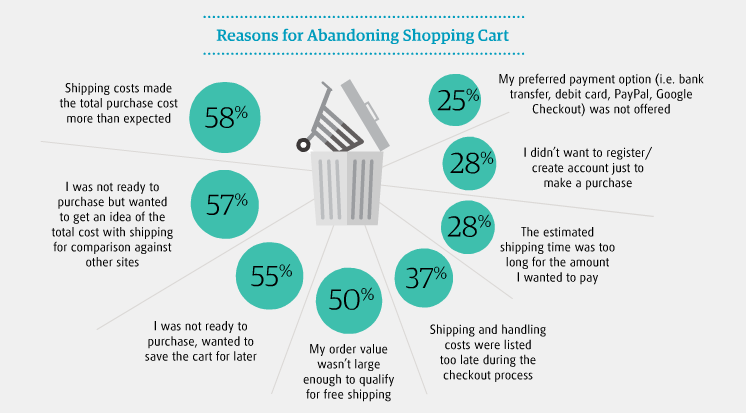
What are the major shopping cart abandonment reasons?  In an empirical study by Research Gate, we find the following cognitive and behavioral reasons for high shopping cart abandonment rate in 2019:

Fact: MasterCard and University of Oxford came together to hold a study in 2017 that reveals a drop in one-third of purchases is due to users forgetting their passwords. This leads to a common user preference of biometrics over passwords.

Statista Shopping Cart Abandonment Statistics:

Cart Abandonment Stats: Tackling Shopping Cart Abandonment in 2021

Shopping cart abandonment is the pain in the foot of every m-commerce or online retail store today. For vigilant marketers, they bring meaningful learnings about user behavior. You can try and turn your cart abandonment into key insights to restabilize all that is wrong with your marketing plan.

Let us look at the shopping cart abandonment Statistics 2019to see if there is a silver lining to this problem- A technique for every m-commerce app that needs shopping cart abandonment optimization.

So how to fix cart abandonment? One thing that is fairly evident is that a good conversion rate optimization approach can sustain and re-engage your audience to lower your cart abandonment rate.

How to convert abandoned carts? The Conversion rate Optimisation Approach

What if you choose to do nothing about the high cart abandonment rate?

You miss a lot of revenue and fail in conversions as your users continue to jump off the ship. On an average rate of cart abandonment is 68% for ecommerce retailers.

Everyone is looking for a quick fix to develop a customer base that keeps returning for more. The quest to recapture the lost value has become the food for thought, for many bloggers, marketers, entrepreneurs, and agencies.

We all are users at some point in our day.

Think like one! One technique to reduce shopping cart abandonment is to get the knack of your customer’s mind is to step in their shoes and generate your own perspective. What makes you snap back before you enter your cart details?

Make a list of these points just like we did to arrive at the main causes for effective abandonment cart strategy. While we took a generalists approach, you need the one specific to your business needs.

Many think of their mobile apps as currency vending machines, which they are not. Your mobile app is a platform that brings you an opportunity to develop a relationship with your customer, promote loyalty and leave a lasting impression in your heads.

1. Guest Checkout

Overview | Amazon Pay

Save your shoppers from new account fatigue. Allow them to make a purchase without creating and signing in to their user accounts.

Remember all those times when a paywall or overbearing request kept you from accessing the products on an app. Enabling guest checkout will let your customers browse through the products and share their details only when they are ready.

Understand and accept that the user wants to compare, assess and evaluate the value you offer against the purchase. Encourage users to sign up and log in once they ensure that you offer the maximum value.

In fact, the e-commerce market leaders like Amazon, Walmart, and others are already doing it. They all have a one-step checkout implementation option on their mobile apps.

2. Device optimization

The Complete Guide to YouTube Ads for Marketers

With smartphones taking over the internet, another thing you will like to consider is the device your customers are using to access your website.  Users spend about 15 hours a week on their smartphone browsing products on different m-commerce applications. Once the users set their eyes on a product about 45% switch to their laptops or tablets to make the purchase.

Make the mobile-responsive design your first priority. This approach is a great value add to your competitive growth. Optimize your website for mobile shoppers.

Come to think of it from a users point of view. A user who comes to your site has already been there through a smartphone.

Mobile shopping cart abandonment rates are high pertaining to casual browsers. Carts abandoned on mobiles are reopened on websites. So if you let them save the products that they like, you can seal the deal. Later they will come to your site with their visa and keyboards.

3. Add to Smart Wish List

Wishlist Plus – Ecommerce Plugins for Online Stores – Shopify App Store

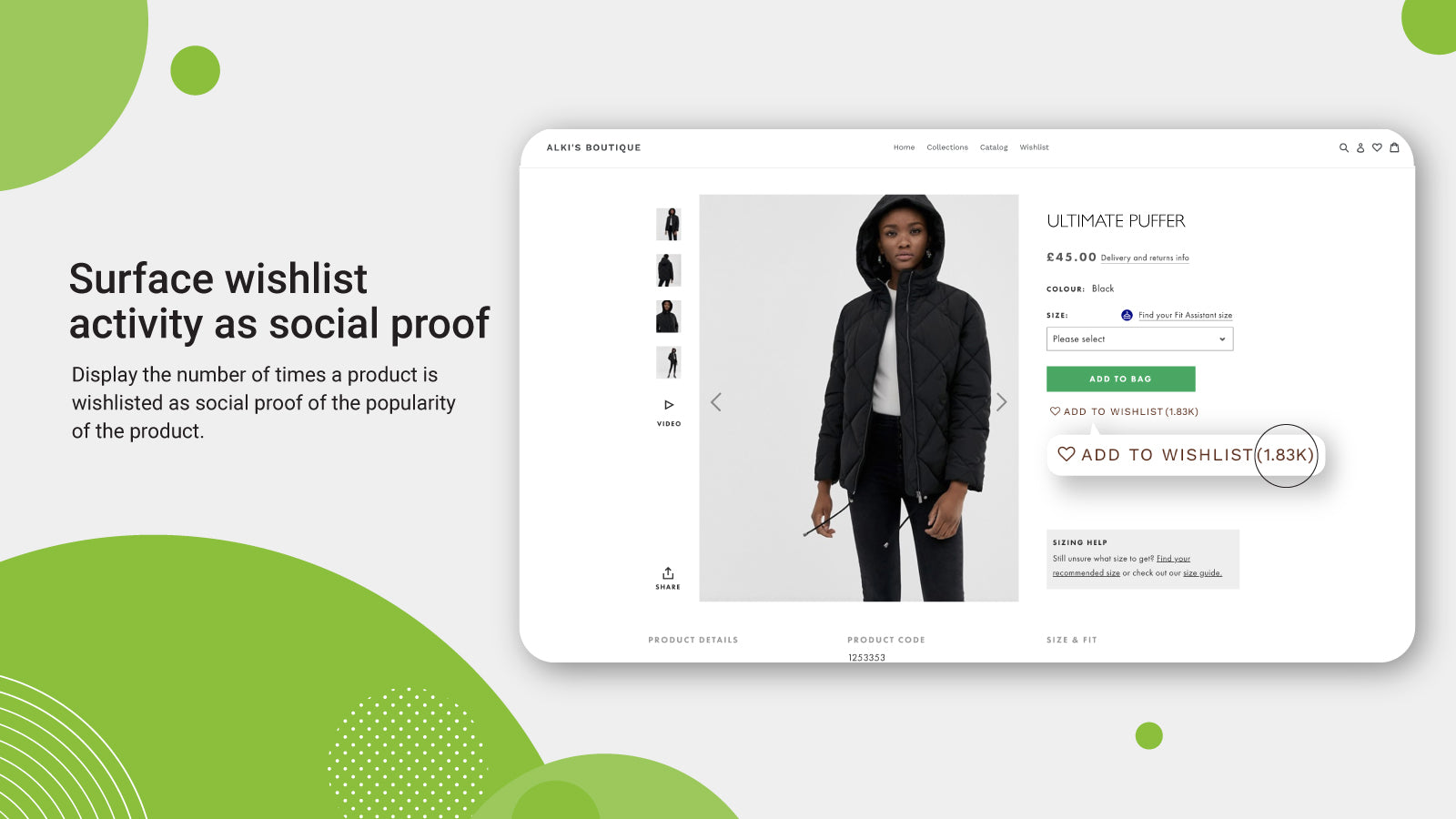
We all have a long list of items that we want to purchase. A wish list lets your user bundle all on that list. With emerging technologies, Smart Wish List can make you stand out and nurture your audience.

The basket works and that is why the cart format has stuck. But very few have the Wish List feature.

Taking an example of an m-commerce app that deals in clothes. Suppose a user really likes a scarf but can’t find a matching pullover with it. Wishlist helps your customers to make a bundle of items in their own time.

Another scenario can be that you are out of stock and running low on the inventory of the pullover. The user can simply add it to the wish list. Once the stock is in the inventory the user gets automatically notified.

Wish least can also help manufacturers make pre-launch bookings, like on new gadgets before the price is disclosed. This brings a lot of customer feedback to the retailers and manufacturers to devise combos, offers, and discounts on selective merchandise. These are all part of the Shopping cart page best practices.

Now make the wish list feature smart. Add options to categorize the wish list for birthdays, anniversaries, paydays and others. Allow users to share the wish lists with each other.

A little push can add the right spices and increase sales revenue. Add a ‘buy before’ criteria to the wish list to bring a sense of urgency.  Suppose an expiry time of 60 days can bring the shoppers back before their itinerary disappears into the black hole forever.

4. Quick sign-ups

6 steps to get started on the Flipkart mobile app [Flipkart Stories]

It’s good if you are not forcing user registration. But it does more harm if you do not remind your shoppers to log in before they go. Keeping it simple and subtle, can capture the user’s attention.

‘Sign up with Google’ is a simple yet strong call to action. Users recognize google in a blink. It is secure, familiar and ideal. Give users the perception of choice, with a quick sign up.

This also tells you about when, where and how users prefer to communicate with you. So strive to secure your m-commerce app using best practices of network encryption.

5. Email reminders and Push notifications

What is a Push Notification and Why It Is Important

Communicate with your customers to re-stimulate their interest. One of the wise old tricks of marketing is direct communication with your user. Workaround a great email reminder campaign. Being too zealous won’t put you at the right foot here, like bombarding the inboxes with a streak of reminders. By rule of thumb, here is a list of what a good reminder email encloses:

  • Vibrant images of the product- To remind the buyer
  • A strong call to action- To stimulate decision making
  • Brief service guarantee or refund policy- To alleviate any concerns

Another alternative you have is of smart push notifications. If you make good offers the ones that bring a sense of cost incentive to the users, you will hit the jackpot.

6. Short-lived discounts

Ajio First Order Coupon Codes | May 2021 | Ajio Offers on First Order Rs.500 Off + FREE Shipping| Ajio Coupons Codes

Cutting down prices may critically affect your bottom line. But it’s a good bait to drive in the shoppers waiting on the fence.

A study of the effect on price discounts and bonus packs on online impulse buying speaks of the impact on users. Percentage discounts make the best detours for items bought for pleasure, while combos and bonus packs work best for utilitarian items.

Time-bound discount offers on items with elastic prices can show your intent that you value your customers. And to a customer that is a great feeling.

7. Brand Familiarity is not a myth

The Importance of Brand Awareness - KOBBA

Google Trusted Store badge is one heck of a tag that ensures certainty, reliability and trust factor through visual representations.

A name that your buyer has not heard before is bound to add skepticism about your credibility and offerings. Promote your brand to raise familiarity with your audience. Showing up in google search or social media advertisements will not bring you great returns.

8. Eliminate surprise costs

How Amazon became a pandemic giant – and why that could be a threat to us all | Amazon | The Guardian

High shipping costs and taxes often switch off the buying intent in customers. Free shipping on orders above a certain value is not a new idea but the one that makes magic happen. Disclose the additional costs early in the buying funnel.

A Forrester study confirms that surprise costs make 44 percent of online shoppers drift away and uninstall the apps.

Make a serious attempt to reduce all potential barriers between you and the wallet of your users. An active, persistent approach to curb the checkout leaks, navigation and performance issues are a few other things to spot.

Ecommerce shopping cart abandonment solutions are easy to implement if you understand their customers. Implementing the Techniques to Reduce Shopping Cart Abandonment as discussed above will soon make the bounce rates wind down and conversions ramp up.

Now, Google is giving Developers a New way to Make Money.

How does Google make money ? – Startup Today

Google has decided to give its Android app developers other tools to earn money from users who don’t wish to pay. And if you are thinking it’s subscription-based then no it’s not.

Google is going to introduce a new way to let it’s Android developers earn money. The programme is called ‘Rewarded products’ and will allow developers to show videos on their apps to monetize the apps.

The programme is a win-win for both developers and app users. How will this work? The app users won’t have to spend money on the app instead they can just spend some extra time to earn benefits. But the trick here is that these benefits will also be received by the app developers.

For instance, if a user scores 30 points in a gaming app then the developers can put an option to double the points by viewing a video ad. This is how both the parties are winning without either of them losing money.

Google also said that developers can easily adapt to it as the integration process is not difficult and does not require additional API calls or extra SDK integration.

What is SDK? - Software Development Kit - YouTube

The developers are quite happy with this new change but we still have to see how the users react to the video ads. It also depends on how the videos will be added in the app. The video ads are the first of the rewarded products that Google has added. There may be more of these products to come in the future.

In a blog, Google said, “Developers are increasingly using multiple methods to monetize their apps and games. One trend has been to reward users for a monetizable action, like watching a video, with in-game currency or other benefits. This gives users more choice in how they experience the app or game, and has been an effective way to monetise non-paying users,

This new programme was influenced by developers demand to reduce app store tax. Google has been very supportive of its developers and has constantly been adding new tools for developer. This new programme might seem somewhat similar to most but there is a difference.

Move Over SEO: How Developers Can Generate You More Traffic

Developers had already been using advertisements to monetize their apps but this new programme will become the official product of Google. This will make integration an easier process and will also give Google an edge in competing with third-parties that offer something similar.

The rewarded products can be added to any app in the Google Play Billing Library or AIDL interface. All this can be achieved with just a few additional APIs and would not need any SDK as mentioned earlier.

Another catch with this sudden launch is Apple’s full embracement of subscription. We have seen that subscriptions have become the largest source of revenue growth app stores recently. As good as it sounds for Google to be introducing the new monetization programme for apps, they still don’t have an upper hand.

The iOS and Android Duopoly - CCS Insight

iOS users are more likely to pay for apps that they enjoy than Android users. This is why Apple has seen almost double Google’s revenue even with fewer downloads. All this resulted in the very heated argument of Android vs iOS which has still not settled.

For Android developers, this means that they won’t be able to use the benefits of subscription any time soon unlike Apple. This also means that developers going for cross-platform development will be more inclined towards iOS just for revenue growth.

It’s a good thing that Google introduced this rewarded products programme for proper monetization of apps. This might bring back the developers’ attention to Android and hopefully increase the in-store sales of Android.

The rewarded video product is launching in open beta and will be available for developers in the Play Console.

This was all about Google’s new Rewarded Products programme launched for the Android app developers. Stay tuned for more or contact our Android developers at Anteelo.

error: Content is protected !!