Criterias to Consider When Choosing an Email Hosting Provider

Business Email Hosting Solutions.

For business communications, your first choice of getting in touch is likely to be email. It’s quick, easy and unlike the many messaging apps, everybody has it. You can send it internally and externally, attach documents or add links and use it for all manner of purposes. For a business, an own-domain email address is essential. However, while there are plenty of email services you can use, not all of them are the same. Here, we’ll explain what things you need to look for when finding a business emailhosting provider.

1. Security

ESA - ESA practices cybersecurity

As virtually everyone has an email address, email has become a popular tool for cybercriminals. Aside from the mountain of spam that can clog up your inbox and waste hours of your employees’ time, emails are used to defraud, to phish, to spread malware and to ransom computers. For businesses, not only is there the threat that comes from receiving, opening and acting on these emails, there is also the potential of unknowingly passing on malware to recipients, including your customers, from an infected computer. In addition, some cybercriminals may send fake emails in your company’s name to try and scam your customers.

All of these threats can have damaging consequences for your business and its reputation; that’s why you need solutions that will minimise the security risks. These include email scanning and filtering tools that detect spam, phishing and malware, preventing them from arriving in your inbox and stopping infected emails being unwittingly sent. Also, look for emailsigning certificates that both verify the legitimacy of your outgoing emails to customers and secure its contents, including attachments, by encryption. You should also look for email backup services that ensure your communications are never lost and can be easily restored.

For businesses that need to comply with regulations like GDPR and ISO, you may want to consider enterprise-level email. This detects, alerts and blocks sensitive content from being sent, as well as archiving emails and providing powerful auditing tools.

2. Reliability

100 of the Most Effective Ways to Boost Machine Reliability

The sending and receiving of timely communications are vital for companies. When your phone call ends with, ‘I’ll emailit now,’ or your website tells customers, ‘Check your inbox’, most people will sit waiting for the delivery. When it doesn’t happen, it leads to disappointment and sometimes to the loss of business. Companies cannot afford their emails to be hosted on unreliable servers that frequently go down. As a minimum, you should look for a guaranteed 99% uptime and, if needed, choose enterprise email that offers 100% uptime.

3. Accessibility

What is web accessibility?. The basics of web accessibility, and… | by Marty Wallwood | UX Collective

Whether you are sending or receiving, email should be easy. You should be able to access it in the office or on the go, on computers or mobile devices and via both web portals and email clients such as Outlook. You should also have the option of using both Pop3 and IMAP access. What’s more, your email should be synced so that everything is available on all devices.

Make sure that your hosting provides the level of accessibility your business needs, especially if you have remote employees who need to send and receive away from the office.

4. More than just email

Successful Marketing Requires More Than Just Email – Dynamo Software

Email services should do much more than let you send and receive communications. They should also provide you with the ability to manage your contact lists, calendars and tasks, share files securely and fully integrate with clients like Outlook. This valuable suite of features makes it easier for your business to communicate and for employees to collaborate and manage their schedules or projects.

5. Adequate storage

Whether it’s for compliance or future reference, many of the emails we receive, together with their attachments, will be kept in our inboxes or archives. Over time, the amount of storage you will need increases, especially if you regularly send or receive large attachments.

It is important, therefore, that you choose a provider that offers email packages with gradually increasing storage. This means, as your storage needs grow, you can upgrade to a larger package without having to migrate your email to a new host.

6. Enough email addresses for your needs

How to Get a Professional Email Address with a Custom Domain

Even very small companies often need multiple email addresses, some for individuals, some for departments (e.g. sales@) or some for specific purposes (e.g. info@ or newsletter@). You will often find various options available from email providers; at Anteelo, for example, our packages range from a single email address to unlimited addresses, so as your company grows, you can upgrade when it is appropriate to do so. Make sure you choose a host that provides packages which offer you enough addresses for your current needs and the flexibility to grow.

7. Easy management

Datavo - Why Us

Another consideration is the ease at which you can manage your email service, carrying out such tasks as adding or deleting email addresses or configuring your account settings. The quality of the control panel you use for this purpose is key. Control panels like cPanel and Plesk are ideal for this purpose, enabling you to manage your email from the same interface as you run your website and offering a suite of tools to improve the email service. cPanel, for example, can compress email on delivery, helping minimise the amount of storage you need.

8. 24/7 technical support

Ultrasound Technical Support – Phone, E-mail, FaceTime | MXR

As email is essential, it is critical that, should you encounter any problems or need assistance, support is available 24/7. Check carefully that your email provider offers technical support, not just customer service, so that you can be confident an expert can help you out there and then.

Conclusion

Businesses rely on emails to deliver their services. Being almost universally used, they are necessary for both internal and external communications. Choosing the right email hosting solution is crucial to ensure you have a secure, reliable and fully featured service that is accessible, flexible and easy to manage.

6 Reasons Why Businesses Should Use The Linux Operating System

Cloud Focused Linux Distros For People Who Breathe Online - It's FOSS

The Operating system (OS) is the program that manages your server’s hardware and software resources and which provides the services other applications need to run. Without it, your server would not be able to function. In this post, we’ll look at the Linux OS and explain why it is one of the best choices for businesses.

1. Linux is open source software

OpenSSF and Linux Foundation offer 3 free courses on developing secure open source software - TechRepublic

One of the biggest advantages of Linux is that it is open source. Unlike Windows, it has not been developed by a single company but by a wide range of contributors. As it is not owned by any individual business, developers are able to take it and make improvements and modifications to it. As a result, Linux has seen constant innovation over its lifetime, where developers have sought to iron out issues and make enhancements that have extended its capabilities. This has led to it being one of the best OS solutions available.

One of the consequences of Linux being open source is that, over time, different versions have been produced. Known as ‘distributions’, each of them takes the Linux kernel and builds their own system around it, each with different functions and abilities. This gives users a greater choice when choosing their Linux OS. Some of the well-known ones are Ubuntu, Fedora and CentOS.

2. It’s free to use

The other major advantage of being open source is that Linux is free to use. As no company owns the software, you cannot be charged a licence fee. That’s brilliant news for small and medium-sized businesses who have to be careful with their budgets. This is one of the reasons that Linux hosting is cheaper than Windows hosting: if you use Windows, the cost of the licence will be included in your hosting fees.

3. It’s perfect for developers

As an open source program, Linux is designed to be played around with. This means that companies with specific requirements are able to give it to their developers to make business-driven modifications which they can trial in cloud-based testing environments. This is exceptionally useful if you are developing a new application or if you have an existing application that isn’t fully compatible with your Linux distribution. The only proviso is that any improved version that comes out of the development process must also be open source and free for others to use.

4. A robustly secure OS

Tips & Tricks - FCI

While no piece of software currently stands invincible against cyber attacks, Linux has consistently proved itself to be highly resilient. Again, this is partly due to its open source origins. With so many developers working on it around the world, any security holes are spotted and dealt with very swiftly with the quick release of security patches.

The other advantage is that Linux is much less of a priority for cybercriminals. Although it is widely used on web servers, it doesn’t feature much in other forms of computing. There are far more home computers to hack into and the vast majority of these are using Windows and Mac OS. This makes them far more appealing prey to the hacker – especially as PCs and laptops are generally less well secured than business servers.

5. A fast performing OS

How to Make Your Computer Faster - Panda Security

As a business, you want your server to perform as quickly as possible, whether that’s to deliver blisteringly fast website loading times or to run big data analyses. Although there are a lot of factors involved when it comes to speed, your choice of OS does play a part.

Anyone who owns a Windows PC will be aware that it can get bloated and sluggish over time. There is always a plethora of background processes hogging the resources and a regular need to defrag the drive and the registry.

What makes Linux faster is that it doesn’t format its drive using NTFS and nor does it have a registry. So, two of the things which are renowned for slowing Windows down are completely absent from the Linux make up.

6. Consider your app choices

Mobile app development in 2021 - evaluating your choices - K&C

When comparing Linux with Windows, you also need to think beyond the operating system itself and to the wider software ecosystem. If you opt into a specific system, you may be restricted in the types of software you can use. Just as an Android phone can’t run an iOS app (and vice versa), there are certain apps that can only run on a Windows or Linux server – this even includes your choice of control panel app. If you’re a big fan of cPanel, for example, you’ll be disappointed to know it’s not compatible with Windows servers.

When making your choice, you also need to consider that the open source nature of Linux has led to the development of a multitude of open source applications which can run on it. These are also free to use.

Conclusion

Linux is an exceptionally popular and widely used server operating system. It’s free to use, continually updated and comes in a range of distributions, each offering their own unique features. It’s a highly secure system, fast performing and works with a huge range of other free, open source applications.

7 Mistakes to Avoid When Starting an eCommerce Business

Why Ecommerce Businesses are Thriving - Hedge Think

If you are investing time, effort and money in setting up an online store, you want to make sure it is successful. Often the focus for startups is on the products being sold and creating a website with the right brand image. While these are obviously important considerations, there are other matters which if not handled correctly can cause your fledgeling business to fail. Here are seven mistakes that eCommerce business should avoid.

1. Ineffective product photography

Is Bad Product Photography Impacting Your Conversion & Return Rates?

For all its convenience, the big drawback of purchasing anything online is that consumers don’t get to see the product in real life. For most consumers, the biggest clue to what a product looks like is the photograph. The product image, therefore, is crucial to achieving a sale. Indeed, for 82% of Netflix viewers, it is the main factor in helping them choose a movie – so much so, that the company now serves different images to different audiences.

One of the mistakes new eCommerce business companies make is to overlook the importance of the product image. Photographs not only have to be of a high quality, but they also need to be resizable and show the product in a way that is compelling. For many products, a single image will not suffice. You may need to have a series of images showing the product from all angles and others which zoom in to show features and details. This is what customers want and those stores which provide this are going to get more of the sales.



2. Badly written product descriptions

How to write product descriptions that sell

If a product image catches the visitor’s eye, the next stage of their purchasing journey will be to read the product description. Although no-one is looking for a long-winded essay, generally, customers do want more than a couple of lines of text. The more information you can tell them about a product the more they are likely to find a feature or a benefit that makes them want to buy it.

Any text should be in plain English with technically accurate spelling, punctuation and grammar. Details given must be accurate and include things such as size, colour, weight, energy efficiency ratings and part numbers.

3. Dodgy customer reviews

16 Tips to Handle Negative Customer Reviews Online

After images and product descriptions, one of the other major factors that help consumers make purchasing decisions are customer reviews. Reviews are increasingly important as they let potential customers discover what others think about a product, warts and all.

However, as the BBC recently highlighted, there are some ecommerce business that will write 5-star reviews of the products they sell or pay individuals to write 5-star reviews for them. Consumers, though, are a sceptical lot: just as they are alerted by gushing product descriptions, they are equally as suspicious of a product with a perfect run of 5-star reviews. The moral is a simple one – don’t be tempted into writing 5-star reviews of the products you sell, not only is it likely to get you into hot water, it can have the opposite effect on sales to what you intended.

4. Aggressive returns policies

How To Write An Ecommerce Return Policy (Real Examples)

From a legal point of view, online customers in most countries have the legal right to return goods bought online. In the UK, for example, the Distance Selling Act means that anything purchased online from a business (not from private individuals) can be returned within 14 days of delivery. They then have 14 days to return the products and the refund must be given within 14 days of their return.

While these protections are statutory, many ecommerce business have other clauses in their policy designed to make it difficult to return the products – such as making the customers pay for return postage or requiring special repackaging conditions. While some of these conditions are understandable, the main consideration should be on how these affect purchasers. If your returns policy puts customers off buying from you, it will lose you sales. Offering free returns may improve overall sales and help retain customers, even if it is inconvenient and costly.

5. Hard to navigate site structure

10 Ways Website Structure Can Affect SEO

It can be a challenge just to get customers visiting your site. When they do, you want to make the most of the opportunity while they are there.  You can’t do this, however, if they can’t easily find what they are looking for.

A user-friendly website enables customers to find products without any hassle. The easier it is, the more chance they will buy from you. For this reason, make sure you have your products correctly categorised and that you use menus and search bars. The search feature, in particular, should enable visitors to refine their search by things like price, colour, size, brand, etc.

6. Complicated checkouts and unexpected surprises

Checkout Page Optimization: 22 Best Ways to Recover Lost Sales

You will be surprised by the number of people who abandon a sale at the checkout. There are two main reasons for this. One of the big issues is that some eCommerce business companies hide their shipping costs until the very last part of the process. When customers suddenly see how much more things are going to cost, they bail out of the sale. It is always better to include shipping in your product pricing and state that you offer free shipping. If you can’t do this, be upfront and transparent about what the costs are before customers get to the checkout.

The other chief culprit is an over-complex checkout process. Forcing customers to register on your site, fill in detailed forms or having list after list of last-minute bargains thrown in front of them can leave some customers just to click on the X. If you have a sale in the bag, don’t lose it by making customers jump through unnecessary hoops. If you want this information, ask for it after the sale has been completed.

7. Poor website loading times

12 Reasons Your Website Is Slow (And How to Fix Them) - DreamHost

This is a problem we have mentioned numerous times before: a slow loading website sells fewer products. Even something as small as a one second delay has been shown to reduce conversion rates and website revenue by 7% and cut the number of page views by 11%. Quite simply, in the age of superfast broadband and 4G, consumers don’t wait around for a hanging website to load.

With increased competition meaning ever-smaller profit margins, improving your site speed by one second can be the difference between success and failure. To solve this problem, visit Google’s PageSpeed Insights Tool to discover how fast your site is loading and what you can do to improve your site’s speed. In addition, make sure your site is hosted with a service provider that uses high-performance servers that are optimised for website hosting, this can make a real difference.

Conclusion

As you can see, there are a lot of mistakes that new eCommerce sites can make which can have a negative impact on the performance of their business. Hopefully, the information provided here will help you avoid them and give your site the best chance of success.

What are the differences between IaaS, PaaS, SaaS, CaaS, and MaaS?

Cloud Ace Blog 2019-12-10 - Differences between SaaS, PaaS, IaaS and DaaS

Confused by all the different types of ‘as a Service’? It’s not surprising. When you’re considering a managed service, you’ll frequently come across a range of IT acronyms, such as IaaS, PaaS and SaaS. Although you’ll soon learn what each one stands for, understanding what they mean and what kind of services each one provides can be a challenge. To help you get your head around the concepts and be able to differentiate between each service, this post will provide an overview of the main aaS types you are likely to find.

Iaas: Infrastructure as a Service

What is IaaS (Infrastructure as a Service)? | The Iron.io Blog

Infrastructure as a Service is when the service provider supplies the preconfigured hardware and equipment you need to run your business’ IT system. In this way, you lease the use of hardware rather than owning it, and the service provider takes responsibility for the effective operation and maintenance of the equipment.

IaaS often includes the use of a server and storage, as well as failover server replication, remote backups, load balancing and firewalls.

In most situations, customers are charged on a pay as you go basis, where the more resources you use, the more you pay – with the advantage that you can be flexible when it comes to scaling up or down. As this is the lowest level type of cloud service, infrastructure software, such as an operating system, are not usually included so you would need to provide your own.

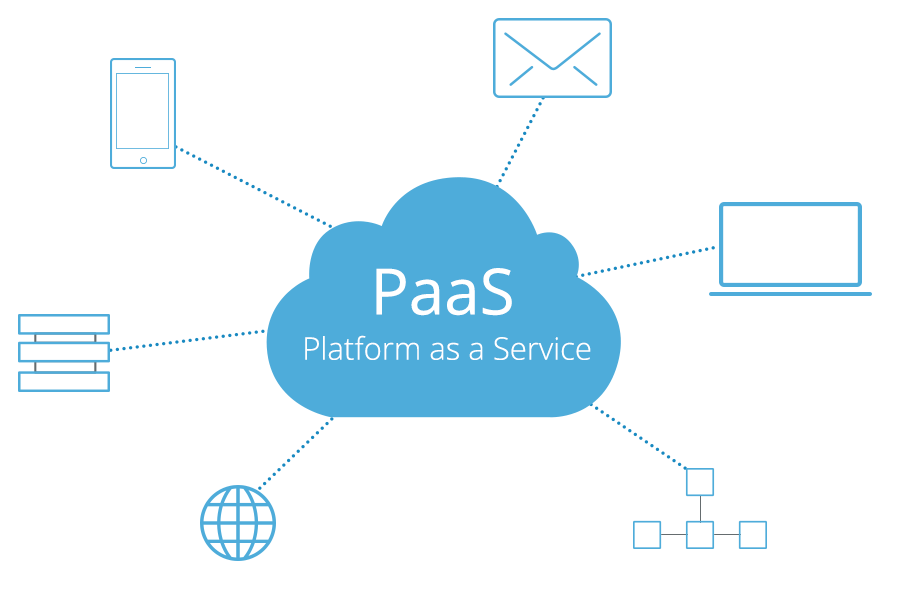
PaaS: Platform as a Service

What is PaaS (Platform as a Service) in Cloud Computing? | Benefits of PaaS - MilesWeb

Platform as a Service goes one level higher than IaaS, providing both the hardware infrastructure and the web applications that organisations need. Using this kind of service means companies can often save on the cost of acquiring these applications for themselves and do away with the burden of deploying them or managing them. The savings come from the fact that the software licenses are owned by the service provider and the costs for these can be shared out among those who opt to use them.

One of the advantages of using PaaS is that you can be guaranteed that the applications are entirely compatible with the service provider’s system and, being based in the cloud, they are also web accessible.

Users will have total control over their apps and, for some solutions, may also take control over the hosting environment. However, as IaaS is part of PaaS, they won’t have to deal with the more complex burdens of managing the infrastructure.

Benefits for PaaS for enterprises include a quick time to market and speedy solutions for application design, development and testing. It can also provide these services significantly cheaper than doing them in-house.

SaaS: Software as a service

Software as a Service – #SaaS – How to make real strategic choices – Xorlogics

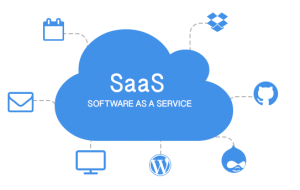
Software as a Service is essentially software made easy. Service providers offer a range of on-demand applications, such as enterprise resource planning (ERP), HR, customer relationship management (CRM), payroll and productivity apps like Microsoft Office. Subscribing SaaS users can access these easily through an internet browser.

One of the main advantages of SaaS is that the management of the applications and the server they are housed on, together with the storage and backup of data, are all taken care of by the service provider. In addition, as they are cloud-based applications, it enables users to log in to the services from any compatible device with an internet connection and ensures that data can be easily synced across devices so that everyone has the latest versions of files and documents.

CaaS: Communication as a Service

Cloud Services Part 1

Investment in the creation of an enterprise level, unified communication system can be very expensive when you include components such as email, telephony, online chat, VPN and video conferencing.

Communication as a Service can bring several benefits to businesses. Firstly, it removes the burden of managing the services by transferring responsibility to the service provider and, as a consequence, it saves money by removing the need to employ staff to undertake that management. Also, should an issue arise with one of the communication systems, the task of dealing with it is left to the service provider who will be in a much better position to provide continuity of service through their redundant, failover resources.

MaaS: Monitoring as a Service

Monitoring as a service (MaaS) | Omnilogy

With so many critical applications being moved to the cloud, monitoring the performance of cloud-based applications has become crucial to ensure that businesses do not suffer from unnecessary downtime. This has led to the emergence of Monitoring as a Service (MaaS), which removes the need for expensive in-house tools to keep an eye on applications and infrastructure and replaces them with a service provider hosted, internet-based, monitoring dashboard.

This enables users to monitor the status of their critical apps on a pay as you go basis and, crucially for many businesses, can be accessed over the internet.

Conclusion

As you can see, there are clear differences between these types of cloud services, hopefully, this post has given you a better understanding of what each type is and how it can benefit your organisation.

The Smart Business Choice: Managed Hosting

Top 6 Benefits of Managed Hosting Services For Every Business

Sometimes it doesn’t make sense to do everything in-house. You wouldn’t deliver your own letters, service your company vehicles or rewire the offices; you’d pass those tasks on to expert third parties like the Post Office, a garage or an electrician. Surprisingly, not every company uses the same logic when it comes to the complex matter of managing their IT infrastructure. There are, however, several advantages of moving away from a DIY approach and opting for managed hosting services and in this post, we’ll explain what they are.

Managed hosting – the basics

Managed vs. unmanaged hosting | Tom's Guide

Managed hosting is a service designed to alleviate the server management burdens faced by in-house IT staff so that they can focus their time and efforts on business-related projects. Offered by leading service providers like Anteelo, it provides companies with all the hardware and computing resources they need (servers, high-speed storage, network, RAM, bandwidth, CPU, etc.) and provides a flexible range of management services which reduces the time, money and effort needed to carry them out in house.

With the hardware being housed securely at the service provider’s datacentre and its expert IT staff taking care of management, admin and technical support, companies find it easier and more cost-efficient than operating their own system on-site.

Range of managed hosting services

Best managed web hosting services of 2021 | TechRadar

Different service providers offer different ranges of service. In general, however, the typical managed hosting package will include datacentre operations such as server housing, site security, national grid and back-up power, air-conditioning, building maintenance and IT engineers, etc., together with hardware and networking.

Aside from managing the infrastructure, other aspects of the provision will include the operating system (including updating and patching), application infrastructure, application installation, real-time server monitoring, performance optimisation, Next-Gen firewalls, intrusion prevention and remote backups. In addition, there is expert technical support on tap, 24/7.

Many hosts offer a flexible range of services, extending beyond those mentioned above to include such things as application management. Here at Anteelo, it is even possible to create bespoke IT solutions to meet the precise needs of your organisation.

Versatile uses of managed hosting

Managed Hosting: Managed Servers, Yönetilen Sunucular - Mitues

Managed hosting is ideal for a wide range of computing scenarios, offering practical solutions for website hosting, running legacy applications, extending company infrastructure and more. By providing single tenancy hosting, it is also beneficial for companies which need outstanding IT performance, significant data storage and which wish to make use of data analytics. Many organisations also use it to back up data and for disaster recovery.

The single-tenant hosting that comes with managed services also provides better compliance for organisations which need sensitive or personal data stored securely.

Aspects of managed hosting to consider

Managed Hosting Services: How Can Customers Benefit? - ITSM.tools

Aside from the information mentioned above, when looking at different managed hosting solutions, organisations should also consider the following aspects:

  • High availability: If you are hosting mission-critical apps on your managed service, it is crucial that they stay online all the time. Make sure you opt for a provider which guarantees 100% uptime.
  • Control panel: Although a managed solution, there are still aspects of your IT that you will need to take care of in-house, such as managing user accounts. A quality control panel, like Plesk or cPanel, will make this much easier to do.
  • Firewall: Not all firewalls offer the same level of protection. Next-Gen firewalls, like FortiGate, offer the most advanced protection from a wide range of threats.
  • Port speed: Port speeds of 1GB offer the network performance needed for faster loading websites.
  • Highperformance: Whether carrying out data analytics or handling thousands of customer requests simultaneously, you want hardware that can perform exceptionally, such as Intel Xeon CPUs and SSD hard drives.
  • Full root access: You should have total control of your server, so make sure your provider enables full root SSH / RDP access.
  • Technical support: IT issues happen for a variety of reasons and when you least expect them. For this reason, 24/7 expert technical support is absolutely essential to help you get things sorted in the quickest possible timeframe.

Conclusion

The range of services included in a managed hosting package can make it more expensive than unmanaged hosting, however, it can work out significantly cheaper than managing your system in-house. You won’t, for example, need to spend capital on hardware or pay for overheads such as server housing, IT staff time, power or insurance. Aside from the savings, many of the technical headaches caused by IT management will be taken care of on your behalf, freeing up your staff for more critical tasks. In addition, you’ll benefit from tighter data security, enhanced compliance and servers which perform better.

8 Reasons Why Cloud Hosting Helps Businesses Compete

5 Best Cloud Hosting Companies In 2021 - Productivity Land

Organisations are flocking to cloud computing in greater numbers than ever before and many are expanding their use of it. This comes as no surprise, given the many advantages that cloud migration brings. In this post, we’ll look at how the cloud hosting enables its users to outperform their competitors.

1. Cloud users save money

4 Ways Cloud Computing Can Save Money | TechnologyAdvice

One of the primary reasons that organisations migrate to the cloud is to cut costs. By using the hardware and services of your cloud provider you’ll no longer need to spend enormous sums on purchasing your own hardware. And that’s just the start of your savings. As you won’t need a data centre any longer, you can eliminate the expenses of running one. The money spent on maintenance, management, space, security, air-conditioning, power, insurance, etc. can all be put to better purposes.

2. Instant scalability

How Cloud Can Bring Instant Scalability to Your Business | TECHNIA

Being competitive means being able to adapt at speed to market demands. One of the drawbacks for businesses running their own data centre is that scaling up can be a slow and expensive process. If you are getting increased traffic to your website and you need additional resources to cope, scaling up can involve purchasing a new server, setting it up and getting it online. This can take quite some time to do. When you use the cloud hosting, your service provider’s vast data centres mean that you can have all the resources you need instantly.

Another issue faced by organisations scaling up in-house is that the additional resources they acquire aren’t fully utilised. For example, your company may get high traffic for certain periods but for the rest of the time, the new server sits idle. This doesn’t make it the wisest investment. Cloud services, however, are charged on a pay as you go basis. You only pay for what you use, so during quieter times, the costs are minimised.

3. Speedy application deployment

Speedy Framework

It’s not just scaling up that can be done quickly in the cloud hosting , the deployment of the critical applications needed to give you the edge in a competitive market can also be done instantaneously. This can be particularly advantageous for smaller enterprises as it gives them the same speed of deployment as larger competitors who have superior in-house capacities.

Cloud-based apps require far less time for successful execution, most of them being available immediately on signup, giving you instant access to game-changing technologies such as AI and machine learning.

4. 100% uptime

100% Server uptime – why aren't you achieving it?

Today’s organisations rely on critical applications to run their operations. The disruption caused by downtime is a major issue, as events such as server failures can cause operations to grind to a halt. Fixing the problem can be difficult and time-consuming and the resulting losses and reputational damage can be substantial.

In a cloud environment, server failure cannot cause downtime. As clients are hosting on virtual machines, when a physical server error occurs, the virtual machine is simply moved to another part of the server cluster. This hyper-converged infrastructure protects organisations against everything from hard disk issues to entire server failures, guaranteeing 100% uptime for critical applications.

5. Latest technologies, exceptional performance

Must-Know Event Technology Trends for 2020 | Social Tables

Another problem with in-house data centres is that the technology organisations purchase or lease soon become less competitive than the newer, high-performance products that are regularly released onto the market. Continually updating is both expensive and disruptive and this often puts companies at a disadvantage.

For cloud service providers, investment in these new technologies is a necessity in order for them to remain competitive and meet the growing expectations of their clients. The advantage for cloud users is that they will see their applications running on the latest, high-performance servers without the need to invest in the technology themselves. These are servers where performance is consistently optimised, using powerful processors, blisteringly fast SSD drives and load balancing to maximise speed and capacity utilisation.

6. Increased security

Increased security automation supports reliability, efficiency and compliance for grid operators | POWERGRID International

Every organisation has concerns about security, so it’s good to know that cloud providers are obliged to comply with stringent security regulations to safeguard customer data. Your provider will protect you against hacking, malware and internal data theft. Using state of the art firewalls that feature intrusion prevention and in-flow virus protection, threats will be detected and isolated long before they reach your server. Other security features include data encryption, remote backups and VPN.

7. Organisational transformation from working online

Careers - A&F Business Consultants

As a cloud user, your employees can access your system from anywhere with an internet connection and this has helped many organisations to reap the benefits of remote working. It enables companies to employ highly skilled members, no matter where they live, and bring about more flexible working hours. It also means they can save on the amount of office space needed as staff can collaborate in real-time using online conferencing and through the sharing of synchronised files.

Furthermore, as employees can access the company’s system using connected devices such as smartphones and laptops, many companies have dispensed with these costs by introducing a ‘bring your own device (BYOD)’ policy that uses authentication to maintain security.

8. Do more with technology

Do We Really Need It? On The Excess Of Technology

Perhaps the biggest benefit of the cloud is that it is a technology that enables you to do more with other technologies. With Big Data analysis, machine learning and AI all rapidly deployable, just imagine what potential cloud brings: personalised marketing and communications, improved customer services, discovering new development opportunities and much more. Cloud is also the ideal place for companies wanting to take advantage of the Internet of Things, augmented reality and the other ground-breaking innovations that are helping to reshape the way the world works.

Conclusion 

Cloud hosting enables even the smallest of companies to take advantage of the technologies that are transforming today’s marketplace and working environments. In doing so, it makes them far more competitive, while enabling them to spend less and do more. At the same time, these organisations can also benefit from the cloud’s high-performance and reliability, its scalability and flexibility and its highly secure environment.

Cloud Computing : 6 Most Common Applications

Cloud computing: A brief history, where we are today and what's next

Cloud computing has become very popular for businesses. As of 2018, over three-quarters of enterprises were already using it and more are adopting it every day. If you haven’t considered it yet, that’s possibly because you’re not sure what you can use it for. To give you an idea, here we’ll show you the six main ways it is being put to good use.

1. Big Data analytics

Real-Time Big Data Analytics: A Comprehensive Guide

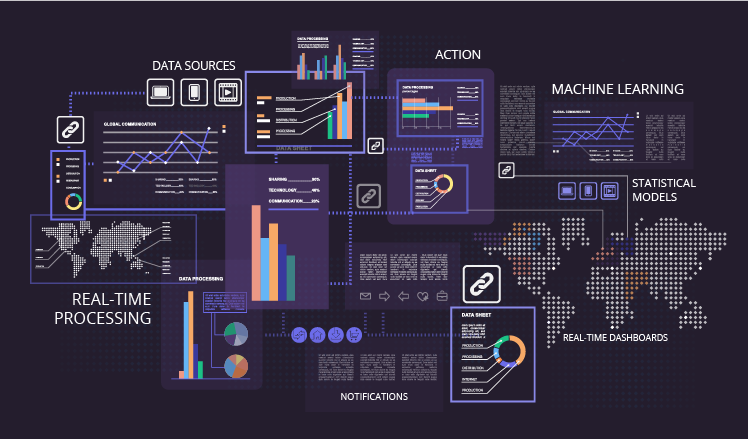
Today’s businesses collect vast amounts of data on all manner of things: customers, operational processes, logistics, machinery health, product condition and much more. The value of that data comes from making sense of it, using it to come up with solutions to problems or discovering new opportunities. To do this, however, you’ll need to conduct Big Data analytics and this requires the use of substantial computing resources, often over short periods.

Those resources would be incredibly expensive if you had to purchase them and for much of the time would stand unused. Convincing the finance director this was the wisest use of the company’s money would be a difficult challenge. The advantage of cloud computing is that its pay-as-you-go pricing means you can access all those resources for the times you do need them but not pay for them when you don’t. This way you can carry out Big Data analytics whenever you need but do so affordably.

2. File storage

Cloud File Storage, Store Files & Documents Online - Zoho WorkDrive.

While it’s true that you can store your files in many places, what makes the cloud so appealing is that files can be accessed, edited and shared anywhere with an internet connection and this opens up a variety of opportunities for mobile working, collaboration and even improved security.

What’s more, the cloud provides high-speed, high-availability access as well as offering scalability to increase or decrease storage as demand requires – again paid for on a per-use basis.

3. Testing and development

Why Use Automation Testing Tools in Accelerated Development cycles

Developing a new application or platform in-house can be an expensive and long-winded process. It involves significant spending, time and staff involvement and requires the procurement, installation and configuration of hardware. This means it takes longer to complete a project and can put your company at a disadvantage with competitors.

Cloud computing can make testing and development quicker, less expensive and less complicated. This is because there are various pre-existing and perfectly suitable cloud environments already built and ready to use out of the box.

4. Disaster recovery

The Importance of Planning for Disaster Recovery | Caylent

Lots of companies use the cloud as the solution for their disaster recovery needs. Continuous backups of your servers in the cloud mean that you’ll no longer need to pay for a separate, redundant DR site of your own. Not only is recovery much cheaper, it’s also far quicker, ensuring your business is back online in no time at all.

5. Data backups

Data Backup and Recovery: 9 Benefits

Traditional methods of backing up data have tended to be complicated and time-consuming, often requiring portable drives or even tapes being shipped to remote sites for storage. This is also a technique that can back-fire if the drives are too small for the data or are discovered to be defective.

Cloud-based backup is far easier to carry out and more secure. You can schedule backups to meet your needs; store them remotely on virtual servers, knowing that if the physical hardware hits a problem the data is still available; they can be encrypted for increased security and checked to make sure the data is not corrupt. And as with all cloud storage, you can have as much space as you need without fear of running out.

6. The Internet of Things

An Introduction to the Internet of Things

The internet of Things is beginning to transform the way we live our lives and increasing numbers of enterprises are making use of it. An IoT system works by collecting data from large numbers of connected sensors and uses this to make intelligent decisions – often using artificial intelligence and machine learning.

To take advantage of the IoT, the cloud is needed to analyse that data and make insights from it. A smart traffic system, for example, can monitor traffic conditions across an entire area, discovering where issues arise and using AI to quickly reroute or slow down vehicles in order to prevent a hold up. This kind of intervention would be almost impossible to gather without the capabilities of cloud.

Cloud’s scalability is also important for IoT. As a company grows, so might the number of IoT devices it sends and receives information from. More devices mean it will need larger computing resources and this can be achieved quickly and easily in the cloud without the need for significant capital investment.

Conclusion

Cloud enables businesses to do many things that, without it, they would find more expensive, overly time-consuming or beyond their in-house IT capabilities. From basic solutions, like storing files and backing up data, to highly sophisticated processes, such as Big Data analytics and IoT data processing, the potential of the cloud is enormous. Indeed, what we have discussed here barely scratches the surface and there are even more developments yet to come.

How to Develop a Successful Social Media Strategy

Building Your Social Media Marketing Strategy for 2021 | Sprout Social

When it comes to making a purchase, 75% of consumers will opt for a company they have previously liked on social media. With statistics like this, it is impossible to ignore the potential that social media has to transform your business. However, you can’t just post things willy-nilly and hope for the best; instead, you need to have a social media marketing strategy. In this post, we’ll take you through the process of creating one.

1. Define the outcomes you want to achieve

How to Develop a Successful Social Media Strategy

Your social media strategy needs to be linked to your company’s goals for it to have practical value for your business. For example, you may wish to expand awareness of your brand, improve online sales, increase ROI, get more customers visiting your bricks and mortar store or develop an audience of loyal followers.

When creating your social media strategy, you’ll need to decide what your objectives for it are and then set short-term goals that you know are achievable and affordable.

2. Know your audience

7 Proven Ways to Know Your Audience Better

Understanding your audience is the key to a successful social media marketing strategy. Luckily, your research can be made easier by using some of the many analytics tools. These can give you detailed insights into the audience demographics of the various social media platforms, showing you the best platforms to use and the types of content you should post.

Once established on a platform, you can drill down and analyse the demographic data of those who follow you. This can give you a much sharper understanding of those who actually see your content and how they interact with it.

3. Focus on metrics that count

How to reach my real target audience on Instagram - Quora

To work effectively, a social media marketing strategy should make effective use of the data it has available. However, some data is more valuable than others and you need to be selective about which metrics are going to benefit your company the most. Rather than focusing on likes and shares, it may be more useful to track the volume of users who see a post, the number of clicks-throughs your content gets, the rate of engagement (the ratio of interactions to impressions) and the sentiment of those interactions (emoji data). Overall, the metrics you choose to focus on should be able to help you understand how effectively you are achieving your outcomes.

4. Check out the competition

Checkin' out the competition. Before creating your product, you… | by Sean Pan | Medium

Discovering what works for your competitors is a useful way to help you shape your own social media strategy. You can do this simply by following them and viewing their content or by using one of the many competitor analysis tools that are now available.

What you shouldn’t do is simply imitate what your competitors are doing. Instead, look at the most interacted with types of content which your competitors post, whether that’s video, images, text, or even user-generated content, and use these to inform the creation of your own, unique content.

5. Start working on your own content

8 Steps to Start Your Own Business in 2021 — Startup Guide

Only once you’ve set your goals, chosen your platforms, identified your key metrics and checked out how others do things well, are you ready to start creating the content to publish yourself.

There are several considerations you need to take into account here. Firstly, you’ll need to make decisions about what to publish. This will depend on the platform you have chosen, the preferences of your audience and your budget.

Video is one of the most liked and shared mediums on all social platforms, however, creating it professionally can be very costly. User-generated content, which can be created using a brand hashtag, is not only very popular, it’s often unique and saves you having to create so much content of your own – and because it’s user-generated, it can be forgiven for not being so professional. Visually stunning images have always been popular on social media and these are also useful for getting customers to click through to other content, such as blog posts or promotions on your website. Aside from the format, you must also consider what messages to post. If you over-focus on selling products, users can lose interest – almost half of users are likely to unfollow a brand whose content is consistently trying to sell them things. Instead, post on a wider range of engaging, relevant topics that promote your company without the hard sell.

6. Get the timings right

How to get your timings right when presenting - The Prezenter

Timing is crucial to the success of your social media marketing strategy – and in a number of ways. First of all, followers will expect to see you post regularly and consistently. Not just on Tuesdays, but every Tuesday. It’s like in the old days when we used to get our favourite magazine delivered on a certain day – we looked forward to it arriving and were disappointed if it didn’t. Lack of consistency can make you lose followers.

Users will also expect you to respond to their comments or questions quickly, which is important if you want to develop meaningful relationships and networks, and essential if you are using social media for customer service. The speed of your response speaks volumes about your commitment to your audience and quick replies are a big plus for social media brand building.

Another important consideration is the time you actually post a message. Post it at the wrong time and many of your audience might be offline. By the time they are online again, it could have disappeared into the abyss of their feed, never to be seen. Luckily, you can use tools that will allow you to schedule when your posts are published so that they can be sent out at the most effective times of the day.

7. Go back and check the metrics

7 Crucial Metrics to Measure Your Content's Success

Finally, you should always keep an eye on your social media strategy data to see which things worked well and which things didn’t. This will stop you wasting time, effort and money on ineffective ideas and inform you which of your creatives are getting the most traction with your users. The more data you have, the better informed you will be.

Conclusion 

As you can see, the process of setting up a social media marketing strategy requires forward planning and research. You’ll need to set goals, research the different platforms and their audiences, figure out the most important metrics to focus on and research your competitors before you start. Only then will you be in a position to create the right content, work out the best times to post and how quickly to respond. And remember to track the progress of your strategy throughout your campaign.

In 2020, keep an eye on these five social media trends.

15 Social Media Trends to Follow in 2019

No communication channel is quite as fluid as social media. It is always evolving, continually influenced by its billions of users, and still learning the errors of its ways. It does, however, present businesses with the potential to reach out and engage with vast audiences. To take full advantage, it is always important to keep a close eye on the trends and developments that reshape the social media landscape. With this in mind, this post will look at the main trends predicted for 2020.

1. Video becomes users’ first choice format

The Ultimate Guide to Video Marketing

If you are not already posting videos on your social media accounts, now might be the time to reconsider. Video is by far the most popular form of social media content and its highly engaging format makes it ideal for reaching out to large numbers of users. It is also on a rising trend that businesses shouldn’t ignore.

Indeed, video has become so popular that YouTube now ranks second amongst the search engines, only outperformed by its owner, Google. Add this to the fact that, by next year, the format will account for three quarters of all mobile traffic and it’s obvious just how crucial it is for brands which use social media to start making their own – even if it is only short, in-house productions filmed and edited on a smartphone.

2. The rise of video-sharing platforms

10 Best Video Hosting Solutions to Consider in 2021 (Free vs Paid)

It’s not just video as a format that’s trending, but also video-sharing apps. While YouTube has been the dominant video-sharing platform for many years and looks likely to remain there, other video apps and networks are becoming increasingly popular and offer plenty of rewards for companies which find value in using them.

Instagram, which started out primarily as a photo-sharing app has now become increasingly video orientated, even ranking videos higher than other forms of content. This shift in emphasis has led to a huge rise in the platform’s popularity. According to influencermarketinghub.com, it is now the 2nd biggest global social media channel and has over a billion monthly active users.

There is also a growing number of highly popular niche video channels that offer marketing potential. TikTok, for example, is an app used for creating and sharing short videos, with three quarters of a billion monthly active users, most of them millennials and younger. Vimeo is another very popular video network with a similar demographic.

3. A more caring social media

How Social Media Is Taking Away from Your Friendships

Social media can have its downsides and these come in the form of internet addiction, trolling and online bullying. The mental health issues and even suicides that result has led to increasing concern about the subject. In response, many users are spending less time on social networks; some, including a few well known public figures, have even abandoned it completely.

In 2020, any brand that posts on social media needs to be more accountable for its impact. Some companies are already making significant changes, posting less frequently and with content that is less likely to spark unhealthy disagreements between commenters. Instead of encouraging audiences to do more things online, they are, instead, trying to get them to participate more in real life – as was done by ITV’s Get Britain Talking campaign.

4. Liking is likely to go

How to Make Someone Stop Liking You: 13 Steps (with Pictures)

The liking of posts is another area that has come under scrutiny for its impact on mental health. This is because when posts stop being liked, it can lead to low self-esteem and all the problems that go with it.

In order to tackle this issue, Instagram is testing the removal of its liking features and its owner, Facebook is trialling the removal too. If likes disappear, they can no longer be used as a ranking criterion, and other forms of social engagement will take precedence, such as how many commenters and comments a post gets and how many times it gets shared. In 2020, the trend will be to produce more sharable and comment-worthy content (another reason to use video) and to find ways to encourage users to comment and share – something YouTube vloggers have been doing explicitly for years.

5. Social media for customer service

The Ultimate Guide to Social Media Customer Service

Chatbots have been a common feature of business websites for a few years now but in 2020, we’ll see their increasing use on social media. These clever AI programs are designed to engage automatically when messages are received, giving users the confidence that your company is dealing immediately with their query.

Using machine learning, they respond to the keywords within questions to give the most appropriate responses and, as a result, help companies communicate with more customers, more efficiently, than they can with a human-only team. Next year, as chatbots are set to become the primary solution for customer service communication, expect to see even more companies using social media as the place to carry this out.

Conclusion

2020 promises to be a busy and exciting year in social media. We will see more video content, with businesses seeking out the growing number of niche video sharing networks. Demands for a more responsible internet will change how companies interact with their audiences, while the need for comments and sharing will push them to find better ways to engage. Finally, expect to see more brands using social media as the place to carry out customer service, relying heavily on chatbots to undertake many of the interactions.

Is It Time to Switch to a PCI-Compliant Server for Your eCommerce Store?

Six Goals of PCI-DSS [Overview for PCI Compliant Hosting] | Liquid Web

If you intend to take payments for goods or services on your website, you’ll be required to comply with Payment Card Industry Data Security Standard (PCI DSS) regulations. These are the security standards that companies which store, process or transmit payment card data have to meet. In this post, we’ll take a closer look at what they are and explain why you need a PCI-compliant server.

What PCI-compliance entails

What is PCI DSS | Compliance Levels, Certification & Requirements | Imperva

If you want your company to accept online card payments your server environment and eCommerce application have to comply with PCI DSS. This is the case even if you use a third-party payment processor. Failure to comply can have a significant impact, including ongoing fines or in the worst-case scenario, being prohibited from taking payments and thus finding your company unable to trade.

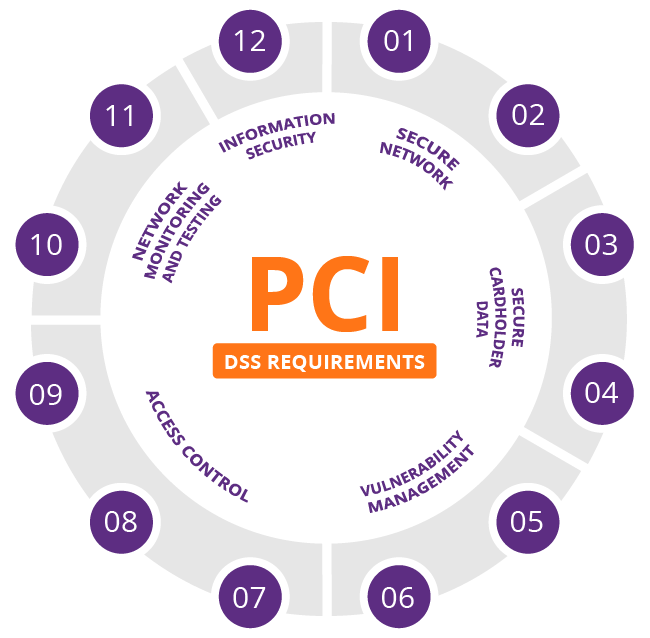
The standards you have to meet for PCI compliance are detailed and rigorous. They require you to build and maintain a secure network, protect cardholder data, maintain a vulnerability management program, implement strong access control measures, monitor and test networks on a regular basis and maintain an information security policy.

Ensuring these standards are met requires many other operations to be put into effect, such as the installation and maintenance of an appropriately configured firewall, the use of strong (non-vendor-supplied) system passwords, the encryption of cardholder data during transit, the secure storage of cardholder data and the use of anti-virus software. In addition, you’ll need to update and patch applications, restrict both system and physical access to cardholder data and create unique IDs for individual staff so that you can track and monitor all access to network resources and cardholder data.

It is obvious from this that the PCI DSS standards are stringent and the responsibility for implementing and maintaining them, as well as evidencing compliance, falls with the eCommerce company and any third-party service providers they use.

The challenges and solutions of PCI compliance

Top 5 Challenges of PCI DSS Compliance - Cipher

eCommerce companies face two major challenges when striving to comply with PCI DSS regulations. Firstly, is the cost of building an in-house system that meets the standards and, secondly, they often lack the expertise to attain compliance. A solution that makes compliance easier and less expensive to achieve is to use the services of a PCI-compliant hosting provider that can offer both the server infrastructure and the necessary expertise.

At eukhost, for example, we are geared up to ensure our data centres, networks and operations are PCI DSS compliant. Aside from ensuring robust physical and system security of all our data centres,  all our VPS, cloud servers and dedicated servers are PCI compliant-capable. In other words, we are able to carry out all the necessary configuration changes needed to meet PCI compliance upon request.

There are different levels of PCI compliance and the solutions put in place will depend upon the level your business is obliged to achieve. Most eCommerce sites, for example, have to meet either the SAQ A or SAQ A-EP levels. These are required for companies which process payments via a third-party payment gateway, such as Stripe or PayPal. As customers are transferred to the payment gateway to carry out these kinds of transactions, no card information is stored or transmitted by our servers. As a result, your compliance burden is dramatically reduced.

Putting the compliance process into action

To determine the exact requirements of making a server PCI compliant, your hosting vendor will need to know the application you are going to use and the level of PCI compliance you are required to meet. Here at eukhost, we carry out the following as standard:

  • Ensure you have a firewall enabled and have a robust firewall policy implemented.
  • Ensure that you have an SSL certificate installed and correct cyphers are set up.
  • Ensure that encryption is enforced for all services.
  • Disable any software which is not required to provide service.
  • Enable and configure intrusion prevention.
  • Enable an application firewall
  • Enable and configure anti-virus and anti-malware services.
  • Ensure logging and log retention policies are in place.
  • Apply an access and password policy.
  • Ensure a backup policy is in place and that backups are encrypted.

Once you have these features, plus any others you require, put into place, you will then be able to arrange for a PCI compliance assessor to undertake a compliance scan.

Remember, overall responsibility lies with the company

While a PCI DSS compliant vendor can help you comply and do so more economically, the ultimate responsibility lies with the company. Standards, such as assigning unique user IDs and maintaining an information security policy, which are carried out in-house, also have to be achieved. Furthermore, companies also need to ensure that any third-party hosting services they use also comply with the regulations.

Conclusion

PCI DSS is one of the most important regulations that an eCommerce company has to comply with. Designed to protect the consumer, it has a stringent set of requirements and is rigorously policed. One of the most effective ways to help you achieve compliance is to use the services of a hosting partner that has experience and expertise in PCI compliance and can provide the compliant server environment required.

error: Content is protected !!