APPLYING FOR A DESIGNING JOB

Finding the right choice for a designing job can be really challenging. There are several aspects that are to be covered for applying, but your initial presentation should be impactful. What happens in most of the cases is that the applicants don’t represent themselves and their work in the right way. Hence, we’re here to help you better understand the process and aspects of applying for a designing job.How to Get a Job as a Graphic Designer | Glassdoor

SET YOUR GOALS

You need to ask yourself, ‘what is your passion and what is it that you want to do?’. And if you are not sure, then you need to figure it out. It is best if you talk to someone who’s already in the same profession and industry. This will give you a much clearer vision and you would be able to figure out the direction you want to go in.

Answering the Interview question: Where Do you see yourself 5 Years from Now? - Naukrigulf.com

One question that you will be asked in every interview is – “Where do you see yourself in five years?” Now the important thing is you need to know the answer for that question for yourself. So make sure that you know what you want to do in your life and just focus on it, this would help you a lot and even make it easy for you to plan your future.

Be sure of building your career in an environment you can thrive in. Because the people around you can really affect your job and your career in the long run. So, you would want to find a job with an environment where people have passions similar to yours, connect with those people and you will go a long way in your choice of life.


WORK THAT PORTFOLIO

First impression is the long lasting impression if not the last impression. So, with your portfolio, you make the first impression. Your portfolio is the first thing your potential employer will look at. You have to work hard on your impression and present a few of your projects that you’re most proud of. Remember a portfolio is not just a bunch of sheets, it is how you present yourself and your way of thinking, so make sure every minute detail is perfect.

How to Organize Your Portfolio for Your Job Interview

Try to avoid portfolios in pdf forms and dropbox folders with screenshots of your designs, especially if you’re applying at a digital company. There are a bunch of great online services that can help you build your portfolio in the best way (like Readymag, semplice, etc)

As a designer, always try solving the problems at hand with your projects. Talk about the approach you went with and the process you had whilst working on the said projects. 

Here a few things that you should consider while sending your portfolio:

  1. What are the goals of your project?
  2. What is it that you want to solve?
  3. What is the background of your project?
  4. Who are your users?
  5. How do you plan on solving the problem with your project?


Design is not just about creating beautiful things, instead it’s about following the right process and employing creative storytelling to come up with a solution. Which implies, functional utility > aesthetics. 

A lot of times, people looking for a job say that they don’t have any work to show, since they didn’t get a real opportunity to work. You should know that you need not worry about not having any experience of working in an agency or with clients. There might be a website or a tool that you use in your daily life, one with which you would have had a bad experience.

Now, look into and find out what the problem/flaw is and try to come up with a solution for it, as to how you could improve it. There you go, you can present your work and approach by resolving the problem.


Be extremely careful with your portfolio, keep in mind all the current technologies and the latest designs for the same. Lastly, show what you are best at, and what you would want to work on.


INTERVIEW: PREPARE YOURSELF


First, research the company thoroughly before you go for the interview. Gain knowledge about the people who already work there and try to find them on social media. You will find a lot of useful information that may help you further. And, don;t forget to research the clients’ they are working for and the projects that they have done so far.

The 5 Best Interview Questions Candidates Ask During Job Interviews

Second, be ready to present yourself and your work. Critiques help you sharpen your communication skills as a designer, as there is always scope for learning how to articulate what you did, how you did and why. Basically, it will help you in explaining your idea to the reviewer in a much better way. 


The last and the most important key, BE HONEST. Nobody is perfect, so you remember to communicate them to your reviewer/potential employer.


CONCLUSION

Explore different companies, their profiles and websites, where you will find what they do and how they do it. And also about the people and the culture in their company. Attend design workshops and meetups, you have the best shot at meeting and getting to talk to people from the industry, you will find a lot of insightful information. And lastly, stay fresh with your portfolio work and keep yourself updated on the current trends in digital designs. Remember, this not just for applying to a job, but for all times. It’s good to stay updated all time. 


App or Website? Choose ‘the one’ for you!

As the world is going digital, all start-ups and businesses are indulged in developing their website and mobile applications. However, the question that arises is which amongst the two makes your business thrive and skyrocket its profit? The broad idea is that everyone in the coming times would have a mobile phone rather than laptops or any other. Besides, mobile apps are the latest things due to the popularity of mobile phones.

So far, the mobile apps get developed after the website has been launched, but is this the best decision for your business? However, should it be the only thing you start with? Especially if one’s budget doesn’t allow to launch both? Does that mean the web is dead?

Furthermore, having a mobile phone does not merely translate into downloading mobile applications. So, how to surpass your competitors on the web? Through a web vs app? There are many advantages and disadvantages involved in both. You must opt for the right platform for your start-up. The answer is, of course, selected according to your needs and the kind of customers you want to attract.

Should I start with an App or Website?

Therefore, before you choose, you must consider the importance of a mobile-friendly website as well as a mobile app. Going through this guide answers the most frequently asked question – What should I begin with – Mobile App or Website?

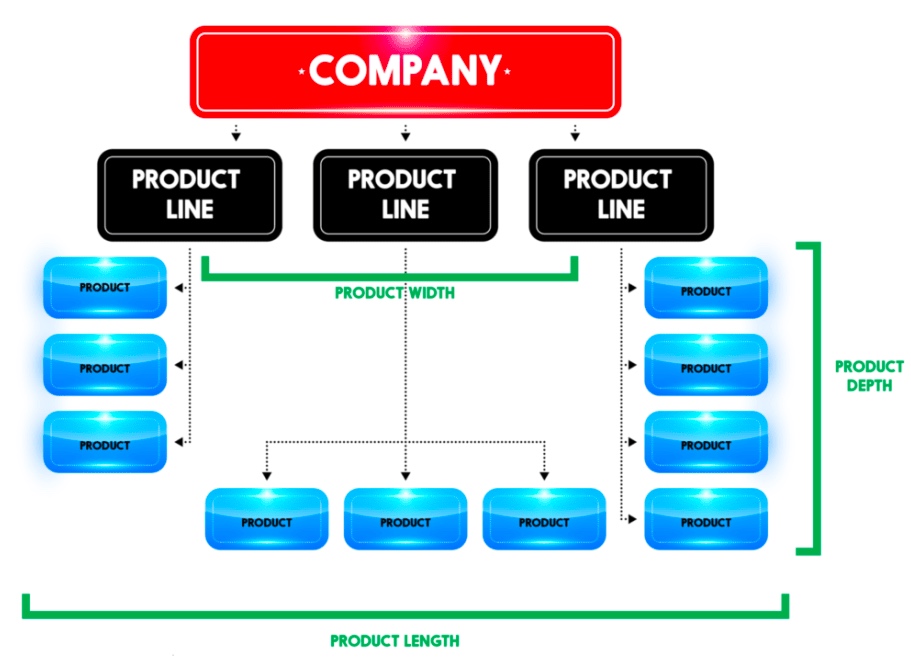
1. Product Line

Product Line

Does your product include GPS, navigation, or location-based elements? An instance of it would be Ola or Uber. Such start-ups must have a mobile app rather than having a website. Their business links the passengers with cab drivers willing to drop them to their desired destination. Similarly, if you plan to build an application for people to track their route or an application facilitating the runners map the distance covered and the number of steps taken, then you can provide your clients with the best possible experience only through a mobile app since GPS is the lifeline for a business.

Similarly, a flight or train booking business needs an app to make it accessible from everywhere. If you are into developing Android applications or even online games, to-do lists, notes, alarm clock, reminders, social media, or email, then mobile apps involve more users and interact with them in the best way possible. The business can only be successful by comprehending the requirements of its audience and target market first.

On the contrary, if you are an event management company who needs people to go through your catalogs and know about your business, or if you are a photographer or a hairstylist who needs people to checkout pictures or samples of your work, you can very well go with a website as it serves your purpose better.

2. Budget

A budget with a vision and direction; The Times of India, February 2, 2018

The first thing that you need to think about after getting your Company Registration completed is the budget you have for going over the internet. Furthermore, you need to set aside at least some amount to keep your platform, weather website, or mobile application, updated. Most Web Designing and Development Companies suggest that you develop a website first and then a mobile app since it is an economical option. You get the advantage of showcasing all the content on a single interface on a website. Besides, updating the content takes fewer efforts in case of a mobile app as compared to a website.

Furthermore, the UI of an App must be adjusted for every platform like Android, iOS, and Windows. An app-only business model might face issues reaching out to consumers across all the platforms. It is said that you are required to spend more on developing different apps for different platforms. It reduces your cost per OS. If you have started your business with a limited amount, it won’t make sense to start developing a mobile application.

3. Marketing Plan

Advantages and Disadvantages of a Marketing Plan

In the beginning, all the businesses only have restricted resources. As the business scales up, you can go for additional platforms. Still, if a company is opting to go app-only, it risks missing out on a broad market of potential customers. Mainly, if their app does not happen to feature amongst the top few apps of choice for a consumer.

A famous example is Myntra, the leading fashion e-commerce marketplace in India. A few years back, it announced that it is going app-only. The company claimed that this step was taken to improve personalization. Without a doubt, the loyal users of Myntra were compelled to download the mobile app. This approach was adopted to push out the competition. As consumers would be more captive in a particular environment and shopping around for discounts would decrease. But the move only backfired. Within a year, Myntra was compelled to relaunch its mobile website.

4. Tools Required

Tools Required

Are you launching something complicated? Would you require to show data analysis or reports and more? Will your users need sophisticated numbers, reporting, or calculations? It is almost impossible to utilize these tools on a website. So in this parameter of the website vs app, the mobile app is a clear winner due to its optimized UI, which displays all the data. For instance, if you will be needing complex calculations, numbers, reporting, then you should acknowledge that it will be next to impossible to use these tools without a dedicated app.

5. Frequency of Usage

Coronavirus: online food & beverage sales delivery methods U.S. 2020 | Statista

Do your targeted customers need to access your services on a daily or hourly basis? If you want your users to check into your platform a few times a day, then it makes more sense to start with an app. It is far more convenient, faster to access, and it has the option of notifications for the users to keep updated. But you must make sure that your app is not slow to launch or perform the desired actions. It will become a barrier that stops people from using your app.

6. User-Friendly

What makes an E-commerce Store user friendly - VAR Sales Management Blog: News, Tips & Many More By VARStreet

Most of the websites have a navigational UI. However, mobile apps need to have an interactive UI to be successful.  Again the example of games comes to mind. A mobile app will be a better choice for a game development company as compared to a website. A responsive web design approach acknowledges as well as resolves many of the usability problems for a mobile-friendly website. So, you must consider the needs of your business and the choice as well as the comfort of your users.

7. Accessibility

Evaluating Web Accessibility Overview | Web Accessibility Initiative (WAI) | W3C
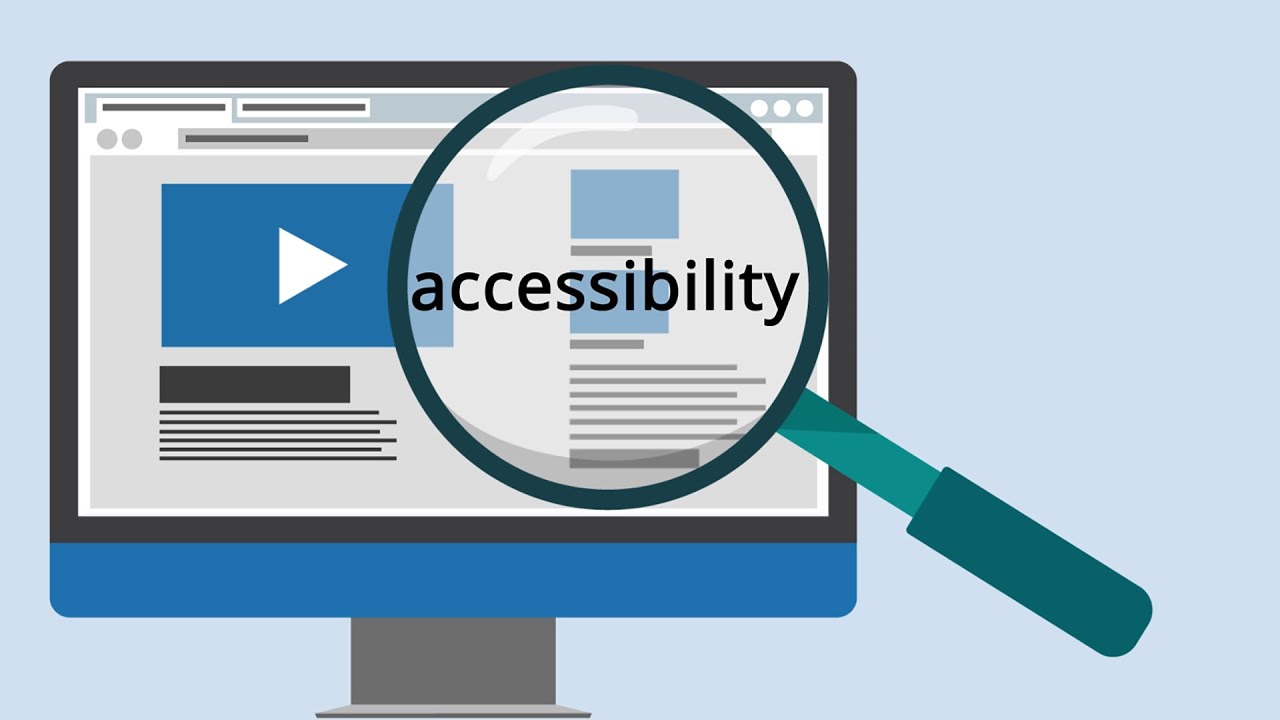
Even today, accessibility to the internet is a major problem in many parts of the world. So, do in-depth research on how long would a customer need your services. For offline accessibility, you must build location-dependent, parallel apps. Therefore, mobile apps will be more appropriate for offline mode of navigation rather than a website. If you think that your business would serve mostly to offline users, then it is much better to develop a mobile app where the user can access your services whenever they need it. For instance, dictionaries facilitate accessibility to know words, even without an internet connection. Users can use it whenever they need, wherever they need.

8. Speed

Speed

Those who’ll use your app or website pretty often during the day would want to have their interaction to be smooth and lag-free. Nobody would want to wait even for a minute to play games during their 15-minute metro ride or while waiting for a cab. Nobody has the time to bear with a slow platform for their needs. Imagine if you always had to access your favorite Social Media like Facebook, Instagram, or LinkedIn through your browser first and then having to sign in. Only after doing all that every time would you be able to read that message or know of the newly vacant position. Wouldn’t it be much better to get an immediate notification as soon as you receive the message? However, if you are targeting customers who would not be accessing your platform frequently, then installing a mobile app will be more time consuming as compared to visiting a website.

Conclusion 

Many companies and businesses may want to go for a mobile app first. It is a much more advanced and trending way to connect with consumers. But it can be a huge mistake too. Unless you have a mobile-based start-up, developing a website first, is the way to go, rather than spending some significant part of your budget in making a mobile app. Instead, you can try to make your website more user-friendly or even pay extra to make it rank up on the Search Engines. The final verdict is that there are many points that you must carefully consider before you make a choice should I start with an App or Website?. Amidst the Website vs. Mobile App, it’s challenging to pick an absolute winner. It all depends on you and your business requirements. With this article, we have all the advantages and disadvantages served before you, which you will have to weigh for yourself.

How AI is likely to transform the Consumer Packaged Goods (CPG) Industry

Top 10 Real World Artificial Intelligence Applications | AI Applications | Edureka

The future is Artificial Intelligence (AI), and various industries are investing heavily in creating self-evolving AI applications. The CPG industry (consumer packaged goods) has till now been somewhat dormant and is looking at opportunities to improve efficiency and reduce expenses. Amazon, Microsoft and Facebook have been among the front runners in this domain. Amazon, for instance, spends more than 10% of its yearly revenues on Tech research, whereas top CPG companies are still at 1-2%. This is changing and changing fast, more and more CPG players recognize the hidden power and are putting in robust efforts in the area.

Expansion of AI Application in the CPG Industry

Artificial intelligence in financial services | Deloitte Insights

Overall, the possibilities of AI application in the CPG industry is infinite. However, presently the state of AI application is still at a stage of infancy, lagging far behind other sectors such as retail and technology. Even though investment in AI from CPG companies has considerably increased, most companies are still working on identifying the critical applications with high business impact. In 2015, CPG firms, on average, spent 0.66% of revenue on AI application. This percentage is expected to keep increasing until a precise evaluation of their AI maturity is established. This article will discuss the areas in which CPG companies can expect to find successful applications of AI.

Consumer Feedback

Customer feedback: how to collect and what to do with it | Blog | Hiver™

Receiving feedback from customers at a massive scale usually involves leveraging natural language processing (NLP) programs for sentiment evaluation. Fundamentally, NLP focuses on teaching a machine to infer the gist of raw text. It is tremendously valuable but more complicated and resource-demanding than processing structured data. Structured data is greatly systematized and easily cognized by machine language. For instance, an AI program will be easily able to compute names, credit card numbers, geo-locations, stock data, etc. Analyzing customer sentiment, on the other hand, requires much more resources. The analysis is only the first step. A comprehensive AI-powered system must also be able to integrate ways to convey this analysis to the company’s customer feedback manager in plain and simple terms so that essential modifications can be made.

For instance, Hitachi devised a way to analyze customer feedback in a bid to reduce food wastage. They conducted a test in a hospital where trolleys mounted with cameras were used to collect trays from patients. The camera clicked images of the leftovers, and machine learning was used to detect the patterns of leftovers. In future servings, these wasted food items were not included in the patients’ meals.

Supply Chain

Top 25 Supply Chains of 2020 | IndustryWeek

Another heavily researched field of AI application in the CPG industry is forecasting consumer demands. The data of wasted and sold food items in the past can help businesses efficiently forecast market demands. At the retail level, supermarkets will be able to stock precise amounts of food, considerably reducing wastage and avoiding stock shortages. CPG companies can easily supervise product locations and stock availability using AI tools that will eliminate the need for manual labor and boost effectiveness in logistics.

For example, when a major apparel company was faced with exceeding supply chain expenses, their products were not being able to reach potential customers, making lost sales a critical problem. Even a 1% recovery could provide a substantial increase in its yearly revenue. The company implemented AI to examine its products and discover how in-demand they were in the eyes of the customer. This application of AI was able to forecast precise classifications by store and by item. The AI program was able to predict which store would sell which item, ranking each item in terms of expected demand. Based on this analysis, the company was able to cut down on excess inventory and provide its customers with improved product-availability.

Marketing

The New Era of Marketing Strategy

A recent Nielsen survey revealed that over seventy per cent of CPG investment in marketing fail to breakeven. The major problem that CPG companies have when it comes to marketing is that they fail to integrate forecasting and planning in order to find the best promotional solutions. AI has the capability to introduce a data-driven method for CPG industry marketers. Powered by historical data, they can easily detect which marketing avenues are expected to generate maximum returns. An efficient program will be able to forecast and make recommendations on whether an in-store marketing tactic like – ‘buy two, get one free offer’ is the most effective for a specific product or brand, or if television advertisements will give the desired results.

AI programs can evaluate thousands of scenarios, incorporating even the littlest amounts of data before providing the ideal suggestion on which promotional channel will deliver the best results. Providing marketers with vital data like this is the only way for CPG companies to implement operationalized marketing projects on a large-scale yet cost-effective manner.

Pitfalls to avoid

The world's 40 largest fast moving consumer goods companies

CPG companies find themselves in a perfect place to make the most out of the AI boom. The technology is widely accepted as useful, and there are several verified methodologies shaped by other industries. By analyzing companies that are already reaping the benefits of AI application, the key takeaways include –

  • AI as a means, not an end – CPGs can apply AI to various aspects of their business operations and get augmented results. However, this is only possible when AI application is treated as a means to help workers, not eliminate them. For instance, when applying AI in marketing, any substantial discoveries or predictions should be provided to the experts in the marketing team so that they can then make even more informed decisions.
  • Streamlined Approach – CPG companies should avoid incorporating AI into every aspect of the business. Launching ten initiatives at once will more than likely result in those projects being stuck in the development phase for the next ten years. Companies must narrow down on one or two aspects of their business in order to have a better chance of delivering mass-scale results.

CPG company heads must stop viewing AI investment as “research projects” and welcome it as a way of carrying out day to day business tasks. Accepting the use of data-driven models in departments where employee intuition has always led operations can be a challenging and combative change. There is lot that CPG companies can achieve by using AI applications to support business but choosing the right initiative may be the key to its successful implementation.

Criterias to Consider When Choosing an Email Hosting Provider

Business Email Hosting Solutions.

For business communications, your first choice of getting in touch is likely to be email. It’s quick, easy and unlike the many messaging apps, everybody has it. You can send it internally and externally, attach documents or add links and use it for all manner of purposes. For a business, an own-domain email address is essential. However, while there are plenty of email services you can use, not all of them are the same. Here, we’ll explain what things you need to look for when finding a business emailhosting provider.

1. Security

ESA - ESA practices cybersecurity

As virtually everyone has an email address, email has become a popular tool for cybercriminals. Aside from the mountain of spam that can clog up your inbox and waste hours of your employees’ time, emails are used to defraud, to phish, to spread malware and to ransom computers. For businesses, not only is there the threat that comes from receiving, opening and acting on these emails, there is also the potential of unknowingly passing on malware to recipients, including your customers, from an infected computer. In addition, some cybercriminals may send fake emails in your company’s name to try and scam your customers.

All of these threats can have damaging consequences for your business and its reputation; that’s why you need solutions that will minimise the security risks. These include email scanning and filtering tools that detect spam, phishing and malware, preventing them from arriving in your inbox and stopping infected emails being unwittingly sent. Also, look for emailsigning certificates that both verify the legitimacy of your outgoing emails to customers and secure its contents, including attachments, by encryption. You should also look for email backup services that ensure your communications are never lost and can be easily restored.

For businesses that need to comply with regulations like GDPR and ISO, you may want to consider enterprise-level email. This detects, alerts and blocks sensitive content from being sent, as well as archiving emails and providing powerful auditing tools.

2. Reliability

100 of the Most Effective Ways to Boost Machine Reliability

The sending and receiving of timely communications are vital for companies. When your phone call ends with, ‘I’ll emailit now,’ or your website tells customers, ‘Check your inbox’, most people will sit waiting for the delivery. When it doesn’t happen, it leads to disappointment and sometimes to the loss of business. Companies cannot afford their emails to be hosted on unreliable servers that frequently go down. As a minimum, you should look for a guaranteed 99% uptime and, if needed, choose enterprise email that offers 100% uptime.

3. Accessibility

What is web accessibility?. The basics of web accessibility, and… | by Marty Wallwood | UX Collective

Whether you are sending or receiving, email should be easy. You should be able to access it in the office or on the go, on computers or mobile devices and via both web portals and email clients such as Outlook. You should also have the option of using both Pop3 and IMAP access. What’s more, your email should be synced so that everything is available on all devices.

Make sure that your hosting provides the level of accessibility your business needs, especially if you have remote employees who need to send and receive away from the office.

4. More than just email

Successful Marketing Requires More Than Just Email – Dynamo Software

Email services should do much more than let you send and receive communications. They should also provide you with the ability to manage your contact lists, calendars and tasks, share files securely and fully integrate with clients like Outlook. This valuable suite of features makes it easier for your business to communicate and for employees to collaborate and manage their schedules or projects.

5. Adequate storage

Whether it’s for compliance or future reference, many of the emails we receive, together with their attachments, will be kept in our inboxes or archives. Over time, the amount of storage you will need increases, especially if you regularly send or receive large attachments.

It is important, therefore, that you choose a provider that offers email packages with gradually increasing storage. This means, as your storage needs grow, you can upgrade to a larger package without having to migrate your email to a new host.

6. Enough email addresses for your needs

How to Get a Professional Email Address with a Custom Domain

Even very small companies often need multiple email addresses, some for individuals, some for departments (e.g. sales@) or some for specific purposes (e.g. info@ or newsletter@). You will often find various options available from email providers; at Anteelo, for example, our packages range from a single email address to unlimited addresses, so as your company grows, you can upgrade when it is appropriate to do so. Make sure you choose a host that provides packages which offer you enough addresses for your current needs and the flexibility to grow.

7. Easy management

Datavo - Why Us

Another consideration is the ease at which you can manage your email service, carrying out such tasks as adding or deleting email addresses or configuring your account settings. The quality of the control panel you use for this purpose is key. Control panels like cPanel and Plesk are ideal for this purpose, enabling you to manage your email from the same interface as you run your website and offering a suite of tools to improve the email service. cPanel, for example, can compress email on delivery, helping minimise the amount of storage you need.

8. 24/7 technical support

Ultrasound Technical Support – Phone, E-mail, FaceTime | MXR

As email is essential, it is critical that, should you encounter any problems or need assistance, support is available 24/7. Check carefully that your email provider offers technical support, not just customer service, so that you can be confident an expert can help you out there and then.

Conclusion

Businesses rely on emails to deliver their services. Being almost universally used, they are necessary for both internal and external communications. Choosing the right email hosting solution is crucial to ensure you have a secure, reliable and fully featured service that is accessible, flexible and easy to manage.

6 Reasons Why Businesses Should Use The Linux Operating System

Cloud Focused Linux Distros For People Who Breathe Online - It's FOSS

The Operating system (OS) is the program that manages your server’s hardware and software resources and which provides the services other applications need to run. Without it, your server would not be able to function. In this post, we’ll look at the Linux OS and explain why it is one of the best choices for businesses.

1. Linux is open source software

OpenSSF and Linux Foundation offer 3 free courses on developing secure open source software - TechRepublic

One of the biggest advantages of Linux is that it is open source. Unlike Windows, it has not been developed by a single company but by a wide range of contributors. As it is not owned by any individual business, developers are able to take it and make improvements and modifications to it. As a result, Linux has seen constant innovation over its lifetime, where developers have sought to iron out issues and make enhancements that have extended its capabilities. This has led to it being one of the best OS solutions available.

One of the consequences of Linux being open source is that, over time, different versions have been produced. Known as ‘distributions’, each of them takes the Linux kernel and builds their own system around it, each with different functions and abilities. This gives users a greater choice when choosing their Linux OS. Some of the well-known ones are Ubuntu, Fedora and CentOS.

2. It’s free to use

The other major advantage of being open source is that Linux is free to use. As no company owns the software, you cannot be charged a licence fee. That’s brilliant news for small and medium-sized businesses who have to be careful with their budgets. This is one of the reasons that Linux hosting is cheaper than Windows hosting: if you use Windows, the cost of the licence will be included in your hosting fees.

3. It’s perfect for developers

As an open source program, Linux is designed to be played around with. This means that companies with specific requirements are able to give it to their developers to make business-driven modifications which they can trial in cloud-based testing environments. This is exceptionally useful if you are developing a new application or if you have an existing application that isn’t fully compatible with your Linux distribution. The only proviso is that any improved version that comes out of the development process must also be open source and free for others to use.

4. A robustly secure OS

Tips & Tricks - FCI

While no piece of software currently stands invincible against cyber attacks, Linux has consistently proved itself to be highly resilient. Again, this is partly due to its open source origins. With so many developers working on it around the world, any security holes are spotted and dealt with very swiftly with the quick release of security patches.

The other advantage is that Linux is much less of a priority for cybercriminals. Although it is widely used on web servers, it doesn’t feature much in other forms of computing. There are far more home computers to hack into and the vast majority of these are using Windows and Mac OS. This makes them far more appealing prey to the hacker – especially as PCs and laptops are generally less well secured than business servers.

5. A fast performing OS

How to Make Your Computer Faster - Panda Security

As a business, you want your server to perform as quickly as possible, whether that’s to deliver blisteringly fast website loading times or to run big data analyses. Although there are a lot of factors involved when it comes to speed, your choice of OS does play a part.

Anyone who owns a Windows PC will be aware that it can get bloated and sluggish over time. There is always a plethora of background processes hogging the resources and a regular need to defrag the drive and the registry.

What makes Linux faster is that it doesn’t format its drive using NTFS and nor does it have a registry. So, two of the things which are renowned for slowing Windows down are completely absent from the Linux make up.

6. Consider your app choices

Mobile app development in 2021 - evaluating your choices - K&C

When comparing Linux with Windows, you also need to think beyond the operating system itself and to the wider software ecosystem. If you opt into a specific system, you may be restricted in the types of software you can use. Just as an Android phone can’t run an iOS app (and vice versa), there are certain apps that can only run on a Windows or Linux server – this even includes your choice of control panel app. If you’re a big fan of cPanel, for example, you’ll be disappointed to know it’s not compatible with Windows servers.

When making your choice, you also need to consider that the open source nature of Linux has led to the development of a multitude of open source applications which can run on it. These are also free to use.

Conclusion

Linux is an exceptionally popular and widely used server operating system. It’s free to use, continually updated and comes in a range of distributions, each offering their own unique features. It’s a highly secure system, fast performing and works with a huge range of other free, open source applications.

7 Mistakes to Avoid When Starting an eCommerce Business

Why Ecommerce Businesses are Thriving - Hedge Think

If you are investing time, effort and money in setting up an online store, you want to make sure it is successful. Often the focus for startups is on the products being sold and creating a website with the right brand image. While these are obviously important considerations, there are other matters which if not handled correctly can cause your fledgeling business to fail. Here are seven mistakes that eCommerce business should avoid.

1. Ineffective product photography

Is Bad Product Photography Impacting Your Conversion & Return Rates?

For all its convenience, the big drawback of purchasing anything online is that consumers don’t get to see the product in real life. For most consumers, the biggest clue to what a product looks like is the photograph. The product image, therefore, is crucial to achieving a sale. Indeed, for 82% of Netflix viewers, it is the main factor in helping them choose a movie – so much so, that the company now serves different images to different audiences.

One of the mistakes new eCommerce business companies make is to overlook the importance of the product image. Photographs not only have to be of a high quality, but they also need to be resizable and show the product in a way that is compelling. For many products, a single image will not suffice. You may need to have a series of images showing the product from all angles and others which zoom in to show features and details. This is what customers want and those stores which provide this are going to get more of the sales.

2. Badly written product descriptions

How to write product descriptions that sell

If a product image catches the visitor’s eye, the next stage of their purchasing journey will be to read the product description. Although no-one is looking for a long-winded essay, generally, customers do want more than a couple of lines of text. The more information you can tell them about a product the more they are likely to find a feature or a benefit that makes them want to buy it.

Any text should be in plain English with technically accurate spelling, punctuation and grammar. Details given must be accurate and include things such as size, colour, weight, energy efficiency ratings and part numbers.

3. Dodgy customer reviews

16 Tips to Handle Negative Customer Reviews Online

After images and product descriptions, one of the other major factors that help consumers make purchasing decisions are customer reviews. Reviews are increasingly important as they let potential customers discover what others think about a product, warts and all.

However, as the BBC recently highlighted, there are some ecommerce business that will write 5-star reviews of the products they sell or pay individuals to write 5-star reviews for them. Consumers, though, are a sceptical lot: just as they are alerted by gushing product descriptions, they are equally as suspicious of a product with a perfect run of 5-star reviews. The moral is a simple one – don’t be tempted into writing 5-star reviews of the products you sell, not only is it likely to get you into hot water, it can have the opposite effect on sales to what you intended.

4. Aggressive returns policies

How To Write An Ecommerce Return Policy (Real Examples)

From a legal point of view, online customers in most countries have the legal right to return goods bought online. In the UK, for example, the Distance Selling Act means that anything purchased online from a business (not from private individuals) can be returned within 14 days of delivery. They then have 14 days to return the products and the refund must be given within 14 days of their return.

While these protections are statutory, many ecommerce business have other clauses in their policy designed to make it difficult to return the products – such as making the customers pay for return postage or requiring special repackaging conditions. While some of these conditions are understandable, the main consideration should be on how these affect purchasers. If your returns policy puts customers off buying from you, it will lose you sales. Offering free returns may improve overall sales and help retain customers, even if it is inconvenient and costly.

5. Hard to navigate site structure

10 Ways Website Structure Can Affect SEO

It can be a challenge just to get customers visiting your site. When they do, you want to make the most of the opportunity while they are there.  You can’t do this, however, if they can’t easily find what they are looking for.

A user-friendly website enables customers to find products without any hassle. The easier it is, the more chance they will buy from you. For this reason, make sure you have your products correctly categorised and that you use menus and search bars. The search feature, in particular, should enable visitors to refine their search by things like price, colour, size, brand, etc.

6. Complicated checkouts and unexpected surprises

Checkout Page Optimization: 22 Best Ways to Recover Lost Sales

You will be surprised by the number of people who abandon a sale at the checkout. There are two main reasons for this. One of the big issues is that some eCommerce business companies hide their shipping costs until the very last part of the process. When customers suddenly see how much more things are going to cost, they bail out of the sale. It is always better to include shipping in your product pricing and state that you offer free shipping. If you can’t do this, be upfront and transparent about what the costs are before customers get to the checkout.

The other chief culprit is an over-complex checkout process. Forcing customers to register on your site, fill in detailed forms or having list after list of last-minute bargains thrown in front of them can leave some customers just to click on the X. If you have a sale in the bag, don’t lose it by making customers jump through unnecessary hoops. If you want this information, ask for it after the sale has been completed.

7. Poor website loading times

12 Reasons Your Website Is Slow (And How to Fix Them) - DreamHost

This is a problem we have mentioned numerous times before: a slow loading website sells fewer products. Even something as small as a one second delay has been shown to reduce conversion rates and website revenue by 7% and cut the number of page views by 11%. Quite simply, in the age of superfast broadband and 4G, consumers don’t wait around for a hanging website to load.

With increased competition meaning ever-smaller profit margins, improving your site speed by one second can be the difference between success and failure. To solve this problem, visit Google’s PageSpeed Insights Tool to discover how fast your site is loading and what you can do to improve your site’s speed. In addition, make sure your site is hosted with a service provider that uses high-performance servers that are optimised for website hosting, this can make a real difference.

Conclusion

As you can see, there are a lot of mistakes that new eCommerce sites can make which can have a negative impact on the performance of their business. Hopefully, the information provided here will help you avoid them and give your site the best chance of success.

What are the differences between IaaS, PaaS, SaaS, CaaS, and MaaS?

Cloud Ace Blog 2019-12-10 - Differences between SaaS, PaaS, IaaS and DaaS

Confused by all the different types of ‘as a Service’? It’s not surprising. When you’re considering a managed service, you’ll frequently come across a range of IT acronyms, such as IaaS, PaaS and SaaS. Although you’ll soon learn what each one stands for, understanding what they mean and what kind of services each one provides can be a challenge. To help you get your head around the concepts and be able to differentiate between each service, this post will provide an overview of the main aaS types you are likely to find.

Iaas: Infrastructure as a Service

What is IaaS (Infrastructure as a Service)? | The Iron.io Blog

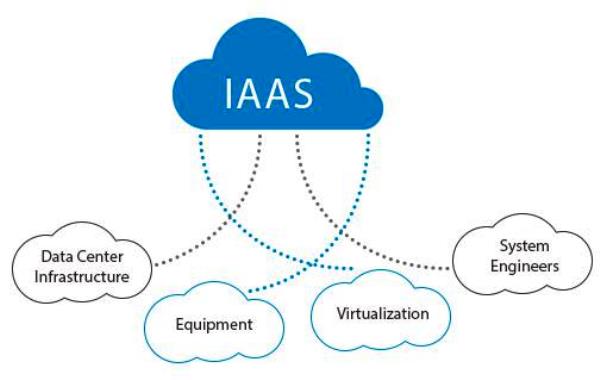
Infrastructure as a Service is when the service provider supplies the preconfigured hardware and equipment you need to run your business’ IT system. In this way, you lease the use of hardware rather than owning it, and the service provider takes responsibility for the effective operation and maintenance of the equipment.

IaaS often includes the use of a server and storage, as well as failover server replication, remote backups, load balancing and firewalls.

In most situations, customers are charged on a pay as you go basis, where the more resources you use, the more you pay – with the advantage that you can be flexible when it comes to scaling up or down. As this is the lowest level type of cloud service, infrastructure software, such as an operating system, are not usually included so you would need to provide your own.

PaaS: Platform as a Service

What is PaaS (Platform as a Service) in Cloud Computing? | Benefits of PaaS - MilesWeb

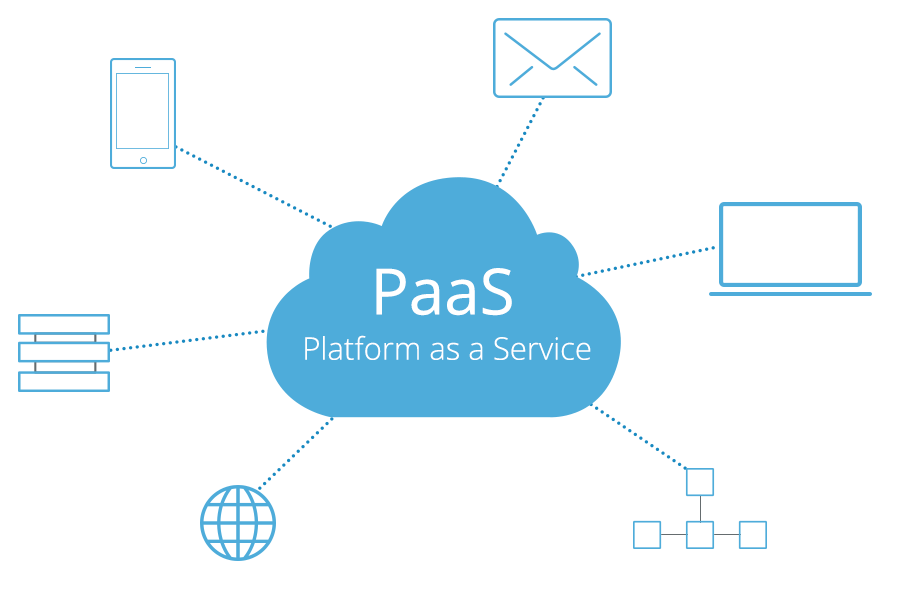
Platform as a Service goes one level higher than IaaS, providing both the hardware infrastructure and the web applications that organisations need. Using this kind of service means companies can often save on the cost of acquiring these applications for themselves and do away with the burden of deploying them or managing them. The savings come from the fact that the software licenses are owned by the service provider and the costs for these can be shared out among those who opt to use them.

One of the advantages of using PaaS is that you can be guaranteed that the applications are entirely compatible with the service provider’s system and, being based in the cloud, they are also web accessible.

Users will have total control over their apps and, for some solutions, may also take control over the hosting environment. However, as IaaS is part of PaaS, they won’t have to deal with the more complex burdens of managing the infrastructure.

Benefits for PaaS for enterprises include a quick time to market and speedy solutions for application design, development and testing. It can also provide these services significantly cheaper than doing them in-house.

SaaS: Software as a service

Software as a Service – #SaaS – How to make real strategic choices – Xorlogics

Software as a Service is essentially software made easy. Service providers offer a range of on-demand applications, such as enterprise resource planning (ERP), HR, customer relationship management (CRM), payroll and productivity apps like Microsoft Office. Subscribing SaaS users can access these easily through an internet browser.

One of the main advantages of SaaS is that the management of the applications and the server they are housed on, together with the storage and backup of data, are all taken care of by the service provider. In addition, as they are cloud-based applications, it enables users to log in to the services from any compatible device with an internet connection and ensures that data can be easily synced across devices so that everyone has the latest versions of files and documents.

CaaS: Communication as a Service

Cloud Services Part 1

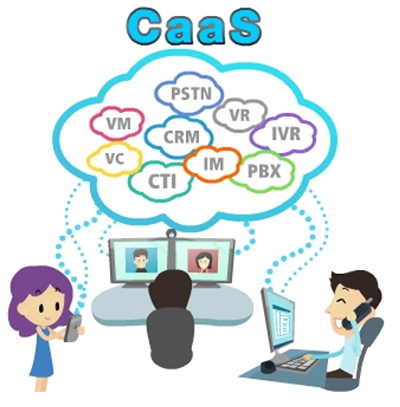
Investment in the creation of an enterprise level, unified communication system can be very expensive when you include components such as email, telephony, online chat, VPN and video conferencing.

Communication as a Service can bring several benefits to businesses. Firstly, it removes the burden of managing the services by transferring responsibility to the service provider and, as a consequence, it saves money by removing the need to employ staff to undertake that management. Also, should an issue arise with one of the communication systems, the task of dealing with it is left to the service provider who will be in a much better position to provide continuity of service through their redundant, failover resources.

MaaS: Monitoring as a Service

Monitoring as a service (MaaS) | Omnilogy

With so many critical applications being moved to the cloud, monitoring the performance of cloud-based applications has become crucial to ensure that businesses do not suffer from unnecessary downtime. This has led to the emergence of Monitoring as a Service (MaaS), which removes the need for expensive in-house tools to keep an eye on applications and infrastructure and replaces them with a service provider hosted, internet-based, monitoring dashboard.

This enables users to monitor the status of their critical apps on a pay as you go basis and, crucially for many businesses, can be accessed over the internet.

Conclusion

As you can see, there are clear differences between these types of cloud services, hopefully, this post has given you a better understanding of what each type is and how it can benefit your organisation.

The Smart Business Choice: Managed Hosting

Top 6 Benefits of Managed Hosting Services For Every Business

Sometimes it doesn’t make sense to do everything in-house. You wouldn’t deliver your own letters, service your company vehicles or rewire the offices; you’d pass those tasks on to expert third parties like the Post Office, a garage or an electrician. Surprisingly, not every company uses the same logic when it comes to the complex matter of managing their IT infrastructure. There are, however, several advantages of moving away from a DIY approach and opting for managed hosting services and in this post, we’ll explain what they are.

Managed hosting – the basics

Managed vs. unmanaged hosting | Tom's Guide

Managed hosting is a service designed to alleviate the server management burdens faced by in-house IT staff so that they can focus their time and efforts on business-related projects. Offered by leading service providers like Anteelo, it provides companies with all the hardware and computing resources they need (servers, high-speed storage, network, RAM, bandwidth, CPU, etc.) and provides a flexible range of management services which reduces the time, money and effort needed to carry them out in house.

With the hardware being housed securely at the service provider’s datacentre and its expert IT staff taking care of management, admin and technical support, companies find it easier and more cost-efficient than operating their own system on-site.

Range of managed hosting services

Best managed web hosting services of 2021 | TechRadar

Different service providers offer different ranges of service. In general, however, the typical managed hosting package will include datacentre operations such as server housing, site security, national grid and back-up power, air-conditioning, building maintenance and IT engineers, etc., together with hardware and networking.

Aside from managing the infrastructure, other aspects of the provision will include the operating system (including updating and patching), application infrastructure, application installation, real-time server monitoring, performance optimisation, Next-Gen firewalls, intrusion prevention and remote backups. In addition, there is expert technical support on tap, 24/7.

Many hosts offer a flexible range of services, extending beyond those mentioned above to include such things as application management. Here at Anteelo, it is even possible to create bespoke IT solutions to meet the precise needs of your organisation.

Versatile uses of managed hosting

Managed Hosting: Managed Servers, Yönetilen Sunucular - Mitues

Managed hosting is ideal for a wide range of computing scenarios, offering practical solutions for website hosting, running legacy applications, extending company infrastructure and more. By providing single tenancy hosting, it is also beneficial for companies which need outstanding IT performance, significant data storage and which wish to make use of data analytics. Many organisations also use it to back up data and for disaster recovery.

The single-tenant hosting that comes with managed services also provides better compliance for organisations which need sensitive or personal data stored securely.

Aspects of managed hosting to consider

Managed Hosting Services: How Can Customers Benefit? - ITSM.tools

Aside from the information mentioned above, when looking at different managed hosting solutions, organisations should also consider the following aspects:

  • High availability: If you are hosting mission-critical apps on your managed service, it is crucial that they stay online all the time. Make sure you opt for a provider which guarantees 100% uptime.
  • Control panel: Although a managed solution, there are still aspects of your IT that you will need to take care of in-house, such as managing user accounts. A quality control panel, like Plesk or cPanel, will make this much easier to do.
  • Firewall: Not all firewalls offer the same level of protection. Next-Gen firewalls, like FortiGate, offer the most advanced protection from a wide range of threats.
  • Port speed: Port speeds of 1GB offer the network performance needed for faster loading websites.
  • Highperformance: Whether carrying out data analytics or handling thousands of customer requests simultaneously, you want hardware that can perform exceptionally, such as Intel Xeon CPUs and SSD hard drives.
  • Full root access: You should have total control of your server, so make sure your provider enables full root SSH / RDP access.
  • Technical support: IT issues happen for a variety of reasons and when you least expect them. For this reason, 24/7 expert technical support is absolutely essential to help you get things sorted in the quickest possible timeframe.

Conclusion

The range of services included in a managed hosting package can make it more expensive than unmanaged hosting, however, it can work out significantly cheaper than managing your system in-house. You won’t, for example, need to spend capital on hardware or pay for overheads such as server housing, IT staff time, power or insurance. Aside from the savings, many of the technical headaches caused by IT management will be taken care of on your behalf, freeing up your staff for more critical tasks. In addition, you’ll benefit from tighter data security, enhanced compliance and servers which perform better.

8 Reasons Why Cloud Hosting Helps Businesses Compete

5 Best Cloud Hosting Companies In 2021 - Productivity Land

Organisations are flocking to cloud computing in greater numbers than ever before and many are expanding their use of it. This comes as no surprise, given the many advantages that cloud migration brings. In this post, we’ll look at how the cloud hosting enables its users to outperform their competitors.

1. Cloud users save money

4 Ways Cloud Computing Can Save Money | TechnologyAdvice

One of the primary reasons that organisations migrate to the cloud is to cut costs. By using the hardware and services of your cloud provider you’ll no longer need to spend enormous sums on purchasing your own hardware. And that’s just the start of your savings. As you won’t need a data centre any longer, you can eliminate the expenses of running one. The money spent on maintenance, management, space, security, air-conditioning, power, insurance, etc. can all be put to better purposes.

2. Instant scalability

How Cloud Can Bring Instant Scalability to Your Business | TECHNIA

Being competitive means being able to adapt at speed to market demands. One of the drawbacks for businesses running their own data centre is that scaling up can be a slow and expensive process. If you are getting increased traffic to your website and you need additional resources to cope, scaling up can involve purchasing a new server, setting it up and getting it online. This can take quite some time to do. When you use the cloud hosting, your service provider’s vast data centres mean that you can have all the resources you need instantly.

Another issue faced by organisations scaling up in-house is that the additional resources they acquire aren’t fully utilised. For example, your company may get high traffic for certain periods but for the rest of the time, the new server sits idle. This doesn’t make it the wisest investment. Cloud services, however, are charged on a pay as you go basis. You only pay for what you use, so during quieter times, the costs are minimised.

3. Speedy application deployment

Speedy Framework

It’s not just scaling up that can be done quickly in the cloud hosting , the deployment of the critical applications needed to give you the edge in a competitive market can also be done instantaneously. This can be particularly advantageous for smaller enterprises as it gives them the same speed of deployment as larger competitors who have superior in-house capacities.

Cloud-based apps require far less time for successful execution, most of them being available immediately on signup, giving you instant access to game-changing technologies such as AI and machine learning.

4. 100% uptime

100% Server uptime – why aren't you achieving it?

Today’s organisations rely on critical applications to run their operations. The disruption caused by downtime is a major issue, as events such as server failures can cause operations to grind to a halt. Fixing the problem can be difficult and time-consuming and the resulting losses and reputational damage can be substantial.

In a cloud environment, server failure cannot cause downtime. As clients are hosting on virtual machines, when a physical server error occurs, the virtual machine is simply moved to another part of the server cluster. This hyper-converged infrastructure protects organisations against everything from hard disk issues to entire server failures, guaranteeing 100% uptime for critical applications.

5. Latest technologies, exceptional performance

Must-Know Event Technology Trends for 2020 | Social Tables

Another problem with in-house data centres is that the technology organisations purchase or lease soon become less competitive than the newer, high-performance products that are regularly released onto the market. Continually updating is both expensive and disruptive and this often puts companies at a disadvantage.

For cloud service providers, investment in these new technologies is a necessity in order for them to remain competitive and meet the growing expectations of their clients. The advantage for cloud users is that they will see their applications running on the latest, high-performance servers without the need to invest in the technology themselves. These are servers where performance is consistently optimised, using powerful processors, blisteringly fast SSD drives and load balancing to maximise speed and capacity utilisation.

6. Increased security

Increased security automation supports reliability, efficiency and compliance for grid operators | POWERGRID International

Every organisation has concerns about security, so it’s good to know that cloud providers are obliged to comply with stringent security regulations to safeguard customer data. Your provider will protect you against hacking, malware and internal data theft. Using state of the art firewalls that feature intrusion prevention and in-flow virus protection, threats will be detected and isolated long before they reach your server. Other security features include data encryption, remote backups and VPN.

7. Organisational transformation from working online

Careers - A&F Business Consultants

As a cloud user, your employees can access your system from anywhere with an internet connection and this has helped many organisations to reap the benefits of remote working. It enables companies to employ highly skilled members, no matter where they live, and bring about more flexible working hours. It also means they can save on the amount of office space needed as staff can collaborate in real-time using online conferencing and through the sharing of synchronised files.

Furthermore, as employees can access the company’s system using connected devices such as smartphones and laptops, many companies have dispensed with these costs by introducing a ‘bring your own device (BYOD)’ policy that uses authentication to maintain security.

8. Do more with technology

Do We Really Need It? On The Excess Of Technology

Perhaps the biggest benefit of the cloud is that it is a technology that enables you to do more with other technologies. With Big Data analysis, machine learning and AI all rapidly deployable, just imagine what potential cloud brings: personalised marketing and communications, improved customer services, discovering new development opportunities and much more. Cloud is also the ideal place for companies wanting to take advantage of the Internet of Things, augmented reality and the other ground-breaking innovations that are helping to reshape the way the world works.

Conclusion 

Cloud hosting enables even the smallest of companies to take advantage of the technologies that are transforming today’s marketplace and working environments. In doing so, it makes them far more competitive, while enabling them to spend less and do more. At the same time, these organisations can also benefit from the cloud’s high-performance and reliability, its scalability and flexibility and its highly secure environment.

error: Content is protected !!